Software Development
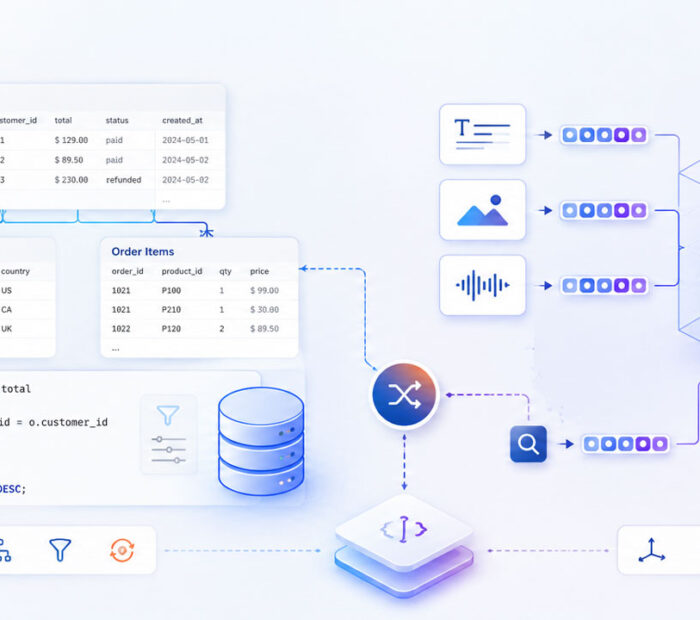
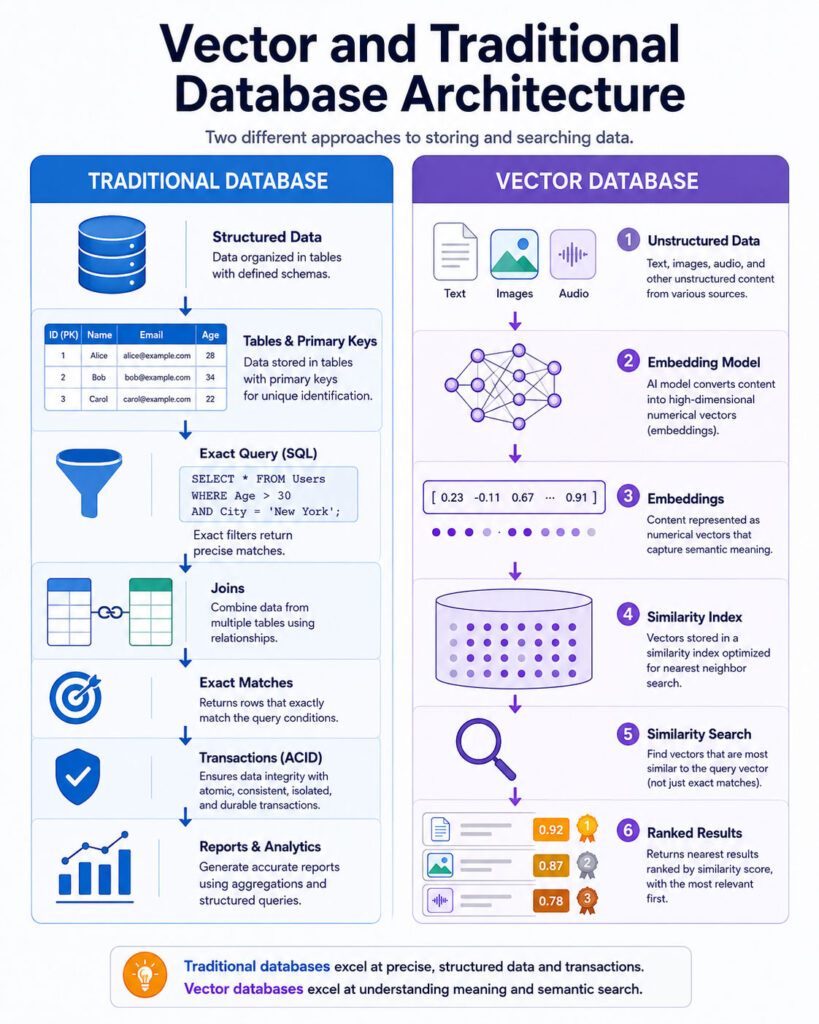
The Vector Database vs Traditional Database comparison helps developers decide how applications should store, search, filter, and retrieve information. Traditional databases excel at exact values, structured queries, relationships, transactions, and predictable business rules. In contrast, vector databases retrieve information according to numerical similarity, which can represent meaning, visual characteristics, sound, behaviour, or other complex features.
For example, a traditional database can answer “Find invoice 1042” or “Show unpaid orders from this month.” Meanwhile, vector search can help answer “Find documents related to passwordless login” or “Show products visually similar to this image.”
However, vector search does not replace primary keys, transactions, permissions, joins, or ordinary filtering. Therefore, many modern applications combine vector search with relational databases, document databases, search engines, or platforms that support both structured and vector data.
Vector Database vs Traditional Database: Quick Answer
- Choose a traditional database for transactions, users, orders, inventory, exact lookups, joins, reporting, and structured filters.
- Choose vector search when users need conceptually or visually similar text, images, audio, products, code, or other information.
- Use a database with vector support when structured business records and semantic retrieval belong in the same system.
- Consider a dedicated vector database when vector retrieval becomes a major workload requiring specialised indexing or scaling.
- Use hybrid search when both semantic similarity and exact keywords matter.
What Is a Traditional Database?
A traditional database stores and retrieves information through defined fields, keys, relationships, and query operations. Common categories include relational, document, key-value, graph, wide-column, and time-series databases.
Strengths of Traditional Databases
- Exact record retrieval.
- Structured filtering and sorting.
- Transactions and consistency controls.
- Relationships and constraints.
- Aggregations and reporting.
- Mature backup and recovery tools.
- Permissions and auditing.
What Is a Vector and an Embedding?
A vector is an ordered list of numbers representing characteristics of an item. An embedding is a vector representation generated from information such as text, images, audio, video, products, users, or source code.
Embedding models place related items closer together in a mathematical space. As a result, semantically related content can be retrieved even when the exact wording differs.
What Is a Vector Database?
A vector database is a database or data platform designed to store vectors and retrieve the nearest or most similar records efficiently.
A vector record commonly contains a unique identifier, one or more embeddings, original text or a source reference, metadata, and embedding-model version information.
How Vector Search Works
- The application receives a text, image, audio, or other supported query.
- An embedding model converts the query into a vector.
- The database compares the query with indexed vectors.
- Nearest candidates are identified.
- Metadata filters apply business and access restrictions.
- The database returns ranked results.
- The application may rerank, validate, display, or send results to another AI model.
Exact vs Approximate Vector Search
Exact search compares a query against every eligible vector and can provide a useful quality baseline for smaller datasets. Approximate nearest-neighbour search reduces the amount of comparison required and can provide much faster retrieval across large collections.
The trade-off is that approximate search may occasionally miss a result that exact search would rank highly. Therefore, measure both retrieval speed and recall.
Vector Database vs Traditional Database Comparison
| Area | Traditional Database | Vector Database |
|---|---|---|
| Primary retrieval | Keys, fields, filters, joins, ranges | Vector similarity |
| Typical data | Structured and semi-structured records | Embeddings with metadata |
| Best for | Transactions and precise business queries | Similarity and semantic retrieval |
| Transactions | Mature support | Varies by platform |
| Typical uses | Users, orders, billing, inventory | Semantic search, RAG, recommendations |
Vector Search for Semantic Search
Semantic search retrieves information according to meaning instead of requiring identical words.
- Split source content into searchable chunks.
- Create embeddings for each chunk.
- Store vectors with source content and metadata.
- Create an embedding for the user’s query.
- Retrieve the nearest candidates.
- Apply filters or reranking.
- Return the most relevant results.
Keyword search may still perform better for exact names, codes, dates, and uncommon terminology.
Vector Database for RAG
Retrieval-Augmented Generation (RAG) retrieves relevant evidence before a language model generates an answer.
User question → Query embedding → Vector search → Relevant chunks → LLM → Grounded answerThe vector database supplies candidate evidence; it does not generate the final response. Therefore, poor retrieval can create incomplete or misleading answers even when the language model performs well.
Why RAG Can Fail
- Poor document extraction.
- Weak chunk boundaries.
- An unsuitable embedding model.
- Missing metadata.
- Low retrieval recall.
- Outdated documents.
- Duplicate or conflicting information.
- Incorrect permission filtering.
Vector Search for Recommendations and Media
Embeddings can represent products, users, articles, music, videos, code, and behavioural patterns. Consequently, applications can retrieve items whose vectors resemble a product, user preference, session, or written description.
Visual similarity does not prove that two products are identical. Important details such as model, size, price, material, and compatibility should still come from authoritative structured data.
Metadata Filtering
Metadata allows semantic retrieval to respect exact business restrictions such as category, language, tenant ID, user access group, document version, source URL, department, and expiration date.
Similarity ranking must never replace permission checks.
What Is Hybrid Search?
Hybrid search combines vector similarity with keyword or full-text retrieval. Vector search handles concepts and paraphrases well, while keyword search remains valuable for exact phrases, product codes, names, legal terminology, and technical identifiers.
What Is Reranking?
Reranking evaluates an initial set of candidates using a more accurate or expensive technique. A vector index may quickly retrieve 50 candidates before a reranking model selects the five most relevant results.
However, reranking cannot recover a useful document that the initial retrieval stage never returned.
Chunking for Vector Search
Chunking divides long documents into smaller searchable units. If chunks are too large, unrelated topics may be combined. If they are too small, important context may be lost.
Useful boundaries can follow paragraphs, headings, sentences, tables, document pages, code functions, or audio/video segments.
Embedding Model Changes and Re-Embedding
Changing an embedding model can alter vector dimensions and the mathematical space in which similarity is calculated. Therefore, embeddings from incompatible models should not normally be mixed in the same index.
Traditional Database with Vector Support vs Dedicated Vector Database
| Area | Database with Vector Support | Dedicated Vector Database |
|---|---|---|
| Primary design | General database plus vector capabilities | Vector retrieval as a central workload |
| Transactions | Often a major strength | Capabilities vary |
| Joins | Available in relational systems | Often more limited |
| Operational complexity | May reuse existing infrastructure | Adds another specialised system |
How to Choose Between a Vector Database and Traditional Database
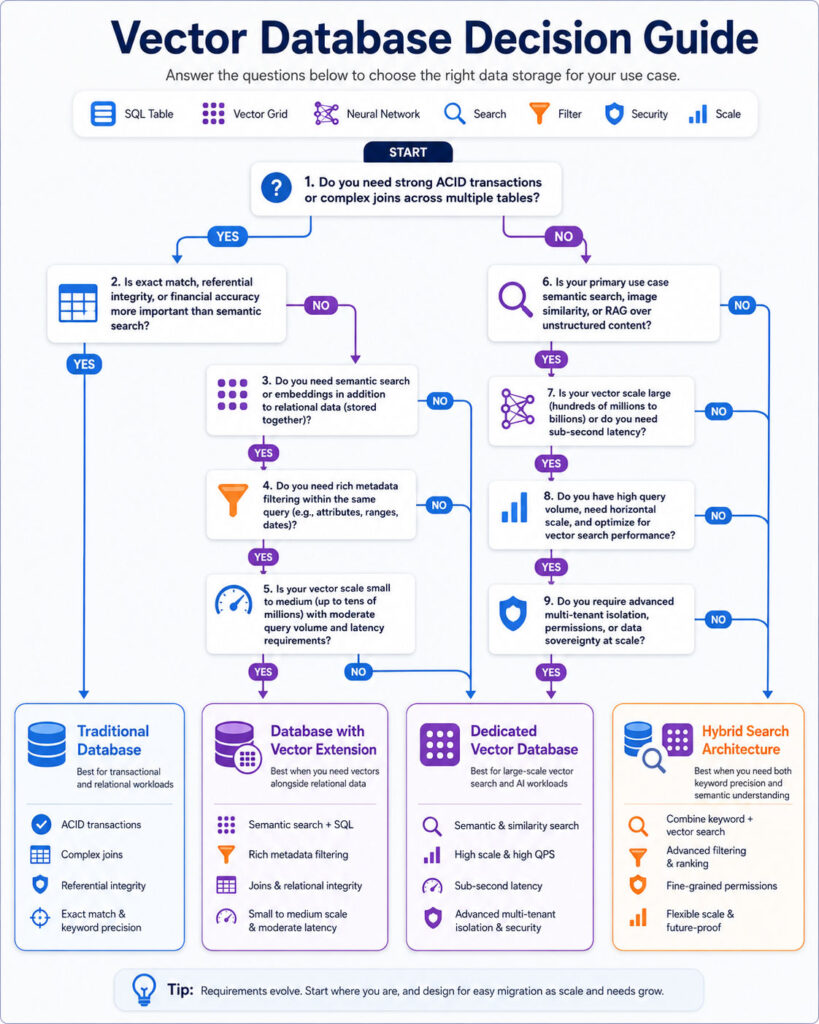
Start with the application’s query requirements rather than selecting technology simply because vector search is associated with AI.
Choose a Traditional Database When
- Records require exact identifiers.
- Transactions and consistency are important.
- Relationships and joins are central.
- Users need reports and structured filters.
- The system manages accounts, orders, payments, or inventory.
Choose Vector Search When
- Users search by meaning rather than exact wording.
- The application needs semantic document search.
- Similar products or media need to be discovered.
- RAG requires semantic retrieval.
- Similarity matching is a core feature.
Use a Combined Architecture
Many production applications should keep authoritative business information in a traditional database while using vectors as an additional search representation.
For example, an e-commerce platform can store products, inventory, prices, and availability in a relational database while embeddings support similarity search. Vector search returns candidate IDs, and the application then retrieves verified business data from the operational database.
Source of Truth vs Search Index
A source of truth is the authoritative system that owns the current record. A vector database often acts as a derived search index because embeddings are generated from information stored elsewhere.
The architecture should define how updates create new embeddings, how deleted records remove vectors, how failed indexing operations are retried, and how stale data is detected.
Synchronising Traditional and Vector Databases
When vectors live outside the source database, an indexing pipeline must keep the two systems aligned. Common approaches include change-data capture, event queues, scheduled synchronisation, batch indexing, application events, and webhooks.
Indexing operations should be idempotent so processing the same event more than once still produces the correct final state.
Vector Database Security and Privacy
Permission-aware retrieval is essential because a confidential document must not reach an AI model simply because its embedding is relevant.
Useful controls include tenant isolation, server-side permission filters, authenticated APIs, encryption, restricted service accounts, auditing, deletion procedures, and retention policies.
How to Measure Vector Search Quality
- Recall at K.
- Precision at K.
- Mean reciprocal rank.
- Useful top-result percentage.
- Permission-filter correctness.
- Search latency percentiles.
- Index build time.
- Memory and storage usage.
- Update and deletion delay.
- Cost per successful retrieval.
Common Vector Database Mistakes
- Using vector search for exact identifiers.
- Treating the vector index as the authoritative transactional database.
- Mixing embeddings from incompatible models.
- Ignoring document structure while chunking.
- Applying permissions after content reaches the language model.
- Replacing keyword search completely.
- Ignoring update and deletion synchronisation.
- Assuming a vector database automatically creates reliable RAG.
Frequently Asked Questions
Can a Traditional Database Store Vectors?
Yes. Several established databases support vector fields and similarity indexes directly or through extensions.
Is a Vector Database Required for RAG?
No. RAG requires retrieval, but retrieval can use vector search, keyword search, SQL, graph traversal, APIs, or a combination.
Is Vector Search Better Than Keyword Search?
Not universally. Vector search performs well for semantic similarity, while keywords are often better for exact names, codes, and rare terms. Hybrid search can therefore provide stronger overall results.
Choosing the Right Database Architecture
The Vector Database vs Traditional Database comparison does not produce one universal winner. Traditional databases remain the foundation for transactions and exact records, while vector databases add similarity-based retrieval.
For many applications, the strongest design keeps authoritative records in a dependable operational database and uses embeddings as searchable representations.

AboutTPJ Technical Team
The Project Jugaad Technical Team creates practical, easy-to-follow content on software development, web technologies, artificial intelligence, cybersecurity, cloud platforms, and digital tools. Our articles are informed by more than 13 years of hands-on experience with .NET, Angular, SQL Server, AWS, WordPress, Linux hosting, application deployment, and real-world troubleshooting. Each guide is researched, reviewed, and updated to provide accurate, useful, and actionable information for developers, businesses, and everyday technology users.