Software Development
The GitHub Actions vs Jenkins comparison helps development teams decide how they should build, test, package, and deploy software. Although both platforms automate continuous integration and delivery, they differ in setup, infrastructure, maintenance, extensibility, security, and developer experience.
GitHub Actions is integrated directly into GitHub repositories. Therefore, teams can connect automation with pushes, pull requests, releases, schedules, and manual triggers without operating a separate CI/CD controller.
Jenkins, by contrast, is an open-source automation server that an organisation installs and manages. It provides extensive flexibility through pipelines, plugins, agents, shared libraries, and custom integrations.
Consequently, GitHub Actions often suits teams that want fast repository-native automation. Jenkins remains valuable, however, when infrastructure control and extensive customisation matter more than operational simplicity.
GitHub Actions vs Jenkins: Quick Answer
- Choose GitHub Actions when your code already lives on GitHub and you want fast CI/CD setup with managed runners.
- Select Jenkins when your organisation needs specialised agents, extensive plugins, several source-control systems, or complete infrastructure control.
- Use self-hosted GitHub runners when workflows require custom hardware, private-network access, or organisation-managed environments.
- Keep an established Jenkins installation when its pipelines remain secure, reliable, documented, and cost-effective.
- Consider GitHub Actions for new projects when reducing controller and plugin maintenance is a priority.
- Evaluate total ownership because platform price, infrastructure, administration, security, and recovery all affect the final cost.
In short, GitHub Actions usually provides the simpler starting point. Nevertheless, Jenkins can offer greater control for highly customised and self-managed delivery environments.
What Is Continuous Integration?
Continuous Integration, commonly called CI, is a development practice in which code changes are merged and validated frequently. As a result, teams can detect integration failures before they reach production.
After a developer pushes code or opens a pull request, an automated workflow may:
- Restore project dependencies.
- Compile the application.
- Execute unit tests.
- Check code formatting.
- Perform static analysis.
- Scan dependencies.
- Create a build package.
- Publish the final result.
However, CI does not guarantee software quality by itself. Meaningful tests, code reviews, stable build environments, and clear failure reporting still determine whether the process provides useful protection.
What Is Continuous Delivery?
Continuous Delivery extends CI by keeping validated software ready for release. Therefore, an authorised person can deploy a tested version without repeating a large manual process.
A delivery pipeline may:
- Create a deployable artefact.
- Run integration tests.
- Publish a container image.
- Deploy to a test environment.
- Complete security checks.
- Request release approval.
- Promote the same artefact to production.
Although automation prepares the release, production deployment can still remain a deliberate business decision.
What Is Continuous Deployment?
Continuous Deployment automatically releases every qualifying change after it passes the required checks. Consequently, teams can reduce release delays and deliver smaller updates more frequently.
This approach requires strong automated testing, observability, rollback procedures, and production safeguards. For that reason, many organisations practise Continuous Delivery without enabling automatic production deployment.
CI vs CD
| Area | Continuous Integration | Continuous Delivery or Deployment |
|---|---|---|
| Main purpose | Validate code changes frequently | Prepare or release validated software |
| Common trigger | Push or pull request | Successful build, release, tag, or approval |
| Typical output | Tested code and build results | Deployable artefact or running release |
| Primary environment | Build and test runner | Development, staging, or production |
| Human involvement | Usually code review | May include deployment approval |
Why Teams Need a CI/CD Tool
Manual software delivery creates inconsistent steps and makes releases difficult to reproduce. For example, one developer may use a different dependency version, skip a test, or forget a configuration step.
A CI/CD tool provides a repeatable workflow. In addition, it records logs and results that help teams understand what happened during each build or deployment.
Common benefits include:
- Consistent application builds.
- Earlier defect detection.
- Faster developer feedback.
- Repeatable deployment steps.
- Automated quality checks.
- Clearer release visibility.
- Reduced manual work.
- Traceability between code and deployment.
What Is GitHub Actions?
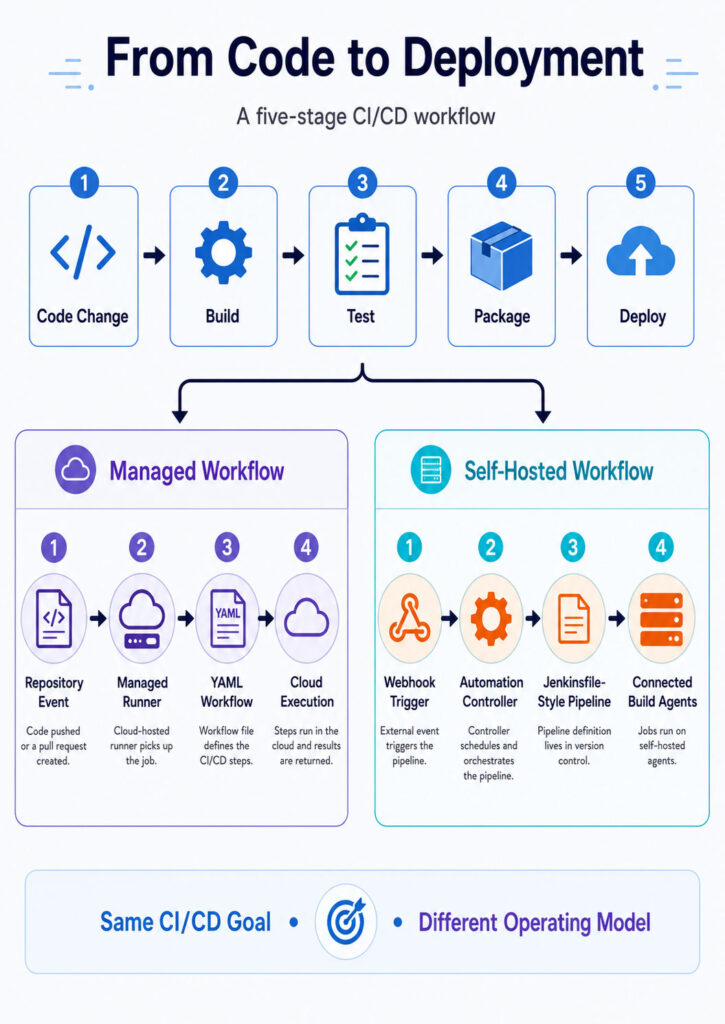
GitHub Actions is an automation platform integrated with GitHub repositories. A team creates one or more YAML workflow files inside the repository, and GitHub runs those workflows when configured events occur.
For example, a workflow can begin when:
- Code reaches a selected branch.
- A pull request opens or changes.
- A release becomes available.
- A version tag is created.
- An authorised user starts the workflow.
- A configured schedule reaches its time.
- Another workflow completes.
- An external system sends an approved event.
Consequently, application code and automation configuration remain together in the same repository.
GitHub Actions Workflow Structure
A GitHub Actions workflow contains one or more jobs. Meanwhile, every job contains ordered steps that run commands or reusable actions.
| Component | Purpose |
|---|---|
| Workflow | Defines the complete automated process |
| Event | Starts the workflow |
| Job | Groups related steps on a runner |
| Step | Runs a command or reusable action |
| Action | Provides reusable automation logic |
| Runner | Executes the job |
| Environment | Represents a deployment target and its rules |
GitHub Actions Workflow Example
The following simplified workflow builds and tests a Node.js application:
name: Build and Test

on:
push:
branches:
- main
pull_request:

permissions:
contents: read

jobs:
test:
runs-on: ubuntu-latest

```
steps:
  - name: Check out source code
    uses: actions/checkout@v4

  - name: Configure Node.js
    uses: actions/setup-node@v4
    with:
      node-version: 22
      cache: npm

  - name: Install dependencies
    run: npm ci

  - name: Run tests
    run: npm test

  - name: Build application
run: npm run buildWhen a qualifying event occurs, GitHub assigns the job to a compatible runner. Afterwards, each step executes in the configured order.
What Is a GitHub Action?
An action is a reusable unit of automation. For instance, an action may check out code, configure a development runtime, upload an artefact, or authenticate with a cloud provider.
Teams can use official actions, reviewed third-party actions, or internally developed actions. However, every referenced action can execute code within the workflow.
Therefore, organisations should review:
- The action publisher.
- The source repository.
- The requested permissions.
- The maintenance history.
- The release and update process.
- The selected version reference.
What Is a GitHub Actions Runner?
A runner is the machine that executes a GitHub Actions job. GitHub provides managed runners for common operating systems, whereas organisations can also register their own self-hosted runners.
Each model serves different requirements. Managed runners reduce infrastructure work, while self-hosted runners offer greater control over networking, hardware, software, and execution capacity.
GitHub-Hosted Runners
GitHub-hosted runners provide temporary managed environments for workflow jobs. Therefore, teams do not need to patch or maintain the underlying virtual machine.
They are useful when developers want:
- Fast initial setup.
- Common operating-system images.
- Preinstalled development tools.
- Automatic runner maintenance.
- Fresh job environments.
- Simple scaling for ordinary workloads.
However, a hosted image may not contain every required tool or private network route. In that situation, the workflow can install additional software or use an organisation-managed runner.
Self-Hosted GitHub Runners
A self-hosted runner is a machine deployed and maintained by the organisation. Consequently, the team controls its operating system, installed software, network access, hardware, and lifecycle.
Self-hosted runners can operate on:
- Physical servers.
- Virtual machines.
- Cloud instances.
- Container-based environments.
- Kubernetes-managed platforms.
- Specialised build hardware.
Nevertheless, increased control brings additional responsibility. The organisation must therefore manage patching, isolation, scaling, cleanup, monitoring, and incident response.
What Is Jenkins?
Jenkins is an open-source automation server used for continuous integration, delivery, deployment, testing, and operational workflows. An organisation installs a Jenkins controller and connects one or more agents that execute jobs.
Because Jenkins supports a large plugin ecosystem, teams can integrate it with many source-control, testing, build, cloud, notification, and deployment systems.
However, extensive flexibility can increase maintenance. As a result, Jenkins administrators must manage core upgrades, plugins, security, agents, backups, and compatibility.
Jenkins Controller and Agent Architecture
The Jenkins controller coordinates the automation environment. Among other responsibilities, it manages configuration, schedules jobs, authenticates users, tracks build history, and assigns work to agents.
Build agents execute the resource-intensive steps. Therefore, production installations should avoid running ordinary builds directly on the controller whenever practical.
The controller commonly handles:
- System configuration.
- Pipeline scheduling.
- User authentication.
- Permission enforcement.
- Build-history management.
- Agent coordination.
- Plugin administration.
- Web interface access.
What Is a Jenkins Agent?
A Jenkins agent provides one or more executors that run jobs or Pipeline stages. Because agents can have different capabilities, Jenkins uses labels to select a suitable machine.
Agents may differ by:
- Operating system.
- CPU architecture.
- Installed software.
- Container image.
- Network location.
- Hardware capability.
- Security boundary.
For example, one agent may build a Windows desktop application, while another publishes a Linux container image.
What Is a Jenkins Job?
A Jenkins job is a configured automation task. Older installations may contain freestyle jobs created mainly through the web interface, whereas modern implementations commonly use Pipeline jobs defined in source control.
Although freestyle jobs remain useful for simple tasks, Pipeline as Code provides stronger versioning, review, reuse, and recovery. Therefore, new delivery processes should generally prefer version-controlled pipelines.
What Is a Jenkins Pipeline?
A Jenkins Pipeline defines the stages and steps used to build, test, package, and deliver software. The configuration is commonly stored in a file named Jenkinsfile inside the source repository.
As a result, teams can review automation changes alongside application code and restore an earlier pipeline version when necessary.
Declarative vs Scripted Jenkins Pipeline
| Area | Declarative Pipeline | Scripted Pipeline |
|---|---|---|
| Structure | Uses a defined and opinionated syntax | Uses flexible Groovy-based scripting |
| Readability | Usually easier for standard workflows | Can become complex in large pipelines |
| Validation | Provides clearer structural validation | Relies more heavily on script correctness |
| Flexibility | Suitable for most CI/CD requirements | Useful for highly customised logic |
| Typical use | Maintainable standard pipelines | Advanced dynamic behaviour |
In many cases, Declarative Pipeline offers the better starting point. Nevertheless, scripted sections remain useful when a workflow requires additional logic.
Jenkins Pipeline Example
The following Declarative Pipeline builds and tests a Node.js application:
pipeline {
    agent {
        label 'linux'
    }

```
tools {
    nodejs 'NodeJS-22'
}

stages {
    stage('Checkout') {
        steps {
            checkout scm
        }
    }

    stage('Install') {
        steps {
            sh 'npm ci'
        }
    }

    stage('Test') {
        steps {
            sh 'npm test'
        }
    }

    stage('Build') {
        steps {
            sh 'npm run build'
        }
    }
}

post {
    always {
        junit 'test-results/**/*.xml'
    }
}
```

}
After Jenkins reads the file, it selects a matching agent and executes each stage. If a stage fails, the Pipeline stops or follows the configured failure behaviour.
What Is Jenkins Pipeline as Code?
Pipeline as Code stores the delivery process in source control rather than relying only on manual server settings. Consequently, pipeline changes can follow the same review and approval process as application changes.
This approach provides:
- Version history.
- Code review.
- Branch-specific automation.
- Repeatable configuration.
- Faster disaster recovery.
- Clearer ownership.
- Reusable development practices.
Therefore, Pipeline as Code should normally replace large collections of undocumented manual job configurations.
What Is a Jenkins Multibranch Pipeline?
A Multibranch Pipeline discovers repository branches that contain a Jenkinsfile. As branches appear or disappear, Jenkins can create or remove the related Pipeline jobs automatically.
Consequently, pull requests and feature branches can receive CI validation without an administrator manually creating a job for each branch.
GitHub Actions vs Jenkins Core Comparison
| Area | GitHub Actions | Jenkins |
|---|---|---|
| Platform type | GitHub-integrated automation service | Self-managed open-source automation server |
| Pipeline configuration | YAML workflow files | Jenkinsfile using Pipeline syntax |
| Source integration | Native GitHub integration | Supports several systems through integrations and plugins |
| Managed execution | GitHub-hosted runners available | Organisation normally operates controller and agents |
| Self-hosted execution | Available through self-hosted runners | Core deployment model |
| Extensibility | Actions, APIs, apps, and reusable workflows | Plugins, APIs, scripts, and Shared Libraries |
| Initial setup | Usually faster for GitHub repositories | Requires installation and administration |
| Maintenance | Managed service reduces platform maintenance | Organisation maintains core, plugins, and infrastructure |
| Infrastructure control | Moderate to high depending on runner model | High |
| Strongest use case | Repository-native modern automation | Highly customised self-managed automation |
Repository Integration
GitHub Actions has a natural advantage when the repository already uses GitHub. Workflows can respond directly to pull requests, reviews, releases, labels, issues, and repository permissions.
Jenkins can also integrate with GitHub. However, it commonly requires webhook configuration, credentials, plugins, and Jenkins-side administration.
By contrast, Jenkins can connect several source-control platforms to one central automation environment. Therefore, it may suit organisations that have not standardised on GitHub.
Workflow Triggers
Both platforms can start pipelines through source-control events, schedules, manual requests, API calls, and upstream automation.
GitHub Actions expresses triggers through the workflow’s on configuration. Meanwhile, Jenkins can use webhooks, polling, schedules, parameters, upstream jobs, and plugin-provided triggers.
Ultimately, the better trigger model depends on the wider development platform and administrative requirements.
Pull Request Validation
GitHub Actions integrates directly with GitHub pull requests and required status checks. For example, a workflow can run tests, publish annotations, and block merging until mandatory checks succeed.
Jenkins can provide similar validation through source-control and branch integrations. Nevertheless, GitHub Actions usually requires less integration work when every repository already lives on GitHub.
Branch-Based Pipelines
Both platforms support branch-specific automation. GitHub Actions can filter events by branch, tag, path, or condition, while Jenkins Multibranch Pipelines discover branches containing a Jenkinsfile.
As a result, teams can validate feature branches and apply different deployment rules to development, release, and production branches.
Pipeline Configuration Language
GitHub Actions uses YAML for workflow structure and expressions for conditions and values. Jenkins Pipeline, by comparison, uses a Groovy-based domain-specific language.
YAML is approachable for many developers. However, deeply nested or highly repetitive workflow files can become difficult to maintain.
Groovy provides greater programming flexibility. Nevertheless, excessive scripting can create pipelines that only a few specialists understand.
Learning Curve
GitHub Actions often has a lower initial learning curve for teams already familiar with GitHub. A simple workflow can be added directly to the repository without installing a server.
Jenkins requires knowledge of controllers, agents, plugins, credentials, jobs, backups, upgrades, and security configuration. However, experienced Jenkins teams may find those concepts more familiar than moving to a new platform.
GitHub-Hosted Runners vs Jenkins Agents
GitHub-hosted runners reduce infrastructure management because GitHub maintains the underlying execution environments. Jenkins agents, by comparison, remain under the organisation’s control.
Therefore, GitHub’s managed model offers convenience, whereas Jenkins provides deeper customisation of operating systems, software, networks, hardware, and capacity.
Managed vs Self-Managed Execution
| Area | Managed GitHub Runner | Self-Managed Runner or Jenkins Agent |
|---|---|---|
| Provisioning | Handled by the platform | Handled by the organisation |
| Operating-system updates | Platform responsibility | Organisation responsibility |
| Installed software | Standard image with workflow customisation | Fully customisable |
| Private-network access | Requires an approved connectivity design | Can operate directly inside the private network |
| Hardware choice | Limited to available runner options | Organisation selects the hardware |
| Scaling | Managed for standard workloads | Must be designed and operated |
| Maintenance effort | Lower | Higher |
Operating-System Support
GitHub-hosted environments support common Linux, Windows, and macOS workloads. In addition, self-hosted GitHub runners can use organisation-controlled environments supported by the runner software.
Jenkins agents can also operate across Linux, Windows, macOS, virtual machines, containers, and cloud platforms. Therefore, both tools can support multi-platform builds, although their provisioning models differ.
Specialised Hardware
Some delivery pipelines require hardware unavailable through ordinary hosted runners. For example, a workflow may need GPUs, ARM processors, mobile-device labs, signing equipment, or embedded devices.
In those cases, a self-hosted GitHub runner or Jenkins agent can provide the necessary access. However, specialised machines should remain isolated because build code may attempt to access connected devices and local resources.
Container Support
Both tools can use containers to create repeatable build environments. GitHub Actions jobs can use containers and container-based service dependencies, while Jenkins Pipeline can assign stages to Docker-based agents.
For instance, a pipeline may compile a .NET API in one image and build an Angular application in another. As a result, teams can reduce configuration differences between build machines.
Containerised Build Benefits
- Consistent dependency versions.
- Reduced agent configuration drift.
- Easier local reproduction.
- Clearer build isolation.
- Simpler multi-language environments.
- Portable build definitions.
Nevertheless, containers do not automatically provide complete security isolation. Privileged containers, host mounts, and Docker socket access therefore require strict control.
Matrix Builds
A matrix build runs one job across several combinations of variables. For example, a project may test multiple operating systems, runtime versions, databases, or browser engines.
GitHub Actions provides a matrix strategy directly within workflow configuration. Jenkins, meanwhile, can implement similar testing through parallel stages, Pipeline logic, or supporting plugins.
GitHub Actions Matrix Example
jobs:
  test:
    strategy:
      matrix:
        os:
          - ubuntu-latest
          - windows-latest
        node:
          - 20
          - 22

```
runs-on: ${{ matrix.os }}

steps:
  - uses: actions/checkout@v4

  - uses: actions/setup-node@v4
    with:
      node-version: ${{ matrix.node }}

  - run: npm ci
- run: npm testThis configuration creates a separate job for every operating-system and runtime combination. Consequently, teams can identify platform-specific failures before release.
Parallel Execution
Parallel execution reduces pipeline duration by running independent work at the same time. GitHub Actions jobs run independently unless a dependency is defined, whereas Jenkins can use parallel stages or distribute work across several agents.
However, additional concurrency may increase hosted usage or self-managed infrastructure demand. Therefore, teams should parallelise expensive independent work rather than splitting every small command.
Job Dependencies
Some jobs must wait until earlier validation finishes. For example, deployment should begin only after build, test, and security checks succeed.
GitHub Actions defines dependencies between jobs through workflow configuration. Jenkins expresses ordering through stages, conditions, and Pipeline structure.
Consequently, both platforms can model simple pipelines and complex promotion paths.
Dependency Caching
Dependency caching reduces repeated downloads between pipeline runs. Common cache candidates include package-manager directories, compiled dependencies, tool downloads, and language-specific modules.
GitHub Actions provides cache features through workflow actions and common setup actions. Jenkins teams may instead use persistent agent storage, plugins, Pipeline logic, or external cache services.
However, an incorrect cache key can restore incompatible files. Therefore, keys should include relevant dependency, operating-system, and architecture information.
Build Artefacts
Artefacts preserve files produced by a pipeline. Examples include application packages, test reports, coverage results, installation files, logs, and deployment manifests.
GitHub Actions can upload and download workflow artefacts. Jenkins can archive outputs or publish them to an external repository.
For production releases, however, an artefact repository usually provides stronger retention, immutability, access control, and promotion workflows.
Build Once and Deploy Many Times
A reliable delivery process should build one release artefact and promote that same artefact through environments. Otherwise, separate rebuilds may create different outputs from the same source commit.
Therefore, the pipeline should record:
- Source commit.
- Build number.
- Dependency versions.
- Container digest.
- Artefact checksum.
- Deployment environment.
As a result, teams can identify exactly which software version reached every environment.
Reusable GitHub Workflows
Reusable workflows allow teams to centralise common GitHub Actions logic. For example, several repositories may call one approved workflow that builds, scans, and publishes a container image.
This model reduces duplication and simplifies policy updates. Nevertheless, a shared workflow change can affect many repositories, so versioning and release management remain important.
Composite Actions
A composite action groups several workflow steps into a reusable component. It can standardise environment setup, validation, version generation, or test-result publishing.
Composite actions are useful for step-level reuse. Reusable workflows, by contrast, can coordinate complete jobs and permissions.
Jenkins Shared Libraries
Jenkins Shared Libraries store reusable Pipeline code in a separate source repository. Consequently, teams can provide common functions, classes, variables, and company-approved delivery patterns.
For example, a library may define one supported method for building and publishing internal services. However, a large or highly dynamic library can become difficult to test and maintain.
Therefore, teams should keep shared interfaces simple, documented, versioned, and clearly owned.
GitHub Actions Marketplace vs Jenkins Plugins
| Area | GitHub Actions Ecosystem | Jenkins Plugin Ecosystem |
|---|---|---|
| Main reuse unit | Actions and reusable workflows | Plugins and Shared Libraries |
| Installation scope | Referenced by workflow configuration | Often installed on the Jenkins controller |
| Platform impact | Usually affects the calling workflow | Can affect the complete Jenkins instance |
| Upgrade method | Update referenced versions | Coordinate core and plugin compatibility |
| Security review | Review code, publisher, permissions, and version | Review maintenance, dependencies, permissions, and advisories |
Plugin Maintenance
Jenkins plugins provide extensive flexibility. However, every installed plugin introduces maintenance and security considerations.
For instance, a plugin may depend on another extension, require a newer Jenkins version, become unmaintained, or introduce a security advisory.
Consequently, administrators should minimise unnecessary plugins and test updates before applying them to a business-critical installation.
Secrets in GitHub Actions
GitHub Actions can store secrets at repository, environment, organisation, and supported enterprise scopes. Therefore, teams can separate development credentials from production credentials.
However, secrets may still leak through unsafe commands, logs, compromised dependencies, or third-party actions. For that reason, workflows should receive only the credentials required for the current job.
GitHub Token Permissions
GitHub Actions workflows can receive an automatically generated token for repository operations. The workflow should request the smallest permission set it needs.
For example, a test workflow may require only read access, whereas a release workflow may need permission to create a release. Consequently, broad write access should not remain enabled merely for convenience.
OpenID Connect for Cloud Deployment
OpenID Connect, commonly called OIDC, can allow a workflow to request short-lived cloud credentials. As a result, teams can avoid storing long-lived access keys in repository secrets.
The cloud provider can validate repository, branch, environment, or workflow information before issuing temporary access. However, the trust policy must remain narrow enough to prevent unrelated workflows from receiving the same privilege.
Jenkins Credentials
Jenkins provides a credentials system for secret text, usernames, passwords, files, SSH keys, and certificates. Pipelines should reference stored credential identifiers rather than hard-code sensitive values.
Nevertheless, users who can modify a trusted Jenkinsfile may attempt to expose available secrets. Therefore, source permissions and Pipeline trust boundaries remain critical.
Secret-Handling Checklist
- Grant the minimum required permissions.
- Prefer temporary credentials.
- Separate production secrets.
- Restrict untrusted pull-request workflows.
- Mask sensitive output.
- Avoid command-line secret exposure.
- Rotate credentials regularly.
- Review access logs.
- Remove unused secrets.
- Block sensitive credentials from untrusted code.
Untrusted Pull Requests
Pull requests from forks or external contributors can contain malicious build code. If that code runs on a privileged self-hosted runner, it may attempt to access local files, network systems, cached credentials, or internal services.
Therefore, untrusted changes should use isolated runners with restricted permissions. In addition, production secrets should never become available merely because a pull request opened.
Third-Party Action Risks
A third-party GitHub Action can execute code during the workflow. Before adopting one, review its publisher, source, maintenance activity, permissions, dependencies, and selected version.
Pinning an action to an immutable commit can reduce the risk of a mutable tag changing unexpectedly. However, pinned dependencies still require monitoring for security fixes.
Jenkins Controller Security
The Jenkins controller contains sensitive configuration and coordinates the entire automation environment. Therefore, administrators should protect it carefully.
- Require authenticated access.
- Apply role-based permissions.
- Use HTTPS.
- Restrict network exposure.
- Install security updates.
- Review plugin advisories.
- Run builds on agents.
- Back up configuration.
- Monitor administrative activity.
- Protect the Jenkins home directory.
Controller Isolation
Build scripts should normally run on agents instead of the Jenkins controller. Otherwise, a faulty or malicious build may consume resources, read files, or destabilise the service.
Consequently, controller isolation protects availability as well as sensitive system configuration.
Deployment Environments
A deployment environment represents a target such as development, testing, staging, or production.
GitHub Actions can associate environments with secrets, deployment history, and protection rules. Jenkins, meanwhile, can model environments through stages, parameters, credentials, plugins, and approval steps.
Therefore, both platforms can support controlled promotion, although their configuration approaches differ.
Manual Approval
Production deployment may require approval from an authorised reviewer. In GitHub Actions, environment protection can pause a deployment according to configured rules.
Jenkins can pause through an input step or another approved mechanism. However, approval should occur immediately before the sensitive deployment rather than before unrelated build work.
Concurrency Control
Two deployments targeting the same environment can interfere with each other. For example, an older pipeline may finish after a newer one and unintentionally restore an earlier version.
Concurrency rules can cancel, replace, or queue conflicting runs. Therefore, production pipelines should define how simultaneous deployments are handled.
Pipeline Logs
Both tools provide logs for workflow and Pipeline execution. Useful logs should identify the trigger, source commit, runner or agent, stage duration, test outcome, deployment target, and failure reason.
However, logs should never expose secrets, tokens, customer data, or complete confidential configuration files.
Debugging GitHub Actions
GitHub Actions debugging commonly involves job logs, expressions, event assumptions, permissions, runner differences, and action versions. Developers can also reproduce individual commands locally where practical.
Nevertheless, a hosted runner image may differ from a developer’s computer. Therefore, explicit tool versions and containerised builds improve reproducibility.
Debugging Jenkins
Jenkins debugging may involve the Jenkinsfile, plugin behaviour, agent connectivity, tool configuration, credentials, controller logs, and Shared Libraries.
The Pipeline Replay feature can help authorised users test a temporary change. Afterwards, however, the verified update should return to source control so the repository remains authoritative.
Restarting Failed Pipelines
Long delivery pipelines can fail after completing expensive stages. Jenkins Declarative Pipeline can support restarting from a completed top-level stage under suitable conditions.
GitHub Actions can rerun jobs or complete workflows according to the available controls. Nevertheless, deployment retries require care because an external action may already have succeeded even when the job reported a timeout.
Idempotent Deployments
An idempotent deployment reaches the same desired state when it runs more than once. Therefore, retrying should not create duplicate records, DNS entries, users, or releases.
Deployment scripts should inspect the current state before changing it. As a result, both GitHub Actions and Jenkins can recover more safely from partial failures.
Infrastructure Maintenance
GitHub maintains the hosted Actions service and managed runner images. Organisations still maintain workflow code, dependencies, permissions, integrations, and any self-hosted runners.
Jenkins administrators maintain the controller, Java runtime, plugins, agents, operating systems, storage, certificates, backups, and monitoring. Consequently, Jenkins usually requires more dedicated operational ownership.
Jenkins Upgrades
Before upgrading Jenkins, administrators should review Java requirements, plugin compatibility, security advisories, configuration changes, backup status, and rollback procedures.
A staging instance can reduce production risk. In addition, updates should occur regularly enough to prevent the controller from becoming difficult to upgrade safely.
Jenkins Backups
Jenkins stores important configuration and job information under its home directory. Therefore, backups should protect system settings, jobs, credentials data, plugin details, and build metadata according to organisational policy.
However, a backup provides little value when nobody can restore it. Consequently, teams should test recovery and document the required encryption keys, plugins, and infrastructure.
GitHub Actions Availability
GitHub Actions depends on the availability of GitHub and its workflow coordination services. Self-hosted runners may remain online during some disruptions, but they still require GitHub to receive new jobs.
Therefore, organisations should define how urgent releases proceed during a temporary service outage.
Jenkins Availability
A self-managed Jenkins installation gives the organisation control over availability architecture. However, the team must design monitoring, durable storage, backups, recovery, and agent replacement.
In other words, self-hosting provides control rather than automatic resilience.
Scaling GitHub Actions
GitHub-hosted runners simplify ordinary scaling because the platform supplies execution capacity within account and service limits.
For specialised workloads, teams can add larger or self-hosted runners. Nevertheless, queue time, concurrency limits, cost, and private-network connectivity still require planning.
Scaling Jenkins
Jenkins scales by distributing work across agents. Those agents may remain permanently available or start dynamically through cloud and container integrations.
Kubernetes-based agents can provide temporary build environments. However, the controller, plugin architecture, storage, queue, and Shared Libraries can still become bottlenecks.
Autoscaling Runners and Agents
Autoscaling creates execution capacity when work arrives and removes it after completion. As a result, organisations can reduce idle infrastructure and configuration drift.
However, autoscaling requires reliable machine images, secure registration, fast startup, network connectivity, capacity controls, monitoring, and failure cleanup.
Private-Network Access
Build and deployment workflows may need private package registries, databases, Kubernetes clusters, or internal APIs. A self-hosted GitHub runner or Jenkins agent inside the private network can access those resources according to firewall rules.
GitHub-hosted runners can also use approved private-connectivity designs. Nevertheless, every connection to sensitive systems should use narrow permissions and auditable identities.
On-Premises Environments
Jenkins remains common in on-premises environments because the organisation controls the complete server and agent network. GitHub Actions can also support on-premises workloads through self-hosted runners when GitHub remains the source platform.
Therefore, an on-premises deployment requirement does not automatically make Jenkins the only option.
Air-Gapped Environments
An air-gapped environment has little or no direct internet access. Jenkins can operate in a restricted network when administrators manage installation packages, plugins, dependencies, and updates through approved offline processes.
A cloud-coordinated GitHub Actions service may not suit a fully disconnected environment. Consequently, strict air-gap requirements can favour an entirely self-managed automation platform.
Monorepo Support
A monorepo stores several applications or libraries in one repository. Both tools can filter work according to paths, projects, or dependency relationships.
For example, a frontend-only change should not necessarily rebuild every backend service. Therefore, monorepo pipelines should identify affected components and avoid unnecessary work.
Multi-Repository Pipelines
Some releases combine components from several repositories. Jenkins can coordinate those workflows through jobs, parameters, Shared Libraries, and plugins.
GitHub Actions can use workflow dispatch, repository events, APIs, and reusable workflows. However, distributed releases can become difficult to trace.
Consequently, teams should maintain a release manifest that records the exact version of every component.
Cost of GitHub Actions
GitHub Actions cost depends on the plan, repository visibility, runner type, execution time, storage, and additional services. Managed runners may include usage allowances and charge for additional consumption.
Self-hosted runners can reduce managed execution charges in some scenarios. However, the organisation still pays for infrastructure, operations, security, and maintenance.
Cost of Jenkins
Jenkins software is open source, but operating it is not free. Costs may include controller infrastructure, agents, storage, networking, monitoring, backups, security management, upgrade testing, and administrator time.
Consequently, Jenkins may be economical for a skilled team with existing infrastructure or expensive when administration becomes complex.
Total Cost of Ownership
| Cost Area | GitHub Actions | Jenkins |
|---|---|---|
| Platform setup | Low for standard GitHub workflows | Installation and configuration required |
| Hosted execution | Usage-based according to plan and runner | Organisation supplies infrastructure |
| Administration | Lower for managed service | Higher for controller and plugins |
| Custom hardware | Requires specialised or self-hosted runner | Managed through custom agents |
| Backup and recovery | Workflow code remains in repositories; runner recovery still matters | Controller configuration requires explicit backup and restore |
| Migration cost | Depends on workflow complexity | Depends on jobs, plugins, and scripts |
Developer Experience
GitHub Actions places workflow status close to commits and pull requests. Consequently, developers can inspect failures without switching to a separate CI/CD system.
Jenkins provides a dedicated automation interface that can coordinate many repositories and platforms. However, users may need to move between the source platform and Jenkins while investigating a change.
Centralised vs Repository-Owned Automation
GitHub Actions encourages repository-owned workflow files. Therefore, application teams can update automation through the same pull-request process used for code.
Jenkins can also use repository-owned Jenkinsfiles. Nevertheless, central administrators commonly control plugins, agents, credentials, and Shared Libraries.
As a result, Jenkins can provide stronger central platform control, whereas GitHub Actions can support greater repository autonomy.
Governance
Large organisations need consistent security and delivery policies across many repositories. Common governance controls include approved actions or plugins, mandatory scans, protected production environments, restricted runners, credential policies, and audit retention.
Both platforms can support governance. However, the implementation differs according to the hosting model, enterprise plan, and administrative structure.
How to Choose Between GitHub Actions and Jenkins
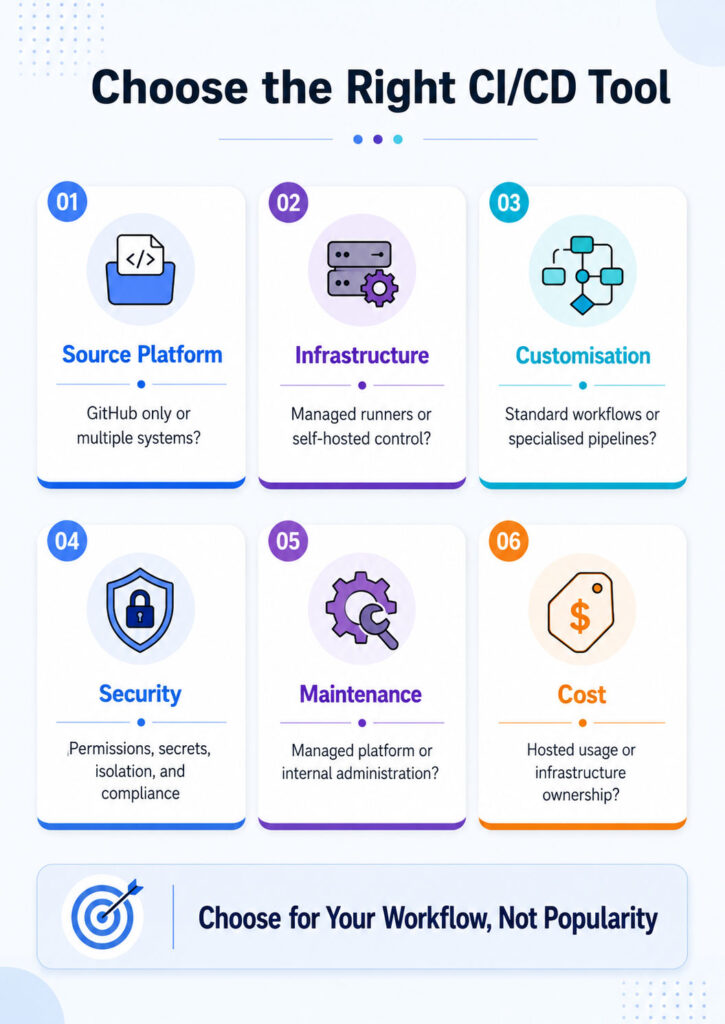
First, consider where your source code is stored and how much infrastructure control your organisation requires. Next, review pipeline complexity, compliance, security boundaries, workload, team skills, and operational ownership.
Finally, compare the total cost of operating the platform. Although the software price matters, infrastructure, maintenance, security, upgrades, and recovery can affect the final cost more significantly.
When GitHub Actions Is the Better Fit
GitHub Actions provides the most natural experience when repositories, pull requests, reviews, releases, and permissions already use GitHub. Consequently, teams can add CI/CD without deploying a separate automation controller.
In addition, repository-native workflows make build and deployment results visible beside commits and pull requests. Therefore, developers can investigate failures without constantly moving between separate systems.
GitHub Actions is particularly suitable when teams need:
- Repository-controlled workflow files.
- Direct pull-request checks.
- Managed runner availability.
- Built-in GitHub event triggers.
- Deployment environment protection.
- Organisation-level workflow controls.
- Reusable actions and workflows.
- Reduced platform maintenance.
Situations That Favour Jenkins
Jenkins can be the stronger option when an organisation needs complete control over controllers, agents, plugins, networks, storage, and update schedules. Moreover, it can connect several source-control and business systems through one centrally managed automation platform.
For example, Jenkins may suit:
- Strict on-premises deployments.
- Air-gapped environments.
- Several source-control platforms.
- Specialised build hardware.
- Legacy operating systems.
- Proprietary compilers.
- Complex internal integrations.
- Existing Jenkins expertise.
However, greater control creates more operational responsibility. Therefore, the organisation must maintain the controller, agents, plugins, backups, security, and monitoring.
Best Choice for a Small Development Team
A small team may not have a dedicated CI/CD administrator. In that case, GitHub Actions can reduce operational work because the workflow service and managed runners are already available.
As a result, developers can focus on application builds, tests, and deployments instead of maintaining a separate controller. Nevertheless, the team must still review workflow permissions, third-party actions, usage costs, and deployment safeguards.
Established Enterprise Automation
Many enterprises already operate large Jenkins environments containing jobs, agents, plugins, Shared Libraries, and internal integrations. Therefore, replacing the platform can require significant testing and process redesign.
Keeping Jenkins may remain sensible when:
- The platform stays secure and supported.
- Existing pipelines remain reliable.
- Administrative ownership is clear.
- Build capacity meets current demand.
- Developers receive timely feedback.
- Backups and recovery are regularly tested.
- Migration benefits remain limited.
However, an established installation should not remain unchanged forever. Instead, teams should modernise older jobs, remove unused plugins, improve agent isolation, and move pipeline logic into source control.
Open-Source Project Requirements
GitHub Actions integrates naturally with public repositories, forks, pull requests, contributors, and releases. Consequently, maintainers can validate external contributions without operating an additional automation service.
However, forked pull requests can contain untrusted code. Therefore, ordinary contribution checks should remain separate from trusted release workflows, production credentials, and privileged self-hosted runners.
Supporting Multiple Source-Control Platforms
An organisation may use GitHub, GitLab, Bitbucket, Subversion, or internal source systems simultaneously. In such an environment, Jenkins can provide one central automation layer through plugins, webhooks, jobs, and Shared Libraries.
GitHub Actions, by contrast, remains closely associated with GitHub repositories. Consequently, Jenkins may provide easier centralisation when the organisation has not standardised on one source platform.
Cloud-Native Delivery Workflows
GitHub Actions can connect repository workflows with cloud identities, container registries, Kubernetes clusters, infrastructure code, and protected deployment environments. In addition, OpenID Connect can provide temporary cloud credentials without storing long-lived access keys.
However, cloud-native delivery does not become secure automatically. Therefore, teams still need narrow cloud roles, protected production environments, network restrictions, approval rules, and deployment auditing.
Legacy and Restricted Systems
Legacy applications may require unusual tools, older operating systems, proprietary compilers, private hardware, or restricted network access. In those situations, Jenkins agents can operate inside specialised environments.
Nevertheless, self-hosted GitHub runners can also support many custom workloads. Therefore, teams should test the actual technical requirements instead of assuming that only Jenkins can handle older systems.
Using Both CI/CD Platforms
An organisation does not always need an immediate all-or-nothing migration. For example, GitHub Actions can validate pull requests while Jenkins continues running an established on-premises deployment process.
Similarly, one platform can trigger an approved workflow in the other. However, this hybrid approach creates additional credentials, logs, integrations, and ownership boundaries.
Consequently, teams should use both platforms only when the division provides a clear operational, security, or migration benefit.
GitHub Actions vs Jenkins by Team Requirement
| Team or Requirement | Likely Starting Choice | Main Reason |
|---|---|---|
| Small GitHub-based team | GitHub Actions | Faster setup and lower administration |
| Established Jenkins environment | Keep or modernise Jenkins | Existing automation and expertise |
| Open-source GitHub project | GitHub Actions | Repository-native contribution workflows |
| Strict air-gapped organisation | Jenkins | Complete self-managed deployment |
| Custom hardware builds | Either platform | Both support self-hosted execution |
| Several source-control systems | Jenkins | Central integration across platforms |
| Cloud-native GitHub repositories | GitHub Actions | Integrated workflows and cloud identity |
| Highly customised legacy automation | Jenkins | Flexible agents, scripts, and plugins |
GitHub Actions Strengths
- Direct GitHub repository integration.
- Fast initial workflow setup.
- Managed runner availability.
- Pull-request and release events.
- YAML-based workflow configuration.
- Reusable actions and workflows.
- Deployment environment integration.
- Lower platform-maintenance requirements.
- Convenient developer visibility.
- Self-hosted runner support.
Overall, these strengths make GitHub Actions a practical default for many modern GitHub-based projects.
Limitations of GitHub Actions
- Strong dependency on the GitHub platform.
- Usage costs that may grow with workload.
- Hosted-runner limitations for specialised builds.
- Complex YAML in large workflows.
- Supply-chain risks from external actions.
- Security responsibilities for self-hosted runners.
- Limited suitability for complete air gaps.
- Additional design for cross-repository orchestration.
Nevertheless, many of these limitations can be reduced through reusable workflows, runner isolation, permission controls, and careful cost monitoring.
Jenkins Strengths
- Open-source automation platform.
- Extensive infrastructure control.
- Large plugin ecosystem.
- Support for diverse source systems.
- Flexible agent architecture.
- Strong customisation options.
- Pipeline as Code support.
- Reusable Shared Libraries.
- Suitability for restricted networks.
- Long enterprise automation history.
Therefore, Jenkins remains useful when the organisation needs extensive control or already has substantial internal automation built around it.
Limitations of Jenkins
- Controller administration requirements.
- Plugin compatibility challenges.
- Planned and tested upgrades.
- Continuous security maintenance.
- Organisation-managed backups and recovery.
- Variable developer experience.
- Potentially complex Groovy pipelines.
- Infrastructure work for scaling.
- Configuration drift in older jobs.
- Knowledge concentrated among a few administrators.
Consequently, Jenkins works best when platform ownership is clearly assigned rather than treated as an occasional development task.
Implementation Plan for GitHub Actions
- First, identify the required build, test, scan, and deployment stages.
- Next, create a minimal pull-request validation workflow.
- Then, set the smallest required token permissions.
- Afterwards, select managed or self-hosted runners.
- Additionally, configure dependency caching carefully.
- Meanwhile, publish useful test reports and artefacts.
- Where possible, create reusable workflows for common patterns.
- Before deployment, separate development and production environments.
- For cloud access, prefer temporary credentials where supported.
- Finally, monitor workflow usage, queue time, cost, and failure rates.
Jenkins Setup and Modernisation Plan
- Begin with a supported Jenkins release.
- Next, place the controller on protected infrastructure.
- Afterwards, create dedicated agents for build execution.
- Meanwhile, install only the plugins that are genuinely required.
- Then, configure authentication and role-based authorisation.
- For secrets, use the Jenkins credentials system.
- Where possible, move pipelines into version-controlled Jenkinsfiles.
- Additionally, use Multibranch Pipelines for branch discovery.
- For repeated logic, create small and maintainable Shared Libraries.
- Finally, test backups, restoration, upgrades, and agent replacement.
CI/CD Pipeline Design Checklist
- Keep pipeline definitions in source control.
- Pin important tool and dependency versions.
- Build one immutable release artefact.
- Run fast validation early.
- Separate trusted and untrusted code.
- Grant minimum credential permissions.
- Use isolated runners or agents.
- Publish useful test and security reports.
- Control concurrent deployments.
- Require approval at the point of risk.
- Record the deployed commit and artefact.
- Make deployments repeatable.
- Provide rollback procedures.
- Monitor quality, cost, and duration.
In addition, teams should review this checklist whenever applications, infrastructure, or compliance requirements change.
Common GitHub Actions Mistakes
- Granting unnecessarily broad token permissions.
- Using external actions without review.
- Referencing mutable versions without a policy.
- Exposing secrets to untrusted pull requests.
- Running forked code on privileged runners.
- Duplicating large workflows across repositories.
- Ignoring runner usage and artefact storage.
- Combining builds and production deployment without protection.
- Depending on unspecified preinstalled tools.
- Keeping production credentials at a broad scope.
Therefore, workflow reviews should examine permissions and execution environments as carefully as application code.
Frequent Jenkins Administration Mistakes
- Running ordinary builds on the controller.
- Installing more plugins than necessary.
- Postponing upgrades indefinitely.
- Leaving unnecessary anonymous access enabled.
- Hard-coding credentials in Jenkinsfiles.
- Using manual jobs without version control.
- Failing to back up Jenkins home.
- Skipping restore tests.
- Allowing one agent to access every environment.
- Creating oversized Shared Libraries.
- Depending on undocumented administrator knowledge.
- Exposing Jenkins without suitable network protection.
As a result, a poorly maintained Jenkins installation can become difficult to secure, upgrade, and recover.
Moving from Jenkins to GitHub Actions
A migration should begin with an inventory rather than a direct syntax conversion. First, document every Jenkins job, source trigger, plugin dependency, agent label, credential, artefact destination, deployment environment, approval, and notification.
Next, classify pipelines according to complexity and business importance. Consequently, the team can start with low-risk pull-request validation before moving production releases.
A Practical Migration Strategy
- Start with a simple validation pipeline.
- Then, create the equivalent GitHub workflow.
- Temporarily run both platforms.
- Afterwards, compare artefacts and test results.
- Move repeated logic into reusable workflows.
- Configure environments and credentials carefully.
- Next, migrate deployment stages.
- Meanwhile, monitor reliability and duration.
- Disable the Jenkins job after successful validation.
- Finally, retain required logs and configuration.
Avoid Direct Plugin-for-Action Translation
A Jenkins plugin may solve a problem that GitHub already handles through repository events, environments, APIs, or cloud integrations. Therefore, migration should redesign the workflow where appropriate instead of recreating every historical implementation detail.
Conversely, specialised Jenkins behaviour may require a custom action, script, external service, or self-hosted runner.
Moving from GitHub Actions to Jenkins
A reverse migration may become necessary when an organisation requires an air-gapped environment, centralised platform control, or infrastructure unavailable to the current workflows.
In that case, teams should map workflow triggers to Jenkins events, jobs to Pipeline stages, actions to scripts or plugins, environments to deployment stages, and reusable workflows to Shared Libraries.
However, the organisation must also establish processes for controllers, plugins, agents, security, backups, and upgrades.
Can GitHub Actions Fully Replace Jenkins?
In many cases, yes. GitHub Actions supports managed runners, self-hosted execution, matrix builds, caching, artefacts, protected environments, reusable workflows, and cloud authentication.
However, replacement becomes harder when Jenkins coordinates several source systems, specialised infrastructure, extensive plugins, or fully disconnected environments.
Is Jenkins Capable of Replacing GitHub Actions?
Technically, yes. Jenkins can build and deploy software stored in GitHub and many other source-control systems.
Nevertheless, teams may lose repository-native convenience and accept additional administration. Therefore, the move should address a genuine requirement rather than occur only because Jenkins offers more customisation.
Which Platform Is Easier to Start?
Generally, GitHub Actions is easier for a GitHub repository because the automation service is already integrated. In addition, managed runners remove the need to configure an initial execution server.
Jenkins requires installation, agents, plugins, security, backups, and maintenance. However, experienced Jenkins teams may find their existing platform easier than adopting and governing a different system.
Does Jenkins Still Matter for Modern Development?
Yes, Jenkins remains relevant for self-managed automation, specialised agents, diverse source platforms, restricted networks, and complex enterprise integrations.
However, older environments should be modernised through Pipeline as Code, controlled plugins, protected controllers, isolated agents, and documented administration.
GitHub Actions Pricing Considerations
GitHub Actions usage depends on repository visibility, account plan, runner type, execution time, storage, and related services. Therefore, teams should review current billing rules and monitor workflow consumption.
Meanwhile, self-hosted runners may reduce certain managed execution charges, although infrastructure and maintenance still create costs.
Understanding the Real Cost of Jenkins
Jenkins software is open source. Nevertheless, organisations still pay for controllers, agents, storage, networking, security, upgrades, monitoring, backups, administration, and recovery.
Consequently, the absence of a software licence does not make Jenkins operationally free.
Running GitHub Actions on Private Infrastructure
Yes, a self-hosted runner can execute GitHub Actions workflows on organisation-managed servers. As a result, workflows can access private networks, custom tools, or specialised hardware.
However, the runner still communicates with GitHub to receive jobs and return results. Therefore, a fully disconnected environment requires another approach.
Using Jenkins on Cloud Servers
Jenkins controllers and agents can run on cloud virtual machines, containers, Kubernetes, or other supported infrastructure. Consequently, organisations can scale build agents without keeping every machine permanently active.
However, the organisation remains responsible for securing, monitoring, patching, and recovering the environment.
Docker Support in GitHub Actions
GitHub Actions can build container images and use supported job or service containers. In addition, workflows can publish images to container registries and deploy them to cloud or Kubernetes environments.
Nevertheless, privileged operations and Docker socket access require careful review, especially on persistent self-hosted runners.
Docker Support in Jenkins
Jenkins Pipeline can run stages inside Docker-based agents and can build or publish container images. Therefore, different stages can use different repeatable tool environments.
However, access to the host Docker socket can provide extensive control over the machine. Consequently, that access should remain tightly restricted.
Kubernetes CI/CD Platform Selection
Both platforms can build container images and deploy applications to Kubernetes. GitHub Actions often suits GitHub-hosted cloud-native projects, whereas Jenkins can create dynamic agents inside private clusters.
Therefore, the better option depends on repository hosting, cluster access, identity management, network design, and operational ownership.
Best Option for .NET Projects
Both platforms can restore, build, test, package, and deploy .NET applications. GitHub Actions provides managed Windows and Linux runners, while Jenkins provides custom organisation-managed agents.
Consequently, the application framework alone does not determine the best CI/CD platform.
Angular CI/CD Platform Selection
Both tools can install Node.js, restore packages, run Angular tests, build the application, and publish deployment artefacts.
GitHub Actions may offer simpler setup when the source already lives in GitHub. However, Jenkins can remain suitable when the frontend belongs to a wider enterprise delivery process.
Mobile Application Pipeline Requirements
Mobile builds may require macOS agents, signing certificates, emulators, physical devices, and secure key storage. Therefore, teams should compare runner hardware, concurrency, isolation, signing controls, and cost.
Both platforms can support these requirements through appropriate managed or self-hosted infrastructure.
Microservices Delivery Automation
GitHub Actions works well when every microservice owns its repository workflow and uses shared templates. Jenkins, by contrast, can centralise delivery through Shared Libraries and common agent infrastructure.
However, both models require consistent versioning, security, observability, and release coordination.
Monorepo Automation Requirements
Both tools can support monorepos through path filtering, selective builds, caching, dependency analysis, and parallel jobs.
Consequently, the better platform depends on repository size, build tooling, developer workflow, and existing automation.
Security Comparison
Neither platform is automatically more secure in every configuration. GitHub manages its hosted service, but workflow permissions, external actions, and self-hosted runners still introduce risks.
Jenkins provides complete infrastructure control. However, that control includes responsibility for plugins, updates, backups, network exposure, credentials, and controller security.
Therefore, secure architecture and administration matter more than the product name.
Cost Comparison
GitHub Actions can be cost-effective when managed usage remains reasonable and reduced administration saves engineering time.
Jenkins can also be economical when existing infrastructure and skilled administrators already support it. However, hidden maintenance and recovery work can make self-hosting more expensive than expected.
Consequently, organisations should calculate the total cost per successful build and deployment.
Final Verdict: GitHub Actions vs Jenkins
The GitHub Actions vs Jenkins comparison does not produce one universal winner.
GitHub Actions provides repository-native CI/CD with managed runners, direct pull-request integration, reusable workflows, and lower platform administration. Therefore, it is a strong default for new projects already hosted on GitHub.
Jenkins offers extensive control through self-managed controllers, flexible agents, plugins, and Shared Libraries. As a result, it remains valuable for restricted networks, legacy systems, specialised hardware, and complex enterprise automation.
Choose GitHub Actions when fast adoption, developer convenience, and lower operational overhead matter most. By contrast, select Jenkins when source-platform independence, extensive customisation, or complete infrastructure ownership is essential.
Finally, keep an existing Jenkins environment when it remains secure, maintainable, documented, and effective. A migration should solve a real delivery problem rather than simply follow a newer trend.

AboutTPJ Technical Team
The Project Jugaad Technical Team creates practical, easy-to-follow content on software development, web technologies, artificial intelligence, cybersecurity, cloud platforms, and digital tools. Our articles are informed by more than 13 years of hands-on experience with .NET, Angular, SQL Server, AWS, WordPress, Linux hosting, application deployment, and real-world troubleshooting. Each guide is researched, reviewed, and updated to provide accurate, useful, and actionable information for developers, businesses, and everyday technology users.