Technology
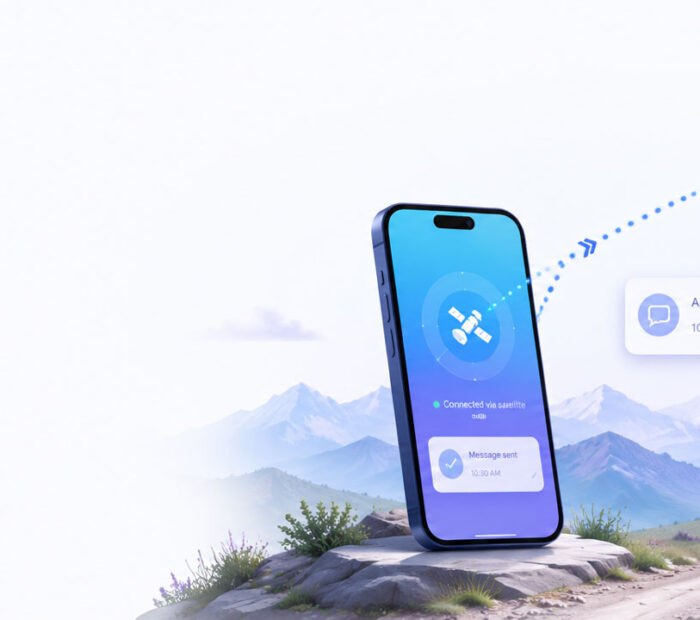
Satellite messaging on smartphones can help people communicate when cellular and Wi-Fi networks are unavailable. Instead of connecting to a nearby mobile tower, a supported phone communicates with a satellite passing overhead or positioned within the service area.
This capability can be valuable during hiking trips, road emergencies, natural disasters, power outages, or travel through remote regions. However, satellite connectivity does not turn every smartphone into a full satellite phone.
Most current services focus on emergency communication, short text messages, location sharing, and selected low-data applications. In addition, availability depends on the phone model, software, country, mobile carrier, satellite partner, and view of the sky.
Therefore, users should understand both the benefits and limitations before depending on satellite messaging in an emergency.
Satellite Messaging on Smartphones: Quick Answer
- Supported phones can connect directly to satellites when ordinary mobile and Wi-Fi coverage is unavailable.
- Common features include emergency SOS, short messages, location sharing, and selected low-data services.
- A clear view of the sky usually improves the connection because buildings, mountains, trees, and indoor locations can block satellite signals.
- Service availability varies according to the device, country, carrier, and satellite network.
- Voice calls, video streaming, and high-speed browsing may remain unavailable on many current smartphone satellite services.
- Emergency planning still matters because satellite messaging should not replace maps, backup power, first-aid supplies, or responsible travel preparation.
In short, smartphone satellite communication provides a useful backup outside normal coverage. Nevertheless, it remains slower and more limited than a terrestrial mobile network.
What Is Satellite Messaging on a Smartphone?
Satellite messaging allows a compatible smartphone to send and receive limited information through a satellite network.
A traditional mobile phone normally communicates with a nearby cellular tower. The tower then connects the phone to the wider mobile network.
When no tower is available, a satellite-capable phone may attempt to establish a direct radio link with a satellite. Afterwards, the satellite forwards the information through ground infrastructure and communication networks.
Depending on the service, the phone may send:
- An emergency request.
- A short text message.
- Location coordinates.
- A roadside-assistance request.
- A check-in message.
- Limited data for selected applications.
However, the exact capabilities differ significantly between manufacturer-provided features and carrier-based direct-to-cell services.
Why Satellite Messaging Is Coming to Normal Smartphones
Traditional satellite phones use specialised hardware and dedicated satellite networks. Although they remain valuable for professional and remote-area use, they can be expensive and unfamiliar to ordinary users.
Smartphone manufacturers, mobile carriers, satellite operators, and chipset companies are now integrating satellite communication into consumer devices.
Several developments have made this possible:
- Modern phone modems support additional satellite communication features.
- Low Earth orbit constellations can reduce distance and latency.
- Satellite operators are partnering with mobile carriers.
- Industry standards now include non-terrestrial networks.
- Phone software can guide users toward an available satellite.
- Low-data messaging requires less bandwidth than normal internet access.
As a result, some users can access satellite features without carrying a separate satellite phone or external antenna.
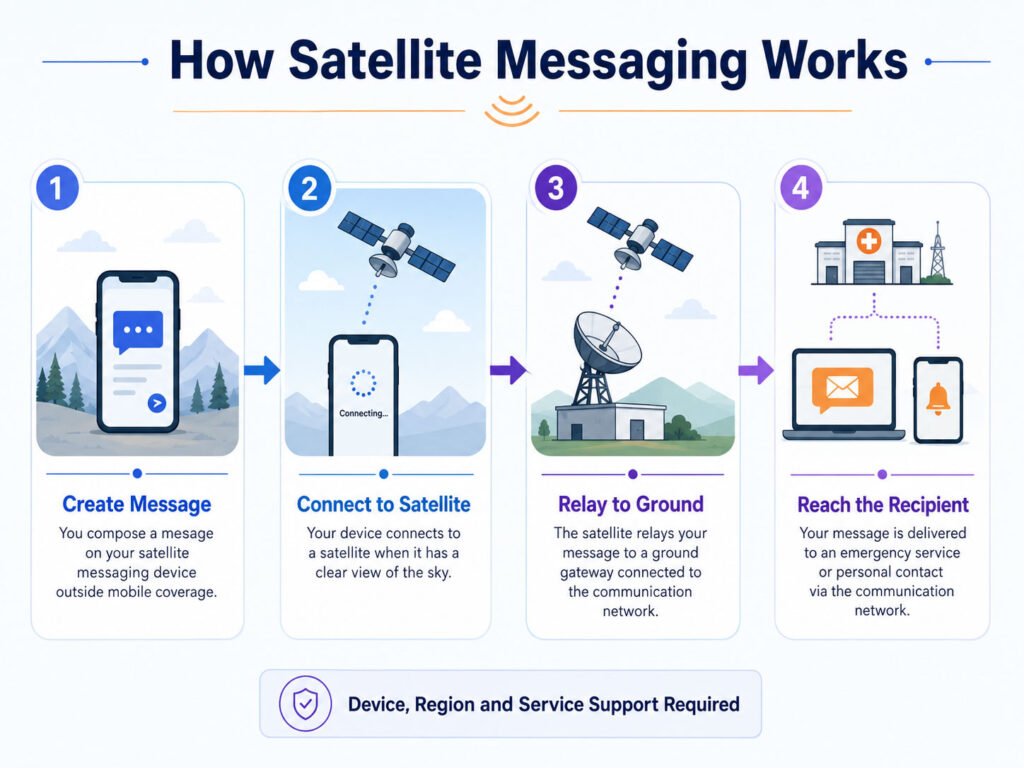
How Satellite Messaging Works
The process varies between services, but a typical connection follows several stages:
- The phone detects that cellular and Wi-Fi networks are unavailable.
- A supported satellite feature becomes available.
- The user selects an emergency, messaging, or location-sharing option.
- The phone searches for a compatible satellite signal.
- On-screen guidance may help the user point the device correctly.
- The phone transmits a compressed message or data packet.
- A satellite relays the information to a ground station or network gateway.
- The service routes the message to emergency responders, another user, or an authorised application.
- A reply follows the reverse communication path when two-way messaging is supported.
Unlike normal mobile messaging, the connection may require the user to remain outdoors and keep the phone pointed in a suitable direction.
The Satellite Communication Path
| Stage | Main Role |
|---|---|
| Smartphone | Creates and transmits the message |
| Satellite | Receives and relays the radio signal |
| Ground gateway | Connects the satellite system to terrestrial networks |
| Service platform | Processes, routes, or translates the information |
| Recipient | Receives the message, alert, or location |
Some modern systems use links between satellites before sending the data to a ground gateway. However, the user generally does not need to understand or manage that part of the process.
What Is Direct-to-Device Satellite Connectivity?
Direct-to-device, commonly shortened to D2D, describes satellite communication with ordinary or specially supported consumer devices.
The term can include several technical approaches. For example, one service may use dedicated satellite frequencies and compatible smartphone hardware, while another uses mobile spectrum through a partnership with a cellular carrier.
Consequently, two services described as direct-to-device may offer different coverage, device support, data speeds, and user experiences.
What Is Direct-to-Cell Satellite Service?
Direct-to-cell service allows a compatible satellite to operate similarly to a mobile tower in space.
In this model, the satellite communicates with supported mobile devices through frequencies coordinated with a terrestrial carrier.
One important advantage is broader compatibility with existing phones. Nevertheless, the mobile carrier, device software, spectrum permissions, and satellite network must all support the service.
Direct-to-cell services may begin with text messaging and emergency alerts. Over time, some networks may add limited app data, voice, or broader internet capabilities.
What Is a Non-Terrestrial Network?
A non-terrestrial network, or NTN, uses communication platforms above the Earth instead of relying only on ground-based mobile towers.
These platforms may include:
- Low Earth orbit satellites.
- Medium Earth orbit satellites.
- Geostationary satellites.
- High-altitude platform systems.
- Airborne communication platforms.
Industry standards increasingly integrate non-terrestrial networks with 4G and 5G technologies. Therefore, future devices may move more naturally between terrestrial and satellite coverage.
3GPP and Smartphone Satellite Connectivity
3GPP develops technical specifications used by mobile networks and devices worldwide.
Support for non-terrestrial networks became a major part of its newer mobile standards. As a result, manufacturers can design compatible modems, phones, satellites, and carrier networks around a more consistent technical foundation.
However, a standards-compatible phone does not automatically receive satellite service. Commercial availability still depends on carrier deployment, regulatory approval, satellite coverage, and software support.
Low Earth Orbit vs Geostationary Satellites
| Area | Low Earth Orbit | Geostationary Orbit |
|---|---|---|
| Relative distance | Closer to Earth | Much farther from Earth |
| Movement in the sky | Satellites move across the user’s view | Satellite appears fixed relative to the ground |
| Typical latency | Generally lower | Generally higher |
| Coverage approach | Uses a constellation of satellites | Covers a large area from one orbital position |
| Phone guidance | May require tracking a moving satellite | May require pointing toward a fixed direction |
| Common advantage | Lower distance and potential direct-to-cell use | Large regional coverage |
Neither orbit is universally better. Instead, network design, spectrum, antenna capability, service goals, and satellite availability determine the final experience.
Why Does the Phone Need a Clear View of the Sky?
Satellite signals travel over a much greater distance than signals from a nearby mobile tower. In addition, a smartphone uses a small internal antenna and limited transmission power.
Buildings, thick roofs, mountains, dense trees, and deep valleys can therefore weaken or block the connection.
For the best chance of connecting:
- Move outdoors when it is safe.
- Choose an open area.
- Stay away from tall buildings.
- Avoid standing directly below dense tree cover.
- Follow the direction shown on the phone.
- Keep the device positioned until transmission finishes.
However, users should never move into an unsafe location merely to improve the signal.
Why Does Satellite Messaging Take Longer?
A normal mobile message usually travels through a nearby network tower with strong connectivity and substantial bandwidth.
Satellite messaging, by comparison, may need to locate a satellite, establish a weak long-distance radio link, compress the message, wait for a transmission opportunity, and route the data through a specialised gateway.
Consequently, sending a message may take several seconds or longer. Obstructions, satellite position, congestion, and weather conditions can increase the delay.
Therefore, users should keep messages clear and concise rather than sending unnecessary details.
Emergency SOS vs Normal Satellite Messaging
| Area | Emergency SOS | General Satellite Messaging |
|---|---|---|
| Main purpose | Request emergency assistance | Communicate with personal contacts |
| Information collected | May include emergency type, location, and medical details | Usually includes message text and delivery information |
| Recipient | Emergency service or relay centre | Selected friend, family member, or contact |
| Availability | Supported in selected countries and devices | May have a more limited regional rollout |
| Priority | Designed for urgent situations | Intended for non-emergency communication |
| Cost | Depends on manufacturer and region | May require a plan or subscription |
Users should not send a normal check-in message when urgent emergency assistance is required. Instead, they should use the device’s dedicated emergency workflow where available.
Satellite Messaging vs a Satellite Phone
| Area | Smartphone Satellite Messaging | Dedicated Satellite Phone |
|---|---|---|
| Primary device | Supported consumer smartphone | Specialised satellite handset |
| Common features | SOS, short text, location, and limited data | Voice, text, and service-specific data |
| Antenna | Built into the phone | Usually larger and purpose-built |
| Ease of use | Integrated with familiar phone software | Requires a separate device and service |
| Coverage | Depends on consumer service availability | Depends on the selected satellite network |
| Best suited for | Occasional backup communication | Regular professional or remote-area communication |
A dedicated satellite phone may remain the better option for expeditions, offshore operations, disaster-response teams, remote fieldwork, or locations where reliable voice communication is essential.
Satellite Messaging vs a Personal Locator Beacon
A personal locator beacon, commonly called a PLB, sends a distress signal through a dedicated search-and-rescue satellite system.
Unlike a smartphone messaging service, a PLB usually focuses on emergency alerting rather than ordinary conversation.
A registered beacon may provide:
- A strong dedicated distress signal.
- Long battery storage life.
- Purpose-built emergency operation.
- Search-and-rescue registration information.
- Operation without a monthly messaging plan in many cases.
However, a beacon may not support normal two-way texting. Therefore, people travelling into high-risk remote regions may carry both a communication device and a dedicated emergency beacon.
Types of Smartphone Satellite Services
| Service Type | Typical Capability |
|---|---|
| Manufacturer emergency service | SOS communication and emergency questionnaires |
| Manufacturer personal messaging | Short messages to selected contacts |
| Location sharing | Updates a contact with the user’s position |
| Roadside assistance | Requests vehicle help outside mobile coverage |
| Carrier direct-to-cell service | Messaging and selected network features on compatible phones |
| Satellite-enabled application data | Limited access to supported low-data applications |
The service name alone does not confirm every capability. Therefore, users should check the exact features supported by their phone, carrier, and country.
Does Every Smartphone Support Satellite Messaging?
No. Satellite communication requires compatible hardware, modem support, antennas, software, and an active service.
Two phones that appear similar may therefore have different satellite capabilities. Moreover, a supported model purchased in one country may not receive the same service in another region.
Before relying on the feature, confirm:
- The exact phone model.
- The installed software version.
- The supported country or region.
- The required mobile carrier.
- The satellite service provider.
- Any activation or subscription requirement.
- The available emergency and non-emergency features.
Does Satellite Messaging Need a SIM Card?
The answer depends on the service.
A manufacturer-provided emergency feature may work according to the phone’s activation status and regional requirements. By contrast, a carrier-based direct-to-cell service may require an active SIM or eSIM, a supported mobile plan, and registration with the carrier.
Therefore, users should not assume that an inactive or unregistered phone will receive every available satellite feature.
Does Satellite Messaging Need Mobile Data?
The satellite connection itself is intended for situations where normal mobile data and Wi-Fi are unavailable.
However, the phone may require internet access beforehand for software updates, activation, account setup, map downloads, emergency-contact configuration, or service registration.
Consequently, preparation should occur before entering an area without coverage.
Can Satellite Messaging Replace a Mobile Network?
No. Terrestrial mobile networks provide much higher capacity, faster data, lower latency, broader app support, and better indoor coverage.
Satellite messaging currently acts mainly as a backup for areas beyond normal mobile service.
Although direct-to-cell networks are expanding, they still face limits related to satellite capacity, spectrum, device power, geography, and regulatory approval.
Therefore, users should continue using cellular or Wi-Fi connectivity whenever it is available.
When Do You Need Satellite Messaging?
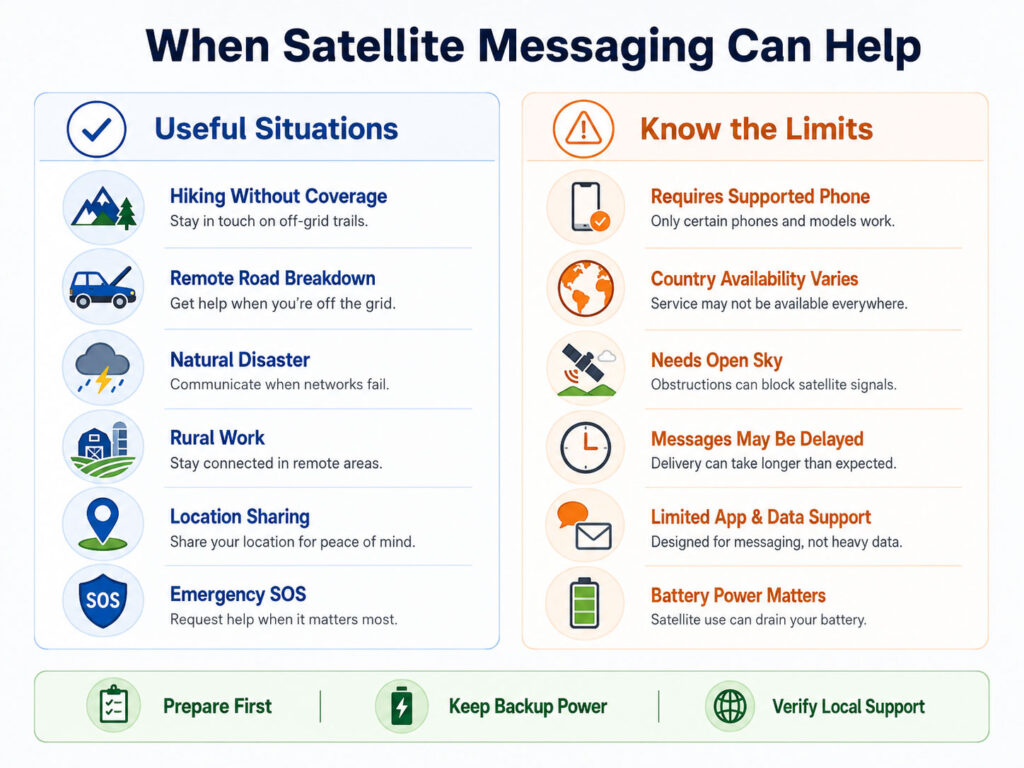
Satellite messaging is most useful when a person is outside cellular and Wi-Fi coverage but still needs to communicate.
Common situations include remote travel, hiking, rural road journeys, natural disasters, outdoor work, boating, and unexpected vehicle breakdowns.
However, the feature should not encourage users to enter dangerous areas without preparation. Instead, it should form one part of a broader safety plan.
Satellite Messaging for Hiking and Trekking
Hikers can lose cellular coverage soon after entering mountains, forests, or isolated trails.
A satellite-capable smartphone may help them:
- Request emergency assistance.
- Send a delayed-arrival message.
- Share a current location.
- Notify family members that they are safe.
- Report an injury or route problem.
- Request help after becoming lost.
Nevertheless, hikers should also carry offline maps, sufficient water, weather protection, first-aid supplies, and backup power.
In addition, someone outside the group should know the route and expected return time.
Satellite Messaging for Road Trips
Remote highways and rural roads may contain long areas without mobile coverage.
During a breakdown, satellite connectivity can help the driver share a location or request assistance where supported.
Before starting the trip, drivers should:
- Check the vehicle’s condition.
- Download offline maps.
- Carry water and essential supplies.
- Charge the phone and power bank.
- Save roadside-assistance details.
- Tell someone about the planned route.
However, users should stop the vehicle safely before attempting to point or operate the phone.
Satellite Messaging During Natural Disasters
Earthquakes, floods, storms, wildfires, and other disasters can damage mobile towers, power systems, and internet infrastructure.
A satellite service may continue operating because its main communication path does not depend entirely on nearby terrestrial towers.
As a result, supported users may receive alerts or send short messages when local networks fail.
Nevertheless, major disasters can create heavy demand and network congestion. Therefore, messages should remain brief, accurate, and limited to necessary communication.
Satellite Messaging for Rural Communities
People living or working in remote regions may encounter regular mobile dead zones.
Satellite communication can provide an additional safety option for:
- Agricultural workers.
- Remote construction teams.
- Utility technicians.
- Forest personnel.
- Survey teams.
- Mining operations.
- Rural travellers.
However, organisations that require dependable daily communication should evaluate professional satellite equipment rather than relying only on a consumer phone feature.
Satellite Messaging for Boating
Mobile coverage can disappear quickly after a boat moves away from the coast.
Some smartphone satellite services may work in open areas with a clear view of the sky. However, service availability over water, maritime boundaries, and international regions can vary.
Therefore, boaters should use approved marine communication and emergency equipment suited to the journey.
A smartphone should complement, rather than replace, devices such as marine radios, emergency beacons, navigation systems, and properly maintained safety equipment.
Satellite Messaging for International Travel
A phone may support satellite communication in the country where it was purchased but not in every destination.
Availability can depend on:
- Local regulations.
- Satellite coverage.
- Carrier agreements.
- Emergency-service integration.
- The phone’s regional model.
- Roaming and activation rules.
- Supported languages.
Consequently, travellers should check official device and carrier documentation shortly before departure.
Satellite Messaging in India
As of June 2026, ordinary smartphone satellite messaging is not broadly available across India through the major consumer features offered in several overseas markets.
Some satellite and direct-to-device technologies are under development, consultation, testing, or regulatory consideration. However, this does not guarantee that a satellite feature advertised on a phone will work in India.
Therefore, Indian buyers should not purchase a device solely for satellite messaging unless the manufacturer or carrier explicitly confirms local availability.
Before depending on the feature, verify:
- Official India support from the phone manufacturer.
- Service availability from an Indian mobile carrier.
- Applicable regulatory approval.
- The supported phone model and software version.
- Whether emergency-service integration is active.
- Any required plan or subscription.
Is Satellite Messaging Free?
Pricing varies between manufacturers, carriers, and satellite providers.
A company may include emergency satellite service for a limited period after phone activation. Another provider may include messaging within a premium mobile plan or charge a separate monthly fee.
Possible pricing models include:
- Free emergency-only access.
- A limited introductory period.
- Monthly subscription.
- Carrier plan inclusion.
- Pay-per-message pricing.
- Separate data or app access charges.
Therefore, users should check both the current price and the renewal terms.
Can Satellite Messaging Send Normal Text Messages?
Some services support two-way personal messages in addition to emergency communication.
However, the recipient experience varies. A message may arrive through a normal messaging application, a relay service, a special conversation type, or an online link.
In addition, message length, character support, media attachments, and group conversations may be limited.
Consequently, users should test the feature before relying on it during a trip.
Can WhatsApp Work Through a Satellite?
The answer depends on the service.
Most early smartphone satellite features focus on emergency requests, basic texts, and location information rather than full internet access.
However, some carrier-based direct-to-cell networks are beginning to support selected low-data applications, including messaging and navigation services.
Therefore, users must check whether their specific carrier, plan, phone, country, and application support satellite data.
A phone showing satellite connectivity does not automatically mean that every internet application will work.
Can You Make Voice Calls Through a Satellite?
Dedicated satellite phones commonly support voice communication. By contrast, many current smartphone satellite features do not provide ordinary voice calls.
Direct-to-cell networks may add voice capability as technology and network capacity improve. Nevertheless, support will vary by carrier, country, phone, and service phase.
Therefore, people who require reliable voice communication in remote regions should consider purpose-built satellite equipment.
Can You Use the Internet Through Smartphone Satellite Service?
Most consumer smartphone satellite services provide far less bandwidth than a normal 4G or 5G network.
Current or emerging services may support:
- Short text messages.
- Emergency information.
- Location updates.
- Weather data.
- Basic navigation information.
- Selected low-data applications.
However, video streaming, large downloads, video calls, and ordinary high-speed browsing may not work.
Satellite Messaging and Location Sharing
A supported phone may allow users to share their location through satellite when mobile networks are unavailable.
This feature can reassure family members or help responders locate someone in an emergency.
However, one location update does not provide continuous tracking unless the service specifically supports it.
Therefore, the user should include useful context such as the route, condition, destination, or intended movement where message length allows.
Location Accuracy
The phone may use satellite navigation systems to calculate its position and a separate communication satellite to transmit that information.
Accuracy depends on:
- View of the sky.
- Terrain and buildings.
- Device sensor quality.
- Satellite geometry.
- Software processing.
- Whether the user is moving.
Consequently, users should not assume that every transmitted location is accurate to the exact metre.
Roadside Assistance Through Satellite
Some supported services allow users to request roadside help when cellular and Wi-Fi coverage are unavailable.
The process may ask for:
- The type of vehicle problem.
- The user’s location.
- Vehicle details.
- Whether anyone is injured.
- The nearest route or landmark.
- A contact method.
However, satellite communication does not guarantee that a service vehicle can reach every road or remote area.
Therefore, users should understand coverage, response limits, membership conditions, and potential service charges.
Emergency Relay Centres
In some regions, emergency services cannot receive satellite messages directly.
A relay centre may therefore receive the user’s information and communicate with the appropriate emergency organisation.
Trained personnel can pass along the emergency type, location, and relevant details.
However, procedures vary by country. Consequently, users should follow the questions and instructions shown by the phone rather than sending an unstructured message.
What Information Should an Emergency Message Include?
When possible, provide:
- The nature of the emergency.
- The number of people involved.
- Any injuries or medical conditions.
- The current location.
- Nearby landmarks.
- Weather or environmental dangers.
- Available shelter and supplies.
- Whether the group can move safely.
Keep the information accurate and concise. Moreover, notify responders when the situation changes.
Does Satellite Messaging Work Indoors?
It generally works poorly or not at all inside most buildings.
Roofs, walls, metal structures, and coated glass can block the satellite signal. Therefore, the user may need to move outdoors or near an open area.
However, safety comes first. Someone inside a burning building, severe storm, dangerous conflict, or unstable area should not move merely to improve connectivity unless doing so is safe.
Does Satellite Messaging Work Under Trees?
Light tree cover may allow an intermittent connection. Dense foliage, however, can obstruct the signal.
The phone may ask the user to move or point in another direction. As a result, transmission can take longer in a forest than in an open field.
Where practical, move toward a clearing while remaining on a safe and known route.
Does Satellite Messaging Work Between Tall Buildings?
Urban streets surrounded by tall buildings provide only a narrow view of the sky.
Reflected signals and physical obstructions can make satellite acquisition difficult.
Therefore, users may need to move to an open junction, park, rooftop area, or another safe location with better sky visibility.
Nevertheless, emergency services may be available through ordinary mobile networks in urban areas even when one carrier temporarily loses coverage.
Does Weather Affect Satellite Messaging?
Heavy rain, storms, dense clouds, and atmospheric conditions can affect certain satellite frequencies and network performance.
However, buildings, terrain, trees, antenna direction, and satellite position often have a more noticeable impact on a small smartphone connection.
During severe weather, users should focus on physical safety first. Afterwards, they can attempt communication from the safest available open location.
Does Satellite Messaging Work in Mountains?
Mountain terrain can block large sections of the sky.
A user in a valley, beside a cliff, or behind a ridge may therefore struggle to establish a connection.
Moving a short distance to a safer open location can help. However, users should never climb unstable terrain or abandon shelter only to obtain a signal.
Does Satellite Messaging Work Everywhere?
No. Satellite coverage can have geographic, political, technical, and regulatory limits.
Service may be unavailable:
- Outside supported countries.
- At extreme latitudes.
- In restricted regions.
- Over certain oceans or borders.
- Inside buildings or tunnels.
- Under dense tree cover.
- Near severe physical obstructions.
- When the required satellite is unavailable.
Therefore, users should review the official coverage information for the exact service.
How Long Does a Satellite Message Take?
Transmission time may range from several seconds to a few minutes, depending on the system and conditions.
Factors include:
- Satellite visibility.
- Message size.
- Network congestion.
- Terrain and obstructions.
- Satellite movement.
- Weather conditions.
- Whether the phone must retry.
Consequently, users should remain patient and keep the phone positioned until the interface confirms completion.
Can You Send Photos or Videos?
Many current smartphone satellite services limit communication to text and compact data.
Photos and videos require substantially more bandwidth. Therefore, attachments may be unavailable, heavily compressed, or restricted to future service phases.
If visual evidence is important, save it locally and send it after normal connectivity returns unless the service explicitly supports media transmission.
Can Satellite Messages Be Delayed?
Yes. A message may wait until the phone obtains a suitable connection.
Moreover, the recipient’s network, emergency relay process, or service platform can add additional delay.
Therefore, users should not assume that a sent message has been read until the service provides an appropriate delivery or response indication.
Battery Use
Searching for a satellite and transmitting through a weak long-distance connection can use additional battery power.
To preserve power:
- Charge the phone before travelling.
- Carry a reliable power bank.
- Reduce unnecessary screen brightness.
- Close non-essential applications.
- Use airplane or low-power settings carefully.
- Keep the phone protected from extreme temperatures.
- Avoid repeatedly searching for a connection without need.
However, do not enable a setting that disables the satellite feature or prevents emergency communication.
Cold Weather and Phone Batteries
Cold temperatures can temporarily reduce battery performance and cause a phone to shut down earlier than expected.
Therefore, keep the device close to the body or inside an insulated pocket when travelling in cold conditions.
Extreme heat can also damage a battery and force the phone to reduce performance. Consequently, the device should remain shaded and ventilated where possible.
Privacy and Satellite Communication
Satellite messages may pass through the phone manufacturer, satellite operator, mobile carrier, relay centre, emergency organisation, or other service providers.
Depending on the situation, transmitted information can include:
- Message content.
- Current location.
- Device identifiers.
- Emergency questionnaire responses.
- Account or carrier details.
- Medical information selected by the user.
- Communication timestamps.
Therefore, users should review the applicable privacy terms before travelling, especially when using non-emergency satellite services.
Can Emergency Services See Your Location?
A satellite SOS workflow may share the user’s location with emergency responders or a relay centre.
This information is necessary to coordinate assistance. However, the exact data-sharing process differs by service and country.
Users should keep their emergency contact and medical information current where the phone provides those settings.
Satellite Messaging and Mobile Network Priority
A supported phone normally prefers cellular or Wi-Fi connectivity when those networks are available.
Satellite mode may appear only after the phone confirms that ordinary connectivity cannot complete the task.
As a result, users do not normally need to select satellite communication for everyday messages.
Will Satellite Connectivity Appear Automatically?
Some carrier-based services may connect automatically when ordinary coverage disappears. Other features require the user to open a dedicated emergency or messaging workflow.
Therefore, users should learn the process for their own phone before travelling.
A demonstration mode, when available, provides a safer way to practise without creating an emergency request.
Satellite Messaging Limitations
- Only selected phones receive support.
- Country availability remains limited.
- Carrier participation may be required.
- Clear sky visibility is often necessary.
- Messages can take longer to send.
- Voice and high-speed data may be unavailable.
- Buildings and mountains can block signals.
- Service pricing can change.
- Emergency integration differs by region.
- Battery consumption may increase.
- Network congestion can delay communication.
- Software updates may be required.
Satellite Messaging Should Not Replace Preparation
Technology can fail because of battery loss, device damage, unavailable satellites, software issues, or environmental obstructions.
Therefore, travellers should still prepare through:
- Offline maps.
- A shared route plan.
- Emergency contact information.
- Appropriate clothing.
- Food and water.
- First-aid equipment.
- A power bank.
- Vehicle or outdoor safety supplies.
- A dedicated beacon for higher-risk journeys.
Satellite messaging adds another communication path. However, it does not remove the need for sound judgement and responsible planning.
How to Prepare Satellite Messaging Before a Trip
Do not wait until an emergency to discover whether the feature is available.
Before entering an area without coverage, confirm the device, software, region, plan, and required setup.
In addition, practise through an official demonstration mode when the phone provides one.
Satellite Messaging Preparation Checklist
- Verify the exact phone model.
- Install current operating-system updates.
- Confirm service availability in the destination.
- Review carrier and subscription requirements.
- Configure emergency contacts.
- Update relevant medical information.
- Learn how to open satellite mode.
- Test an official demonstration where available.
- Download offline maps.
- Charge the phone and power bank.
- Carry suitable cables.
- Share the travel plan with a trusted contact.
- Save emergency and roadside numbers.
Check the Exact Phone Model
A product family may contain several models with different satellite capabilities.
Therefore, check the model number rather than relying only on the brand or series name.
Regional variants can also differ. Consequently, imported phones may not receive the same features as locally supported devices.
Install Software Updates
Satellite features often depend on modem firmware, operating-system support, network settings, and application updates.
Install updates while reliable Wi-Fi and power are available. Afterwards, restart the phone and verify that the relevant menu or demonstration appears.
However, avoid performing a major update immediately before an important trip unless there is enough time to test the phone afterwards.
Configure Emergency Contacts
Emergency contacts may receive location information or messages when the user starts a satellite SOS session.
Review:
- Contact names.
- Current phone numbers.
- Relationship details.
- Medical information.
- Allergies.
- Important medication.
- Relevant health conditions.
Nevertheless, include only accurate information that would help during an emergency.
Download Offline Maps
Satellite messaging does not guarantee full map access.
Therefore, download maps for the route, destination, and surrounding area before leaving coverage.
A paper map or dedicated navigation device can also provide a useful backup when the phone is damaged or loses power.
Practise Before You Need It
Some phones provide a satellite demonstration that does not contact emergency responders.
A practice session can show:
- Where the satellite feature appears.
- How the phone guides alignment.
- How long a connection may take.
- Which messages or options are available.
- What information the phone requests.
As a result, the process will feel more familiar during a real emergency.
How to Send a Satellite Message
The exact interface varies, but the general process is similar:
- Confirm that ordinary cellular and Wi-Fi connectivity are unavailable.
- Move to a safe outdoor area with an open view of the sky.
- Open the supported messaging or satellite feature.
- Select the intended recipient or emergency workflow.
- Enter a concise message or answer the emergency questions.
- Follow the on-screen direction indicator.
- Hold the phone steadily until transmission finishes.
- Watch for a reply or delivery confirmation.
- Continue following emergency instructions where applicable.
However, users should follow the exact instructions shown on their own device.
How to Point a Phone Toward a Satellite
The phone may display an arrow, circle, or directional guide.
Move the device gradually rather than making sudden large movements. Afterwards, maintain the indicated position while the message transmits.
Because low Earth orbit satellites move across the sky, the required direction may change during a longer session.
Keep Messages Short and Clear
A concise message reduces transmission time and the chance of misunderstanding.
For a non-emergency check-in, include:
- Your condition.
- Your current location or route.
- The reason for the delay.
- Your next planned action.
- The expected time of the next update.
For example, “We are safe near the north trail shelter. Heavy rain delayed us. We will stay here and update at 8 AM” provides more value than a vague message asking someone not to worry.
Do Not Send Unnecessary Messages During an Emergency
A satellite network may have limited capacity, especially during a major disaster.
Therefore, avoid sending repeated messages when one clear update is sufficient.
However, continue responding when emergency personnel request additional information.
What to Do If the Phone Cannot Connect
- Confirm that the satellite feature is supported in the current region.
- Move outdoors when it is safe.
- Look for a wider view of the sky.
- Move away from buildings, cliffs, and dense trees.
- Follow the phone’s direction guide.
- Remove a case only if official guidance suggests interference.
- Wait for the phone to search again.
- Restart the feature if the session fails.
- Preserve battery between attempts.
- Use another emergency method when available.
Why Satellite Mode Is Not Appearing
Possible causes include:
- The phone model lacks support.
- The operating system is outdated.
- The feature is unavailable in the current country.
- The carrier or plan does not support it.
- Cellular or Wi-Fi coverage remains available.
- Activation is incomplete.
- The phone was purchased for another region.
- The service is temporarily unavailable.
Therefore, review official support information rather than relying on third-party videos or menus from another country.
Why the Message Is Taking Too Long
Slow transmission can result from poor sky visibility, satellite movement, congestion, message size, or repeated signal loss.
Move only when the current position is safe. In addition, keep the phone aligned with the displayed indicator.
If a non-urgent message repeatedly fails, preserve battery and try again later from a more open location.
Why the Message Shows as Undelivered
The satellite network may have received the message even when the final recipient’s service is unavailable.
Alternatively, the phone may have lost the satellite connection before transmission completed.
Therefore, review the status shown by the application and avoid repeatedly submitting a financial or emergency action without checking the outcome.
Satellite Messaging Safety Tips
- Prepare the feature before travelling.
- Keep the phone charged.
- Carry backup power.
- Use a protective case.
- Download maps in advance.
- Remain in a safe location while connecting.
- Follow official emergency instructions.
- Share accurate location information.
- Keep messages concise.
- Avoid unnecessary retries.
- Verify that important messages were delivered.
- Carry another emergency device for high-risk travel.
Do Not Operate the Phone While Driving
Satellite acquisition may require the user to point the phone and follow an on-screen guide.
Therefore, the driver should stop in a safe location before attempting to connect.
A passenger may operate the phone when local laws and road conditions allow it. Nevertheless, everyone should remain aware of traffic and environmental hazards.
Satellite Messaging Scams
As satellite features become more familiar, scammers may create false activation pages, subscription offers, emergency messages, or device-upgrade claims.
Warning signs include:
- An unexpected payment request for emergency activation.
- A link asking for account credentials.
- A claim that every phone can gain satellite service through an application.
- An unofficial website promising global coverage.
- A message requesting a one-time verification code.
- A fake carrier notice demanding immediate payment.
- An application requesting unnecessary permissions.
Therefore, activate or manage satellite features only through the phone’s settings, official manufacturer documentation, or the authorised mobile carrier.
Can an App Add Satellite Hardware to Any Phone?
No. An application cannot create missing satellite radio hardware, antenna support, modem capability, regulatory approval, or network access.
An app may provide information, connect to an external satellite accessory, or manage an existing supported feature.
However, users should avoid applications that falsely promise direct satellite messaging on every phone.
Protect Personal Information
Emergency services may need location, health, identity, or contact information. However, ordinary satellite messages should contain only the details needed for the situation.
Do not send:
- Passwords.
- One-time codes.
- Banking credentials.
- Complete payment-card information.
- Unnecessary identity documents.
- Unrelated medical records.
- Confidential business information.
In addition, confirm the intended recipient before transmitting sensitive information.
Do Not Depend on Satellite Messaging Alone
A phone can break, lose power, become wet, overheat, or fail to find a satellite.
High-risk travellers should therefore consider additional equipment such as:
- A personal locator beacon.
- A dedicated satellite communicator.
- A satellite phone.
- A marine or two-way radio.
- A paper map and compass.
- A second power source.
- An emergency whistle or signalling device.
The appropriate backup depends on the location, activity, weather, group size, and rescue environment.
Smartphone Satellite Messaging vs Satellite Communicator
| Area | Smartphone Feature | Dedicated Satellite Communicator |
|---|---|---|
| Device | Integrated into a supported phone | Separate purpose-built device |
| Battery | Shared with normal phone use | Dedicated to communication and tracking |
| Durability | Depends on the phone and case | Often designed for outdoor use |
| Messaging | Depends on manufacturer or carrier | Usually supports service-specific messaging |
| Tracking | May provide individual location updates | May support scheduled tracking |
| Subscription | May be included or charged separately | Commonly requires a dedicated plan |
| Best suited for | Occasional backup communication | Frequent remote travel |
Who Should Consider a Satellite-Capable Smartphone?
The feature may provide meaningful value for:
- Frequent hikers and trekkers.
- People driving through remote regions.
- Outdoor workers.
- Residents of areas with mobile dead zones.
- Travellers visiting national parks.
- People concerned about disaster communication.
- Boaters remaining within supported service areas.
- Families seeking an additional emergency option.
However, users who remain mainly within reliable urban coverage may rarely need the feature.
Should Satellite Support Influence Your Next Phone Purchase?
Satellite support can be a useful buying factor, but it should not be the only one.
Before paying extra, consider:
- Whether the service works in your country.
- Which features are currently available.
- How long free access lasts.
- The future subscription cost.
- Whether your carrier participates.
- How often you travel outside coverage.
- Whether you need a dedicated outdoor device instead.
For Indian users, local availability should receive particular attention because overseas advertising may not reflect Indian service support.
Satellite Messaging Buying Checklist
- Check the exact phone model and regional variant.
- Confirm official support in your country.
- Review the required carrier and plan.
- Compare emergency and personal messaging features.
- Check whether location sharing is available.
- Review introductory and renewal pricing.
- Understand sky-visibility requirements.
- Check software-update commitments.
- Review battery performance.
- Confirm whether selected apps receive satellite data.
- Read privacy and data-sharing terms.
- Consider a dedicated device for high-risk journeys.
Common Satellite Messaging Mistakes
- Assuming every phone in a product series supports the feature.
- Expecting overseas services to work in India.
- Entering a remote area without testing the phone.
- Forgetting to update the operating system.
- Relying on satellite mode for full internet access.
- Trying to connect from inside a building.
- Allowing the battery to become critically low.
- Sending long, unclear emergency messages.
- Assuming a sent message was delivered.
- Ignoring subscription renewal terms.
- Believing an app can add unsupported satellite hardware.
- Replacing professional emergency equipment with one consumer feature.
Does Satellite Messaging Work Without a Mobile Tower?
Yes. That is its main purpose.
A supported phone communicates with a satellite instead of relying on a nearby cellular tower. However, the service must be active in the current region.
Does Satellite Messaging Work Without Wi-Fi?
Yes. Satellite features are intended for situations where Wi-Fi and cellular connectivity are unavailable.
Nevertheless, initial activation, software updates, and service setup may require internet access beforehand.
Can Any Smartphone Send Satellite Messages?
No. The phone needs compatible hardware, software, antenna capability, and service support.
Therefore, users must verify the exact model and region.
Can iPhones Send Messages Through Satellites?
Selected iPhone models support satellite features in supported countries and regions.
Capabilities can include emergency communication, personal messaging, location sharing, and roadside assistance. However, availability differs by country and feature.
Can Android Phones Use Satellite SOS?
Selected Android devices support satellite emergency features in approved countries.
Other Android phones may receive direct-to-cell service through participating mobile carriers. Nevertheless, model and regional support differ.
Does Satellite Messaging Work in India?
As of June 2026, users should not assume that major overseas smartphone satellite features work in India.
India is developing and considering frameworks for satellite and direct-to-device communication. However, consumers should wait for explicit confirmation from the manufacturer and Indian carrier before relying on a service.
Is Satellite SOS the Same as Calling an Emergency Number?
No. Satellite SOS may use a structured questionnaire, text session, relay centre, or dedicated emergency workflow.
However, its purpose is similar: connecting a person in danger with appropriate help when normal networks are unavailable.
Can Satellite Messages Be Tracked?
The service may process location, time, device, account, and message information.
Emergency communication commonly shares location with responders. Therefore, users should review the relevant privacy terms.
Will Satellite Messaging Drain the Battery?
Searching for and communicating with a satellite can use additional power.
However, occasional emergency use should remain manageable on a charged phone. Carrying backup power is still strongly recommended.
Can You Use Satellite Messaging in Airplane Mode?
Behaviour varies by phone and service.
Some features may guide the user to enable or disable specific wireless settings. Therefore, follow the instructions shown by the device rather than relying on one universal rule.
Can You Receive Messages Through a Satellite?
Two-way services can support replies or incoming messages during an active or available satellite connection.
However, the phone may need an open sky view and may not receive messages continuously while stored indoors.
Can You Share Live Location Through a Satellite?
Some services support individual location updates, while dedicated satellite communicators may offer scheduled tracking.
Therefore, check whether the phone provides one-time sharing or continuous updates.
Will Satellite Messaging Become Standard on All Phones?
Support is likely to expand as mobile standards, carrier partnerships, chipsets, and satellite networks develop.
However, cost, spectrum, regulation, battery use, and satellite capacity will continue affecting availability.
Consequently, satellite connectivity may remain differentiated by device and plan for some time.
Final Verdict: Satellite Messaging on Smartphones
Satellite messaging on smartphones provides a valuable backup when cellular and Wi-Fi networks are unavailable. It can support emergency requests, short messages, location sharing, roadside assistance, and selected low-data services.
However, the technology still has important limitations. A supported phone may need a clear view of the sky, messages can take longer to send, and availability depends on the device, carrier, country, and satellite network.
For occasional travellers and outdoor users, built-in satellite communication can add meaningful safety without requiring another everyday device. By contrast, frequent remote travellers and professionals may still need a dedicated satellite communicator, beacon, or satellite phone.
Finally, verify local support before relying on the feature. Prepare the phone in advance, keep it charged, download offline maps, practise the connection process, and treat satellite messaging as one part of a complete emergency plan.

AboutTPJ Technical Team
The Project Jugaad Technical Team creates practical, easy-to-follow content on software development, web technologies, artificial intelligence, cybersecurity, cloud platforms, and digital tools. Our articles are informed by more than 13 years of hands-on experience with .NET, Angular, SQL Server, AWS, WordPress, Linux hosting, application deployment, and real-world troubleshooting. Each guide is researched, reviewed, and updated to provide accurate, useful, and actionable information for developers, businesses, and everyday technology users.