Web Development
The SSR vs CSR vs SSG comparison helps developers decide when and where a website should generate its HTML. Although all three approaches can produce the same visible page, they affect search visibility, loading speed, hosting, caching, interactivity, and data freshness in different ways.
Client-side rendering creates most page content inside the browser after JavaScript loads. By contrast, server-side rendering creates HTML when a request reaches the server, while static site generation creates pages before visitors request them.
Each approach solves a different problem. For example, a blog can use prebuilt pages, a frequently changing product page can use request-time rendering, and a private dashboard can rely mainly on browser rendering.
Therefore, the strongest modern architecture is often hybrid. Instead of applying one method everywhere, developers can select the most suitable rendering strategy for each route.
SSR vs CSR vs SSG: Quick Answer
- Use static site generation for blogs, documentation, portfolios, landing pages, and other stable public content
- Select server-side rendering when public pages need fresh, regional, personalised, or request-specific information
- Choose client-side rendering for private dashboards, internal systems, editors, and highly interactive application screens
- Adopt hybrid rendering when different routes have different SEO, performance, and data requirements
- Reduce browser JavaScript because visible HTML alone does not guarantee fast interaction
- Measure production results because no rendering method automatically guarantees strong Core Web Vitals
In general, prebuilt pages provide the simplest fast delivery for stable content. Meanwhile, request-time HTML supports fresher public pages, whereas browser rendering works well for application-style experiences after sign-in.
What Web Rendering Means
Web rendering converts components, templates, styles, and data into the page displayed by a browser. However, rendering and interactivity are not the same process.
A server or build system can create the first HTML response. Afterwards, browser JavaScript can activate menus, forms, filters, editors, and other interactive controls.
Usually, a page combines:
- HTML structure
- CSS styling
- JavaScript behaviour
- Images and fonts
- Content from files or APIs
- User-specific application state
Why the Rendering Method Matters
A rendering decision affects more than developer preference. Instead, it changes how quickly useful content appears, how easily crawlers discover the page, and how much work the browser or server performs.
In addition, the selected method influences:
- Initial HTML content
- JavaScript bundle size
- Server processing requirements
- CDN caching options
- Personalisation
- Data freshness
- Traffic-spike handling
- Deployment complexity
Consequently, the correct choice depends on the page’s purpose rather than the framework name alone.
How a Browser Loads a Page
- First, the visitor opens a URL
- Next, the browser requests the page
- Afterwards, a server or CDN returns HTML
- Meanwhile, the browser downloads styles, scripts, images, and fonts
- Then, the browser creates the visible layout
- Where necessary, JavaScript requests more data
- Finally, event handlers activate interactive controls
CSR, SSR, and SSG mainly differ in what the initial response contains and how much work happens afterwards.
How Client-Side Rendering Works
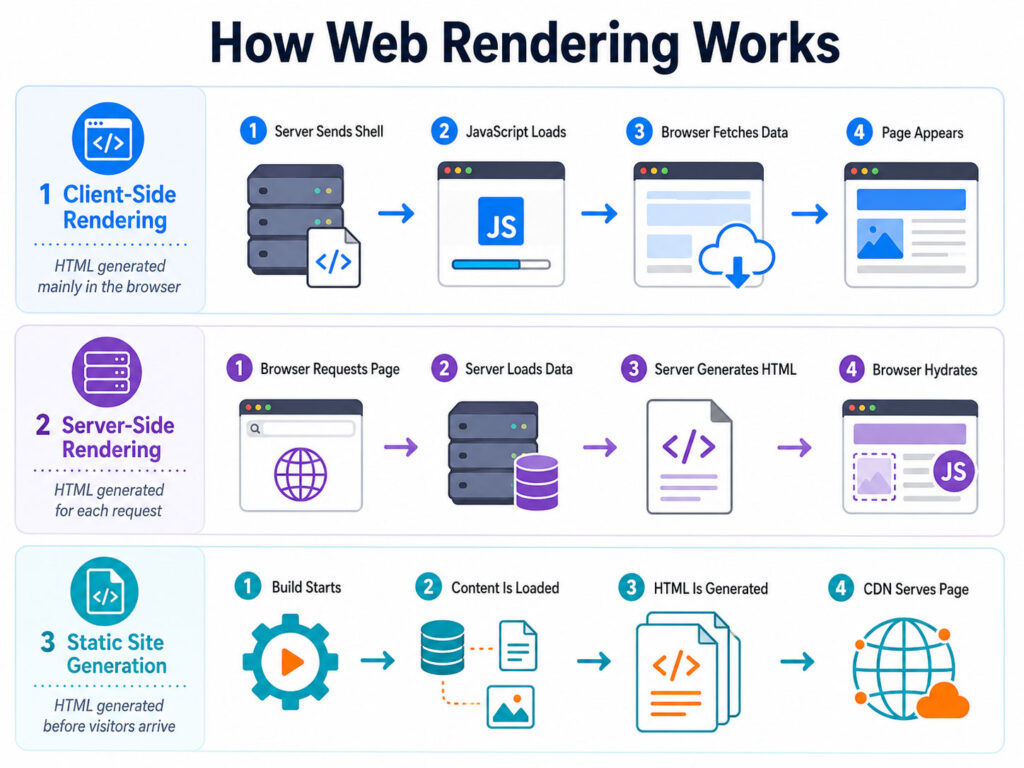
Client-side rendering, often shortened to CSR, generates most of the interface inside the browser. Typically, the server sends a lightweight HTML shell together with JavaScript files.
After the scripts download, the application starts, requests its data, and creates the visible components. Consequently, the visitor may briefly see a loading screen or an almost empty page.
<body>
  <app-root></app-root>
  <script src="/app.js"></script>
</body>
In this example, the initial HTML contains only an application root. Therefore, JavaScript must run successfully before the main content appears.
Client-Side Rendering Benefits
- Rich application-style interaction
- Fast navigation after the first load
- Clear separation between frontend and APIs
- Convenient browser-side state management
- Static hosting for the application shell
- Strong support for private authenticated systems
For that reason, CSR can work well for dashboards, email interfaces, design tools, analytics platforms, and internal business applications.
Client-Side Rendering Limitations
- The initial response may contain little useful content
- Large scripts can delay rendering and interaction
- Low-powered devices may process JavaScript slowly
- Search engines may need an additional rendering stage
- Critical images can be discovered late
- A JavaScript failure may hide the complete interface
However, code splitting, caching, lightweight components, and careful data loading can reduce several of these limitations.
How Server-Side Rendering Works
Server-side rendering, commonly called SSR, creates HTML when a request reaches the application server. First, the server loads the required data; next, it renders the route; finally, it returns meaningful HTML to the browser.
As a result, headings, body content, links, and image references can appear before the complete client application loads. Afterwards, hydration can attach interactive behaviour.
<main>
  <h1>Latest Web Development Guides</h1>
  <p>Compare modern rendering strategies.</p>
</main>
Unlike a minimal application shell, this response already contains useful page content. Therefore, crawlers and visitors can inspect the main information immediately.
Server-Side Rendering Benefits
- Meaningful HTML arrives with the first response
- Public content becomes easier to discover
- Request-time information can remain fresh
- Regional or personalised data can affect the response
- Page-specific metadata is easier to generate
- Social sharing previews become more reliable
Consequently, SSR often suits public pages that change frequently or depend on request-specific information.
Server-Side Rendering Limitations
- Every uncached request may require server work
- Slow APIs or databases can delay the response
- Traffic spikes can increase compute demand
- Personalised responses can reduce cache efficiency
- Hydration may still require substantial JavaScript
- Server and browser output can become inconsistent
Therefore, a production SSR application needs caching, timeouts, fallbacks, monitoring, and appropriate scaling.
How Static Site Generation Works
Static site generation, or SSG, creates HTML during a build or publishing process. Before deployment, the application reads templates and content, renders known routes, and writes the final files.
Afterwards, a static server or CDN can deliver those pages without running the application for every visitor. Consequently, prebuilt pages usually provide predictable performance and low runtime cost.
- First, the build process discovers available routes
- Next, it loads content and required data
- Then, each route becomes an HTML file
- Afterwards, the generated assets are deployed
- Finally, a CDN caches and serves the pages
Static Site Generation Benefits
- Fast CDN delivery
- Minimal request-time processing
- Meaningful HTML in the first response
- Simple and resilient hosting
- Strong traffic-spike handling
- Reliable page-specific metadata
For example, blogs, documentation sites, portfolios, help centres, and marketing pages often fit this model well.
Static Site Generation Limitations
- Content may become stale between builds
- Large sites may experience long generation times
- Unknown routes may not exist in advance
- Personalised content needs another strategy
- Publishing failures can delay updates
- Real-time values must load separately
Nevertheless, incremental regeneration, targeted revalidation, and client-side updates can solve many of these problems.
SSR vs CSR vs SSG Comparison
| Area | CSR | SSR | SSG |
|---|---|---|---|
| HTML generation | Inside the browser | On the server for a request | During a build or publishing process |
| Initial response | Often an application shell | Request-time page content | Prebuilt page content |
| Data freshness | Can fetch current data after loading | Can fetch current data for each request | Reflects the latest generation |
| SEO foundation | Depends on reliable JavaScript rendering | Strong initial HTML support | Strong initial HTML support |
| Runtime server | Not required for the frontend shell | Required for uncached requests | Not required after generation |
| CDN caching | Strong for scripts and shell | Possible when responses can be shared | Excellent for generated pages |
| Personalisation | Strong after client data loads | Can personalise the first response | Requires client or server additions |
| Common use case | Private interactive application | Dynamic public page | Stable public content |
Hydration After SSR or SSG
Hydration attaches browser behaviour to HTML that was created earlier. Before hydration finishes, visitors may see the page while some controls remain inactive.
During hydration, the framework matches components with the existing HTML and attaches event handlers. Therefore, server-generated content should remain consistent with the browser’s first render.
Hydration Mismatches
A mismatch occurs when the browser produces different markup from the server or build process. For example, the page may use the current time, a random value, browser storage, or a different locale during its first client render.
Consequently, the initial output should remain deterministic. Browser-specific changes can then run after hydration.
Web Rendering for SEO
First, search engines need to discover URLs, retrieve resources, understand content, and follow internal links. Although JavaScript-rendered pages can be indexed, browser rendering introduces an additional processing stage.
By contrast, SSR and SSG place important content in the initial HTML. Therefore, they usually provide a more direct technical foundation for public pages that depend on search traffic.
However, rendering alone does not improve rankings. Instead, useful content, correct metadata, internal links, mobile usability, and reliable hosting remain equally important.
Best Rendering Method for SEO
In practice, the best rendering method for SEO depends on the page. For stable public content, static site generation is usually the simplest choice because crawlers receive complete HTML from a fast cache.
Meanwhile, server-side rendering works well when public information changes frequently or depends on the request. Nevertheless, client-side rendering can still succeed, but developers must ensure that scripts, APIs, links, metadata, and direct routes remain accessible.
Consequently, the best rendering method for SEO is often a hybrid plan rather than one site-wide rule.
SEO Advantages of Initial HTML
For that reason, crawlers can inspect important page elements immediately when meaningful HTML arrives in the first response.
For example, the initial response can include:
- Page titles
- Meta descriptions
- Canonical URLs
- Main headings
- Body content
- Internal links
- Structured data
- Image references
- Language information
As a result, SSR and SSG reduce the number of technical conditions that must succeed before the page becomes understandable.
Client-Side Rendering SEO Checklist
- Return valid responses for public routes
- Provide page-specific titles and canonical URLs
- Keep scripts and required APIs crawlable
- Use standard links for important navigation
- Avoid hiding critical content behind a click
- Return correct errors for deleted pages
- Support direct access to every public route
- Include important routes in the sitemap
- Test rendered output in search tools
- Monitor JavaScript and API failures
In addition, a CSR application should provide a useful error state instead of leaving visitors with a blank screen.
Server-Side Rendering SEO Checklist
- Return complete page-specific HTML
- Generate unique titles and descriptions
- Use correct HTTP status codes
- Cache public responses safely
- Avoid slow request-time API chains
- Preserve canonical information after hydration
- Include important structured data
- Prevent hydration from replacing valid content
- Test language and regional variants
- Monitor rendering failures
Therefore, server-side rendering should be treated as an operational system rather than a simple SEO switch.
Static Site Generation SEO Checklist
- Generate every important public route
- Update the sitemap after publishing
- Regenerate changed content
- Remove expired pages correctly
- Create unique metadata during generation
- Check canonical URLs across environments
- Prevent preview pages from being indexed
- Redirect replaced routes
- Include image and structured-data information
- Monitor build and deployment failures
Consequently, a reliable publishing workflow is essential even when the final website contains only static files.
Social Sharing and Metadata
For example, social platforms commonly inspect Open Graph or similar metadata when someone shares a URL. However, some preview systems execute limited or no client-side JavaScript.
Therefore, metadata generated only after browser execution may produce an incomplete preview. SSR and SSG can instead place the title, description, and preview image in the first response.
Core Web Vitals
Overall, no rendering strategy automatically guarantees strong Core Web Vitals. Nevertheless, the chosen approach influences when browsers discover content and how much JavaScript they must process.
For instance, a prebuilt page can provide a fast response, but a large client bundle can still delay interaction. Similarly, request-time rendering can expose the main image early, yet a slow server can delay the entire page.
Largest Contentful Paint
For performance measurement, Largest Contentful Paint, or LCP, records when the main visible content element finishes rendering. Usually, the LCP element is a hero image, heading, poster, or large text block.
As a result, the browser can discover that element sooner when the initial HTML references it directly. However, an oversized image, slow server, blocking stylesheet, or late font can still produce a poor result.
Interaction to Next Paint
Interaction to Next Paint, or INP, measures responsiveness during user interaction. Because long JavaScript tasks block the main thread, heavy hydration can hurt INP even after SSR or SSG delivered the first content quickly.
Therefore, developers should reduce client-side work rather than use server rendering only to hide an oversized application bundle.
Cumulative Layout Shift
Cumulative Layout Shift, known as CLS, measures unexpected movement of visible elements. For example, missing image dimensions, late advertisements, and font changes can push content after it appears.
Consequently, developers should reserve space for media and keep server and browser layouts consistent.
Improving CSR Performance
- Split JavaScript by route and feature
- Lazy-load non-critical components
- Remove unused dependencies
- Optimise API requests
- Cache stable responses
- Preload only critical resources
- Virtualise large tables and lists
- Move expensive work away from the main thread
- Use stable loading placeholders
- Test on ordinary mobile devices
As a result, the browser performs less work before useful content and interaction become available.
Improving SSR Performance
- Cache public responses where appropriate
- Place execution closer to users
- Parallelise independent data requests
- Set clear API timeouts
- Use fallbacks for optional information
- Stream slow sections where supported
- Avoid unnecessary personalisation
- Optimise database queries
- Measure server processing time
- Monitor cache hit rates
Meanwhile, slow request-time dependencies should never block unrelated sections when the framework supports streaming or partial loading.
Data Freshness
| Method | Typical Freshness Model |
|---|---|
| CSR | Fetches current data after the application loads |
| SSR | Can load current data for each request |
| SSG | Displays data from the latest generation |
However, every method can use caching. Therefore, actual freshness depends on cache duration, revalidation, publishing triggers, and API behaviour.
Personalised Content
For example, personalisation may include account data, recommendations, location, language, or customer-specific pricing. CSR can request this information after authentication, whereas SSR can include it in the initial response.
By contrast, SSG cannot prebuild a unique page for every unknown visitor. Nevertheless, a static page can load a small personalised component after arrival.
Consequently, one dynamic widget does not require request-time rendering for the complete route.
Blogs and Documentation
Blogs and documentation usually change through publishing rather than every second. Therefore, static site generation is often a strong starting point.
In addition, incremental regeneration can update selected pages without rebuilding the complete site. Meanwhile, comments, search, feedback forms, and account features can remain interactive in the browser.
Marketing Websites
Similarly, marketing pages benefit from fast initial content, reliable metadata, and simple CDN delivery. Consequently, SSG often works well for home pages, service descriptions, pricing pages, case studies, and campaigns.
However, SSR may become useful when pricing, language, availability, or location changes for every request.
E-Commerce Websites
By contrast, e-commerce combines searchable product information with changing stock, price, delivery, and cart state. Therefore, one rendering method rarely fits the complete store.
For example, a practical hybrid approach can use:
- SSG for category descriptions
- SSG or regeneration for stable product content
- SSR for request-specific product information
- CSR for carts and wish lists
- Client updates for stock and delivery estimates
- Secure server processing for checkout
As a result, each part uses the simplest strategy that satisfies its data and interaction requirements.
SaaS Applications
Likewise, a SaaS platform commonly combines a public website with a private application. For example, marketing and help pages can use SSG, invitation pages can use SSR, and the authenticated dashboard can use CSR.
Therefore, hybrid rendering aligns naturally with many subscription software products.
Administrative Dashboards
An administrative dashboard usually contains private, frequently changing information and many interactive controls. Consequently, client-side rendering can be a practical choice because public SEO is irrelevant.
Nevertheless, teams should still optimise bundle size, route loading, charts, tables, and API requests.
Real-Time Applications
Meanwhile, real-time systems receive continuous updates through WebSockets, Server-Sent Events, polling, or similar channels. However, the initial page can still use SSR or SSG.
Afterwards, browser JavaScript can maintain the live state. Therefore, real-time information does not require pure CSR for the complete route.
Incremental Static Regeneration
For large sites, Incremental Static Regeneration updates prebuilt pages after deployment without rebuilding every route together. For example, regeneration can follow a time interval, publishing event, or incoming request depending on the platform.
Consequently, websites can combine CDN delivery with controlled freshness. However, teams must understand when visitors receive an older cached version and when the replacement becomes available.
Streaming SSR
Similarly, streaming SSR sends parts of the response as they become ready. For example, the server can return the page structure and main article before a slower recommendation section finishes.
As a result, visitors can begin reading earlier. Nevertheless, streaming requires clear loading states, error handling, and suitable infrastructure.
Hybrid Rendering
Finally, hybrid rendering applies different methods to different routes or components. For example, the home page can use SSG, product pages can use SSR, and a private dashboard can use CSR.
Consequently, hybrid rendering focuses on route requirements instead of framework-wide rules.
A hybrid application may use:
- Prebuilt public articles
- Request-time product or search pages
- Browser-rendered account tools
- Streaming for slow dynamic sections
- Client components for interactive controls
Hybrid Rendering Benefits
- Better alignment with each route’s purpose
- Reduced unnecessary server processing
- Less browser JavaScript
- Improved public content delivery
- Flexible personalisation
- More effective caching
- Gradual migration from an existing SPA
- Balanced infrastructure cost
However, hybrid systems require clear documentation because developers must understand the rendering and cache behaviour of every route.
How to Choose the Right Rendering Strategy
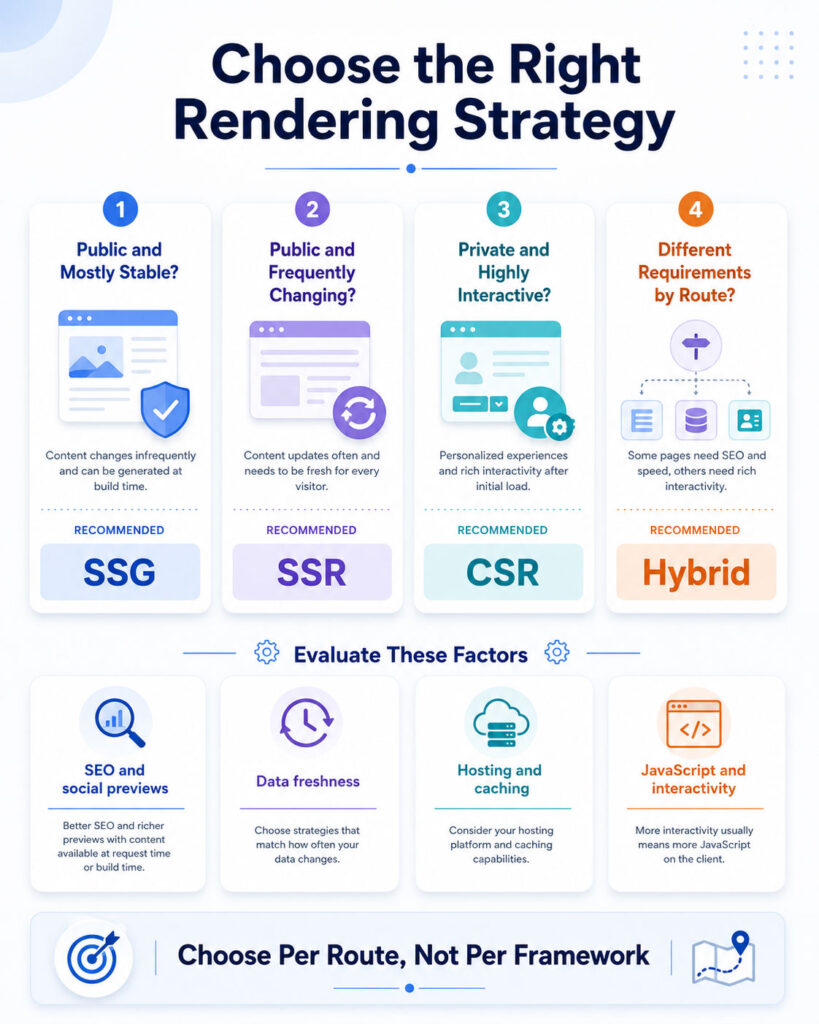
First, evaluate each route independently instead of applying one method to the complete application. Next, identify whether the page needs public search visibility, request-time data, personalisation, fast global delivery, or intensive browser interaction.
Finally, measure the production result on real devices. Although architectural guidance is useful, actual users reveal whether the selected approach delivers a fast and reliable experience.
Start with Public or Private Access
Public pages usually need crawlable content, page-specific metadata, internal links, and dependable social previews. Therefore, SSR or SSG normally provides the stronger starting point.
Private pages behind authentication may instead use CSR. However, request-time rendering can still improve the first account view when users need meaningful content immediately after signing in.
Review How Often the Content Changes
Stable content that changes only after publishing can use static site generation. By contrast, frequently changing public information may require server-side rendering, regeneration, or a browser update.
Meanwhile, real-time information can begin with server-generated or prebuilt HTML and continue updating in the browser.
Check Whether Every Visitor Sees the Same Page
Shared public content can be cached efficiently. Therefore, SSG or cached SSR often reduces runtime work.
Personalised information may require request-time rendering or client-side loading. Nevertheless, one personalised widget does not justify rendering the complete page separately for every visitor.
Measure the Required Interactivity
Dashboards, editors, maps, drag-and-drop interfaces, and advanced filters need browser JavaScript. However, strong interaction does not require pure client-side rendering for the complete route.
Instead, developers can render stable content first and hydrate only the controls that genuinely need state or event handlers.
Plan for Caching and Slow Services
Cacheable pages can use static generation or cached server responses. By contrast, private and user-specific pages require careful cache rules.
In addition, every strategy needs a plan for slow APIs. SSR can delay the response, SSG can delay publishing, and CSR can leave a section loading.
Therefore, timeouts, fallbacks, cached data, and clear error states should be part of the architecture.
Rendering Strategy Decision Table
| Page Requirement | Recommended Starting Method |
|---|---|
| Public blog article | SSG |
| Marketing landing page | SSG |
| Frequently changing product page | SSR or incremental regeneration |
| Private administrative dashboard | CSR |
| Public search results | SSR with client-side filtering |
| Large documentation website | SSG with incremental builds |
| Account overview | SSR or CSR depending on the first-load requirement |
| Real-time analytics screen | CSR with an optional server-rendered shell |
| E-commerce store | Hybrid rendering |
| SaaS platform | SSG marketing plus CSR or SSR application |
SSR vs CSR vs SSG in Angular
Angular supports client-side rendering, server-side rendering, prerendering, and route-level hybrid strategies. Therefore, one route group can be generated in advance, another can render on the server, and a private area can remain client-side.
import { RenderMode, ServerRoute } from '@angular/ssr';

export const serverRoutes: ServerRoute[] = [
{
path: '',
renderMode: RenderMode.Prerender
},
{
path: 'blogs/**',
renderMode: RenderMode.Prerender
},
{
path: 'products/**',
renderMode: RenderMode.Server
},
{
path: 'dashboard/**',
renderMode: RenderMode.Client
}
];
In this example, the home and blog routes use prebuilt HTML. Meanwhile, product pages use request-time rendering, whereas the dashboard relies on browser rendering.
Modern Rendering in Next.js
Next.js combines server and client components with static generation, request-time rendering, streaming, and cache revalidation. As a result, developers can keep data-heavy or non-interactive components on the server.
Meanwhile, smaller client components can handle buttons, forms, editors, browser APIs, and local state.
import AddToCartButton from './add-to-cart-button';

export default async function ProductPage() {
const product = await loadProduct();

return (

{product.name}
{product.description}


);
}
Here, the product content remains server-rendered. However, the cart button becomes a client component because it needs interaction.
Hybrid Rendering in Nuxt
Nuxt supports universal rendering, client-side routes, prerendering, and hybrid route rules. Consequently, developers can assign different caching and rendering behaviour to different URL groups.
export default defineNuxtConfig({
  routeRules: {
    '/': {
      prerender: true
    },
    '/blogs/**': {
      prerender: true
    },
    '/products/**': {
      swr: 3600
    },
    '/dashboard/**': {
      ssr: false
    }
  }
});
In this example, stable public pages are generated ahead of time. Meanwhile, product pages can refresh through revalidation, and the dashboard remains browser-rendered.
Framework Terms Can Differ
Frameworks use terms such as prerendering, static rendering, SSG, ISR, SWR, dynamic rendering, and universal rendering. Although the labels differ, the underlying questions remain similar.
- When is the HTML generated?
- Where is the HTML generated?
- How long is the response cached?
- When does the data update?
- How much JavaScript reaches the browser?
- Which components require hydration?
Therefore, developers should compare behaviour rather than choose an architecture only from framework terminology.
Migrating from CSR to SSR or SSG
A complete rewrite is rarely necessary. Instead, teams can begin with public routes that receive search traffic or show poor first-load performance.
- First, list the important public routes
- Next, identify required metadata and initial content
- Then, isolate browser-only code
- Afterwards, move stable data loading to the server or build
- Meanwhile, keep interactive controls client-side
- Next, correct hydration mismatches
- Finally, test direct routes, search rendering, and social previews
As a result, the application can improve gradually without replacing every feature at once.
Separate Browser-Only Code
Server and build environments do not provide every browser API. Therefore, code using window, document, local storage, screen size, or browser-only libraries should run inside a client-safe boundary.
Instead of disabling SSR for the complete page, developers should isolate the specific component that requires the browser.
Move Critical Data Earlier
A client-rendered page may request essential information only after JavaScript starts. During migration, teams can move public content into the server or generation process.
Consequently, headings, links, body text, and important image references can appear in the initial response.
Keep Client-Side Navigation
SSR and SSG do not require a complete page reload for every navigation. Modern frameworks can deliver the initial route as HTML and continue with client-side transitions.
Therefore, teams can improve first-load delivery without losing an application-style experience.
Move Suitable SSR Pages to SSG
Some request-time pages return identical content to every visitor. In those cases, static site generation can reduce server demand and improve caching.
A route is a good candidate when:
- Its content changes only after publishing
- No request-time identity is required
- The result can be cached publicly
- Its route parameters are known or generated on demand
Add Personalisation to Static Pages
A prebuilt page can deliver shared content first and load a personal section later. For example, a product description can remain static while a saved-item indicator or local delivery estimate loads separately.
Consequently, a small personalised feature does not require request-time rendering for the complete page.
Keep Static Pages Fresh
Teams can update prebuilt content through a new deployment, incremental regeneration, targeted revalidation, client-side loading, or a server-rendered dynamic section.
However, the correct choice depends on how long the information may safely remain stale.
Improve a Slow SSR Route
- First, measure server processing time
- Next, identify slow API and database requests
- Then, run independent requests in parallel
- Where safe, cache reusable public data
- Afterwards, remove unnecessary personalisation
- Next, stream non-critical sections
- Meanwhile, configure timeouts and fallbacks
- Finally, monitor response and cache performance
Consequently, the server spends less time waiting before it returns useful HTML.
Reduce Hydration Cost
- Keep static components on the server
- Create smaller client boundaries
- Remove unnecessary event handlers
- Lazy-load complex widgets
- Reduce third-party scripts
- Avoid serialising excessive data
- Use partial hydration where supported
- Measure main-thread execution
As a result, the browser can become responsive sooner even when the page started with SSR or SSG.
Client Rendering Mistakes
- Using CSR for every public page
- Shipping one large JavaScript bundle
- Loading the main image through JavaScript
- Hiding all useful content behind an API call
- Using non-crawlable navigation
- Ignoring direct-route server configuration
- Generating metadata only after page load
- Testing only on powerful devices
- Providing no useful failure state
Therefore, client-side rendering should remain an intentional application choice rather than the automatic default for every route.
Server Rendering Mistakes
- Rendering every route on every request
- Waiting for optional APIs before returning HTML
- Skipping response caching
- Personalising content that could be shared
- Exposing private data through a public cache
- Sending excessive JavaScript for hydration
- Ignoring hydration errors
- Using browser APIs during server rendering
- Returning successful responses for missing pages
Consequently, server-side rendering requires careful runtime and cache management.
Static Generation Mistakes
- Generating pages that require real-time accuracy
- Rebuilding the complete website for one change
- Forgetting dynamic routes
- Publishing stale metadata
- Ignoring build failures
- Including sensitive data in generated files
- Failing to remove deleted pages
- Hydrating every component unnecessarily
Therefore, static generation still needs monitoring, publishing controls, and a clear freshness policy.
Rendering Strategy Checklist
- Identify whether the route is public or private
- Determine its SEO importance
- Measure content-update frequency
- Decide whether initial personalisation is necessary
- Check whether the response can be cached
- Estimate route count and build time
- Review browser interaction requirements
- Calculate server and CDN costs
- Plan error and fallback behaviour
- Define cache invalidation
- Measure JavaScript size
- Test ordinary mobile devices
- Monitor production Core Web Vitals
Is SSR Better Than CSR?
SSR is usually better when public content should appear in the initial HTML. However, CSR can be simpler and effective for private, highly interactive applications.
Therefore, neither method is universally better.
Is SSG Better Than SSR?
SSG is generally faster and easier to cache because pages exist before the request. By contrast, SSR is more appropriate when the first response must contain current request-time information.
Consequently, data freshness and personalisation determine the better choice.
Is Client-Side Rendering Bad for SEO?
No. Search engines can process well-built JavaScript websites.
However, client-side rendering introduces additional technical requirements and possible failure points. Therefore, SSR or SSG normally provides a simpler foundation for important public pages.
Does Server-Side Rendering Improve Rankings?
No rendering method creates an automatic ranking advantage. Nevertheless, server-side rendering can make content, links, metadata, and images easier to discover.
Search performance still depends on helpful content, relevance, site quality, and technical health.
Can Static Pages Include Dynamic Content?
Yes. A static page can fetch current data in the browser, regenerate after publishing, or combine with a dynamic server section.
Therefore, SSG does not mean that every visible value must remain permanently fixed.
Can One Website Use All Three Methods?
Yes. Modern frameworks commonly support hybrid rendering.
For example, a website can prebuild articles, render product pages on request, and use browser rendering for its private dashboard.
Final Verdict: SSR vs CSR vs SSG
The SSR vs CSR vs SSG comparison does not produce one universal winner.
Client-side rendering works well for private, highly interactive applications where public search visibility matters less. Meanwhile, server-side rendering suits public pages that need fresh or personalised request-time information.
Static site generation provides fast, cacheable delivery for stable content such as blogs, documentation, and marketing pages. Therefore, it should often be the first option considered for public content that changes mainly through publishing.
For most modern websites, hybrid rendering provides the best balance. Consequently, teams can prebuild stable routes, render request-sensitive pages on the server, and reserve browser rendering for components that genuinely need interaction.
Finally, measure real performance, search rendering, data freshness, build duration, server cost, and user interaction before treating the architecture as complete.

AboutTPJ Technical Team
The Project Jugaad Technical Team creates practical, easy-to-follow content on software development, web technologies, artificial intelligence, cybersecurity, cloud platforms, and digital tools. Our articles are informed by more than 13 years of hands-on experience with .NET, Angular, SQL Server, AWS, WordPress, Linux hosting, application deployment, and real-world troubleshooting. Each guide is researched, reviewed, and updated to provide accurate, useful, and actionable information for developers, businesses, and everyday technology users.