Web Development
Lazy Loading in Angular helps improve application performance by loading specific parts of an app only when users need them.
In a normal Angular application, many features may load during the initial page load. However, users may not need every feature immediately. Lazy loading solves this problem by splitting the application into smaller JavaScript bundles.
As a result, the browser downloads less code at the beginning. Then, Angular loads the required feature when the user visits a specific route.
What Is Lazy Loading in Angular?
Lazy loading is a technique where Angular loads a component, feature, or route only when the user needs it.
For example, an application may have separate sections like dashboard, reports, profile, and admin. The user may open only the dashboard first. So, Angular does not need to load the reports or admin section immediately.
Instead, Angular loads those sections when the user navigates to them. This approach keeps the initial load faster and improves the user experience.
Why Lazy Loading Is Important
Performance plays an important role in every web application. If an application takes too long to load, users may leave before they even start using it.
Lazy loading helps reduce this problem because it limits the amount of JavaScript loaded at the start.
It mainly helps with two important performance areas:
- Response time: The application becomes usable faster because Angular loads fewer files initially.
- Resource consumption: The browser downloads only the code needed for the current route.
Therefore, lazy loading can make Angular applications faster, lighter, and easier to manage.
How Lazy Loading Works in Angular
Angular uses routing to load features on demand.
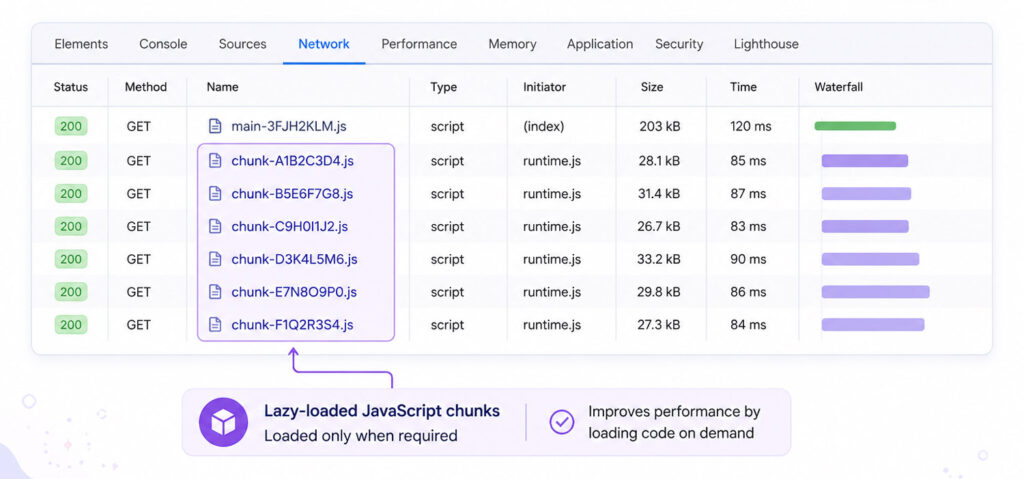
When a user opens a route, Angular checks the route configuration. If that route uses lazy loading, Angular downloads the related JavaScript bundle at that time.
For example, if the user opens the dashboard route, Angular loads only the dashboard-related code. Later, if the user opens the reports route, Angular downloads the reports bundle separately.
This process is called code splitting. It helps break a large application into smaller parts.
Lazy Loading with loadComponent
In modern Angular applications, you can lazy load a standalone component using loadComponent.
Example:
import { Routes } from '@angular/router';
export const routes: Routes = [
{
      path: 'dashboard',
      loadComponent: () => import('./dashboard/dashboard.component').then(c => c.DashboardComponent)
}];
In this example, Angular does not load the dashboard component during the initial load. Instead, it loads the component when the user visits the /dashboard route.
Lazy Loading with loadChildren
You can also lazy load a group of child routes using loadChildren.
This is useful when a feature has multiple pages or child routes.
Example:
import { Routes } from '@angular/router';
export const routes: Routes = [
{
      path: 'reports',
      loadChildren: () => import('./reports/reports.routes').then(r => r.REPORTS_ROUTES)
}];
Here, Angular loads the reports routes only when the user visits the /reports path.
This approach keeps feature-specific code separate from the main application bundle.
Lazy Loading Example Structure
A simple Angular application with lazy loading may follow this structure:
src/
  app/
    app.routes.ts
    dashboard/
      dashboard.component.ts
    reports/
      reports.routes.ts
      report-list.component.ts
      report-details.component.ts
In this structure, the dashboard can load as a standalone component. Meanwhile, the reports feature can load with its own child routes.
This keeps the project cleaner as the application grows.
Advantages of Lazy Loading in Angular
Lazy loading provides several benefits for Angular applications.
| Advantage | Benefit |
|---|---|
| Faster initial load | The browser downloads less JavaScript at the start |
| Smaller bundles | Angular splits large code into smaller route-based files |
| Better user experience | Users can start using the application sooner |
| Cleaner structure | Features can stay grouped by routes or functionality |
| Better scalability | Large applications become easier to organize and maintain |
Lazy Loading vs Eager Loading
Angular applications can load code in two common ways: eager loading and lazy loading.
| Loading Type | How It Works |
|---|---|
| Eager Loading | Angular loads the code during the initial application load |
| Lazy Loading | Angular loads the code only when the user visits the route |
Eager loading works well for small applications or common features. However, lazy loading works better for large features, admin panels, reports, settings, and other sections that users may not open immediately.
When Should You Use Lazy Loading?
Lazy loading is useful when your Angular application has multiple routes or large feature sections.
You should consider lazy loading for:
- Admin modules
- Dashboard sections
- Reports pages
- User profile pages
- Settings pages
- Feature-heavy pages
However, avoid lazy loading very small or commonly used sections unnecessarily. Too many lazy routes can also create extra network requests.
What Is Preloading in Angular?
Lazy loading improves the first load by delaying route bundles. However, users may notice a small delay when they open a lazy route for the first time.
Preloading helps reduce this delay.
With preloading, Angular loads lazy route bundles in the background after the initial page load. So, users get the benefit of a faster first load and smoother navigation later.
Best Practices for Lazy Loading
Follow these best practices to use lazy loading effectively:
- Group routes based on features or functionality.
- Use lazy loading for large or less-used sections.
- Keep shared code separate from feature-specific code.
- Avoid lazy loading every small component.
- Test bundle size after applying lazy loading.
- Use preloading when users frequently move between lazy routes.
These practices help keep the application fast without making the routing structure too complex.
Conclusion
Lazy Loading in Angular is a useful technique for improving application performance. It reduces the initial JavaScript bundle size and loads route-specific code only when users need it.
For small applications, eager loading may be enough. However, for larger Angular applications, lazy loading can improve response time, reduce resource consumption, and create a smoother user experience.
By using loadComponent, loadChildren, and proper route planning, Angular applications can stay fast, organized, and scalable.

AboutTPJ Technical Team
The Project Jugaad Technical Team creates practical, easy-to-follow content on software development, web technologies, artificial intelligence, cybersecurity, cloud platforms, and digital tools. Our articles are informed by more than 13 years of hands-on experience with .NET, Angular, SQL Server, AWS, WordPress, Linux hosting, application deployment, and real-world troubleshooting. Each guide is researched, reviewed, and updated to provide accurate, useful, and actionable information for developers, businesses, and everyday technology users.