Web Development
The Headless CMS vs Traditional CMS comparison helps businesses and developers choose how website content should be created, stored, delivered, and displayed. A traditional CMS manages the content backend and website presentation within one connected platform. In contrast, a headless CMS separates content management from the frontend and delivers structured content through APIs.
Both approaches can support blogs, service websites, product pages, landing pages, media libraries, multilingual content, and editorial workflows. However, they differ in frontend freedom, development effort, preview experience, hosting, performance, security responsibilities, maintenance, and total cost.
A traditional CMS often suits organisations that need to launch and manage a standard website efficiently. Meanwhile, a headless CMS can suit businesses delivering the same content to websites, mobile applications, kiosks, smart devices, and other digital channels. Therefore, the best CMS for a website depends on its real publishing and technical requirements.
Headless CMS vs Traditional CMS: Quick Answer
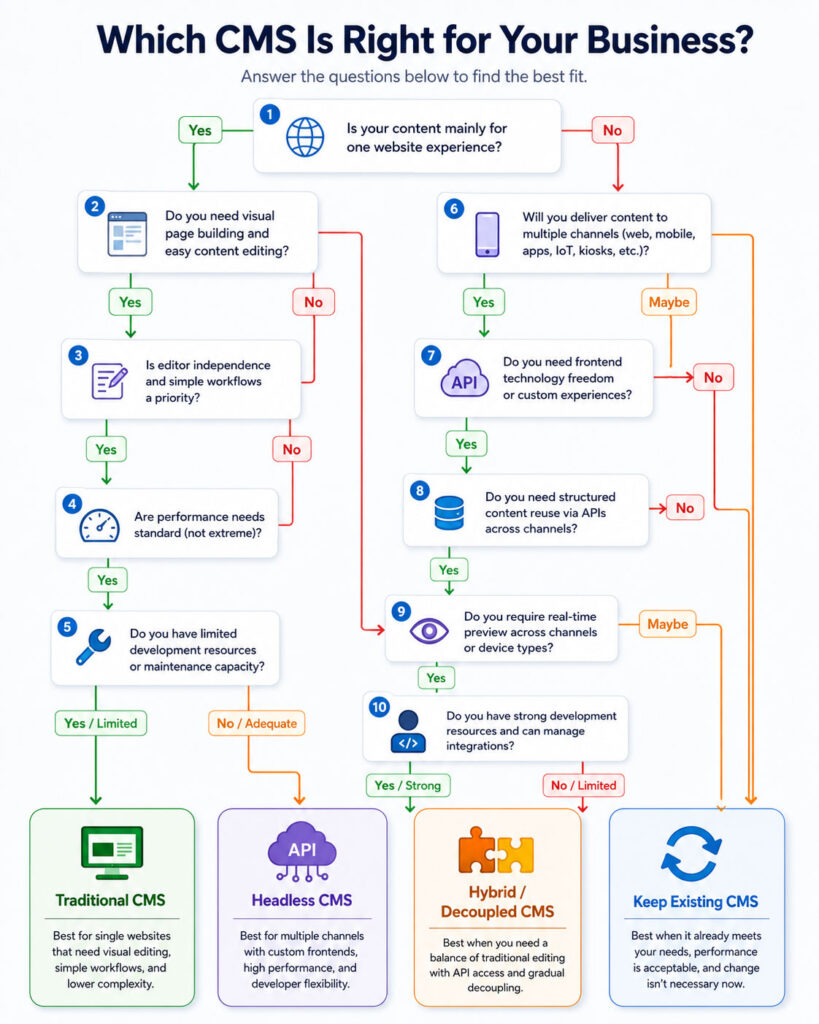
- Choose a traditional CMS when editors need an integrated website builder, themes, plugins, previews, and a straightforward publishing workflow.
- Choose a headless CMS when developers need full frontend control or the organisation must reuse structured content across several digital channels.
- Choose a decoupled or hybrid CMS when you need API-based delivery while preserving more editorial preview and page-management capabilities.
- Keep your existing CMS when it already meets performance, publishing, security, and business requirements without creating unnecessary restrictions.
A headless CMS is not automatically faster, safer, or more modern in every implementation. It changes the architecture and moves more responsibility to the development and platform teams.
What Is a Content Management System?
A content management system, commonly called a CMS, helps users create, organise, edit, approve, publish, and maintain digital content.
A CMS may manage:
- Articles and blog posts.
- Website pages.
- Product information.
- Images, documents, and videos.
- Navigation menus.
- Categories and tags.
- Author and editor accounts.
- Multilingual content.
- Metadata and search settings.
- Publishing schedules and revisions.
Without a CMS, developers may need to update content directly in source code or build custom administration tools. A CMS separates everyday content editing from software development.
What Is a Traditional CMS?
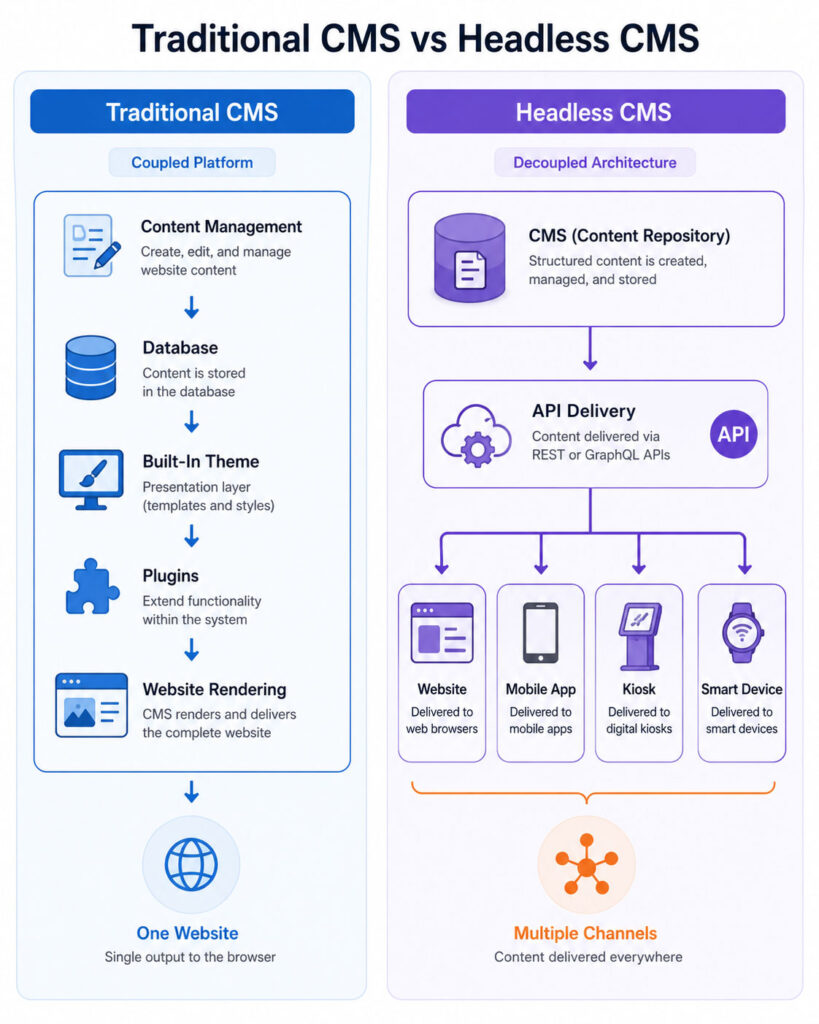
A traditional CMS combines content management, templates, themes, rendering, and website delivery within one platform. The backend and frontend are closely connected.
Editors create content inside the administration area. The CMS stores that content in a database and uses themes or templates to generate complete web pages for visitors.
WordPress is a common example of a platform often used as a traditional CMS. A WordPress theme controls page presentation, while plugins can add forms, SEO features, e-commerce, security controls, caching, and many other functions.
Other traditional systems may provide page builders, template engines, modules, extensions, media libraries, navigation management, and built-in preview tools.
How a Traditional CMS Works
- An editor signs in to the CMS administration area.
- The editor creates or updates a page or post.
- The CMS stores the content and related settings in its database.
- A theme or template retrieves the content.
- The CMS renders the complete HTML page.
- The web server returns the page to the visitor.
The CMS manages the content, presentation rules, and publishing process within one connected system. This integration can make ordinary website development and editing efficient.
Advantages of a Traditional CMS
- Integrated content editing and page presentation.
- Established themes and templates.
- Visual page builders and reusable blocks.
- Immediate or straightforward preview.
- Large plugin and extension ecosystems.
- Lower development effort for standard websites.
- Familiar workflows for content teams.
- Built-in navigation, media, users, revisions, and publishing tools.
- Potentially lower initial cost.
- Many hosting and support options.
Limitations of a Traditional CMS
- Frontend development may remain tied to the CMS theme system.
- Content can become mixed with layout-specific markup.
- Reusing the same content across several channels may require additional APIs or plugins.
- A large collection of plugins can create compatibility and maintenance problems.
- Complex custom experiences may be difficult to implement within the theme architecture.
- Backend and frontend releases may become closely connected.
- Performance depends heavily on themes, plugins, hosting, caching, and database design.
- Major redesigns may require substantial template changes.
What Is a Headless CMS?
A headless CMS manages content without requiring one built-in presentation layer. The content repository and editorial interface form the backend, while independently developed applications act as the frontend or “heads.”
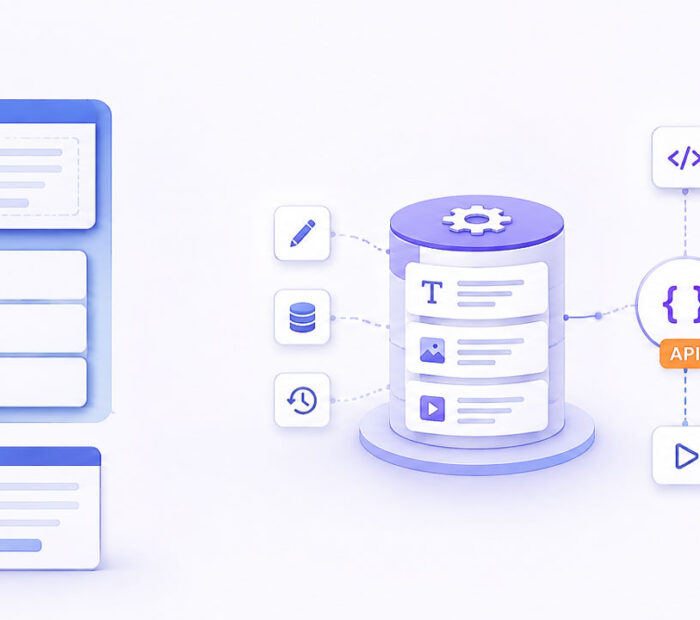
Content is commonly delivered through REST, GraphQL, or another API. A website, mobile application, digital display, voice interface, or connected device can request the same structured content.
For example, an editor may create one product entry containing a name, description, specifications, price reference, images, and support information. Several applications can retrieve and present that content according to their own layouts.
This separation allows developers to select frontend frameworks and hosting models independently from the content-management platform.
How a Headless CMS Works
- An editor creates structured content in the headless CMS.
- The CMS stores entries, relationships, media, localisation, and metadata.
- The CMS exposes published content through APIs.
- A website or application requests the required content.
- The frontend renders the content through its own components.
- Caching or static generation may store the resulting pages closer to users.
- Webhooks can notify the frontend when content changes.
The CMS manages content, but the frontend application controls the final design, routing, interactions, and rendering strategy.
What Does “Headless” Mean?
The “head” represents the presentation layer that visitors see. A traditional CMS includes this layer through its themes or templates.
A headless CMS removes the requirement for one built-in frontend. It provides the content body and APIs while allowing developers to create one or more separate heads.
These frontends may include:
- A public website.
- A mobile application.
- An internal dashboard.
- A digital kiosk.
- A smart display.
- A customer portal.
- A voice interface.
- An e-commerce storefront.
Advantages of a Headless CMS
- Freedom to select frontend frameworks and technologies.
- Structured content that can be reused across channels.
- Independent frontend and content-platform development.
- Flexible rendering through static generation, server rendering, or client rendering.
- Clearer separation between content and presentation.
- Potential for highly customised user experiences.
- API-based integration with commerce, search, personalisation, and other services.
- Ability to replace a frontend without moving all content.
- Support for several websites or applications from one content repository.
- Potentially smaller public attack surface when the editorial backend is separated from visitors.
Limitations of a Headless CMS
- Requires a separately developed and hosted frontend.
- Higher development and integration effort.
- Preview can require custom configuration.
- Editors may lose some visual page-building freedom.
- SEO behaviour must be implemented in the frontend.
- Navigation, redirects, forms, search, and sitemaps may require separate services or code.
- API usage, delivery, and build limits may create ongoing costs.
- Frontend and CMS schemas must remain compatible.
- More systems require monitoring and security management.
- Developers must handle caching, revalidation, failures, and API availability.
Headless CMS vs Traditional CMS Architecture
| Area | Traditional CMS | Headless CMS |
|---|---|---|
| Content backend | Included | Included |
| Frontend | Built into themes or templates | Developed and hosted separately |
| Content delivery | Usually rendered directly by the CMS | Delivered through APIs |
| Technology choice | Influenced by the CMS platform | Greater frontend freedom |
| Preview | Usually integrated | Often requires frontend integration |
| Multi-channel delivery | Possible but may need extensions | Core architectural strength |
| Initial development | Usually faster for standard websites | Usually requires more engineering |
| Frontend redesign | Theme or template replacement | Frontend can change independently |
| Hosting | CMS and frontend commonly hosted together | CMS and frontend commonly hosted separately |
| Maintenance | One main platform plus extensions | CMS, APIs, frontend, hosting, and integrations |
| Typical user | Content-focused website team | Multi-channel or developer-led product team |
The Headless CMS vs Traditional CMS comparison centres on coupling. A traditional CMS connects content and presentation, while a headless CMS allows several independent applications to consume the same content.
What Is a Decoupled CMS?
A decoupled CMS separates content management from frontend delivery but may still provide an optional presentation layer, preview tools, templates, or page-building features.
The terms “headless” and “decoupled” are sometimes used interchangeably. However, a strictly headless platform focuses on backend content and APIs, while a decoupled platform may include more frontend-support capabilities.
Some organisations choose a hybrid architecture that uses the CMS’s normal rendering for selected pages and APIs for other applications.
The practical capabilities matter more than the label. Teams should test content modelling, preview, APIs, webhooks, localisation, workflows, and frontend integration before selecting a platform.
What Is an API-First CMS?
An API-first CMS treats programmatic content delivery as a central product capability rather than an additional feature.
It normally provides documented APIs, authentication, content schemas, filtering, pagination, localisation, asset delivery, webhooks, and developer tools.
A platform can expose an API without being designed primarily as headless. For example, a traditional CMS may provide a REST API that allows developers to build a separate frontend.
Therefore, API availability and complete headless readiness are related but not identical.
Can WordPress Be Used as a Headless CMS?
Yes. WordPress provides a REST API that allows applications to retrieve and manage supported site data through JSON requests.
Developers can use WordPress for content editing while building the public frontend with another technology. This approach is commonly called headless WordPress or decoupled WordPress.
For example, a frontend can retrieve posts from:
GET /wp-json/wp/v2/posts
The response can supply post titles, content, dates, authors, featured-media references, categories, and other exposed fields.
However, moving WordPress to a headless architecture changes how themes, plugins, previews, forms, redirects, search, menus, and SEO features reach the public website.
Headless CMS vs Traditional CMS for Content Editing
A traditional CMS usually provides an editing experience closely connected to the final website. Editors can select templates, add blocks, configure layouts, and preview pages within the same platform.
This approach works well when content teams need control over page composition without depending on developers for every change.
A headless CMS generally focuses on structured content fields such as title, summary, body, image, author, product specification, or call-to-action reference.
Structured editing improves reuse, but it can feel restrictive when editors expect to design each page visually. Therefore, the Headless CMS vs Traditional CMS decision should include real editorial testing rather than only an architectural review.
Structured Content vs Page-Based Content
Traditional websites often store content as complete pages. An editor creates a heading, paragraphs, images, buttons, columns, and other visual elements for one URL.
A headless CMS often encourages structured content. Instead of storing one finished page, it stores reusable entries and relationships.
For example, a service entry may contain:
- Service name.
- Short summary.
- Detailed content.
- Benefits.
- Frequently asked questions.
- Related services.
- Featured image.
- SEO metadata.
- Call-to-action reference.
A website, mobile application, and sales display can use the same entry while presenting it differently.
Benefits of Structured Content
- Content can be reused across pages and channels.
- Fields can be validated.
- Editors enter information consistently.
- Developers can render content predictably.
- Translations can be managed field by field.
- Search and filtering become easier.
- Content relationships can be maintained centrally.
- Design changes do not require rewriting every entry.
Limitations of Structured Content
- Content models require careful planning.
- Editors may have less page-level freedom.
- Too many small fields can make editing slow.
- Overly generic models can create confusing relationships.
- Schema changes can affect several frontends.
- Complex visual pages may require component-based page builders.
- Migrating unstructured HTML into fields can require substantial work.
Content Modelling
Content modelling defines the content types, fields, validation rules, relationships, and reusable components within a CMS.
A good model reflects what the content means rather than only how one website currently displays it.
For example, storing a field called blueRightColumnText ties content to one design. A field called customerBenefit describes meaning and can survive a redesign.
However, extremely abstract models can become difficult for editors. Teams should balance reuse, clarity, flexibility, and publishing speed.
Headless CMS vs Traditional CMS for Visual Page Building
Traditional CMS platforms commonly provide themes, block editors, page builders, widgets, and shortcodes. These tools allow editors to create varied layouts without writing frontend code.
Headless systems can also provide page-building features, but the frontend must contain components that correspond to the content blocks selected by editors.
For example, an editor may arrange Hero, Feature Grid, Testimonial, FAQ, and Call to Action blocks. The frontend application decides how each block appears.
This component-based approach preserves design consistency, but developers must build and maintain the component library.
Preview and Draft Content
Preview is usually straightforward in a traditional CMS because the same platform manages the content and frontend rendering.
A headless CMS must securely connect draft content to the separately hosted frontend. The frontend needs a preview mode that retrieves unpublished entries and renders them for authorised editors.
The preview system must prevent visitors and search engines from accessing unpublished content.
It should also show how entries appear within their complete page context rather than displaying isolated field values.
Preview Challenges in a Headless CMS
- Draft APIs may use different credentials or endpoints.
- Static pages may need dynamic preview rendering.
- Editors need secure preview links.
- Nested references must use draft versions consistently.
- Frontend components must handle incomplete drafts.
- Preview content must not enter public caches.
- Several websites may need separate preview environments.
- Real-time editing may require additional integration.
Preview should be planned during architecture design instead of being added after editors begin using the platform.
Editorial Workflow and Governance
Both CMS approaches may support drafts, reviews, approvals, scheduling, revisions, roles, permissions, and localisation. Actual features vary by platform and subscription level.
Evaluate whether the organisation needs:
- Author, editor, reviewer, and publisher roles.
- Multi-step approval.
- Scheduled publication and unpublication.
- Field-level permissions.
- Content history and rollback.
- Comments and editorial assignments.
- Legal or compliance approval.
- Several brands or business units.
- Translation workflows.
- Environment promotion from testing to production.
A flexible frontend cannot compensate for an editorial workflow that does not meet the organisation’s publishing process.
Headless CMS vs Traditional CMS for Multiple Channels
Multi-channel publishing is one of the strongest reasons to consider a headless CMS.
A traditional CMS can expose feeds or APIs, but its content may have been created specifically for web pages. Embedded layout markup and plugin-specific shortcodes can be difficult to reuse in a mobile application.
A headless CMS stores structured content that several applications can request and present independently.
However, multi-channel reuse works only when the content model avoids assumptions tied to one screen size, layout, or interaction pattern.
Headless CMS vs Traditional CMS for Performance
A headless website can use static generation, server-side rendering, edge caching, or client-side rendering. These options can produce fast pages when implemented correctly.
A traditional CMS can also provide excellent performance through page caching, object caching, a content delivery network, optimised themes, suitable hosting, and efficient plugins.
Therefore, the CMS label does not determine website speed. Performance depends on architecture, code, images, scripts, database queries, caching, hosting, and third-party services.
A poorly built JavaScript frontend can be slower than an optimised traditional CMS. Similarly, an overloaded traditional installation can be slower than a carefully generated static site.
Static Site Generation
Static site generation creates HTML pages before a visitor requests them. The generated files can be delivered through a content delivery network.
This approach can provide fast response times and reduce direct requests to the CMS.
However, a large website may require significant build time. Content changes may not appear until the affected pages are rebuilt or revalidated.
Webhooks can notify the frontend platform when content changes, allowing it to regenerate selected pages rather than rebuilding the entire website.
Server-Side Rendering
Server-side rendering creates a page when a visitor requests it or when the platform refreshes a cached response.
This method can display recent content without waiting for a full build. It also allows the server to create complete HTML before the browser loads the application.
However, every dynamic request requires frontend infrastructure, caching, and failure handling. The website may also depend directly on CMS API availability unless responses are cached.
Client-Side Rendering
Client-side rendering loads JavaScript in the browser and then requests content through an API.
This method can support highly interactive applications, but visitors may initially receive limited content until scripts and API requests complete.
Public content pages should not depend entirely on client-side rendering without considering SEO, accessibility, performance, social previews, and failure behaviour.
Incremental and On-Demand Revalidation
Modern frontend frameworks can combine static performance with controlled content updates. A page may be generated statically and refreshed after a defined interval or webhook event.
This approach avoids rebuilding every page for one small content change.
However, teams must understand cache invalidation. An editor may publish an update while some visitors continue receiving an older cached version.
The system should document which content changes trigger revalidation and how editors can confirm that updates are live.
Headless CMS vs Traditional CMS for SEO
Both approaches can support strong SEO. A traditional CMS often provides SEO fields, canonical tags, XML sitemaps, redirects, social metadata, schema markup, and plugin integrations.
In a headless architecture, the frontend must retrieve the SEO fields and render the correct HTML metadata.
The development team may need to implement:
- SEO titles and meta descriptions.
- Canonical URLs.
- Robots directives.
- XML sitemaps.
- Open Graph metadata.
- X card metadata.
- Structured data.
- Pagination metadata.
- Redirect management.
- Alternate-language links.
- Image metadata.
- 404 and removed-content behaviour.
A headless CMS does not damage SEO automatically, but missing frontend implementation can create serious indexing and sharing problems.
Headless CMS SEO Content Model
A reusable SEO component may contain:
{
"seoTitle": "Headless CMS vs Traditional CMS",
"metaDescription": "Compare headless and traditional CMS platforms.",
"canonicalUrl": "/blogs/headless-cms-vs-traditional-cms/",
"robotsIndex": true,
"robotsFollow": true,
"socialTitle": "Headless CMS vs Traditional CMS",
"socialDescription": "Compare both CMS architectures.",
"socialImage": "asset-reference"
}
The frontend must validate these fields, provide sensible defaults, and avoid creating duplicate or conflicting tags.
URL and Redirect Management
Traditional CMS platforms often manage URLs and redirects through built-in settings or plugins.
In a headless system, the CMS may store slugs and redirect records, while the frontend or delivery platform applies them.
Developers must handle:
- Unique slugs.
- Nested paths.
- Changed URLs.
- Permanent redirects.
- Temporary redirects.
- Deleted content.
- Trailing-slash policy.
- Uppercase and lowercase variations.
- Language prefixes.
- Canonical consistency.
Changing a frontend framework should not break established public URLs.
Sitemap Generation
A traditional CMS may generate a sitemap automatically. A headless frontend must obtain all indexable content and create one or more sitemap files.
Large websites need pagination, sitemap indexes, accurate modification dates, language alternatives, and controlled exclusions.
The sitemap-generation process should not expose drafts, preview entries, internal content, or unpublished URLs.
Headless CMS vs Traditional CMS for Security
A headless architecture can separate the public frontend from the editorial backend. Visitors may access cached or generated pages without connecting directly to the CMS.
This separation can reduce some exposure, but it does not make the complete system secure automatically.
A headless application still includes:
- A CMS administration platform.
- Content-delivery APIs.
- Preview APIs.
- Frontend hosting.
- Build and deployment pipelines.
- Webhook endpoints.
- API tokens.
- Third-party integrations.
- Media delivery.
Each component requires authentication, authorization, updates, monitoring, secret management, and incident response.
Traditional CMS Security
A traditional CMS is often publicly reachable because it renders pages and provides the administration interface from the same application.
Security depends on:
- Core, theme, and plugin updates.
- Strong administrator authentication.
- Least-privilege user roles.
- Secure hosting and server configuration.
- Backups and recovery testing.
- File-upload controls.
- Web application firewall rules.
- Monitoring and malware detection.
- Removal of unused themes and plugins.
- Protection against brute-force login attempts.
A maintained traditional CMS can be secure, while an outdated installation with unnecessary extensions creates avoidable risk.
Headless CMS Security
Headless implementations require secure management of delivery tokens, preview tokens, webhooks, API permissions, and frontend environment variables.
Public delivery credentials should have read-only access to published content. Preview or management credentials should never be embedded in browser code.
Webhook endpoints should validate signatures or secrets, limit accepted events, and prevent attackers from triggering unlimited builds.
The frontend must also protect forms, user accounts, search, commerce, and any dynamic features that the CMS no longer handles directly.
API Availability and Failure Handling
A headless frontend may depend on the CMS API during page builds, server rendering, search, or runtime requests.
Applications should prepare for timeouts, rate limits, network failures, schema changes, unavailable entries, and temporary service interruption.
Useful controls include:
- Cached content.
- Request timeouts.
- Retry limits.
- Fallback responses.
- Build failure alerts.
- Schema validation.
- API versioning.
- Health monitoring.
- Graceful handling of missing references.
A public website should not become completely unavailable because one content API request fails temporarily.
Headless CMS vs Traditional CMS for Maintenance
A traditional CMS combines several capabilities within one platform. Teams maintain the core system, themes, plugins, database, server, and content.
A headless architecture separates responsibilities, but it can increase the number of components. Teams may maintain the CMS, frontend framework, build system, hosting, APIs, search, forms, authentication, redirects, and preview tools.
Independent components provide flexibility, but every integration can change, fail, or require an upgrade.
Therefore, maintenance effort should be evaluated across the complete architecture rather than only the CMS subscription.
Headless CMS vs Traditional CMS Cost
| Cost Area | Traditional CMS | Headless CMS |
|---|---|---|
| CMS platform | Open-source, hosted, or licensed | Hosted subscription or self-hosted platform |
| Frontend development | Theme or page-builder work | Separate application development |
| Hosting | CMS and website hosting | CMS plus frontend hosting |
| Preview | Usually included | May require custom implementation |
| SEO tools | Often available through plugins | Implemented in frontend and content model |
| Forms and search | Often added through extensions | Separate services or custom code |
| Maintenance | Core, themes, plugins, and server | CMS, frontend, APIs, integrations, and delivery |
| Scaling | Hosting and caching upgrades | API, build, CDN, and frontend usage |
A headless platform may reduce some infrastructure work while increasing frontend engineering and integration costs. Calculate the total cost of delivery, not only the CMS licence.
Choose a Traditional CMS for a Standard Business Website
A traditional CMS is often the better choice for a company website containing services, blogs, case studies, contact forms, landing pages, and standard marketing content.
The organisation can use an established theme, page builder, SEO plugin, form plugin, caching system, and managed hosting service.
Editors can update pages without waiting for a separate frontend deployment. Developers can still create custom themes, blocks, plugins, and integrations when required.
Moving such a website to headless architecture may add cost and complexity without providing a meaningful business benefit.
Choose a Traditional CMS When Editors Need Layout Control
Content teams may need to create landing pages, change sections, add banners, rearrange blocks, and preview the exact result before publishing.
A traditional CMS with a suitable block editor or page builder can make these tasks accessible without frontend development.
A headless component-based builder can offer similar capabilities, but the development team must first create and maintain the available components.
Choose a Traditional CMS When Budget and Team Size Are Limited
A small organisation may not have separate frontend, backend, DevOps, design-system, and content-platform specialists.
A traditional CMS can combine common website functions within one manageable environment. Hosting providers and agencies may also offer established maintenance packages.
However, the organisation should still budget for updates, backups, security, performance, accessibility, and content quality.
Choose a Headless CMS for Multi-Channel Content
A headless CMS becomes valuable when the same structured content must reach several independently developed experiences.
For example, a retail organisation may publish product information to:
- An e-commerce website.
- A mobile shopping application.
- An in-store display.
- A customer-support portal.
- A partner catalogue.
- A voice or conversational interface.
Managing this information centrally can reduce duplication and inconsistent updates.
Choose a Headless CMS for Frontend Freedom
A headless CMS allows developers to build the frontend with a suitable framework, rendering strategy, hosting platform, and design system.
This freedom can support highly interactive applications, advanced product experiences, custom commerce, real-time dashboards, and several branded websites.
However, the team becomes responsible for delivering every visitor-facing feature that a traditional platform might include automatically.
Choose a Headless CMS for Independent Frontend Releases
Separating the frontend from content management can allow development teams to release interface changes without changing the CMS platform.
Similarly, content editors can publish entries without requiring application source-code changes when the existing components support the content.
However, content-schema changes still need coordination. Removing or renaming a required field can break one or more frontends.
Use schema validation, migration scripts, environments, and compatibility testing.
Choose a Decoupled or Hybrid CMS
A hybrid approach may fit organisations that need a familiar CMS but also want API-based content delivery.
Possible patterns include:
- Using the normal CMS frontend for the main website and APIs for a mobile application.
- Rendering marketing pages traditionally while a separate frontend powers an interactive product area.
- Using WordPress as the content backend for a new frontend while retaining selected traditional pages.
- Gradually moving sections to a headless architecture.
- Using a headless CMS with a visual component builder and preview environment.
A hybrid approach can reduce migration risk, although it may create two publishing and delivery models to maintain.
Headless WordPress Benefits
Using WordPress as a headless CMS can preserve its familiar editing interface, media library, user roles, revisions, and plugin ecosystem for supported backend functions.
Developers can build the frontend separately and retrieve content through REST or another supported API layer.
Potential benefits include:
- Continued use of existing WordPress content.
- Independent frontend technology.
- Flexible static or server-rendered delivery.
- Ability to use WordPress for more than one frontend.
- Reduced dependency on a traditional theme for public presentation.
Headless WordPress Challenges
Many WordPress plugins expect the active theme and traditional request lifecycle to render their output.
A separate frontend may need custom implementations for:
- SEO metadata.
- Menus.
- Forms.
- Search.
- Comments.
- Redirects.
- Related posts.
- Shortcodes.
- Page-builder content.
- Preview.
- Authentication.
- E-commerce sessions.
Before choosing headless WordPress, verify which existing plugins expose usable data and which features require replacement.
Traditional WordPress vs Headless WordPress
| Area | Traditional WordPress | Headless WordPress |
|---|---|---|
| Frontend | WordPress theme | Separate web application |
| Content editing | WordPress administration | WordPress administration |
| Content delivery | WordPress-rendered HTML | REST, GraphQL, or custom APIs |
| Theme plugins | Usually work as intended | May not affect the separate frontend |
| Preview | Built into the theme workflow | Requires secure frontend integration |
| SEO output | Theme or SEO plugin renders tags | Frontend must retrieve and render data |
| Hosting | One primary application stack | WordPress plus frontend hosting |
| Development effort | Lower for ordinary websites | Higher but more flexible |
Headless CMS Migration Planning
Migrating from a traditional CMS requires more than copying articles into a new repository.
The migration may include:
- Content audit.
- Content-model design.
- Field mapping.
- HTML cleanup.
- Media migration.
- URL preservation.
- Redirect creation.
- SEO metadata transfer.
- Author and taxonomy migration.
- Frontend component development.
- Preview integration.
- Search and form replacement.
- Analytics and consent integration.
- Testing and editor training.
A migration should preserve useful content while removing obsolete, duplicated, or layout-specific information.
Step 1: Audit Existing Content
Identify content types, fields, URLs, media assets, authors, categories, tags, languages, redirects, SEO metadata, and plugin-generated information.
Determine which content is:
- Still accurate and valuable.
- Outdated.
- Duplicated.
- Missing metadata.
- Dependent on shortcodes or page builders.
- Required by another application.
- Receiving search traffic or backlinks.
Do not migrate every record automatically without reviewing its purpose.
Step 2: Design the Content Model
Translate page-specific content into meaningful content types and reusable components.
For example, a long services page might become:
- Service.
- Benefit.
- Process step.
- Testimonial.
- FAQ item.
- Call to action.
- SEO settings.
Avoid creating so many references that editors cannot understand how one page is assembled.
Step 3: Build the Frontend Component Library
Every content block needs a corresponding frontend component.
The component library should define:
- Supported fields.
- Responsive behaviour.
- Accessibility requirements.
- Allowed content lengths.
- Empty-state behaviour.
- Image treatment.
- Theme options.
- Analytics events.
- Preview behaviour.
Editors should see clear field names and guidance that match the components they control.
Step 4: Preserve URLs and SEO
Record every existing public URL before launching the new frontend.
Where possible, preserve the same paths. When a URL must change, create a relevant permanent redirect.
Transfer:
- SEO titles.
- Meta descriptions.
- Canonical URLs.
- Social metadata.
- Structured data.
- Image alternative text.
- Indexing directives.
- Language relationships.
Test sitemaps, redirects, 404 pages, canonical tags, and social previews before launch.
Step 5: Implement Preview and Publishing
Editors should be able to preview drafts, schedule content, understand publishing status, and confirm when changes become visible.
If the frontend uses static generation, connect CMS webhooks to targeted revalidation or builds.
Display useful publishing errors when a build fails instead of leaving editors uncertain about whether their update reached the website.
Step 6: Test the Complete Workflow
Testing should include:
- Content creation and editing.
- Draft preview.
- Publishing and unpublishing.
- Scheduled changes.
- Frontend rendering.
- API errors.
- Missing references.
- Large media files.
- Mobile layouts.
- Accessibility.
- SEO metadata.
- Cache invalidation.
- Forms and search.
- Redirects and deleted content.
- Editor permissions.
Step 7: Train Editors
A headless workflow may change how editors think about content. Instead of designing complete pages, they may create structured entries and select predefined components.
Training should cover:
- Content types and relationships.
- Required fields.
- Image dimensions.
- Preview.
- Publishing status.
- Scheduling.
- SEO fields.
- Reusable content.
- Translation workflows.
- Error reporting.
Managing Content Schema Changes
A content type acts like a contract between the CMS and every frontend that uses it.
Changing a field from text to a reference, deleting a property, or changing allowed values can break applications.
Use a controlled process:
- Add the new field without removing the old field.
- Update content entries.
- Deploy frontends that support both versions.
- Confirm that every consumer has migrated.
- Remove the old field through a planned schema migration.
Avoid changing production content models without reviewing their downstream consumers.
Webhook Security
Headless CMS platforms often send webhooks when content is published, updated, or deleted.
A webhook may trigger page revalidation, search indexing, cache clearing, or a new deployment.
Protect webhook endpoints by:
- Validating a signature or secret.
- Using HTTPS.
- Restricting supported events.
- Applying rate limits.
- Validating entry identifiers.
- Preventing command injection.
- Logging success and failure without exposing secrets.
- Making repeated events safe.
An attacker should not be able to create unlimited builds or purge the complete cache through an unprotected endpoint.
API Token Management
Use separate credentials for public delivery, preview, content management, builds, and administration.
Apply the minimum permissions required for each purpose.
Public frontend code must not contain management tokens or credentials that expose draft content.
Store secrets in a suitable server-side or deployment secret system, rotate them periodically, and revoke unused credentials.
Media and Digital Asset Management
Both CMS approaches normally include media handling, but a headless frontend must decide how assets are transformed and delivered.
Consider:
- Responsive image sizes.
- Modern image formats.
- Alternative text.
- Focal points and cropping.
- Video delivery.
- Copyright and licence metadata.
- Asset replacement.
- CDN caching.
- Deleted-asset behaviour.
- Private-media access.
Do not expose original private files merely because public content references a transformed version.
Search in a Headless Website
A traditional CMS may provide database search or a plugin-based search engine.
A headless website often uses a separate search service or custom index. Content webhooks update the index when entries change.
The search system must handle permissions, languages, deleted content, draft exclusions, ranking, synonyms, filters, and index failures.
Search results should link to stable public URLs rather than internal CMS entry identifiers.
Forms in a Headless Website
A traditional CMS can process forms through plugins or built-in modules.
A headless frontend may submit forms to a custom API, serverless function, CRM, email service, or dedicated form platform.
The form workflow must include:
- Server-side validation.
- Spam protection.
- Rate limiting.
- Consent handling.
- Secure storage.
- Email delivery.
- Error messages.
- Accessibility.
- Data-retention rules.
Do not send secret service credentials directly from browser JavaScript.
Common Traditional CMS Mistakes
- Installing unnecessary plugins.
- Using an unmaintained theme.
- Mixing content with page-builder markup that is difficult to migrate.
- Ignoring updates and backups.
- Using weak administrator credentials.
- Allowing every editor full administrative access.
- Uploading oversized images.
- Assuming caching fixes inefficient code permanently.
- Customising core files directly.
- Using the CMS for workflows it was not designed to support.
Common Headless CMS Mistakes
- Choosing headless architecture only because it is popular.
- Ignoring the editor experience.
- Building the frontend before designing the content model.
- Failing to implement secure preview.
- Forgetting redirects, sitemaps, and social metadata.
- Exposing preview or management tokens.
- Depending on the CMS API without caching or fallback behaviour.
- Using one large rich-text field instead of meaningful structured content.
- Creating too many small reusable entries.
- Failing to plan schema migration.
- Underestimating forms, search, navigation, and authentication.
- Assuming static generation keeps every page immediately current.
- Ignoring API and build usage costs.
- Maintaining several services without clear ownership.
Headless CMS vs Traditional CMS Decision Checklist
- Do you manage only one standard website? A traditional CMS may be sufficient.
- Must editors design pages independently? Traditional or visually composable CMS tools may fit better.
- Must content reach several applications? Consider a headless CMS.
- Do developers need complete frontend freedom? Headless architecture provides greater control.
- Is the development team small? Avoid unnecessary architectural complexity.
- Do you need mobile and web content from one source? Structured headless content may help.
- Does the existing CMS already perform well? Keep it unless a clear limitation exists.
- Are preview and editorial workflows critical? Test them before selecting a headless platform.
- Can the team maintain several services? Include that capacity in the decision.
- Is a gradual transition safer? Consider a decoupled or hybrid approach.
Questions to Ask Before Choosing a CMS
- How many websites and applications will use the content?
- Who creates and approves content?
- Do editors need visual page-building freedom?
- Which frontend technologies are required?
- Does content need to be reused across channels?
- How important is real-time preview?
- Will pages be static, server-rendered, or dynamic?
- How will search, forms, redirects, and navigation work?
- Who will maintain the frontend and integrations?
- What happens when the content API is unavailable?
- How will schema changes be deployed?
- What are the platform, API, build, and hosting costs?
- Which security and compliance controls are required?
- Can the current CMS solve the problem through a smaller improvement?
Is a Headless CMS Better for Performance?
A headless CMS can support fast static or edge-delivered pages. However, performance depends on frontend implementation, caching, media, scripts, APIs, and hosting.
An optimised traditional CMS can also load quickly. Headless architecture should not be selected solely to solve performance problems that could be fixed through better hosting, caching, image optimization, or theme development.
Is a Headless CMS Better for SEO?
Not automatically. A headless frontend can provide excellent SEO when it renders complete HTML, metadata, structured data, sitemaps, and stable URLs.
However, the development team must implement these features. A traditional CMS may provide them through established plugins and templates.
Is a Headless CMS More Secure?
Separating the public frontend from the content backend can reduce direct CMS exposure. However, a headless architecture adds APIs, tokens, webhooks, build systems, frontend hosting, and integrations that also require protection.
Security depends on the complete implementation rather than the architecture label.
Is a Headless CMS More Expensive?
It often requires more initial development because the frontend, preview, SEO, forms, search, and integrations must be implemented separately.
Costs may be justified when the organisation operates several channels or needs advanced frontend capabilities. For one straightforward website, a traditional CMS may deliver better value.
Does Headless CMS Mean No Page Builder?
No. Some headless platforms provide visual composition tools, while development teams can create modular page builders using predefined frontend components.
However, the available editing freedom depends on which components the frontend supports.
Can a Traditional CMS Deliver Content Through APIs?
Yes. Many traditional platforms provide REST, GraphQL, feed, or custom APIs.
This capability can support mobile applications or separate frontends without immediately replacing the complete CMS.
Can One CMS Be Both Traditional and Headless?
Yes. A platform may render its own website while also exposing content through APIs.
This hybrid approach can support gradual adoption or different delivery requirements across projects.
Should You Convert an Existing WordPress Website to Headless?
Convert only when clear requirements justify the additional development and operational work.
Headless WordPress may be suitable when the organisation needs a separate advanced frontend, content reuse across applications, or independent presentation layers.
Keep traditional WordPress when the website relies heavily on themes, plugins, visual editing, standard SEO tools, and straightforward publishing.
Which CMS Is Better for a Small Business?
A traditional CMS is often more practical because it can provide pages, blogs, forms, SEO, media, and editing within one platform.
A small business should choose headless architecture only when it has specific multi-channel or frontend requirements and access to ongoing development support.
Which CMS Is Better for an Enterprise?
An enterprise may benefit from a headless CMS when several brands, regions, applications, and digital channels need centrally managed structured content.
However, governance, localisation, permissions, integrations, procurement, migration, and editor experience remain critical. Some enterprise websites may still work better through a traditional or hybrid CMS.
Which CMS Is Better for E-Commerce?
A traditional commerce platform can provide catalogue management, checkout, payments, customer accounts, and storefront presentation in one system.
A headless commerce architecture can support a highly customised frontend and several sales channels, but teams must integrate content, products, inventory, pricing, cart, checkout, search, and customer identity carefully.
Will Headless CMS Replace Traditional CMS?
Headless platforms will continue growing where multi-channel content and custom frontend experiences matter. However, traditional CMS platforms remain practical for millions of websites that need integrated editing and delivery.
The two approaches will continue to overlap through APIs, visual builders, composable platforms, and hybrid architectures.
Final Verdict: Headless CMS vs Traditional CMS
The Headless CMS vs Traditional CMS comparison does not produce one winner for every project. A traditional CMS combines content management and website presentation, making it efficient for blogs, marketing websites, service pages, landing pages, and editor-led publishing.
A headless CMS separates structured content from presentation and delivers it through APIs. It works well when organisations need several frontends, reusable content, advanced digital experiences, or freedom to choose frontend technologies.
Choose a traditional CMS when integrated editing, visual page building, lower development effort, and straightforward website management matter most. Choose a headless CMS when multi-channel delivery, structured content reuse, and independent frontend development provide clear business value.
Finally, avoid replacing a successful CMS only to follow an architectural trend. Review editor needs, frontend requirements, SEO, security, preview, maintenance, and total cost. The right CMS is the simplest platform that supports the organisation’s content strategy and digital roadmap without creating unnecessary restrictions.
AboutTPJ Technical Team
The Project Jugaad Technical Team creates practical, easy-to-follow content on software development, web technologies, artificial intelligence, cybersecurity, cloud platforms, and digital tools. Our articles are informed by more than 13 years of hands-on experience with .NET, Angular, SQL Server, AWS, WordPress, Linux hosting, application deployment, and real-world troubleshooting. Each guide is researched, reviewed, and updated to provide accurate, useful, and actionable information for developers, businesses, and everyday technology users.