Artificial Intelligence
Multimodal AI allows artificial intelligence systems to process and connect more than one type of information. Instead of working only with text, a multimodal system can analyse images, speech, audio, video, documents, sensor readings, and other forms of data within the same workflow.
This approach makes AI more useful for real-world tasks because information rarely exists in only one format. For example, a customer may describe a damaged product and attach a photograph, while a technician may ask a spoken question while showing a machine through a camera.
However, supporting multiple modalities also introduces additional challenges. Each data type has its own quality issues, privacy concerns, processing requirements, and possible failure modes.
Multimodal AI: Quick Answer
- Multimodal AI processes two or more data types such as text, images, audio, and video.
- It connects information across modalities rather than treating every input independently.
- Systems may use one integrated multimodal model or several specialised models working together.
- Common applications include document analysis, visual search, customer support, accessibility, education, and video analysis.
- Results still require verification because models can misunderstand visual, spoken, or document-based information.
- Security controls should cover every supported modality, including uploaded files and embedded instructions.
What Is a Modality?
A modality is a form or channel through which information is represented. Common AI modalities include text, images, speech, audio, video, code, documents, sensor data, medical scans, and 3D information.
Each modality has a different structure. Text contains tokens, images contain spatial relationships, audio changes over time, and video combines frames, motion, and often sound. Therefore, multimodal systems need ways to transform these formats into representations that can be compared and combined.
What Is Multimodal AI?
Multimodal AI works with two or more modalities. A system may accept several input types, produce several output types, or do both.
For instance, an application may accept a photograph and a written question before returning a text answer. Similarly, another system might receive spoken instructions while analysing a live camera view.
Unimodal AI vs Multimodal AI
| Area | Unimodal AI | Multimodal AI |
|---|---|---|
| Input | Usually one main data type | Two or more data types |
| Context | Limited to one modality | Connects evidence across modalities |
| Testing | One primary input channel | Each modality plus their interactions |
| Typical use | Text classification or image recognition | Visual Q&A, document or video analysis |
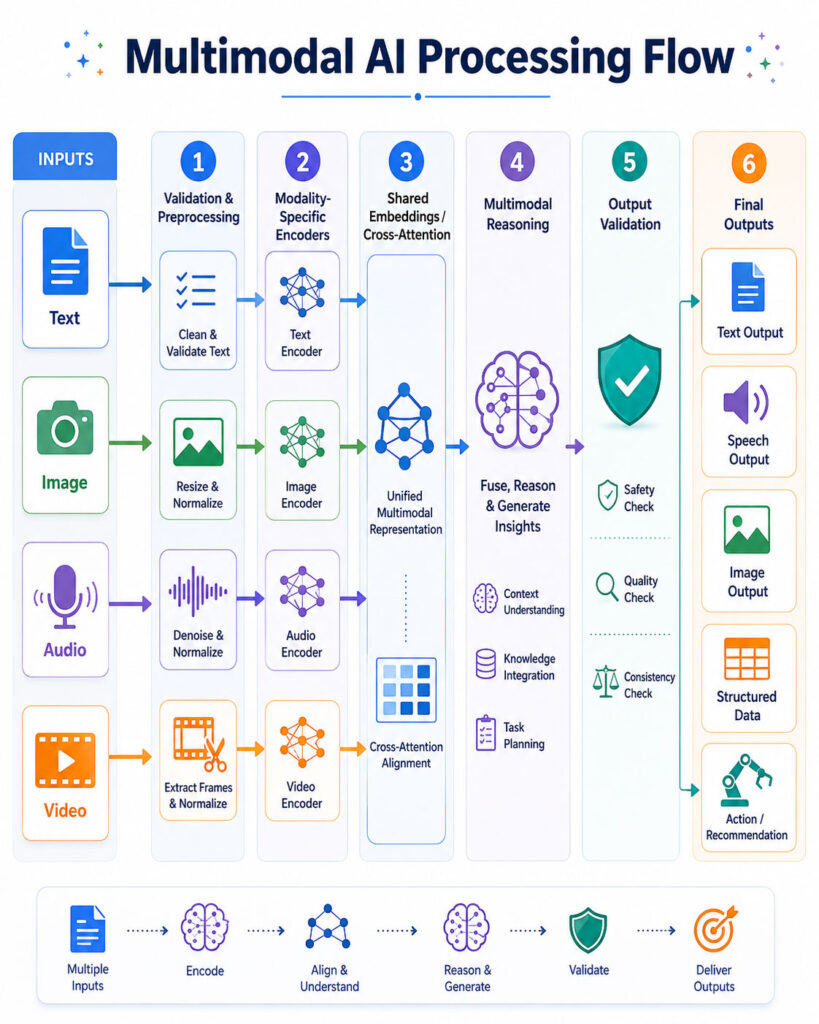
How Multimodal AI Works
- The application receives supported inputs.
- It validates file type, size, permissions, and security requirements.
- Pre-processing prepares each modality.
- Encoders convert inputs into numerical representations.
- The system aligns or combines those representations.
- The model performs retrieval, classification, reasoning, or generation.
- Application rules validate important outputs.
- The result is returned in the required format.
Embeddings and Alignment
Embeddings are numerical vectors that represent important characteristics of an input. Related concepts can appear close together even when they come from different modalities.
Alignment helps the model connect an image with its caption, spoken language with written text, or a video segment with its transcript. Poor alignment, however, can create incorrect connections.
Multimodal Fusion
Fusion combines information from different modalities. Systems may combine features early, combine independently generated outputs later, or connect modalities through shared layers and attention mechanisms.
How Text and Images Contribute
Text often provides the user’s objective, instructions, metadata, or desired output format. Images contribute objects, scenes, diagrams, interface layouts, and visual context.
Visual understanding is still imperfect. Small text, crowded scenes, unusual angles, reflections, low resolution, and precise counting can cause errors. Therefore, specialised computer-vision tools and independent validation may still be necessary for exact measurements or safety-critical detection.
Audio, Video, and Documents in Multimodal AI
Audio in Multimodal AI
Audio can contain speech, music, alarms, environmental sounds, tone, timing, and background noise. Therefore, multimodal AI can use audio for more than transcription.
A transcript alone may lose information such as tone, overlapping speech, silence, or non-verbal sounds. Processing the original audio can provide additional context.
Video in Multimodal AI
Video combines visual frames over time and may also include audio, subtitles, metadata, and scene changes. As a result, video understanding requires both spatial and temporal analysis.
Because processing every frame can be expensive, systems may sample frames or divide a recording into segments. Consequently, very brief events can sometimes be missed.
Documents as Multimodal Inputs
Documents are often multimodal even when they appear to contain mostly text. Meaning may also depend on headings, columns, tables, charts, signatures, stamps, images, handwriting, and page layout.
Optical Character Recognition can extract visible text, but OCR may misread handwriting, small text, unusual fonts, rotated pages, or poor-quality scans. Important fields should therefore be checked against the original document.
Multimodal Search and RAG
Multimodal search allows users to search using one type of information while retrieving another. For example, users can search a product catalogue using a photograph, find a video by describing an action, or locate visually similar designs.
Multimodal retrieval-augmented generation retrieves relevant text, images, document pages, tables, or media segments before generating an answer. Although retrieval improves access to organisation-specific information, incorrect retrieval can still produce misleading results.
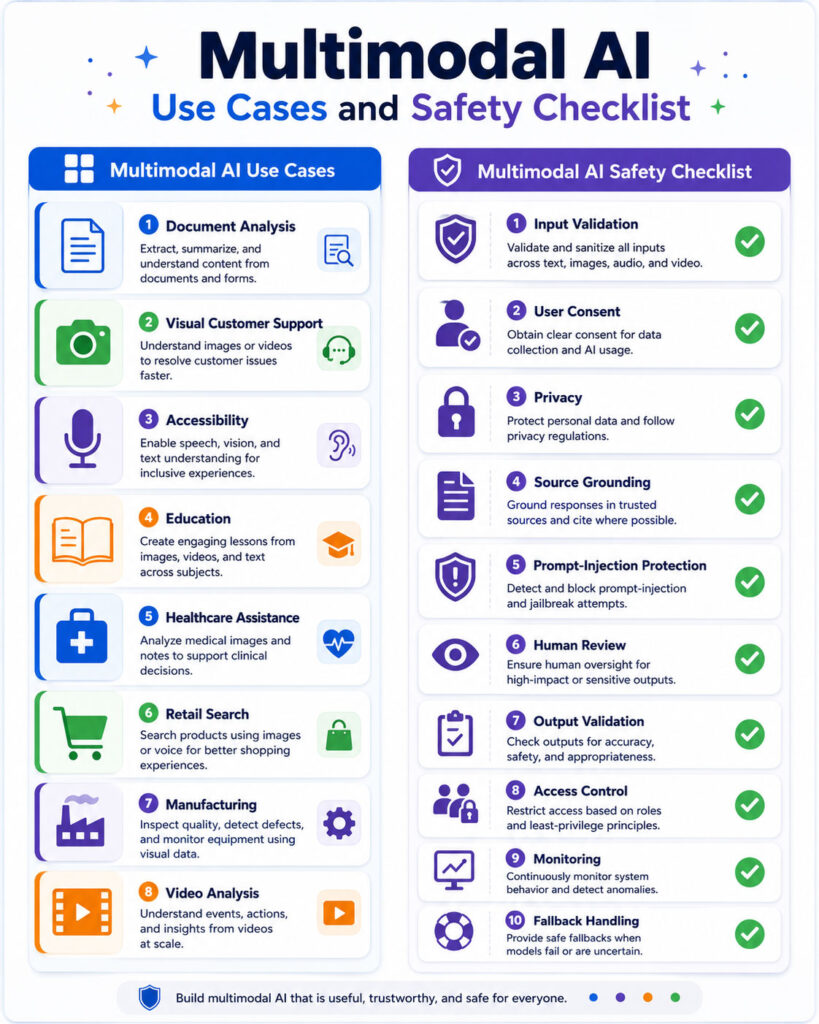
Common Multimodal AI Use Cases
| Use Case | Modalities | Possible Result |
|---|---|---|
| Document processing | Text, page images, tables, layout | Structured data extraction |
| Customer support | Text, voice, images, video | Troubleshooting guidance |
| Accessibility | Camera, text, audio | Scene descriptions or spoken guidance |
| Retail search | Product images and text | Similar or matching products |
| Video analysis | Frames, audio, transcript | Search, summary, or event detection |
| Manufacturing | Images, sensor data, records | Inspection and troubleshooting support |
Benefits and Limitations
Benefits
- More natural interaction.
- Richer context than one data type can provide.
- Search across different media formats.
- Reduced manual transcription and data entry.
- Improved accessibility features.
- Flexible input for mobile and field users.
Limitations
- Higher processing and storage requirements.
- Greater architectural complexity.
- Errors from one modality can affect the final result.
- Weaknesses in fine visual or temporal understanding.
- Additional camera, microphone, document, and privacy risks.
- More complex testing and monitoring.
Multimodal Hallucinations
A multimodal hallucination occurs when an AI system produces information that is not supported by the supplied text, image, audio, video, or retrieved evidence.
For example, a model might describe an object that is not present, read text that does not appear on a document, assign speech to the wrong person, or report an incorrect chart value. Therefore, important conclusions should remain linked to supporting evidence and be independently verified.
Multimodal AI Security Risks
Every supported modality creates another input channel that attackers may try to manipulate. Security controls designed only for written prompts may miss instructions hidden inside images, audio, documents, video frames, subtitles, filenames, or metadata.
Multimodal Prompt Injection
Uploaded or retrieved content can contain instructions intended to manipulate an AI system. Therefore, content-derived instructions should never override system policies, user permissions, or application-level business rules.
Reducing Prompt-Injection Risk
- Separate trusted instructions from uploaded or retrieved content.
- Do not allow files to define application permissions.
- Use deterministic authorisation outside the model.
- Restrict tools and external actions.
- Require confirmation for sensitive operations.
- Test attacks across every supported modality.
File Upload Security
Multimodal applications may accept images, audio, video, and complex documents. Useful safeguards include allowlisted file types, server-side content validation, size and duration limits, malware scanning, safe filenames, isolated conversion, processing timeouts, and restricted storage permissions.
Privacy, Consent, and Identity
Images, voice recordings, video, documents, and location data can reveal sensitive information about users and other people. Applications should clearly explain what information is processed, where it is sent, how long it is retained, and whether it is reused for another purpose.
Additionally, applications should collect only the modalities required for the requested feature. A simple text request should not automatically activate a camera or microphone.
Handling Conflicting or Missing Inputs
Different modalities can contradict each other. A product photograph may not match its description, a transcript may differ from the audio, or a timestamp may conflict with metadata.
Instead of silently selecting one source, the system should follow a defined rule: report the conflict, request clarification, prefer an authoritative source, apply confidence thresholds, or route the case for human review.
How to Evaluate Multimodal AI
- Test each modality independently.
- Test correct multimodal combinations.
- Test irrelevant, missing, and conflicting inputs.
- Test low-quality media.
- Test malicious or adversarial content.
- Measure real task success, latency, correction rate, and cost.
- Preserve source references and timestamps where possible.
Choosing a Multimodal AI Architecture
Start with application requirements rather than selecting a model simply because it supports many file types. Consider required modalities, accuracy, privacy, latency, file limits, language support, structured output, model stability, and deployment cost.
An integrated multimodal model can simplify interaction, while specialised pipelines can provide greater control for narrow tasks. In practice, many production systems combine both approaches.
Multimodal AI Implementation Checklist
- Define why multiple modalities are required.
- List required and optional inputs.
- Validate every uploaded file.
- Define privacy, consent, and retention rules.
- Separate trusted instructions from untrusted content.
- Restrict tools and sensitive actions.
- Preserve source references and timestamps.
- Test missing, conflicting, low-quality, and malicious inputs.
- Measure accuracy, latency, and cost by workflow.
Frequently Asked Questions
Is Multimodal AI the Same as Generative AI?
No. Multimodal describes the types of information a system can process or produce, whereas generative AI describes systems that create new content. Many modern systems are both.
Can Multimodal AI Understand Video?
Yes. Supported systems can analyse frames, audio, transcripts, and temporal relationships. However, long videos, brief events, fine movements, and precise counting can still be challenging.
Can Multimodal AI Read Documents?
Yes. It can combine visible pages, extracted text, layout, tables, charts, and other document elements. Important fields should still be validated against the original document.
Putting Multimodal AI Into Practice
Multimodal AI connects text, images, audio, video, documents, and other forms of information. As a result, applications can create more natural interactions and use context that a single modality may miss.
However, every additional modality introduces new accuracy, privacy, security, processing, and testing requirements. The strongest implementations use multimodal AI where combining data types genuinely improves the task and keep important results grounded in verifiable evidence.

AboutTPJ Technical Team
The Project Jugaad Technical Team creates practical, easy-to-follow content on software development, web technologies, artificial intelligence, cybersecurity, cloud platforms, and digital tools. Our articles are informed by more than 13 years of hands-on experience with .NET, Angular, SQL Server, AWS, WordPress, Linux hosting, application deployment, and real-world troubleshooting. Each guide is researched, reviewed, and updated to provide accurate, useful, and actionable information for developers, businesses, and everyday technology users.