Artificial Intelligence
When an AI chatbot appears to “remember” a conversation, it can be tempting to imagine that the model has an unlimited memory of everything you have ever told it. In reality, language models work with a limited amount of information at a time.
That working space is commonly called the context window.
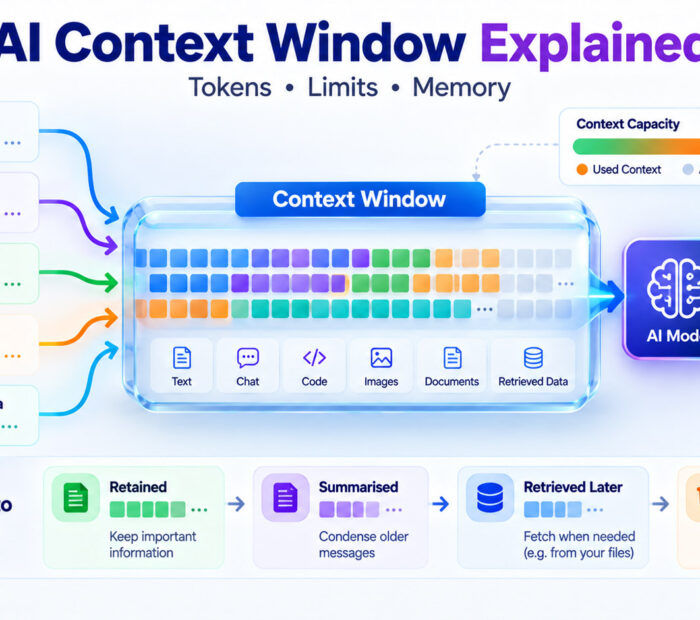
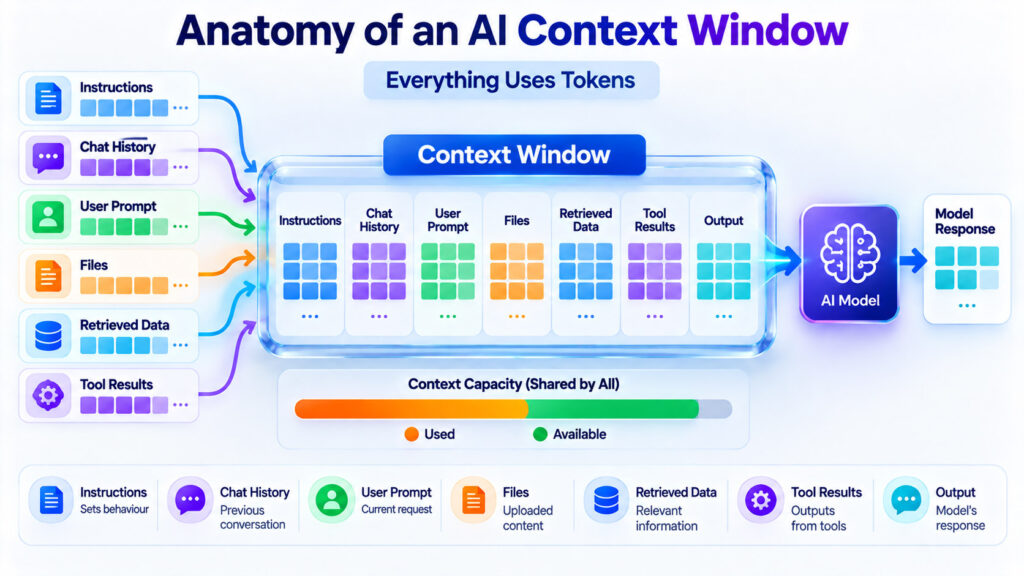
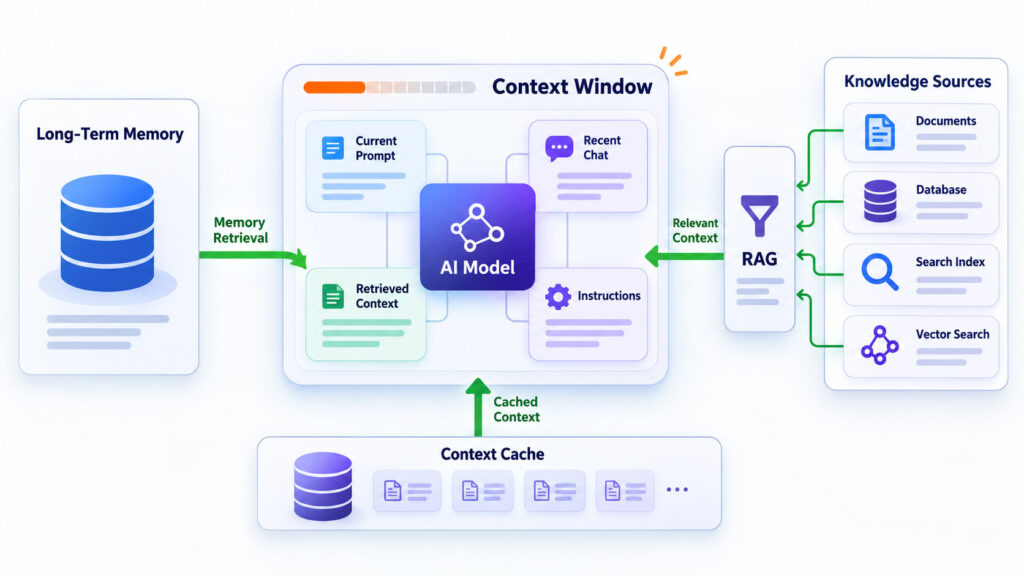
The context window can contain your current prompt, previous conversation messages, system instructions, documents, retrieved information, tool results, images or other supported inputs, and space required for the model’s response. All of this information consumes tokens.
Understanding context windows explains why an AI system can analyse a large document, why extremely long chats may eventually lose older detail, why developers use retrieval-augmented generation, and why a model with a larger context window is not automatically more accurate.
AI Context Window: Quick Answer
An AI context window is the amount of information a model can process as part of a request, usually measured in tokens.
A simplified request can look like this:
System instructions
        +
Conversation history
        +
User message
        +
Attached or retrieved information
        +
Available response space
        =
Context used by the model
When the available context becomes full, the application must somehow manage the excess information. Depending on the system, it may reject the request, remove older content, summarise earlier messages, retrieve only relevant information, or start a new context.
Google Cloud defines a context window as the number of tokens a foundation model can process in a prompt. Its documentation also notes that every model has limits on the amount of prompt and response information it can process.
Reference: Google Cloud Documentation – Generative AI glossary, “context window” and “tokens”.
What Is a Token?
AI models do not normally process text as complete sentences or paragraphs. Instead, the input is divided into smaller units called tokens.
A token might represent:
- A complete short word.
- Part of a longer word.
- Punctuation.
- A number.
- A symbol.
- Part of source code.
For example, a longer technical word may be represented by several tokens rather than one token.
Google Cloud describes tokenization as the process of splitting input into units the model can process. Its documentation gives examples in which words may be represented as whole tokens or divided into smaller meaningful pieces.
Reference: Google Cloud Documentation – Generative AI glossary, “tokens”.
Tokens Are Not the Same as Words
A common mistake is assuming that a 100,000-token context window means exactly 100,000 words.
It does not.
The relationship varies according to:
- Language.
- Word length.
- Punctuation.
- Numbers.
- Source code.
- The tokenizer used by the model.
Therefore, word count should only be treated as a rough estimate when planning model input. If an API provides an official token-counting method, use that instead of estimating from characters or words.
Multimodal Inputs Can Also Consume Context
Modern foundation models may accept more than text. Images, audio, video, documents, and other input types can also consume context capacity.
The exact conversion depends on the model and provider. For example, an image may be represented internally through visual tokens, while audio or video can consume tokens according to duration and processing settings.
This means that a request containing a few pages of text plus several images may use significantly more context than the text alone.
Reference: Google Cloud Documentation – Generative AI glossary and multimodal token guidance.
What Information Can Be Inside the Context Window?
| Context Component | Purpose |
|---|---|
| System instructions | Define application-level behaviour, rules, role, or constraints |
| User prompt | Contains the current request |
| Conversation history | Provides relevant previous messages and responses |
| Documents | Provide source material for summarisation, analysis, or question answering |
| Retrieved information | Adds relevant external knowledge through search or RAG |
| Tool results | Provide information returned from databases, APIs, browsers, code, or other tools |
| Examples | Demonstrate desired behaviour or output structure |
| Generated response | Uses the available output budget while the model creates its answer |
Context Window vs Maximum Output Length
Context capacity and maximum response length are related but should not automatically be treated as the same setting.
A model or API may expose one limit for the total information it can process and another setting controlling how many tokens it is permitted to generate in the response.
For example, an application might technically support a large input while intentionally limiting responses to a few thousand tokens.
When designing an application, check the model provider’s current documentation for:
- Maximum input size.
- Maximum output size.
- Total context rules.
- Multimodal token accounting.
- Tool-result accounting.
These details can differ between models and APIs, so avoid assuming that every model with the same advertised context size behaves identically.
What Happens When the Context Window Becomes Full?
A language model cannot simply accept unlimited input because its architecture and serving system have finite context limits.
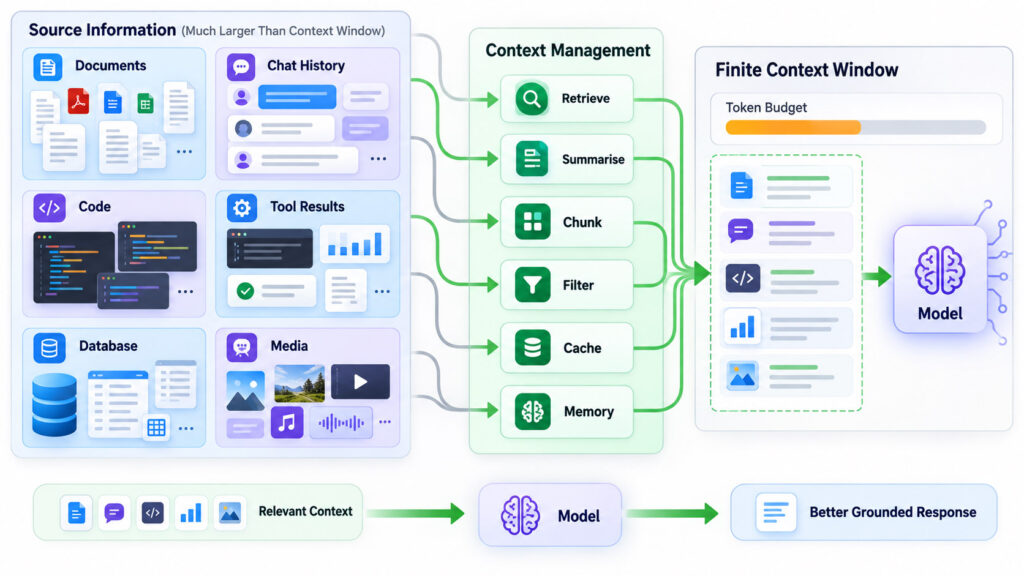
If the combined instructions, conversation, documents, tool results, and requested response exceed the supported limit, the application must manage the overflow.
Possible strategies include:
- Rejecting the request because it is too large.
- Removing older conversation turns.
- Keeping only the most recent messages.
- Summarising previous conversation history.
- Retrieving selected older information when it becomes relevant.
- Compressing or shortening tool results.
- Starting a new context window with a saved task summary.
Google’s current documentation for long-running AI sessions describes context-window compression as one method. A system can prune older turns or summarise information when accumulated context approaches the supported limit.
Reference: Google Cloud Documentation – Context window compression and long-running sessions.
Why Can an AI Chat Forget Something From Earlier?
A long conversation can accumulate a large amount of context.
If older information is no longer included in the model’s active context, the model cannot directly use that original information during the current generation unless the application provides it again through a summary, retrieval system, memory mechanism, or another data source.
This is why an AI interface can appear to remember something during one part of a conversation and later need the information again.
The user-facing conversation may still display the old message, but the model does not necessarily receive every visible message verbatim on every turn.
Context Window Is Not the Same as Permanent Memory
These concepts are easy to confuse.
| Concept | What It Means |
|---|---|
| Context window | Information currently available to the model for the request |
| Conversation history | Previous messages that may be included in the current context |
| Long-term memory | Information stored outside the immediate model context and retrieved later |
| RAG | Relevant external information retrieved and added to the current context |
| Context cache | Repeated context stored or reused efficiently by the serving system |
A memory system can persist information across sessions, but the model still needs relevant memory to be made available when generating the current response.
Google Cloud’s Memory Bank documentation describes long-term memories as information that persists across multiple sessions and can later be used to expand the context available to an agent.
Reference: Google Cloud Documentation – Agent Platform Memory Bank.
A Larger Context Window Is Like a Larger Working Desk
A useful analogy is a desk.
Imagine trying to answer a research question using papers spread across your desk. A small desk can hold only a few documents at once. A larger desk lets you keep more source material visible while working.
However, a larger desk does not automatically:
- Make the documents correct.
- Tell you which document is important.
- Remove duplicate information.
- Resolve contradictions.
- Prevent you from overlooking a detail.
A larger context window works similarly. It increases how much information can be available to the model, but good context selection and prompt design still matter.
Why Long Context Is Useful
Long context makes several previously difficult workflows much easier.
A model can potentially work with:
- Large technical manuals.
- Long contracts.
- Entire collections of meeting transcripts.
- Large code repositories or selected repository snapshots.
- Research papers.
- Large customer-support conversations.
- Long reports and financial documents.
- Multiple related source documents.
- Audio or video transcripts.
Google Cloud compares a large context window with short-term working memory and documents long-context use cases involving extensive text, code, audio, video, and document analysis.
Reference: Google Cloud Documentation – Long context.
Does a Bigger Context Window Always Produce a Better Answer?
No.
Additional context is useful when the additional information is relevant. Filling the window with duplicate, outdated, contradictory, or unrelated material can make a prompt harder to process and can also increase latency and cost.
Prompt structure therefore becomes more important as inputs become larger.
Anthropic’s current long-context prompting guidance recommends structuring large inputs carefully, separating documents and metadata clearly, and placing the actual query after long source material for complex document tasks.
Reference: Anthropic Documentation – Prompting best practices for long-context inputs.
More Context Does Not Guarantee Factual Accuracy
A context window tells you how much information a model can consider. It does not guarantee that the model will interpret every piece correctly or produce a factually correct answer.
A model can still:
- Misinterpret a source.
- Miss a relevant detail.
- Combine conflicting information incorrectly.
- Generate unsupported information.
- Use outdated content if outdated material is supplied.
Important answers should therefore remain grounded in authoritative source material and be independently checked when accuracy matters.
Long Context vs RAG: What Is the Difference?
A large context window and retrieval-augmented generation solve related problems in different ways.
With long context, the application can provide a large amount of source material directly to the model.
With RAG, the application first searches a larger collection and inserts only the most relevant information into the model’s current context.
| Area | Long Context | RAG |
|---|---|---|
| Main idea | Provide a large source set directly | Retrieve a smaller relevant subset first |
| Best fit | One or several manageable large sources | Very large or frequently changing knowledge collections |
| Retrieval system required | Not necessarily | Yes |
| Token usage | Can be high | Can reduce model input by selecting relevant evidence |
| Fresh information | Must be supplied in the prompt or files | Can retrieve current information from maintained sources |
| Retrieval errors | No separate retrieval stage | Relevant information can be missed by poor retrieval |
Google describes RAG as a process that retrieves relevant knowledge, adds that information to the model input, and generates a response grounded in the retrieved evidence.
Its current RAG guidance also notes that retrieval can be useful when the complete information set is larger than the available context or when reducing token usage improves performance and cost.
Reference: Google Cloud – Retrieval-Augmented Generation guidance.
For a deeper explanation of the database side of retrieval, see our Vector Database vs Traditional Database – When Do You Need Vector Search? article.
When Long Context May Be Simpler Than RAG
Long context can be attractive when you already know exactly which material the model needs.
Examples include:
- Summarising one long report.
- Comparing a small group of contracts.
- Reviewing a selected codebase snapshot.
- Analysing a meeting transcript.
- Answering questions about one technical manual.
In these situations, building a complete embedding and retrieval pipeline may add unnecessary architecture if the entire relevant source comfortably fits into the supported context.
When RAG Becomes More Useful
Retrieval becomes more valuable when the knowledge collection is too large, changes frequently, or contains information that should only be supplied when relevant.
Examples include:
- Thousands of company documents.
- A continuously updated support knowledge base.
- Product documentation covering many versions.
- A large legal-document repository.
- Customer-specific information with permission rules.
- A database containing millions of records.
Instead of loading everything into every request, the application searches first and adds the best evidence to the active context.
Long Context and RAG Can Work Together
The two approaches are not competitors.
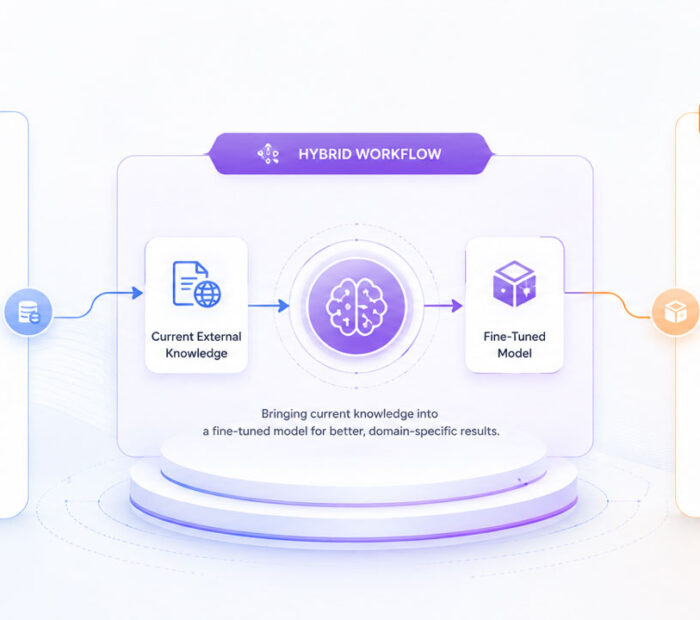
A system may retrieve several large relevant documents through RAG and then use a long-context model to analyse them together.
For example:
User question
      ↓
Search large knowledge base
      ↓
Retrieve relevant documents
      ↓
Place selected documents in long context
      ↓
Compare, reason, and generate answer
This combination can provide both scalable retrieval and enough working space for detailed analysis.
What Is Context Caching?
Applications sometimes send the same large information repeatedly.
Examples include:
- A long system prompt.
- A large reference manual.
- A code repository snapshot.
- A video or audio file analysed through several separate questions.
Context caching allows supported AI platforms to reuse repeated context more efficiently instead of processing the same content from scratch for every request.
Google’s current context-caching documentation describes caching as a way to reduce latency and token cost when a substantial portion of the input is repeated across requests.
Reference: Google Cloud Documentation – Context caching overview.
Context Caching Does Not Increase the Context Window
This distinction matters.
Caching can make repeated context cheaper or faster to reuse on supported platforms, but cached content still belongs to the model’s usable context when referenced.
It does not create unlimited context capacity.
Context Window vs Memory vs RAG vs Cache
| Technology | Main Purpose |
|---|---|
| Context window | Holds information available to the model right now |
| Long-term memory | Stores selected information for possible future sessions |
| RAG | Searches external knowledge and inserts relevant evidence |
| Context caching | Reuses repeated context more efficiently |
| Summarisation | Compresses older or larger information into fewer tokens |
Context Windows Also Affect Cost
Many model APIs charge according to token usage.
Sending a large document with every request can therefore cost substantially more than sending a short prompt.
A production AI application should consider:
- Input-token cost.
- Output-token cost.
- Cached-token pricing where available.
- Retrieval infrastructure cost.
- Latency.
- Model quality requirements.
The cheapest architecture is not automatically the one with the smallest context. Sending too little evidence can reduce answer quality and create additional retries or manual review.
The objective is to provide enough relevant context, not simply the minimum possible number of tokens.
Privacy Matters More as Context Gets Larger
A larger context window makes it technically possible to provide more information to an AI model. That does not mean every available document should be sent.
Before adding information to model context, consider:
- Whether the user is authorised to access it.
- Whether personal information is necessary.
- Whether confidential business information should be included.
- How the provider processes or retains data.
- Whether retrieved documents contain malicious instructions.
- Whether source information can be deleted when required.
Permission filtering should happen before restricted information is placed into model context.
This is especially important in RAG systems because semantic relevance does not imply that a user is authorised to see a document.
How to Use an AI Context Window More Effectively
A large context window is most useful when the information inside it is relevant, organised, and trustworthy.
1. Remove Information That Does Not Help the Task
More context is not automatically useful context.
If the model is reviewing a database migration plan, unrelated marketing copy, old meeting transcripts, and unused documentation may simply consume capacity and make the prompt harder to reason over.
2. Put Important Instructions Clearly in the Prompt
Do not assume that the model will infer every requirement from a large collection of documents.
State:
- The task.
- The desired output.
- Important constraints.
- Which sources should be treated as authoritative.
- What the model should do when information is missing.
3. Structure Large Documents
When providing several documents, preserve useful boundaries such as:
- Document titles.
- Section headings.
- Source identifiers.
- Dates.
- Versions.
- Page or section references.
This makes it easier to connect a claim with its source.
Anthropic’s long-context prompting guidance recommends clearly structured documents and metadata for large multi-document tasks.
Reference: Anthropic Documentation – Prompting best practices.
4. Ask for Evidence
If the task involves source documents, ask the model to identify the supporting section or quotation before making an important conclusion.
This does not guarantee correctness, but it makes unsupported answers easier to identify.
5. Use Retrieval When the Knowledge Base Is Large
Do not repeatedly load thousands of documents merely because a model has a large context window.
When only a small portion is relevant to each question, search and retrieval can reduce noise, token use, and latency.
6. Summarise Old Conversation State Carefully
Long-running assistants can compress earlier work into a structured summary containing:
- Decisions already made.
- Requirements.
- Open questions.
- Completed steps.
- Important identifiers.
- Pending tasks.
A structured summary is often more useful than preserving every casual sentence from a long conversation.
7. Preserve Important State Outside the Chat
For long-running software, research, or agent workflows, important state should not exist only inside conversation history.
Applications may store:
- Project configuration.
- Task state.
- Approved decisions.
- Structured user preferences.
- Workflow progress.
- References to source documents.
That state can then be retrieved when a future request actually requires it.
8. Cache Repeated Static Context When Supported
If every request includes the same large manual, system instruction set, or codebase, context caching may reduce repeated processing cost and latency on platforms that support it.
Google specifically lists recurring queries over large document collections, extensive system instructions, video analysis, and code-repository analysis as examples where context caching can be useful.
Reference: Google Cloud Documentation – Context caching overview.
Context Window Planning for AI Applications
| Application | Useful Context Strategy |
|---|---|
| Simple chatbot | Recent conversation plus concise instructions |
| Document summariser | Long context when the complete document fits |
| Enterprise knowledge assistant | RAG plus permission-aware retrieval |
| Code assistant | Relevant files, repository search, summaries, and long context where useful |
| Long-running AI agent | Task state, summaries, memory, retrieval, and controlled tool results |
| Repeated analysis of one large source | Long context plus context caching where supported |
Common AI Context Window Mistakes
| Common Mistake | Better Approach |
|---|---|
| Treating tokens as identical to words | Use the model’s actual tokenizer or token-counting API |
| Assuming a large context window is permanent memory | Separate active context from stored memory |
| Sending the entire knowledge base with every request | Retrieve only what is relevant when the source collection is large |
| Filling the context because capacity is available | Prioritise relevant, authoritative information |
| Ignoring output-token requirements | Leave sufficient capacity for the requested response |
| Mixing old and current versions of documents | Include version and date metadata |
| Sending confidential data unnecessarily | Minimise context and enforce access control before retrieval |
| Assuming RAG guarantees correct answers | Evaluate retrieval quality and verify generated claims |
| Assuming context caching creates extra capacity | Treat caching as an efficiency feature, not an unlimited window |
Frequently Asked Questions
What Is an AI Context Window?
An AI context window is the amount of information a model can process for a request. It is generally measured in tokens and may include instructions, conversation history, the current prompt, documents, retrieved information, tool results, multimodal input, and generated output according to the provider’s implementation.
What Is a Token in AI?
A token is a unit of information processed by a model. A token can represent a word, part of a word, punctuation, a number, code, or another model-specific unit.
Is One Token Equal to One Word?
No. Some words may be represented by one token, while others require several. Token counts also vary by language and tokenizer.
What Does a 128K Context Window Mean?
It means the model or endpoint supports a context measured in approximately 128,000 tokens under that provider’s specific accounting rules. It does not mean exactly 128,000 words or pages.
Always check the provider’s documentation to determine whether the published number applies to input alone, combined context, or another endpoint-specific definition.
What Does a 1 Million Token Context Window Mean?
It means a very large amount of information can potentially be supplied within one model interaction. Google uses examples such as large collections of source code, books, transcripts, audio, and video to demonstrate the scale of a one-million-token window.
The practical usefulness still depends on information relevance, prompt design, model capability, latency, and cost.
Does Chat History Use Context Tokens?
Yes, when previous conversation messages are included in the current model request. Applications may eventually summarise, truncate, retrieve, or otherwise manage older conversation history.
Is AI Memory the Same as Context?
No. Context is information available to the model during the current request. Memory usually refers to information stored beyond the immediate request and retrieved when needed later.
What Happens When the Context Window Is Full?
The behaviour depends on the application and API. A request may be rejected, older information may be removed, history may be summarised, context may be compressed, or selected information may be retrieved again.
Is a Larger Context Window Always Better?
Not automatically. Larger windows make more information available but may also increase token usage, latency, cost, and the amount of irrelevant material the model must process.
Relevant and well-structured context usually matters more than filling the maximum available capacity.
What Is the Difference Between RAG and a Context Window?
The context window is the working information supplied to the model. RAG is a retrieval process that searches external information and inserts selected evidence into that context.
Do Vector Databases Increase the Context Window?
No. A vector database can help retrieve relevant information efficiently, but the retrieved content still occupies model context when it is supplied to the model.
Does Context Caching Increase the Token Limit?
No. Context caching can reduce repeated processing cost or latency on supported platforms, but it does not turn a finite model context into unlimited capacity.
Can an AI Remember More Than Its Context Window?
An AI application can store information outside the immediate model context through databases, files, summaries, memories, or retrieval systems. Relevant information can then be reintroduced into a later context when required.
Designing Better AI Context, Not Just Bigger Context
Context windows are best understood as an AI model’s active working space. Instructions, conversation history, documents, retrieved evidence, tool results, multimodal inputs, and generated output all compete for that finite capacity.
Larger context windows make it possible to analyse much more information at once, but size alone does not solve every AI problem. Context still needs to be relevant, current, properly structured, securely authorised, and appropriate for the task.
For a single large document, long context may be the simplest solution. For a very large knowledge base, retrieval can provide a smaller set of relevant evidence. Long-running assistants may combine active context with persistent memory, while repeated large inputs can benefit from caching where the platform supports it.
The practical goal is therefore not to place as many tokens as possible into every prompt. It is to give the model the right information at the right time while preserving enough context for the task and response.

AboutTPJ Technical Team
The Project Jugaad Technical Team creates practical, easy-to-follow content on software development, web technologies, artificial intelligence, cybersecurity, cloud platforms, and digital tools. Our articles are informed by more than 13 years of hands-on experience with .NET, Angular, SQL Server, AWS, WordPress, Linux hosting, application deployment, and real-world troubleshooting. Each guide is researched, reviewed, and updated to provide accurate, useful, and actionable information for developers, businesses, and everyday technology users.