Artificial Intelligence
AI Hallucination Explained is an important topic for anyone who uses AI tools for writing, learning, research, coding, business work, or daily productivity.
AI tools can answer questions quickly, but they do not always give correct information. Sometimes, they may generate answers that sound confident but are actually wrong, incomplete, or misleading.
This type of mistake is often called an AI hallucination. So, if you use AI tools regularly, you should understand what it means and how to reduce the risk.
What Is AI Hallucination?
AI hallucination happens when an AI tool gives information that looks correct but is not accurate.
For example, an AI tool may create a fake fact, wrong date, incorrect explanation, broken code, imaginary source, or misleading summary. The answer may still sound polished and professional, which makes it harder to notice the mistake.
In simple words, AI hallucination means the AI produced an answer that should not be trusted without checking.
Why Does AI Hallucination Happen?
AI tools generate answers based on patterns, training data, user instructions, and context. They do not understand truth in the same way humans do.
Because of this, an AI tool may sometimes predict an answer that sounds likely instead of confirming that the answer is fully correct.
Hallucination can happen more often when the question is unclear, the topic is very recent, the data is limited, or the user asks for very specific facts without enough context.
Common Types of AI Hallucination
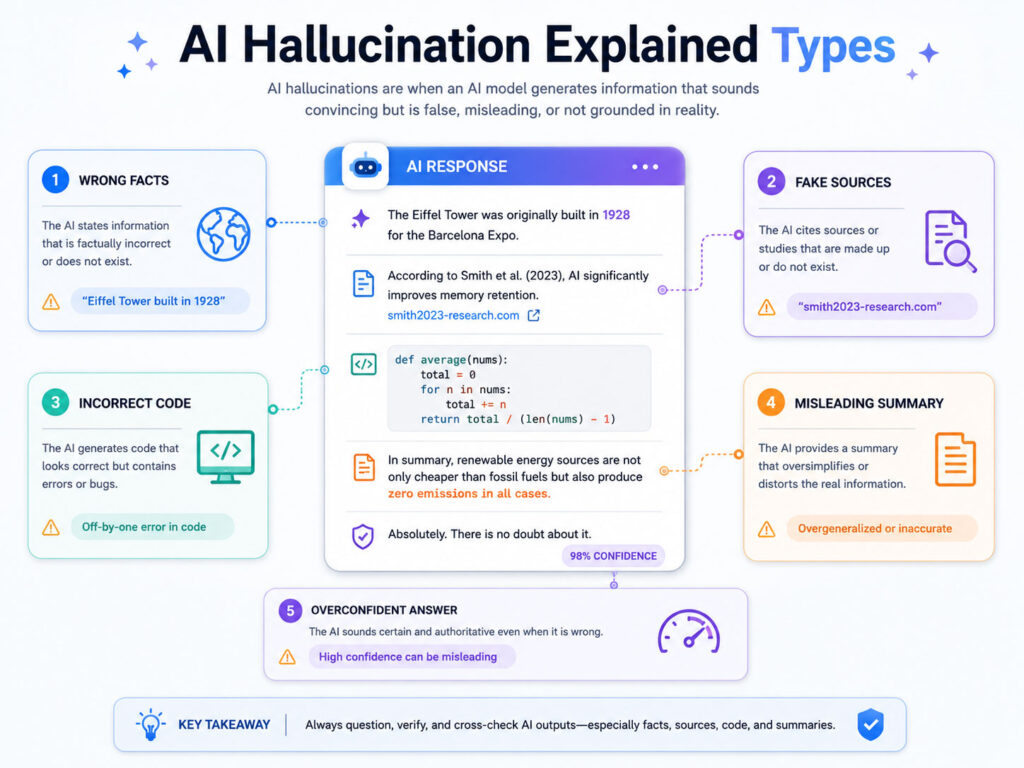
AI hallucination can appear in different forms.
| Type | Example |
|---|---|
| Wrong Facts | The AI gives an incorrect date, name, number, or explanation |
| Fake Sources | The AI mentions a source, link, book, or report that does not exist |
| Incorrect Code | The AI gives code that looks valid but fails during execution |
| Misleading Summary | The AI summarizes text but changes the meaning |
| Overconfident Answer | The AI gives a confident answer even when the information is uncertain |
These mistakes can create confusion if users copy the answer without review.
Why AI Answers Can Sound Correct Even When They Are Wrong
AI tools are designed to generate natural and helpful responses. As a result, even a wrong answer can sound clear, confident, and well-written.
This is one reason AI hallucination can be risky. A badly written answer is easy to doubt, but a polished answer may look trustworthy.
For example, an AI tool may explain a topic in a smooth way but include one incorrect technical detail. If you do not check that detail, you may use the wrong information.
Where AI Hallucination Can Cause Problems
AI hallucination can cause problems in many areas, especially when accuracy matters.
- Students may learn incorrect facts.
- Writers may publish inaccurate information.
- Developers may use code that does not work properly.
- Office users may prepare reports with wrong numbers.
- Business users may make decisions based on incomplete details.
- General users may trust unsafe advice without verification.
Therefore, AI output should be treated as a draft or assistant response, not as final proof.
Examples of AI Hallucination
Here are some simple examples to understand the issue better.
| Situation | Possible Hallucination |
|---|---|
| Asking for a legal rule | The AI gives an outdated or incorrect rule |
| Asking for a software command | The AI invents a command that does not exist |
| Asking for a quotation | The AI creates a quote that the person never said |
| Asking for statistics | The AI gives numbers without a reliable source |
| Asking for a summary | The AI misses an important point or changes the meaning |
Because of this, you should verify important answers before using them.
How to Identify AI Hallucination
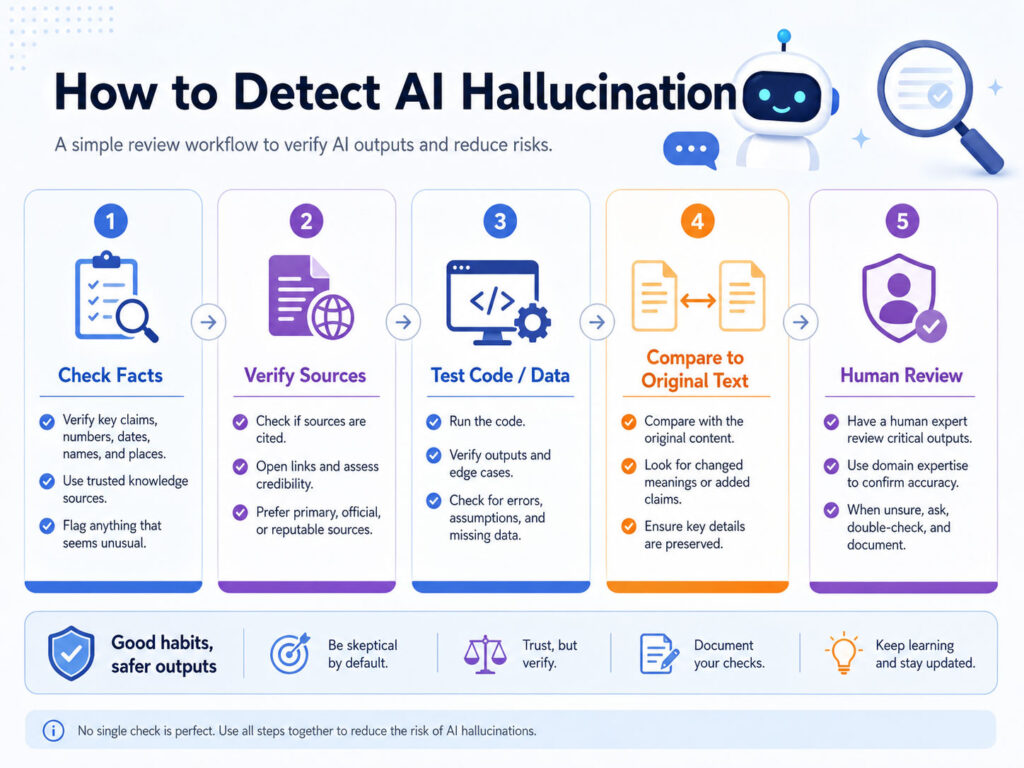
You can identify possible hallucination by looking for warning signs.
- The answer gives very specific facts without sources.
- The response sounds too confident on a complex topic.
- The AI gives names, links, or references that you cannot verify.
- The code looks correct but does not run.
- The answer avoids uncertainty even when the topic is unclear.
- The response changes meaning while summarizing your original text.
If you notice these signs, pause and check the answer from a reliable source.
How to Reduce AI Hallucination
You cannot remove AI hallucination completely, but you can reduce the risk by using AI tools carefully.
First, write clear prompts. Add context, purpose, expected format, and important details. A clear prompt helps the AI understand what you need.
Second, ask the AI to mention uncertainty when it is not sure. This can make the answer more balanced.
Third, verify important facts from trusted sources before using the answer in public, academic, legal, financial, medical, or business work.
Better Prompts to Reduce Wrong Answers
Good prompts can improve answer quality.
| Weak Prompt | Better Prompt |
|---|---|
| Tell me about cyber security. | Explain cyber security tips for beginners in simple language and mention that users should verify important account settings from official sources. |
| Give me statistics about AI. | Give me recent AI statistics only if reliable sources are available. If not, explain the topic without making up numbers. |
| Write code for login. | Write a basic login form example and explain that production login needs proper security, validation, and server-side checks. |
These prompts set better expectations and reduce the chance of overconfident wrong output.
Best Practices for Using AI Safely
Follow these habits when using AI tools:
- Use AI output as a starting point, not the final answer.
- Check facts before publishing or sharing information.
- Ask for simple explanations when the topic is complex.
- Test code before using it in a real project.
- Compare summaries with the original content.
- Avoid using AI alone for serious medical, legal, or financial decisions.
- Do not share private or sensitive information unnecessarily.
These habits help you get value from AI while avoiding common mistakes.
Conclusion
AI hallucination means an AI tool gives an answer that sounds correct but may be wrong, fake, or misleading.
This can happen because AI tools generate responses based on patterns and context. They may not always confirm every fact before answering.
To use AI safely, write better prompts, review the output, verify important facts, and apply your own judgment. AI tools can be very helpful, but human review is still important.

AboutTPJ Technical Team
The Project Jugaad Technical Team creates practical, easy-to-follow content on software development, web technologies, artificial intelligence, cybersecurity, cloud platforms, and digital tools. Our articles are informed by more than 13 years of hands-on experience with .NET, Angular, SQL Server, AWS, WordPress, Linux hosting, application deployment, and real-world troubleshooting. Each guide is researched, reviewed, and updated to provide accurate, useful, and actionable information for developers, businesses, and everyday technology users.