Technology
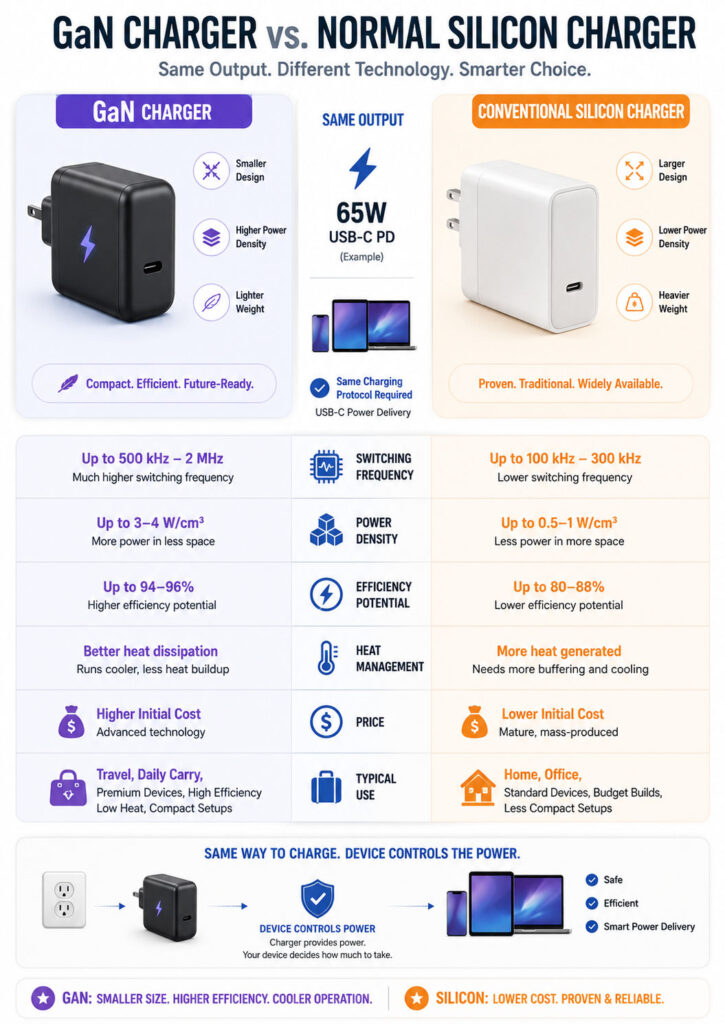
The GaN Charger vs Normal Charger comparison helps users choose a suitable power adapter for phones, tablets, laptops, power banks, and other USB devices. A GaN charger uses gallium nitride power components, whereas a conventional charger commonly relies on silicon-based components.
GaN technology can support faster switching and greater power density. As a result, manufacturers can design chargers that deliver high wattage from a smaller and lighter enclosure. However, charging speed still depends on the device, supported charging protocol, charger output profile, cable, number of connected devices, and battery-management system.
A normal silicon charger can remain a good choice when it provides the correct wattage, reliable safety protections, compatible charging standards, and a reasonable warranty. Therefore, the GaN Charger vs Normal Charger decision should not depend on semiconductor material alone.
GaN Charger vs Normal Charger: Quick Answer
- Choose a GaN charger when you want high wattage from a smaller adapter, several charging ports, easier travel, or one charger for a phone, tablet, and laptop.
- Choose a normal charger when you need a basic low-wattage adapter, already own a compatible charger, or prefer the lowest practical price.
- Check protocols before wattage because a high-wattage charger may not provide the fastest charging mode required by a particular device.
- Check individual port output because the total advertised wattage may be divided when several devices are connected.
- Use a suitable cable because an under-rated or incompatible cable can limit charging power.
- Prioritise safety and authenticity because neither GaN nor silicon technology makes a poorly designed charger safe.
For many users carrying several devices, a reliable multi-port GaN charger provides the most convenient option. By contrast, a good-quality normal charger may perform equally well when charging one phone at a modest wattage.
What Does GaN Mean?
GaN stands for gallium nitride. It is a semiconductor material used in power electronics, radio-frequency equipment, lighting, and other applications.
Power components inside a charger repeatedly switch electrical energy while converting mains electricity into the lower-voltage direct current required by electronic devices.
Gallium nitride power transistors can switch at high frequencies while keeping switching losses relatively low. Consequently, charger designers may reduce the size of certain transformers, inductors, capacitors, and cooling components.
However, the final charger also contains controllers, transformers, capacitors, isolation components, protection circuits, USB controllers, connectors, and thermal-management features. Therefore, GaN is one important part of the charger rather than the complete design.
What Is a GaN Charger?
A GaN charger is a power adapter that uses gallium nitride components in one or more power-conversion stages.
Manufacturers commonly use GaN technology in compact USB-C chargers that provide 45W, 65W, 100W, 140W, or higher total power. Nevertheless, GaN can also appear in lower-power products.
A GaN charger may include:
- One or more USB-C ports.
- A USB-A port for older devices.
- USB Power Delivery support.
- Programmable Power Supply support.
- Dynamic power distribution across several ports.
- Protection against excessive current, voltage, temperature, or short circuits.
These features do not come automatically from GaN. Instead, they depend on the charger’s complete hardware, firmware, controller, and product design.
What Is a Normal Charger?
In this comparison, a normal charger refers to a conventional power adapter built mainly around silicon power components.
Silicon chargers have powered phones, laptops, routers, monitors, and other electronics for decades. As a result, they are widely available and can provide safe, efficient, and reliable charging when correctly designed.
A conventional charger may be larger than a GaN charger with comparable output. However, size differences vary considerably between individual products.
Moreover, a modern silicon charger can still support USB Power Delivery, PPS, multiple ports, and high wattage. Therefore, GaN technology and fast charging are not the same concept.
How a Phone or Laptop Charger Works
A wall charger converts high-voltage alternating current from a power outlet into controlled direct current for a connected device.
A simplified charging process includes:
- The charger receives AC power from the wall outlet.
- Input protection and filtering components manage electrical disturbances.
- A rectification stage converts AC into high-voltage DC.
- Power transistors switch the energy at high frequency.
- A transformer provides voltage conversion and safety isolation.
- Secondary circuits rectify and filter the low-voltage output.
- A USB controller communicates available charging profiles.
- The connected device requests a supported voltage and current.
- The charger regulates its output according to the negotiated profile.
Importantly, the connected device controls how much supported power it accepts. Therefore, a 100W charger does not force 100W into a phone that requests only 20W.
GaN vs Silicon Power Components
Silicon and gallium nitride are semiconductor materials that manufacturers can use to create switching devices for power conversion.
GaN components can switch more quickly and reduce switching losses in suitable designs. In addition, higher switching frequency allows engineers to use smaller surrounding magnetic and passive components.
Consequently, these properties can increase power density, which means delivering more power from a given physical volume.
However, a charger’s real efficiency, heat, reliability, and size depend on its complete circuit topology, component selection, enclosure, manufacturing quality, firmware, and operating conditions.
Does a GaN Charger Charge Faster?
A GaN charger does not automatically charge a device faster than a normal charger.
Charging speed depends on:
- The maximum charging power accepted by the device.
- The charging protocol supported by both devices.
- The voltage and current profiles offered by the charger.
- The cable’s power rating and electronic capabilities.
- Battery percentage.
- Battery temperature.
- Device usage while charging.
- Power sharing between charger ports.
For example, a phone that accepts 20W through USB Power Delivery may charge at a similar maximum rate from a compatible 20W silicon charger and a compatible 65W GaN charger.
The GaN charger’s advantage is different. It may also charge a laptop, provide several ports, or fit into a smaller enclosure.
Understanding Watts, Volts, and Amps
Charging power is measured in watts. A simplified relationship is:
Power in watts = Voltage × CurrentFor example:
9 volts × 3 amps = 27 wattsA charger and device negotiate supported voltage and current combinations. Therefore, the device does not simply draw the charger’s complete labelled wattage at all times.
In addition, charging power may decrease as the battery fills or becomes warm. Consequently, the maximum number printed on the charger is not a constant charging rate.
What Is Power Density?
Power density describes how much electrical power a charger can deliver relative to its physical size or volume.
For instance, a compact 100W charger has a higher power density than a much larger 100W adapter, assuming both can sustain their rated output safely.
GaN technology can help increase power density because its switching characteristics allow smaller supporting components in suitable circuit designs.
Therefore, higher power density is especially useful for laptop chargers, multi-port adapters, travel chargers, and products where weight and bag space matter.
GaN Charger Benefits
- Smaller enclosure at comparable output power.
- Lower weight in many high-wattage designs.
- High power density.
- Efficient power conversion in a well-designed product.
- Practical multi-port charger designs.
- Convenient replacement for several separate adapters.
- Support for high-wattage USB-C charging in compact products.
- Potentially lower internal power loss than a comparable older design.
These are potential GaN charger benefits rather than guarantees for every product. Therefore, compare actual specifications, independent testing, warranty support, and manufacturer reputation instead of relying only on the GaN label.
Normal Charger Benefits
- Lower purchase price in many basic wattage categories.
- Wide availability.
- Proven technology and established supply chains.
- Suitability for low-power phones and accessories.
- Support for USB PD, PPS, and other charging protocols in modern models.
- Good performance when physical size is not important.
- Compatibility with devices that already include conventional adapters.
Consequently, replacing a reliable silicon charger provides little benefit when it already meets the device’s wattage and protocol requirements.
GaN Charger vs Normal Charger Comparison
| Area | GaN Charger | Normal Silicon Charger |
|---|---|---|
| Power semiconductor | Uses gallium nitride in selected stages | Primarily uses silicon components |
| Physical size | Often smaller at higher wattages | May be larger at comparable output |
| Weight | Often lighter | Can be heavier |
| Power density | Generally higher in a well-designed product | Generally lower in older conventional designs |
| Efficiency | Can be highly efficient | Can also be efficient |
| Charging speed | Depends on wattage and protocol | Depends on wattage and protocol |
| Heat | May reduce internal losses but can feel warm because of compact size | May spread heat across a larger enclosure |
| Multi-port options | Common in compact high-power models | Also available |
| Price | Often more expensive | Often less expensive |
| Safety | Depends on complete product quality | Depends on complete product quality |
| Best suited for | Travel, laptops, several devices, and compact setups | Basic charging, fixed locations, and limited budgets |
The GaN Charger vs Normal Charger comparison shows that size and power density create the clearest GaN advantage. However, charging compatibility and safety still depend on the complete product.
Is GaN More Efficient Than Silicon?
GaN power devices can reduce switching losses and support high-frequency operation. As a result, these characteristics may improve conversion efficiency and reduce the size of supporting components.
However, comparing semiconductor materials alone does not reveal the efficiency of a complete charger. In fact, a high-quality silicon adapter can outperform a poorly designed GaN product.
Efficiency also changes with input voltage, output voltage, connected load, temperature, and the number of active ports.
Therefore, users should treat broad efficiency claims as design possibilities rather than guaranteed results for every GaN charger.
Do GaN Chargers Run Cooler?
A GaN circuit can produce less power loss than an older silicon design under comparable conditions. Nevertheless, a compact GaN charger may still feel warm or hot on its outer surface.
A smaller enclosure concentrates heat into less surface area. Moreover, the case transfers internal heat away from sensitive components, so a warm exterior does not automatically indicate failure.
However, stop using a charger when it becomes unusually hot, smells burnt, makes abnormal sounds, repeatedly disconnects, shows physical damage, or discolours the socket or cable.
In addition, do not cover a charger with cloth, bedding, or other materials while it is operating.
Does GaN Improve Battery Health?
GaN technology does not directly improve the chemistry or lifespan of a device battery.
The phone, tablet, or laptop manages battery charging through its internal controller and software. Therefore, the device decides how much power to request and usually reduces charging speed as the battery fills or heats up.
A compatible and stable charger supports the intended charging process. However, battery health depends more on temperature, charge cycles, usage, storage conditions, and device-level charging management than on whether the adapter uses GaN.
GaN Is Not a Charging Protocol
GaN describes the power semiconductor technology inside the charger. It does not describe how the charger communicates with a phone or laptop.
Charging protocols include:
- USB Power Delivery.
- USB Power Delivery PPS.
- Manufacturer-specific fast-charging systems.
- Older USB charging modes.
Consequently, a GaN charger without the protocol required by a device may charge slowly. By contrast, a silicon charger supporting the correct protocol may charge the same device faster.
USB Power Delivery
USB Power Delivery, commonly called USB PD, is a charging and power-delivery standard used through USB-C connections.
A compatible charger advertises supported power profiles. The connected device then selects a profile that both products support.
USB PD can power phones, tablets, laptops, monitors, docks, power banks, and other devices. However, each product supports its own maximum power and profile combinations.
For example, a charger labelled 100W may offer several profiles up to its maximum. A phone might request a lower 9V profile, whereas a laptop may request 20V or another supported profile.
USB Power Delivery 3.1 and Higher Wattage
USB Power Delivery supports power levels up to 240W through compatible USB-C equipment.
Extended Power Range adds higher fixed-voltage levels for devices requiring more than the earlier 100W limit.
However, the charger, device, cable, connectors, and complete power-delivery path must support the required level.
Therefore, a 240W-rated charger cannot provide 240W to a laptop designed to accept only 65W. Similarly, a high-power laptop may remain limited when the charger or cable does not support its required profile.
What Is PPS?
Programmable Power Supply, commonly called PPS, is an optional capability within USB Power Delivery.
PPS allows a compatible device to request adjustable voltage within a supported range instead of selecting only fixed-voltage profiles.
As a result, the device can manage power conversion and temperature more closely. Some phones also require PPS for their fastest supported USB-C charging mode.
However, both the charger and device must support PPS. Therefore, the charger’s wattage alone does not confirm compatibility.
USB PD vs Proprietary Fast Charging
Some manufacturers use charging systems that require specific voltage, current, communication, cable, or connector arrangements.
A third-party USB PD charger may charge such a device safely. However, it may not provide the device’s highest advertised speed.
Therefore, check the manufacturer’s required protocol and charging profiles before buying a charger.
Marketing terms such as fast charging, turbo charging, or super charging do not describe one universal technical standard. Consequently, users who prioritise maximum speed may need the original charger or a verified compatible model.
How Much Charger Wattage Do You Need?
Choose charger wattage according to the device’s supported input and the number of products you plan to charge simultaneously.
| Device Type | Common Charger Range to Consider | Important Check |
|---|---|---|
| Earbuds, watch, or small accessory | 5W to 20W | Connector and low-power compatibility |
| Typical smartphone | 20W to 45W | Required protocol and charging profile |
| Large phone or tablet | 30W to 65W | USB PD or manufacturer-specific support |
| Thin and light laptop | 45W to 100W | Laptop’s minimum and recommended USB-C input |
| High-performance USB-C laptop | 100W to 240W | USB PD EPR, compatible port, and cable |
| Several devices together | 65W to 200W or more total | Multi-port power distribution |
These ranges are examples rather than universal rules. Therefore, always check the power specifications for the exact phone, tablet, laptop, or accessory.
Can You Use a Higher-Wattage Charger?
A compatible USB-C charger can generally offer more maximum wattage than the connected device requires.
For example, a phone that accepts 25W does not automatically consume the complete 100W capacity of a charger. Instead, it negotiates and accepts a supported amount.
However, compatibility still depends on correct charging standards and a properly designed product. Therefore, avoid unknown chargers that provide unclear specifications or misleading labels.
Can an Underpowered Charger Damage a Laptop?
A lower-wattage compatible charger may charge a laptop slowly or fail to increase the battery level while the laptop is under heavy use.
As a result, the operating system may display a slow-charger warning or reduce performance. Some laptops may also refuse charging when the available power falls below their minimum requirement.
Therefore, use the laptop manufacturer’s recommended wattage for dependable operation. High-performance workloads may require the original adapter or a higher-power USB-C charger.
Single-Port vs Multi-Port GaN Chargers
A single-port charger dedicates its available output to one connected device. Consequently, its power behaviour is generally easier to understand.
A multi-port GaN charger can replace several adapters and reduce travel clutter. However, the labelled total power may be shared across its ports.
For example, a charger advertised as 100W total might provide:
- Up to 100W from the primary USB-C port when used alone.
- 65W from one port and 30W from another when two devices are connected.
- A different distribution when a USB-A port is active.
The exact combinations vary by model. Therefore, read the power-distribution table instead of assuming every port provides the complete advertised wattage.
Understanding Total Wattage
The largest number on a multi-port charger commonly represents its combined maximum output.
Therefore, check:
- Maximum output from each individual port.
- Output when two ports are active.
- Output when every port is active.
- Which USB-C port supports the highest wattage.
- Whether PPS is available on every USB-C port.
- Whether using USB-A reduces USB-C output.
For instance, a 140W three-port charger may not supply 140W from one port unless its specifications explicitly state that capability.
Dynamic Power Distribution
Some multi-port chargers allocate available power dynamically according to connected devices.
When a second device is connected, the charger may renegotiate power on the first port. As a result, the first device may briefly disconnect or restart charging.
Such behaviour may be normal for the product. However, it can interrupt sensitive equipment, external drives, docks, or devices that do not handle renegotiation smoothly.
Therefore, use a dedicated port or charger for equipment that requires uninterrupted power.
USB-C and USB-A Ports
USB-C ports generally support newer charging standards and higher power levels. USB-A ports, meanwhile, remain useful for older cables, watches, headphones, and accessories.
However, a USB-A port may use an older or manufacturer-specific charging mode. Consequently, it may not provide the same wattage as the charger’s USB-C ports.
If all your main devices support USB-C, prioritise a charger with enough USB-C ports instead of adding several USB-A ports that you may rarely use.
The Cable Can Limit Charging Speed
A charger, cable, and device form one charging system. Therefore, the weakest or incompatible component can limit the result.
A cable may affect:
- Maximum current.
- Maximum supported wattage.
- USB Power Delivery communication.
- Charging stability.
- Connector temperature.
- Data-transfer speed.
Consequently, do not assume that every USB-C cable supports the same power or data capabilities.
60W and 240W USB-C Cable Ratings
Current USB-C power markings commonly identify cables by 60W or 240W capability.
A 60W cable can support many phones, tablets, and laptops. However, higher-power USB PD applications require a cable rated for the required output.
For charging above 60W, use a suitable electronically marked cable from a reputable source. Similarly, Extended Power Range applications require an appropriate 240W-rated cable.
Nevertheless, a cable may support high charging power while providing only basic data speed. Therefore, charging wattage and data-transfer speed must be checked separately.
Charging Cable vs Data Cable
A USB-C cable can support:
- Charging only or basic data.
- USB 2 data speeds.
- Higher USB data speeds.
- Display output.
- USB4 capabilities.
- Different maximum power ratings.
A high-power charging cable is not automatically the fastest cable for an external SSD or monitor.
Therefore, choose according to both the power and data requirements of the intended device.
Built-In Cable vs Detachable Cable
A charger with a built-in cable is convenient and prevents users from choosing an under-rated cable. However, damage to that cable can make the complete charger less useful.
A detachable USB-C cable is easier to replace and allows different lengths. Nevertheless, it creates an additional compatibility decision.
For travel, a short detachable cable can reduce clutter. By contrast, a longer cable may provide better placement for a desk or bedside setup.
GaN Charger vs Normal Charger for Phones
A phone usually does not require GaN technology to reach its maximum charging speed. Instead, it requires the correct protocol, power profile, and cable.
A compact GaN charger is useful when:
- You want a small travel adapter.
- You charge a phone and tablet together.
- You also carry a USB-C laptop.
- You want to replace several separate chargers.
However, a normal charger remains suitable when it already supports the phone’s required charging mode.
GaN Charger vs Normal Charger for Laptops
Laptop charging is where the size and weight advantages of GaN become more noticeable.
For example, a compact 65W or 100W GaN charger may replace a larger conventional adapter for a compatible USB-C laptop.
Before replacing the original charger, verify:
- The laptop supports charging through the selected USB-C port.
- The charger provides the recommended wattage.
- The required USB PD profile is supported.
- The cable supports the required wattage.
- The laptop does not rely on a proprietary connector or higher-power adapter.
However, gaming and workstation laptops may need more power than their USB-C ports accept. Therefore, they may require the manufacturer’s dedicated adapter for full performance.
GaN Charger vs Normal Charger for Tablets
Tablets commonly benefit from USB PD chargers in the 20W to 65W range, depending on the model.
A GaN charger can provide a compact shared solution for a tablet and phone. However, a basic compatible silicon charger may provide the same speed when only one tablet is connected.
Therefore, check whether the tablet supports fast charging through USB-C and which profiles it accepts.
GaN Charger for Power Banks
Many modern power banks support USB-C input and output.
A higher-wattage charger can reduce recharge time when both products support the same protocol. However, the power bank’s maximum input may be lower than its maximum output.
Therefore, check the input specification rather than assuming that a 100W output rating also means 100W charging input.
GaN Charger for Travel
Travel is one of the strongest use cases for a multi-port GaN charger.
One adapter may charge:
- A laptop.
- A phone.
- A tablet.
- A smartwatch.
- Earbuds.
- A power bank.
However, a plug adapter changes only the physical plug shape and does not automatically convert voltage.
Therefore, check that the charger supports the destination’s mains voltage and frequency. Many modern chargers accept a wide input range, but users should confirm the printed specification.
Input Voltage for International Travel
A travel-friendly charger commonly states an input such as:
100–240V~ 50/60HzThis range indicates that the charger is designed for common international mains-voltage systems.
Nevertheless, you may still need a safe plug adapter for the destination’s socket type.
Therefore, never assume that every extension board, plug adapter, appliance, or proprietary charger supports all international voltages.
Will a GaN Charger Work with an iPhone or Android Phone?
A compatible GaN USB-C charger can charge supported iPhone and Android models. However, the achievable speed depends on each model’s charging standard and maximum accepted input.
Some Android phones require PPS or a manufacturer-specific protocol for their fastest mode. Others, meanwhile, may use standard USB PD.
Therefore, review the phone manufacturer’s charging requirements before selecting a third-party charger.
Will a GaN Charger Work with a MacBook or Windows Laptop?
A GaN charger can charge a compatible USB-C MacBook or Windows laptop when it provides sufficient wattage and supported USB Power Delivery profiles.
However, some laptops support USB-C charging only through selected ports. Others use proprietary barrel connectors or high-power adapters.
A charger that is adequate for light office use may be insufficient during gaming, video rendering, or other demanding tasks. Therefore, compare the charger’s output with the laptop’s actual workload requirements.
GaN Charger Safety
GaN is a semiconductor material rather than a complete safety certification.
A safe charger requires appropriate:
- Electrical isolation.
- Circuit spacing.
- Input protection.
- Overcurrent protection.
- Overvoltage protection.
- Short-circuit protection.
- Temperature management.
- Flame-resistant materials.
- Mechanical construction.
- Quality control.
Therefore, a poorly designed GaN charger can be unsafe, while a properly designed silicon charger can be safe and reliable.
Safety Certifications and Registration
Purchase chargers from reputable manufacturers and authorised sellers. In addition, check the product and packaging for applicable regulatory details, model information, electrical ratings, importer information, and warranty support.
For products sold in India, verify applicable registration details through the appropriate official system when possible.
Certification and registration do not remove every risk. However, they provide more assurance than vague safety claims from an unknown seller.
Protection Features to Look For
- Overvoltage protection.
- Overcurrent protection.
- Overtemperature protection.
- Short-circuit protection.
- Overload protection.
- Input surge protection.
- Safe output renegotiation.
- Appropriate insulation and isolation.
Marketing may use different names for these features. Therefore, prefer products with clear technical documentation instead of vague statements such as complete protection or intelligent safety.
Warning Signs of a Poor Charger
- No clear manufacturer or importer identity.
- No model number or electrical ratings.
- Unrealistic wattage claims for a very low price.
- Loose pins or ports.
- Poorly aligned enclosure seams.
- Unusually low weight for a high-power design.
- Counterfeit certification marks.
- Repeated charging disconnections.
- Burning smell, crackling, or visible sparking.
- Excessive connector or socket temperature.
- No warranty or support information.
Do Not Buy by Size Alone
A very small charger can be convenient. However, extreme power density places greater demands on thermal design and component quality.
Therefore, compare the charger’s continuous output, dimensions, weight, independent reviews, safety information, and warranty.
A slightly larger charger may provide better port spacing, lower surface temperature, more stable sustained output, or a lower price.
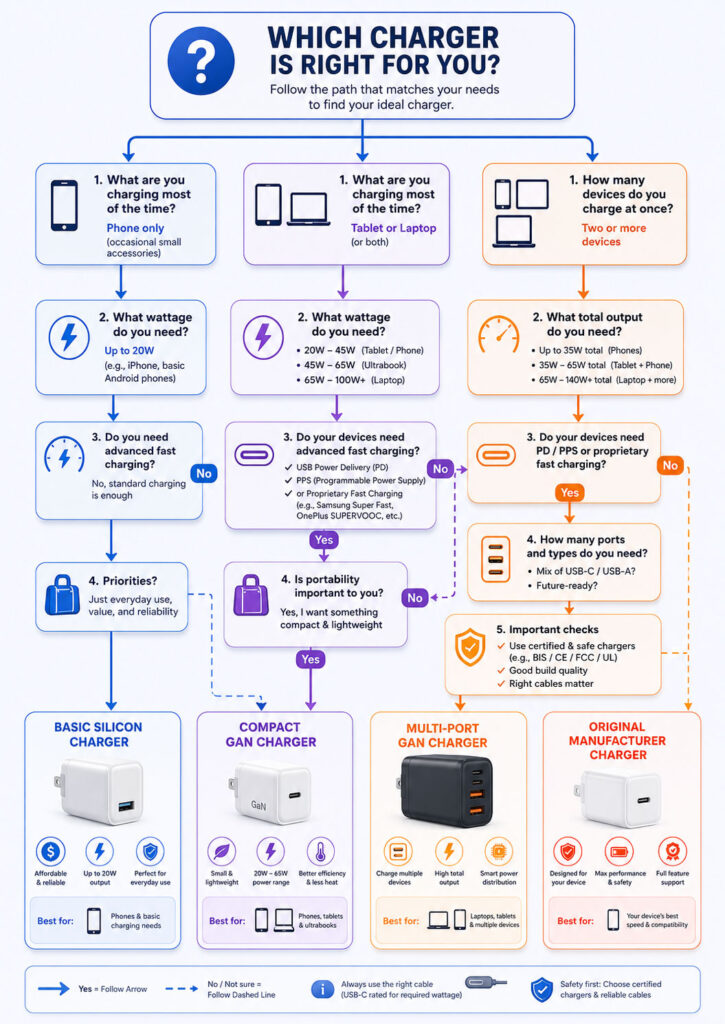
How to Choose a GaN Charger
Begin with the devices you actually need to charge. Record each device’s connector, recommended wattage, supported protocol, and whether it must charge at the same time as another device.
Next, choose the charger’s total output, number of ports, per-port power, cable requirements, and physical size.
Finally, review safety registration, manufacturer reputation, warranty, seller authenticity, input-voltage range, and replacement support.
Therefore, a charger buying decision should follow verified requirements rather than the largest wattage or smallest enclosure.
Step 1: List Your Devices
Create a simple list:
| Device | Charging Port | Recommended Power | Required Protocol |
|---|---|---|---|
| Phone | USB-C or another supported connector | Check manufacturer specification | USB PD, PPS, or device-specific protocol |
| Tablet | Usually USB-C on newer models | Check manufacturer specification | Often USB PD |
| Laptop | USB-C or proprietary input | Check original adapter | USB PD or manufacturer-specific system |
| Power bank | USB-C input | Check maximum input wattage | USB PD or another supported mode |
| Watch or earbuds | USB-C, USB-A, or proprietary cable | Usually low power | Basic USB charging may be sufficient |
Step 2: Check the Original Charger
The original charger provides a useful reference for:
- Maximum output wattage.
- Supported voltage and current profiles.
- Connector type.
- Required cable.
- Manufacturer-specific charging requirements.
However, do not copy only the largest wattage number. Instead, read the individual output combinations printed on the charger or listed in the official specifications.
Step 3: Choose the Required Total Wattage
For one device, select a charger that supports the device’s recommended wattage and protocol.
For several devices, estimate the simultaneous requirement.
For example:
Laptop: 65W
Phone: 25W
Earbuds: 5W
Combined target: approximately 95W
A 100W or higher multi-port charger may be suitable. However, its power-distribution table must provide enough output to the laptop and phone simultaneously.
Step 4: Check Every Port
Do not assume identical capability across ports.
For example, a charger may have:
- One primary 100W USB-C port.
- One secondary 30W USB-C port.
- One 18W USB-A port.
Another charger may provide 65W from either USB-C port individually. However, it may divide output differently when both ports are active.
Therefore, review the port labels and printed power table carefully.
Step 5: Check Charging Protocols
Confirm whether you need:
- USB Power Delivery.
- USB PD PPS.
- Extended Power Range.
- A specific manufacturer’s fast-charging mode.
- Legacy USB-A compatibility.
A charger may advertise 100W while failing to provide one lower-wattage PPS profile required by a phone. Therefore, protocol compatibility remains as important as total wattage.
Step 6: Choose the Correct Cable
Check whether the charger includes a cable and whether that cable supports the expected power.
For higher-power USB-C charging, choose a clearly rated cable from a reputable manufacturer.
In addition, replace cables with damaged connectors, exposed wiring, loose plugs, or unusual heat.
A long cable may produce more voltage loss than a well-designed shorter cable, especially when carrying higher current. Therefore, cable quality and conductor size matter.
Step 7: Check Physical Design
Consider:
- Charger dimensions.
- Weight.
- Plug orientation.
- Port spacing.
- Whether it blocks nearby sockets.
- Whether the charger remains stable in a loose wall socket.
- Whether a detachable mains cable would suit a desk better.
- Whether folding pins are useful for travel.
A heavy multi-port adapter can place stress on a weak wall socket. Therefore, a short extension lead may provide better support.
Step 8: Verify Safety and Authenticity
Review the model number, manufacturer, seller, regulatory details, electrical ratings, and warranty.
For a charger sold in India, check the applicable registration information and verify it through the relevant official lookup when possible.
In addition, purchase from an authorised or reputable seller because counterfeit products can copy branding, certification symbols, and packaging.
Step 9: Check Warranty
A charger is a mains-powered product that may be used every day. Therefore, a meaningful warranty and accessible support provide value beyond the initial specifications.
Check:
- Warranty duration.
- Invoice requirements.
- Replacement process.
- Service availability in your region.
- Whether cables receive separate coverage.
Step 10: Avoid Paying for Unused Capacity
A 140W multi-port GaN charger may be unnecessary when you only charge one 20W phone.
Higher-wattage chargers can provide future flexibility. However, they also cost more and may be larger than a basic adapter.
Therefore, choose enough headroom for expected devices without buying capacity that has no practical use.
Which GaN Charger Wattage Should You Buy?
| Your Devices | Practical Starting Point |
|---|---|
| One phone | 20W to 45W with the correct protocol |
| Phone and earbuds | 30W to 45W with two suitable ports |
| Phone and tablet | 45W to 65W |
| USB-C laptop only | Match the laptop’s recommended wattage |
| Laptop and phone | 65W to 100W or more, depending on simultaneous output |
| Laptop, phone, and tablet | 100W to 140W or more, depending on devices |
| High-power laptop and several devices | 140W to 240W with compatible EPR equipment where required |
Use these values only as planning ranges. Ultimately, the device manufacturer’s specifications remain the primary reference.
When a 20W or 30W Charger Is Enough
A small charger can be sufficient when:
- You charge one phone.
- The phone’s maximum input is within that range.
- You do not need to charge a laptop.
- You are comfortable charging accessories separately.
- You already have a compatible cable.
At these lower power levels, GaN may provide only a limited practical size advantage because both GaN and silicon adapters can already be compact.
When a 45W or 65W GaN Charger Makes Sense
This range suits many users with a phone, tablet, lightweight laptop, handheld gaming device, or power bank.
For example, a 65W GaN charger can replace both a phone adapter and a compatible laptop charger while travelling.
However, review the output when two devices are connected. A 65W total charger may divide power into combinations such as 45W and 20W.
When a 100W GaN Charger Makes Sense
A 100W charger can support compatible laptops while leaving some capacity for a phone or accessory.
It is useful for:
- Business travel.
- Shared family charging.
- A laptop and phone desk setup.
- Large power banks.
- Tablets and mobile workstations.
However, confirm that the highest-output port can provide the expected wattage while other ports are active.
When a 140W or Higher Charger Makes Sense
Higher-power chargers suit selected laptops, multi-device workstations, and users replacing several large adapters.
At these levels, check:
- USB PD Extended Power Range support.
- Maximum output from one port.
- Compatible high-power USB-C cable.
- Laptop charging requirements.
- Sustained output and thermal behaviour.
- Power sharing across ports.
Moreover, some laptops use proprietary fast-charging methods even when they support lower-power USB-C charging.
Single Charger for Every Device
One multi-port charger can reduce clutter and make travel easier. However, one failure can also affect every device.
Therefore, consider keeping:
- A compact primary multi-port charger.
- A small backup phone charger.
- The original high-power laptop adapter when travelling for critical work.
A backup is particularly useful when the laptop requires a specific wattage or proprietary charger.
GaN Charger vs Normal Charger for Home Use
At home, size may matter less than port layout, cable length, reliability, and cost.
A normal silicon charger can remain a sensible choice for a fixed bedside phone cable or accessory charging station.
However, a multi-port GaN charger becomes useful when several devices share one desk, extension board, or charging location.
GaN Charger vs Normal Charger for Office Use
A 65W to 100W GaN charger can simplify a laptop-and-phone workstation.
In addition, it is usually easier to carry between home and office than a traditional laptop power brick.
However, check whether the charger provides enough power for docking stations, external monitors, and demanding laptop workloads.
A USB-C dock may consume part of the available power before passing the remainder to the laptop.
GaN Charger vs Normal Charger for Travel
GaN usually provides the clearest advantage for travel because higher power density reduces bag space and weight.
A multi-port model can replace several adapters. However, travellers should also verify:
- Input-voltage range.
- Destination plug type.
- Port distribution.
- Cable ratings.
- Airline or accommodation socket quality.
- Warranty support.
GaN Charger vs Normal Charger for Budget Buyers
A budget buyer should prioritise compatibility and safety before GaN branding.
A reliable silicon charger with the correct protocol can provide better value than an unknown GaN charger with exaggerated specifications.
Therefore, buy GaN when compactness, several ports, or high wattage provides a real benefit rather than simply because it is newer technology.
Is a GaN Charger Worth the Extra Cost?
A GaN charger is usually worth considering when:
- You charge a USB-C laptop.
- You carry several adapters.
- You travel frequently.
- You need several high-output ports.
- You value a smaller and lighter charger.
- You expect to use it with future USB-C devices.
However, the extra cost may not be worthwhile when you charge only one low-power phone and already own a safe compatible adapter.
Should You Replace a Working Charger?
Do not replace a safe and compatible charger solely because it uses silicon.
Instead, consider replacing it when:
- It does not support the required charging protocol.
- Its wattage is insufficient for a new device.
- You need more ports.
- It is physically damaged.
- It becomes unstable or unusually hot.
- You need a smaller travel solution.
- The manufacturer no longer supports or recognises the product.
Can You Leave a GaN Charger Plugged In?
A quality charger normally consumes a small amount of standby power and is designed for normal plugged-in use.
However, unplug it when:
- The socket is loose or damaged.
- The charger shows physical damage.
- There is a burning smell or abnormal noise.
- The area is exposed to water.
- The charger is covered or cannot release heat.
- You are using unreliable temporary wiring.
In addition, follow the manufacturer’s instructions and local electrical-safety practices.
Is It Normal for a GaN Charger to Get Warm?
Yes, a charger can become warm during high-power operation.
Compact adapters may feel warmer because heat reaches the enclosure across a smaller surface.
However, normal warmth differs from severe heat accompanied by smell, discolouration, repeated shutdown, deformation, or painful connector temperature.
Therefore, stop using a charger when its behaviour changes unexpectedly.
Can GaN Chargers Damage a Phone?
A properly designed compatible charger should negotiate an output supported by the phone.
Risk comes from counterfeit products, poor design, defective components, damaged cables, incorrect protocols, unsafe mains power, or physical wear rather than GaN itself.
Therefore, use reputable products and inspect cables and connectors regularly.
Are GaN Chargers Safe for Overnight Charging?
A reputable charger and device should manage normal charging automatically. As the battery fills, the device reduces or stops battery charging according to its battery-management system.
Nevertheless, use an undamaged charger on a stable, ventilated surface. In addition, do not place it under pillows, bedding, clothing, or flammable materials.
Do GaN Chargers Make Noise?
Some chargers may produce a faint high-frequency sound under particular loads. This sound is often associated with vibration in magnetic or electrical components rather than the GaN material itself.
However, a loud buzz, crackling, unstable output, or new noise can indicate a problem.
Therefore, disconnect the charger and contact the manufacturer or seller when the noise appears abnormal.
Are All GaN Chargers USB-C?
No. GaN describes internal power technology, so a GaN charger can include USB-C, USB-A, a fixed cable, or another connector.
However, GaN is commonly used in modern USB-C chargers because compact high-power designs benefit from its power density.
Does a GaN Charger Need a Special Cable?
GaN itself does not require a special cable. Instead, the required cable depends on output wattage, connector, USB Power Delivery level, and device.
Higher-power charging requires a cable rated for that power. Similarly, proprietary charging systems may require a compatible cable.
Can a 100W GaN Charger Charge a 20W Phone?
Yes, when the charger and phone support a compatible charging mode.
The phone requests a supported amount rather than receiving the charger’s complete 100W capacity.
Therefore, charging speed remains limited by the phone’s accepted input and current charging conditions.
Why Is My GaN Charger Charging Slowly?
Possible reasons include:
- The device does not support the charger’s fastest protocol.
- The cable limits power.
- The device is connected to a lower-power port.
- Another port is sharing the charger’s capacity.
- The battery is nearly full.
- The battery or charger is warm.
- The device is consuming power while charging.
- The charger or cable is damaged.
Why Does Charging Restart When I Connect Another Device?
A multi-port charger may renegotiate and redistribute power when another device is connected or removed.
As a result, output may briefly stop and restart.
Therefore, check the product documentation when you need stable, uninterrupted power for a dock, drive, router, or other sensitive equipment.
Is GaN Better Than Silicon?
GaN offers important power-density and switching advantages, especially for compact high-wattage chargers.
Silicon, however, remains suitable for many chargers and may provide a lower price.
Therefore, complete product quality matters more than declaring one material universally better.
Do GaN Chargers Last Longer?
GaN technology alone does not determine charger lifespan.
Longevity depends on:
- Capacitor quality.
- Thermal design.
- Component ratings.
- Manufacturing consistency.
- Operating temperature.
- Electrical input quality.
- Mechanical wear.
- Usage pattern.
Consequently, a quality charger from either category can last for years, while a poorly made product may fail early.
Is a GaN Charger Better for the Environment?
A smaller charger can use fewer materials, while higher efficiency can reduce energy lost during conversion.
In addition, one multi-port charger may replace several separate adapters.
However, manufacturing, shipping, lifespan, repairability, packaging, and electronic waste also affect environmental impact.
Therefore, continuing to use a safe existing charger may be more responsible than replacing it unnecessarily.
GaN Charger Buying Checklist
- List every device you need to charge.
- Check each device’s recommended wattage.
- Confirm USB PD, PPS, EPR, or proprietary protocol requirements.
- Check maximum output from every port.
- Review multi-port power distribution.
- Choose a cable rated for the required power.
- Check whether high-speed data is also required.
- Verify input-voltage support for travel.
- Review applicable registration details in India.
- Buy from a reputable manufacturer and seller.
- Check warranty and local support.
- Inspect plug design and port spacing.
- Avoid unrealistic wattage claims and unknown brands.
- Keep a backup charger for critical travel or work.
Common GaN Charger Buying Mistakes
- Assuming GaN always means faster charging.
- Buying by total wattage without checking per-port output.
- Ignoring PPS or manufacturer-specific protocols.
- Using an under-rated cable.
- Assuming every USB-C cable supports high-speed data.
- Buying more wattage than any device can use.
- Choosing the smallest charger without reviewing heat and safety.
- Using counterfeit or unverified products.
- Ignoring warranty and seller authenticity.
- Assuming every port can deliver maximum power simultaneously.
- Replacing a safe working charger without a practical reason.
- Using damaged cables or loose wall sockets.
Which Charger Is Better for One Phone?
A reliable normal charger is sufficient when it supports the phone’s maximum charging protocol and power.
A small GaN charger may still be attractive for travel. However, it may not provide a meaningful speed advantage.
Which Charger Is Better for a Phone and Laptop?
A multi-port GaN charger commonly provides the better combination of size, wattage, and portability.
However, choose enough simultaneous output for the laptop and phone, and verify the power provided by each port combination.
Which Charger Is Better for Several Family Devices?
A multi-port charger can reduce the number of wall adapters.
However, confirm total power, port allocation, and protocol compatibility across the family’s devices.
In some cases, several separate chargers remain more practical because devices charge in different rooms.
Which Charger Is Better for Travel?
A GaN charger usually provides the strongest travel advantage because it can offer laptop-level power and multiple ports from a compact enclosure.
Nevertheless, check international input voltage, socket adapters, cables, and every device’s requirements before travelling.
Final Verdict: GaN Charger vs Normal Charger
The GaN Charger vs Normal Charger comparison does not produce one winner for every user. GaN technology enables compact, lightweight, and power-dense charger designs. Therefore, it is especially useful for laptops, multi-device charging, travel, and users who want to replace several adapters with one unit.
A normal silicon charger remains a practical choice for basic phone charging, fixed home use, limited budgets, and devices that do not need high wattage. In fact, it can charge just as quickly as a GaN charger when both products support the same output profile and protocol.
Choose a GaN charger when its smaller size, higher wattage, or multi-port design solves a real problem. By contrast, choose a normal charger when it already meets your device’s requirements safely and reliably.
Finally, do not buy by semiconductor material alone. Check wattage, USB PD, PPS, port distribution, cable rating, input voltage, safety registration, warranty, and manufacturer reputation. The best charger is the one that safely provides the correct power to all your devices without unnecessary cost or complexity.

AboutTPJ Technical Team
The Project Jugaad Technical Team creates practical, easy-to-follow content on software development, web technologies, artificial intelligence, cybersecurity, cloud platforms, and digital tools. Our articles are informed by more than 13 years of hands-on experience with .NET, Angular, SQL Server, AWS, WordPress, Linux hosting, application deployment, and real-world troubleshooting. Each guide is researched, reviewed, and updated to provide accurate, useful, and actionable information for developers, businesses, and everyday technology users.