Technology Guide
The Matter vs Thread vs Zigbee comparison can be confusing because these technologies do not perform exactly the same job. Matter defines a common language that compatible smart-home devices and platforms can use. Thread, meanwhile, provides a low-power, IP-based mesh network, whereas Zigbee combines networking and device communication within a mature smart-device ecosystem.
A Matter device may communicate through Thread, Wi-Fi, or Ethernet. Therefore, Matter and Thread often work together rather than compete directly. Zigbee devices usually operate on a separate mesh and may connect to Matter ecosystems through a compatible bridge.
The best option depends on the products you already own, the smart-home platform you use, whether battery life matters, and how much local control you need. In practice, a modern home may use all three technologies without requiring the user to select only one.
Matter vs Thread vs Zigbee: Quick Answer
- Prefer Matter-certified products when cross-platform compatibility and easier ecosystem sharing are important.
- Select Matter over Thread for compatible low-power sensors, locks, switches, and other devices that benefit from mesh networking.
- Use Matter over Wi-Fi for powered products that need greater bandwidth or already connect directly to the home network.
- Keep Zigbee when you already have a reliable Zigbee hub and want access to its large, mature device ecosystem.
- Add a Matter bridge when a supported hub can expose existing Zigbee devices to Matter platforms.
- Build a hybrid setup when different products benefit from different networking technologies.
In summary, Matter mainly improves interoperability. Meanwhile, Thread provides low-power IP networking, whereas Zigbee delivers a complete and established wireless smart-device solution. Therefore, the right choice depends on the role each technology must perform.
Why Smart-Home Standards Are Confusing
Smart-home products depend on several technical layers. One layer controls how radio signals travel, another manages networking, and an application layer defines what a device means when it reports temperature, changes brightness, or locks a door.
However, marketing often describes Matter, Thread, Zigbee, Wi-Fi, and Bluetooth as competing protocols. In reality, they may serve different layers of the same system.
For example, a Matter light may use Wi-Fi for networking, whereas a Matter contact sensor may use Thread. Both products speak Matter at the application level even though their underlying network connections differ.
Zigbee traditionally provides mesh networking together with a standardised device language. Consequently, it covers more layers within one technology stack.
Understanding the Smart-Home Technology Layers
| Layer | Main Purpose | Examples |
|---|---|---|
| Radio or physical connection | Moves signals between devices | IEEE 802.15.4, Wi-Fi radio, Ethernet cable |
| Network layer | Addresses and routes information | Thread, Wi-Fi, Ethernet |
| Application layer | Defines device behaviour and commands | Matter, Zigbee application models |
| Smart-home platform | Provides apps, automations, voice control, and account services | The user’s chosen home-control ecosystem |
A product can therefore support Matter and Thread at the same time. Matter defines the smart-home communication, while Thread provides the network carrying it.
What Is Matter?
Matter is an IP-based connectivity standard for compatible smart-home and Internet of Things devices. It defines a common application language that allows certified devices and control platforms to communicate more consistently.
The standard is developed through the Connectivity Standards Alliance with participation from device manufacturers, platform providers, semiconductor companies, and other technology organisations.
Its goal is to reduce dependence on separate proprietary integrations for every combination of device and smart-home platform.
Matter can operate over:
- Thread.
- Wi-Fi.
- Ethernet.
Bluetooth Low Energy has commonly supported initial setup. However, newer Matter releases provide additional commissioning options.
Matter Is Not a Wireless Radio
Matter does not define one new radio technology. Instead, it operates through supported IP-based networks.
For example, two Matter devices may use different underlying connections:
- A smart bulb may use Wi-Fi.
- A door sensor may use Thread.
- A controller or television may use Ethernet.
Nevertheless, the Matter application model allows these products to participate within compatible smart-home platforms even though their network transports differ.
How Matter Works
- The user selects a Matter-compatible product.
- A supported application or controller begins the setup process.
- The device securely joins the appropriate Wi-Fi, Thread, or Ethernet network.
- The product joins a Matter environment managed by the selected platform.
- The platform discovers the device’s supported capabilities.
- The user assigns the product to a room and creates automations.
- The device can be shared with other compatible platforms when supported and authorised.
The exact setup interface depends on the device, operating system, and smart-home ecosystem.
What Is Matter Multi-Admin?
Multi-admin allows a Matter device to connect with more than one compatible smart-home platform or control application.
For instance, members of one household may prefer different apps or voice assistants. With supported multi-admin functionality, the same product can appear in more than one authorised ecosystem.
However, users decide which platforms receive access. The feature does not allow every application to control the device automatically.
Platform support and available features can also differ. One ecosystem may expose basic on-and-off control, whereas a manufacturer’s own application provides additional configuration.
Does Matter Work Locally?
Matter is designed for local IP-based communication between compatible devices and controllers. Therefore, many core commands can continue working across the local network without sending every action through a cloud server.
However, a complete smart-home experience may still use the internet for:
- Remote control while the user is away.
- Voice-assistant processing.
- Account synchronisation.
- Notifications.
- Firmware downloads.
- Energy or usage history.
- Manufacturer-specific features.
Consequently, buyers should check which important functions remain available during an internet outage.
Current Matter Standard
As of June 2026, Matter 1.6 is the latest major specification release. It was announced on June 17, 2026.
In particular, the release focuses on more flexible setup, multi-ecosystem administration, and context-aware device control. In addition, it introduces full commissioning through supported NFC-based workflows.
Meanwhile, earlier versions expanded support to appliances, energy management, cameras, doorbells, closures, and environmental sensors.
However, a new specification does not mean that every existing device or smart-home platform immediately supports each new capability. Therefore, manufacturers and ecosystems still need time to implement, test, certify, and distribute updates.
What Is Thread?
Thread is a secure, low-power, IPv6-based wireless mesh networking protocol designed for connected devices.
It uses low-power IEEE 802.15.4 radio technology and allows suitable mains-powered devices to relay network traffic for nearby products.
Because Thread is IP-based, devices can participate more naturally in IP networks without requiring proprietary protocol translation for every message.
However, Thread does not define the complete user-facing smart-home language by itself. Instead, an application protocol such as Matter runs over the Thread network.
Thread Is a Network, Not a Smart-Home Platform
Thread does not provide a consumer app, voice assistant, automation interface, or universal device-control language.
Instead, it supplies the networking foundation. Matter can then use that foundation to define how a light, lock, thermostat, sensor, or another supported product behaves.
Consequently, a product label may say:
- Matter over Thread.
- Thread-enabled Matter device.
- Matter-compatible Thread accessory.
Each phrase describes a device that speaks Matter through a Thread network.
How a Thread Mesh Network Works
A Thread network can include several device roles:
- Router-capable devices: Relay traffic and help extend the mesh.
- End devices: Communicate through a parent device without routing traffic for others.
- Sleepy end devices: Remain inactive for long periods to conserve battery power.
- Thread Border Routers: Connect the Thread mesh to the home’s Wi-Fi or Ethernet IP network.
Suitable powered Thread devices can create alternative network paths. Therefore, if one routing device becomes unavailable, the mesh can reorganise through another path when coverage allows.
What Is a Thread Border Router?
A Thread Border Router connects Thread devices to the wider home IP network. As a result, phones, controllers, and other IP-connected systems can communicate with products on the Thread mesh.
Border Router functionality may be built into:
- Smart speakers.
- Compatible smart displays.
- Selected Wi-Fi routers.
- Home-automation hubs.
- Televisions or streaming devices.
- Other always-powered network products.
A home can contain more than one Border Router. In fact, several suitable Border Routers can improve coverage and provide alternative network paths. Consequently, one device failure does not always disconnect the complete Thread network.
Does Thread Need a Hub?
Thread devices need access to a Thread Border Router when they must communicate with products on the home’s Wi-Fi or Ethernet network.
People often call the product containing this Border Router a hub. However, a Thread Border Router and a traditional proprietary smart-home hub do not perform exactly the same role.
A Border Router forwards IP traffic between networks. Therefore, it does not need to translate Matter into a proprietary language.
What Is Zigbee?
Zigbee is a standards-based, low-power wireless mesh solution used in smart homes, commercial buildings, energy systems, and industrial applications.
Unlike Thread, Zigbee provides a more complete stack that includes mesh networking and standardised application behaviour for connected products.
Common Zigbee devices include:
- Smart bulbs.
- Motion sensors.
- Contact sensors.
- Buttons and remote controls.
- Smart plugs.
- Thermostats.
- Locks.
- Leak detectors.
- Energy-monitoring equipment.
Zigbee has a large existing product ecosystem. Therefore, it remains widely used alongside newer Matter devices.
How a Zigbee Mesh Network Works
A Zigbee network commonly contains:
- Coordinator: Forms and manages the network.
- Routers: Relay messages and extend the mesh.
- End devices: Connect through routers or the coordinator.
- Sleepy end devices: Conserve power by remaining inactive between communications.
Mains-powered bulbs, plugs, and similar products often act as routers. Battery-operated sensors, by contrast, commonly behave as sleepy end devices and do not extend the mesh.
Does Zigbee Need a Hub?
Consumer Zigbee devices normally join a network created by a coordinator. That coordinator is commonly built into a smart-home hub, gateway, or another platform device.
The hub may provide:
- Device setup.
- Automations.
- App control.
- Cloud connectivity.
- Voice-assistant integration.
- Firmware updates.
- Bridging to Matter or other systems.
However, a Zigbee product should be checked against the selected hub’s compatibility list because certification does not guarantee that every platform exposes every device feature.
Current Zigbee Standard
Zigbee 4.0 was announced in November 2025. It continues Zigbee’s established mesh ecosystem while adding updated security, onboarding, scalability, and range-related capabilities.
Importantly, the release is designed to maintain backward compatibility with Zigbee 3.0 and Zigbee Smart Energy devices.
In addition, Zigbee 4.0 expands support for sub-GHz operation in selected regions through capabilities introduced under the Suzi name.
However, individual devices and hubs may continue using earlier Zigbee versions. Therefore, users should verify actual compatibility instead of relying only on the latest specification number.
Matter vs Thread vs Zigbee Comparison
| Area | Matter | Thread | Zigbee |
|---|---|---|---|
| Primary purpose | Common device and application language | Low-power IP mesh networking | Full-stack low-power smart-device solution |
| Technology layer | Application layer | Network layer | Network and application layers |
| Network transport | Uses Thread, Wi-Fi, or Ethernet | IEEE 802.15.4-based IPv6 mesh | Primarily IEEE 802.15.4 mesh |
| IP-based | Yes | Yes | Not natively in the same way |
| Mesh networking | Depends on underlying network | Yes | Yes |
| Low-power device support | Through Thread for suitable products | Core strength | Core strength |
| Required infrastructure | Matter Controller and suitable network | Thread Border Router for wider IP connectivity | Zigbee coordinator or hub |
| Multi-platform control | Core interoperability objective | Depends on application protocol | Depends on hub and integrations |
| Existing ecosystem | Growing across many platforms | Growing with Matter adoption | Large and mature |
| Best suited for | Cross-platform smart-home compatibility | Low-power IP-connected devices | Mature hub-based sensors, lights, and automation |
Matter over Thread vs Zigbee
Matter over Thread and Zigbee can both support low-power mesh devices. However, their network and application architectures differ.
Matter over Thread uses IPv6-based Thread networking and the Matter application model. Zigbee, by comparison, uses the Zigbee networking stack and Zigbee application definitions.
A Thread device cannot join a Zigbee network merely because both commonly use IEEE 802.15.4 radio technology. Similarly, an existing Zigbee device does not become a native Matter-over-Thread product through a simple setting change.
Instead, a compatible Matter bridge can translate supported Zigbee devices into Matter representations for other platforms.
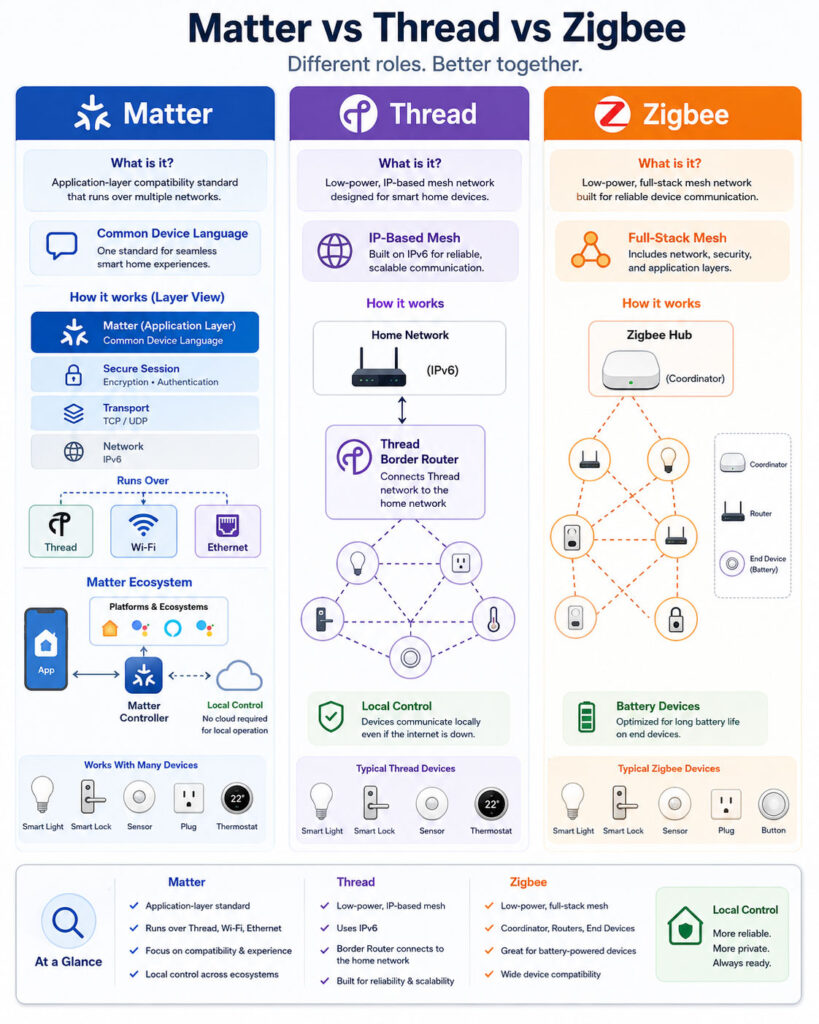
Matter Controller vs Thread Border Router
A Matter Controller and a Thread Border Router perform different responsibilities, although one physical product may include both.
First, a Matter Controller manages Matter devices within a smart-home ecosystem. In other words, it understands device types, commands, permissions, rooms, and automations.
By contrast, a Thread Border Router connects the Thread mesh with the wider home IP network. It forwards network traffic but does not define the smart-home behaviour of every product.
Because a smart speaker or hub may contain both roles, product descriptions can make them appear identical. Nevertheless, their technical responsibilities remain different.
Matter Commissioner
A Matter Commissioner securely adds a new device to a Matter environment.
Commissioning can be handled by:
- Compatible mobile applications.
- Smartphone operating-system services.
- Supported smart-home hubs.
- Selected smart speakers or displays.
- Other authorised setup tools.
Afterwards, one or more Matter Controllers can manage the device according to the user’s permissions. Therefore, commissioning and everyday control do not always need to occur through the same product.
Matter Bridge vs Thread Border Router
A Matter Bridge translates between Matter and another smart-device protocol. A Thread Border Router, however, does not perform that translation.
For example:
- A Zigbee-to-Matter bridge represents supported Zigbee lights and sensors as Matter devices.
- Thread Border Router functionality carries IP traffic between the Thread mesh and Wi-Fi or Ethernet.
One hub may contain a Zigbee coordinator, Matter Controller, Matter Bridge, and Thread Border Router. Nevertheless, those remain separate technical roles. Therefore, users should check which specific capabilities a hub actually provides.
Can Existing Zigbee Devices Work with Matter?
Existing Zigbee devices can participate in a Matter ecosystem when a compatible Zigbee hub provides Matter-bridge functionality for those device types.
The bridge creates a Matter representation of each supported Zigbee product. Consequently, a Matter platform can control the represented device without joining it directly to Thread or Wi-Fi.
However, bridging has limitations:
- The hub must support Matter bridging.
- The specific Zigbee device type must be exposed by the bridge.
- Some manufacturer-specific features may not appear through Matter.
- The Zigbee device remains dependent on its original mesh.
- The bridge remains part of the communication path.
Therefore, a bridge improves interoperability but does not convert the device’s radio or firmware into native Matter over Thread.
Do You Need to Replace Zigbee Devices?
No. A reliable Zigbee system can continue providing useful smart-home automation.
Replacement may be unnecessary when:
- The devices respond reliably.
- The existing hub remains supported.
- Automations work locally.
- The required replacement batteries remain available.
- Security updates continue.
- Matter bridging or platform integration meets your needs.
Consequently, replace products when they become unsupported, unreliable, insecure, or incompatible with essential features rather than simply because Matter is newer.
Matter over Wi-Fi vs Matter over Thread
| Area | Matter over Wi-Fi | Matter over Thread |
|---|---|---|
| Common device type | Powered devices with higher data needs | Low-power sensors, locks, switches, and controls |
| Network connection | Directly through the Wi-Fi network | Through the Thread mesh and Border Router |
| Battery suitability | Usually less efficient for small sleepy devices | Designed for low-power operation |
| Mesh behaviour | Depends on the Wi-Fi network | Self-healing mesh through eligible routing devices |
| Infrastructure | Compatible Wi-Fi access point and Matter Controller | Thread Border Router and Matter Controller |
| Bandwidth | Higher | Designed for smaller IoT messages |
| Common examples | Cameras, appliances, plugs, and powered devices | Sensors, locks, buttons, and low-power accessories |
The correct transport depends on the product. Matter, however, provides the common device language across both network types.
Matter vs Thread vs Zigbee for Local Control
All three technologies can contribute to local smart-home operation. However, the final behaviour depends on the ecosystem and product implementation.
For example, Matter supports local communication between compatible controllers and devices. Meanwhile, Thread provides local mesh networking, whereas Zigbee hubs can run local commands and automations.
Nevertheless, an application may still depend on cloud services for account login, remote access, advanced automations, historical data, voice processing, or manufacturer-specific settings.
Therefore, users should verify which features continue working when internet access is unavailable. In addition, essential automations should be tested before an actual outage occurs.
Internet Outage Behaviour
A well-designed local smart home should preserve essential functions during a temporary internet outage.
Possible locally available functions include:
- Turning lights on and off.
- Using physical switches and buttons.
- Running hub-based automations.
- Reading local sensor states.
- Controlling compatible devices from the home network.
However, remote control, cloud notifications, online voice processing, account synchronisation, and third-party web integrations may stop working.
Therefore, essential routines should not depend entirely on external cloud services. For example, safety-related lighting, heating control, or basic security automations should continue locally where possible.
Matter vs Thread vs Zigbee for Interoperability
Matter has the strongest explicit focus on interoperability across participating smart-home platforms.
Meanwhile, Thread provides interoperable IP networking. However, application compatibility still depends on the protocol running over that network.
Zigbee provides certified device definitions and a large ecosystem. Nevertheless, practical compatibility can depend on the hub, device profile, and manufacturer-specific features.
Therefore, certification should be checked together with platform support. In addition, buyers should confirm whether advanced device features appear in their preferred application.
Certification vs Platform Support
A certified product demonstrates compliance with the relevant standard and testing programme. However, certification does not guarantee identical behaviour in every platform.
A smart-home platform may:
- Support only selected device categories.
- Expose only common features.
- Require a particular hub or controller.
- Add support through a future software update.
- Restrict sensitive actions such as remote unlocking.
Consequently, review both the manufacturer’s compatibility list and the selected ecosystem’s supported-device documentation.
Matter Multi-Admin Limitations
Multi-admin can make one Matter device available to more than one platform. However, users may still notice differences in:
- Room and device names.
- Automation capabilities.
- Energy information.
- Firmware controls.
- Historical data.
- Manufacturer-specific settings.
- Notifications.
- User permissions.
Matter standardises common device behaviour, whereas platforms and manufacturers can continue offering additional features.
Therefore, sharing a device across two ecosystems does not guarantee that both platforms will display the same settings or automation options.
Matter vs Thread vs Zigbee for Mesh Networking
Thread and Zigbee both use mesh networking for suitable devices. Therefore, powered router-capable products can relay messages and create alternative communication paths.
Matter itself does not always create a mesh. For instance, a Matter-over-Thread product uses Thread’s mesh, whereas a Matter-over-Wi-Fi device relies on the home Wi-Fi network.
Furthermore, mesh quality depends on device placement, building materials, radio interference, firmware, network size, and the availability of powered routing products.
Consequently, adding many battery-powered sensors does not necessarily strengthen the network. Instead, a reliable mesh requires well-positioned products that can remain powered and route traffic.
Which Devices Extend the Mesh?
Battery-powered sensors normally conserve energy by sleeping. Therefore, they usually do not route traffic for other devices.
Mains-powered products are more likely to extend a Thread or Zigbee mesh. Examples may include:
- Smart plugs.
- Hardwired switches.
- Powered light bulbs.
- Always-powered controllers.
- Dedicated routers or repeaters.
However, device roles vary. Consequently, verify the manufacturer’s documentation instead of assuming every powered product acts as a router.
Range and Coverage
Thread and common Zigbee products often use the 2.4 GHz band. Their individual range depends on antenna design, transmit power, walls, interference, and receiver quality.
Mesh networking extends coverage by allowing messages to travel through intermediate routing devices.
Therefore, a large house may benefit from:
- Several well-positioned powered mesh devices.
- More than one Thread Border Router.
- A centrally positioned Zigbee coordinator.
- Careful Wi-Fi channel planning.
- Avoiding hubs enclosed inside cabinets.
However, adding many battery sensors without powered routers does not necessarily strengthen the mesh.
2.4 GHz Interference
Wi-Fi, Thread, Zigbee, Bluetooth, and other devices may operate in or near the 2.4 GHz spectrum.
As a result, interference can cause:
- Delayed commands.
- Devices appearing temporarily offline.
- Failed setup.
- Reduced effective range.
- Battery drain caused by repeated communication attempts.
Therefore, place hubs and routers away from dense electrical equipment, metal enclosures, and powerful Wi-Fi access points where practical.
Advanced users can also review Wi-Fi and mesh channel planning. However, changing an established Zigbee channel may require devices to reconnect.
Matter vs Thread vs Zigbee for Battery Life
Thread and Zigbee are both designed to support low-power devices that sleep between communications.
Actual battery life depends on:
- Device reporting frequency.
- Wireless signal quality.
- Sensor type.
- Battery chemistry and capacity.
- Temperature.
- Firmware.
- How often the user operates the device.
- Retries caused by weak network coverage.
Matter over Thread is therefore well suited to battery-powered products, whereas Matter over Wi-Fi is more common for powered devices.
Battery Reporting
A device may report battery percentage, voltage, or a low-battery warning. However, these estimates are not always precise.
Cold temperatures and certain battery chemistries can cause sudden changes in the reported percentage.
Therefore, keep suitable replacement batteries available for locks, leak sensors, smoke-related equipment, and other important devices.
Matter vs Thread vs Zigbee for Speed
All three technologies can respond quickly enough for typical lighting, sensor, switch, lock, and thermostat commands when the network is healthy.
Response time depends on:
- Whether control remains local.
- Mesh path quality.
- Hub and controller performance.
- Device sleep behaviour.
- Automation processing.
- Cloud dependencies.
- Radio interference.
Wi-Fi provides greater bandwidth. However, higher bandwidth does not necessarily make a simple light command visibly faster.
Matter vs Thread vs Zigbee for Security
Each technology includes security mechanisms. Nevertheless, overall safety also depends on implementation, firmware updates, account protection, and network configuration.
For example, Matter includes secure commissioning, encrypted communication, device identity, and certification requirements.
Meanwhile, Thread protects network communication using industry-standard cryptography, whereas Zigbee provides security at the network and application layers.
However, protocol security cannot correct weak passwords, abandoned devices, unsafe cloud accounts, or unsupported firmware.
Therefore, users should buy authentic products, install updates, protect accounts with strong authentication, remove unused devices, and replace unsupported hubs. In addition, the home router and Wi-Fi network should remain properly secured.
Device Attestation
Matter uses device attestation during setup to help a controller verify information about the product joining the ecosystem.
However, attestation is only one part of security. It does not guarantee that a product contains no software vulnerabilities or that every associated cloud service is private.
Therefore, review the manufacturer’s update policy, privacy practices, support period, and vulnerability-response process.
Privacy Considerations
A locally controlled sensor can still send information to a manufacturer’s cloud service when its application or advanced feature requires it.
Therefore, review whether the product collects:
- Camera or microphone data.
- Occupancy history.
- Door-lock activity.
- Energy usage.
- Device identifiers.
- Account details.
- Automation behaviour.
- Location information.
Matter interoperability does not replace the privacy policy of the manufacturer or smart-home platform.
Matter vs Thread vs Zigbee Device Use Cases
| Device or Requirement | Commonly Suitable Choice | Reason |
|---|---|---|
| Cross-platform smart bulb | Matter over Wi-Fi or Thread | Common Matter control across supported ecosystems |
| Battery contact sensor | Matter over Thread or Zigbee | Low-power mesh communication |
| Existing smart-light system | Zigbee with optional Matter bridge | Preserves the established device ecosystem |
| Smart lock | Matter over Thread or supported Zigbee | Low-power operation and local communication |
| Camera or video doorbell | Matter-capable Wi-Fi or Ethernet product | Higher bandwidth requirements |
| Leak detector | Matter over Thread or Zigbee | Battery-friendly sensor networking |
| Smart plug | Any suitable certified option | Powered device can also strengthen a mesh |
| Large existing Zigbee installation | Continue Zigbee and add bridging where useful | Avoids unnecessary device replacement |
| New multi-platform home | Matter-certified products | Improved ecosystem choice |
| Low-power new installation | Matter over Thread | IP-based mesh with Matter interoperability |
Matter vs Thread vs Zigbee for Cost
Product cost depends on the brand, features, certification, sensors, build quality, and required infrastructure.
A Matter-over-Thread device may require a compatible Border Router and Matter Controller. A Zigbee product, meanwhile, commonly requires a suitable hub or coordinator.
However, the required infrastructure may already exist inside a smart speaker, router, display, or home-automation hub.
Therefore, calculate the complete setup cost instead of comparing only one bulb or sensor.
Total Smart-Home Cost
Include:
- Devices.
- Hubs and controllers.
- Thread Border Routers.
- Bridges.
- Replacement batteries.
- Cloud subscriptions.
- Installation.
- Network improvements.
- Future replacement of unsupported products.
Consequently, a slightly more expensive product with long-term updates and local control may provide better value than a cheaper device with a short support period.
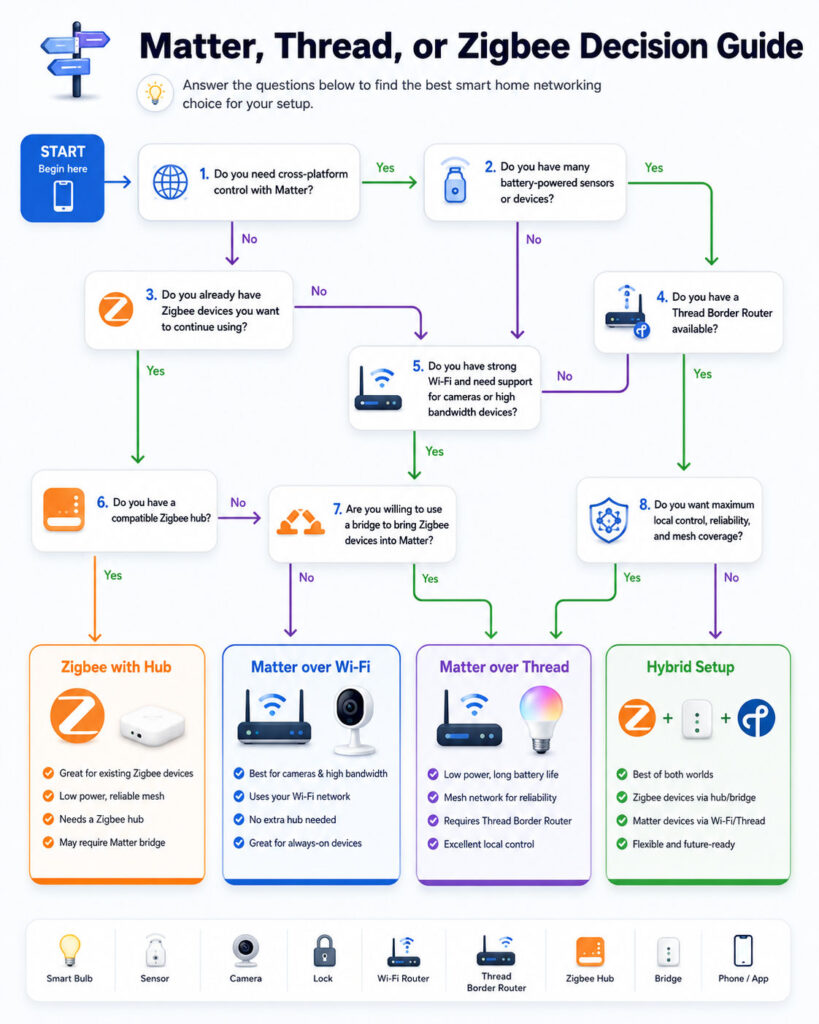
How to Choose Between Matter, Thread, and Zigbee
Begin with the smart-home platform and devices you already use. Replacing a reliable installation may cost more than adding compatible bridges or controllers.
Next, identify whether the new product requires low power, high bandwidth, mesh coverage, local automation, or cross-platform control.
Finally, verify the exact infrastructure required. For example, a Matter-over-Thread sensor needs a Thread Border Router, whereas a Zigbee sensor needs a compatible coordinator or hub.
Choose Matter When Interoperability Matters
Matter is a strong starting point for a new smart home when household members use several compatible platforms or may change ecosystems later.
Potential benefits include:
- A more consistent setup approach.
- Common controls across participating ecosystems.
- Multi-admin platform sharing.
- Local IP-based communication.
- Reduced dependence on separate proprietary integrations.
- A recognised certification programme.
However, verify that the selected ecosystem supports the device category and features you require.
Choose Matter over Thread for Low-Power Devices
Matter over Thread is suitable for devices that send small amounts of information and need long battery life.
Common candidates include:
- Door and window sensors.
- Motion sensors.
- Temperature sensors.
- Smart locks.
- Buttons.
- Low-power switches.
- Leak detectors.
- Other compact accessories.
Therefore, confirm that your home contains an active Thread Border Router compatible with your preferred ecosystem.
Choose Matter over Wi-Fi for Powered Devices
Matter over Wi-Fi is practical for powered products already suited to the home Wi-Fi network.
Possible examples include:
- Smart plugs.
- Appliances.
- Cameras.
- Video doorbells.
- Televisions.
- Powered lighting products.
- Large energy-management devices.
However, consider Wi-Fi coverage, router capacity, security, and device-update support.
Choose Zigbee for a Mature Device Ecosystem
Zigbee remains a strong option when the selected hub supports the required devices and automations.
It can be particularly useful for:
- Large lighting systems.
- Affordable contact and motion sensors.
- Buttons and remote controls.
- Commercial automation.
- Energy-monitoring systems.
- Homes with an established Zigbee mesh.
Therefore, a mature Zigbee installation does not need replacement simply because Matter products are available.
Choose a Hybrid Smart Home
A hybrid smart home uses different technologies according to their strengths.
For example:
- Matter-over-Thread sensors provide cross-platform low-power operation.
- Matter-over-Wi-Fi supports powered appliances and cameras.
- Existing Zigbee lights continue through their current hub.
- A Matter bridge exposes supported Zigbee devices to additional platforms.
- Ethernet connects fixed controllers and media equipment.
As a result, the user may experience one combined control interface even though several networks operate behind it.
Step 1: Choose Your Primary Smart-Home Platform
Select the main application or ecosystem that will manage rooms, users, scenes, and automations.
Review:
- Phone and operating-system compatibility.
- Voice-control preferences.
- Local automation support.
- Remote access.
- Household user management.
- Supported device categories.
- Privacy settings.
- Export and migration options.
Matter improves device interoperability. However, it does not eliminate the need for a primary management platform.
Step 2: Check Existing Infrastructure
Identify which smart-home capabilities your current equipment already provides.
- Look for an available Matter Controller.
- Confirm whether commissioning support is included.
- Identify any active Thread Border Router.
- Review existing Zigbee coordinator functionality.
- Check for Matter-bridge support.
- Verify that the Wi-Fi network is compatible and reliable.
In many cases, one hub, router, smart speaker, or display provides several of these capabilities. Therefore, users may not need to purchase a separate device for every technical role.
Step 3: Read the Product Label Carefully
Do not assume that every Matter device uses Thread.
Instead, determine whether the product uses:
- Matter over Thread.
- Wi-Fi-based Matter connectivity.
- Ethernet-based Matter connectivity.
- A Zigbee network.
- Matter-bridge functionality.
- Thread Border Router functionality.
- Several integrated smart-home radios.
In addition, the label should identify the supported device category and any required hub. Therefore, review the setup requirements before completing the purchase.
Step 4: Verify Ecosystem Support
Check both the device manufacturer’s documentation and the smart-home platform’s compatibility information.
Confirm the following details:
- Support for the required device category.
- Availability of the features you need.
- Regional availability for setup and operation.
- Reliable remote-access functionality.
- Multi-admin support when required.
- Bridge support for existing devices.
- A documented firmware-update process.
However, basic compatibility does not guarantee that every advanced feature will appear. Therefore, compare the common Matter controls with the capabilities available through the manufacturer’s application.
Step 5: Separate Basic and Advanced Features
Matter may provide common controls, while the manufacturer’s application offers advanced configuration.
For example, a Matter platform may support:
- On and off.
- Brightness.
- Temperature adjustment.
- Lock status.
- Basic sensor readings.
The manufacturer’s application may additionally provide calibration, detailed energy history, firmware controls, effects, advanced schedules, or diagnostic information.
Step 6: Plan the Mesh Before Adding Sensors
Battery sensors do not normally strengthen a Thread or Zigbee mesh.
Therefore, install suitable powered routing devices throughout the home before placing battery sensors at distant locations.
Possible routing devices include compatible:
- Smart plugs.
- Hardwired switches.
- Powered bulbs.
- Border Routers.
- Dedicated repeaters.
In addition, avoid placing every routing device on one switch that is frequently turned off.
Step 7: Position Hubs and Border Routers Correctly
Place hubs and Border Routers in open areas instead of metal cabinets, closed electrical boxes, or crowded entertainment units.
A central location can improve coverage. Moreover, large or multi-floor homes may benefit from additional infrastructure.
Where practical, keep network equipment away from sources of strong electrical interference.
Step 8: Plan for Internet Failure
Test essential automations with the internet temporarily disconnected.
Confirm whether you can still:
- Operate lights.
- Use physical buttons.
- Unlock or lock doors locally.
- Run safety-related automations.
- Receive local sensor updates.
- Control heating or cooling.
Therefore, do not wait for an actual outage or emergency to discover cloud dependencies.
Step 9: Maintain Firmware and Accounts
Keep hubs, controllers, routers, bridges, and end devices updated.
Also:
- Enable strong account authentication.
- Remove former household users.
- Delete devices you no longer own.
- Review third-party integrations.
- Back up supported hub configurations.
- Replace products that no longer receive security support.
Example: Starting a New Smart Home
A user starting from zero may select a primary Matter-compatible platform with an integrated Thread Border Router.
The home can then use:
- Matter-over-Thread contact and motion sensors.
- Matter-over-Wi-Fi plugs and appliances.
- Ethernet-connected controllers.
- Additional Thread Border Routers for coverage.
As a result, this approach supports current interoperability goals while leaving room for future devices.
Example: Existing Zigbee Smart Home
A user with dozens of reliable Zigbee lights and sensors can keep the existing hub and mesh.
If the hub supports Matter bridging, selected devices may also appear in other Matter platforms.
New products can then be added through Zigbee, Matter over Thread, or Matter over Wi-Fi according to their requirements.
Therefore, this gradual approach avoids unnecessary replacement and electronic waste.
Example: Large Multi-Floor Home
A larger home may use several Thread Border Routers and powered Thread devices to improve coverage.
Meanwhile, an existing Zigbee hub can manage a separate mesh supported by powered plugs and lights across each floor.
The home network should also provide reliable Wi-Fi and Ethernet for controllers, cameras, and high-bandwidth products.
Consequently, one control application may combine the devices through Matter, bridges, and native integrations.
Example: Rental Home
A renter may prefer devices that do not require permanent electrical changes.
Suitable products can include:
- Smart plugs.
- Portable sensors.
- Battery-powered buttons.
- Replaceable bulbs.
- Standalone hubs.
A Matter-compatible setup can therefore make it easier to move products to another home or change the primary platform later.
Matter Setup Problems
If a Matter device does not join correctly, review the following areas:
- Update the phone and controller software.
- Factory-reset a device that was previously commissioned.
- Verify that the setup code belongs to the correct product.
- Enable the required Bluetooth, NFC, Wi-Fi, or Thread functionality.
- Keep the phone near the product during setup.
- Confirm that the Matter Controller supports the device category.
- Allow local-device communication through the home network.
- Remove the product from an old Matter environment when necessary.
Afterwards, restart the setup process through the intended primary ecosystem. However, repeated failures may indicate unsupported firmware, incorrect network configuration, or an incompatible controller.
Thread Device Problems
If a Thread device appears offline, check:
- An active Thread Border Router is available.
- The device has adequate mesh coverage.
- Powered routing products remain switched on.
- The battery is healthy.
- Border Routers and controllers use current software.
- Multiple disconnected Thread networks have not been created unintentionally.
After moving or restarting several products, allow the mesh time to reorganise.
Zigbee Device Problems
If a Zigbee device disconnects, check:
- The hub remains powered and online.
- The device battery is healthy.
- Powered mesh routers remain available.
- The device is within range during pairing.
- The hub supports the specific product.
- Wireless interference has increased.
- The device requires a factory reset before rejoining.
Therefore, do not remove several powered Zigbee routers simultaneously without considering the devices that depend on them.
Why a Smart Device Appears in One App but Not Another
A product may appear in one platform but remain unavailable in another for several reasons:
- Multi-admin sharing may not have been completed.
- Another platform may not support the device category.
- A Zigbee hub may lack Matter-bridge functionality.
- Bridge support may expose only selected features.
- The accounts may use different homes or locations.
- Outdated firmware may prevent correct discovery.
Therefore, first confirm that the device was deliberately shared with the second ecosystem. Next, verify platform and bridge compatibility before resetting the product.
Why a Matter Device Still Needs the Manufacturer App
Matter provides standardised common controls. However, a manufacturer may still use its application for:
- Firmware updates.
- Advanced configuration.
- Calibration.
- Detailed energy reports.
- Lighting effects.
- Device diagnostics.
- Warranty registration.
Therefore, check whether the manufacturer account remains optional after setup when minimising cloud dependence is important.
Common Matter Mistakes
- Assuming every Matter device uses Thread.
- Buying a Thread device without a Border Router.
- Expecting identical features in every ecosystem.
- Confusing a Matter Controller with a Thread Border Router.
- Relying on promised future features.
- Ignoring the manufacturer’s update policy.
- Assuming Matter removes every cloud dependency.
- Discarding reliable existing devices unnecessarily.
Common Thread Mistakes
- Treating Thread as a complete smart-home platform.
- Assuming battery sensors extend the mesh.
- Placing every Border Router in the same area.
- Turning off powered routing devices regularly.
- Creating fragmented Thread networks through incompatible setup paths.
- Assuming Thread and Zigbee devices can join the same mesh.
- Ignoring radio interference and physical obstructions.
Common Zigbee Mistakes
- Assuming every Zigbee device works fully with every hub.
- Buying sensors without enough powered routing devices.
- Removing the hub before planning migration.
- Expecting a Matter bridge to expose every Zigbee feature.
- Placing the coordinator beside a powerful Wi-Fi access point.
- Turning off smart bulbs that act as mesh routers.
- Replacing an established Zigbee network without a practical reason.
Matter, Thread, and Zigbee Buying Checklist
- Select the primary smart-home platform.
- List the hubs, bridges, and devices you already own.
- Identify available Matter Controller functionality.
- Confirm whether a Thread Border Router is active.
- Review bridging support for existing Zigbee devices.
- Determine the new product’s actual network transport.
- Verify certification and platform compatibility.
- Test or research local operation during internet outages.
- Compare common controls with manufacturer-specific features.
- Examine firmware-update and security-support policies.
- Plan powered mesh routers before adding distant battery sensors.
- Review privacy and subscription requirements.
- Purchase from a reputable manufacturer and seller.
- Avoid replacing reliable equipment without a clear benefit.
Is Matter Better Than Zigbee?
Matter offers stronger cross-platform interoperability goals and uses IP-based networks. Zigbee, meanwhile, provides a mature low-power mesh ecosystem with a wide selection of devices.
Therefore, Matter may be the better starting point for a new multi-platform home. However, Zigbee can remain the stronger option for an existing hub-based installation or a specialised device ecosystem.
Is Thread Better Than Zigbee?
Thread provides IPv6-based networking and works naturally with Matter. Zigbee, by contrast, combines networking with an established application ecosystem.
Neither technology is universally better. Instead, Thread provides a strong foundation for new Matter products, whereas Zigbee remains practical for mature automation systems.
Is Matter the Same as Thread?
No. Matter defines compatible smart-device behaviour, while Thread provides low-power IP mesh networking.
Therefore, Matter can run over Thread, but it can also operate over Wi-Fi and Ethernet.
Is Matter the Same as Zigbee?
No. Matter and Zigbee are separate technologies, although both are developed through the Connectivity Standards Alliance.
However, Zigbee devices can participate in a Matter ecosystem through a compatible bridge.
Can Matter Devices Work Without Thread?
Yes. Matter can operate through Wi-Fi or Ethernet as well as Thread.
Consequently, a Matter-over-Wi-Fi product does not require a Thread Border Router.
Can Thread Devices Work Without Matter?
Yes. Thread is a general IP networking technology and can carry application protocols other than Matter.
However, Matter is currently the most visible consumer smart-home application associated with Thread.
Can Zigbee Devices Join a Thread Network?
No. Zigbee and Thread use different network stacks even though many products use similar underlying 802.15.4 radio technology.
A bridge can connect their ecosystems at the application level. Nevertheless, the Zigbee device remains on its original Zigbee network.
Does Matter Require a Hub?
Matter requires a compatible controller. In addition, Matter-over-Thread products need access to a Thread Border Router for communication with the wider home network.
However, these capabilities may already be built into a smart speaker, display, television, router, or another platform product.
Does Zigbee Require Internet?
The Zigbee radio network can communicate locally without internet access.
However, the hub’s app, remote access, notifications, voice control, or cloud automations may require connectivity. Therefore, check the exact hub and product behaviour.
Does Thread Require Internet?
Thread provides a local IP mesh and does not require the public internet for every device message.
However, remote access, cloud services, accounts, updates, and some platform features may still need internet connectivity.
Which Standard Is Best for Battery Sensors?
Matter over Thread and Zigbee are both suitable for low-power battery sensors.
Therefore, choose according to your available Border Router or hub, ecosystem support, device selection, battery expectations, and local automation requirements.
Which Standard Is Best for Smart Lights?
Zigbee remains widely used for large lighting systems, whereas Matter lights can use Thread or Wi-Fi for cross-platform compatibility.
The best option depends on mesh coverage, hub availability, dimming quality, scenes, accessory support, and platform integration.
Which Standard Is Best for Smart Locks?
Matter over Thread is attractive for new locks because it combines low-power networking with Matter interoperability.
However, Zigbee locks can also work well through compatible security-focused hubs.
Therefore, review local control, remote-unlocking restrictions, battery life, physical security, emergency access, and platform support.
Which Standard Is Best for Cameras?
Cameras require more bandwidth than typical sensors. Therefore, Wi-Fi or Ethernet is more suitable than low-power Thread or Zigbee networking.
Matter now includes camera-related capabilities. However, actual products and platforms still need to implement the relevant specification support.
Will Matter Replace Zigbee?
Matter adoption will continue expanding. However, Zigbee has a large installed base and remains actively supported.
Therefore, both technologies are likely to coexist for years. In addition, Matter bridges provide a practical way to integrate supported Zigbee devices instead of replacing every product.
Should You Wait Before Buying Matter Devices?
There is no need to delay a purchase when a current Matter product supports your required features and platform.
However, do not buy only for a future feature promised by a newer specification. Instead, confirm what the product and ecosystem support today.
Final Verdict: Matter vs Thread vs Zigbee
The Matter vs Thread vs Zigbee comparison does not produce one universal winner because the three technologies serve different roles. Matter provides a common application language and improves compatibility across participating smart-home platforms. Meanwhile, Thread supplies secure, low-power, IP-based mesh networking, whereas Zigbee delivers a mature full-stack mesh solution with an extensive existing ecosystem.
Choose Matter-certified products when cross-platform control and future flexibility are priorities. Similarly, Matter over Thread suits compatible low-power devices. By contrast, Zigbee remains a strong choice when you already have a reliable mesh or require products supported by a particular hub.
Most users do not need to replace one technology completely. Instead, existing Zigbee devices can continue operating while new Matter-over-Thread and Matter-over-Wi-Fi products are introduced gradually. Consequently, a compatible bridge can combine supported devices within a more unified interface.
Finally, check the complete product rather than relying only on the protocol logo. Verify the controller, Border Router, hub, bridge, local operation, security support, device features, and update policy. As a result, your smart home will remain easier to manage without unnecessary replacement or complexity.

AboutTPJ Technical Team
The Project Jugaad Technical Team creates practical, easy-to-follow content on software development, web technologies, artificial intelligence, cybersecurity, cloud platforms, and digital tools. Our articles are informed by more than 13 years of hands-on experience with .NET, Angular, SQL Server, AWS, WordPress, Linux hosting, application deployment, and real-world troubleshooting. Each guide is researched, reviewed, and updated to provide accurate, useful, and actionable information for developers, businesses, and everyday technology users.