Technology
eSIM vs Physical SIM is an important comparison for anyone buying a new phone, changing a mobile carrier, travelling internationally, or managing multiple mobile numbers.
Both options connect your phone to a mobile network and identify your subscription. However, a physical SIM uses a removable card, while an eSIM stores the mobile plan digitally on a supported device.
Therefore, the better option depends on your phone, carrier, travel needs, device-switching habits, and preference for digital or physical activation.
What Is a Physical SIM?
A physical SIM is a small removable card that fits inside the SIM tray of a phone, tablet, router, or another connected device.
The card stores the information required to identify your mobile subscription on the carrier’s network. When you move the card into another compatible and unlocked phone, the mobile number can usually move with it.
Physical SIM cards come in different sizes, although most modern smartphones use a nano-SIM.
How Does a Physical SIM Work?
First, the mobile carrier activates the SIM card for a specific plan or number. Next, you insert the card into the supported device.
The phone then reads the SIM information and connects to the carrier’s network. If you change phones, you can often remove the card and insert it into the replacement device.
This physical transfer remains one of the main advantages of a traditional SIM.
What Is an eSIM?
An eSIM is a digital SIM profile that works through secure hardware built into a supported device.
Instead of inserting a removable card, you download and activate a mobile plan digitally. The carrier may provide the plan through its app, a QR code, an activation code, automatic setup, or a device-to-device transfer process.
Because the eSIM hardware remains inside the phone, you do not need to open a SIM tray when activating a supported plan.
How Does an eSIM Work?
First, confirm that both the device and carrier support eSIM.
Next, request an eSIM plan or conversion from the carrier. The phone then downloads the carrier profile and stores it securely on the embedded SIM hardware.
After activation, the eSIM connects to the mobile network in the same way as a supported physical SIM plan.
Common eSIM Activation Methods
| Activation Method | How It Works |
|---|---|
| QR Code | The user scans a carrier-provided code in the phone settings |
| Carrier App | The carrier app downloads and activates the mobile plan |
| Automatic Activation | The carrier assigns a plan that appears during phone setup |
| Manual Activation Code | The user enters details supplied by the carrier |
| Device-to-Device Transfer | A supported phone transfers the mobile plan to another device |
Not every carrier or phone supports every activation method. Therefore, users should follow the instructions for their exact device and network provider.
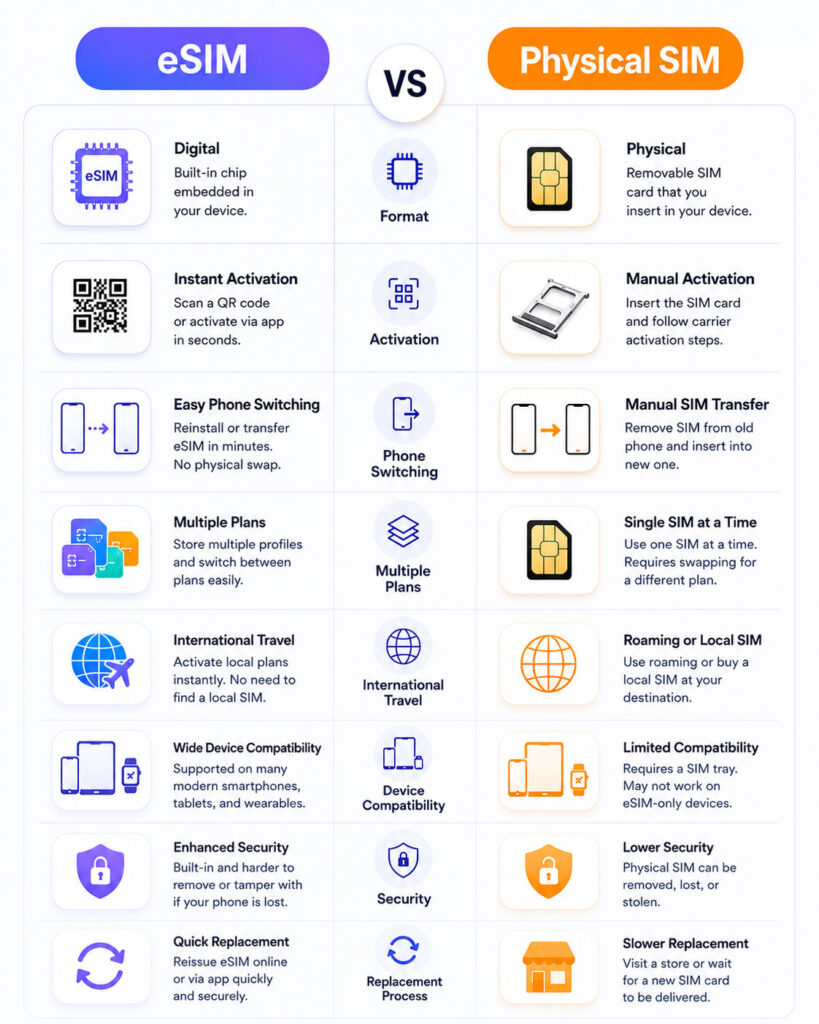
eSIM vs Physical SIM: Quick Comparison
| Point | eSIM | Physical SIM |
|---|---|---|
| Format | Digital profile stored on built-in hardware | Removable plastic card with a secure chip |
| Activation | Digital setup through supported carrier methods | Insert an activated card into the SIM tray |
| Phone Switching | Requires a supported transfer or carrier activation | Usually involves moving the card physically |
| Multiple Plans | Supported devices can store multiple profiles | Limited by the available physical SIM slots |
| Travel | Can add a supported travel or local plan digitally | Requires buying and inserting another card |
| Compatibility | Requires eSIM support from the device and carrier | Works with a wider range of older devices |
| Damage or Loss | No removable card to lose or damage | The card can become lost, bent, or damaged |
Does eSIM Improve Network Speed?
An eSIM does not automatically provide faster internet or stronger signal than a physical SIM.
Network speed depends mainly on the carrier, plan, coverage, network technology, congestion, phone hardware, and location.
Therefore, the same carrier plan should provide similar network performance whether it uses eSIM or a physical SIM.
Can One Phone Use Both?
Many modern phones support a combination of physical SIM and eSIM.
This setup can help users keep separate personal and work numbers, use a local travel plan, or maintain two carrier connections.
However, the number of stored and active plans depends on the phone model, software, region, and carrier support.
Benefits of eSIM
eSIM provides several practical benefits for users with compatible phones and carriers.
1. Digital Activation
You can activate a supported mobile plan without waiting for or collecting a physical card.
For example, the carrier may provide a QR code or assign the plan directly to the device. As a result, activation can require fewer physical steps.
However, identity verification and activation time still depend on the carrier.
2. Multiple Mobile Plans
A supported phone can store more than one eSIM profile.
Therefore, users may keep profiles for personal service, work, travel, or different carriers on the same device.
Still, storing several profiles does not mean the phone can use all of them simultaneously. The number of active lines depends on the device.
3. Convenient Travel Setup
Travellers can purchase a supported local or travel eSIM and install it without changing the physical card.
Consequently, they can keep their main number available while using another plan for mobile data, subject to the phone’s dual-SIM capabilities.
Before purchasing, travellers should check coverage, validity, data limits, hotspot rules, calling support, and refund conditions.
4. No Removable Card
An eSIM cannot fall out of the phone, bend, or become damaged while users change cards.
In addition, a person who takes the phone cannot simply remove the eSIM in the same way as a physical card. However, device locks, carrier-account security, and remote protection still remain essential.
5. Useful for Smaller Connected Devices
Embedded SIM technology allows manufacturers to support mobile connectivity without adding a traditional SIM tray.
As a result, eSIM can work well in supported smartwatches, tablets, and other compact connected devices.
Limitations of eSIM
eSIM offers convenience, but it also introduces some practical limitations.
1. Device and Carrier Support
Both the phone and carrier must support eSIM.
A device may support eSIM in one country or model variation but not another. Similarly, a carrier may support eSIM only for selected plans, customers, or devices.
Therefore, users should verify the exact model number instead of checking only the general phone name.
2. Phone Transfers Can Require Extra Steps
Moving an eSIM to a new phone may require a supported transfer process, carrier app, QR code, or customer-service request.
Some modern devices offer direct transfer. However, compatibility can depend on both phones, their software versions, and the carrier.
Consequently, switching devices may take longer when automatic transfer is unavailable.
3. Emergency Device Changes May Be Less Convenient
Suppose your phone suddenly stops working. With a physical SIM, you may be able to move the card immediately into another compatible phone.
An eSIM may require you to activate or transfer the plan before the replacement phone can connect.
Therefore, users who change phones frequently should review the carrier’s eSIM transfer process in advance.
4. Accidental Profile Deletion
Deleting an eSIM profile can remove the mobile plan from the device.
Reinstalling it may require a new activation process or help from the carrier. As a result, users should not delete an eSIM while troubleshooting unless the carrier or device instructions specifically recommend it.
Benefits of a Physical SIM
A physical SIM continues to offer several advantages.
1. Easy Physical Transfer
You can usually move the SIM card between compatible unlocked phones.
This feature helps users test another device, replace a damaged phone, or temporarily use a basic backup phone.
2. Wider Device Compatibility
Physical SIM cards work with many older phones and devices that do not support eSIM.
Therefore, users who keep a backup handset may find a physical SIM more flexible.
3. Familiar Activation Process
Many users already understand how to insert, remove, and replace a physical SIM.
In addition, local mobile stores can often provide hands-on help with physical card replacement.
4. Clear Physical Control
Users can remove the SIM card when they want to disconnect that mobile subscription from the device.
This physical control can feel simpler for people who do not want to manage digital profiles through phone settings.
Limitations of a Physical SIM
A removable SIM also has disadvantages.
- The card can become lost or damaged.
- The SIM tray can become damaged during repeated changes.
- Travellers may need to carry and protect several small cards.
- A thief can remove the card from an unlocked or stolen phone.
- Changing plans may require visiting a store or waiting for a replacement card.
- Dual physical SIM use depends on the number of available slots.
Therefore, physical SIM convenience depends on how often the user changes devices or plans.
eSIM vs Physical SIM for Travel
eSIM can provide a convenient option for international travel because users can install a supported plan before or during the trip.
For example, a traveller may keep the main number for calls and messages while using a travel eSIM for data.
However, users should confirm which line handles mobile data, calls, messages, and roaming. Otherwise, the phone may use the main carrier’s roaming service unexpectedly.
A physical local SIM remains useful when the destination carrier does not offer eSIM or when the traveller needs a local phone number with full calling support.
eSIM vs Physical SIM for Dual SIM Use
Dual SIM allows one phone to manage two mobile plans.
Depending on the device, the combination may include one physical SIM and one eSIM, two physical SIM cards, or two active eSIM profiles.
Users can often select default lines for calls, messages, and mobile data. Nevertheless, the exact settings and simultaneous-use options vary by phone and carrier.
Is eSIM More Secure Than a Physical SIM?
eSIM offers some practical security advantages because it does not use a removable card.
For example, someone cannot take the eSIM out and place it in another phone physically. In addition, remote provisioning follows defined security and certification requirements.
However, eSIM does not eliminate mobile-account fraud. Attackers may still target the carrier account, impersonate the customer, steal verification information, or attempt an unauthorised number transfer.
Therefore, users should protect both eSIM and physical SIM accounts with strong carrier-account security.
Mobile Number Security Tips
- Add a carrier account PIN when available.
- Use a unique password for the carrier account.
- Enable number-transfer or port-out protection when supported.
- Do not share OTPs, activation codes, or QR codes.
- Protect the phone with a strong screen lock.
- Enable device-tracking and remote-lock features.
- Review unexpected carrier messages immediately.
- Contact the carrier after unexplained network loss.
In particular, treat an eSIM activation QR code as sensitive information because another person should not receive or reuse it.
Which Is Better When a Phone Is Lost?
An eSIM remains inside the lost phone, whereas someone can remove a physical SIM.
This difference may help the phone stay connected long enough for supported tracking or remote-protection features. However, a person may still switch off the device, block connectivity, or reset it.
Therefore, immediately mark the phone as lost, contact the carrier, block the mobile service when necessary, and secure important accounts.
Which Is Better When a Phone Breaks?
A physical SIM can be easier when the phone becomes unusable because you may move the card into a backup handset.
With eSIM, you may need access to the old device, carrier account, verification process, or customer support before activating the replacement.
However, supported device-to-device transfers can make eSIM migration straightforward when both phones remain available.
Does eSIM Work Without the Internet?
Downloading and activating an eSIM profile may require Wi-Fi or another internet connection.
After successful activation, the mobile plan can connect through the carrier’s cellular network. Therefore, the phone does not need Wi-Fi for normal mobile service.
Still, the carrier may require internet access during future profile downloads, transfers, or troubleshooting.
Can You Convert a Physical SIM to eSIM?
Some carriers allow customers to convert an existing physical SIM plan into an eSIM.
Depending on the provider and phone, the conversion may happen through device settings, a carrier app, customer support, or a store.
Once the eSIM activates, the previous physical SIM normally stops working for that number.
Can You Convert eSIM Back to a Physical SIM?
Many carriers can issue a physical replacement SIM for a number currently using eSIM.
However, the process may require identity verification, a store visit, a replacement card, or a service request.
Therefore, confirm the carrier’s process before deleting the existing eSIM profile.
Can You Keep the Same Mobile Number?
Converting between eSIM and physical SIM does not necessarily require a new number.
The carrier can usually move the existing mobile subscription to the new SIM format when it supports the conversion.
However, users should verify plan eligibility, activation requirements, and any temporary service interruption.
Does Factory Reset Remove an eSIM?
The result depends on the device and the reset option selected.
Some phones allow users to keep eSIM profiles while erasing other data. Other reset choices may remove the profiles.
Therefore, read every reset option carefully and confirm that you can reactivate the mobile plan before deleting an eSIM.
Who Should Choose eSIM?
eSIM may suit you when digital activation and multiple profiles provide practical value.
- You travel frequently and use temporary mobile plans.
- You keep personal and work numbers on one phone.
- Your phone and preferred carrier fully support eSIM.
- You want to avoid handling small physical cards.
- You change carrier plans more often than devices.
- You use a smartwatch or another eSIM-enabled device.
In these situations, eSIM can simplify mobile-plan management.
Who Should Choose a Physical SIM?
A physical SIM may suit you when easy device swapping and broad compatibility matter more.
- You change phones frequently.
- You maintain an older backup phone.
- Your carrier offers limited eSIM support.
- You prefer in-store activation and replacement.
- You travel to locations where physical SIM cards are easier to obtain.
- You want to move your number without downloading a digital profile.
As a result, physical SIM remains a practical and reliable choice for many users.
What to Check Before Choosing eSIM
- Confirm that the exact phone model supports eSIM.
- Check whether the carrier supports the device and plan.
- Review how activation and identity verification work.
- Understand the process for moving to a new phone.
- Check how many profiles the phone can store and activate.
- Confirm dual-SIM and roaming behaviour.
- Save the carrier’s official support details.
- Secure the carrier account before converting.
These checks can prevent activation and transfer problems later.
Safe eSIM Conversion Checklist
- Back up important phone data.
- Update the phone software.
- Connect to a trusted Wi-Fi network.
- Confirm that the carrier account details are correct.
- Follow only official carrier or device instructions.
- Keep the physical SIM until the eSIM works correctly.
- Test calls, messages, mobile data, and OTP delivery.
- Do not share or publicly store the activation QR code.
- Remove the old SIM only after confirming activation.
Most importantly, do not interrupt the process while the carrier transfers the number.
Common eSIM Mistakes to Avoid
- Do not assume every version of a phone supports eSIM.
- Do not delete an active profile during basic troubleshooting.
- Do not purchase a travel eSIM without checking coverage and validity.
- Do not share activation codes or QR codes.
- Do not reset the phone before understanding the eSIM deletion option.
- Do not transfer the number shortly before an important call without testing it.
- Do not discard the physical SIM before confirming successful conversion.
A few preparation steps can prevent unnecessary service loss.
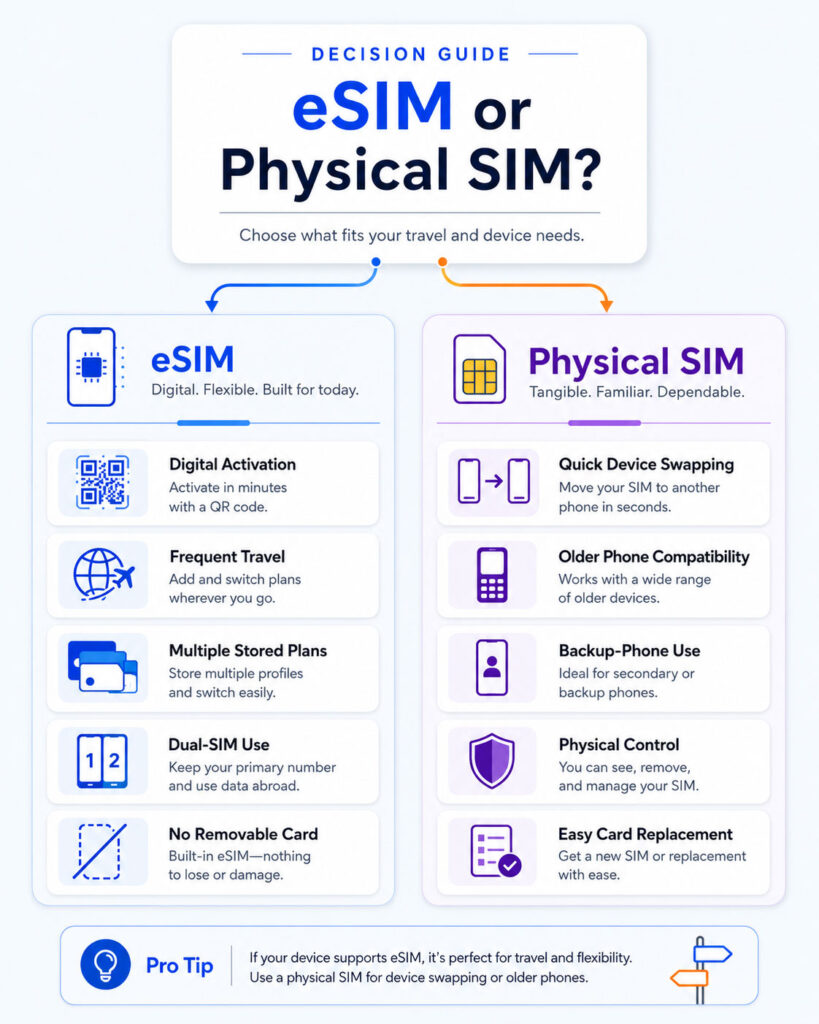
eSIM vs Physical SIM: Which One Should You Choose?
| Your Requirement | Recommended Starting Point |
|---|---|
| Digital activation without a removable card | eSIM |
| Frequent international travel | eSIM, when destination support is suitable |
| Quick physical transfer between phones | Physical SIM |
| Older or basic phone compatibility | Physical SIM |
| Multiple stored mobile plans | eSIM |
| Emergency use in a backup handset | Physical SIM may be easier |
| Personal and work numbers together | Either option with supported dual SIM |
| No reliable eSIM support from the carrier | Physical SIM |
Final Verdict
eSIM provides convenient digital activation, multiple stored profiles, and useful travel options. Therefore, it works well for users with compatible devices and reliable carrier support.
Physical SIM offers simple device swapping, broad compatibility, and clear physical control. As a result, it remains useful for people who change phones frequently or keep a backup handset.
Neither option automatically improves signal quality or mobile speed. The network, plan, phone, coverage, and location have a much greater effect.
Conclusion
eSIM vs Physical SIM does not have one universal winner.
Choose eSIM when digital activation, multiple profiles, and travel convenience match your needs. In contrast, choose a physical SIM when fast device swapping and compatibility with more phones matter most.
Before deciding, confirm support for your exact phone, carrier, plan, and transfer process. The best SIM format is the one that keeps your mobile service secure, available, and easy to manage.

AboutTPJ Technical Team
The Project Jugaad Technical Team creates practical, easy-to-follow content on software development, web technologies, artificial intelligence, cybersecurity, cloud platforms, and digital tools. Our articles are informed by more than 13 years of hands-on experience with .NET, Angular, SQL Server, AWS, WordPress, Linux hosting, application deployment, and real-world troubleshooting. Each guide is researched, reviewed, and updated to provide accurate, useful, and actionable information for developers, businesses, and everyday technology users.