Technology
Wi-Fi 6 vs Wi-Fi 7 is an important comparison for anyone buying a new router, laptop, smartphone, gaming device, or mesh Wi-Fi system.
Both generations can provide fast and reliable wireless networking. However, Wi-Fi 7 adds wider channels, improved data transmission, multi-link connectivity, and better ways to use available spectrum.
Therefore, Wi-Fi 7 can deliver higher capacity and lower latency under suitable conditions. Still, many homes and offices can continue using Wi-Fi 6 effectively, especially when their internet plan and devices do not require the newer features.
What Is Wi-Fi 6?
Wi-Fi 6 is the consumer-friendly name for wireless technology based on IEEE 802.11ax.
It focuses on high-efficiency wireless networking. Instead of improving only the maximum speed of one device, it also helps a router communicate more efficiently when many phones, laptops, televisions, cameras, and smart devices share the network.
Wi-Fi 6 commonly operates on the 2.4 GHz and 5 GHz frequency bands. Meanwhile, Wi-Fi 6E extends the same generation into the 6 GHz band where regional regulations allow it.
What Is Wi-Fi 7?
Wi-Fi 7 is based on IEEE 802.11be, which is known as Extremely High Throughput.
It builds on Wi-Fi 6 and introduces features designed for higher bandwidth, lower delays, improved reliability, and more efficient use of congested wireless spectrum.
Wi-Fi 7 can operate across the 2.4 GHz, 5 GHz, and 6 GHz bands. However, the exact bands and features available depend on the router, client device, firmware, and local spectrum rules.
Wi-Fi 6 vs Wi-Fi 7: Quick Comparison
| Point | Wi-Fi 6 | Wi-Fi 7 |
|---|---|---|
| IEEE Technology | 802.11ax | 802.11be |
| Main Focus | High efficiency and better multi-device performance | Extremely high throughput, lower latency, and improved reliability |
| Common Frequency Bands | 2.4 GHz and 5 GHz | 2.4 GHz, 5 GHz, and 6 GHz |
| 6 GHz Support | Available through Wi-Fi 6E | Supported by compatible Wi-Fi 7 equipment where permitted |
| Maximum Channel Width | Up to 160 MHz | Up to 320 MHz in suitable 6 GHz deployments |
| Modulation | Up to 1024-QAM | Up to 4096-QAM, also called 4K-QAM |
| Multi-Link Operation | No | Yes, on supported routers and devices |
| Multi-RU Support | More limited resource-unit allocation | Improved allocation through multiple resource units |
| Best Fit | General homes, offices, streaming, and many connected devices | Multi-gigabit networks, demanding applications, and future-ready installations |
The table shows the maximum technical capabilities. Nevertheless, real performance remains lower and depends on the complete network setup.
How Wi-Fi Speed Differs from Internet Speed
Wi-Fi speed describes the wireless connection between a device and a router or access point.
Internet speed, on the other hand, describes the connection provided by the internet service provider.
For example, a Wi-Fi 7 laptop may establish a fast local wireless connection. However, downloads from the internet cannot exceed the practical limits of the broadband plan, remote server, router, and other network equipment.
Consequently, replacing a Wi-Fi 6 router with Wi-Fi 7 will not automatically turn a slower internet plan into a multi-gigabit service.
Main Wi-Fi 6 Features
Wi-Fi 6 introduced several technologies that improve efficiency in busy networks.
1. OFDMA
Orthogonal Frequency Division Multiple Access allows the router to divide a wireless channel into smaller resource units.
As a result, the router can serve several devices more efficiently instead of making every device wait for the complete channel.
This feature can help networks with many small and frequent data transfers, such as smart devices, messaging, browsing, and application updates.
2. MU-MIMO
Multi-User Multiple Input Multiple Output allows compatible access points to communicate with multiple devices more efficiently.
Therefore, several users can receive or transmit data without relying entirely on one-at-a-time communication.
However, the router and client devices must support the relevant capabilities before the network can use them fully.
3. 1024-QAM
Quadrature Amplitude Modulation determines how much information the network can encode into each wireless transmission.
Wi-Fi 6 supports 1024-QAM under suitable signal conditions. Consequently, it can carry more data than the lower modulation levels used by earlier generations.
Still, higher modulation requires a strong and clean signal. Therefore, users may not receive the full benefit through several walls or at the edge of the coverage area.
4. Target Wake Time
Target Wake Time allows supported devices to coordinate when they wake to send or receive data.
This scheduling can reduce unnecessary competition for wireless access. In addition, it may help suitable battery-powered and smart devices conserve energy.
5. Better Performance in Busy Networks
Wi-Fi 6 was designed to improve efficiency where many devices share the same network.
For example, it can help in apartments, offices, classrooms, event spaces, and homes with many smart devices.
However, correct router placement, channel planning, and sufficient wired capacity still remain important.
What Is Wi-Fi 6E?
Wi-Fi 6E is not a completely separate Wi-Fi generation.
Instead, it extends Wi-Fi 6 technology into the 6 GHz frequency band. This additional spectrum can provide cleaner channels and reduce competition from older 2.4 GHz and 5 GHz devices.
However, only compatible Wi-Fi 6E and Wi-Fi 7 devices can use the 6 GHz connection. Older Wi-Fi clients cannot gain 6 GHz support through a software update alone.
In addition, 6 GHz availability and allowed channel widths vary by country or region.
Main Wi-Fi 7 Features
Wi-Fi 7 keeps many Wi-Fi 6 technologies and extends them with several important improvements.
1. 320 MHz Channels
Wi-Fi 7 can support channel widths of up to 320 MHz in suitable 6 GHz spectrum.
This width is double the 160 MHz maximum commonly associated with Wi-Fi 6 and Wi-Fi 6E.
As a result, a compatible router and device can transfer more data at once when enough clean spectrum is available.
Nevertheless, wide channels may not always be practical. Nearby networks, regional regulations, router settings, and interference can reduce the usable width.
2. 4K-QAM
Wi-Fi 7 supports 4096-QAM, commonly called 4K-QAM.
Compared with 1024-QAM, it can encode more information into each transmission. Therefore, it can increase data rates under excellent signal conditions.
However, 4K-QAM requires a strong signal and low interference. Users farther from the router may connect through a lower and more reliable modulation level instead.
3. Multi-Link Operation
Multi-Link Operation allows compatible Wi-Fi 7 devices to establish and manage more than one wireless link.
Depending on the equipment, the network may use links across different frequency bands or channels.
This capability can provide several benefits:
- Combine capacity from multiple links.
- Move traffic to a less congested link.
- Reduce delays for time-sensitive traffic.
- Maintain communication when one link experiences interference.
However, both the router and client must support compatible Multi-Link Operation features.
4. Multi-RU
Wi-Fi 7 improves how resource units can be assigned to devices.
Instead of limiting a device to one resource unit in certain situations, supported equipment can use multiple resource units more flexibly.
Consequently, the network can make better use of available channel space.
5. Preamble Puncturing
Interference may affect only one section of a wide wireless channel.
Without suitable handling, the network may need to avoid a larger portion of that channel. Preamble puncturing allows supported Wi-Fi 7 equipment to exclude the affected section while continuing to use other available parts.
Therefore, a wide channel can remain useful even when a smaller section experiences interference.
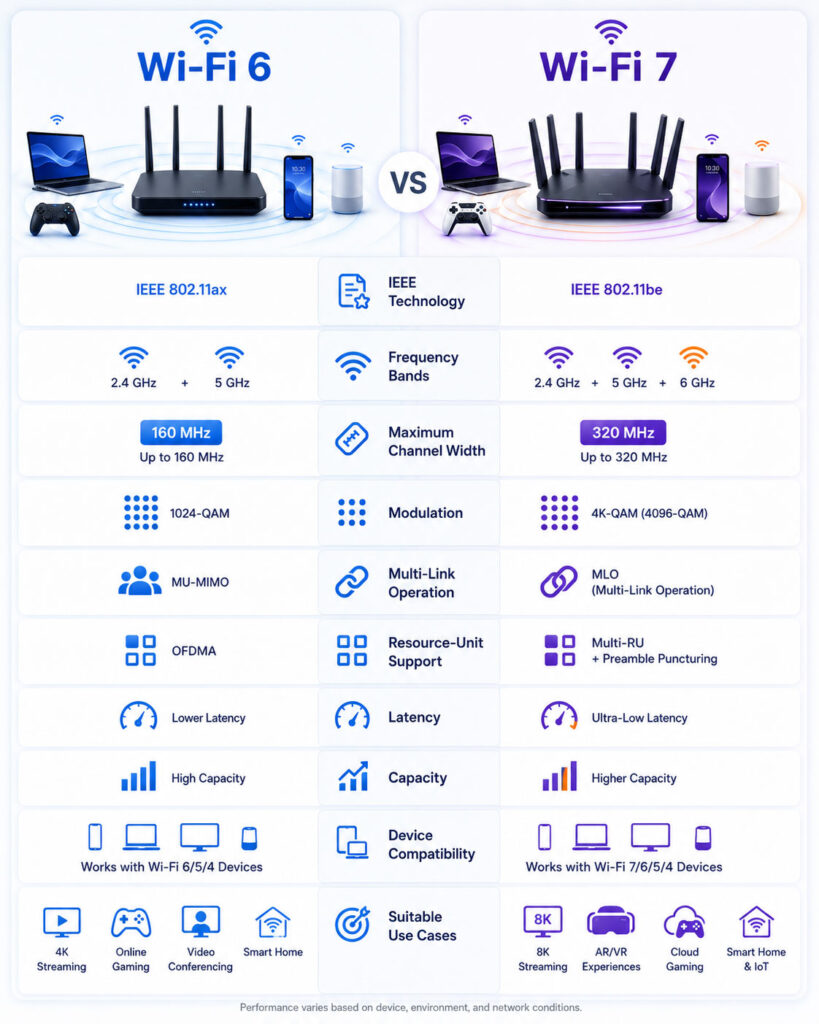
Wi-Fi 6 vs Wi-Fi 7 Speed
Wi-Fi 7 supports substantially higher theoretical capacity than Wi-Fi 6.
However, theoretical wireless rates do not equal the speed of one real download. They represent ideal conditions involving suitable channel width, spatial streams, modulation, signal quality, and compatible equipment.
In practice, speed depends on:
- The router’s radio and antenna configuration.
- The capabilities of the connected device.
- The selected frequency band.
- The distance from the router.
- Walls, furniture, and other obstacles.
- Nearby wireless networks.
- The wired Ethernet connection behind the router.
- The internet service plan.
- The remote server or application.
Therefore, do not choose a router only because the box displays a large combined speed number.
What Do Router Speed Numbers Mean?
Router names often combine the theoretical rates of several wireless bands.
For example, a tri-band router may advertise a total based on its 2.4 GHz, 5 GHz, and 6 GHz radios. However, one device does not necessarily receive the combined number.
In addition, marketing totals may assume channel widths and spatial streams that a typical phone or laptop does not support.
Consequently, compare the capabilities of each band and the client device instead of relying only on the largest advertised figure.
Channel Width Comparison
| Channel Width | Common Use | Practical Consideration |
|---|---|---|
| 20 MHz | Busy 2.4 GHz networks and longer-range compatibility | Lower capacity but less spectrum usage |
| 40 MHz | Moderate performance where enough spectrum exists | Can create congestion in crowded areas |
| 80 MHz | Common high-performance 5 GHz connections | Good balance for many homes |
| 160 MHz | High-speed Wi-Fi 6, Wi-Fi 6E, and Wi-Fi 7 connections | Needs compatible equipment and clean spectrum |
| 320 MHz | Maximum-width Wi-Fi 7 connections in suitable 6 GHz spectrum | Requires compatible devices and regional availability |
A wider channel can carry more data. However, it also consumes more spectrum and can become harder to use in congested environments.
Wi-Fi 6 vs Wi-Fi 7 Latency
Latency describes how long data takes to travel through the network and receive a response.
Wi-Fi 7 includes technologies that can reduce wireless delays and improve consistency, particularly through Multi-Link Operation and more flexible spectrum use.
Nevertheless, total application latency also depends on the internet provider, router processing, wired network, remote server, and physical distance.
Therefore, Wi-Fi 7 cannot remove delays created outside the local wireless network.
Which Is Better for Online Gaming?
Both generations can support online gaming effectively.
Wi-Fi 7 may provide lower and more consistent wireless latency when the router and gaming device support its advanced features. In addition, MLO can help suitable devices use a better link when one band becomes congested.
However, a stable Ethernet connection often remains the most predictable option for a stationary gaming computer or console.
Before replacing the router, check whether high gaming latency comes from Wi-Fi interference, the internet provider, the game server, background downloads, or the device itself.
Which Is Better for Video Streaming?
Wi-Fi 6 can handle several high-resolution video streams when the network has sufficient signal quality and internet bandwidth.
Wi-Fi 7 provides additional capacity for homes that stream high-resolution content while simultaneously gaming, transferring large files, and using many connected devices.
Still, streaming quality depends heavily on the internet plan and video service. Therefore, upgrading the wireless generation may not solve buffering caused by a slow broadband connection.
Which Is Better for Large File Transfers?
Wi-Fi 7 can provide a significant advantage for local file transfers.
For example, users may move large videos between a laptop and a local storage server without relying on the internet connection.
However, the storage device, router ports, switches, cables, and computer interfaces must also support sufficient speed.
If the network uses a 1 Gbps Ethernet connection behind the router, that wired link may become the bottleneck even when the wireless connection supports a higher rate.
Which Is Better for Cloud Backups?
A faster local wireless connection can help a device reach the router efficiently.
However, cloud backup speed usually depends on the internet plan’s upload rate.
Therefore, a Wi-Fi 7 upgrade may provide little benefit when the broadband upload speed remains much slower than the existing Wi-Fi connection.
Wi-Fi 6 vs Wi-Fi 7 for Smart Homes
Many smart-home devices require reliability rather than extremely high speed.
Wi-Fi 6 already provides strong support for networks with many connected devices. In addition, Target Wake Time can help suitable low-power devices coordinate wireless activity.
Wi-Fi 7 may benefit a large and demanding smart home. Still, simple sensors, plugs, and appliances may continue using 2.4 GHz Wi-Fi because it offers broad compatibility and better reach through obstacles.
Wi-Fi 6 vs Wi-Fi 7 for Offices
Offices with many employees, video meetings, cloud applications, and high-bandwidth devices can benefit from newer wireless technology.
Wi-Fi 7 may provide more capacity and flexible link use. However, successful office deployment requires more than replacing access points.
Organisations should also review:
- Access-point placement.
- Channel planning.
- Wired switch capacity.
- Multi-gigabit Ethernet ports.
- Power requirements.
- Network security.
- Roaming behaviour.
- Client-device compatibility.
Consequently, a professional survey and staged rollout may provide better results than replacing every access point at once.
Does Wi-Fi 7 Have Better Range?
Wi-Fi 7 does not automatically provide a larger coverage area than Wi-Fi 6.
Range depends on the frequency band, router power, antenna design, building layout, interference, and client hardware.
The 2.4 GHz band generally travels farther through indoor obstacles than 5 GHz or 6 GHz. Meanwhile, 6 GHz can provide cleaner and wider channels but may lose signal more quickly through walls.
Therefore, Wi-Fi 7 often improves capacity and performance more than physical coverage.
Will Wi-Fi 7 Fix Dead Zones?
A new router may improve performance, but it cannot guarantee coverage in every room.
Large homes, thick walls, multiple floors, metal structures, and poor router placement can still create weak areas.
In these situations, a properly designed mesh system or wired access points may provide a better solution than one powerful central router.
Wi-Fi Mesh Performance
A mesh network uses several connected units to provide broader coverage.
Wi-Fi 7 can improve mesh backhaul capacity when compatible nodes use wider channels or multiple links. As a result, satellite units may communicate more efficiently.
However, wired Ethernet backhaul can still deliver excellent consistency because it keeps node-to-node traffic away from the wireless spectrum.
Before choosing a mesh product, confirm whether its advertised features apply to client connections, wireless backhaul, or both.
Wi-Fi 6 vs Wi-Fi 7 Security
Both generations can support modern wireless security when the router is configured correctly.
Security depends on more than the generation label. Therefore, users should:
- Enable WPA3 when all important devices support it.
- Use a strong and unique Wi-Fi password.
- Change the router’s default administrator password.
- Install firmware updates.
- Disable outdated security modes where possible.
- Create a separate guest network.
- Separate untrusted smart devices when the router supports it.
- Disable remote management unless it is required and secured.
Most importantly, a newer router cannot protect a network that uses weak passwords or outdated firmware.
Backward Compatibility
Wi-Fi 7 routers can generally connect with older Wi-Fi devices on supported bands and security settings.
However, an older device uses only the features that it supports. A Wi-Fi 5 or Wi-Fi 6 phone does not gain 320 MHz channels, 4K-QAM, or Multi-Link Operation simply because it connects to a Wi-Fi 7 router.
Therefore, the greatest benefit appears when both the router and the client support the newer generation.
Do You Need Wi-Fi 7 on Every Device?
No. A network can contain devices from several Wi-Fi generations.
For example, a new laptop may use Wi-Fi 7, while an older television uses Wi-Fi 5 and a smart plug uses 2.4 GHz Wi-Fi.
Still, older devices can increase congestion or require compatibility settings. Therefore, place demanding modern devices on faster bands and keep low-bandwidth smart devices on a suitable separate connection when practical.
How to Test Your Current Wi-Fi
Measure the existing network before purchasing new equipment.
- Run an internet speed test near the router.
- Repeat the test in the rooms where problems occur.
- Test at different times of day.
- Compare Wi-Fi results with a wired Ethernet test.
- Check the connected frequency band and link rate.
- Review whether one device or every device has the problem.
- Pause background downloads and cloud backups.
- Restart and update the router before testing again.
If the wired test is also slow, the router’s Wi-Fi generation may not be the main issue.
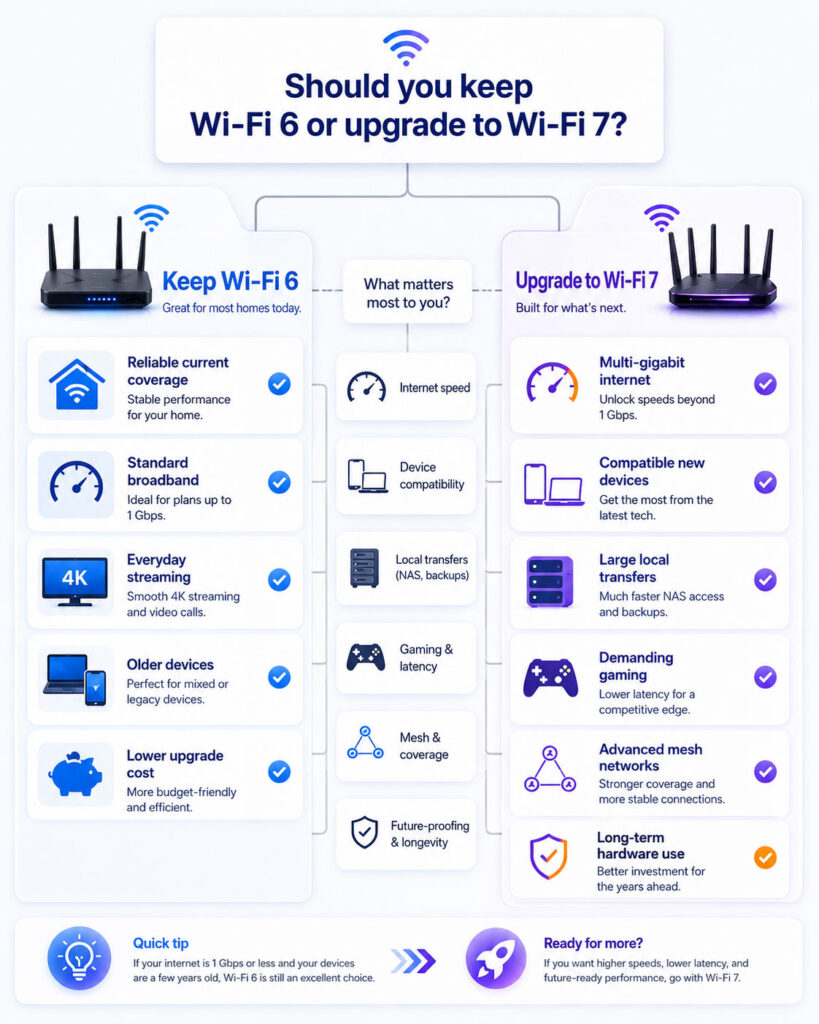
Should You Upgrade to Wi-Fi 7?
The answer depends on your current router, devices, internet plan, local network traffic, and coverage problems.
Wi-Fi 7 can be a valuable long-term upgrade. However, replacing a reliable Wi-Fi 6 network may not create a noticeable improvement when most devices remain older or the internet plan is the primary bottleneck.
Keep Wi-Fi 6 When It Already Meets Your Needs
You can continue using Wi-Fi 6 when:
- Coverage remains reliable throughout the required area.
- Video calls and streaming work without interruption.
- Online games do not experience local wireless instability.
- Your internet plan is slower than the practical capacity of the current network.
- Most phones, laptops, and televisions support Wi-Fi 6 or older standards.
- You do not frequently transfer large files across the local network.
- The router still receives security and firmware updates.
In these cases, improving placement or adding a suitable access point may provide more value than changing generations.
Consider Wi-Fi 7 When You Need More Capacity
Wi-Fi 7 becomes more useful when:
- You have multi-gigabit internet service.
- Several devices perform demanding tasks simultaneously.
- You transfer large files to local network storage.
- You are buying new laptops or phones with Wi-Fi 7 support.
- You need a new mesh system and want longer-term compatibility.
- You use high-bandwidth creative, gaming, or immersive applications.
- Your existing router lacks sufficient wired or wireless capacity.
- You plan to keep the next router for several years.
Even then, verify that the chosen equipment supports the specific Wi-Fi 7 capabilities you need.
Should Wi-Fi 6E Users Upgrade?
Wi-Fi 6E already provides access to the 6 GHz band on compatible devices.
Therefore, users with a well-performing Wi-Fi 6E network may not need an immediate upgrade.
Wi-Fi 7 adds wider channels, Multi-Link Operation, 4K-QAM, Multi-RU, and other improvements. However, those additions provide the most value when compatible devices and demanding workloads can use them.
If the current 6E network delivers sufficient speed and reliability, waiting may be the more economical option.
Should Wi-Fi 5 Users Upgrade?
A Wi-Fi 5 network may benefit more noticeably from an upgrade.
Moving to Wi-Fi 6 or Wi-Fi 7 can improve efficiency, security options, capacity, and support for newer client devices.
However, Wi-Fi 6 may still provide the best balance of price and performance for a standard home. In contrast, Wi-Fi 7 may suit users who want multi-gigabit networking or longer-term hardware value.
Router and Device Compatibility Checklist
Before purchasing a Wi-Fi 7 router, review the complete network.
- Check whether important phones and laptops support Wi-Fi 7.
- Confirm whether the device supports the 6 GHz band.
- Review supported channel widths and spatial streams.
- Check whether both the router and device support Multi-Link Operation.
- Confirm regional 6 GHz availability.
- Review the router’s Ethernet port speeds.
- Check whether the modem or internet gateway can exceed 1 Gbps.
- Verify mesh-node and backhaul capabilities.
- Confirm the router continues receiving security updates.
- Review whether older devices require legacy compatibility.
This review prevents you from paying for features that the rest of the network cannot use.
Check Ethernet Port Speeds
A high-performance wireless router also needs sufficient wired capacity.
For example, a Wi-Fi 7 connection may exceed the practical capacity of a 1 Gbps Ethernet port. In that case, the wired connection between the router, modem, switch, or storage server can limit performance.
Therefore, review whether the router includes suitable multi-gigabit WAN and LAN ports.
Also, confirm that switches, network adapters, and cables support the required rate.
Check the Internet Gateway
Some internet providers supply a modem-router combination.
Adding a new router behind that gateway without the correct configuration can create double routing, conflicting Wi-Fi networks, or unnecessary complexity.
Therefore, determine whether the provider device supports bridge mode, access-point mode, or another recommended setup.
When uncertain, follow the provider’s official instructions before changing network settings.
Check Router Placement Before Upgrading
Router placement can affect performance more than the generation number.
Place the router in an open and central location when possible. In addition, keep it away from enclosed cabinets, large metal objects, thick concrete barriers, and sources of interference.
Avoid placing the only router at one edge of a large property unless the required coverage remains nearby.
For multiple floors or distant rooms, use wired access points or a suitable mesh design.
Single Router vs Mesh Wi-Fi
A single router works well in a smaller or open home when it can provide strong coverage.
A mesh system may suit larger properties, multiple floors, or layouts with significant obstacles.
| Requirement | Better Starting Point |
|---|---|
| Small home with central router placement | Single router |
| Several floors or distant rooms | Mesh or wired access points |
| Maximum performance near one workspace | High-quality router or wired access point |
| Consistent roaming across a large home | Well-designed mesh system |
| High-speed local storage transfers | Multi-gigabit wired backbone with suitable Wi-Fi |
However, a mesh system does not automatically guarantee higher speed. Node placement and backhaul quality remain essential.
Common Wi-Fi Upgrade Mistakes
- Buying based only on the largest speed number.
- Assuming Wi-Fi 7 automatically increases broadband speed.
- Ignoring whether client devices support the new features.
- Expecting one router to remove every dead zone.
- Using slow Ethernet ports behind a fast wireless network.
- Placing the router inside a closed cabinet.
- Enabling maximum channel width in a highly congested area without testing.
- Installing several access points without proper channel planning.
- Keeping weak default passwords.
- Ignoring firmware and security updates.
A measured upgrade plan prevents unnecessary cost and configuration problems.
How to Upgrade Safely
- Record the existing internet and Wi-Fi settings.
- Back up the current router configuration when supported.
- List devices that use reserved IP addresses or special rules.
- Update the new router’s firmware before full deployment.
- Create a strong administrator password.
- Configure modern wireless security.
- Reconnect important devices first.
- Test internet access and local network services.
- Check coverage in every important room.
- Update printers, cameras, smart devices, and guest access.
- Disable the old wireless network after confirming the new setup.
- Keep the old router temporarily in case rollback becomes necessary.
Afterwards, monitor the network for a few days before changing advanced channel settings.
How to Improve Wi-Fi Without Buying a New Router
Several low-cost changes can improve an existing Wi-Fi 6 network.
- Move the router to a central and open position.
- Install current firmware updates.
- Use 5 GHz for nearby high-bandwidth devices.
- Use 2.4 GHz for suitable long-range and smart devices.
- Select cleaner channels when automatic selection performs poorly.
- Connect fixed devices through Ethernet.
- Reduce unnecessary wireless repeaters.
- Replace damaged or outdated network cables.
- Remove abandoned devices from the network.
- Add a correctly placed wired access point.
Therefore, diagnose the actual problem before replacing working hardware.
Wi-Fi 6 vs Wi-Fi 7 Buying Decision
| Your Situation | Recommended Starting Point |
|---|---|
| Current Wi-Fi 6 network works reliably | Keep Wi-Fi 6 |
| Standard broadband and everyday home use | Wi-Fi 6 is usually sufficient |
| Most devices support Wi-Fi 5 or Wi-Fi 6 | Upgrade only when coverage or capacity requires it |
| Multi-gigabit internet service | Consider Wi-Fi 7 |
| Frequent large local file transfers | Consider Wi-Fi 7 with multi-gigabit Ethernet |
| New Wi-Fi 7 laptops and phones | Wi-Fi 7 can provide greater value |
| Existing Wi-Fi 6E performs well | Upgrade only for specific Wi-Fi 7 features |
| Large home with dead zones | Prioritise mesh design or wired access points |
| Router no longer receives updates | Replace it with a secure current model |
Is Wi-Fi 7 Future-Proof?
No technology remains future-proof forever.
However, Wi-Fi 7 can provide longer useful life when users are already adopting compatible devices and multi-gigabit services.
Still, future value depends on firmware support, security updates, build quality, wired ports, and regional feature availability.
Therefore, choose a well-supported router instead of purchasing only for the generation label.
Final Verdict
Wi-Fi 6 remains a strong choice for most homes and small offices.
It provides efficient multi-device performance, modern wireless features, and enough capacity for common browsing, streaming, video calls, gaming, and smart-home use.
Wi-Fi 7 adds wider 320 MHz channels, 4K-QAM, Multi-Link Operation, Multi-RU, and improved spectrum use. Consequently, it can provide higher throughput, lower latency, and greater flexibility on compatible networks.
However, the upgrade becomes worthwhile only when your devices, wired network, internet service, and usage can take advantage of those improvements.
Conclusion
Wi-Fi 6 vs Wi-Fi 7 does not have one universal winner for every user.
Keep Wi-Fi 6 when it already provides reliable coverage and sufficient speed. Alternatively, consider Wi-Fi 7 when you need multi-gigabit performance, lower wireless latency, advanced mesh capacity, or support for several new compatible devices.
Most importantly, identify the real bottleneck before purchasing. Router placement, wired ports, device compatibility, internet speed, and building layout often matter as much as the Wi-Fi generation itself.

AboutTPJ Technical Team
The Project Jugaad Technical Team creates practical, easy-to-follow content on software development, web technologies, artificial intelligence, cybersecurity, cloud platforms, and digital tools. Our articles are informed by more than 13 years of hands-on experience with .NET, Angular, SQL Server, AWS, WordPress, Linux hosting, application deployment, and real-world troubleshooting. Each guide is researched, reviewed, and updated to provide accurate, useful, and actionable information for developers, businesses, and everyday technology users.