Technology
How much RAM do you need when buying or upgrading a laptop or desktop computer?
The answer depends on the applications you use, the number of tasks you run together, and how long you plan to keep the computer.
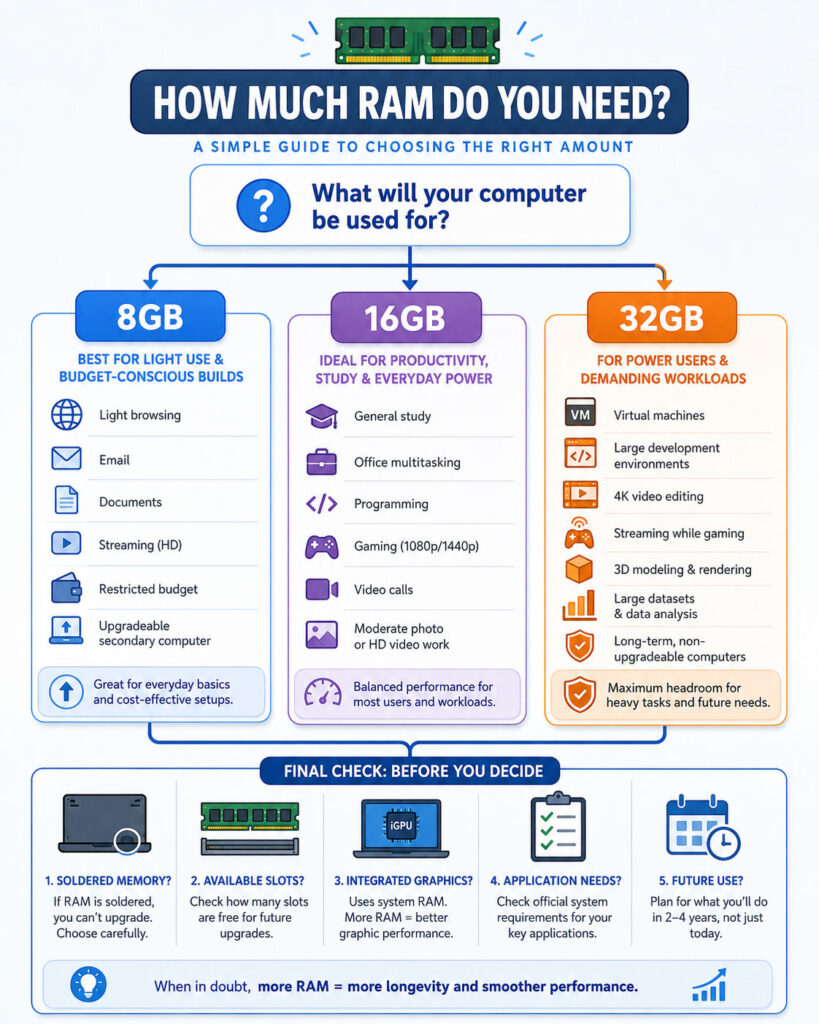
For light browsing and basic office work, 8GB of RAM may still be usable. However, 16GB provides a more comfortable experience for most modern users. Meanwhile, 32GB becomes valuable for professional content creation, software development, virtual machines, advanced gaming, and heavy multitasking.
Therefore, the best RAM capacity is not simply the largest number you can afford. It should match your actual workload and the upgrade options available on the computer.
What Is RAM?
RAM stands for Random Access Memory.
It provides temporary high-speed working space for the operating system, applications, browser tabs, open documents, and active data.
When you start an application, the computer loads the information it needs from storage into RAM. As a result, the processor can access that information much faster than it could from a storage drive.
SSD or Storage
      ↓
Application data loads into RAM
      ↓
Processor works with active data
      ↓
Changes are saved back to storage
RAM does not normally keep your files after the computer loses power. Instead, it holds the information required for the current session.
RAM vs Storage
RAM and storage serve different purposes.
| Point | RAM | Storage |
|---|---|---|
| Main Purpose | Holds active applications and working data | Stores files, software, and the operating system |
| Data Retention | Temporary | Long-term |
| Common Capacity | 8GB, 16GB, 32GB, or more | 256GB, 512GB, 1TB, or more |
| Performance Role | Supports active tasks and multitasking | Affects loading, saving, and file capacity |
| Typical Technology | DDR4, DDR5, LPDDR, or unified memory | SSD, NVMe SSD, or hard drive |
Adding more storage does not directly increase the amount of memory available to running applications. Likewise, installing more RAM does not provide additional space for photos, videos, and documents.
What Happens When RAM Becomes Full?
Operating systems try to manage memory efficiently.
When physical RAM becomes limited, the system may compress memory, close cached data, or move less active information to a storage-based page file or swap area.
This process helps the computer continue operating. However, even a fast SSD is slower than physical RAM for active workloads.
Consequently, a computer with insufficient RAM may show:
- Slow switching between applications.
- Browser tabs reloading unexpectedly.
- Delays while opening files or menus.
- Applications becoming temporarily unresponsive.
- Stuttering during games or creative work.
- High storage activity during normal use.
- Longer export or processing times.
- Applications closing because of insufficient memory.
Still, high RAM usage does not always mean there is a problem. Modern operating systems often use available memory for caching and release it when another application needs it.
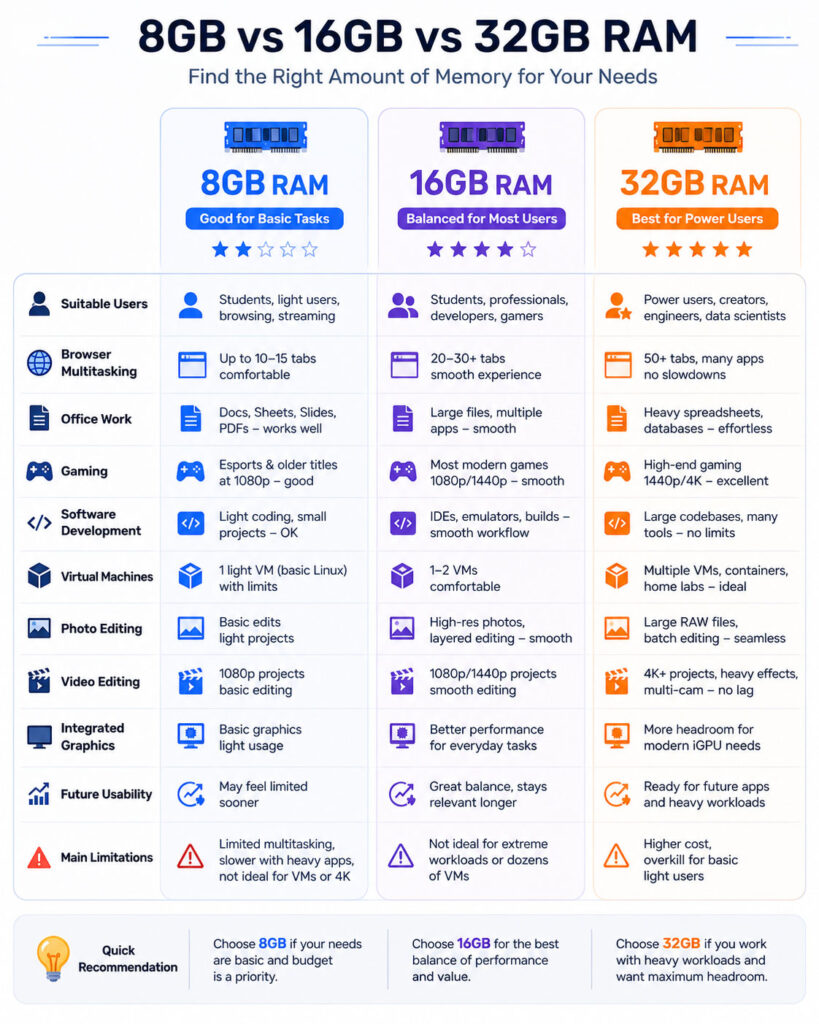
8GB vs 16GB vs 32GB RAM: Quick Comparison
| RAM Capacity | Suitable Starting Point | Main Limitation |
|---|---|---|
| 8GB | Basic browsing, documents, email, streaming, and light study | Limited space for heavy multitasking and demanding applications |
| 16GB | General home use, office work, programming, gaming, and moderate creative work | May become restrictive for several professional applications or virtual machines |
| 32GB | Heavy multitasking, development, virtual machines, 4K editing, design, and demanding games | Higher cost and unnecessary capacity for basic users |
For most people buying a new general-purpose computer, 16GB is the safest practical starting point. Nevertheless, 8GB can still work for carefully controlled light use, while 32GB provides more headroom for demanding or long-term workloads.
Is 4GB RAM Still Enough?
Windows 11 lists 4GB as a minimum memory requirement. However, a minimum requirement only indicates the basic threshold for installing and running the operating system.
It does not guarantee a comfortable experience after adding a browser, office applications, security software, background services, and system updates.
Therefore, a new general-purpose Windows computer with only 4GB of RAM is not a sensible long-term purchase for most users.
Such a configuration may still appear in low-cost or specialised devices. Nevertheless, buyers should expect limited multitasking and frequent reliance on storage-based virtual memory.
Is 8GB RAM Enough?
8GB can be enough when the workload remains light and predictable.
It may support:
- Web browsing with a limited number of tabs.
- Email.
- Word processing.
- Spreadsheets with moderate data.
- Online classes.
- Video streaming.
- Video calls.
- Basic accounting or billing software.
- Light photo adjustments.
- Simple programming projects.
However, performance can decline when several of these activities run together.
For example, a user may open a video meeting, a presentation, a spreadsheet, a messaging application, and several browser tabs. Although each task may work individually, the combined workload can exceed the comfortable capacity of an 8GB system.
Who Should Consider 8GB?
8GB may be reasonable when:
- The computer is used for one or two basic tasks at a time.
- The budget is highly restricted.
- The device serves as a secondary computer.
- The operating system and applications are lightweight.
- The RAM can be upgraded later.
- The user does not run modern games or creative applications.
- The device will not be kept for many years.
Before buying, confirm whether the RAM is replaceable or permanently attached to the motherboard.
Main Limitations of 8GB RAM
An 8GB computer may feel responsive immediately after startup. However, memory pressure can increase quickly after opening several modern applications.
Common limitations include:
- Frequent browser-tab reloading.
- Limited multitasking during video calls.
- Reduced performance in newer games.
- Difficulty running virtual machines.
- Slow handling of large photos or videos.
- Limited headroom for future software updates.
- Greater dependence on the SSD page file.
In addition, integrated graphics may reserve or share part of the available system memory. Consequently, the operating system and applications may have access to less than the full installed amount.
Is 16GB RAM Enough?
16GB is the recommended starting point for most users buying a modern laptop or desktop.
It usually provides enough capacity for:
- Everyday browsing with many tabs.
- Office applications.
- Video calls and collaboration tools.
- Programming and local development.
- Modern gaming.
- Moderate photo and video editing.
- Basic music production.
- Large spreadsheets.
- Light virtual-machine use.
- General multitasking.
As a result, 16GB offers a useful balance between cost, performance, and future usability.
Who Should Choose 16GB?
Choose 16GB when:
- You are buying a computer for several years of general use.
- You regularly keep many browser tabs open.
- You use office, communication, and media applications together.
- You play modern games but do not perform heavy professional production.
- You write software without running several large virtual environments.
- You edit photos or occasional HD video.
- You cannot upgrade the memory later.
For students, office users, developers, and home users, 16GB is generally the most balanced option.
When Can 16GB Become Limiting?
16GB may become restrictive when several memory-intensive workloads run together.
For example, a developer may run an integrated development environment, multiple browser windows, containers, a local database, communication tools, and a virtual machine.
Similarly, a content creator may edit high-resolution footage while running graphics, audio, and browser applications.
In those situations, the system may use substantial swap space even though each application supports 16GB individually.
Is 32GB RAM Worth It?
32GB provides significantly more room for demanding workloads and heavy multitasking.
It can be worthwhile for:
- Professional software development.
- Multiple virtual machines.
- Container-heavy development environments.
- 4K video editing.
- Motion graphics and visual effects.
- Large photo projects.
- 3D modelling and rendering.
- Engineering and scientific software.
- Professional music production.
- Large datasets.
- High-end gaming while streaming or recording.
- Local AI and machine-learning experiments.
Furthermore, 32GB gives the operating system more space to cache active data. Therefore, switching between large applications can remain smoother.
Who Should Choose 32GB?
Choose 32GB when:
- Your applications officially recommend it.
- You regularly use more than one demanding application at a time.
- You run virtual machines, emulators, or many containers.
- You edit 4K or higher-resolution media.
- You work with large software solutions or databases.
- You stream, record, and play demanding games together.
- You plan to keep a non-upgradable computer for several years.
- Your current 16GB computer frequently shows high memory pressure.
Nevertheless, 32GB will not automatically make light browsing or document editing twice as fast as 16GB.
When Is 32GB Unnecessary?
32GB may provide little noticeable benefit when the user only browses the web, streams video, attends online meetings, and edits standard documents.
Unused memory does not directly increase processor or storage speed. Therefore, money may be better spent on a stronger processor, larger SSD, better display, improved battery, or longer warranty.
What About 24GB RAM?
Some modern computers offer 24GB as a middle option.
This capacity can suit users who need more headroom than 16GB but do not regularly require 32GB.
For example, 24GB may work well for moderate content creation, software development, large browser workloads, and occasional virtual machines.
However, the available configurations and memory-channel arrangement depend on the computer. Therefore, review the manufacturer’s specification instead of judging capacity alone.
How Much RAM Do Students Need?
Most students should consider 16GB when buying a new computer.
This capacity provides enough room for research tabs, online classes, documents, presentations, coding tools, messaging, and media applications.
However, 8GB may remain acceptable for basic schoolwork when the device is affordable and upgradeable.
Students studying software development, engineering, architecture, animation, data science, or video production should consider 32GB if their applications and budget justify it.
How Much RAM Do Office Users Need?
Standard office work usually fits comfortably within 16GB.
A typical workload may include:
- Email.
- Browser tabs.
- Documents.
- Presentations.
- Spreadsheets.
- Video meetings.
- Chat and collaboration tools.
- Cloud-storage synchronisation.
- Accounting or business applications.
Although 8GB can handle some of these tasks, performance may decline when meetings, browsers, and large office files remain open together.
Meanwhile, 32GB can benefit analysts working with very large spreadsheets, business-intelligence tools, development environments, or several enterprise applications.
How Much RAM Do You Need for Web Browsing?
Browser memory usage depends on the number of tabs, websites, extensions, videos, and web applications you open.
A simple text page may use little memory. By contrast, an online design tool, video platform, email client, or interactive dashboard can use much more.
Browsers also isolate websites into separate processes to improve reliability and security. Consequently, a large number of active tabs can consume several gigabytes of memory.
| Browsing Pattern | Suggested RAM |
|---|---|
| A few basic tabs | 8GB may be sufficient |
| Many tabs with office applications | 16GB recommended |
| Several browser profiles, web apps, development tools, and media | 32GB may provide useful headroom |
Tab-sleeping and memory-saving features can help. However, inactive tabs may reload when you return to them.
How Much RAM Do You Need for Gaming?
For most modern gaming computers, 16GB remains a practical starting point.
It can support the game, operating system, voice chat, launcher, browser, and common background utilities.
However, 32GB becomes useful when:
- The game recommends more than 16GB.
- You use large modifications or high-resolution texture packs.
- You stream or record gameplay.
- You keep browsers and communication tools open.
- You play simulation or strategy games with large datasets.
- You run a game server on the same computer.
- You use the computer for gaming and professional creation.
Before deciding, check the official requirements of the games you play most often.
Will 32GB Increase Gaming Frame Rates?
Additional RAM can improve performance when the previous capacity was insufficient.
For example, moving from an overloaded 8GB configuration to 16GB may reduce stuttering and background swapping.
However, increasing from 16GB to 32GB may produce little frame-rate improvement when the game already fits comfortably within 16GB.
In that situation, the processor, graphics card, cooling, and game settings usually have a greater effect.
How Much RAM Do Programmers Need?
Programming requirements vary widely.
A lightweight editor and small web project can work with 8GB. Nevertheless, 16GB provides a better starting point for most developers.
A typical development workload may include:
- An integrated development environment.
- Several browser tabs.
- A local web server.
- A database.
- Source-control tools.
- Communication applications.
- Build and test processes.
- Containers or emulators.
Therefore, professional developers often benefit from 32GB, especially when working with large solutions or several services.
RAM for .NET, Java, and Large Development Tools
Large integrated development environments, build processes, language servers, and local databases can consume substantial memory.
For a single moderate project, 16GB may remain comfortable. However, 32GB provides more room when developers run multiple solutions, backend services, browser debugging, containers, and database tools together.
In addition, software builds may use available memory for parallel processing and caching.
RAM for Frontend and Web Development
Frontend development can appear lightweight, but modern projects may include several memory-intensive tools.
For example, a developer may run:
- A code editor.
- A development server.
- A browser with debugging tools.
- Node.js build processes.
- Automated tests.
- A design application.
- Containers.
- Team communication tools.
As a result, 16GB is a sensible minimum for regular professional work, while 32GB becomes useful for large projects and heavier multitasking.
How Much RAM Do Virtual Machines Need?
A virtual machine reserves part of the host computer’s memory for its guest operating system.
For example, assigning 8GB to a virtual machine on a 16GB computer leaves less memory for the host operating system and other applications.
16GB Physical RAM
        ↓
8GB assigned to virtual machine
        ↓
Remaining memory supports the host OS,
browser, development tools, and background services
Consequently, users who run virtual machines regularly should consider 32GB or more.
The correct amount depends on the number of virtual machines and the workloads inside them.
How Much RAM Do Containers Need?
Containers normally use fewer resources than full virtual machines because they share parts of the host operating system.
However, several application containers, databases, search engines, message brokers, and development tools can still consume significant memory.
A small containerised project may run comfortably with 16GB. Meanwhile, a larger local microservices environment may justify 32GB or more.
How Much RAM Do Photo Editors Need?
8GB can support basic photo editing, but 16GB is a better starting point for regular work.
Larger images, many layers, high-resolution displays, batch processing, and multiple open documents increase memory usage.
Professional photographers may prefer 32GB when they:
- Edit very large raw files.
- Combine many image layers.
- Create large panoramas.
- Run several creative applications together.
- Use high-resolution external displays.
- Process many files in batches.
Furthermore, creative applications may use the storage drive as temporary working space when RAM becomes limited. A fast SSD helps, but it does not fully replace sufficient memory.
How Much RAM Do Video Editors Need?
Video editing requires more memory as resolution, frame rate, effects, and project complexity increase.
16GB may support basic HD editing. However, 32GB is the stronger starting point for regular 4K production and motion-graphics work.
| Video Workload | Suggested Starting Point |
|---|---|
| Basic short HD editing | 16GB |
| Regular HD projects with several applications | 16GB to 32GB |
| 4K editing and effects | 32GB |
| Complex 4K, higher resolutions, or heavy visual effects | 32GB or more |
Adobe’s current recommendations similarly increase from 16GB for HD media to 32GB or more for 4K and higher-resolution workflows.
How Much RAM Do Graphic Designers Need?
Graphic designers working with standard web and print assets can often work comfortably with 16GB.
Nevertheless, 32GB provides useful headroom for:
- Large multi-page documents.
- High-resolution images.
- Several design applications.
- Multiple external displays.
- Large illustration files.
- 3D assets.
- Generative features and background processing.
How Much RAM Do 3D Artists Need?
3D applications may use substantial memory for models, textures, simulations, scenes, and rendering data.
Therefore, 32GB is often a more suitable starting point than 16GB for regular 3D work.
Complex scenes, engineering models, simulations, and professional rendering may require 64GB or more.
Still, graphics memory and processor performance also matter. Adding system RAM cannot compensate for an unsuitable graphics card.
How Much RAM Do Music Producers Need?
Music-production requirements depend on the number of tracks, plugins, sampled instruments, and audio libraries.
16GB can support many moderate projects. However, 32GB becomes valuable when using large sample libraries, orchestral instruments, several effects, and complex arrangements.
Storage speed also matters because audio libraries may stream data from the drive while the project runs.
How Much RAM Do Data Analysts Need?
Data-analysis tools often load datasets into memory for processing.
As a result, the required RAM depends on:
- Dataset size.
- Number of copies created during processing.
- Programming language and libraries.
- Database usage.
- Visualisation tools.
- Virtual environments.
- Concurrent applications.
16GB may handle learning projects and moderate datasets. By contrast, 32GB or more may be necessary for professional analysis and local data processing.
How Much RAM Do AI Applications Need?
Cloud-based AI tools perform most model processing on remote servers. Therefore, they may not require exceptional local RAM beyond the browser and normal applications.
Local AI workloads are different.
Running models locally may require substantial system memory, graphics memory, or unified memory. The requirement depends on the model size, numerical precision, context length, software, and hardware architecture.
Consequently, 32GB can provide a useful starting point for local experimentation, but some workloads require considerably more.
RAM Capacity vs RAM Speed
Capacity and speed measure different characteristics.
Capacity determines how much active information the system can hold. Meanwhile, speed affects how quickly memory transfers data.
For most users, sufficient capacity matters before small differences in memory speed.
For example, a computer with 16GB of slightly slower RAM will usually multitask better than an otherwise similar computer with only 8GB of faster RAM.
DDR4 vs DDR5 RAM
DDR4 and DDR5 are different generations of desktop and laptop memory.
DDR5 supports higher data rates and newer platform capabilities. However, the modules are not physically interchangeable with DDR4 slots.
The processor and motherboard determine which generation the computer supports.
Therefore, buyers cannot upgrade a DDR4 computer to DDR5 simply by purchasing new memory modules.
What Is Dual-Channel Memory?
Dual-channel memory allows the memory controller to access compatible memory through more than one channel.
This configuration can increase available memory bandwidth.
For example, two compatible 8GB modules may provide 16GB of total capacity while enabling a broader memory path than one comparable 16GB module on some systems.
The improvement can be particularly helpful for integrated graphics because the graphics processor shares system memory.
However, modern laptops may use soldered memory, flexible channel arrangements, or platform-specific designs. Therefore, review the manufacturer’s configuration details.
Integrated Graphics and Shared Memory
Integrated graphics commonly use part of the system’s memory instead of having a large separate graphics-memory pool.
Consequently, an 8GB computer with integrated graphics may have less memory available to Windows and applications during graphics-heavy work.
For this reason, 16GB is a safer choice for a modern computer that relies on integrated graphics.
What Is Unified Memory?
Unified memory is a design in which the processor, graphics components, and other hardware share one memory pool.
This architecture can reduce unnecessary data copying and use memory efficiently. However, the same capacity must support both general applications and graphics workloads.
Therefore, direct comparisons with traditional separate RAM and graphics memory are not always simple.
Most importantly, many unified-memory computers do not allow later memory upgrades. Buyers should select enough capacity at the time of purchase.
Does More RAM Reduce Battery Life?
The effect depends on the memory technology, module count, platform, and workload.
Additional memory can consume some power. However, insufficient RAM may increase storage activity because the system relies more heavily on swap.
In normal use, display brightness, processor workload, graphics activity, wireless connectivity, and battery condition often have a greater impact.
How to Check Installed RAM in Windows
Windows provides several ways to check installed memory.
To use Task Manager:
- Press
Ctrl + Shift + Esc. - Select
Performance. - Choose
Memory. - Review the installed capacity, current usage, speed, and available slots.
The information displayed can vary by computer and firmware.
Alternatively:
- Open
Settings. - Select
System. - Open
About. - Review the installed RAM value.
How to Check RAM Usage in Windows
Task Manager can help determine whether applications are placing the computer under memory pressure.
- Open Task Manager.
- Select the
Processestab. - Choose the
Memorycolumn to sort applications. - Review which programs use the most memory.
- Open the
Performancetab for overall usage.
Check the computer during your normal workload rather than immediately after startup.
For example, open the browser tabs, office files, development tools, games, or creative applications you regularly use.
How to Check Memory Usage on a Mac
macOS provides memory information through Activity Monitor.
- Open
Activity Monitor. - Select the
Memorytab. - Review Memory Pressure.
- Check Memory Used, Cached Files, Compressed Memory, and Swap Used.
- Sort the application list by memory usage when necessary.
Apple uses the Memory Pressure graph to indicate whether the system is managing memory efficiently.
- Green: Memory resources are being used efficiently.
- Yellow: The computer may eventually need more memory for the current workload.
- Red: The system is experiencing significant memory pressure.
Occasional swap usage is not automatically a problem. However, sustained yellow or red pressure during normal work can indicate that the current capacity is insufficient.
How Much RAM Are You Actually Using?
Do not judge requirements from one brief measurement.
Instead, monitor memory across several realistic situations:
- Normal workday.
- Video meeting with other applications open.
- Gaming session.
- Software build.
- Virtual-machine usage.
- Photo or video export.
- Large spreadsheet or dataset.
Also, observe whether performance problems occur at the same time as high memory pressure.
Signs That You Need More RAM
Your computer may benefit from additional memory when:
- Applications frequently become unresponsive.
- Browser tabs reload when revisited.
- Switching between applications causes long delays.
- Task Manager shows consistently high memory usage.
- Activity Monitor shows sustained yellow or red memory pressure.
- The system uses substantial swap during normal work.
- Games stutter while background applications run.
- Virtual machines cannot receive enough memory.
- Large projects fail or slow down because of memory limits.
- Closing one application immediately improves another.
Nevertheless, similar symptoms can also result from a slow processor, full storage drive, overheating, malware, outdated drivers, or failing hardware.
Will Adding More RAM Make a Computer Faster?
Adding RAM can create a major improvement when insufficient capacity is causing swapping and delays.
For example, upgrading an overloaded 8GB computer to 16GB can improve multitasking substantially.
However, more RAM provides limited benefit when the existing capacity already meets the workload.
If a computer uses only 9GB during its heaviest tasks, increasing from 16GB to 32GB may not create a noticeable everyday difference.
RAM Does Not Replace a Better Processor
The processor performs calculations and executes instructions. Therefore, adding memory does not make a weak processor complete every task faster.
Likewise, RAM cannot replace a suitable graphics processor for gaming, 3D work, or GPU-accelerated applications.
A balanced computer should provide sufficient memory alongside an appropriate processor, graphics capability, cooling system, and SSD.
RAM Does Not Fix a Full Storage Drive
Computers can slow down when the system drive has very little free space.
The operating system needs storage for updates, temporary files, caches, and virtual memory.
Therefore, check available storage before assuming every performance problem is caused by RAM.
Can Laptop RAM Be Upgraded?
Some laptops include replaceable memory modules. Meanwhile, others have some or all memory soldered directly to the motherboard.
Before buying or upgrading, check:
- Whether memory slots are available.
- How many slots the laptop includes.
- Maximum supported capacity.
- Supported DDR generation and speed.
- Whether opening the laptop affects warranty terms.
- Whether the existing memory is soldered.
- Whether compatible modules require matched specifications.
Do not purchase memory until you confirm the exact laptop model and manufacturer documentation.
Can Desktop RAM Be Upgraded?
Desktop computers commonly provide more upgrade flexibility than thin laptops.
However, compatibility still depends on:
- Motherboard model.
- Processor memory controller.
- DDR generation.
- Maximum module capacity.
- Number of memory slots.
- Supported speeds and voltages.
- Firmware support.
- Operating-system edition.
For reliable operation, use memory listed as compatible by the motherboard or system manufacturer whenever practical.
Can You Mix Different RAM Capacities?
Some computers can operate with modules of different capacities. However, the final speed and channel configuration may not be ideal.
For example, a system might combine an 8GB module with a 16GB module to provide 24GB total capacity.
Part of the memory may operate in a multi-channel mode while the remaining capacity follows a different arrangement.
Because platform behaviour varies, matched modules provide the most predictable result.
Can You Mix Different RAM Speeds?
A computer may run mixed-speed modules at the speed supported by the slowest compatible component.
However, mixing modules can also create stability or firmware-training problems.
Therefore, match the memory type, speed, capacity, timings, and voltage whenever possible.
Should You Upgrade from 8GB to 16GB?
For most users experiencing memory-related slowdowns, upgrading from 8GB to 16GB provides the strongest value.
The additional capacity improves headroom for browsers, office applications, meetings, games, and background processes.
Before upgrading, confirm that the processor and storage are not the main bottlenecks.
Should You Upgrade from 16GB to 32GB?
The upgrade is worthwhile when your real workload regularly approaches or exceeds the available 16GB.
Typical reasons include:
- Running virtual machines.
- Using many development services.
- Editing high-resolution media.
- Processing large datasets.
- Using 3D and engineering applications.
- Gaming while streaming and recording.
- Keeping several professional applications open.
However, users with consistently low memory pressure may gain little from the upgrade.
Should You Buy 8GB Now and Upgrade Later?
This strategy can reduce the initial cost when the computer includes accessible memory slots.
Nevertheless, it carries several risks:
- The memory may be soldered.
- The computer may provide only one slot.
- Compatible modules may become harder to find.
- The upgrade may affect warranty conditions.
- Labour costs may reduce the saving.
- The original configuration may use an inefficient channel arrangement.
Therefore, confirm upgradeability before relying on a future memory purchase.
How Much RAM Is Suitable for a Non-Upgradeable Laptop?
When memory cannot be upgraded, buyers should consider future requirements more carefully.
For a general-purpose laptop expected to last several years, 16GB is the safer minimum.
Meanwhile, developers, creators, engineers, and heavy multitaskers should consider 32GB when the budget allows.
Choosing 8GB in a permanently fixed configuration may limit the useful life of the computer.
How Much RAM Do You Need for Future Use?
Future-proofing does not mean purchasing the highest configuration available.
Instead, consider:
- Current peak memory usage.
- Expected software changes.
- How long you will keep the computer.
- Whether the memory can be upgraded.
- The additional cost of the next capacity level.
- Whether your work may become more demanding.
For most general users, 16GB offers reasonable long-term value. For demanding professional users, 32GB provides stronger headroom.
When Do You Need 64GB or More?
Some professional workloads exceed the 32GB range.
64GB or more may be appropriate for:
- Several large virtual machines.
- Professional 3D rendering.
- Complex engineering simulations.
- Large scientific datasets.
- High-resolution visual-effects projects.
- Advanced music production with large sample libraries.
- Large local AI models.
- Professional software builds and test environments.
- Workstation-class content creation.
However, these requirements are specialised. Most home and office users do not need 64GB.
Common RAM Myths
| Myth | Reality |
|---|---|
| More RAM always makes a computer faster | It helps mainly when the current capacity is insufficient |
| 8GB is enough for every user | It can be enough for light use but limits heavy multitasking |
| 32GB doubles performance compared with 16GB | Performance improves only when the workload benefits from the additional capacity |
| RAM and storage are the same | RAM holds active data, while storage keeps files and applications |
| A fast SSD completely replaces RAM | An SSD helps virtual memory but remains slower than physical RAM |
| Every laptop can be upgraded | Many laptops use soldered or non-replaceable memory |
| Unused RAM is wasted | Operating systems can use available memory for caching |
| Gaming always requires 32GB | Many games run well with 16GB, although requirements vary |
RAM Buying Checklist
- List the applications you use most often.
- Check their minimum and recommended requirements.
- Estimate how many applications run together.
- Review your current peak memory usage.
- Check whether the computer uses integrated graphics.
- Confirm whether memory is upgradeable.
- Review the maximum supported capacity.
- Check the DDR generation and module format.
- Consider how long you plan to keep the computer.
- Compare the cost of 16GB and 32GB configurations.
- Balance RAM with processor, graphics, storage, display, and battery quality.
8GB vs 16GB vs 32GB Decision Guide
| Your Main Use | Recommended Starting Point |
|---|---|
| Basic browsing, email, and documents | 8GB can work, but 16GB provides better longevity |
| Student laptop for general study | 16GB |
| Office work and video meetings | 16GB |
| Heavy browser multitasking | 16GB to 32GB |
| General gaming | 16GB |
| Gaming with streaming, recording, or large modifications | 32GB |
| General programming | 16GB |
| Development with virtual machines and many containers | 32GB |
| Basic photo and HD video editing | 16GB |
| Regular 4K editing and motion graphics | 32GB |
| 3D, engineering, and large datasets | 32GB or more |
| Light secondary computer | 8GB |
| Non-upgradeable laptop kept for several years | 16GB minimum; 32GB for demanding use |
Which RAM Capacity Offers the Best Value?
For most new computers, 16GB provides the best balance.
It supports everyday multitasking, office work, study, programming, gaming, and moderate creative applications without the restrictions commonly associated with 8GB.
Meanwhile, 32GB offers stronger value for professional workloads and users who frequently exceed 16GB.
Although 8GB reduces the initial price, it should mainly be considered for light use or an upgradeable budget computer.
Final Verdict
Choose 8GB only when your workload is basic, your budget is limited, and you understand the multitasking restrictions.
For most students, office users, home users, programmers, and gamers, 16GB is the recommended starting point.
Choose 32GB when you run virtual machines, large development environments, professional creative software, high-resolution media projects, local AI tools, or several demanding applications together.
Ultimately, more RAM is useful only when your applications can use it. Therefore, combine capacity recommendations with real memory measurements and application requirements.
Conclusion
The 8GB vs 16GB vs 32GB RAM decision should begin with your workload rather than a marketing number.
First, identify the applications you run together. Next, check their recommended requirements and observe current memory pressure.
For general use, 16GB provides the most balanced and dependable choice. However, demanding users should consider 32GB, especially when buying a computer with non-upgradeable memory.
Most importantly, choose a balanced system. Sufficient RAM should work alongside a suitable processor, SSD, graphics capability, cooling system, display, and battery.

AboutTPJ Technical Team
The Project Jugaad Technical Team creates practical, easy-to-follow content on software development, web technologies, artificial intelligence, cybersecurity, cloud platforms, and digital tools. Our articles are informed by more than 13 years of hands-on experience with .NET, Angular, SQL Server, AWS, WordPress, Linux hosting, application deployment, and real-world troubleshooting. Each guide is researched, reviewed, and updated to provide accurate, useful, and actionable information for developers, businesses, and everyday technology users.