Technology
AI PC and NPU Explained is an important topic for anyone planning to buy a new laptop. Manufacturers now promote AI laptops with dedicated processors, on-device intelligence, and new software features.
However, the term AI PC can create confusion. A normal laptop can already use online AI tools through a browser. An AI PC goes further by adding hardware that can run certain AI tasks directly on the device.
Therefore, you should understand what an NPU does before paying extra for an AI-focused laptop. The best choice depends on your applications, budget, performance needs, and upgrade timeline.
What Is an AI PC?
An AI PC is a computer that includes hardware and software for running artificial intelligence tasks efficiently.
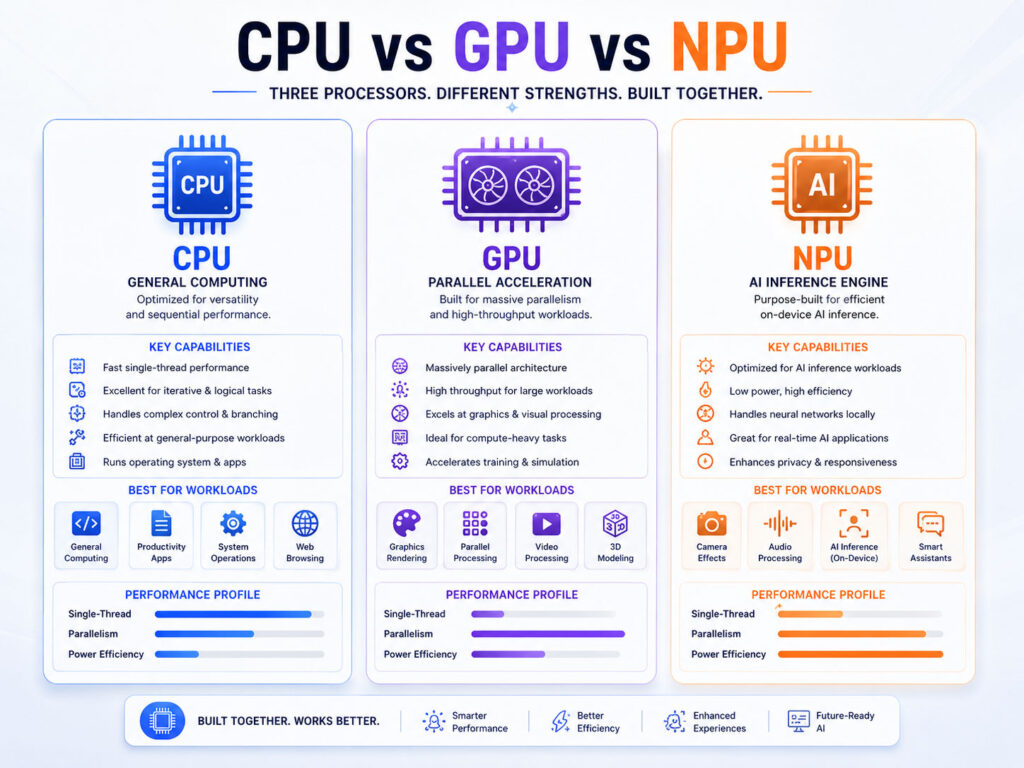
Most modern AI PCs combine three main processing units:
- A CPU for general computing tasks.
- A GPU for graphics and highly parallel workloads.
- An NPU for efficient AI processing.
These processors can work together. As a result, the computer can send each task to the most suitable processing unit.
For example, the CPU may manage the operating system, while the GPU handles graphics. Meanwhile, the NPU may process background effects, voice features, image enhancement, or compatible local AI models.
What Is an NPU?
NPU stands for Neural Processing Unit.
An NPU is a specialised processor that handles machine-learning and AI workloads. It focuses on the mathematical operations that neural networks use for tasks such as image recognition, speech processing, background effects, and local AI inference.
In simple words, an NPU is an AI-focused processor inside the computer.
Why Do AI PCs Need an NPU?
CPUs and GPUs can also run AI tasks. However, they may consume more power when they continuously process lightweight AI features.
An NPU can handle supported AI workloads more efficiently. Consequently, the CPU and GPU remain available for other applications.
This division can help laptops run ongoing features such as camera enhancement, background blur, eye-contact correction, noise removal, and live audio processing without placing the complete workload on the CPU or GPU.
CPU vs GPU vs NPU
| Processor | Main Strength | Common Tasks |
|---|---|---|
| CPU | General-purpose processing | Operating system, applications, browser tasks, and sequential work |
| GPU | High parallel processing power | Graphics, gaming, video editing, rendering, and large AI workloads |
| NPU | Power-efficient AI processing | Camera effects, voice features, image processing, and compatible local AI tasks |
The NPU does not replace the CPU or GPU. Instead, it adds another specialised processing option.
What Is On-Device AI?
On-device AI means the computer processes an AI task locally instead of sending the entire task to a remote cloud server.
Local processing can reduce network delay and keep some information on the device. In addition, certain features may continue working without a constant internet connection.
Still, an AI PC does not make every AI tool fully offline. Many assistants, research tools, and large models continue to use cloud services because they need more computing power or current online information.
AI PC vs Traditional Laptop
| Point | Traditional Laptop | AI PC |
|---|---|---|
| AI Processing | Mainly uses CPU, GPU, or cloud services | Adds a dedicated NPU for supported tasks |
| Local AI Efficiency | Depends on CPU and GPU capabilities | NPU can handle compatible workloads efficiently |
| Software Support | Runs normal desktop and browser applications | Runs normal apps plus supported NPU features |
| Internet Requirement | Cloud AI normally needs internet access | Some AI features can work locally |
| Best Fit | General work without specialised AI needs | Newer workflows that use local AI regularly |
Therefore, the main difference is dedicated local AI acceleration rather than access to AI itself.
What Does TOPS Mean?
TOPS stands for trillions of operations per second.
Manufacturers use this measurement to describe the potential AI processing performance of an NPU or another processor. For example, an NPU rated at 40 TOPS can theoretically perform up to 40 trillion supported operations per second.
However, TOPS alone does not show the complete performance of an AI laptop.
Real results also depend on:
- The AI model and data type.
- Software optimisation.
- Memory speed and capacity.
- Processor architecture.
- Power and cooling limits.
- Application support for the NPU.
Therefore, avoid comparing laptops only by their TOPS number.
What Is a Copilot+ PC?
Copilot+ PC is Microsoft’s category for Windows computers that meet specific hardware requirements for supported Windows AI experiences.
Current minimum requirements include a compatible processor with an NPU capable of at least 40 TOPS, 16 GB of memory, and 256 GB of storage.
However, an AI PC and a Copilot+ PC are not always the same thing. A computer may include an NPU but still fail to meet the complete Copilot+ PC requirements.
What Can an NPU Do?
An NPU can support several types of AI workloads when the operating system and application recognise it.
- Improve webcam background effects.
- Reduce unwanted background noise.
- Support speech recognition and live captions.
- Enhance photos and videos.
- Process supported language or vision models locally.
- Reduce CPU and GPU usage during continuous AI tasks.
- Support AI features in compatible creative and productivity apps.
Nevertheless, the exact features vary by laptop, processor, operating system, and application.
Benefits of an AI Laptop
An AI laptop can provide several practical advantages.
1. Better Efficiency for Supported AI Tasks
The NPU can run certain AI workloads with lower power usage than a CPU or high-performance GPU.
As a result, supported background features may have less effect on battery life and general system performance.
2. Faster Local Processing
Local AI processing avoids sending every task to a cloud server.
Consequently, compatible features may respond faster because they do not depend completely on internet speed or server availability.
3. More Privacy for Some Tasks
When an application processes data locally, it may keep that information on the device.
However, users should still check the application’s privacy settings. An NPU does not guarantee that every app keeps all information offline.
4. Improved Video Meetings
NPUs can support camera framing, background effects, eye-contact correction, voice focus, and noise reduction.
These features may run continuously during meetings. Therefore, a power-efficient processor can provide value for remote workers and frequent video-call users.
5. Support for Future Applications
Software developers continue adding local AI features to creative, communication, security, and productivity applications.
An NPU may help a newer laptop support these workloads over its useful life. Still, future software support can vary, so buyers should not rely only on promises.
Limitations of AI PCs
AI PCs also have important limitations.
- Not every application uses the NPU.
- Many popular AI tools still rely on cloud processing.
- NPU performance differs between processors.
- AI-focused laptops may cost more.
- New AI features can change or remain unavailable in some regions.
- Older applications may not gain any benefit from the NPU.
Moreover, an NPU cannot compensate for weak memory, limited storage, a poor display, or an unsuitable processor.
Can an AI Laptop Run ChatGPT or Gemini Faster?
Browser-based AI assistants usually process their largest models in the cloud.
Therefore, adding an NPU does not automatically make every ChatGPT, Gemini, or Copilot response faster. Internet speed, server performance, account plan, and model choice may have a larger effect.
However, a desktop application may use the NPU for selected local features. Always check the application documentation before assuming it supports the hardware.
Can an AI PC Work Without the Internet?
Some local AI features can work without internet access.
For example, compatible camera effects, audio processing, image tools, or locally installed models may continue to work offline.
In contrast, cloud assistants, current web research, online file access, and server-based models still require an internet connection.
As a result, an AI PC offers partial offline intelligence rather than complete offline access to every AI service.
Do You Need an AI Laptop?
You do not need an AI laptop only because manufacturers promote AI features.
Instead, consider how you use your current computer. An AI PC makes more sense when you plan to buy a new laptop anyway and expect to keep it for several years.
It can also help when supported AI features form a regular part of your work.
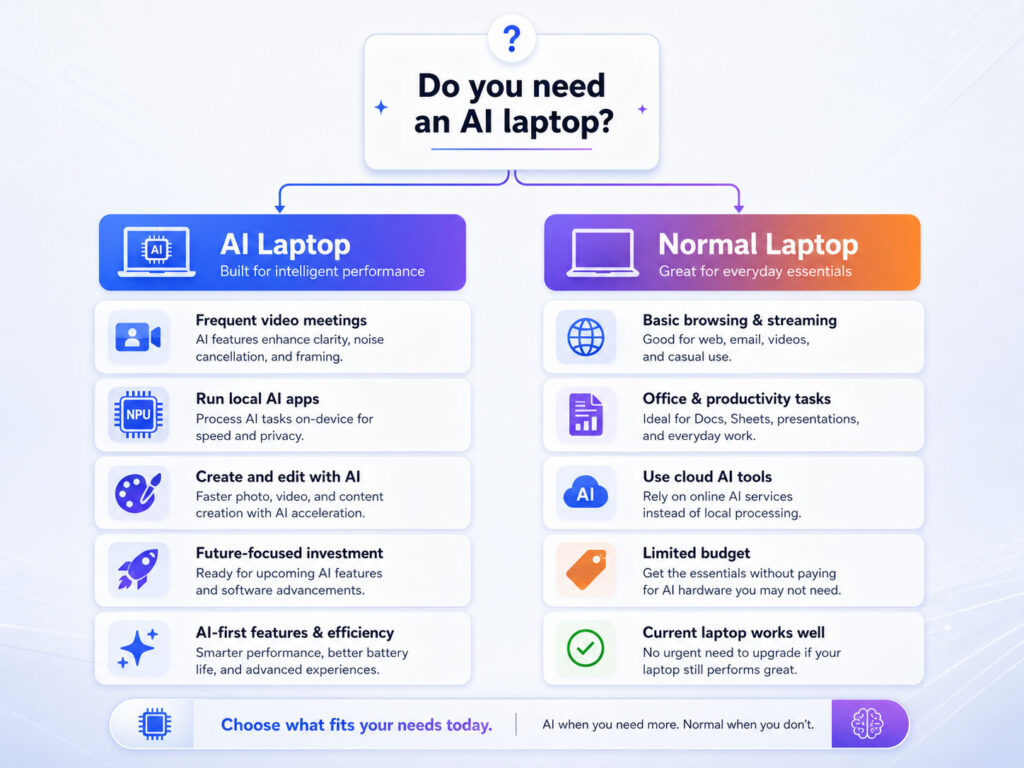
An AI Laptop May Be Useful When
- You attend frequent video meetings.
- You use creative apps with local AI features.
- You want to experiment with local AI models.
- You need efficient voice, image, or camera processing.
- You plan to keep the laptop for several years.
- You want supported Copilot+ PC features.
- Your workplace plans to adopt NPU-enabled applications.
In these cases, an NPU can add practical value instead of becoming an unused specification.
You May Not Need an AI Laptop When
- Your current laptop still performs well.
- You mainly browse websites, watch videos, and use basic office apps.
- You use AI only through cloud-based browser tools.
- Your preferred applications do not support NPU acceleration.
- A normal laptop offers better overall specifications for your budget.
- You plan to replace the device again within a short time.
Therefore, do not upgrade only for the AI label.
What Should Students Choose?
Students should first focus on performance, battery life, weight, durability, and software compatibility.
An AI laptop can provide extra value for coding, research, design, media work, and long-term use. However, sufficient RAM and storage often matter more for everyday study.
For example, a laptop with limited memory but a strong NPU may still struggle with several browser tabs, development tools, or large files.
What Should Office Users Choose?
Office users may benefit from an AI laptop when they use video meetings, transcription, document tools, presentations, or supported Microsoft 365 features regularly.
Still, the laptop should also provide a comfortable keyboard, clear display, reliable webcam, useful ports, and strong battery life.
Therefore, treat the NPU as one part of the complete laptop rather than the only buying factor.
What Should Developers Choose?
Developers should consider whether they plan to build or test local AI applications.
An NPU-enabled laptop can help with supported machine-learning inference and Windows AI development. Meanwhile, a strong GPU may remain more useful for larger models, training, graphics, gaming, or applications that lack NPU support.
In addition, developers should check architecture, framework support, drivers, runtime tools, memory, and software compatibility before choosing a device.
What Should Content Creators Choose?
Content creators may benefit from AI-assisted photo editing, video effects, audio cleanup, transcription, and background processing.
However, professional video editing and rendering still depend heavily on the CPU, GPU, memory, and storage speed.
Consequently, creators should not trade a stronger GPU or better display for an NPU unless their applications clearly use it.
What to Check Before Buying an AI Laptop
| Specification | Why It Matters |
|---|---|
| NPU Performance | Controls supported local AI acceleration |
| Processor | Affects general application performance |
| GPU | Matters for graphics, gaming, editing, and heavier AI tasks |
| RAM | Supports multitasking and larger applications |
| Storage | Controls available space and file performance |
| Battery Life | Matters for portable and long working sessions |
| Software Compatibility | Confirms whether your apps support the processor and NPU |
| Ports and Display | Affect everyday productivity and external-device use |
Do Not Compare TOPS Alone
A higher TOPS rating may suggest more potential AI performance. However, it does not guarantee that every application will run faster.
Software support, memory bandwidth, model format, processor design, drivers, and cooling all affect the result.
Therefore, compare real application tests and complete laptop specifications instead of choosing only the highest number.
AI PC Buying Checklist
- Confirm that you need a new laptop.
- List the applications you use most often.
- Check whether those applications support the NPU.
- Compare CPU, GPU, RAM, storage, display, and battery life.
- Review the processor architecture and app compatibility.
- Check whether you need Copilot+ PC features.
- Compare complete laptop prices rather than NPU numbers alone.
- Read independent tests for the exact model.
- Review warranty, repairability, and service options.
Should You Upgrade Your Current Laptop?
If your current laptop performs well, you probably do not need to replace it only to gain an NPU.
Cloud-based AI services will continue working on many traditional laptops. In addition, some systems can improve through an SSD or RAM upgrade.
Consider replacement when your existing device no longer supports your software, battery needs, security updates, or performance requirements.
Final Verdict
An AI PC provides dedicated hardware for local AI workloads, while an NPU handles supported tasks efficiently.
However, most users should not choose a laptop based only on the AI label. CPU performance, memory, storage, display quality, battery life, software compatibility, and price remain essential.
Therefore, buy an AI laptop when you need a new device and the complete package fits your work. Otherwise, continue using your current computer until a practical reason for upgrading appears.
Conclusion
AI PC and NPU Explained becomes simple when you understand the role of each processor.
The CPU handles general computing, the GPU manages graphics and heavy parallel work, and the NPU accelerates compatible AI tasks with better efficiency.
An AI laptop can support useful local features, but it does not make every cloud assistant faster or replace strong overall specifications.
Before buying, check your applications, compare the complete hardware, and decide whether the available AI features solve a real need.

AboutTPJ Technical Team
The Project Jugaad Technical Team creates practical, easy-to-follow content on software development, web technologies, artificial intelligence, cybersecurity, cloud platforms, and digital tools. Our articles are informed by more than 13 years of hands-on experience with .NET, Angular, SQL Server, AWS, WordPress, Linux hosting, application deployment, and real-world troubleshooting. Each guide is researched, reviewed, and updated to provide accurate, useful, and actionable information for developers, businesses, and everyday technology users.