Software Development
Docker vs Virtual Machine is an important comparison for developers, DevOps teams, system administrators, and businesses that run applications across different environments.
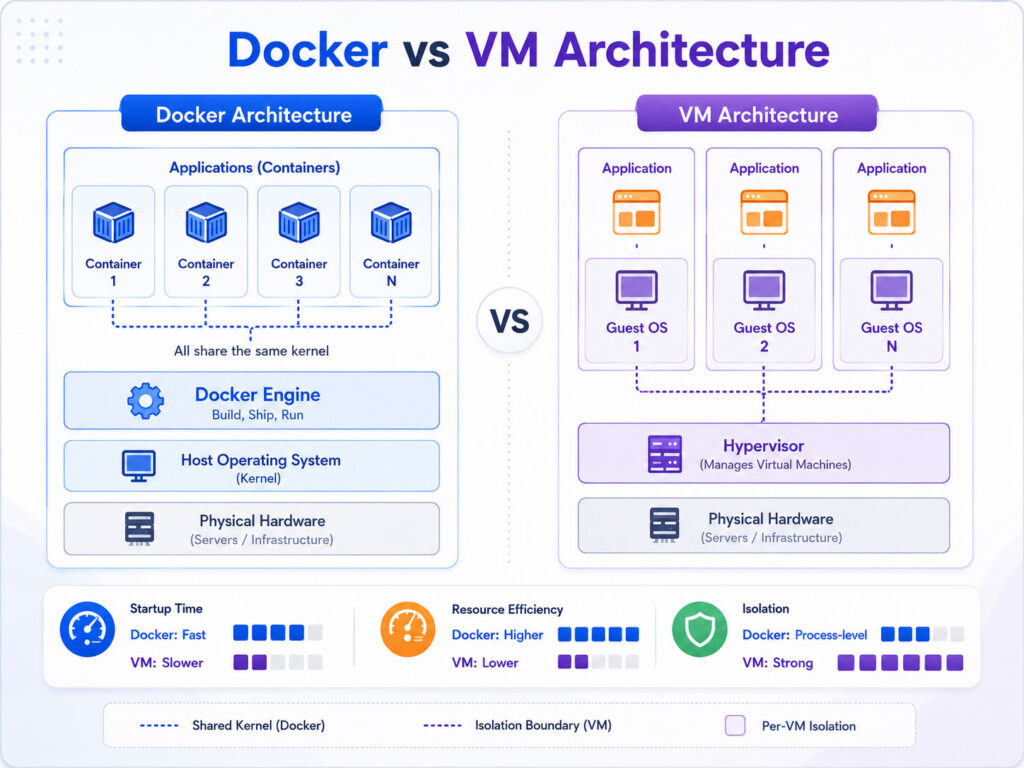
Both technologies help isolate applications and reduce conflicts. However, they achieve isolation in different ways. Virtual machines include a complete guest operating system, while Docker containers share the host operating system kernel.
Therefore, Docker containers usually start faster and use fewer resources. In contrast, virtual machines provide stronger separation and support different operating systems on the same physical machine.
What Is Docker?
Docker is a platform used to build, package, distribute, and run applications inside containers.
A container includes the application code, required libraries, dependencies, and configuration. As a result, the application can behave consistently across a developer computer, testing server, and production environment.
Docker uses images as reusable application templates. When Docker starts an image, it creates a running container.
What Is a Docker Container?
A Docker container is an isolated process that runs on the host operating system.
Containers share the host kernel instead of running a complete operating system for every application. Consequently, they often use less memory and storage than virtual machines.
For example, a web application may run in one container, its API in another container, and its database in a third container. Docker networking can then connect these services.
What Is a Virtual Machine?
A virtual machine is a complete virtual computer that runs inside a physical computer.
Each VM includes virtual hardware, a guest operating system, applications, and required dependencies. A hypervisor manages the virtual machines and allocates processor, memory, storage, and network resources.
Because every VM has its own operating system, one physical machine can run different operating systems at the same time.
What Is a Hypervisor?
A hypervisor is software that creates and manages virtual machines.
It separates the virtual machines from the physical hardware and distributes available resources between them. Therefore, several isolated systems can run on one server.
Some hypervisors run directly on server hardware. Others run as applications on top of an existing operating system.
Quick Difference Between Docker and Virtual Machines
| Point | Docker Container | Virtual Machine |
|---|---|---|
| Operating System | Shares the host kernel | Includes a complete guest operating system |
| Startup Time | Usually starts quickly | Usually takes longer to boot |
| Resource Usage | Generally uses fewer resources | Generally uses more memory and storage |
| Isolation | Process-level isolation | Full machine-level isolation |
| Portability | Easy to package and move as an image | Portable, but images are usually larger |
| Operating System Choice | Depends on a compatible host kernel | Can run a different guest operating system |
The main difference is simple. Docker virtualizes the application environment, while a virtual machine virtualizes the complete computer.
How Docker Works
Docker packages an application into an image.
The image contains instructions and files required to run the application. Next, Docker uses the image to create one or more containers.
Application code → Docker image → Running containerBecause the image defines the environment, teams can use the same package during development, testing, and deployment.
Simple Docker Example
A basic Dockerfile for a Node.js application may look like this:
FROM node:alpine
WORKDIR /app
COPY package*.json ./
RUN npm install
COPY . .
EXPOSE 3000
CMD ["npm", "start"]
This file selects a base image, creates a working directory, installs dependencies, copies the application, and defines the startup command.
Afterwards, developers can build an image and run the application inside a container.
How a Virtual Machine Works
A virtual machine starts with virtual hardware and a complete guest operating system.
The hypervisor assigns resources to the VM. Then, the guest operating system starts, loads its services, and runs applications.
Physical hardware → Hypervisor → Guest operating system → ApplicationSince each VM includes a complete operating system, it behaves like an independent computer.
Docker Architecture
A common Docker environment includes several important parts.
| Component | Purpose |
|---|---|
| Dockerfile | Defines how Docker should build an image |
| Image | Provides a reusable application template |
| Container | Runs the application from an image |
| Registry | Stores and distributes Docker images |
| Docker Engine | Builds and runs containers |
| Docker Compose | Defines and runs multi-container applications |
Together, these components support repeatable application packaging and deployment.
Virtual Machine Architecture
A virtual machine environment also contains several layers.
| Component | Purpose |
|---|---|
| Physical Hardware | Provides processor, memory, storage, and networking |
| Hypervisor | Creates and manages virtual machines |
| Virtual Hardware | Presents virtual CPU, memory, disk, and network devices |
| Guest Operating System | Runs independently inside the VM |
| Applications | Run inside the guest operating system |
This layered architecture provides strong separation, although it also adds resource overhead.
Docker Performance
Docker containers usually start within a short time because they do not boot a complete operating system.
They also share the host kernel. Therefore, a server can often run more containers than full virtual machines with the same hardware resources.
However, application performance still depends on storage, networking, container limits, host configuration, and workload design.
Virtual Machine Performance
Virtual machines use more resources because every VM runs its own operating system.
They need memory and storage for system services, updates, logs, and applications. As a result, startup usually takes longer.
Nevertheless, modern hypervisors can provide strong and reliable performance for many workloads.
Docker Isolation vs VM Isolation
Containers isolate processes, filesystems, networks, and resources. Still, they share the host kernel.
Virtual machines create a stronger boundary because every VM includes a separate operating system. Consequently, VMs often suit workloads that require stronger separation or different operating systems.
Docker security still depends on secure images, restricted permissions, updated software, careful secrets management, and proper runtime configuration.
Benefits of Docker
Docker can make application development and deployment more consistent.
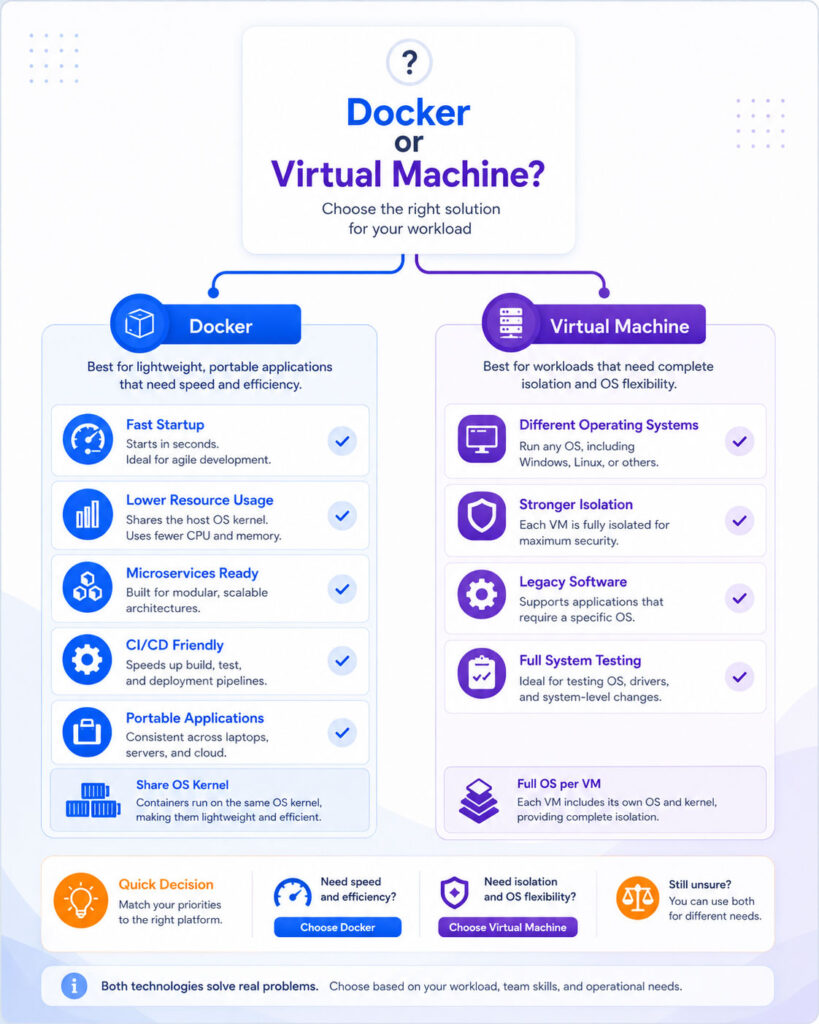
- Containers usually start quickly.
- Images create repeatable application environments.
- Containers generally consume fewer resources than virtual machines.
- Teams can package applications with their dependencies.
- Docker works well with automated build and deployment pipelines.
- Developers can run several isolated services on one host.
Therefore, Docker suits modern development, testing, microservices, and cloud deployment workflows.
Limitations of Docker
Docker also has limitations.
- Containers share the host kernel.
- Persistent storage requires careful planning.
- Networking can become complex in larger environments.
- Poorly configured containers may create security risks.
- Container logs and monitoring need proper tools.
- Teams must manage image versions and vulnerabilities.
In addition, containers do not remove the need for application architecture, testing, security, or operational planning.
Benefits of Virtual Machines
Virtual machines provide complete and flexible computing environments.
- Each VM includes an independent operating system.
- One host can run different operating systems.
- VMs provide strong workload separation.
- They support older applications that expect a full operating system.
- Administrators can allocate resources to each machine.
- Snapshots can help with testing and recovery.
As a result, virtual machines remain useful for infrastructure, legacy systems, testing, and security-sensitive workloads.
Limitations of Virtual Machines
Virtual machines require more resources and maintenance.
- Each VM consumes memory and storage for its operating system.
- Boot time is usually longer than container startup time.
- Operating systems need updates and security patches.
- VM images can become large.
- Running many VMs may require powerful hardware.
- Provisioning can take longer without automation.
Therefore, VMs may be inefficient when teams only need lightweight application isolation.
When Should You Use Docker?
Docker works well when application portability, fast startup, and efficient resource usage matter.
- Developing and testing applications consistently.
- Running microservices.
- Creating CI/CD pipelines.
- Packaging APIs and web applications.
- Deploying stateless services.
- Running several application versions in isolation.
Docker also suits local development because developers can start databases, queues, APIs, and supporting tools without installing everything directly.
When Should You Use a Virtual Machine?
A virtual machine is useful when the workload needs a full operating system.
- Running different operating systems on one host.
- Supporting older or legacy applications.
- Testing operating-system changes.
- Providing isolated desktop or server environments.
- Running workloads that require stronger separation.
- Hosting applications that do not work well inside containers.
Moreover, a VM can include containers inside it. Many cloud and enterprise environments use this combined approach.
Can Docker and Virtual Machines Work Together?
Yes, Docker and virtual machines often work together.
For example, a cloud provider may create a virtual machine. The team can then install Docker on that VM and run several containers inside it.
Physical server → Virtual machine → Docker Engine → ContainersThis structure combines VM isolation with container portability and efficient application deployment.
Docker vs Virtual Machine for Microservices
Containers often fit microservices because each service can run in its own lightweight environment.
Teams can build, update, scale, and deploy services independently. In addition, orchestration platforms can manage many containers across several machines.
However, microservices add operational complexity. Therefore, teams should not choose them only because Docker makes containers easy to create.
Docker vs Virtual Machine for Development
Docker can help developers reproduce the same environment across different computers.
For example, a project can define its database, API, cache, and message queue through Docker Compose. Consequently, a new developer can start the required services with fewer manual installation steps.
Virtual machines may still help when developers need a complete operating system, special networking, or isolated system-level testing.
Docker vs Virtual Machine for Security
Neither technology becomes secure automatically.
Virtual machines provide a stronger isolation boundary because they use separate guest operating systems. In contrast, Docker containers share the host kernel and require strict runtime controls.
For safer container use, follow these practices:
- Use trusted and minimal base images.
- Scan images for known vulnerabilities.
- Avoid running containers with unnecessary privileges.
- Keep Docker and the host operating system updated.
- Store secrets outside image files.
- Limit network and filesystem access.
Similarly, virtual machines need updates, strong access controls, monitoring, backups, and secure network rules.
Which One Should You Choose?
| Your Requirement | Better Starting Point |
|---|---|
| Fast application startup | Docker |
| Lower resource usage | Docker |
| Different operating systems | Virtual Machine |
| Strong machine-level isolation | Virtual Machine |
| Microservices and CI/CD | Docker |
| Legacy system support | Virtual Machine |
| Cloud application deployment | Docker, often running inside VMs |
| Complete system testing | Virtual Machine |
Common Mistakes to Avoid
- Do not treat containers as small virtual machines.
- Do not store important data only inside a temporary container.
- Do not use untrusted images without review.
- Do not give containers unnecessary administrator privileges.
- Do not create a VM for every small service without checking resource needs.
- Do not ignore updates, monitoring, backups, and security scanning.
Choosing the right tool requires understanding the workload rather than following a trend.
Final Verdict
Docker and virtual machines solve different problems.
Docker provides lightweight application isolation, fast startup, and repeatable packaging. Therefore, it works well for development, testing, microservices, and automated deployment.
Virtual machines provide complete operating systems and stronger separation. As a result, they suit legacy applications, mixed operating systems, infrastructure testing, and workloads that need machine-level isolation.
Conclusion
Docker vs Virtual Machine becomes simple when you compare application isolation with complete system isolation.
Choose Docker when you need portable, lightweight, and quickly deployable application environments. In contrast, choose a virtual machine when you need a complete operating system or stronger workload separation.
In many production environments, the best solution uses both. Virtual machines provide the infrastructure layer, while Docker containers package and run the applications.

AboutTPJ Technical Team
The Project Jugaad Technical Team creates practical, easy-to-follow content on software development, web technologies, artificial intelligence, cybersecurity, cloud platforms, and digital tools. Our articles are informed by more than 13 years of hands-on experience with .NET, Angular, SQL Server, AWS, WordPress, Linux hosting, application deployment, and real-world troubleshooting. Each guide is researched, reviewed, and updated to provide accurate, useful, and actionable information for developers, businesses, and everyday technology users.