Software Development
OAuth 2.0 and OpenID Connect often appear together in login systems, APIs, mobile applications, and single sign-on platforms. However, they do not solve exactly the same problem.
OAuth 2.0 is primarily an authorization framework. It allows an application to request limited access to a protected resource without receiving the user’s password. OpenID Connect, commonly called OIDC, adds an identity layer on top of OAuth 2.0 so that an application can verify who the user is.
The OAuth 2.0 vs OpenID Connect difference becomes easier to understand when authentication and authorization are treated separately. Authentication confirms identity, while authorization determines what an application or user can access.
OAuth 2.0 vs OpenID Connect: Quick Answer
- Use OAuth 2.0 when an application needs permission to call an API or access a protected resource.
- Use OpenID Connect when an application needs to sign users in and receive verified identity information.
- Use both together when an application needs user login as well as authorized API access.
OpenID Connect depends on OAuth 2.0 flows, but OAuth 2.0 does not automatically provide user authentication.
What Is Authentication?
Authentication verifies the identity of a user, device, service, or application. For example, a user may authenticate by entering a password, approving a passkey, using a security key, or completing multi-factor authentication.
After successful authentication, the application can establish that the person is the same user represented by a particular account.
Authentication answers a question such as:
Who is the user?What Is Authorization?
Authorization determines what an authenticated user or application is allowed to access. It may control permissions for files, APIs, account details, payments, calendars, or administrative functions.
Authorization answers questions such as:
Can this application read the user’s calendar?
Can this user access the administration page?
Can this service update the requested record?
A user normally authenticates before receiving permissions. However, authentication and authorization remain separate security decisions.
What Is OAuth 2.0?
OAuth 2.0 is an authorization framework that allows a client application to obtain limited access to a protected resource. The application receives an access token instead of collecting or storing the resource owner’s password.
For example, a photo-printing application may request permission to access selected photographs from another service. The user approves the requested access, and the service issues an access token with an appropriate scope.
The photo application can then use that token to call the protected API. It does not need the user’s main account password.
OAuth 2.0 Roles
An OAuth 2.0 system commonly includes the following roles:
- Resource owner: The user or entity that can grant access to a protected resource.
- Client: The application requesting access.
- Authorization server: The system that authenticates the resource owner, collects consent, and issues tokens.
- Resource server: The API or service that accepts valid access tokens and protects data or operations.
In smaller systems, the authorization server and resource server may belong to the same organisation. In larger architectures, they may operate as separate services.
What Is an OAuth Access Token?
An access token is a credential that a client presents to a protected API. It represents the access granted to the client and may include information about permissions, audience, expiry, or the user involved.
The client commonly sends the token in an HTTP authorization header:
Authorization: Bearer ACCESS_TOKENThe resource server validates the token before allowing access. The client should treat the token as sensitive because anyone who obtains a valid bearer token may be able to use it.
What Is an OAuth Scope?
A scope describes the type of access requested by the client. For example, an application may request permission to read a profile, view calendar events, or upload a file.
Possible scope names may look like:
profile.read
calendar.read
files.write
The exact scope names depend on the authorization server and API. Clients should request only the permissions they genuinely need.
What Is OpenID Connect?
OpenID Connect is an identity protocol built on top of OAuth 2.0. It allows a client application to verify a user’s identity and obtain standard profile information in a consistent format.
OIDC introduces an ID token, standard identity claims, a user information endpoint, discovery metadata, and rules for validating the authentication response.
An application signals that it wants OpenID Connect authentication by including the openid scope in the authorization request.
What Is an ID Token?
An ID token contains information about the user’s authentication event. It is intended for the client application that requested the login.
ID tokens commonly use the JSON Web Token format and may contain claims such as:
issfor the identity provider that issued the token.subfor the user’s stable identifier at that issuer.audfor the intended client.expfor the expiration time.iatfor the issue time.auth_timefor the time of authentication when required.noncefor linking the response to the original request.
The client validates these claims before accepting the authentication result.
Access Token vs ID Token
| Area | Access Token | ID Token |
|---|---|---|
| Primary purpose | Authorize access to an API | Communicate an authentication result |
| Intended recipient | Resource server or API | Client application |
| Used for API calls | Yes | No |
| Contains user identity claims | May contain limited claims | Contains authentication and identity claims |
| Format | May be JWT or opaque | Normally a signed JWT |
| Validation focus | Audience, scope, expiry, issuer, and permissions | Issuer, client audience, signature, expiry, and nonce |
An ID token should not be sent to an API as a substitute for an access token. Similarly, an application should not treat an access token as proof of user authentication unless the complete protocol and token semantics explicitly support that purpose.
OAuth 2.0 vs OpenID Connect Comparison
| Area | OAuth 2.0 | OpenID Connect |
|---|---|---|
| Main purpose | Authorization | Authentication and identity |
| Built on OAuth 2.0 | Not applicable | Yes |
| Main token | Access token | ID token and usually an access token |
| Confirms user identity | Not by itself | Yes |
| API access | Yes | Uses OAuth access tokens |
| Standard user claims | Not defined as an identity protocol | Yes |
| Discovery support | Depends on additional metadata standards | Standard discovery is commonly supported |
| Common use | Delegated API access | User login and single sign-on |
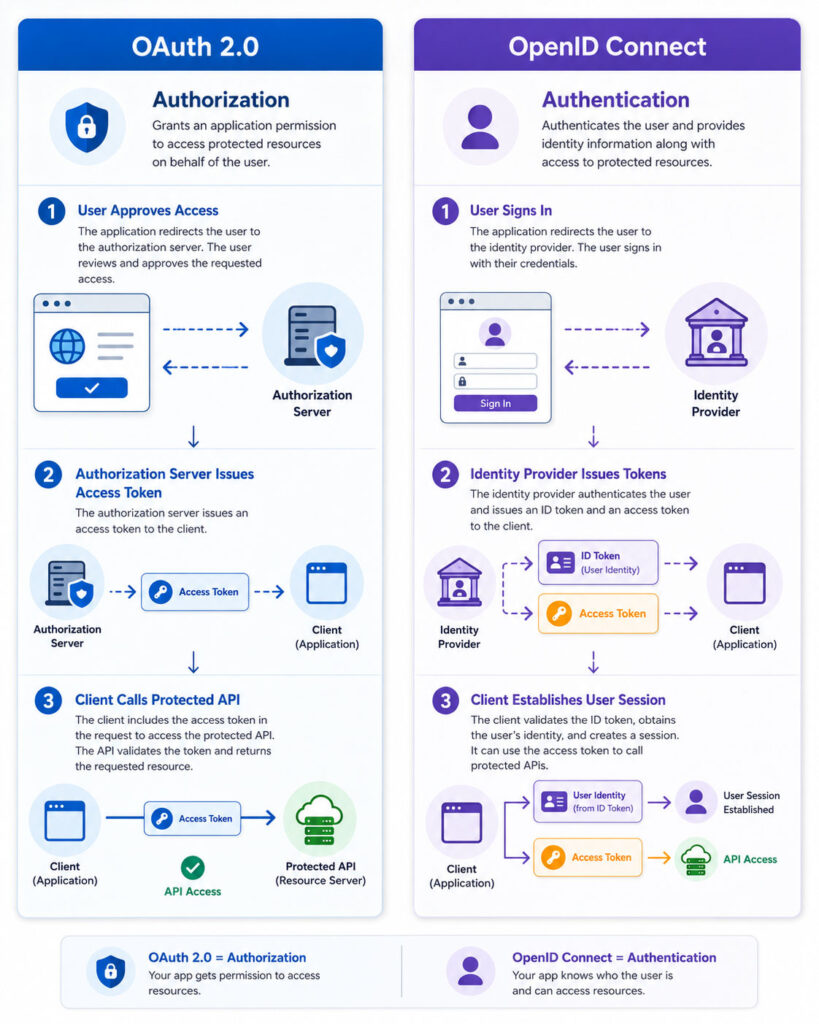
OpenID Connect does not replace OAuth 2.0. Instead, it adds a standardized authentication layer to OAuth-based authorization flows.
How the OAuth 2.0 Authorization Code Flow Works
The authorization code flow is widely used for websites, mobile applications, and browser-based clients. It avoids returning an access token directly through the browser redirect.
- The client sends the user to the authorization server.
- The user authenticates and reviews the requested permissions.
- The authorization server redirects the user back with an authorization code.
- The client exchanges the code for an access token.
- The client sends the access token to the protected API.
- The API validates the token and returns the permitted resource.
The authorization code is short-lived and intended for one-time use. Modern implementations normally combine this flow with Proof Key for Code Exchange, commonly called PKCE.
What Is PKCE?
PKCE protects the authorization code from interception. Before starting the authorization request, the client creates a random code verifier and derives a code challenge from it.
The client sends the challenge with the authorization request. Later, it sends the original verifier when exchanging the authorization code for tokens.
The authorization server verifies that the challenge and verifier match. Therefore, an attacker who steals only the authorization code cannot exchange it without the verifier.
PKCE is particularly important for public clients such as mobile applications and browser-based applications that cannot safely store a permanent client secret.
How the OpenID Connect Login Flow Works
OpenID Connect commonly uses the OAuth authorization code flow with additional OIDC parameters and validation.
- The client redirects the user to the identity provider.
- The request includes the
openidscope. - The user authenticates with the identity provider.
- The identity provider returns an authorization code.
- The client exchanges the code for tokens.
- The token response includes an ID token and may include an access token and refresh token.
- The client validates the ID token.
- The client creates its own application session.
The ID token tells the client about the authentication event. The access token allows the client to call an approved API or user information endpoint.
Why OAuth 2.0 Alone Is Not a Login Protocol
OAuth 2.0 focuses on delegated access. It does not define a standard identity token or a universal way for a client to determine how and when the user authenticated.
An application may receive an access token after an authorization flow. However, the token is primarily intended for the resource server, not for the client application to interpret as proof of login.
Using an OAuth access token as an identity token can create confusion about the issuer, audience, token owner, authentication event, and intended use.
OpenID Connect solves this problem by defining the ID token and specific validation rules for user authentication.
Authorization Server vs Identity Provider
An authorization server issues OAuth tokens that allow access to protected resources. An OpenID Provider is an OAuth authorization server that also supports OpenID Connect authentication.
The term identity provider is often used more broadly for a system that authenticates users and supplies identity information to applications.
A single platform may act as an identity provider, OpenID Provider, authorization server, and token issuer. Nevertheless, each function has a distinct security purpose.
What Is the UserInfo Endpoint?
OpenID Connect defines a UserInfo endpoint that can return claims about the authenticated user. The client calls this endpoint with a valid access token.
Possible claims include name, email address, profile image, locale, or other approved information.
The client should not assume that every requested claim will be available. The returned information depends on scopes, consent, account data, provider policy, and privacy settings.
Common OpenID Connect Scopes
openidactivates OpenID Connect authentication.profilerequests standard profile claims.emailrequests email-related claims.addressrequests address information.phonerequests phone-number information.offline_accessmay request a refresh token for continued access when the user is not present.
The openid scope is required for an OIDC authentication request. The remaining scopes are optional and should be requested only when the application genuinely needs them.
What Is a Claim?
A claim is a piece of information stated about an entity. In OpenID Connect, claims may describe the user, token issuer, intended audience, authentication event, or token lifetime.
For example:
{
  "sub": "248289761001",
  "name": "Example User",
  "email": "user@example.com",
  "email_verified": true
}
Applications should use the issuer and subject combination as the stable identity key. Email addresses, usernames, and display names may change and may not be globally unique.
What Is the Subject Identifier?
The sub claim identifies the user within the context of the issuer. It should remain stable for the relevant client or provider relationship.
An application should not use an email address as the primary identity key because the user may change it. Two providers may also issue the same email address under different accounts or assurance levels.
A safer internal mapping uses both the token issuer and subject:
Identity Key = issuer + subjectWhat Is the Nonce Parameter?
A nonce is a random value that links an authentication request to the resulting ID token. The client sends the nonce in the authorization request and verifies that the same value appears in the returned token.
This validation helps reduce replay and response-substitution risks. The client should generate a new unpredictable nonce for each relevant authentication request.
A nonce does not replace the OAuth state parameter. They protect different parts of the flow.
What Is the State Parameter?
The state parameter links the authorization response to the original browser request. It also helps protect the redirect flow against cross-site request forgery and response mix-up.
The client generates a random value before redirecting the user and checks the returned value before accepting the response.
Applications may also use protected state to preserve navigation information. However, sensitive details should not be exposed directly in an unprotected query value.
ID Token Validation
A client should validate an ID token before creating a user session. Important checks include:
- Verify the token signature with a trusted provider key.
- Confirm that the issuer matches the expected provider.
- Confirm that the audience includes the client identifier.
- Reject an expired token.
- Validate the nonce when one was included in the request.
- Validate additional claims required by the selected flow.
- Accept only expected signing algorithms.
Applications should use a maintained OpenID Connect library rather than implementing token validation manually.
Access Token Validation
The resource server must validate the access token before processing an API request. The exact method depends on whether the token is self-contained or opaque.
For a signed JWT access token, the API may validate the signature, issuer, audience, expiry, and scopes locally. For an opaque token, the API may use a secure introspection process or provider-specific validation mechanism.
The API should reject tokens issued for a different resource or audience, even when the signature is technically valid.
JWT vs Opaque Access Tokens
| Area | JWT Access Token | Opaque Access Token |
|---|---|---|
| Token content | Contains encoded claims | Random or implementation-specific reference |
| Local API validation | Often possible | Usually requires server-side lookup or introspection |
| Immediate revocation | May require additional controls | Often easier through central token state |
| Information exposure | Claims may be readable | Token does not reveal useful details directly |
| Token size | Usually larger | Often smaller |
OAuth 2.0 does not require every access token to use the JWT format. Clients should generally treat access tokens as opaque unless the authorization server explicitly documents their structure and intended validation.
Refresh Tokens
A refresh token allows a client to request a new access token without asking the user to complete the full login or authorization flow again.
Refresh tokens are powerful credentials because they may extend access for a long period. Applications should store them securely, restrict their use to approved clients, and revoke them when suspicious activity occurs.
Modern systems may rotate refresh tokens after each use. If an old token appears again, the server can detect possible theft and revoke the related token family.
OAuth 2.0 Client Types
OAuth clients are commonly grouped into confidential and public clients.
- Confidential client: Runs in an environment that can protect credentials, such as a secure server.
- Public client: Runs in an environment where a permanent secret cannot remain confidential, such as a mobile app or browser application.
Embedding a client secret inside a mobile or browser application does not make the client confidential because users or attackers may extract it.
Common OAuth and OIDC Application Types
| Application | Common Approach | Main Purpose |
|---|---|---|
| Server-rendered web application | OIDC authorization code flow | User login and application session |
| Single-page application | Authorization code flow with PKCE | User login and API access |
| Mobile application | Authorization code flow with PKCE | User login and API access |
| Machine-to-machine service | OAuth client credentials flow | Service authorization without an end user |
| Third-party API integration | OAuth authorization flow | Delegated resource access |
| Enterprise single sign-on | OpenID Connect | Central user authentication |
When OAuth 2.0 Is the Right Choice
- An application needs permission to call a protected API.
- A user should grant limited access without sharing a password.
- A service needs scoped machine-to-machine access.
- A third-party client needs revocable access to selected resources.
- Different APIs require separate audiences or scopes.
When OpenID Connect Is the Right Choice
- An application needs to sign users in.
- Several applications need centralized single sign-on.
- The client needs a standard identity token.
- The application needs verified profile claims.
- The system uses an external identity provider.
- The application needs a standard logout and session-management strategy.
Using OAuth 2.0 and OpenID Connect Together
Many applications need authentication and authorization at the same time. For example, a web application may need to sign a user in and then call an API on that user’s behalf.
In this situation, the application can use an OpenID Connect authorization code flow. The provider returns an ID token for the client and an access token for the protected API.
The client validates the ID token and creates its own user session. It then sends the access token only to the intended API.
Single Sign-On with OpenID Connect
Single sign-on allows a user to authenticate through one identity provider and access several connected applications without entering credentials separately for each application.
Each application still has its own client registration, redirect addresses, tokens, sessions, and authorization rules. The shared identity provider confirms the user’s authentication.
Single sign-on improves convenience, but it also makes the identity provider a critical security component. Strong authentication, monitoring, session controls, account recovery, and availability become especially important.
OAuth Client Credentials Flow
The client credentials flow supports service-to-service authorization when no end user is involved. A confidential client authenticates directly with the authorization server and requests an access token.
For example, a scheduled reporting service may request permission to read data from an internal API.
The issued token represents the client application rather than an interactive user. Therefore, the system should not use this flow to simulate user login.
Why Password Grant Should Be Avoided
Older OAuth implementations sometimes allowed an application to collect a user’s username and password and exchange them directly for tokens.
This design exposes user credentials to the client and prevents the identity provider from controlling the complete authentication experience. It also creates problems for multi-factor authentication, passkeys, federation, and modern risk checks.
Applications should use redirect-based authorization flows instead of collecting credentials for another service.
Why the Implicit Flow Is No Longer Preferred
The implicit flow returned tokens directly through the browser authorization response. It was designed for older applications that could not securely perform an authorization code exchange.
Modern browser and mobile applications can use the authorization code flow with PKCE. This approach avoids exposing access tokens in the front-channel redirect and provides stronger protection against code interception.
New implementations should follow current provider guidance and use maintained security libraries.
Secure Redirect URI Configuration
The redirect URI tells the authorization server where to return the authorization response. Loose redirect validation can allow an attacker to capture authorization codes or tokens.
Clients should register exact redirect addresses whenever possible. Production applications should use HTTPS, except for narrowly defined local development or native application scenarios.
Do not accept arbitrary redirect destinations from untrusted request parameters.
Authorization Code Security
Authorization codes should remain short-lived and usable only once. The authorization server should bind them to the client, redirect URI, and PKCE challenge when applicable.
The client should exchange the code through a secure back-channel request and should never write it into long-term logs.
If the authorization response contains an unexpected issuer, state, redirect location, or error, the client should reject the flow safely.
Token Storage in Web Applications
Server-rendered applications can keep OAuth and OIDC tokens on the server and give the browser only a secure session cookie. This design reduces direct exposure of access and refresh tokens to browser JavaScript.
A backend-for-frontend architecture can provide similar protection for single-page applications by placing token handling behind an application-specific server.
When a browser application directly stores tokens, developers must carefully consider cross-site scripting, refresh-token protection, token lifetime, logout behaviour, and storage access.
OAuth and OIDC Security Checklist
- Use the authorization code flow with PKCE for user-facing applications.
- Register exact redirect URIs.
- Use HTTPS across production systems.
- Validate the
statevalue. - Validate the OIDC nonce when required.
- Verify token signatures with trusted keys.
- Validate issuer, audience, and expiry.
- Accept only expected signing algorithms.
- Request the minimum required scopes.
- Keep access tokens short-lived.
- Protect refresh tokens carefully.
- Rotate refresh tokens when appropriate.
- Send access tokens only to their intended APIs.
- Do not use ID tokens as API credentials.
- Use established OAuth and OIDC libraries.
Common OAuth 2.0 Mistakes
- Using OAuth 2.0 as a login protocol without OpenID Connect.
- Requesting broader scopes than the application needs.
- Failing to validate the access-token audience.
- Sending tokens to the wrong API or domain.
- Storing long-lived tokens in insecure browser storage.
- Embedding a client secret in a mobile or browser application.
- Using unregistered or loosely validated redirect addresses.
- Logging authorization codes, tokens, or secrets.
- Assuming every access token uses the JWT format.
- Implementing a custom OAuth client instead of using a secure library.
Common OpenID Connect Mistakes
- Using an ID token to call a protected API.
- Using an access token as proof of user authentication.
- Skipping issuer or audience validation.
- Using an email address as the permanent account identifier.
- Failing to validate the nonce.
- Trusting claims from an unverified token.
- Accepting tokens issued for another client.
- Assuming every identity provider returns the same optional claims.
- Ignoring account-linking risks across multiple providers.
- Creating an application session before completing token validation.
Account Linking with Multiple Identity Providers
An application may allow users to sign in through several identity providers. However, matching accounts only by email address can create security problems.
The same email may not have the same verification status across providers. A user may also lose control of an old email address or use different addresses for separate accounts.
Applications should use the issuer and subject as the external identity key. They should require an authenticated and deliberate process before linking that identity to an existing local account.
OAuth Consent
Consent allows a user to review the access requested by a client. A clear consent screen should identify the application and explain the requested permissions.
However, consent does not make every request safe. Authorization servers should still enforce client registration, scope policies, risk controls, and administrator restrictions.
Users should also be able to review and revoke connected applications when appropriate.
OAuth 2.0 vs API Keys
An API key commonly identifies a calling application or project. It may be suitable for simple service identification, rate limiting, or low-risk public API access.
OAuth access tokens can represent delegated permissions, users, clients, scopes, audiences, and expiry. They provide more control when applications need revocable and limited authorization.
An API key should not be treated as a complete replacement for user authentication or delegated access.
OAuth 2.0 vs SAML
OAuth 2.0 focuses on authorization, while SAML primarily supports enterprise authentication and federation through XML-based assertions.
OpenID Connect provides modern JSON and HTTP-based identity flows and often fits web, mobile, and API-oriented architectures more naturally.
However, many enterprises continue to use SAML successfully. The correct choice depends on existing identity systems, partner requirements, application architecture, and support.
Is OAuth 2.0 Used for Authentication?
OAuth 2.0 may appear during a sign-in experience, but OAuth alone does not define a standard authentication result for the client.
Use OpenID Connect when the application must verify the user’s identity. OAuth 2.0 can then provide any required API authorization.
Is OpenID Connect More Secure Than OAuth 2.0?
OpenID Connect is not a replacement that makes OAuth 2.0 more secure. It adds standardized authentication rules and identity tokens to an OAuth-based flow.
The security of either implementation depends on redirect validation, PKCE, token validation, storage, scopes, session controls, key management, and application design.
Does OpenID Connect Always Return an Access Token?
An OIDC login commonly returns an ID token and access token through the authorization code exchange. The access token may allow access to the UserInfo endpoint or another approved API.
However, the exact response depends on the provider, client configuration, scopes, and selected flow.
Can OAuth Work Without a User?
Yes. The client credentials flow allows a service to obtain an access token using its own identity when no end user is involved.
The authorization server should issue only the permissions required by that service.
Can OpenID Connect Work Without OAuth 2.0?
No. OpenID Connect is built on OAuth 2.0 authorization flows and extends them with authentication-specific requests, tokens, claims, and validation rules.
Should an API Read the ID Token?
An API should normally receive and validate an access token intended for that API. The ID token belongs to the client application and describes the user authentication event.
Sending an ID token to an API can cause audience and authorization errors because the token was not created for that resource server.
How Long Should Access Tokens Last?
Access-token lifetime depends on security risk, client type, API sensitivity, revocation capabilities, and user experience.
Shorter lifetimes reduce the useful period of a stolen token. Refresh tokens or application sessions can maintain user convenience without issuing very long-lived access tokens.
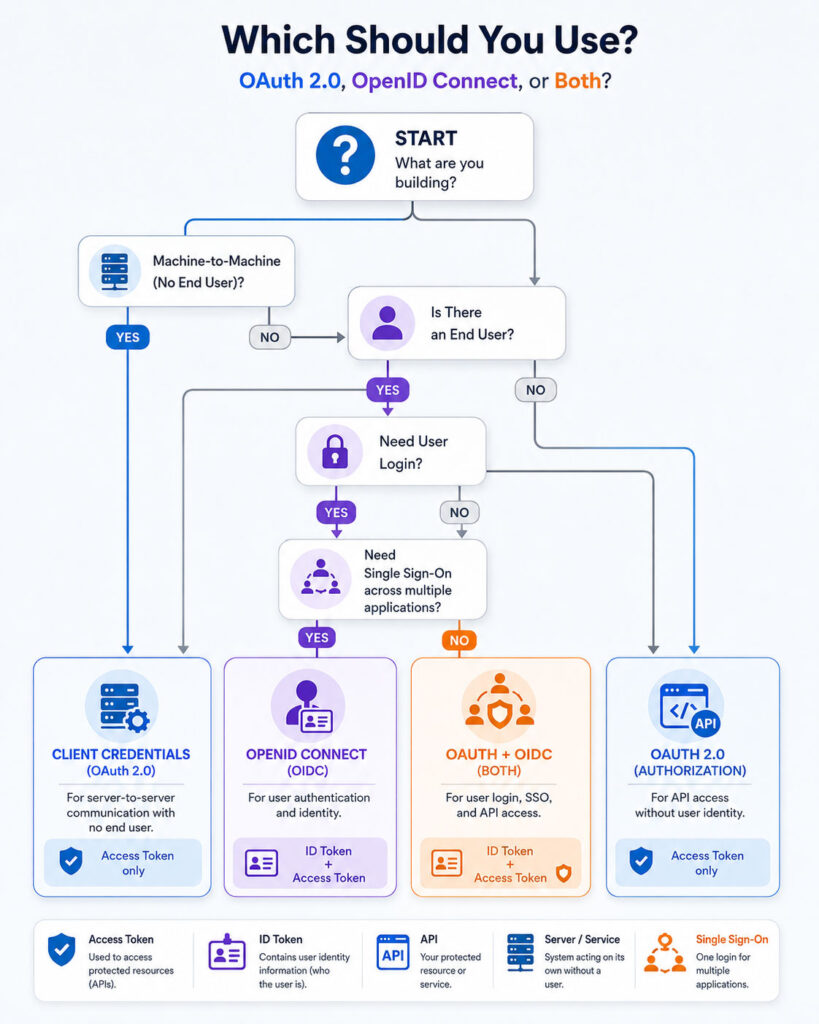
How to Choose Between OAuth 2.0 and OpenID Connect
- Choose OAuth 2.0 when the goal is protected API access.
- Choose OpenID Connect when the goal is user authentication.
- Use both when users sign in and the application calls APIs.
- Use client credentials for service-to-service authorization without a user.
- Use scopes and audiences to restrict API access.
- Use ID tokens only inside the client’s authentication process.
- Use maintained libraries and provider discovery instead of custom implementations.
Final Verdict
The OAuth 2.0 vs OpenID Connect comparison becomes clear when authentication and authorization are separated. OAuth 2.0 grants limited access to protected resources. OpenID Connect verifies user identity through a standard authentication layer built on top of OAuth 2.0.
An access token is intended for an API, while an ID token is intended for the client application. Mixing these tokens or using OAuth alone as proof of login can create security and implementation problems.
Use OAuth 2.0 for delegated API authorization. Use OpenID Connect for login and single sign-on. When an application needs both identity and API access, use the protocols together through a secure authorization code flow with PKCE, strict token validation, and carefully configured redirect addresses.

AboutTPJ Technical Team
The Project Jugaad Technical Team creates practical, easy-to-follow content on software development, web technologies, artificial intelligence, cybersecurity, cloud platforms, and digital tools. Our articles are informed by more than 13 years of hands-on experience with .NET, Angular, SQL Server, AWS, WordPress, Linux hosting, application deployment, and real-world troubleshooting. Each guide is researched, reviewed, and updated to provide accurate, useful, and actionable information for developers, businesses, and everyday technology users.