Technology Guide
A power bank can keep your phone, tablet, earbuds, smartwatch, camera, or laptop running when a wall socket is unavailable. However, choosing one only by its advertised capacity can lead to slow charging, unnecessary weight, incompatible ports, or disappointing battery performance.
To understand how to choose a power bank, consider four main areas: capacity, output wattage, charging compatibility, and safety. You should also check the number of ports, input speed, size, weight, cable requirements, and airline limits.
The best power bank is not always the one with the largest number printed on the box. Instead, it should provide enough usable energy, charge your devices at the required speed, and remain practical enough to carry regularly.
How to Choose a Power Bank: Quick Answer
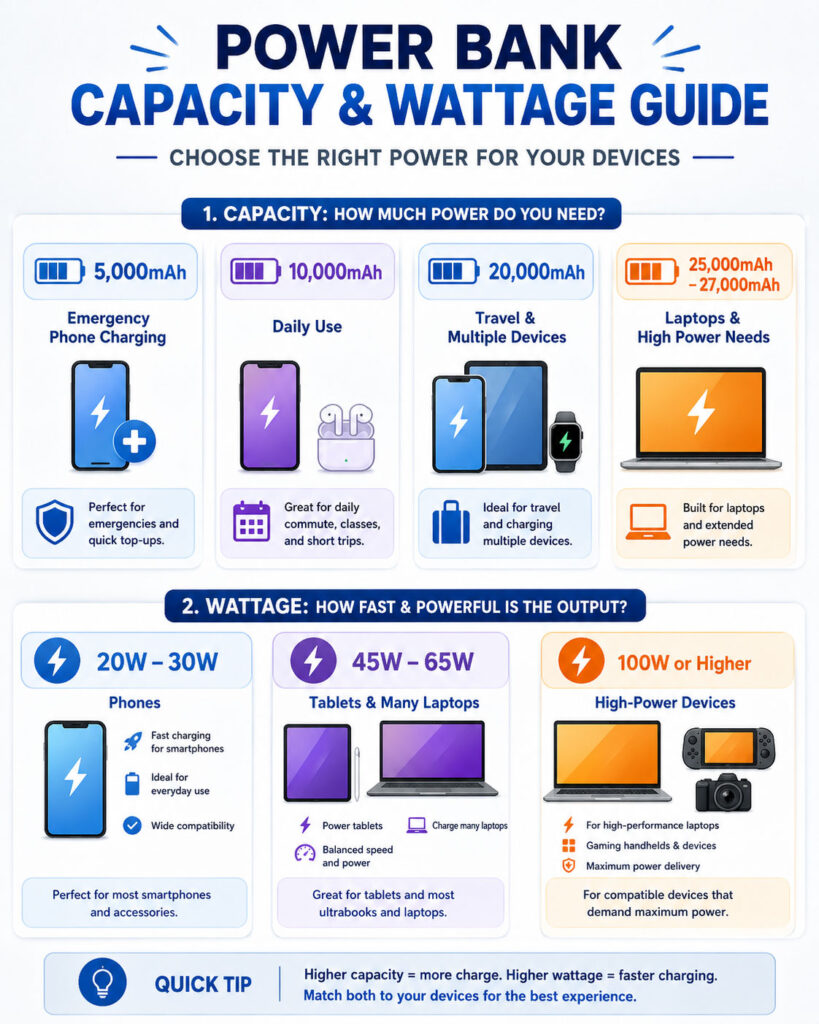
- Choose 5,000mAh for emergency phone charging and maximum portability.
- Choose 10,000mAh for daily travel and approximately one to two phone recharges, depending on the devices involved.
- Choose 20,000mAh for longer trips, multiple devices, tablets, or several phone recharges.
- Choose 25,000mAh to 27,000mAh when you need more energy for laptops while remaining near the common 100Wh airline threshold.
- Choose 20W to 30W output for most modern smartphones and smaller tablets.
- Choose 45W to 65W output for many tablets, handheld devices, and USB-C laptops.
- Choose 100W or higher only when your laptop or equipment can use that power and the power bank, port, and cable all support it.
Always compare these ranges with the charging specifications of your actual device. A phone that accepts 20W will not automatically charge at 65W simply because the power bank supports a higher maximum.
What Is a Power Bank?
A power bank is a rechargeable battery pack that stores electrical energy and later supplies it to another device. It normally contains battery cells, a battery-management system, charging circuitry, input and output ports, and a protective enclosure.
Most current models use lithium-ion or lithium-polymer cells. The internal electronics control charging, convert voltage, monitor temperature, and help protect the battery from unsafe electrical conditions.
Some models focus on compact phone charging. Others provide enough output for tablets, cameras, handheld gaming devices, and USB-C laptops. Therefore, two power banks with the same capacity may serve very different purposes.
Understand Power Bank Capacity
Manufacturers usually advertise power bank capacity in milliampere-hours, written as mAh. Common values include 5,000mAh, 10,000mAh, 20,000mAh, and 27,000mAh.
A larger mAh value generally means that the power bank stores more energy. However, mAh does not tell the complete story because it must be considered together with battery voltage.
Watt-hours, written as Wh, provide a more useful energy measurement when comparing batteries that operate at different voltages.
How to Convert mAh to Wh
You can estimate watt-hours with the following formula:
Watt-hours = (mAh × nominal battery voltage) ÷ 1000For a power bank rated at 20,000mAh with a nominal cell voltage of 3.7V:
(20,000 × 3.7) ÷ 1000 = 74WhThe nominal voltage should appear on the product label or technical specifications. Do not assume every battery uses exactly the same voltage.
Common Capacity and Watt-Hour Examples
| Advertised Capacity | Approximate Energy at 3.7V | Typical Use |
|---|---|---|
| 5,000mAh | 18.5Wh | Emergency phone charging |
| 10,000mAh | 37Wh | Daily commuting and phone charging |
| 20,000mAh | 74Wh | Travel, tablets, and several devices |
| 25,000mAh | 92.5Wh | USB-C laptop and multi-device use |
| 27,000mAh | 99.9Wh | High-capacity travel and laptop charging |
| 30,000mAh | 111Wh | Heavy use with possible airline restrictions |
These watt-hour values are estimates based on a 3.7V nominal voltage. Always use the Wh value printed by the manufacturer when checking airline eligibility or comparing a specific product.
Advertised Capacity vs Usable Capacity
A 10,000mAh power bank does not normally deliver the entire 10,000mAh directly to a phone at its charging voltage. The advertised figure usually refers to the internal cells at their nominal voltage.
The power bank must convert that stored energy to the voltage requested by the connected device. Energy is also lost through voltage conversion, internal resistance, heat, cables, charging circuitry, and the receiving device’s battery-management system.
Therefore, the usable output will be lower than the advertised cell capacity. This difference does not automatically mean that the product is defective. However, an unusually low real-world result may indicate poor efficiency, misleading specifications, battery ageing, or low-quality cells.
How Many Times Can a Power Bank Charge a Phone?
A simple mAh-to-mAh comparison can be misleading because the power bank and phone may use different internal voltages. A better estimate compares their watt-hour values and allows for energy losses.
You can use this general formula:
Estimated charges = usable power bank energy ÷ phone battery energyFor example, a 10,000mAh power bank may not charge a 5,000mAh phone exactly twice. Conversion losses, screen usage, background activity, cable quality, temperature, and charging speed all affect the result.
Use manufacturer testing and independent reviews when you need a more accurate estimate for a particular model.
Choose 5,000mAh for Emergency Portability
A 5,000mAh power bank suits users who want the smallest practical backup. It can help during a commute, event, short journey, or unexpected low-battery situation.
This capacity usually keeps weight and size low. Some models can attach magnetically to compatible phones or fit easily into a pocket.
However, it may not fully recharge a large phone battery after conversion losses. It also provides limited energy for several devices.
Choose 10,000mAh for Everyday Use
A 10,000mAh model offers a useful balance between capacity and portability. It is suitable for office travel, college, daily commuting, local trips, and general phone charging.
Many users can carry this size without adding excessive weight to a bag. It can also charge earbuds, smartwatches, and other small accessories.
For most people who need a dependable daily backup, 10,000mAh is a practical starting point.
Choose 20,000mAh for Travel and Multiple Devices
A 20,000mAh power bank provides more flexibility during longer journeys. It can support several phone charges, larger tablets, cameras, and multiple family devices.
This capacity also makes higher-wattage charging more useful because the battery contains enough energy for larger devices. However, the power bank will be heavier and may take longer to recharge.
Check whether the model supports fast USB-C input. Otherwise, refilling a large battery could take many hours.
Choose 25,000mAh to 27,000mAh for Laptop Use
High-capacity models near 100Wh suit users who regularly charge USB-C laptops, tablets, cameras, handheld gaming systems, or several devices during travel.
However, capacity alone does not guarantee laptop support. The power bank must also provide the voltage and wattage that the laptop accepts through USB-C Power Delivery or another compatible method.
These models can be large and heavy. Therefore, choose one only when the extra energy is more important than pocket-friendly portability.
Should You Buy a 30,000mAh Power Bank?
A 30,000mAh power bank may suit road travel, camping, long power cuts, field work, and situations where size is less important. Nevertheless, it may exceed common airline watt-hour limits depending on its nominal voltage.
It will also require more time and power to recharge. For regular air travel, a clearly labelled model below or near 100Wh is usually easier to manage.
Never rely only on the mAh number when travelling. Check the printed Wh rating and confirm the latest rules with the airline.
What Does Power Bank Wattage Mean?
Wattage describes how quickly a power bank can provide electrical power under supported conditions. It is calculated by multiplying voltage by current:
Watts = Volts × AmpsFor example, an output of 9V at 2A provides 18W. An output of 20V at 3A provides 60W.
The connected device, power bank, charging protocol, port, and cable must agree on a compatible charging level. If any part of the chain supports less power, charging will fall to the highest mutually supported level.
Does a Higher-Wattage Power Bank Damage a Phone?
A properly designed USB charging system does not force its full advertised wattage into every connected device. The phone and charger communicate and select a supported charging profile.
For example, a phone that accepts up to 20W can use a compatible 65W USB-C power bank without automatically receiving 65W. The phone should request only the power it supports.
However, buyers should use standards-compliant products and suitable cables. Poorly designed or counterfeit accessories may not implement power negotiation or protection correctly.
What Is USB Power Delivery?
USB Power Delivery, commonly called USB PD, is a charging standard that allows compatible USB-C devices and power sources to negotiate voltage and current.
It supports many device types, from phones and tablets to monitors and laptops. Newer USB PD versions can support very high power levels, although most portable power banks provide considerably less than the standard’s maximum.
Do not assume that every USB-C port supports the same wattage or features. A USB-C connector describes the physical port, while the supported charging protocol and maximum output depend on the product.
What Is PPS Charging?
Programmable Power Supply, or PPS, is an optional USB Power Delivery feature that allows compatible devices to request smaller voltage and current adjustments during charging.
This flexibility can help supported phones manage charging efficiency, speed, and heat. However, both the power bank and device must support PPS.
A product page that mentions USB PD does not always guarantee PPS. Check the detailed output profiles when this feature matters for your phone.
Proprietary Fast-Charging Systems
Some phone manufacturers use additional fast-charging technologies that require specific chargers, cables, voltage profiles, or communication methods.
A general USB-C PD power bank may still charge such a phone, but it may not reach the manufacturer’s highest advertised speed. Therefore, check whether the power bank explicitly supports the charging protocol used by your device.
Avoid judging compatibility only by a large wattage number. A 100W power bank may charge one phone more slowly than a lower-wattage model that supports the phone’s preferred protocol.
How Much Wattage Do You Need?
| Output Range | Common Use | What to Check |
|---|---|---|
| 10W to 15W | Basic phones, earbuds, and accessories | Suitable for overnight or emergency charging |
| 18W to 30W | Most smartphones and smaller tablets | Check USB PD, PPS, or device protocol |
| 30W to 45W | Premium phones, tablets, and lightweight devices | Confirm the output from the individual port |
| 45W to 65W | Tablets, handheld devices, and many USB-C laptops | Check laptop minimum power requirements |
| 65W to 100W | More demanding USB-C laptops and multi-device use | Use a cable rated for the required power |
| Above 100W | Compatible high-power laptops and specialised equipment | Confirm USB PD EPR support across the complete setup |
These ranges are general guidance. Always compare them with the charging specifications supplied by the device manufacturer.
Check the Output of Each Port
A power bank may advertise 100W total output while only one USB-C port provides the full amount. Other ports may support 30W, 18W, or less.
Read the printed port labels or specification table. Look for individual values such as:
USB-C1: 100W maximumUSB-C2: 30W maximumUSB-A: 18W maximumCombined output: 65W + 30W
The exact distribution can change when several devices are connected. Some power banks briefly interrupt charging while they recalculate power allocation.
Single-Port Output vs Total Output
Single-port output tells you the maximum power available when using one port. Total output describes the combined power that the power bank can distribute across active ports.
For example, a model may provide 65W through one USB-C port when used alone. After connecting a second device, it may divide the available power into 45W and 20W.
This difference matters when charging a laptop and phone together. The laptop may charge slowly or stop charging if its allocated power falls below its requirement.
Check the Power Bank Input Speed
Input wattage determines how quickly the power bank itself can recharge. Buyers often focus only on output and overlook this specification.
A high-capacity battery with slow input may take most of a day to refill. A model with fast USB-C input can become ready much sooner when paired with a compatible wall charger and cable.
Check whether the fast USB-C port supports both input and output. Also confirm whether the required wall charger is included or sold separately.
Can a Power Bank Charge While It Is Recharging?
Some power banks support pass-through charging, which means they can charge a connected device while receiving power from a wall charger.
However, pass-through operation can produce additional heat and may reduce charging speed. Some models also limit output or disable fast charging during this mode.
Use pass-through charging only when the manufacturer supports it. Avoid covering the power bank, placing it on a bed, or leaving a hot battery unattended.
Why the Charging Cable Matters
The cable can limit charging speed even when the power bank and device support higher power. A damaged, low-quality, or incorrectly rated cable may charge slowly, disconnect repeatedly, or become warm.
High-power USB-C charging may require a cable designed and electronically marked for the intended current and wattage. Therefore, use reputable cables with clear power ratings.
A cable that supports fast data transfer does not automatically support every charging level. Similarly, a charging cable may provide high power but only basic data speed.
USB-C vs USB-A Ports
USB-C is the most flexible choice for a new power bank because it can support input, output, and higher USB Power Delivery levels through one reversible connector.
USB-A remains useful for older cables, accessories, watches, lights, and other devices. However, it usually provides fewer modern high-power charging options.
A practical current setup often includes at least one bidirectional USB-C port and one additional port for another device.
How Many Ports Do You Need?
- One USB-C port: Suitable for minimalist phone charging.
- Two USB-C ports: Useful for a phone and tablet or laptop.
- USB-C plus USB-A: Suitable when you still use older accessories.
- Three or more ports: Helpful for families, travel, and multiple devices.
More ports do not guarantee more simultaneous power. Check the combined-output table before buying.
Can a Power Bank Charge a Laptop?
A power bank can charge a laptop when the laptop supports charging through USB-C and both devices share compatible voltage and power profiles.
Check the wattage of the laptop’s original charger. A laptop supplied with a 65W adapter will usually perform better with a power bank that can provide a similar USB-C output.
A lower-wattage power bank may still charge some laptops slowly while they are asleep or switched off. However, the battery may continue to fall during demanding work if the power bank supplies less power than the laptop consumes.
Some gaming and professional laptops require proprietary chargers or considerably more power than common portable batteries provide.
Essential Power Bank Safety Features
A safe power bank should include a well-designed battery-management system and protection against common electrical problems.
Look for clearly documented protections such as:
- Overcharging protection.
- Over-discharging protection.
- Overcurrent protection.
- Overvoltage protection.
- Short-circuit protection.
- Temperature monitoring.
- Input and output surge protection.
- Automatic shut-off during abnormal conditions.
A long list of claimed protections does not replace genuine testing and certification. Buy from a traceable manufacturer or authorised seller that provides specifications, warranty support, and product identification.
Check BIS Registration in India
Power banks sold in India fall under the BIS Compulsory Registration Scheme. Therefore, Indian buyers should look for a genuine BIS registration mark and registration number associated with the specific model.
Do not rely only on a printed logo. Verify the registration details through official BIS resources when product authenticity is uncertain.
Certification reduces risk but does not make careless use safe. Continue following the manufacturer’s charging, storage, and temperature instructions.
Warning Signs of an Unsafe Power Bank
- The casing becomes swollen or changes shape.
- The product produces smoke, sparks, or an unusual smell.
- The battery becomes excessively hot during normal use.
- The ports feel loose, damaged, or burnt.
- The power bank makes unusual sounds.
- Charging starts and stops repeatedly with several known-good cables.
- The casing has cracked after a drop or impact.
- The product has no clear manufacturer, rating label, or warranty details.
Stop using a damaged or swollen power bank. Do not puncture, crush, burn, open, or place it in household waste. Follow local electronic-waste and battery-disposal guidance.
Wireless and Magnetic Power Banks
Wireless power banks provide convenient cable-free charging for compatible phones and accessories. Magnetic models can align themselves with supported devices, which makes them useful during travel and everyday use.
However, wireless charging generally produces more heat and loses more energy than a direct cable connection. It may also charge more slowly.
A thick case, poor alignment, metal object, or incompatible magnetic accessory can reduce performance. Choose wireless charging for convenience rather than maximum energy efficiency.
Power Banks and Airline Travel
Airlines normally treat power banks as spare lithium batteries. They generally belong in carry-on baggage rather than checked baggage.
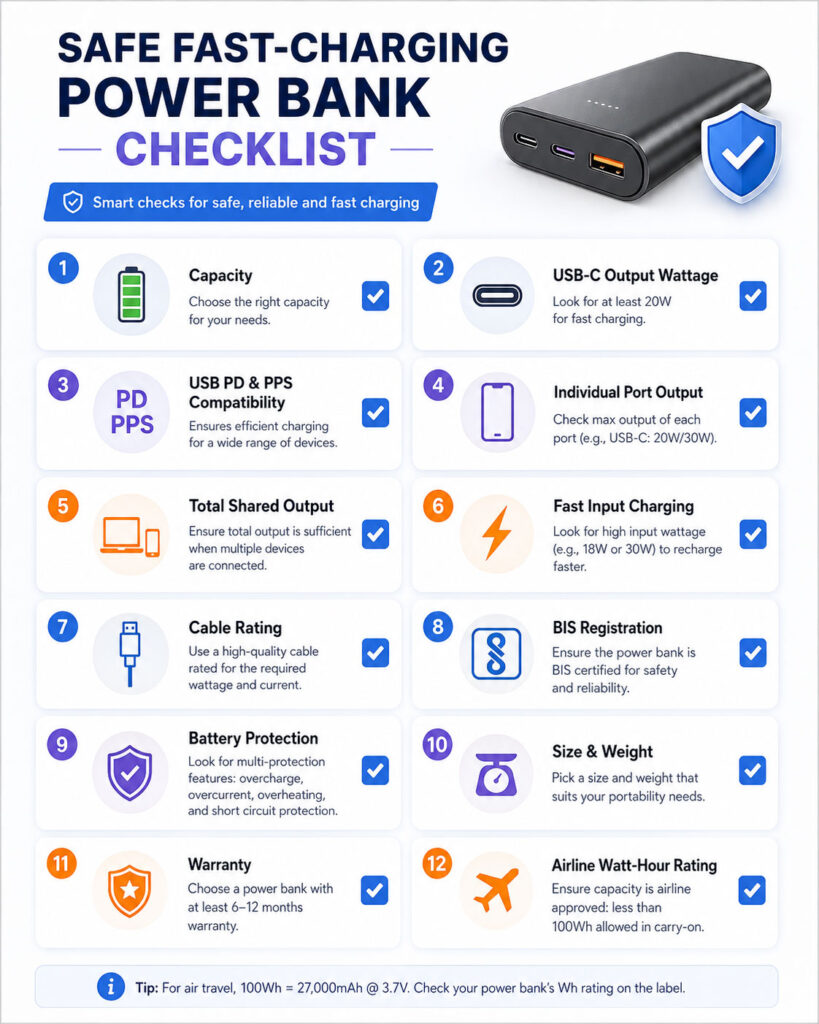
Power banks up to 100Wh are commonly allowed in hand luggage. Batteries between 100Wh and 160Wh may require airline approval, while larger batteries are usually not accepted for ordinary passenger travel.
Airline and national rules can differ. Some operators also restrict the number of power banks, how they must be stored, and whether passengers may use or recharge them during a flight.
Always check the watt-hour rating printed on the product and confirm the latest policy with your airline before travelling.
Best Power Bank for Daily Commuting
A 10,000mAh power bank with a compact design and 20W to 30W USB-C output suits most daily users. It can provide useful phone backup without becoming too heavy.
Choose a model with fast USB-C input so that you can recharge it between trips. A clear battery-level indicator also helps you know when it needs power.
Best Power Bank for Travel
A 20,000mAh model offers a strong balance for train journeys, road trips, holidays, and long days away from a socket. It can charge several devices and support a tablet more comfortably than a smaller model.
For air travel, confirm that the product displays its Wh rating clearly. Keep it in your cabin baggage, protect the ports from short circuits, and follow the airline’s latest instructions.
Best Power Bank for a Laptop
Choose a power bank with enough capacity and a USB-C output that matches the laptop’s charging needs. Many users will need at least 45W to 65W, while demanding laptops may require 100W or more.
Check the power available from a single port and during multi-device charging. Also use a cable rated for the intended wattage.
A digital display that shows remaining battery percentage and live input or output power can be useful for laptop charging.
Best Power Bank for Several Devices
For family travel or several personal devices, consider a 20,000mAh or larger model with at least two USB-C ports and one additional port.
Review how the power bank divides its output. A product with 100W total output may not provide enough power to every device when all ports are active.
Prioritise models with clear port labels and a detailed power-distribution table.
Best Power Bank for Emergency Use
An emergency power bank should hold its charge reliably, fit your storage space, and use cables that match your essential devices.
Recharge it periodically because lithium batteries slowly lose charge while stored. Keep it away from direct sunlight, high heat, water, and metal objects that could contact the ports.
A built-in light may be useful during a power cut, although it should not replace proper emergency lighting.
Useful Power Bank Features
- Battery percentage display: More informative than four basic indicator lights.
- Live wattage display: Helps confirm charging speed and power direction.
- Low-current mode: Useful for earbuds, fitness bands, and small accessories.
- Built-in cable: Convenient, although a damaged fixed cable can reduce long-term usefulness.
- Replaceable cable: Easier to upgrade or replace when damaged.
- Multiple USB-C ports: Useful for modern phones, tablets, and laptops.
- Power button: Allows manual battery checks or low-current mode activation.
- Protective carrying pouch: Helps protect ports and prevents contact with loose metal items.
Features That May Not Justify the Extra Cost
Some features add convenience but may not suit every buyer. For example, a colour screen may consume space without improving charging performance.
Built-in wall plugs can reduce cable clutter, but they may make the unit bulky. Solar panels on compact power banks often recharge too slowly to serve as the primary energy source.
Choose features according to real usage rather than the number of functions advertised on the package.
Power Bank Buying Checklist
- Check the phone, tablet, or laptop battery size.
- Identify the device’s supported charging protocol.
- Check the maximum charging wattage of each device.
- Select enough capacity without adding unnecessary weight.
- Compare the printed Wh rating, especially for travel.
- Choose at least one USB-C input and output port.
- Review each port’s individual maximum output.
- Check the combined output with multiple devices.
- Confirm the power bank’s own input wattage.
- Use a cable rated for the required power.
- Look for documented electrical and temperature protection.
- Verify applicable certification and registration details.
- Buy from a reliable seller with warranty support.
- Check the dimensions and weight before ordering.
- Read independent tests for usable capacity and sustained output.
Common Power Bank Buying Mistakes
- Choosing a product only because it has the largest mAh number.
- Assuming advertised capacity equals usable output.
- Ignoring the power bank’s watt-hour rating.
- Assuming every USB-C port supports fast charging.
- Buying high wattage without checking the required charging protocol.
- Checking total output but ignoring individual port limits.
- Forgetting that output may fall when several ports are active.
- Using an unsuitable cable for high-power charging.
- Ignoring the input speed of a large battery.
- Buying an untraceable product with unclear safety information.
- Carrying a power bank in checked airline baggage.
- Continuing to use a swollen, damaged, or excessively hot battery.
How to Make a Power Bank Last Longer
Keep the power bank away from high temperatures because heat accelerates battery ageing. Do not leave it in a parked car, on a sunny dashboard, or beside a heat source.
Avoid repeatedly draining the battery to zero when it is unnecessary. Recharge it before extended storage and check it periodically.
Use reliable chargers and cables. Keep the ports clean, but never insert metal tools into them.
Do not charge the power bank under a pillow, blanket, mattress, or tightly enclosed surface. It needs ventilation to release heat.
Finally, follow the manufacturer’s instructions because charging limits and storage recommendations can vary by product.
Should You Leave a Power Bank Charging Overnight?
A quality power bank should include charging controls, but unattended charging still adds avoidable risk. Recharge it on a hard, open, non-flammable surface and disconnect it after completion when practical.
Do not charge a damaged, swollen, wet, or unusually hot battery. Stop immediately when you notice abnormal behaviour.
Can You Use Any Charger to Recharge a Power Bank?
Many power banks can recharge from ordinary USB chargers, but charging speed depends on compatible voltage, current, protocol, port, and cable support.
A low-power charger may work safely but take much longer. For the fastest supported input, use a compatible charger that matches the power bank’s specifications.
Can a 20,000mAh Power Bank Charge a Laptop?
Possibly. Capacity determines how much energy the battery stores, while output wattage and voltage profiles determine whether it can charge the laptop.
A 20,000mAh model with only basic phone output may not charge a laptop. A model with suitable USB-C Power Delivery output may support many USB-C laptops.
Is a 10,000mAh or 20,000mAh Power Bank Better?
A 10,000mAh model is better when portability and daily phone backup matter most. A 20,000mAh model is better for longer journeys, multiple devices, tablets, and users who cannot recharge the power bank frequently.
The right choice depends on how much weight you are willing to carry and how many devices need power.
Is 20W Fast Enough for a Power Bank?
Twenty watts is suitable for many phones and small accessories. However, some tablets, premium phones, handheld gaming devices, and laptops can benefit from higher output.
Check the device’s supported charging specifications instead of choosing wattage through a general label such as fast charging.
Is a 65W Power Bank Safe for a Phone?
A standards-compliant 65W USB-C power bank can normally charge a lower-power phone safely because the devices negotiate a mutually supported charging level.
However, the power bank, cable, and phone must be in good condition and follow compatible charging standards.
Why Is My Power Bank Charging Slowly?
Slow charging can result from a low-power port, unsupported protocol, unsuitable cable, several connected devices, high temperature, an ageing battery, or background phone usage.
Check the port label, cable rating, charging mode, and device settings. Also test one device at a time to see whether shared output is causing the slowdown.
Why Does a Power Bank Become Warm?
Some warmth is normal because charging and voltage conversion produce heat. Fast charging and wireless charging can increase that warmth.
However, stop using the product when it becomes excessively hot, emits an unusual smell, swells, smokes, or shows physical damage.
Are Cheap Power Banks Safe?
Price alone does not determine safety, but extremely cheap products may use lower-quality cells, misleading specifications, weak protection, or poor manufacturing controls.
Choose a traceable model with clear ratings, applicable certification, warranty support, and reliable seller information. Avoid products that make unrealistic capacity or charging claims.
How Long Does a Power Bank Last?
Power bank life depends on cell quality, charging cycles, temperature, storage conditions, output load, and usage habits. Battery capacity gradually falls as the cells age.
Replace the unit when its useful runtime drops significantly, the casing becomes damaged, or the battery shows abnormal heat or swelling.
Final Verdict
Learning how to choose a power bank starts with matching the product to your devices. Select enough capacity for your routine, but avoid buying unnecessary weight simply because a larger mAh number looks better.
For daily phone charging, a compact 10,000mAh model with 20W to 30W USB-C output will suit many users. For longer travel and multiple devices, 20,000mAh offers greater flexibility. Laptop users should focus on USB-C Power Delivery wattage, voltage support, cable rating, and single-port output as well as capacity.
Finally, prioritise safety. Check certification, manufacturer details, electrical protection, warranty coverage, and the printed Wh rating. A reliable and compatible power bank provides more value than a high-capacity product with unclear specifications.

AboutTPJ Technical Team
The Project Jugaad Technical Team creates practical, easy-to-follow content on software development, web technologies, artificial intelligence, cybersecurity, cloud platforms, and digital tools. Our articles are informed by more than 13 years of hands-on experience with .NET, Angular, SQL Server, AWS, WordPress, Linux hosting, application deployment, and real-world troubleshooting. Each guide is researched, reviewed, and updated to provide accurate, useful, and actionable information for developers, businesses, and everyday technology users.