Artificial Intelligence
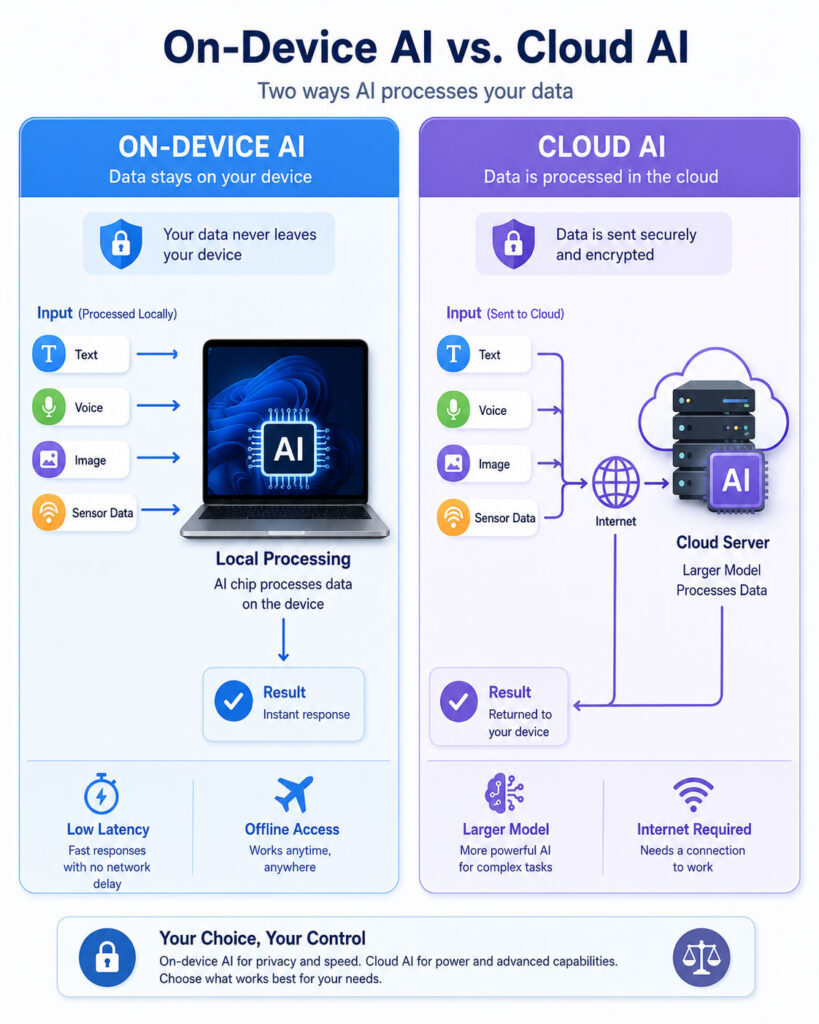
The On-Device AI vs Cloud AI comparison helps users and developers understand where artificial intelligence processing takes place. On-device AI runs a model locally on a phone, computer, camera, vehicle, appliance, or another supported device. In contrast, cloud AI sends a request to remote servers that process the information and return a result.
Both approaches can support image recognition, language processing, voice features, recommendations, automation, and generative AI. However, they differ in privacy, speed, internet dependence, computing power, operating cost, and application design.
On-device AI can provide immediate responses and continue working without a network connection. Meanwhile, cloud AI can use powerful infrastructure and larger models that would be difficult to run on an ordinary consumer device. Therefore, the better choice depends on the task rather than one technology being universally superior.
On-Device AI vs Cloud AI: Quick Answer
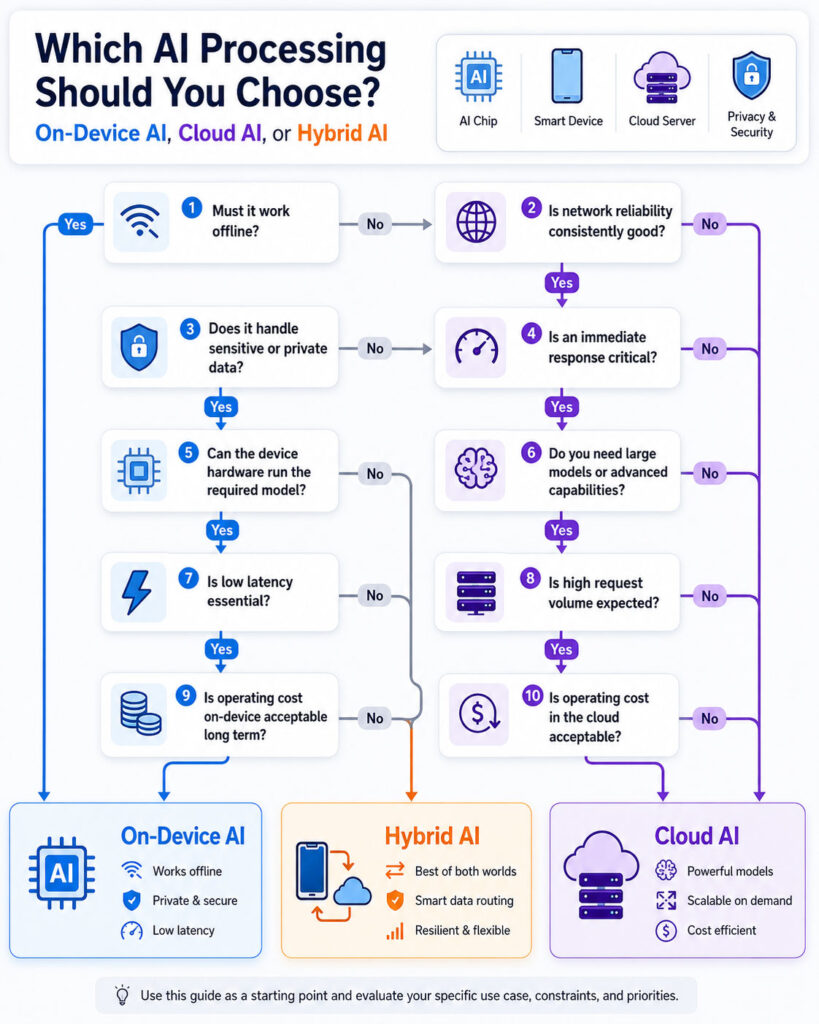
- Choose on-device AI for low latency, offline operation, private local processing, frequent lightweight tasks, and features that must respond immediately.
- Choose cloud AI for large models, complex reasoning, centralised updates, intensive processing, broad knowledge, and workloads that need flexible computing capacity.
- Choose hybrid AI processing when routine or sensitive tasks can run locally while difficult requests move securely to cloud infrastructure.
In many modern applications, the best architecture combines both approaches. The device handles work that benefits from speed and privacy, while the cloud provides additional capability when the local model cannot complete the request reliably.
What Is On-Device AI?
On-device AI means that an artificial intelligence model performs inference directly on the user’s device. Inference is the stage where a trained model receives new input and generates a prediction, classification, recommendation, or response.
For example, a phone may identify objects in a photograph, transcribe speech, detect unwanted calls, improve an image, or suggest text without sending the complete input to a remote server.
The device may use its central processing unit, graphics processor, neural processing unit, or another specialised accelerator. Software frameworks can select the most suitable hardware according to model requirements and device support.
On-device AI does not mean that the entire AI system was developed or trained locally. Developers may train the model on powerful infrastructure and then optimise it for deployment on phones, laptops, embedded systems, or edge devices.
What Is Cloud AI?
Cloud AI performs artificial intelligence processing on remote infrastructure accessed through a network. An application sends input to a cloud service, and the service runs the model on servers equipped with suitable computing resources.
The cloud service then returns an answer, classification, generated image, transcription, recommendation, or structured result. Developers commonly access these capabilities through an API, software development kit, or managed platform.
Cloud infrastructure can support large models, specialised processors, high memory requirements, and workloads that change throughout the day. It can also allow one centrally managed model to serve users across many types of devices.
However, cloud AI requires the application to transmit information over a network. Therefore, developers must consider latency, connectivity, privacy, security, regional processing, service availability, and ongoing usage charges.
Is On-Device AI the Same as Edge AI?
On-device AI is one form of edge AI, but the terms are not always identical. Edge AI refers more broadly to AI processing performed close to where data is generated instead of relying entirely on a distant central cloud.
The edge could be a phone, camera, vehicle, industrial machine, local gateway, retail server, factory computer, or nearby micro data centre. On-device AI specifically refers to processing that happens on the end device itself.
For example, a security camera that detects motion internally uses on-device AI. A group of cameras sending video to a computer inside the same building may use an edge AI architecture even though the processing does not occur inside each camera.
How On-Device AI Processes a Request
- The user or device provides input such as text, audio, an image, video, or sensor data.
- The application prepares the input in a format supported by the local model.
- The model runs on available device hardware.
- The application validates or transforms the model output.
- The result appears without requiring a remote AI server.
This local flow can reduce network delay and keep the input within the device. However, performance depends on the device’s processor, memory, battery, temperature, operating system, and model optimisation.
How Cloud AI Processes a Request
- The user or application creates a request.
- The application encrypts and sends the required data through a network.
- A cloud service receives and authenticates the request.
- The selected model processes the input on remote infrastructure.
- The service returns the result to the application.
- The application displays, stores, validates, or uses the output.
This approach gives the application access to remote computing resources. Nevertheless, the complete response time includes network transmission, queueing, model processing, tool calls, and the return journey.
On-Device AI vs Cloud AI Comparison
| Area | On-Device AI | Cloud AI |
|---|---|---|
| Processing location | Phone, computer, appliance, camera, or local device | Remote servers or cloud data centres |
| Internet requirement | May work offline | Usually requires network access |
| Response time | Can provide very low latency | Includes network and server delay |
| Model size | Limited by device resources | Can support larger and more demanding models |
| Privacy | Input can remain local | Required data is transmitted to a remote service |
| Scalability | Uses each device’s available resources | Cloud capacity can scale centrally |
| Offline availability | Possible | Generally unavailable without connectivity |
| Operating cost | No per-request cloud inference fee after deployment | May involve usage, token, storage, or infrastructure charges |
| Device impact | Uses local battery, memory, storage, and processing power | Reduces local model-processing requirements |
| Model updates | May require application or model downloads | Can be updated centrally |
| Hardware consistency | Performance varies across devices | Provider controls the server environment |
| Best suited for | Private, immediate, offline, or repetitive tasks | Complex, scalable, broad, or computationally intensive tasks |
The On-Device AI vs Cloud AI comparison shows a clear trade-off. Local processing offers speed, offline access, and greater control over data movement. Cloud processing offers larger computing capacity, central management, and access to more capable models.
Examples of On-Device AI
- Face or fingerprint matching for device access.
- Keyboard suggestions and automatic text completion.
- Photo enhancement and background separation.
- Offline speech recognition and command processing.
- Object, gesture, or document detection through a camera.
- Noise reduction during calls or recordings.
- Local summarisation of supported documents or messages.
- Health or activity pattern analysis on a wearable device.
- Fraud or anomaly detection inside a payment terminal.
- Real-time assistance in vehicles, machines, and industrial equipment.
Examples of Cloud AI
- General-purpose conversational assistants.
- Large-scale document analysis and enterprise search.
- Advanced image, audio, and video generation.
- Complex coding and software-development assistance.
- Translation across many languages and specialised domains.
- Central customer-service automation.
- Large recommendation and personalisation systems.
- Scientific, financial, and operational data analysis.
- AI agents that coordinate several tools and services.
- Applications that require large foundation or reasoning models.
These examples are not strict boundaries. A cloud service can perform simple image recognition, while a sufficiently capable device can run selected generative AI models locally.
On-Device AI vs Cloud AI for Privacy
On-device AI can improve privacy by keeping raw input on the user’s device. A local model may process photographs, voice, messages, documents, or sensor data without transmitting the complete content to an external AI service.
This local approach can reduce data exposure and simplify some privacy decisions. It is particularly useful when the information is personal, confidential, regulated, or unnecessary for remote processing.
However, local processing does not automatically guarantee privacy. An application may still upload analytics, diagnostic logs, generated results, account details, or selected input. The device itself may also be compromised, shared, lost, or poorly protected.
Cloud AI can also use strong privacy and security controls. Organisations may apply encryption, access restrictions, regional processing, private networking, contractual protections, limited retention, and isolated infrastructure. Therefore, developers should examine the complete data lifecycle rather than assuming that every local system is private and every cloud system is unsafe.
Data Minimisation
Applications should send only the information required to complete a task. For example, a local model could remove a background, detect sensitive fields, or summarise input before the application sends a smaller request to the cloud.
This approach can reduce unnecessary data transfer while preserving access to a more capable remote model. Developers should also avoid storing prompts and outputs indefinitely unless retention serves a clear purpose.
Data minimisation remains useful in both architectures. An on-device application should not collect unnecessary information, while a cloud application should not transmit or retain more content than the task requires.
On-Device AI vs Cloud AI for Speed
On-device AI can respond quickly because the request does not need to travel to a remote server. This advantage matters for camera effects, speech interfaces, accessibility tools, safety alerts, keyboard suggestions, gaming, and industrial control.
Cloud AI includes network delay, service processing, and the time required to return a result. A fast connection may make this delay small, but congestion, weak coverage, distance, and service demand can still affect performance.
However, a complex model may run faster on powerful cloud hardware than on a limited local processor. Therefore, lower network latency does not guarantee that the complete local task will finish sooner.
The most useful measurement is end-to-end latency. It includes input preparation, data transfer, model execution, tool calls, output validation, and presentation to the user.
Offline Access and Reliability
On-device AI can continue working during an internet outage, weak mobile coverage, or restricted network access. This capability is valuable for travel, remote field work, emergency systems, factories, farms, vehicles, and privacy-sensitive environments.
Cloud AI depends on connectivity and the availability of the external service. If the network or provider becomes unavailable, the application may lose its AI capability.
Nevertheless, a local model can also fail because of insufficient memory, unsupported hardware, software errors, damaged storage, or an outdated application. Reliable systems need clear fallback behaviour regardless of where the model runs.
Model Capability and Accuracy
Cloud AI can use models that require more processing power and memory than most consumer devices provide. These models may support broader knowledge, longer context, advanced reasoning, multimodal input, and more complex instructions.
On-device models usually need to remain compact and efficient. Developers may use distillation, quantisation, pruning, smaller architectures, limited context windows, or specialised training to make them practical for local hardware.
A smaller model can still perform extremely well on a focused task. For example, a local model designed for document detection, noise suppression, command classification, or a fixed set of actions may provide better speed and consistency than a broad general-purpose system.
Therefore, the On-Device AI vs Cloud AI accuracy decision should use real application tests. Model size and deployment location alone do not determine quality.
Cost Comparison
On-device AI can reduce recurring inference charges because each supported device provides the computing resources. Once the model has been distributed, the application may process many requests without paying a cloud fee for each one.
However, local deployment creates other costs. Developers must optimise the model, support different processors, test many devices, manage downloads, handle compatibility, and monitor local performance.
Cloud AI commonly uses a consumption-based model. Charges may depend on input size, output size, requests, processing time, model selection, storage, networking, or reserved infrastructure.
Cloud services can still be economical for applications with limited usage or rapidly changing requirements because the organisation does not need to build and maintain specialised AI infrastructure.
Total Cost of Ownership
A complete cost comparison should include more than the model’s advertised request price. Teams should calculate:
- Cloud inference or API charges.
- Device development and optimisation work.
- Model hosting and storage.
- Network transfer and data-processing costs.
- Testing across operating systems and hardware.
- Monitoring, logging, and incident response.
- Application updates and model downloads.
- Security, privacy, and compliance work.
- Fallback processing and human review.
- Customer support for incompatible or slow devices.
The least expensive model per request may not create the lowest total cost. A less capable solution can increase retries, support cases, user abandonment, and manual correction.
Battery, Heat, and Device Performance
Running an AI model locally consumes processing power and energy. Frequent or intensive inference can reduce battery life, create heat, compete with other applications, and trigger performance limits.
Specialised neural processing units can improve efficiency, but results still vary by model and device. A feature that performs smoothly on a premium phone may respond slowly on an older or lower-cost device.
Developers should monitor model loading time, memory use, storage, battery consumption, sustained performance, and temperature. Testing only one high-end device can hide problems experienced by most users.
Cloud AI moves much of the model computation away from the device. However, network activity, screen usage, data preparation, and continuous uploads can still consume battery power.
Storage and Model Downloads
An on-device model must fit within the application’s storage plan. Large model files can increase installation size, delay updates, consume mobile data, and discourage users with limited storage.
Developers may download a model only when the user enables a feature. They can also offer different model variants based on hardware capability, language, or usage.
However, dynamic downloads require version management, integrity checks, secure delivery, failure recovery, and a clear user experience.
Cloud AI avoids distributing the complete model to each device. The client may remain lightweight because the provider hosts and updates the model centrally.
Scalability
Cloud infrastructure can add or remove computing resources as demand changes. A central service can support users across phones, browsers, computers, and business systems without requiring each client to run the model.
However, sudden traffic can still create queues, rate limits, capacity shortages, or higher costs. Applications should prepare for retries, throttling, timeouts, and provider failures.
On-device AI distributes inference across user hardware. As the number of devices increases, the organisation may not need to add equivalent server capacity for every local request.
Nevertheless, large device populations increase software-distribution, observability, support, security, and compatibility challenges.
Model Updates and Maintenance
Cloud AI allows the provider or application team to update a model centrally. Users can benefit from improvements without downloading a new model file.
Central updates also allow faster fixes when developers discover an accuracy, safety, or security issue. However, an unexpected provider change can alter application behaviour even when the client software remains unchanged.
On-device models give developers more control over which version runs in the application. Still, replacing a local model may require an application update or a separate download.
Teams should track model versions, test backward compatibility, support rollback, and avoid leaving vulnerable or unreliable model files on inactive devices.
Security Considerations
On-device AI reduces some network exposure because raw input may remain local. However, attackers may attempt to extract the model, alter application files, inspect prompts, manipulate local input, or bypass restrictions on a compromised device.
Cloud AI keeps the model and core infrastructure under central control, which can make updates and access management easier. At the same time, the service becomes a valuable target and must protect APIs, credentials, stored data, logs, networks, and administrative systems.
Neither architecture removes the need for authentication, authorization, encryption, secure storage, input validation, output controls, dependency management, and incident monitoring.
Applications that allow an AI model to call tools or change data should apply deterministic permission checks outside the model. A generated instruction should never become sufficient authorization for a sensitive action.
Personalisation
On-device AI can personalise features using local behaviour and private information without requiring the complete personal dataset to leave the device. For example, a local system may learn frequently used terms, preferred actions, or accessibility settings.
However, local personalisation must remain transparent and controllable. Users should be able to reset relevant data and understand when personal information affects the result.
Cloud AI can provide cross-device personalisation because the service can associate preferences and history with an authenticated account. This convenience requires careful consent, storage, access, and retention controls.
Best On-Device AI Use Cases
- Features requiring an immediate response.
- Applications that must continue working offline.
- Tasks involving private local information.
- Frequent requests that would create high cloud costs.
- Simple or specialised classification and extraction.
- Camera, audio, sensor, and accessibility processing.
- Applications running in areas with unreliable connectivity.
- Low-bandwidth industrial and embedded systems.
- Personalisation that should remain on one device.
- Pre-processing before sending selected information to the cloud.
Best Cloud AI Use Cases
- Broad conversational assistants.
- Complex reasoning and multi-step analysis.
- Large document and knowledge workloads.
- Advanced image, audio, and video generation.
- Applications serving many client types.
- Tasks requiring centrally updated knowledge or models.
- Workloads with temporary demand for substantial computing power.
- Enterprise applications integrating several data sources and tools.
- Features that exceed available device memory or processing capacity.
- Central monitoring, governance, and model management.
On-Device AI vs Cloud AI for Common Applications
| Application | Commonly Suitable Approach | Reason |
|---|---|---|
| Keyboard suggestions | On-device AI | Requires fast and frequent local responses |
| Offline voice commands | On-device AI | Must work without network access |
| General-purpose AI assistant | Cloud AI or hybrid | May require a large model and broad knowledge |
| Camera background effects | On-device AI | Real-time visual processing benefits from low latency |
| Enterprise document analysis | Cloud AI or private cloud | May require scalable processing and large context |
| Industrial safety detection | Edge or on-device AI | Immediate action should not depend entirely on connectivity |
| Advanced content generation | Cloud AI | Often uses larger generative models |
| Private note summarisation | On-device AI or hybrid | Local processing can reduce data transfer |
| Customer-support platform | Cloud AI | Central integration and scalable access are important |
| Mobile assistant with complex fallback | Hybrid AI | Local tasks remain fast while the cloud handles difficult requests |
What Is Hybrid AI Processing?
Hybrid AI processing combines local and cloud models within one application. The system decides where to process each request according to privacy, complexity, connectivity, latency, cost, and available hardware.
For example, a phone may transcribe speech locally and remove sensitive details. It can then send only the required text to a larger cloud model for advanced analysis.
Alternatively, the device may try a local model first. If the result fails validation or the model reports low confidence, the application can ask the user for permission before sending the request to the cloud.
Hybrid AI can provide a practical balance, but it also creates additional routing, testing, security, and user-experience requirements.
Choose On-Device AI When Local Processing Matters
Choose on-device AI when an application needs immediate results, offline operation, or tighter control over raw information. It is particularly suitable for frequent tasks that a compact model can complete reliably.
Local inference can also reduce dependence on an external service. The application may continue providing essential features when network quality falls or a cloud provider becomes unavailable.
However, developers must ensure that supported devices have enough memory, storage, processing capacity, and battery life. They should also define what happens on older or incompatible hardware.
Choose Cloud AI When Capability and Scale Matter
Choose cloud AI when the task needs a model that is too large or demanding for ordinary client hardware. Cloud processing can support broad conversations, complex analysis, long documents, advanced generation, and workloads involving several tools.
It can also simplify central model deployment. The development team can update one hosted service instead of distributing a new model to every device.
However, the application should prepare for network delays, service failures, data-handling requirements, rate limits, and variable operating costs.
Choose Hybrid AI When Requirements Vary
A hybrid architecture is suitable when some requests benefit from privacy and low latency while others need the capabilities of a larger cloud model.
The application can classify the request before selecting a processing location. It might consider input sensitivity, user consent, model availability, expected complexity, network quality, response urgency, and estimated cost.
However, routing rules should not rely only on a generative model’s judgement. Deterministic application logic should enforce privacy policies, permission boundaries, and tasks that must never leave the device.
Designing a Hybrid AI Workflow
- Identify which data is required for each feature.
- Separate tasks that can run reliably on the device.
- Define which tasks require a larger cloud model.
- Remove or transform unnecessary sensitive information.
- Check connectivity and local hardware capability.
- Ask for user permission where remote processing requires it.
- Route the request to the selected model.
- Validate the generated result.
- Apply application-level authorization before taking action.
- Record only the operational information required for monitoring.
This design allows the development team to treat processing location as a controlled architectural decision rather than an invisible implementation detail.
Use Local AI as the First Layer
A local model can serve as the first processing layer for classification, filtering, summarisation, redaction, or intent detection. The application can complete straightforward work without contacting a cloud service.
When the local result does not meet a defined confidence or validation threshold, the application can escalate the task. This approach can reduce average latency and cloud usage.
However, confidence scores are not always reliable measures of correctness. Teams should combine them with validation rules, supported-task detection, user feedback, and real-world testing.
Use Cloud AI as a Controlled Fallback
A cloud model can handle requests that exceed local capabilities. The fallback should receive only the information needed to complete the request.
The application should explain when remote processing occurs, particularly when the input contains personal or confidential information. Users may also need a setting that disables cloud processing.
If the cloud request fails, the application should return a clear message or provide a reduced local result instead of silently losing the task.
Model Optimisation for On-Device AI
Developers commonly optimise local models to reduce memory, storage, energy use, and response time. Possible techniques include:
- Quantisation: Represents model values with lower numerical precision.
- Distillation: Trains a smaller model to reproduce selected behaviour from a larger model.
- Pruning: Removes model components that contribute little to the result.
- Hardware delegation: Runs supported operations on a GPU, NPU, or another accelerator.
- Task specialisation: Limits the model to the capabilities required by the application.
- Context reduction: Restricts the amount of input processed at one time.
- Model caching: Keeps frequently used components ready when device resources allow it.
Optimisation can reduce quality when applied too aggressively. Therefore, teams should compare the smaller or compressed model against the original requirements.
Supporting Different Devices
Consumer devices vary in memory, processors, operating systems, storage, thermal behaviour, and available AI acceleration. A local AI feature should detect device capability rather than assuming identical performance.
Applications may provide several model sizes or disable advanced features on unsupported hardware. They can also move eligible requests to a cloud service when the local device cannot complete them.
However, fallback behaviour should remain transparent. Users should not believe that a task is private and local when the application has silently moved it to remote infrastructure.
Testing On-Device AI
Test on-device AI across representative hardware rather than one development phone or computer. Include older devices, limited memory, low battery levels, warm environments, storage pressure, and other applications running simultaneously.
Measure:
- Initial model loading time.
- Time to the first result.
- Total response time.
- Memory and storage consumption.
- Battery usage.
- Temperature and sustained performance.
- Accuracy across supported devices.
- Behaviour when the operating system stops background work.
- Download and update failures.
- Accessibility and user understanding.
Testing Cloud AI
Cloud AI testing should include more than model accuracy. Teams should evaluate network delay, provider availability, regional performance, rate limits, timeouts, retries, authentication failures, and cost under realistic traffic.
They should also test what happens when the provider changes a model version or returns an unexpected format.
Applications need limits for input size, output length, retry attempts, and processing time. Otherwise, a failure can increase both latency and cost.
Monitoring AI Quality
Both local and cloud models can behave differently from the development examples after release. Real users may provide incomplete, unusual, multilingual, hostile, or unexpected input.
Teams should monitor task success, user corrections, validation failures, escalation rates, model versions, latency, and cost. However, monitoring should avoid collecting unnecessary private content.
Important outputs should be evaluated against trusted references or deterministic rules. A fluent answer is not evidence that the model completed the task correctly.
Managing Model Versions
Record which model version produced a result when that information is operationally important. Version tracking helps teams investigate regressions, compare quality, and roll back an unreliable release.
For on-device AI, the server and application may need to support several model versions because users do not update at the same time.
For cloud AI, a provider may offer fixed versions, aliases, or automatic upgrades. Teams should understand the update policy and test important changes before broad deployment.
Accessibility Considerations
On-device AI can support accessibility features with low latency and offline availability. Examples include live captions, object descriptions, voice commands, noise reduction, and text assistance.
However, an inaccurate local model can create serious usability problems. Applications should provide correction methods, alternative input, and clear indicators when the AI is uncertain.
Cloud AI may offer stronger language or multimodal capabilities, but accessibility features should not stop functioning entirely whenever connectivity becomes unavailable.
Environmental and Resource Considerations
Both architectures consume energy. On-device processing uses the user’s battery and hardware, while cloud AI uses data-centre computing, networking, storage, and cooling.
The most resource-efficient choice depends on request frequency, model size, hardware efficiency, network transfer, batching, and whether the result can be reused.
Developers should avoid running an unnecessarily large model when a smaller model, retrieval system, fixed algorithm, or ordinary application code can complete the task reliably.
Common On-Device AI Mistakes
- Assuming every user has a recent device with an NPU.
- Testing only on premium hardware.
- Ignoring battery consumption and sustained heat.
- Distributing an unnecessarily large model.
- Failing to protect downloaded model files.
- Allowing local model output to bypass application permissions.
- Claiming complete privacy while still uploading analytics or content.
- Providing no fallback for unsupported devices.
- Failing to update inaccurate or vulnerable models.
- Assuming local processing automatically produces lower latency for every task.
Common Cloud AI Mistakes
- Sending complete documents when only a small section is required.
- Storing prompts and outputs without a retention purpose.
- Ignoring rate limits and service outages.
- Using a large premium model for simple classification.
- Failing to validate generated output.
- Exposing API credentials inside a public application.
- Sending sensitive information without reviewing provider controls.
- Allowing unlimited output, retries, or tool use.
- Depending on one provider without a failure strategy.
- Assuming a successful API response contains a correct answer.
Common Hybrid AI Mistakes
- Routing sensitive information to the cloud without clear rules.
- Moving requests remotely without informing the user.
- Creating complicated routing that costs more than using one suitable model.
- Using an unreliable confidence score as the only fallback condition.
- Producing inconsistent results between local and cloud models.
- Failing to test behaviour when one processing path is unavailable.
- Maintaining duplicate business rules separately in each model.
- Logging the complete input during routing and troubleshooting.
Questions to Ask Before Choosing an AI Architecture
- Must the feature work without an internet connection?
- How quickly must the application respond?
- Does the input contain personal or confidential information?
- Can the task run accurately on a compact model?
- What devices must the application support?
- How much memory, storage, and battery can the feature use?
- Does the application need broad knowledge or complex reasoning?
- How often will users make requests?
- What is the acceptable cloud cost per successful task?
- How will the team update and monitor the model?
- What happens when the network or cloud service fails?
- Can a hybrid approach reduce data transfer or cost?
- How will the application validate important outputs?
- Will users understand where their data is processed?
Is On-Device AI More Private Than Cloud AI?
On-device AI can provide greater privacy when the application keeps raw input local and does not transmit it elsewhere. However, developers must still review analytics, backups, logs, application permissions, and device security.
Cloud AI can also apply strong privacy controls. The correct assessment depends on what data is sent, who can access it, where it is processed, how long it is retained, and whether it is used for another purpose.
Is On-Device AI Faster Than Cloud AI?
On-device AI can be faster for lightweight and real-time tasks because it avoids a network round trip. However, a complex model may run faster on powerful remote hardware.
Measure the complete user-visible response time rather than comparing only network delay or processor speed.
Can On-Device AI Work Without the Internet?
Yes. A fully downloaded model can perform supported inference without an internet connection. However, some applications still need connectivity for account features, updated information, model downloads, synchronisation, or cloud fallback.
Does On-Device AI Cost Less?
On-device inference can reduce recurring cloud charges for frequent tasks. Nevertheless, local optimisation, compatibility testing, model distribution, and customer support create development and maintenance costs.
The better financial choice depends on request volume, model requirements, device support, engineering effort, and the cost of inaccurate results.
Is Cloud AI More Powerful?
Cloud AI can access more computing power, memory, and larger models than most individual consumer devices. This advantage often supports complex reasoning, broad knowledge, large inputs, and advanced generation.
However, a specialised local model may perform better for a narrow task that requires speed, privacy, or consistent structured output.
Can Generative AI Run on a Device?
Yes. Compact and optimised generative models can run on supported phones, laptops, and other devices. Possible features include summarisation, rewriting, image processing, question answering, and command generation.
Actual capability depends on model size, device hardware, memory, operating system support, and application optimisation.
Will On-Device AI Replace Cloud AI?
On-device AI is unlikely to replace cloud AI completely. Local processing will continue expanding as hardware and compact models improve, but cloud infrastructure will remain useful for large models, intensive workloads, central services, and broad capabilities.
Many applications will use hybrid AI processing so that each request runs in the most suitable location.
Final Verdict: On-Device AI vs Cloud AI
The On-Device AI vs Cloud AI comparison does not produce one universal winner. On-device AI offers low latency, offline operation, local data processing, and reduced dependence on a remote service. It works particularly well for private, frequent, focused, and real-time tasks.
Cloud AI provides scalable infrastructure, central updates, larger models, and broader capabilities. It is generally more suitable for complex reasoning, extensive knowledge, advanced generation, and workloads that exceed device resources.
Choose on-device AI when privacy, immediate response, offline access, or request volume makes local processing valuable. Choose cloud AI when the task needs greater computing power, central management, or a more capable model.
Finally, consider hybrid AI processing when requirements vary. A well-designed hybrid system can keep routine or sensitive work on the device while using the cloud only for difficult requests. This approach can balance privacy, speed, cost, capability, and reliability more effectively than sending every task to the same processing location.
AboutTPJ Technical Team
The Project Jugaad Technical Team creates practical, easy-to-follow content on software development, web technologies, artificial intelligence, cybersecurity, cloud platforms, and digital tools. Our articles are informed by more than 13 years of hands-on experience with .NET, Angular, SQL Server, AWS, WordPress, Linux hosting, application deployment, and real-world troubleshooting. Each guide is researched, reviewed, and updated to provide accurate, useful, and actionable information for developers, businesses, and everyday technology users.