Artificial Intelligence
AI coding assistants can help developers write, understand, test, review, and improve software. They can suggest code inside an editor, answer programming questions, explain unfamiliar files, and generate changes from natural-language instructions.
However, an AI coding assistant does not understand a project in the same way as an experienced developer. It may produce incorrect logic, insecure code, outdated APIs, or changes that do not match the application architecture.
Therefore, developers should treat AI-generated code as a suggestion rather than a finished solution. Human review, testing, security checks, and clear requirements remain essential.
What Is an AI Coding Assistant?
An AI coding assistant is a software tool that uses artificial intelligence to support programming tasks.
The assistant may work inside a code editor, development platform, command line, browser, or code repository. Depending on the tool, it can analyse the current file, selected code, related project files, error messages, and developer instructions.
For example, a developer can ask the assistant to create a function, explain a complex method, suggest unit tests, or identify possible causes of an error.
How Do AI Coding Assistants Work?
Most AI coding assistants use large language models trained to recognise patterns across programming languages, technical documentation, and natural language.
First, the tool receives a prompt and available context. Next, the model predicts a suitable response based on that information. Finally, it returns code, an explanation, a plan, or suggested changes.
Developer instruction
        ↓
Available code and project context
        ↓
AI model processes the request
        ↓
Code suggestion or explanation
        ↓
Developer reviews and tests the result
The quality of the output depends heavily on the quality of the context. Therefore, vague instructions usually produce less reliable results.
Common Types of AI Coding Assistance
| Type | What It Does |
|---|---|
| Inline Code Completion | Suggests code while the developer types |
| Programming Chat | Answers questions and explains code or errors |
| Code Generation | Creates functions, classes, components, or configuration |
| Code Refactoring | Suggests clearer or more maintainable code |
| Test Generation | Creates possible unit, integration, or edge-case tests |
| Code Review | Looks for possible defects, risks, or improvements |
| Coding Agent | Plans and performs multi-file tasks with approved access |
Some tools focus on one feature, while others combine several capabilities in one development environment.
What Can an AI Coding Assistant Help With?
AI coding assistants can support many routine development activities.
- Generate boilerplate code.
- Explain unfamiliar functions or classes.
- Create regular expressions and data transformations.
- Suggest unit-test cases.
- Write comments and technical documentation.
- Convert code between programming languages.
- Find possible causes of compiler or runtime errors.
- Suggest refactoring options.
- Create sample API requests or database queries.
- Summarise code changes.
Still, the assistant should not make important technical decisions without developer oversight.
Simple AI Coding Prompt
A vague prompt may create a function without enough validation:
Create a discount function.A stronger prompt provides the language, requirements, limits, and expected output:
Create a TypeScript function named calculateDiscount.

Requirements:

* Accept price and discountPercentage as numbers.
* Reject negative values.
* Allow discountPercentage from 0 to 100.
* Return the final price rounded to two decimal places.
* Include unit tests for valid and invalid inputs.
* Do not use external packages.
Because the second prompt defines clear conditions, the assistant has a better chance of producing useful code.
Example of Generated TypeScript Code
function calculateDiscount(
  price: number,
  discountPercentage: number
  ): number {
  if (price < 0) {
  throw new Error('Price cannot be negative.');
  }

  if (
  discountPercentage < 0 ||
  discountPercentage > 100
  ) {
  throw new Error(
  'Discount percentage must be between 0 and 100.'
  );
  }

  const discount = price * (discountPercentage / 100);
  return Number((price - discount).toFixed(2));
  }
This example appears reasonable. Nevertheless, a developer should still review the business rules, error handling, numeric precision, and test coverage.
AI Coding Assistants vs Traditional Development Tools
| Traditional Tool | AI Coding Assistant |
|---|---|
| Follows predefined rules | Generates responses from patterns and context |
| Produces predictable linting or compiler errors | May produce different answers for similar prompts |
| Checks known syntax or rules | Can explain, generate, and transform code |
| Usually works on clearly defined inputs | Can interpret natural-language requests |
| Does not replace developer judgement | Also requires developer judgement and verification |
AI assistants work best alongside compilers, linters, tests, security scanners, and code reviews rather than replacing them.
Benefits of AI Coding Assistants
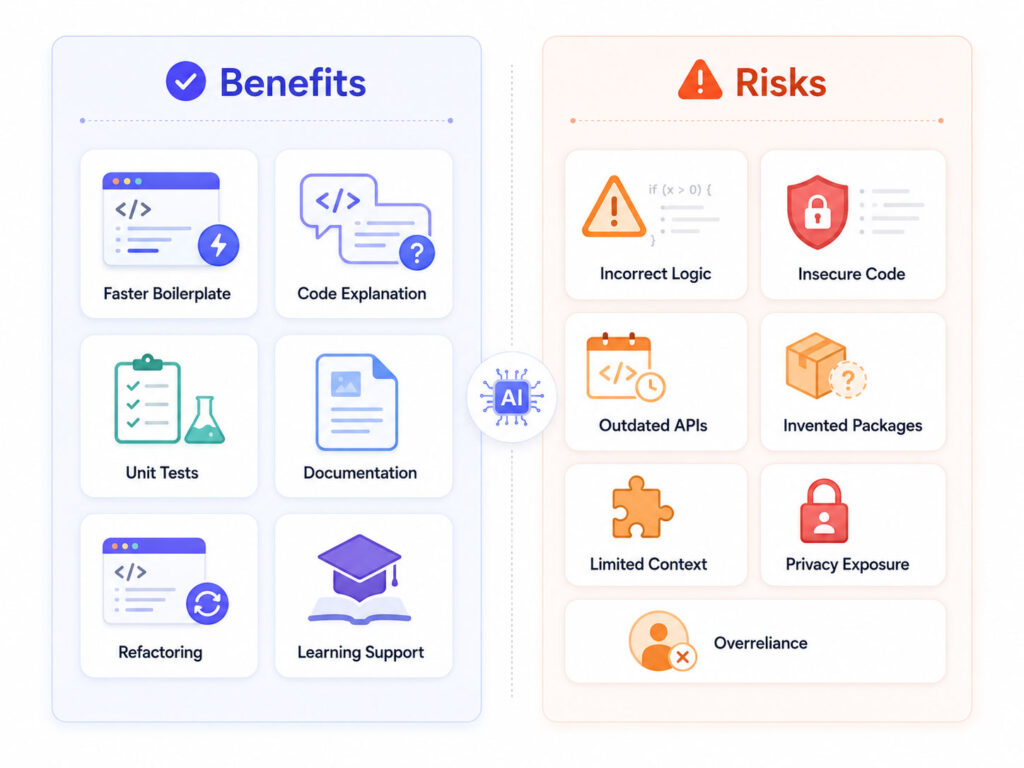
AI coding assistants can reduce the time developers spend on repetitive or unfamiliar tasks.
However, the value depends on how carefully the developer reviews and integrates the output.
1. Faster Boilerplate Development
Many applications require repeated structures such as data models, API endpoints, validation classes, tests, configuration files, and mapping functions.
An AI assistant can create a starting version quickly. As a result, developers can spend more time reviewing business logic and architecture.
Still, generated boilerplate should follow the project’s naming, security, error-handling, and dependency standards.
2. Help with Unfamiliar Code
Developers often join existing projects with large codebases.
An AI coding assistant can summarise a file, describe a method, trace a likely data flow, or explain an unfamiliar programming concept.
For example, a developer can ask:
Explain the purpose of this service.

Include:

* Its main responsibilities.
* Its external dependencies.
* The public methods it exposes.
* Possible side effects.
* Areas that need additional tests.
This approach can support code exploration. Nevertheless, developers should confirm the explanation by reading the actual implementation.
3. Faster Test Creation
An assistant can suggest tests for normal cases, validation failures, null values, boundary conditions, and unexpected inputs.
Therefore, it can help developers identify scenarios they initially missed.
However, generated tests may only confirm the generated implementation rather than the real requirement. A human must verify that every test represents correct business behaviour.
4. Documentation Support
AI tools can draft method summaries, README sections, API examples, migration notes, and pull-request descriptions.
In addition, they can translate technical language into a simpler explanation for non-technical readers.
Developers should still confirm commands, configuration values, version requirements, and examples before publishing the documentation.
5. Refactoring Suggestions
An AI coding assistant can suggest smaller methods, clearer names, reusable functions, or reduced duplication.
For example, it may identify repeated validation logic and propose a shared helper.
Still, a refactoring can change behaviour accidentally. Therefore, developers should add or run tests before accepting large structural changes.
6. Learning and Skill Development
AI assistants can explain syntax, design patterns, algorithms, framework concepts, and error messages.
They can also compare multiple solutions and explain their trade-offs. Consequently, learners can receive guidance while practising.
However, copying complete solutions without understanding them can slow long-term learning. Developers should ask why the code works and then recreate important parts independently.
7. Support for Repetitive Maintenance
Maintenance work often includes renaming fields, updating method signatures, replacing deprecated APIs, or adding similar checks across several files.
An AI agent may help plan and perform these changes. However, broader access creates broader risk.
Therefore, teams should limit permissions, review every changed file, and run the complete validation pipeline.
Main Risks of AI-Generated Code
AI-generated code can look convincing even when it contains serious mistakes.
Developers should understand the most common risks before accepting suggestions.
1. Incorrect Logic
The assistant may misunderstand the requirement or ignore an important edge case.
For example, it may calculate a value correctly for positive numbers but fail for zero, null values, large values, time zones, or concurrent requests.
As a result, code that passes a quick manual test may still fail in production.
2. Security Vulnerabilities
Generated code may include unsafe input handling, weak authentication, insecure file operations, exposed secrets, or vulnerable database queries.
For example, the following query directly combines user input with SQL:
const query = `SELECT * FROM users WHERE email = '${email}'`;This pattern can create an SQL injection risk.
A parameterised query provides a safer approach:
const query = 'SELECT * FROM users WHERE email = ?';
const result = await database.execute(query,[email]);
Even when the assistant recommends a secure pattern, developers must confirm that it matches the selected database library.
3. Outdated APIs and Packages
An AI assistant may recommend an old method, removed library, unsupported package, or deprecated configuration.
Therefore, developers should verify package names, current versions, official documentation, licences, and maintenance status before adding a dependency.
4. Invented Functions or Libraries
Sometimes, an assistant produces a realistic-looking method or package that does not exist.
This problem can waste development time. More importantly, installing an unknown package with a similar name may create a supply-chain risk.
Always confirm dependencies through the official package registry and project documentation.
5. Limited Project Context
The assistant may see the current file but miss business rules, architecture decisions, hidden dependencies, deployment requirements, or related services.
Consequently, a locally correct change may conflict with another part of the system.
Provide relevant interfaces, tests, conventions, and requirements without exposing confidential information.
6. Privacy and Confidentiality Risks
Source code may contain customer information, internal URLs, API keys, credentials, security controls, or proprietary business logic.
Developers should never paste confidential material into an AI tool without confirming the organisation’s policy and the product’s data controls.
In addition, teams should remove secrets from code and use approved secret-management tools.
7. Overreliance on Generated Code
Frequent acceptance of suggestions can reduce careful thinking and code understanding.
A developer may know that the code works during one test but remain unable to explain its behaviour, complexity, or failure conditions.
Therefore, teams should require developers to understand and take ownership of every accepted change.
8. Risks from Coding Agents
A coding agent may read files, execute commands, change code, install packages, or create pull requests.
These capabilities can save time. However, they also increase the potential impact of incorrect instructions, unsafe commands, excessive permissions, or malicious content found in external files.
As a result, teams should use isolated environments, restricted credentials, approved tools, and human confirmation for sensitive actions.
Best Practices for Using AI Coding Assistants
AI coding assistants provide the most value when teams use a clear and controlled workflow.
The following practices help improve accuracy, security, maintainability, and developer understanding.
1. Start with a Clear Requirement
Before asking the assistant to write code, define the expected behaviour.
Include inputs, outputs, validation rules, performance requirements, technology restrictions, and failure conditions.
For example:
Create a service that reads an order by ID.

Technology:

* ASP.NET Core
* Entity Framework Core
* PostgreSQL

Requirements:

* Use asynchronous methods.
* Return a not-found result when the order does not exist.
* Do not expose internal database entities.
* Map the result to OrderResponse.
* Include cancellation-token support.
* Add unit tests.
* Do not add new packages.
A precise request reduces guessing and gives the developer clear review criteria.
2. Ask for a Plan Before Code
For a larger task, ask the assistant to propose a plan first.
Review the affected files, architecture, data flow, dependencies, and tests. Afterwards, approve or correct the plan before requesting implementation.
This step can prevent the assistant from making unnecessary changes.
3. Keep Changes Small
Small changes are easier to understand, test, and review.
Instead of asking an agent to rebuild a complete module, divide the work into focused tasks.
Step 1: Define the request and response models.
  Step 2: Add validation.
  Step 3: Implement the service method.
  Step 4: Add the API endpoint.
  Step 5: Add unit and integration tests.
  Step 6: Review security and performance.
Consequently, developers can detect problems before they spread across many files.
4. Provide Relevant Context
The assistant needs enough information to follow the project’s existing patterns.
Share relevant interfaces, coding standards, error-handling conventions, test examples, and framework versions. However, remove passwords, tokens, personal information, and confidential data.
More context does not always mean better context. Therefore, include only the information that helps solve the task.
5. Review Every Line
Do not accept a suggestion only because it compiles.
Check the logic, naming, error handling, security, performance, accessibility, maintainability, and consistency with the rest of the application.
The developer who accepts the code remains responsible for it.
6. Run Automated Tests
Generated code should pass the existing test suite.
In addition, developers should add tests for the new behaviour, including boundary conditions and failure scenarios.
- Unit tests for individual functions.
- Integration tests for databases and external services.
- API tests for requests and responses.
- UI tests for important user flows.
- Regression tests for previously fixed defects.
Test quantity alone does not guarantee quality. Therefore, review what each test actually proves.
7. Use Compilers, Linters, and Static Analysis
Traditional development tools provide predictable checks that complement AI suggestions.
Run the compiler, formatter, linter, type checker, security scanner, and code-quality rules required by the project.
For example, strict TypeScript settings can detect problems that an AI assistant missed.
8. Scan Dependencies
Review every package that the assistant recommends.
- Confirm that the package exists.
- Check the official publisher.
- Review the licence.
- Check recent maintenance activity.
- Review known vulnerabilities.
- Avoid packages when the platform already provides the feature.
In addition, lock dependency versions and review unexpected package-file changes.
9. Validate Security-Sensitive Code Manually
Authentication, authorisation, encryption, payment processing, file uploads, database queries, and personal-data handling require additional care.
For these areas, follow official framework guidance and the organisation’s secure-development standards.
Never rely on an AI assistant as the only security reviewer.
10. Protect Secrets and Private Code
Do not include passwords, API keys, tokens, private certificates, or production connection strings in prompts.
Before enabling repository-level access, review the tool’s data policy, retention controls, permissions, and organisational settings.
Furthermore, limit access to the repositories and files required for the task.
11. Apply Least Privilege to Coding Agents
A coding agent should receive only the permissions it needs.
Use an isolated branch or development environment. Require confirmation before package installation, database operations, deployment, or access to external systems.
Also, prevent agents from using production credentials.
12. Require Human Code Review
A second developer can identify incorrect assumptions that the original developer or AI assistant missed.
Code review should examine the requirement, implementation, tests, security, and maintainability.
Although AI can assist with review, it should supplement rather than replace human approval.
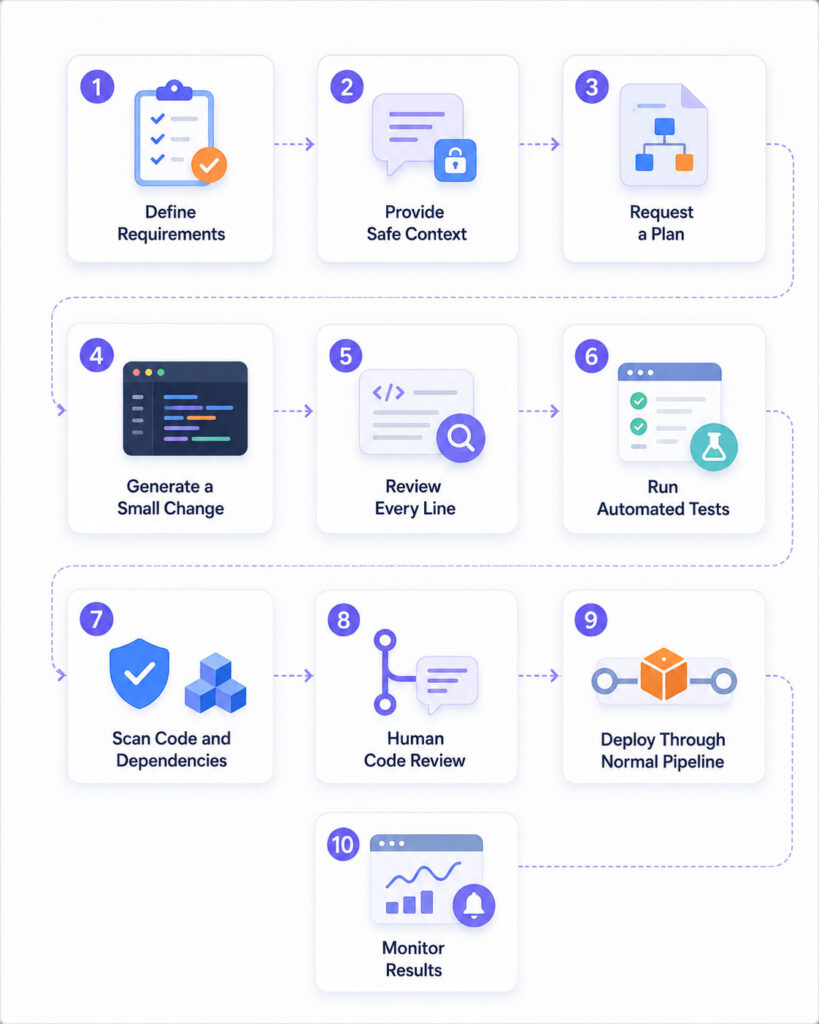
Recommended AI Coding Workflow
Define the requirement
  ↓
  Provide safe and relevant context
  ↓
  Ask for a plan
  ↓
  Generate a small change
  ↓
  Review every line
  ↓
  Compile and run tests
  ↓
  Run security and quality checks
  ↓
  Human code review
  ↓
  Deploy through the normal pipeline
  ↓
  Monitor the result
This process keeps the developer in control from the initial request through production monitoring.
Good Uses for AI Coding Assistants
| Task | Recommended Approach |
|---|---|
| Boilerplate Code | Generate a draft and align it with project standards |
| Code Explanation | Use the explanation as a guide, then verify the source |
| Unit Tests | Review the expected behaviour and add missing cases |
| Documentation | Verify every command, option, and example |
| Refactoring | Run tests before and after the change |
| Debugging | Provide logs and context without exposing secrets |
| Code Review | Use AI feedback as an additional review layer |
Tasks That Need Extra Caution
- Authentication and authorisation.
- Payment and financial calculations.
- Encryption and key management.
- Healthcare or legal systems.
- Production database migrations.
- Infrastructure and deployment configuration.
- Personal or confidential data processing.
- Commands that delete files or resources.
For these tasks, experienced human review and controlled testing are essential.
AI Coding Assistants for Beginners
Beginners can use an AI assistant to ask questions, understand errors, and compare possible solutions.
However, they should avoid copying complete applications without understanding the code.
A better learning approach includes these steps:
- Attempt the problem independently.
- Ask for a hint rather than a complete answer.
- Request an explanation of each step.
- Write the solution again without copying it.
- Add tests and modify the example.
- Compare the result with official documentation.
This method uses AI as a tutor rather than a replacement for practice.
AI Coding Assistants for Experienced Developers
Experienced developers can use AI to reduce repetitive work, explore unfamiliar APIs, create test drafts, and plan migrations.
However, experience does not remove the need for review. In fact, complex systems often contain hidden requirements that the model cannot see.
Therefore, senior developers should focus AI usage on well-defined tasks with measurable outcomes.
AI Coding Assistants for Development Teams
Teams should create a shared AI coding policy instead of allowing every developer to follow a different approach.
The policy should define:
- Approved AI tools and account types.
- Data that developers may or may not share.
- Repository and agent permissions.
- Required code review and testing.
- Security-scanning requirements.
- Rules for third-party packages.
- Documentation and audit expectations.
As a result, the organisation can gain productivity benefits while controlling privacy and security risks.
How to Measure Whether the Tool Helps
Do not measure success only by the number of generated lines.
Instead, review meaningful outcomes:
- Time required to complete a task.
- Number of defects found after review.
- Test coverage and test quality.
- Security findings.
- Time spent correcting generated code.
- Developer understanding and satisfaction.
- Long-term maintainability.
A tool that creates code quickly but increases defects may not improve real productivity.
AI Coding Safety Checklist
- Define the requirement clearly.
- Remove secrets and confidential data.
- Provide only relevant project context.
- Ask for a plan before large changes.
- Generate small and reviewable updates.
- Review every changed line.
- Verify APIs and package names.
- Run tests, linters, and security scanners.
- Use least-privilege permissions.
- Require human code review.
- Deploy through the normal controlled process.
- Monitor the application after release.
Final Verdict
AI coding assistants can improve developer productivity when teams use them for focused and reviewable tasks.
They can help generate boilerplate, explain code, draft tests, create documentation, and suggest refactoring options. However, they can also introduce incorrect logic, insecure patterns, outdated dependencies, and privacy risks.
Therefore, developers should combine AI assistance with human judgement, automated testing, secure-development practices, and code review.
Conclusion
AI coding assistants are useful development tools, but they are not independent software engineers.
Use them to create a starting point, explore possible solutions, and reduce repetitive work. Then, verify the result through official documentation, testing, static analysis, security checks, and human review.
Most importantly, never accept code that you cannot understand, explain, test, and maintain.

AboutTPJ Technical Team
The Project Jugaad Technical Team creates practical, easy-to-follow content on software development, web technologies, artificial intelligence, cybersecurity, cloud platforms, and digital tools. Our articles are informed by more than 13 years of hands-on experience with .NET, Angular, SQL Server, AWS, WordPress, Linux hosting, application deployment, and real-world troubleshooting. Each guide is researched, reviewed, and updated to provide accurate, useful, and actionable information for developers, businesses, and everyday technology users.