
Web Development
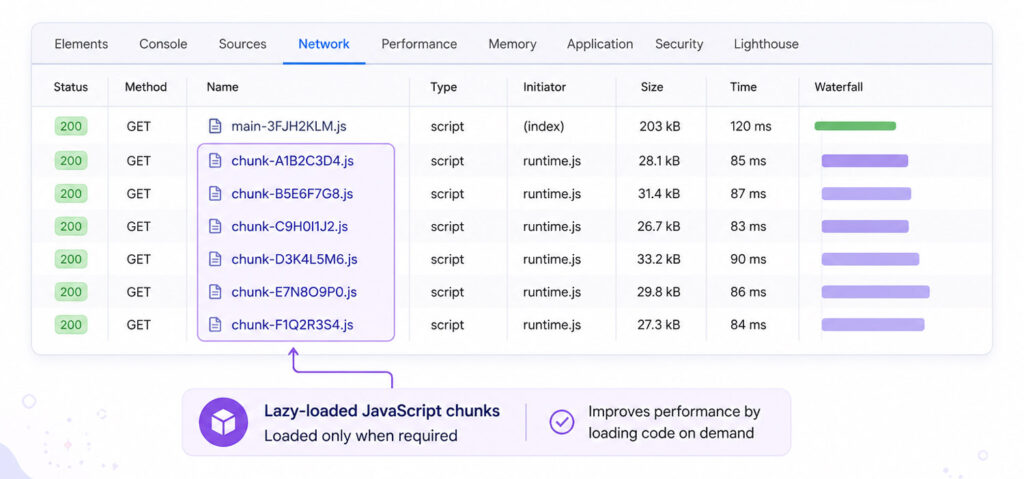
Lazy Loading in Angular improves application performance by loading route-specific code only when users need it. Instead of placing every feature in the initial JavaScript bundle, Angular can split larger applications into smaller chunks and request those chunks during navigation.
This approach can reduce the amount of JavaScript downloaded and processed during startup. As a result, users can reach the first usable screen sooner, especially when an application contains large reports, administration areas, account settings, or other sections that are not required immediately.
However, lazy loading should be applied deliberately. Splitting every small component can create unnecessary requests and routing complexity, so the best results usually come from lazy loading meaningful feature boundaries.
What Is Lazy Loading in Angular?
Lazy loading is a routing technique that defers loading a component or group of routes until navigation requires them. Angular Router works with dynamic JavaScript imports so the build process can create separate chunks for lazily loaded features.
For example, an application may contain a dashboard, reports, profile settings, and an administration area. If most users begin on the dashboard, there is little reason to download the administration code during the initial load.
Why Lazy Loading Matters
- Smaller initial download: The browser receives less JavaScript before the first screen becomes usable.
- Faster startup: Less code may need to be parsed, compiled, and executed initially.
- Route-based code splitting: Large features can be delivered as separate chunks.
- Cleaner feature boundaries: Routes can remain organised around real application capabilities.
- Better scalability: Large applications can grow without forcing every feature into one startup bundle.
Lazy loading does not necessarily reduce the total amount of code in the application. Instead, it changes when that code is downloaded and executed.
How Lazy Loading Works in Angular
When Angular Router encounters a route configured with loadComponent or loadChildren, it can defer the related code until that route is requested.
For example, the browser may load the home route first. Later, when the user opens the reports area, Angular requests the reports chunk and activates the requested route.
Therefore, a well-designed route structure also becomes a useful performance boundary.
Lazy Loading a Standalone Component with loadComponent
Modern Angular applications can lazy load a standalone component directly with loadComponent.
import { Routes } from '@angular/router';

export const routes: Routes = [
  {
    path: 'dashboard',
    loadComponent: () =>
      import('./dashboard/dashboard.component')
        .then(c => c.DashboardComponent)
  }
];
Angular does not need the dashboard component in the initial route bundle. Instead, it requests the component when the user navigates to /dashboard.
Lazy Loading Child Routes with loadChildren
Use loadChildren when a feature contains several related child routes.
import { Routes } from '@angular/router';

export const routes: Routes = [
  {
    path: 'reports',
    loadChildren: () =>
      import('./reports/reports.routes')
        .then(r => r.REPORTS_ROUTES)
  }
];
The reports route configuration can then lazy load its own standalone components.
import { Routes } from '@angular/router';

export const REPORTS_ROUTES: Routes = [
  {
    path: '',
    loadComponent: () =>
      import('./report-list/report-list.component')
        .then(c => c.ReportListComponent)
  },
  {
    path: ':id',
    loadComponent: () =>
      import('./report-details/report-details.component')
        .then(c => c.ReportDetailsComponent)
  }
];
Lazy Loading vs Eager Loading
| Area | Eager Loading | Lazy Loading |
|---|---|---|
| When code loads | During initial application loading | When the related route is requested |
| Best suited for | Core and frequently used features | Large or secondary features |
| Initial bundle | Can become larger | Can remain smaller |
| First visit to feature | No extra route chunk request | May require an additional download |
When Should You Use Lazy Loading?
Lazy loading is particularly useful for large route-level features such as administration panels, reporting areas, account settings, dashboards, and feature-heavy tools.
On the other hand, tiny components used immediately on the first screen should not be split simply because lazy loading is available.
What Is Preloading in Angular?
Preloading provides a middle ground between eager and lazy loading. The first screen can load without a lazy feature, and Angular can then fetch selected lazy route bundles in the background after startup.
This approach can make later navigation feel faster while still keeping the initial route lighter.
How to Verify Lazy Loading
- Build or run the Angular application.
- Open browser developer tools.
- Select the Network panel.
- Reload the application and note the initial JavaScript files.
- Navigate to a lazy route.
- Confirm that an additional route chunk is requested at that moment.
Also review bundle output during production builds. Verification is important because importing lazy feature code elsewhere can accidentally pull it into an eagerly loaded bundle.
Best Practices for Angular Lazy Loading
- Lazy load meaningful route-level features.
- Keep shared code separate from feature-specific code.
- Avoid splitting every small component.
- Use standalone components where they simplify route design.
- Consider preloading for frequently visited lazy routes.
- Measure bundle sizes before and after changes.
- Test navigation on slower devices and networks.
- Keep route guards and resolvers lightweight.
Common Lazy Loading Mistakes
- Lazy loading very small features with no measurable benefit.
- Creating too many tiny chunks.
- Importing a lazy feature through an eagerly loaded dependency.
- Assuming lazy loading automatically improves every performance metric.
- Ignoring the delay on the first visit to a lazy route.
- Failing to measure the production build.
Making Lazy Loading Work for Your Angular App
Lazy Loading in Angular is most effective when route boundaries reflect real application features. Use loadComponent for standalone route components and loadChildren for groups of related routes. Then measure the result rather than assuming that more chunks automatically mean better performance.
For larger applications, thoughtful lazy loading can reduce startup work, keep feature code organised, and provide a smoother experience as the application grows.

AboutTPJ Technical Team
The Project Jugaad Technical Team creates practical, easy-to-follow content on software development, web technologies, artificial intelligence, cybersecurity, cloud platforms, and digital tools. Our articles are informed by more than 13 years of hands-on experience with .NET, Angular, SQL Server, AWS, WordPress, Linux hosting, application deployment, and real-world troubleshooting. Each guide is researched, reviewed, and updated to provide accurate, useful, and actionable information for developers, businesses, and everyday technology users.