Technology Guide
USB-C has made charging more convenient, but it has also created a common misunderstanding: two chargers can use the same USB-C connector while supporting very different charging speeds and capabilities.
A small phone charger may provide 20W or 30W, while a laptop charger may provide 65W, 100W, 140W, or more. Two chargers with the same maximum wattage may also behave differently because one supports USB Power Delivery, another supports PPS, and a third may use a manufacturer-specific fast-charging method.
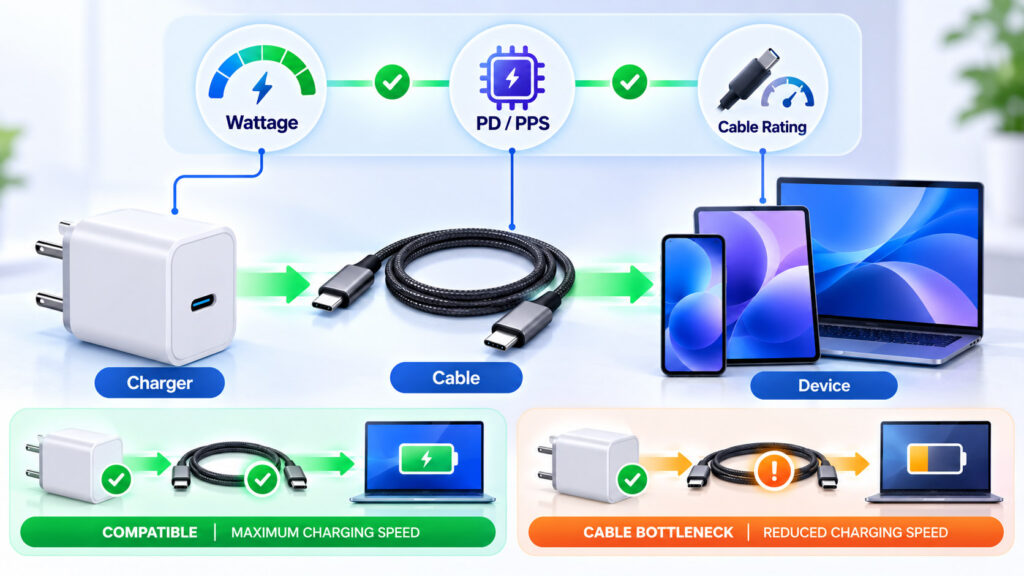
The cable matters too. A charger, cable, and device form one charging system, and the maximum useful charging rate is limited by the capabilities shared across that complete path.
This guide explains how to choose a USB-C charger based on wattage, USB Power Delivery, PPS, cable rating, number of ports, power sharing, device requirements, and safety rather than simply buying the charger with the largest number printed on it.
How to Choose a USB-C Charger: Quick Answer
Before buying a USB-C charger, check these six things:
- Find the charging wattage your device supports.
- Check whether it uses USB Power Delivery, PPS, or another fast-charging protocol.
- Choose a charger that provides the required output from the correct USB-C port.
- Use a USB-C cable rated for the required power.
- Check how power is divided if the charger has multiple ports.
- Buy a standards-compliant product from a traceable manufacturer or seller.
A charger with a higher maximum wattage than your phone requires does not automatically force that full wattage into the phone. With a properly implemented compatible charging system, the power source and device negotiate a supported power level.
Reference: USB Implementers Forum – USB Charger (USB Power Delivery). USB-IF explains that USB Power Delivery allows connected devices to request the power they require and supports power levels up to 240W with compatible equipment.
USB-C Is a Connector, Not a Charging Speed
USB-C describes the physical connector and port shape. It does not tell you the maximum charging power, data speed, display capability, or charging protocol by itself.
For example, two USB-C chargers may look almost identical while one provides only modest phone charging and the other can power a high-performance laptop.
Similarly, two USB-C cables can have the same connectors while supporting different power and data capabilities.
This is why choosing by connector shape alone is not enough.
Understand Watts, Volts, and Amps
Charging power is usually expressed in watts.
A simplified relationship is:
Power (W) = Voltage (V) × Current (A)
For example:
9V × 3A = 27W
and:
20V × 3A = 60W
The charger does not simply output its maximum wattage continuously. Compatible USB Power Delivery equipment communicates and selects a voltage and current profile that both sides support.
How Much Charger Wattage Do You Need?
| Charger Output | Common Use | What to Check |
|---|---|---|
| 10W–20W | Earbuds, accessories, basic phone charging | Device fast-charging requirements |
| 20W–30W | Many smartphones and smaller tablets | USB PD or PPS support where required |
| 30W–45W | Premium phones, tablets, compact laptops | Device-specific protocol and voltage profiles |
| 45W–65W | Tablets, handheld devices, many USB-C laptops | Laptop power requirement and cable rating |
| 65W–100W | Laptops and multi-device charging | Single-port output and cable capability |
| Above 100W | Compatible high-power laptops and specialised equipment | USB PD high-power support across charger, cable, and device |
These ranges are general guidance rather than universal device requirements. Always check the charging specifications supplied by the phone, tablet, or laptop manufacturer.
Start With the Original Charger Specification
If your laptop originally shipped with a 65W USB-C adapter, a good replacement starting point is a compatible charger capable of providing approximately the same output through one USB-C port.
A lower-wattage adapter may still charge some laptops while they are asleep or under light load, but charging can become slow or the battery may continue discharging during demanding use.
For phones, buying dramatically more wattage than the device can use will not automatically make charging faster. Protocol compatibility matters just as much as the number of watts.
What Is USB Power Delivery?
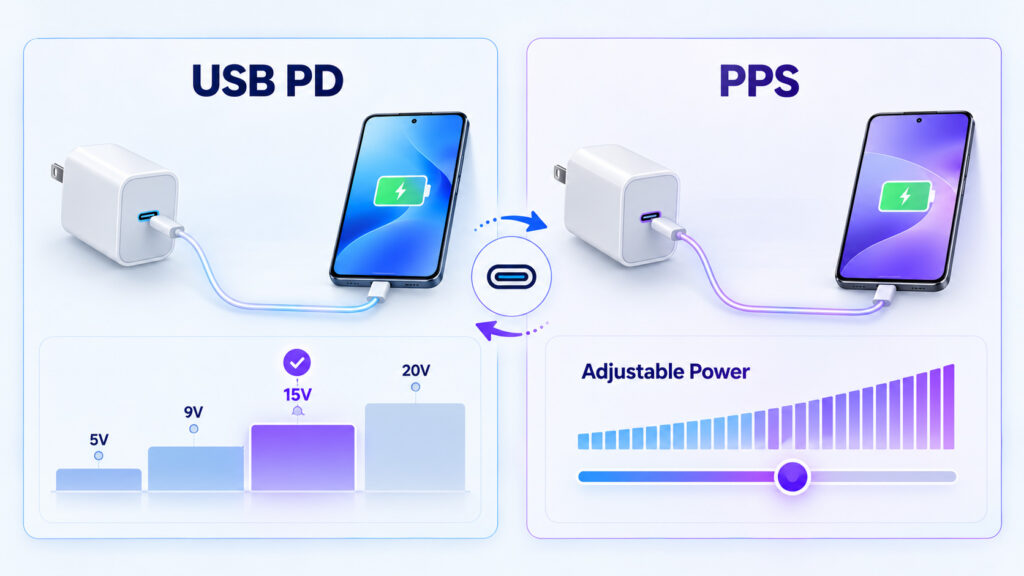
USB Power Delivery, commonly called USB PD, is a power-delivery standard used with compatible USB equipment. It allows a power source and connected device to communicate about available power instead of relying on one fixed charging output.
The charger advertises the power profiles it supports, and the connected device requests a compatible option.
This allows one suitable USB-C charger to serve very different devices, including phones, tablets, laptops, monitors, docks, and power banks.
Reference: USB Implementers Forum – USB Charger (USB Power Delivery).
USB PD Can Support Up to 240W
Current USB Power Delivery specifications extend USB-C charging well beyond the earlier 100W ceiling. USB-IF documents support for power delivery up to 240W using compatible USB-C equipment.
Higher power levels do not mean every USB-C charger, cable, or laptop supports 240W. The complete charging path must support the required capability.
A 240W-capable charger cannot make a 45W laptop consume 240W, just as a 45W charger cannot provide 140W to a laptop that requires that much power under heavy load.
Can a Higher-Wattage USB-C Charger Damage a Phone?
With a properly designed standards-compliant USB charging setup, a higher maximum charger rating does not mean the charger continuously pushes that full power into every device.
The connected device requests a compatible power profile.
For example, a phone that negotiates approximately 20W can be connected to a compatible 65W charger without automatically receiving 65W.
This makes a higher-capacity charger useful when you want one adapter for a phone, tablet, and laptop.
However, this assumes correctly designed equipment. Poor-quality, counterfeit, damaged, or non-compliant chargers and cables should not be treated as equally safe simply because they use a USB-C connector.
What Is PPS Charging?
PPS stands for Programmable Power Supply. It is a USB Power Delivery capability that allows a compatible device to request adjustable voltage and current within the charger’s supported range.
With traditional fixed power profiles, the device selects from predefined voltage options. PPS gives a compatible device finer control over the requested power.
This can help supported phones manage power conversion, charging speed, and temperature more closely.
Reference: USB-IF – Certified USB Fast Charger / Programmable Power Supply guidance.
Do You Need PPS?
You need PPS when your device uses it for the charging performance you want.
For example, Google documents PPS-compatible USB-C adapters among the recommended charging options for current Pixel phones, while Samsung uses USB PD PPS for several Super Fast Charging implementations.
References: Google Pixel Phone Help – Charge your Pixel phone; Samsung – USB PD/PPS charger specifications.
This means a charger can support USB PD but still fail to provide a phone’s fastest supported charging mode when PPS is also required.
USB PD vs PPS
| Feature | USB PD Fixed Profiles | PPS |
|---|---|---|
| Power negotiation | Yes | Yes |
| Voltage behaviour | Selects supported predefined profiles | Allows finer adjustment within supported ranges |
| Device support required | Yes | Yes |
| Charger support required | Yes | Yes |
| Common use | Phones, tablets, laptops, monitors, docks | Compatible fast-charging phones and other supported devices |
How to Choose Wattage for a Phone
Check the manufacturer’s supported wired charging method instead of assuming that every phone with USB-C accepts the same power.
A practical approach is:
- Find the phone’s maximum or recommended charging specification.
- Check whether it requires USB PD, PPS, or another protocol.
- Choose a charger that meets or slightly exceeds the required compatible output.
- Use a suitable USB-C cable.
Apple, for example, documents USB Power Delivery-compatible USB-C adapters for fast charging supported iPhones, while Google and Samsung publish their own charging and PPS requirements for compatible devices.
How to Choose Wattage for a Tablet
Tablets generally have larger batteries than phones and may benefit from higher charging power, but requirements vary substantially.
A 20W phone charger may technically charge a tablet while taking much longer than a charger designed for the tablet’s supported charging level.
Check the manufacturer’s recommended adapter before replacing the original charger.
How to Choose Wattage for a USB-C Laptop
Laptop charging deserves more attention because power requirements can be significantly higher.
Start by checking:
- The wattage of the original charger.
- Whether the laptop accepts charging through USB-C.
- The required USB PD power profiles.
- Whether the charging port supports the maximum required input.
- The cable power rating.
A 65W USB-C laptop generally benefits from a charger capable of providing approximately 65W from a single port. A 100W total multi-port charger is not automatically equivalent to a 100W single-port charger if its power is shared across connected devices.
Why the USB-C Cable Matters
The charger and device can support high power while the cable still becomes the limiting factor.
A USB-C cable should be selected for the power level required by the device and charger. Damaged, poorly made, or incorrectly rated cables can cause slow charging, repeated disconnections, or excessive heating.
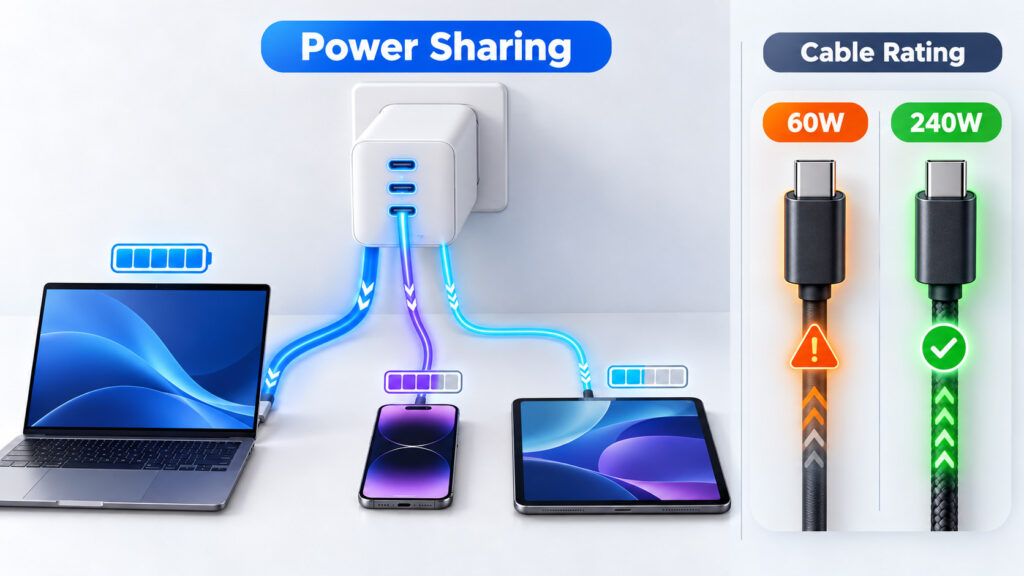
60W vs 240W USB-C Cables
USB-IF’s current cable certification program identifies compliant USB-C-to-USB-C cables by power capability, including 60W and 240W categories.
Reference: USB Implementers Forum – Cables and Connectors / USB-C cable power-rating requirements.
This makes cable selection easier when buying compliant products because the intended power capability can be identified separately from data-transfer performance.
For a phone, a 60W-capable cable is normally far beyond the actual power requirement. For higher-power laptops, the cable rating becomes much more important.
Power Rating and Data Speed Are Different
A common mistake is assuming that a high-wattage charging cable must also provide the fastest data transfer.
Charging capability and data capability are related specifications but are not the same thing.
A cable can be designed primarily for high-power charging while supporting comparatively basic data transfer. Another cable may support high-speed USB or USB4 data as well as high charging power.
Check both specifications when you plan to use the cable for external SSDs, docks, displays, or other high-speed peripherals as well as charging.
What Is an E-Marked USB-C Cable?
Higher-current and advanced USB-C cables may include an electronic marker, commonly called an E-Marker, that communicates information about the cable’s capabilities to connected equipment.
This becomes particularly important for higher-power USB-C charging where the charger and device need to know that the cable is designed for the required electrical load.
USB-IF includes specific compliance requirements for cables implemented with E-Markers.
Reference: USB Implementers Forum – USB Type-C Cable and Connector Compliance information.
Check Single-Port Output, Not Just the Big Number on the Charger
A multi-port charger labelled 100W does not necessarily provide 100W through every port.
For example, a charger could be designed approximately like this:
| Usage | Example Power Distribution |
|---|---|
| USB-C1 only | 100W maximum |
| USB-C2 only | 30W maximum |
| USB-C1 + USB-C2 | 65W + 30W |
| Three devices connected | Power divided according to charger design |
These numbers are examples rather than specifications for a particular product. Always read the charger’s actual power-distribution table.
This matters when charging a laptop and phone together. A charger that supplies 100W to the laptop while used alone might reduce that port to 65W after a second device is connected.
Samsung’s multi-port charger specifications provide a real-world example of this behaviour: maximum output and PPS capability change depending on which ports are being used together. Reference: Samsung multi-port USB-C charger specifications.
What Happens When You Connect a Second Device?
Multi-port chargers have a finite total power budget.
When another device is connected, the charger may:
- Reduce the output available from the first port.
- Re-negotiate USB PD power profiles.
- Briefly interrupt charging while power is redistributed.
- Disable the highest charging mode on one or more ports.
Check the manufacturer’s output table if you expect to charge a laptop and phone simultaneously.
Do You Need a GaN Charger?
GaN, or gallium nitride, describes semiconductor technology used inside some modern chargers. It is not itself a charging protocol.
A GaN charger can provide high power from a smaller enclosure, but charging compatibility still depends on wattage, USB PD, PPS, cable capability, and the device.
If you want a deeper explanation, see our article “GaN Charger vs Normal Charger – Which One Should You Buy?”
A well-designed conventional charger supporting the correct protocol can charge a device just as effectively as a GaN charger with the same supported output. GaN is mainly valuable for power density, compact design, and multi-port high-wattage products.
Can One USB-C Charger Replace Several Chargers?
Often, yes.
A suitable 65W or 100W multi-port USB-C charger can potentially replace separate adapters for a phone, tablet, laptop, earbuds, or power bank when all of those devices support compatible charging methods.
Before consolidating chargers, check:
- The highest-power device you need to charge.
- The charger’s single-port maximum.
- Power distribution with multiple ports active.
- USB PD and PPS requirements.
- Cable ratings.
If you also use portable charging, see our article “How to Choose a Power Bank – Capacity, Wattage, Safety, and Fast Charging.” The same principles of USB PD, PPS, cable rating, and single-port output apply to power banks as well.
How to Check Whether a USB-C Charger Is Safe
Charging speed is only one part of choosing a charger. A power adapter connects directly to mains electricity, so product quality, electrical protection, certification, thermal design, and manufacturer traceability matter.
Look for:
- Clear manufacturer and model information.
- Input and output ratings printed on the charger.
- Documented USB PD or PPS support where claimed.
- Recognised safety or regulatory certification applicable to your country.
- Over-current, over-voltage, short-circuit, and temperature protection where documented.
- A warranty and traceable seller.
- A properly fitted plug and solid USB-C ports.
USB-IF Certification
USB-IF operates compliance and certification programs for USB products. When a product claims USB-IF certification, check that the claim is genuine rather than assuming any product with a USB-C port has passed certification.
USB-IF advises consumers to buy compliant USB products from trusted sources and identifies certified USB charging and cable capabilities through its certification program.
Reference: USB Implementers Forum – Certified USB Charger and cable compliance guidance.
Check BIS Requirements in India
For buyers in India, power adapters for IT equipment are included in the Bureau of Indian Standards Compulsory Registration Scheme.
A genuine applicable BIS registration gives you an additional way to verify that the model and manufacturer are traceable under the required Indian framework.
Do not rely only on a printed BIS-style mark. Registration information can be checked against official BIS records when authenticity is uncertain.
Reference: Bureau of Indian Standards – Scheme II Registration Scheme, Power Adaptors for IT Equipments.
Warning Signs of an Unsafe or Damaged Charger
Stop using a charger or cable when you notice signs such as:
- Cracked or separated charger casing.
- Burn marks or melted plastic.
- Unusual electrical smell.
- Sparking at the charger or connector.
- Loose wall pins.
- Loose or damaged USB-C ports.
- Cable insulation that is cut, frayed, or exposed.
- Repeated charging interruptions with several known-good devices.
- Extreme heating during normal charging.
A charger becoming warm does not automatically mean it is unsafe. Power conversion creates heat, especially in compact high-wattage chargers. However, abnormal heat, smell, visible damage, or repeated electrical problems should not be ignored.
USB-C Charger Buying Checklist
Before buying, work through this list:
- Identify your highest-power device.
- Check its recommended charger wattage.
- Confirm USB PD support.
- Confirm PPS if your phone benefits from or requires it.
- Check the charger’s single-port maximum.
- Check multi-port power distribution.
- Choose the correct USB-C cable power rating.
- Check data requirements separately if you will use the cable for storage or displays.
- Verify relevant safety and regulatory information.
- Buy from a traceable manufacturer or authorised/reputable seller.
Common USB-C Charger Buying Mistakes
| Common Mistake | Better Approach |
|---|---|
| Choosing only by the USB-C connector | Check wattage, PD, PPS, and device compatibility |
| Buying the highest wattage available | Match the charger to actual device requirements |
| Ignoring the cable | Use a cable rated for the required charging power |
| Assuming PD automatically includes PPS | Check PPS support separately when your device needs it |
| Looking only at total charger wattage | Check the maximum output of each individual port |
| Ignoring multi-port power sharing | Read the output table for simultaneous charging |
| Assuming GaN guarantees faster charging | Check charging protocol and power profiles first |
| Buying an untraceable ultra-cheap adapter | Prioritise compliance, safety information, and warranty support |
Frequently Asked Questions
Can I Use a 65W USB-C Charger With a 20W Phone?
Generally, a properly implemented compatible USB charging system will negotiate a power level the phone supports rather than forcing the charger’s full 65W maximum into the phone.
The charger must still support a charging protocol compatible with the phone.
Will a 100W Charger Charge My Phone Faster Than a 30W Charger?
Not necessarily. If the phone accepts a maximum compatible charging rate below 30W, increasing the charger’s maximum capacity to 100W will not automatically increase the phone’s charging speed.
The supported charging protocol, voltage profiles, battery temperature, battery level, and cable also affect charging performance.
Is USB PD the Same as Fast Charging?
USB PD is a standard that enables negotiated power delivery and can support fast charging, but the actual speed depends on the device, charger, cable, and supported profiles.
A product labelled “fast charger” may also use a different charging technology, so check the detailed specification rather than relying on marketing wording alone.
Is PPS Better Than USB PD?
PPS is not a separate replacement for USB PD. It is a capability within the USB Power Delivery ecosystem that provides finer programmable control for compatible equipment.
If your phone uses PPS for its fastest charging mode, a PPS-capable charger can be valuable. If your device does not use PPS, its presence may make little practical difference.
Do I Need a 240W USB-C Cable?
Only when your equipment needs power beyond what a suitable 60W-rated cable can provide or when you want one cable prepared for compatible higher-power applications.
A phone that charges at 25W does not become faster simply because you use a 240W cable.
Can a USB-C Cable Limit Charging Speed?
Yes. The cable forms part of the charging path. If it does not support the current or power required by the charger and device, the system may operate at a lower level.
Can I Charge My Laptop With a Phone Charger?
Sometimes, but performance depends on the laptop and charger. A low-wattage phone adapter may charge some USB-C laptops very slowly while they are asleep, yet fail to keep up while the laptop is running demanding workloads.
Use a charger close to the laptop manufacturer’s recommended power level for normal operation.
Does a GaN Charger Charge Faster?
Not automatically. GaN can enable compact high-power charger designs, but charging speed still depends on output wattage, charging protocol, cable, device support, temperature, and power sharing.
Why Does My Charger Become Warm?
Power conversion produces heat, and compact high-output adapters can become noticeably warm. Mild warmth can be normal.
Stop using the charger if it becomes abnormally hot, produces a burnt smell, sparks, disconnects repeatedly, or shows physical damage.
What Wattage Charger Should I Buy for Several Devices?
Add up your practical needs rather than simply the maximum ratings of every device. For example, you may need enough power to keep a laptop charging at a useful rate while also providing suitable phone or tablet charging.
Then check the charger’s actual simultaneous-output table to make sure the required power reaches each port when several devices are connected.
Final Thoughts
The best USB-C charger is not necessarily the one with the highest wattage. It is the charger that matches the power and charging standards of the devices you actually use.
Start with the device’s charging requirement, then check USB Power Delivery, PPS where relevant, individual port output, cable rating, and multi-port power sharing.
Remember that USB-C describes the connector, not the complete charging capability. A phone, charger, and cable must support compatible power profiles to achieve the intended charging speed.
A higher-wattage compatible charger can be useful because one adapter may serve a phone, tablet, laptop, and power bank, but unused wattage alone does not make charging faster.
Finally, do not sacrifice electrical safety to save a small amount on a charger that connects directly to mains power. Choose traceable equipment with clear ratings, appropriate certification, documented protection, and suitable cables.

AboutTPJ Technical Team
The Project Jugaad Technical Team creates practical, easy-to-follow content on software development, web technologies, artificial intelligence, cybersecurity, cloud platforms, and digital tools. Our articles are informed by more than 13 years of hands-on experience with .NET, Angular, SQL Server, AWS, WordPress, Linux hosting, application deployment, and real-world troubleshooting. Each guide is researched, reviewed, and updated to provide accurate, useful, and actionable information for developers, businesses, and everyday technology users.