Artificial Intelligence
Chatbots, AI assistants, and AI agents are often discussed as if they are completely different technologies. In practice, the boundaries are less tidy. A chatbot can use a powerful language model, an AI assistant can call tools, and an AI agent can still communicate through an ordinary chat window.
The most useful way to understand the difference is therefore not by looking at the product name or user interface. Instead, look at what the system can do after it understands your request.
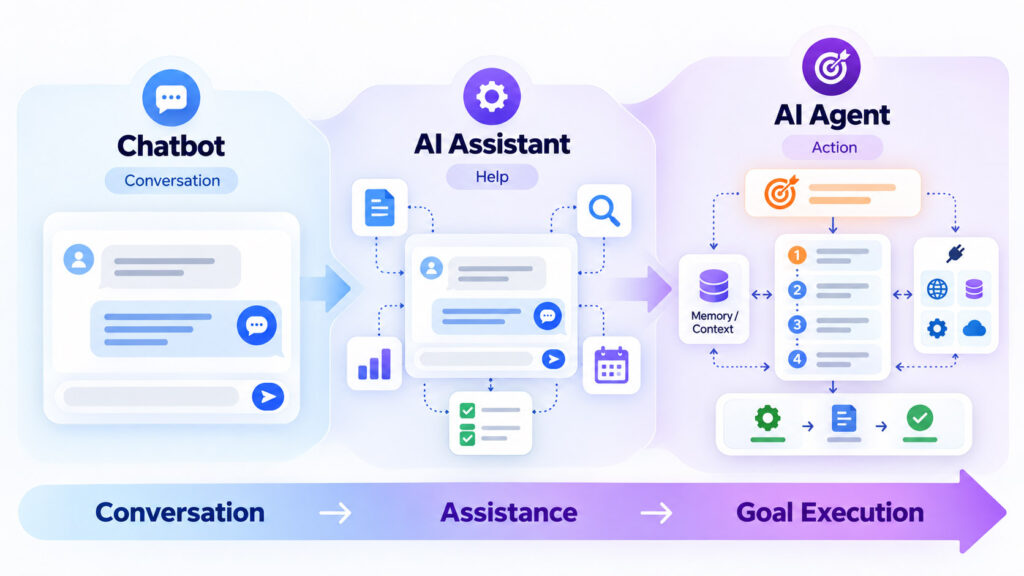
A chatbot primarily holds a conversation. An AI assistant generally helps the user perform work by answering, generating, retrieving, analysing, or recommending. An AI agent goes further by pursuing a goal through multiple steps, deciding what action to take next, using available tools, observing the result, and continuing until it reaches a stopping point.
AI Agents vs AI Assistants vs Chatbots: Quick Answer
| Capability | AI Chatbot | AI Assistant | AI Agent |
|---|---|---|---|
| Main purpose | Conversation and responses | Help the user accomplish work | Pursue and complete a goal |
| Natural-language conversation | Usually | Usually | Often, but not required |
| Generates text or answers | Often | Yes | Often as part of a larger workflow |
| Uses external tools | Sometimes | Often | Commonly |
| Plans multiple steps | Usually limited | Sometimes | Core capability in many agent systems |
| Takes actions | Usually limited | May perform selected actions | Can execute sequences of permitted actions |
| Maintains task state | Conversation context | Conversation and user/work context | Task state, intermediate results, and sometimes persistent memory |
| Level of autonomy | Low | Low to moderate | Moderate to high depending on design |
| Typical example | Customer-support Q&A | Research or writing helper | Multi-step workflow automation |
These are general patterns rather than strict industry definitions. Vendors frequently use terms such as assistant, copilot, agent, and virtual agent differently. The actual capabilities and permissions matter more than the marketing name.
What Is an AI Chatbot?
An AI chatbot is primarily a conversational interface. The user enters text or speaks, and the system responds using natural language.
Traditional chatbots often depend on predefined rules, menus, intents, and scripted conversation paths. Modern generative AI chatbots can instead use large language models to generate responses dynamically.
Google Cloud describes AI chatbots as applications or interfaces that conduct human-like conversations using technologies such as natural-language processing and machine learning. Modern AI chatbots can use large language models rather than relying only on predetermined response flows.
Reference: Google Cloud – AI Chatbot overview.
What Can an AI Chatbot Do?
Depending on its design, an AI chatbot can:
- Answer frequently asked questions.
- Explain a topic.
- Help users find information.
- Generate or rewrite text.
- Collect information during a conversation.
- Guide users through a predefined support flow.
- Retrieve answers from a knowledge base.
The defining characteristic is that the primary interaction is conversational. A chatbot can be sophisticated without necessarily being an autonomous agent.
A Chat Window Does Not Automatically Mean “Chatbot Only”
This distinction is important. An AI agent may use a chat interface, while a basic chatbot may have no ability to perform external actions at all.
The visible interface therefore tells you very little about the architecture behind it.
What Is an AI Assistant?
An AI assistant is usually designed to help a person perform tasks rather than only maintain a conversation.
The assistant might answer questions, summarise documents, draft emails, analyse information, retrieve company knowledge, explain code, organise data, recommend next steps, or interact with selected tools.
A user normally remains closely involved. The assistant proposes, generates, searches, or prepares information, while the user decides what to do next.
AWS documents AI-assistant use cases that include answering questions, retrieving documentation, summarising technical material, recommending improvements, supporting troubleshooting, generating content, and integrating generative AI into other systems.
Reference: AWS Prescriptive Guidance – Use cases for generative AI assistants.
How Is an AI Assistant Different From a Chatbot?
The main difference is usually the breadth of assistance.
A chatbot may primarily answer:
“What is our refund policy?”
An AI assistant may handle a broader request:
“Summarise the refund policy, compare it with this customer’s order, and draft a reply explaining the available options.”
The second request requires more context, document understanding, synthesis, and task support even if the user still decides whether the reply should be sent.
AI Assistant Does Not Have One Universal Definition
The term AI assistant is broad. One product may only answer questions, while another may search company data, use external applications, create files, or execute selected actions.
That means the line between an advanced assistant and an AI agent can become blurry.
A useful distinction is to ask:
- Does the system mainly respond to each user request?
- Or can it independently decide which intermediate actions are needed to complete a larger objective?
The more the system can plan, select tools, execute steps, inspect results, and decide what to do next, the more agent-like the architecture becomes.
What Is an AI Agent?
An AI agent is a software system designed to pursue a goal by reasoning about the current situation, choosing actions, using available tools, observing the results, and continuing until the task reaches an appropriate stopping point.
Google Cloud describes an AI agent as an application that achieves a goal by processing input, reasoning with available tools, and taking actions based on its decisions. Its agent architecture includes orchestration, a model, tools, memory or state, and planning.
Reference: Google Cloud Generative AI glossary – AI agents.
A Simple AI Agent Example
Suppose the user asks:
“Find three hotels near my conference venue that meet my budget and have free cancellation.”
A conversational assistant might explain how to search for hotels or produce a shortlist from information already available to it.
A capable agent could instead:
- Identify the venue and dates.
- Search suitable hotel sources.
- Apply the user’s budget.
- Check distance from the venue.
- Inspect cancellation terms.
- Remove unsuitable options.
- Compare the remaining hotels.
- Present the shortlist to the user.
If the agent also has booking permissions, it could potentially continue further, but a well-designed system should require explicit user approval before an action that creates a financial or contractual commitment.
The Main Difference Is the Agent Loop
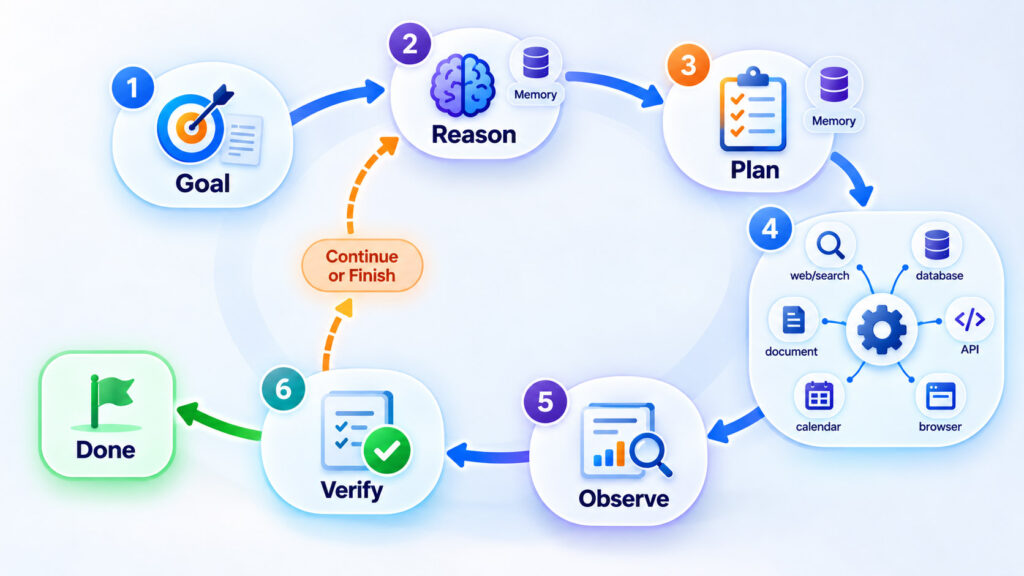
Many agent systems operate through a repeated cycle:
- Understand the goal.
- Reason about the next useful step.
- Select and use a tool.
- Observe the result.
- Update the plan.
- Repeat until the task is complete or needs human input.
Google Cloud describes a similar reason-act-observe pattern in its current explanation of AI-agent concepts.
Reference: Google Cloud – Core concepts of AI agents.
What Makes an AI System Agentic?
There is no single checkbox that turns a chatbot into an agent. Agentic behaviour usually comes from combining several capabilities.
1. A Goal
An agent needs an objective that extends beyond generating the next sentence.
The goal might be:
- Prepare a research report.
- Resolve a customer-support case.
- Find a suitable product.
- Process an invoice.
- Test an application.
- Monitor a system and respond to an event.
2. Planning
A complex objective usually has to be broken into smaller tasks.
An agent may determine that it first needs information from one source, then must call a second tool, compare the results, and only then decide whether another action is required.
AWS describes planning as an important agent capability that breaks goals into manageable steps and handles dependencies between them.
Reference: AWS – What Are AI Agents?
3. Tools
Tools allow the agent to interact with systems outside the language model.
Depending on its permissions, an agent may have tools for:
- Searching the web.
- Querying a database.
- Reading documents.
- Calling an API.
- Running code.
- Using a browser.
- Creating a calendar event.
- Updating a ticket.
- Sending an approved message.
The model does not magically gain these capabilities. The surrounding software must explicitly connect and authorise the tools.
4. State and Memory
Multi-step work requires the system to remember what has already happened.
Short-term state can include:
- The current goal.
- Steps already completed.
- Tool outputs.
- Temporary decisions.
- Information still missing.
Some systems also use longer-term memory to retain selected information across sessions.
AWS documents both short-term conversational context and longer-term agent memory for workflows that need to preserve history or progress.
Reference: Amazon Bedrock AgentCore – Memory documentation.
5. Observation and Feedback
An agent should inspect what happened after an action instead of assuming that the action succeeded.
If an API returns an error, a search produces poor results, or a webpage changes unexpectedly, the system may need to adjust its plan.
6. Stopping Conditions
Good agent design also defines when the system should stop.
An agent may stop because:
- The goal has been completed.
- Required information is missing.
- The user must approve the next action.
- A tool failed.
- The requested action is not permitted.
- Confidence is too low to continue safely.
Chatbot vs Assistant vs Agent Through a Real Example
Imagine that a business user says:
“Our website traffic dropped yesterday. Find out what happened and prepare an explanation.”
| System Type | Possible Behaviour |
|---|---|
| Chatbot | Explains common reasons website traffic can fall and suggests what the user should check |
| AI Assistant | Analyses analytics data supplied by the user, summarises possible causes, and helps draft a report |
| AI Agent | Queries approved analytics tools, checks deployment records, compares dates, investigates anomalies, gathers evidence, and prepares a report through a multi-step workflow |
The difference is not that the agent is necessarily “smarter.” The difference is that it has been given an architecture and permissions that allow it to act toward the objective.
AI Agents Can Operate Through a Browser
One increasingly visible form is the browser agent. Instead of only calling structured APIs, the agent can inspect and interact with websites by navigating, clicking, typing, and reading the resulting pages.
That creates useful possibilities for research, comparison, form completion, and repetitive online work, but it also creates additional risks because each click can change data or create commitments.
For a detailed explanation, see our AI Browser Agents – How AI Can Browse, Click, and Complete Online Tasks guide.
Does Every AI Agent Need Long-Term Memory?
No.
An agent that completes a short task may only need temporary state for the duration of that workflow.
For example, an agent comparing five documents needs to remember what it found in the earlier documents while it analyses the remaining ones. It may not need to retain that information permanently after the task ends.
Long-term memory becomes more useful when future sessions genuinely benefit from previous state, preferences, decisions, or workflow history.
Does an AI Agent Need a Vector Database?
No. Vector search can be useful for retrieving semantically related documents, but it is only one possible component in an agent architecture.
An agent might instead query SQL, call a search engine, use an API, open documents directly, or combine several retrieval methods.
If you are building knowledge retrieval into an AI system, our Vector Database vs Traditional Database guide explains when semantic vector search is useful and when ordinary structured queries remain the better option.
Single Agent vs Multi-Agent System
A single agent can coordinate several tools itself. A multi-agent architecture divides work among specialised agents.
For example:
- A research agent gathers evidence.
- An analysis agent evaluates the information.
- A document agent prepares the report.
- A review agent checks required conditions.
Multi-agent architecture can make responsibilities clearer for complex workflows, but it also introduces additional communication, coordination, latency, security, and debugging complexity.
Using more agents does not automatically improve the result. Start with the simplest architecture that can reliably perform the task.
Why AI Agents Need Stronger Safety Controls
A conversational system that only drafts text can still make mistakes, but a system that can send messages, modify records, execute code, place orders, or change account settings creates a different level of operational risk.
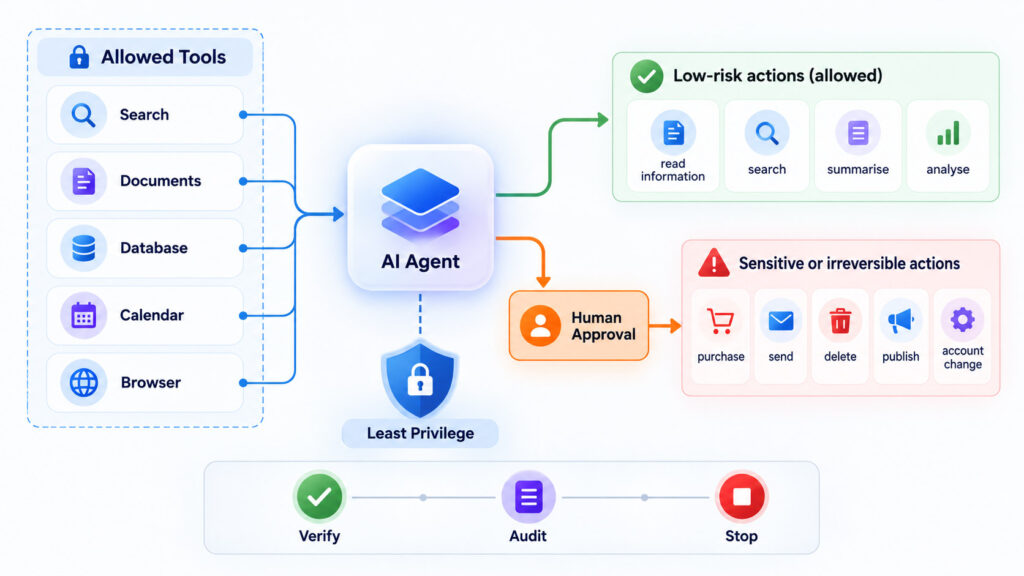
The more authority an AI system receives, the more important permission boundaries, validation, human approval, logging, and recovery become.
Give Agents the Minimum Permissions They Need
An agent that only needs to read documents should not automatically receive permission to delete them. A research agent should not receive payment privileges simply because another workflow uses the same tool platform.
Google Cloud’s current guidance for agent security recommends giving agents their own identity and applying the principle of least privilege so they receive only the roles and permissions necessary for their tasks.
Reference: Google Cloud – AI security and safety for agent tool use.
Require Approval for Sensitive Actions
Many useful tasks can run safely as read-only operations. Risk increases when an agent can create an irreversible or externally visible outcome.
Human confirmation is especially useful before actions such as:
- Sending a message or email.
- Publishing content.
- Making a purchase.
- Booking travel.
- Deleting information.
- Changing permissions.
- Transferring money.
- Submitting confidential data.
Google Cloud distinguishes human-in-the-middle operation, where a user approves agent actions, from agent-only operation and notes that autonomous tool use increases risks such as prompt injection and unsafe tool chaining.
Reference: Google Cloud – AI security and safety.
Treat Tool Outputs and External Content as Untrusted
An agent may retrieve instructions from webpages, documents, emails, databases, or third-party systems. Those sources can contain incorrect information or even text designed to manipulate an AI model.
Therefore, external content should be treated as data rather than automatically trusted instructions.
This becomes particularly important for browser agents and retrieval systems because an agent may encounter malicious prompt-injection content while performing an otherwise legitimate task.
Keep an Audit Trail
Action-oriented systems should record enough information to understand what happened.
Useful records can include:
- The task requested by the user.
- Tools the agent invoked.
- Important tool results.
- Actions that changed external systems.
- User approvals.
- Errors and retries.
- The final outcome.
This helps with debugging, security review, accountability, and recovery when an automated workflow behaves unexpectedly.
When Is a Chatbot the Better Choice?
Use a chatbot when the primary job is conversation and information delivery.
Good examples include:
- Frequently asked questions.
- Basic customer support.
- Product information.
- Educational explanations.
- Simple knowledge-base search.
- Guided conversational forms.
A chatbot is often easier to control because it does not need broad access to external systems.
When Is an AI Assistant the Better Choice?
An AI assistant fits when a person wants substantial help but still wants to remain closely involved in the process.
Examples include:
- Writing and editing.
- Research assistance.
- Document summarisation.
- Data analysis.
- Code explanation.
- Meeting preparation.
- Knowledge retrieval.
- Drafting recommendations.
The assistant can reduce effort without necessarily being responsible for executing the complete workflow.
When Does an AI Agent Make Sense?
An agent becomes useful when the task naturally involves several connected steps and would benefit from automated decisions between those steps.
Good candidates include:
- Researching several sources and compiling a report.
- Triaging support tickets and gathering relevant context.
- Monitoring systems and investigating alerts.
- Processing repeatable business workflows.
- Coordinating actions across multiple approved applications.
- Browsing and comparing information across websites.
- Running tests and adapting based on the results.
Do not use an agent simply because the technology is available. A deterministic script, database query, scheduled job, conventional workflow engine, or chatbot may be cheaper, faster, easier to test, and more predictable for a fixed process.
AI Agent vs Traditional Automation
| Area | Traditional Automation | AI Agent |
|---|---|---|
| Workflow | Predetermined | Can adapt steps dynamically |
| Input | Usually structured | Can interpret natural language and unstructured information |
| Predictability | High for known conditions | Can vary because model decisions are probabilistic |
| Best use | Stable repetitive processes | Tasks requiring interpretation and flexible decisions |
| Testing | Usually straightforward | Requires evaluation across more possible behaviours |
| Permissions | Defined for the workflow | Must be carefully restricted across available tools |
In many systems the strongest architecture combines both approaches. AI can interpret an ambiguous request or decide which workflow applies, while deterministic software performs sensitive or predictable operations.
Frequently Asked Questions
Is an AI Agent the Same as a Chatbot?
No. A chatbot is primarily a conversational interface. An AI agent is designed to pursue a goal through actions and may use planning, tools, state, and repeated decision-making.
An AI agent can still communicate through a chatbot-style interface, so the two concepts can overlap.
Is an AI Assistant an AI Agent?
Sometimes. “AI assistant” is a broad product term rather than a strict technical category.
A simple assistant may only answer questions and generate content. A more advanced assistant may plan tasks and invoke tools, giving it agent-like capabilities.
What Is Agentic AI?
Agentic AI generally refers to AI systems designed to work toward goals through planning, tool use, decisions, actions, and feedback rather than producing only a single response.
The amount of autonomy can vary significantly between implementations.
Do AI Agents Work Without Humans?
Some workflows can operate with substantial autonomy, but that does not mean removing human oversight is always desirable.
High-impact, ambiguous, financial, privacy-sensitive, or irreversible actions often benefit from approval checkpoints.
Do AI Agents Need APIs?
No, although APIs provide a structured and reliable way to interact with external systems.
Agents may also work with databases, files, search systems, command-line tools, browser interfaces, or other controlled integrations.
Can an AI Agent Make Mistakes?
Yes. Agents can misunderstand goals, select the wrong tool, use incorrect information, fail to notice a tool error, or take an unsuitable next step.
Verification, permission boundaries, approval rules, logging, and conventional validation logic remain important.
Are AI Agents More Intelligent Than AI Assistants?
Not necessarily. The distinction is primarily about system design and capabilities rather than a simple intelligence ranking.
The same underlying model could power a chatbot, assistant, or agent depending on the tools, orchestration, memory, permissions, and workflow built around it.
Will AI Agents Replace Traditional Software Automation?
Not in every situation. Traditional automation remains extremely effective when the inputs, rules, and workflow are stable and predictable.
AI agents are more useful when tasks involve natural language, incomplete information, changing conditions, or decisions that cannot easily be represented as fixed rules.
Choosing the Right Level of AI Automation
The difference between a chatbot, AI assistant, and AI agent is best understood as a difference in responsibility and action, not simply the quality of the underlying language model.
A chatbot is usually the right starting point when users mainly need conversation and answers. An AI assistant makes sense when users want deeper help with research, analysis, writing, or other work while remaining directly involved. An AI agent becomes useful when the system needs to pursue a goal across several steps, select tools, evaluate results, and decide what to do next.
More autonomy is not automatically better. Every additional tool, permission, memory source, and automated action creates new engineering and security requirements.
For that reason, start with the least complex system that solves the problem reliably. Add tools when information access is necessary, add agentic planning when workflows genuinely require adaptation, and reserve autonomous actions for situations where the benefits justify the additional controls.
In practical systems, the categories increasingly overlap. A single application can behave as a chatbot for one request, an assistant for another, and an agent when the user explicitly asks it to carry out a multi-step task.

AboutTPJ Technical Team
The Project Jugaad Technical Team creates practical, easy-to-follow content on software development, web technologies, artificial intelligence, cybersecurity, cloud platforms, and digital tools. Our articles are informed by more than 13 years of hands-on experience with .NET, Angular, SQL Server, AWS, WordPress, Linux hosting, application deployment, and real-world troubleshooting. Each guide is researched, reviewed, and updated to provide accurate, useful, and actionable information for developers, businesses, and everyday technology users.