Software Development
SQL vs NoSQL is an important comparison for developers, architects, students, and businesses that need to store and manage application data.
SQL databases organise data into related tables with defined columns and relationships. In contrast, NoSQL databases support flexible models such as documents, key-value pairs, wide columns, and graphs.
Therefore, the right database depends on the structure of your data, expected traffic, consistency requirements, reporting needs, development speed, and long-term scalability.
What Is an SQL Database?
An SQL database stores data in tables made of rows and columns.
SQL stands for Structured Query Language. Developers use SQL to create tables, insert records, retrieve data, update values, delete records, and manage relationships.
Relational databases usually define a schema before storing data. As a result, every record follows a predictable structure.
Simple SQL Table Example
CREATE TABLE users (
  id INT PRIMARY KEY,
  name VARCHAR(100) NOT NULL,
  email VARCHAR(150) UNIQUE,
  is_active BOOLEAN DEFAULT TRUE
);
This table defines the expected columns and data types for every user.
Simple SQL Query Example
SELECT id, name, email
FROM users
WHERE is_active = TRUE
ORDER BY name;
The query retrieves active users and sorts them by name.
What Is a NoSQL Database?
A NoSQL database stores data without requiring the traditional relational table structure.
The term NoSQL commonly means “not only SQL.” It includes several database types designed for different data structures, workloads, and scaling requirements.
For example, a document database can store related information inside one JSON-like document. Consequently, developers can keep application data in a structure that closely matches their code.
Simple NoSQL Document Example
{
  "_id": "USR-101",
  "name": "Riya",
  "email": "riya@example.com",
  "isActive": true,
  "skills": [
    "JavaScript",
    "TypeScript",
    "SQL"
  ]
}
This document stores basic user details and a list of skills together.
Main Types of NoSQL Databases
| NoSQL Type | How It Stores Data | Common Use |
|---|---|---|
| Document Database | JSON-like documents | Content, profiles, catalogues, and web applications |
| Key-Value Database | Unique keys linked to values | Caching, sessions, and fast lookups |
| Wide-Column Database | Column families across distributed nodes | Large-scale analytics and high-volume data |
| Graph Database | Nodes and relationships | Networks, recommendations, and fraud detection |
SQL vs NoSQL: Quick Comparison
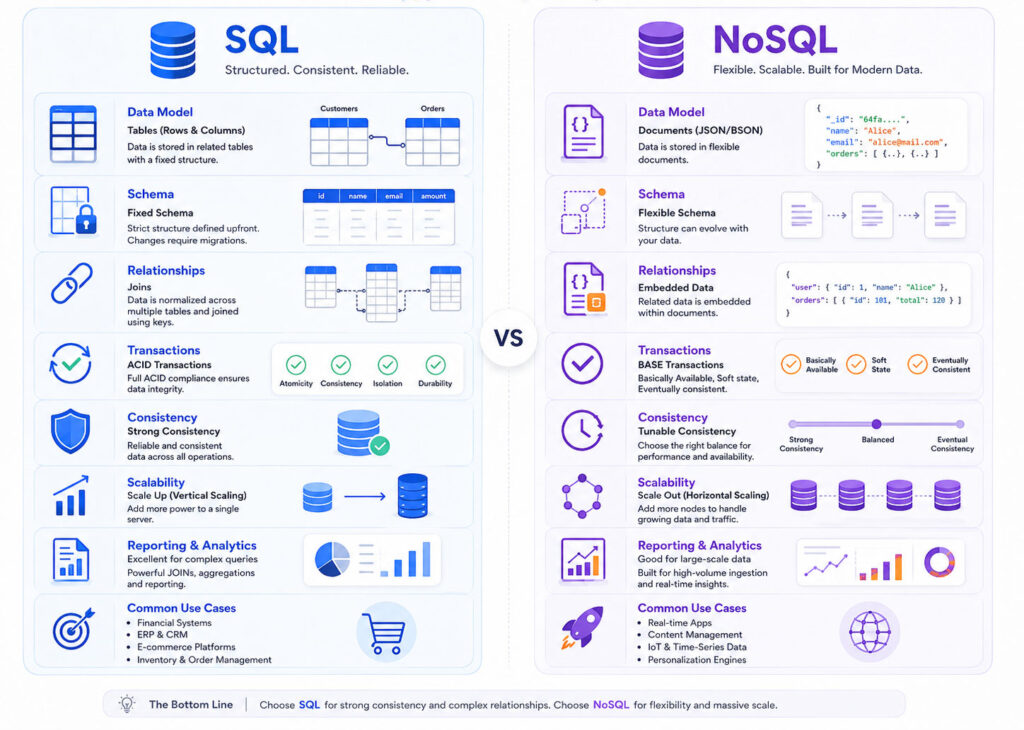
| Point | SQL | NoSQL |
|---|---|---|
| Data Model | Tables, rows, and columns | Documents, key-value, columns, or graphs |
| Schema | Usually predefined and structured | Often flexible and application-driven |
| Relationships | Strong support for joins and foreign keys | Often stores related data together or links it differently |
| Scaling | Commonly scales vertically, although distributed options exist | Often designed for horizontal scaling |
| Consistency | Strong transactional consistency is common | Consistency models vary by database |
| Best Fit | Structured data, transactions, and complex reporting | Flexible data, large-scale distribution, and specialised workloads |
These differences provide a starting point. However, modern SQL and NoSQL products increasingly support features traditionally associated with the other category.
How SQL Databases Organise Data
SQL databases divide information into related tables.
For example, an e-commerce system may use separate tables for customers, products, orders, and order items. Foreign keys then connect those records.
This structure reduces unnecessary duplication and helps maintain reliable relationships between records.
customers
  └── orders
        └── order_items
              └── products
Because the relationships remain explicit, developers can combine data through joins and generate detailed reports.
How NoSQL Databases Organise Data
NoSQL databases organise information according to their data model.
A document database may store an order together with customer details and purchased items. In contrast, a graph database may represent customers, products, and purchases as connected nodes.
Therefore, developers often design NoSQL data around application access patterns rather than normalised tables.
Schema Differences
SQL databases usually require a defined schema.
When developers add a new required column, they may need a database migration. Although migrations require planning, they also keep the data structure consistent.
NoSQL document databases often allow records with different fields. As a result, teams can introduce new properties quickly.
However, schema flexibility does not remove the need for validation. Applications should still define, document, and verify the expected data shape.
Relationships and Joins
SQL databases provide strong support for relationships and joins.
For example, one query can combine customers, orders, products, and payments. Therefore, SQL often suits systems with connected business data and complex reports.
NoSQL databases may reduce joins by storing related information in the same document. This approach can improve common reads, although duplicated data may become harder to update consistently.
Transactions and Data Consistency
Many business systems need several database changes to succeed or fail together.
For example, an order process may update inventory, create a payment record, and save the order. SQL databases commonly support ACID transactions for this type of work.
| ACID Property | Meaning |
|---|---|
| Atomicity | All steps succeed, or the database cancels the complete operation |
| Consistency | The transaction keeps the data within defined rules |
| Isolation | Concurrent transactions do not create incorrect results |
| Durability | Committed data remains stored after a failure |
Many NoSQL databases also support transactions. However, the exact transaction scope and consistency model vary by product.
What Is Eventual Consistency?
Some distributed databases allow different nodes to hold temporarily different values after an update.
Over time, those nodes receive the update and reach the same state. This approach is known as eventual consistency.
It can improve availability and distributed performance. However, it may not suit every operation.
For example, a social media like count may tolerate a short delay. In contrast, a bank balance normally requires stronger consistency.
SQL vs NoSQL Scalability
Vertical scaling increases the power of one database server by adding processor capacity, memory, or faster storage.
Horizontal scaling distributes data and traffic across several servers.
SQL systems have traditionally relied more on vertical scaling. However, modern relational databases can also use replication, partitioning, clustering, and distributed architectures.
NoSQL databases often design horizontal scaling into their architecture. Consequently, they can support large traffic volumes and data sets across many nodes.
SQL vs NoSQL Performance
Neither database type is always faster.
SQL may perform well for structured queries, joins, transactions, and reporting. Meanwhile, NoSQL can provide fast results when its data model matches a specific access pattern.
Performance depends on several factors:
- Data model and schema design.
- Indexes and query structure.
- Read and write patterns.
- Hardware and network capacity.
- Replication and consistency settings.
- Data volume and distribution.
- Application caching.
Therefore, teams should test real workloads instead of relying only on general database labels.
Indexing in SQL and NoSQL
Indexes help databases find records without scanning every item.
SQL databases can create indexes on individual columns or combinations of columns. Similarly, many NoSQL databases support indexes on document fields or other data structures.
However, every index consumes storage and adds work during inserts and updates. As a result, teams should create indexes based on actual query needs.
Reporting and Analytics
SQL works naturally with structured reports, aggregations, joins, and business intelligence tools.
For example, analysts can calculate monthly sales, customer totals, product performance, and regional trends through SQL queries.
NoSQL databases can also support analytics. Nevertheless, teams may use separate pipelines, search engines, data warehouses, or processing platforms for complex reports.
Benefits of SQL Databases
SQL databases provide a clear and reliable model for structured data.
- Tables and schemas create consistent records.
- Joins support complex relationships.
- Transactions protect important business operations.
- SQL supports powerful reporting and aggregation.
- Constraints help maintain data quality.
- A large ecosystem supports development, administration, and analytics.
Therefore, SQL remains a strong choice for financial, inventory, billing, and other transaction-focused systems.
Limitations of SQL Databases
SQL databases can require more planning when the data structure changes frequently.
- Schema migrations may require careful deployment.
- Complex joins can become expensive at large scale.
- Horizontal distribution may add operational complexity.
- Poor table and index design can reduce performance.
- Object-oriented application models may need additional mapping.
Still, good architecture and database design can solve many of these challenges.
Benefits of NoSQL Databases
NoSQL databases support flexible and specialised data models.
- Document structures can match application objects.
- Teams can add optional fields without changing every record.
- Many products support horizontal scaling.
- Key-value systems provide fast lookups.
- Graph databases handle relationship-focused queries.
- Distributed architectures can support high traffic and availability.
Consequently, NoSQL can work well for dynamic content, sessions, event data, catalogues, and large distributed systems.
Limitations of NoSQL Databases
NoSQL flexibility can create problems when teams avoid data modelling.
- Duplicated information may become difficult to update.
- Complex reporting may require extra tools.
- Data structures can become inconsistent without validation.
- Transaction support varies by database.
- Developers may design documents around one query and struggle with another.
- Moving between NoSQL products can require major changes.
Therefore, NoSQL still requires clear schemas, access patterns, indexes, and governance.
When Should You Use SQL?
Choose SQL when your data has clear relationships and consistency matters.
- Banking and payment systems.
- Billing and invoice applications.
- Inventory and order management.
- Human resource systems.
- Customer relationship management.
- Structured reporting and analytics.
- Applications with multi-step transactions.
SQL also works well when users need flexible queries across several related entities.
When Should You Use NoSQL?
Choose NoSQL when the workload benefits from a specialised or flexible data model.
- Content management and product catalogues.
- User sessions and caching.
- Real-time event and activity data.
- Internet of Things data.
- Social networks and recommendation systems.
- Large-scale logs and telemetry.
- Applications with rapidly changing optional fields.
However, the selected NoSQL type should match the use case. A document database, key-value store, and graph database solve different problems.
SQL vs NoSQL for E-Commerce
An e-commerce platform may use SQL for orders, payments, customers, and inventory because these areas need reliable relationships and transactions.
Meanwhile, the same platform may use a document database for a product catalogue with different attributes across categories.
It may also use a key-value database for sessions and caching. Therefore, one system can use several database technologies.
SQL vs NoSQL for Financial Applications
Financial applications usually need strong consistency, reliable transactions, auditing, and structured reporting.
As a result, SQL often provides the safer starting point for balances, invoices, payments, and accounting records.
A financial platform may still use NoSQL for logs, notifications, analytics, or cached data. However, teams should keep critical financial records inside a system that meets their consistency and compliance needs.
SQL vs NoSQL for Real-Time Applications
Real-time applications generate frequent updates and may serve many users at once.
NoSQL databases can support chat messages, activity streams, live events, and distributed session data. Nevertheless, an SQL database can also handle real-time workloads when teams design and scale it appropriately.
Therefore, the access pattern and infrastructure matter more than the word “real-time.”
Can You Use SQL and NoSQL Together?
Yes, many applications use both database types.
This approach is sometimes called polyglot persistence. It means selecting different storage technologies for different requirements.
SQL database
  ├── customers
  ├── orders
  └── payments

Document database
└── product catalogue

Key-value database
├── cache
└── user sessions
This design can improve flexibility. However, every additional database increases development, monitoring, backup, security, and maintenance work.
Questions to Ask Before Choosing
- Is the data highly structured or frequently changing?
- Does the application need complex joins?
- Are multi-step transactions important?
- How much data will the system store?
- What are the expected read and write patterns?
- Does the system need horizontal distribution?
- What consistency level does each operation require?
- Which database does the team understand well?
- How will the team handle backups, monitoring, and recovery?
These questions provide more value than choosing a database because it appears popular.
Common Database Selection Mistakes
- Choosing NoSQL only to avoid schema design.
- Choosing SQL without considering expected scale and access patterns.
- Storing every type of data in one database.
- Creating too many indexes without measuring their cost.
- Ignoring backup and disaster-recovery planning.
- Assuming a flexible schema removes the need for validation.
- Using several databases before the application needs them.
- Following benchmark results that do not match the real workload.
A simpler architecture usually remains easier to operate and maintain.
Which Database Should Beginners Learn First?
Beginners should usually learn SQL first.
SQL teaches tables, keys, relationships, constraints, joins, transactions, aggregation, and data modelling. These concepts remain useful across many database systems.
Afterwards, learners can study document, key-value, graph, and distributed database models. This order makes the differences easier to understand.
Which One Should You Choose?
| Your Requirement | Recommended Starting Point |
|---|---|
| Structured business data | SQL |
| Complex joins and reports | SQL |
| Reliable multi-step transactions | SQL |
| Flexible JSON-like documents | Document NoSQL |
| Fast cache or session lookups | Key-value NoSQL |
| Relationship and network analysis | Graph NoSQL |
| Large distributed event workloads | NoSQL or a distributed SQL system |
| Several different storage needs | SQL and NoSQL together, when justified |
Final Verdict
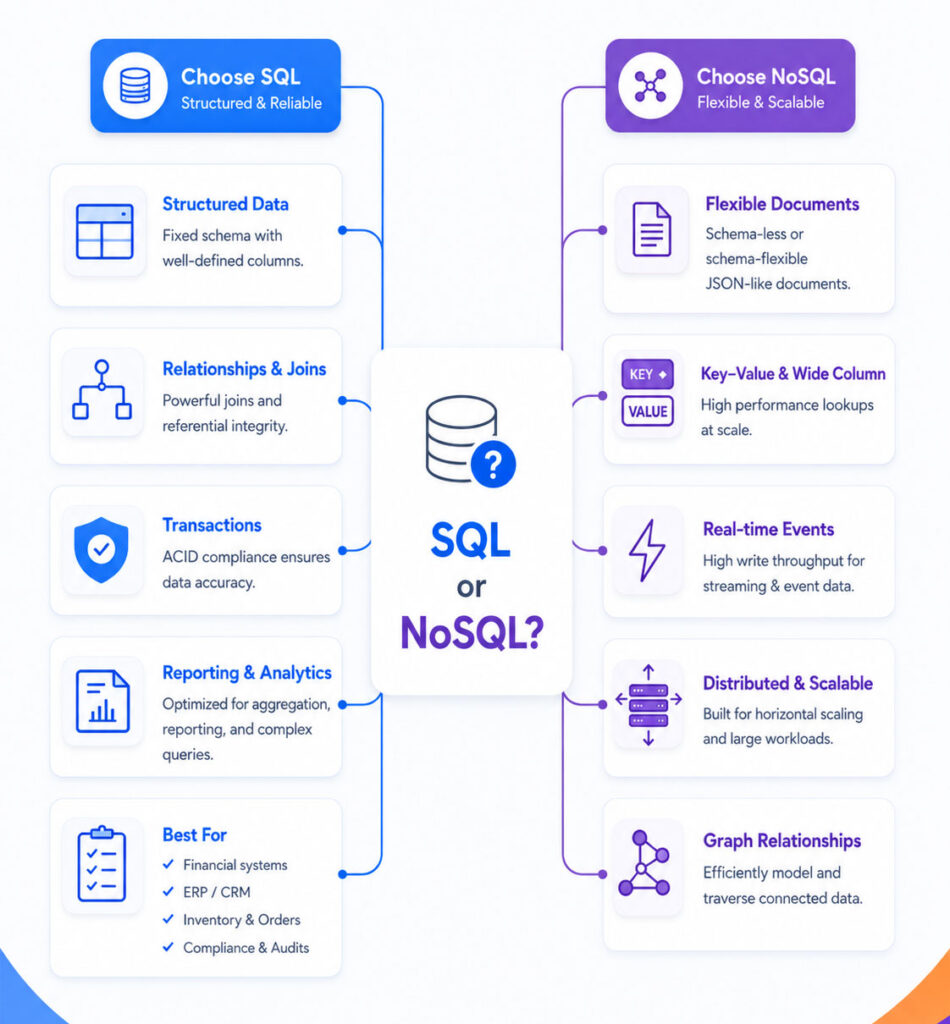
SQL is a strong choice for structured data, relationships, transactions, and reporting.
NoSQL is a strong choice for flexible documents, specialised data models, distributed workloads, and high-scale access patterns.
Therefore, the best database is not the one with the newest label. It is the one that matches the application’s data, queries, consistency needs, scale, and operational capabilities.
Conclusion
SQL vs NoSQL does not have one universal winner.
Choose SQL when your application needs structured relationships, strong transactions, and complex reporting. In contrast, choose NoSQL when flexible or specialised data models provide a clear advantage.
For many applications, SQL offers the safest starting point. Add NoSQL only when a specific requirement justifies the extra technology and maintenance.

AboutTPJ Technical Team
The Project Jugaad Technical Team creates practical, easy-to-follow content on software development, web technologies, artificial intelligence, cybersecurity, cloud platforms, and digital tools. Our articles are informed by more than 13 years of hands-on experience with .NET, Angular, SQL Server, AWS, WordPress, Linux hosting, application deployment, and real-world troubleshooting. Each guide is researched, reviewed, and updated to provide accurate, useful, and actionable information for developers, businesses, and everyday technology users.