Artificial Intelligence
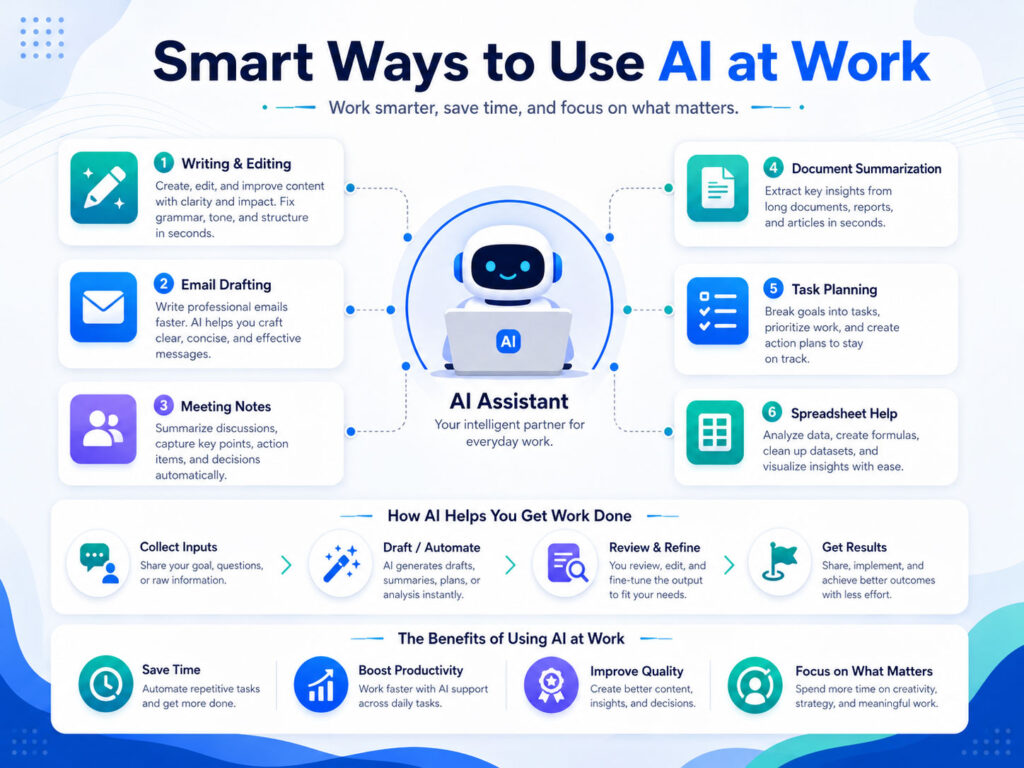
AI Tools for Daily Work can help you write faster, plan better, summarize information, learn new skills, and reduce repetitive tasks. However, they work best when you use them with clear instructions and human review.
Many people think AI tools are only useful for developers or large companies. In reality, students, office users, freelancers, business owners, content creators, and working professionals can all use AI tools in simple ways.
The goal is not to replace human thinking. Instead, AI can support your daily work by saving time, improving clarity, and helping you start faster.
What Are AI Tools?
AI tools are software applications that use artificial intelligence to understand instructions and generate useful output. They can help with writing, research, summaries, ideas, coding, planning, image generation, data understanding, and many other tasks.
For example, you can ask an AI tool to rewrite an email, explain a difficult topic, create a checklist, prepare a draft, or summarize long text.
Still, AI tools do not always give perfect answers. So, you should always review the output before using it in important work.
Why AI Tools Are Useful in Daily Work
AI tools are useful because they reduce the time spent on repetitive and time-consuming tasks.
For example, instead of starting a document from a blank page, you can ask AI to create a first draft. After that, you can edit it based on your own tone, purpose, and requirement.
This approach helps you work faster without losing control over the final result.
| Daily Work Area | How AI Can Help |
|---|---|
| Writing | Create drafts, rewrite content, improve grammar, and simplify text |
| Learning | Explain topics, provide examples, and create study notes |
| Planning | Prepare task lists, schedules, checklists, and step-by-step plans |
| Communication | Draft emails, replies, messages, and meeting summaries |
| Productivity | Summarize long information and reduce manual effort |
Common Ways to Use AI Tools
You can use AI tools in many practical ways during daily work.
- Write professional emails and replies.
- Summarize long articles, notes, or meeting points.
- Create ideas for blogs, captions, presentations, or reports.
- Explain technical or difficult topics in simple language.
- Prepare checklists for tasks, travel, study, or office work.
- Improve grammar, tone, and readability of written content.
- Generate first drafts for documents, proposals, and messages.
As a result, AI tools can become a helpful assistant for common daily tasks.
How to Write Better AI Prompts
A prompt is the instruction you give to an AI tool. A clear prompt usually gives better results.
Instead of writing a very short instruction, add context, purpose, format, and tone. This helps the AI understand what you really need.
| Weak Prompt | Better Prompt |
|---|---|
| Write an email. | Write a polite email to a client asking for project feedback in simple professional language. |
| Explain cloud storage. | Explain cloud storage in simple words for a beginner with 3 practical examples. |
| Make a plan. | Create a 5-day study plan for learning basic Excel formulas for office work. |
Therefore, a good prompt should clearly explain the task, audience, tone, and expected output.
Practical Examples of AI Tools in Daily Work
AI tools can help in different daily situations.
If you receive a long email, you can ask AI to summarize the key points. If you need to reply professionally, you can ask AI to prepare a polite draft. Similarly, if you need to understand a topic quickly, you can ask AI to explain it in beginner-friendly language.
Students can use AI to create notes, quizzes, and learning plans. Office users can use it for reports, emails, meeting summaries, and task planning. Freelancers can use it for content ideas, proposals, client replies, and research support.
What AI Tools Can and Cannot Do
AI tools are powerful, but they also have limits. They can support your work, but they should not replace your judgment.
| AI Tools Can Help With | AI Tools Should Not Replace |
|---|---|
| Drafting content | Your final review and approval |
| Generating ideas | Your creativity and decision-making |
| Summarizing information | Your understanding of important details |
| Explaining concepts | Expert advice for serious matters |
| Improving grammar | Your original message and intent |
Because of this, you should treat AI as a smart assistant, not as a final authority.
Best Practices for Using AI Tools Smartly
Follow these best practices to get better results from AI tools:
- Write clear and specific prompts.
- Add context so the AI understands your requirement.
- Ask for examples when you want easier understanding.
- Review and edit the final output before using it.
- Check important facts from reliable sources.
- Use your own tone instead of copying the output directly.
- Avoid sharing private, sensitive, or confidential information.
These habits help you use AI safely and effectively.
Mistakes to Avoid While Using AI Tools
Many users make the mistake of copying AI-generated content without checking it. This can create problems because AI may sometimes provide incomplete, outdated, or incorrect information.
Another common mistake is giving unclear instructions. If your prompt is confusing, the result may also be weak.
Also, do not share passwords, bank details, personal documents, private client data, or confidential business information with AI tools unless your organization clearly allows it.
Conclusion
AI Tools for Daily Work can make your routine tasks easier, faster, and more organized. They can help with writing, learning, planning, summaries, communication, and idea generation.
However, the best results come when you use AI with clear prompts, practical thinking, and careful review. AI can give you a strong starting point, but your judgment makes the final output useful.
When used smartly, AI tools can save time, improve productivity, and help you work with more confidence.

AboutTPJ Technical Team
The Project Jugaad Technical Team creates practical, easy-to-follow content on software development, web technologies, artificial intelligence, cybersecurity, cloud platforms, and digital tools. Our articles are informed by more than 13 years of hands-on experience with .NET, Angular, SQL Server, AWS, WordPress, Linux hosting, application deployment, and real-world troubleshooting. Each guide is researched, reviewed, and updated to provide accurate, useful, and actionable information for developers, businesses, and everyday technology users.