Cyber Security
Password Manager vs Browser Passwords is an important comparison because most people now have many online accounts. Remembering unique passwords for email, banking, shopping, cloud storage, social media, and work tools can become difficult.
Because of this, many users save passwords in their browser. Others use a dedicated password manager. Both options can help, but they do not offer the same level of control, features, and security.
So, before choosing one, it is useful to understand how both options work and which one is safer for your needs.
What Is a Password Manager?
A password manager is a tool that stores your passwords securely in one place.
Instead of remembering every password, you remember one strong master password. The password manager can then help you save, fill, and generate strong passwords for different websites and apps.
Many password managers also support secure notes, password sharing, breach alerts, two-factor authentication, and passkey storage. These features can make account management easier and safer.
What Are Browser Passwords?
Browser passwords are passwords saved inside a web browser such as Chrome, Edge, Firefox, or Safari.
When you log in to a website, the browser may ask whether you want to save the password. Later, it can fill the saved password automatically when you visit the same website.
This is convenient because you do not need to install a separate tool. However, browser password storage mainly works within that browser or browser account.
Quick Difference Between Password Manager and Browser Passwords
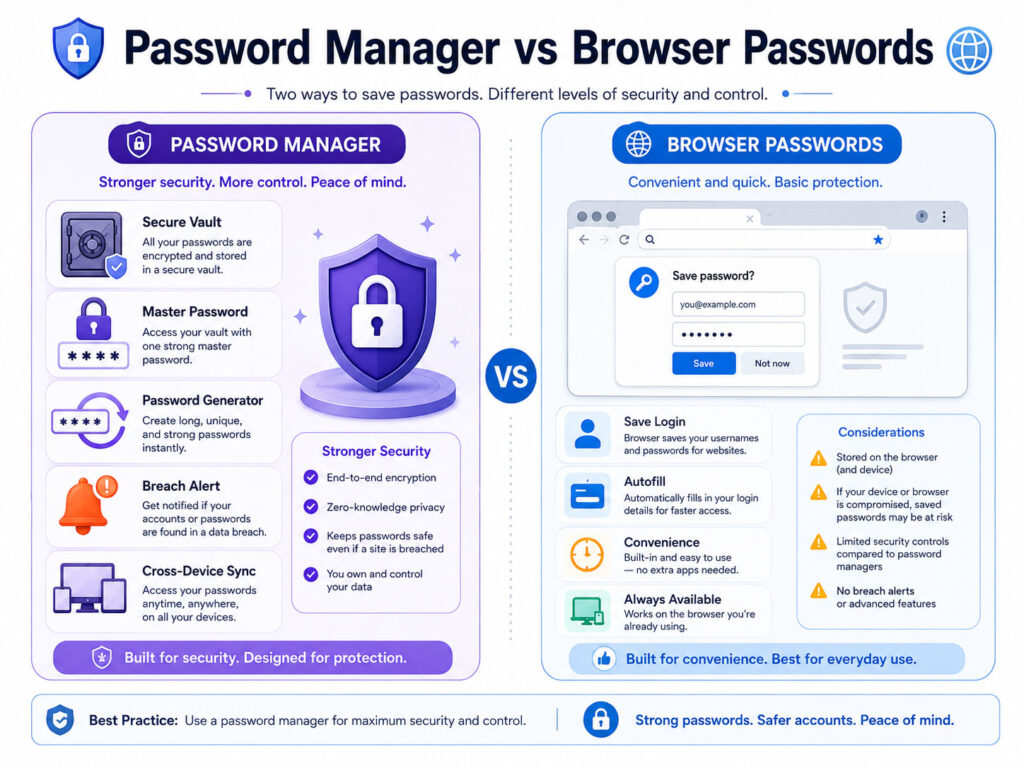
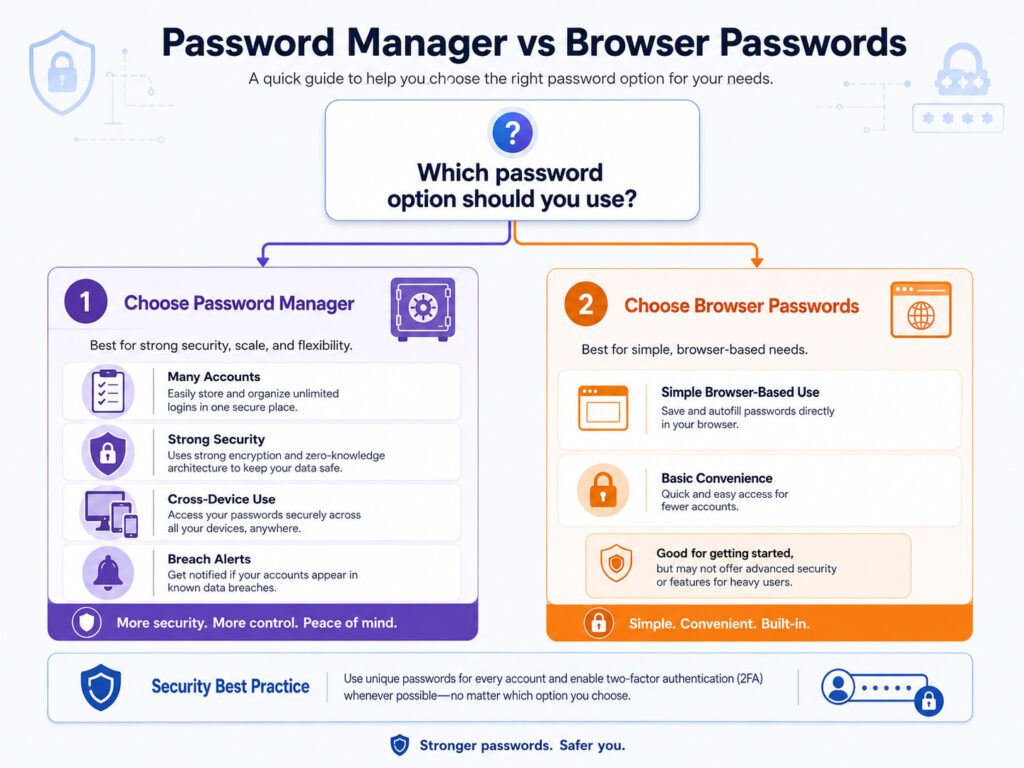
The easiest way to understand the difference is this: browser passwords focus on convenience, while dedicated password managers focus more on complete password management.
| Point | Password Manager | Browser Passwords |
|---|---|---|
| Main Purpose | Manage passwords across apps, devices, and accounts | Save and fill passwords inside the browser |
| Password Generator | Usually strong and flexible | Usually available, but may be simpler |
| Cross-App Use | Often works across browsers and apps | Mostly browser-focused |
| Security Alerts | Often includes breach or weak password alerts | May include basic password check features |
| Best For | Users with many important accounts | Users who need simple browser-based convenience |
Why Password Managers Are Useful
Password managers are useful because they help users create and store strong unique passwords.
Many people reuse the same password on multiple websites because it is easy to remember. However, this is risky. If one website leaks your password, attackers may try the same password on other websites.
A password manager helps reduce this problem by generating different passwords for every account.
- It can create strong and unique passwords.
- It can store passwords in an encrypted vault.
- It can fill login details automatically.
- It can help identify weak or repeated passwords.
- It can support secure sharing in some cases.
- It can work across different browsers, devices, and apps.
As a result, a password manager can make strong password habits easier to follow.
Why Browser Passwords Are Convenient
Browser passwords are popular because they are easy to use.
You do not need to install a separate app. The browser can save passwords while you browse and fill them automatically later.
For many basic users, this convenience is helpful. Browser password saving can also encourage users to avoid writing passwords in notebooks or using the same simple password everywhere.
However, convenience should not be the only deciding factor when important accounts are involved.
Security Differences to Consider
Both options can be safe when used correctly, but there are important differences.
| Security Point | Password Manager | Browser Passwords |
|---|---|---|
| Dedicated Vault | Usually yes | Stored within browser password system |
| Master Password | Commonly required | Depends on browser and device settings |
| Weak Password Alerts | Often available | May be available in modern browsers |
| Device Lock Importance | Very important | Very important |
| Best Protection | Works best with strong master password and 2FA | Works best with secure device, browser sync protection, and 2FA |
In both cases, your device security matters. If someone can unlock your phone or computer, your saved passwords may become more exposed.
When Browser Passwords May Be Enough
Browser passwords may be enough for users who have fewer accounts and mostly use one browser ecosystem.
They can work well for low-risk websites, simple personal browsing, or users who do not want to manage another tool.
Still, you should protect the browser account with a strong password and two-factor authentication. You should also lock your device properly and avoid saving passwords on shared computers.
When a Password Manager Is Better
A password manager is usually better when you have many important accounts or need stronger password control.
You should consider using a password manager for:
- Email accounts
- Banking and payment accounts
- Cloud storage accounts
- Work or business accounts
- Social media accounts
- Shopping accounts with saved payment details
- Accounts used across multiple devices and browsers
A password manager can also help when you want to clean up repeated, weak, or old passwords.
Best Practices for Password Managers
If you use a password manager, follow safe habits.
- Create a strong and unique master password.
- Enable two-factor authentication for the password manager account.
- Keep recovery options updated.
- Do not share your master password with anyone.
- Use the password generator for new accounts.
- Review weak or reused passwords regularly.
- Install the app or extension only from the official source.
These habits make password managers more effective and safer to use.
Best Practices for Browser Passwords
If you use browser passwords, protect your browser and device carefully.
- Use a strong password for your browser account.
- Enable two-factor authentication for browser sync.
- Keep your device locked with PIN, password, fingerprint, or face unlock.
- Do not save passwords on shared or public computers.
- Keep your browser updated.
- Review saved passwords and remove old entries.
- Do not ignore weak or leaked password warnings.
Browser passwords can be convenient, but they still need proper security settings.
Password Manager or Browser Passwords: Which Is Safer?
For most users with many important accounts, a dedicated password manager is usually the better choice.
It gives more control over password generation, password health, cross-platform usage, and secure management. It also helps users follow the important rule of using a unique password for every account.
However, browser passwords can still be useful for basic users if the device and browser account are protected properly.
The safest approach is simple. Use strong unique passwords, enable two-factor authentication, keep devices secure, and avoid saving passwords on shared systems.
Conclusion
Password Manager vs Browser Passwords is not only about convenience. It is about how safely you manage access to your online accounts.
Browser passwords are easy and useful for simple browsing. However, password managers usually provide better control for users who manage many personal, work, financial, or cloud accounts.
If you want stronger password habits, start using unique passwords, enable two-factor authentication, and consider a trusted password manager for important accounts.

AboutTPJ Technical Team
The Project Jugaad Technical Team creates practical, easy-to-follow content on software development, web technologies, artificial intelligence, cybersecurity, cloud platforms, and digital tools. Our articles are informed by more than 13 years of hands-on experience with .NET, Angular, SQL Server, AWS, WordPress, Linux hosting, application deployment, and real-world troubleshooting. Each guide is researched, reviewed, and updated to provide accurate, useful, and actionable information for developers, businesses, and everyday technology users.