Web Development
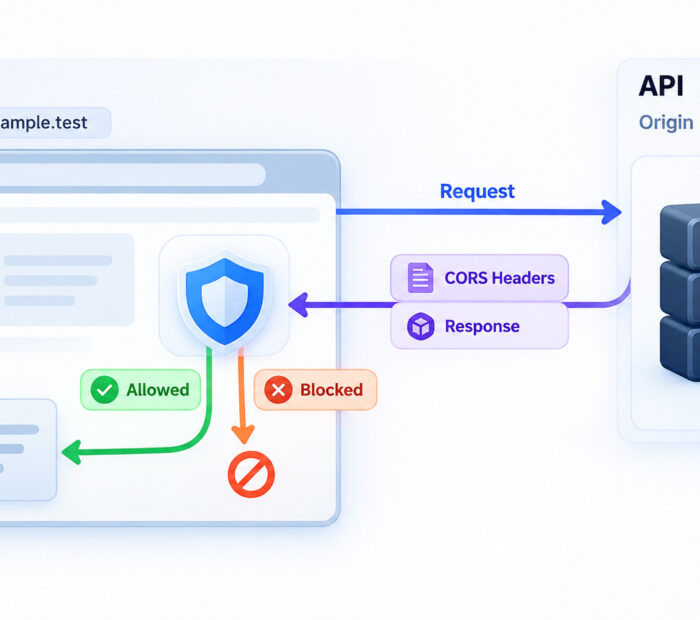
A frontend application works perfectly when it calls its own backend, but the moment the API moves to another domain, subdomain, protocol, or port, the browser starts showing a CORS error.
This often feels confusing because the API may still work in Postman, curl, a mobile application, or server-side code. The difference is that browsers apply the same-origin policy to web pages and use Cross-Origin Resource Sharing, commonly called CORS, to decide whether JavaScript from one origin may read a response from another.
CORS is therefore not simply an annoying browser restriction that should be disabled. It is part of the browser security model. The safest fix is usually to configure the API so that only the frontend origins, methods, headers, and credentials it genuinely needs are permitted.
CORS Explained: Quick Answer
Cross-Origin Resource Sharing (CORS) is an HTTP-header-based mechanism that lets a server tell a browser which other origins are allowed to read its responses.
A typical CORS problem looks like this:
- A web application loads from one origin.
- JavaScript calls an API on another origin.
- The API returns a response.
- The browser checks the response’s CORS headers.
- If the requesting origin is not permitted, JavaScript cannot access the response.
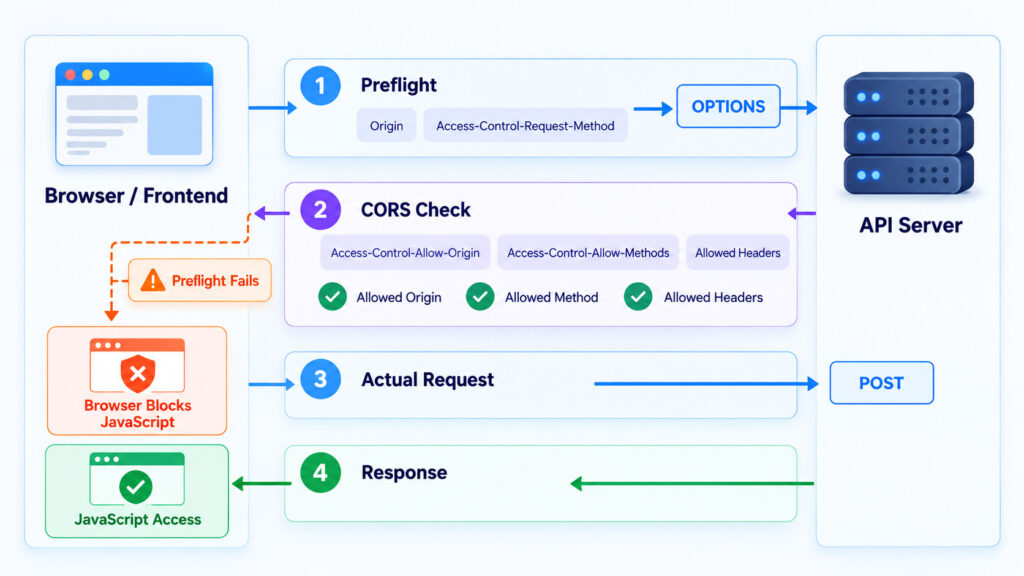
For some requests, the browser first sends an OPTIONS preflight request asking the server whether the intended method and request headers are allowed.
Reference: MDN Web Docs – Cross-Origin Resource Sharing (CORS).
What Is the Same-Origin Policy?
The same-origin policy is a browser security mechanism that restricts how scripts from one origin interact with resources from another origin.
Without this isolation, a malicious website opened in one tab could attempt to read sensitive information from another website where the user is already signed in.
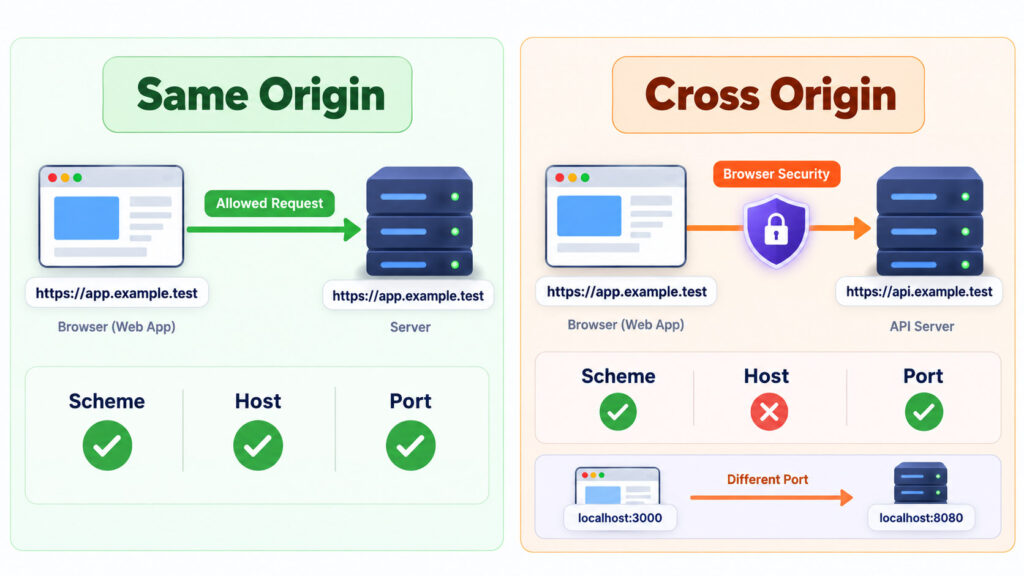
An origin is primarily determined by three values:
- Scheme – such as HTTP or HTTPS.
- Host – the domain or hostname.
- Port – when a non-default or different port is used.
Reference: MDN Web Docs – Same-origin policy and Origin glossary.
Same Origin Examples
| URL A | URL B | Same Origin? | Reason |
|---|---|---|---|
| https://app.example.test/home | https://app.example.test/settings | Yes | Only the path changes |
| https://app.example.test | http://app.example.test | No | Different scheme |
| https://app.example.test | https://api.example.test | No | Different host |
| https://app.example.test:443 | https://app.example.test:8443 | No | Different port |
Subdomains Are Different Origins
A common mistake is assuming that two subdomains automatically have the same origin.
For example:
https://www.example.test
https://api.example.test
These URLs share the same parent domain, but their hosts are different. Browser JavaScript therefore treats them as different origins for same-origin checks.
Localhost Ports Also Matter
During development, this frequently appears when the frontend runs on one port and the API runs on another:
http://localhost:3000
http://localhost:8080
These are different origins because their port numbers differ.
What CORS Actually Does
CORS gives a server a controlled way to opt in to cross-origin browser access.
The API might return:
Access-Control-Allow-Origin: https://app.example.testThis tells the browser that JavaScript running from that specific origin may access the response, assuming the other CORS requirements are also satisfied.
CORS Does Not Protect an API From Being Called
This is one of the most important CORS concepts.
CORS is primarily enforced by browsers. It controls whether browser JavaScript can read a cross-origin response. It does not replace authentication, authorization, API keys, access tokens, network controls, rate limits, or server-side validation.
A command-line client, backend server, automated script, or API testing tool is not prevented from calling an endpoint simply because the endpoint’s CORS configuration excludes that origin.
Express’s official CORS middleware documentation makes the same distinction: the middleware sets response headers, while browsers enforce those headers and decide whether JavaScript can read the response.
Reference: Express.js – CORS middleware documentation.
Why Does the API Work in Postman but Fail in the Browser?
Postman and similar API clients do not apply the browser same-origin policy in the same way a webpage does.
Therefore, an endpoint can:
- Return a successful response in Postman.
- Return a successful response to curl.
- Work from server-side code.
- Still produce a CORS error when called from browser JavaScript.
That difference strongly suggests that the HTTP endpoint itself is reachable and that the next debugging step should focus on browser-origin and CORS configuration.
How a Basic CORS Request Works
Consider a frontend running at:
https://app.example.testIt requests data from:
https://api.example.test/profileThe frontend might contain:
fetch("https://api.example.test/profile")
    .then(response => response.json())
    .then(data => console.log(data));
Because the API is on another origin, the browser applies CORS.
The browser sends an Origin request header similar to:
Origin: https://app.example.testIf the server wants to allow that frontend, its response can include:
Access-Control-Allow-Origin: https://app.example.testThe browser compares the requesting origin with the allowed origin and exposes the response to JavaScript when the policy permits it.
What Is a CORS Preflight Request?
Some cross-origin requests require an additional browser check before the actual request is sent.
This check is called a preflight request.
The browser sends an HTTP OPTIONS request asking the server whether the intended cross-origin request is permitted.
Reference: MDN Web Docs – Cross-Origin Resource Sharing; WHATWG Fetch Standard – CORS protocol.
Example: Browser Preflight
Imagine that a frontend wants to send JSON through a POST request:
fetch("https://api.example.test/orders", {
    method: "POST",
    headers: {
        "Content-Type": "application/json"
    },
    body: JSON.stringify({
        productId: 42
    })
});
The browser may first send something conceptually similar to:
OPTIONS /orders HTTP/1.1
Origin: https://app.example.test
Access-Control-Request-Method: POST
Access-Control-Request-Headers: content-type
The API can respond with:
Access-Control-Allow-Origin: https://app.example.test
Access-Control-Allow-Methods: POST
Access-Control-Allow-Headers: Content-Type
If the preflight succeeds, the browser can continue with the intended request.
Why Does JSON Often Trigger a Preflight?
A cross-origin request can avoid preflight only when it meets the requirements for a CORS-safelisted request.
Among other restrictions, the request uses selected HTTP methods and only safelisted headers and content types.
For example, using:
Content-Type: application/jsondoes not qualify as one of the safelisted form content types, so a cross-origin JSON request commonly triggers preflight.
Custom request headers and methods such as PUT, PATCH, or DELETE can also cause preflight.
Simple Request vs Preflighted Request
| Request Example | Usually Preflighted? |
|---|---|
| GET with safelisted headers | No |
| HEAD with safelisted headers | No |
| Simple form-style POST | Often no |
| POST with application/json | Commonly yes |
| PUT request | Yes |
| DELETE request | Yes |
| Request with custom headers | Often yes |
Important CORS Response Headers
Access-Control-Allow-Origin
Defines which requesting origin can read the response.
Access-Control-Allow-Origin: https://app.example.testFor public non-credentialed resources, a server may intentionally use:
Access-Control-Allow-Origin: *Do not use the wildcard as a quick fix for sensitive or user-specific API responses.
Access-Control-Allow-Methods
Used mainly with preflight responses to tell the browser which HTTP methods are permitted.
Access-Control-Allow-Methods: GET, POST, PUTAccess-Control-Allow-Headers
Specifies which request headers the actual cross-origin request may use.
Access-Control-Allow-Headers: Content-Type, X-Request-IDAccess-Control-Expose-Headers
Browsers expose only a limited set of response headers to frontend JavaScript by default. If the application needs to read another response header, the server can explicitly expose it.
Access-Control-Expose-Headers: X-Request-IDAccess-Control-Max-Age
This header tells the browser how long it may cache the result of a successful preflight request, subject to browser limits.
Access-Control-Max-Age: 600Preflight caching can reduce repeated OPTIONS requests, but values should be chosen deliberately so that CORS-policy changes do not remain cached longer than expected.
Credentialed CORS Requests Need Extra Care
Cross-origin requests become more sensitive when they include credentials such as cookies or HTTP authentication state.
For the Fetch API, a frontend can request that credentials be included:
fetch("https://api.example.test/account", {
    credentials: "include"
});
The server must explicitly allow the requesting origin and credentialed access.
A response can include:
Access-Control-Allow-Origin: https://app.example.test
Access-Control-Allow-Credentials: true
Reference: MDN Web Docs – Access-Control-Allow-Credentials; WHATWG Fetch Standard – CORS protocol and credentials.
You Cannot Use Wildcard Origin With Credentialed Requests
This configuration is invalid for a credentialed cross-origin request:
Access-Control-Allow-Origin: *
Access-Control-Allow-Credentials: true
When the request’s credentials mode is include, the server must return an explicit allowed origin instead of *.
This is an important security boundary because credentialed responses may contain user-specific or sensitive information.
Why Reflecting Every Origin Is Dangerous
Some implementations take the incoming Origin header and copy it directly into:
Access-Control-Allow-Originwithout first validating whether the origin is trusted.
That effectively gives any requesting website permission to read the API response through browser JavaScript.
A safer approach is to compare the incoming origin against a controlled allowlist and return it only when there is an exact approved match.
MDN recommends allowing the minimum possible set of origins and resources necessary for the application to function. OWASP similarly recommends reviewing CORS policies carefully for overly broad origin access.
Reference: MDN Web Docs – Secure CORS configuration; OWASP Web Security Testing Guide – Cross-Origin Resource Sharing.
Add Vary: Origin When the Response Changes by Origin
If a server dynamically returns a different allowed origin depending on the request, caching also needs to understand that the response varies according to the Origin header.
A typical response is:
Access-Control-Allow-Origin: https://app.example.test
Vary: Origin
The Vary: Origin header helps shared caches avoid reusing a response intended for one origin in a different origin context.
Reference: MDN Web Docs and WHATWG Fetch Standard – CORS caching behaviour.
A Safe Basic CORS Policy
Imagine that your production frontend exists only at:
https://app.example.testand its API is:
https://api.example.testA narrowly scoped response might look like:
Access-Control-Allow-Origin: https://app.example.test
Access-Control-Allow-Methods: GET, POST
Access-Control-Allow-Headers: Content-Type
Vary: Origin
If cookies are genuinely required:
Access-Control-Allow-Origin: https://app.example.test
Access-Control-Allow-Credentials: true
Vary: Origin
Only enable methods, request headers, exposed headers, credentials, and origins that the application actually needs.
Example: Safe CORS Configuration in Express
Express applications commonly use CORS middleware to set the appropriate response headers.
A restricted example is:
const express = require("express");
const cors = require("cors");

const app = express();

app.use(cors({
    origin: "https://app.example.test",
    methods: ["GET", "POST"],
    allowedHeaders: ["Content-Type"]
}));

app.get("/api/products", (req, res) => {
    res.json({ products: [] });
});

app.listen(8080);
If your application needs cookies across origins, credentials must be intentionally enabled and the client must also request them.
app.use(cors({
    origin: "https://app.example.test",
    credentials: true
}));
The browser-side request would then use:
fetch("https://api.example.test/account", {
    credentials: "include"
});
Reference: Express.js – CORS middleware configuration.
Do Not Use CORS as Authentication
Even a perfectly configured CORS allowlist does not prove who is calling your API.
Sensitive endpoints still need appropriate server-side controls such as:
- Authentication.
- Authorization.
- Session validation.
- Token validation.
- CSRF protection where relevant.
- Input validation.
- Rate limiting.
- Audit logging.
CORS and CSRF Are Different Problems
CORS primarily controls whether browser JavaScript is permitted to read a cross-origin response.
CSRF protection addresses situations where a browser can be tricked into sending an authenticated state-changing request to another site.
The same-origin policy allows some types of cross-origin writes, such as ordinary form submissions, so a server must not assume that CORS alone prevents unwanted state changes.
For cookie-authenticated sensitive operations, use the appropriate CSRF defenses and cookie settings in addition to CORS.
Reference: MDN Web Docs – Same-origin policy.
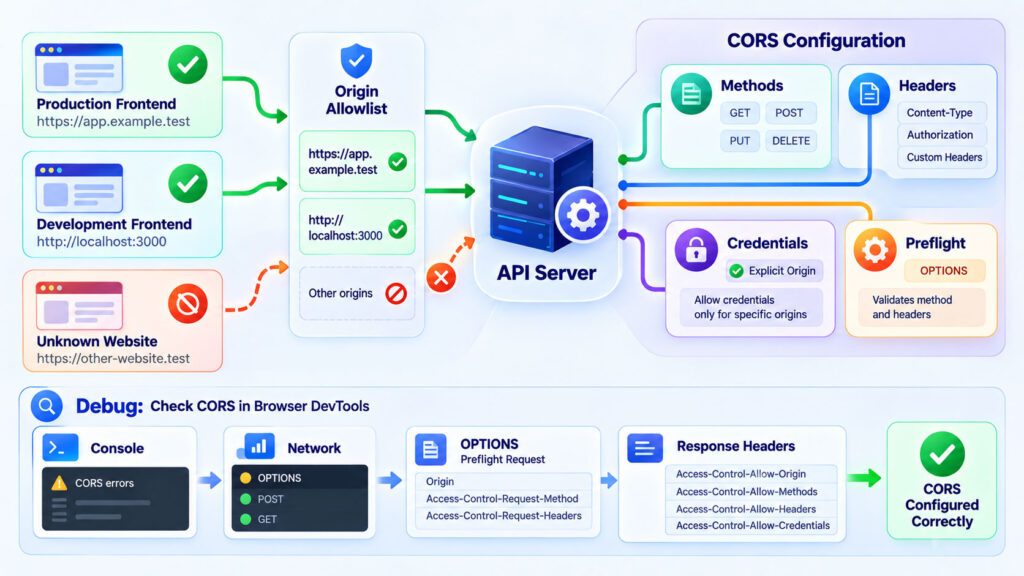
How to Fix a CORS Error Step by Step
A good CORS fix begins by identifying exactly which part of the exchange failed. Do not immediately add a wildcard header or install a browser extension that disables security checks.
1. Read the Browser Console Error
Browsers usually report a useful CORS reason in Developer Tools.
Common messages include:
- Missing
Access-Control-Allow-Origin. - Requested origin does not match the allowed origin.
- Preflight request failed.
- Requested method is not allowed.
- Requested header is not allowed.
- Credentials are being used with a wildcard origin.
- More than one
Access-Control-Allow-Originheader was returned.
MDN maintains documentation for individual browser CORS error reasons and recommends using the developer console to identify the underlying failure.
Reference: MDN Web Docs – CORS errors.
2. Open the Network Panel
Look for both the intended API request and, when applicable, the preceding OPTIONS request.
Check:
- Request URL.
- Request method.
Originrequest header.- HTTP status.
- Response headers.
- Redirects.
- TLS or networking errors.
3. Check Whether OPTIONS Reaches the Server
If the browser sends a preflight but your application never receives it, investigate:
- Reverse proxy rules.
- Load balancer configuration.
- Web server routing.
- Authentication middleware that rejects OPTIONS.
- Firewall behaviour.
- Incorrect endpoint paths.
A common mistake is requiring authentication before the server is willing to answer the preflight itself.
4. Confirm the Exact Origin
Compare the incoming Origin with the server allowlist carefully.
These are different origins:
http://app.example.test
https://app.example.test

https://app.example.test
https://www.app.example.test

http://localhost:3000
http://localhost:5173
Do not compare only the domain name while ignoring the scheme or port.
5. Check the Allowed Method
If the browser wants to send PUT:
Access-Control-Request-Method: PUTthe preflight response must permit that method when required:
Access-Control-Allow-Methods: GET, PUT6. Check the Requested Headers
If the frontend sends:
Content-Type: application/json
X-Request-ID: abc123
the preflight response must allow the relevant non-safelisted headers:
Access-Control-Allow-Headers: Content-Type, X-Request-ID7. Check Credentials Configuration
If the frontend uses:
credentials: "include"verify that:
- The server returns a specific allowed origin.
Access-Control-Allow-Credentials: trueis present.- The cookie itself is configured correctly for the intended cross-site context.
- Your application has appropriate CSRF protection where necessary.
8. Check for Duplicate CORS Headers
Adding CORS configuration at several layers can produce conflicting headers.
For example, CORS might be configured in:
- The application framework.
- Nginx or Apache.
- An API gateway.
- A CDN.
- A cloud load balancer.
If two layers both add Access-Control-Allow-Origin, the browser may reject the response because multiple values are not valid in that form.
Reference: MDN Web Docs – Multiple CORS header Access-Control-Allow-Origin not allowed.
9. Check Whether the Error Is Actually a Network Problem
Not every browser message that appears alongside CORS is caused by CORS configuration.
The underlying request might fail because of:
- DNS failure.
- Connection refused.
- TLS certificate failure.
- Server timeout.
- Mixed HTTP and HTTPS content.
- A browser extension blocking the request.
MDN notes that a generic “CORS request did not succeed” can represent a network or protocol failure rather than an access-control-header problem.
Reference: MDN Web Docs – Reason: CORS request did not succeed.
Why mode: “no-cors” Usually Does Not Fix Your Problem
Developers sometimes find this suggestion:
fetch(url, {
    mode: "no-cors"
});
This does not magically grant JavaScript access to a forbidden API response.
The browser can return an opaque response, which prevents JavaScript from reading the normal response body and most response details.
That may be appropriate for specialised resource-loading situations where you do not need to inspect the response, but it is not a general fix for an application that needs JSON from an API.
What If You Do Not Control the API?
If a third-party API does not allow browser access from your origin, frontend JavaScript cannot force the remote server to change its CORS policy.
Depending on the service and its terms, legitimate options can include:
- Use the provider’s documented browser-compatible endpoint.
- Use its official SDK.
- Call the service from your backend instead of directly from browser JavaScript.
- Ask the provider to add your origin where appropriate.
If your backend acts as an intermediary, secure it properly. Do not create an unrestricted public proxy that can fetch arbitrary URLs on behalf of anyone.
CORS in Headless and Separate-Frontend Architectures
CORS becomes especially relevant when the frontend and content or application backend run separately.
For example, a headless CMS might run at one origin while a JavaScript frontend uses another. Browser-side requests between those origins need an intentional cross-origin policy.
Our Headless CMS vs Traditional CMS guide explains how API-based content delivery changes frontend and backend responsibilities.
CORS can also appear more frequently in client-side rendering because the visitor’s browser directly requests APIs. If the server performs the data request during server-side rendering, the communication occurs server-to-server and is not governed by browser CORS in the same way.
For the rendering differences, see our SSR vs CSR vs SSG comparison.
Common CORS Mistakes
| Mistake | Safer Approach |
|---|---|
Adding * everywhere |
Allow only the origins that actually require browser access |
| Using wildcard origin with credentials | Return an explicit trusted origin |
| Reflecting every Origin header | Validate against a controlled allowlist |
| Treating CORS as authentication | Protect APIs with server-side authentication and authorization |
| Ignoring OPTIONS requests | Handle required preflight requests correctly |
| Configuring CORS in several layers | Define clear ownership and avoid conflicting headers |
| Disabling browser security to “fix” production | Correct the API configuration instead |
Using no-cors to retrieve API JSON |
Configure proper CORS or use a controlled backend integration |
| Forgetting scheme and port | Compare complete origins, not just domain names |
Frequently Asked Questions
What Does CORS Stand For?
CORS stands for Cross-Origin Resource Sharing. It is an HTTP-based browser mechanism that allows servers to declare which other origins may access selected responses from frontend JavaScript.
Why Am I Getting a CORS Error?
The browser determined that the cross-origin response does not satisfy the CORS policy required for your request. Common causes include a missing allowed-origin header, failed preflight, disallowed method or header, origin mismatch, credential configuration, or a separate network failure.
Is CORS a Browser Error or Server Error?
The browser enforces CORS, but the required permissions are normally configured on the server. That is why most genuine CORS problems must ultimately be fixed through API or infrastructure configuration rather than frontend JavaScript.
Can I Fix CORS From the Frontend?
Not when the remote server refuses to allow your origin. You can correct an incorrectly constructed request, but frontend JavaScript cannot give itself permission to read a response that the server has not shared through CORS.
Why Does CORS Work on localhost but Fail in Production?
Your development and production frontends have different origins. The API may allow the development origin but not the deployed HTTPS domain, or the production environment may add a proxy, CDN, authentication layer, or duplicate response header.
Why Does CORS Fail on localhost?
Different localhost ports are different origins. A frontend on port 3000 calling an API on port 8080 is cross-origin and may require CORS configuration.
Does CORS Stop Hackers From Calling My API?
No. CORS restricts browser JavaScript response access. A direct HTTP client or backend application can still send requests. Use authentication, authorization, network controls, validation, and rate limiting to secure the API.
What Is an OPTIONS Request?
OPTIONS is the HTTP method browsers use for CORS preflight. The browser asks the server whether the intended cross-origin method and headers are acceptable before sending certain actual requests.
Can Access-Control-Allow-Origin Contain Multiple Domains?
The header does not take a comma-separated list of origins in the way developers sometimes expect. When several origins are trusted, the server typically checks the request origin against an allowlist and returns the single matching origin.
Should I Use Access-Control-Allow-Origin: *?
It can be appropriate for intentionally public, non-credentialed resources. It should not be used as a blanket fix for private or user-specific APIs, and it cannot be used as the allowed origin for credentialed CORS requests.
Does CORS Protect Against CSRF?
No. CORS and CSRF protections solve different problems. CORS mainly controls cross-origin response sharing with browser scripts, while CSRF defenses protect authenticated state-changing operations from unwanted cross-site requests.
A Better Way to Think About CORS
CORS becomes much easier to debug once you stop thinking of it as “the browser refuses to call my API.”
Instead, ask four questions:
- What is the frontend’s exact origin?
- Does this request require a preflight?
- Which origin, method, headers, and credentials does the server intentionally allow?
- What did the browser actually receive in the preflight and final response?
Start with Developer Tools, inspect the Origin header, inspect the OPTIONS request when one exists, and compare the server’s response with the access the frontend genuinely requires.
A good CORS policy should be narrow enough to protect sensitive browser access but simple enough that developers can understand and test it. Public resources may intentionally allow broad access, while authenticated or user-specific APIs should normally use explicit trusted origins and deliberate credential handling.
Most importantly, keep CORS in its correct role. It is one layer of browser security, not a substitute for API authentication, authorization, CSRF protection, validation, or the rest of your application-security architecture.

AboutTPJ Technical Team
The Project Jugaad Technical Team creates practical, easy-to-follow content on software development, web technologies, artificial intelligence, cybersecurity, cloud platforms, and digital tools. Our articles are informed by more than 13 years of hands-on experience with .NET, Angular, SQL Server, AWS, WordPress, Linux hosting, application deployment, and real-world troubleshooting. Each guide is researched, reviewed, and updated to provide accurate, useful, and actionable information for developers, businesses, and everyday technology users.