Software Development
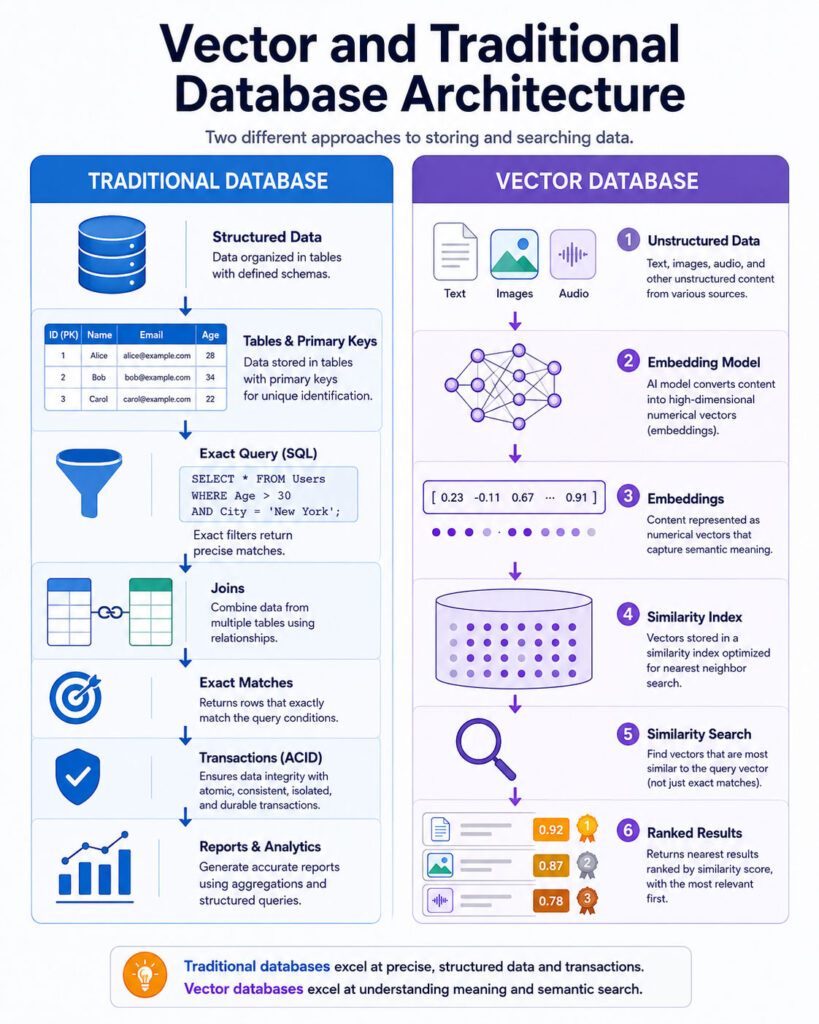
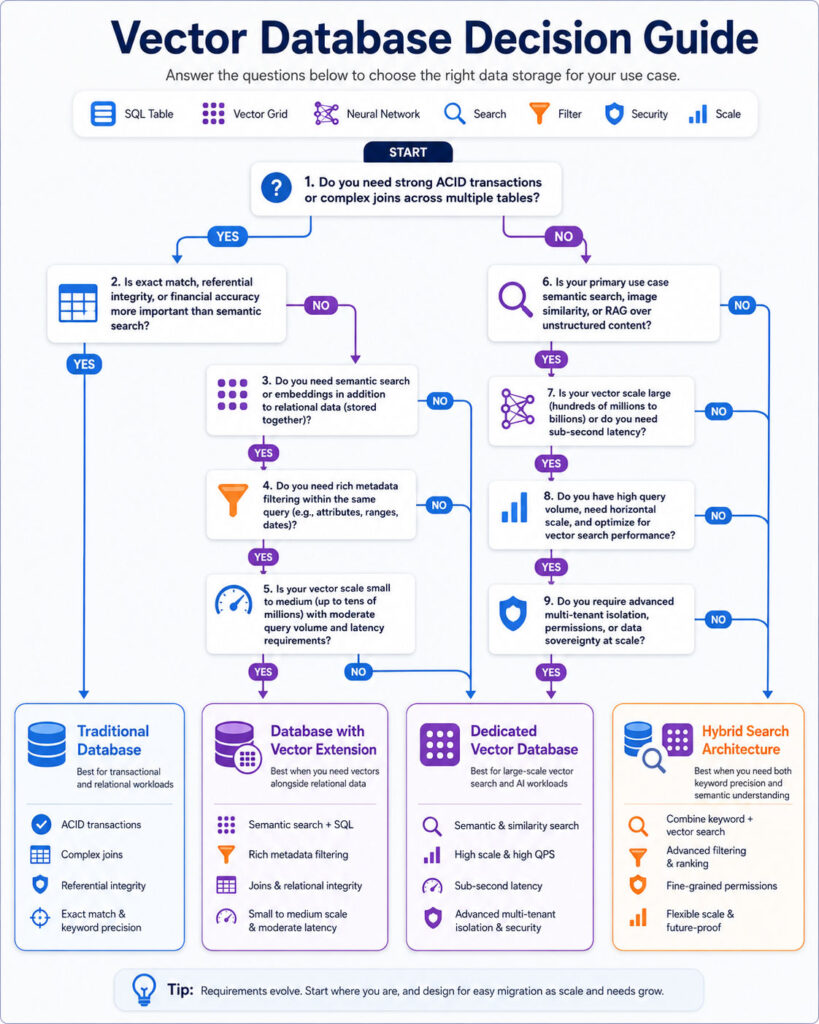
The Vector Database vs Traditional Database comparison helps developers decide how an application should store, filter, and retrieve information. Traditional databases excel at exact values, structured queries, relationships, transactions, and predictable business rules. In contrast, vector databases retrieve items according to numerical similarity, which can represent meaning, visual characteristics, sound, behaviour, or other complex features.
A traditional database can answer questions such as “Find invoice 1042,” “Show orders placed this month,” or “Return customers from Gujarat with unpaid balances.” A vector database, meanwhile, can help answer less exact questions such as “Find documents related to passwordless login,” “Show products that look similar to this image,” or “Retrieve support cases with a similar problem.”
However, vector search does not replace relational queries, primary keys, transactions, permissions, or ordinary filtering. Therefore, many modern applications combine vector search with an existing SQL database, document database, search engine, or platform that supports both structured and vector data.
Vector Database vs Traditional Database: Quick Answer
- Choose a traditional database for transactions, exact lookups, joins, reporting, structured filters, financial records, inventory, users, and application state.
- Choose a vector database when the application must find conceptually similar text, images, audio, products, behaviours, or other high-dimensional data.
- Use a traditional database with vector support when structured business data and vector search belong in the same operational system.
- Use a dedicated vector database when vector retrieval is a central workload and requires specialised scaling, indexing, filtering, or operational features.
- Use hybrid search when semantic similarity and exact keyword matching both matter.
In practice, the best solution is often not a vector database or traditional database alone. Instead, it is an architecture that combines similarity search with reliable structured data, access control, and business rules.
What Is a Traditional Database?
A traditional database stores and retrieves information through defined data models, fields, keys, relationships, and query operations.
The term can include several established database categories:
- Relational databases.
- Document databases.
- Key-value databases.
- Wide-column databases.
- Graph databases.
- Time-series databases.
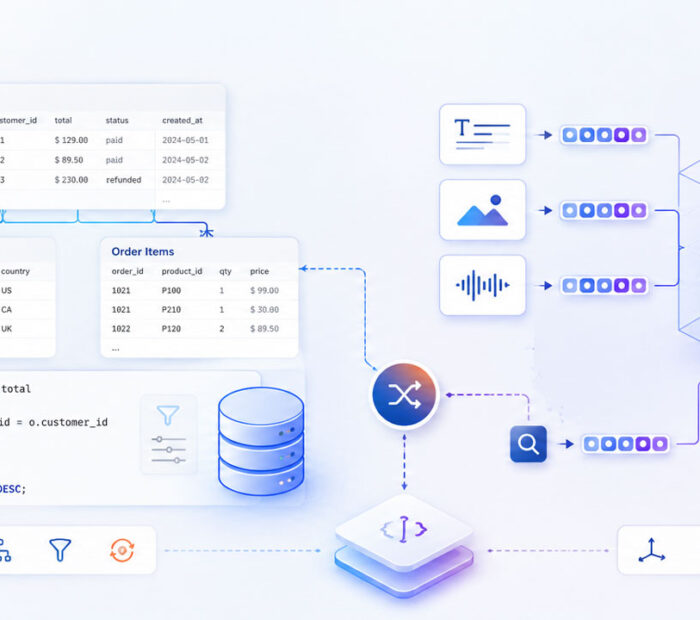
In a relational database, information is commonly stored in tables containing rows and columns. SQL queries can then filter, join, aggregate, insert, update, and delete records.
Other database types organise information differently. Nevertheless, they generally retrieve records through known keys, fields, properties, relationships, ranges, or query expressions.
What Is a Relational Database?
A relational database organises information into tables and connects records through keys.
For example, an e-commerce application may contain:
- A
customerstable. - An
orderstable. - An
order_itemstable. - A
productstable. - A
paymentstable.
The database can use primary keys, foreign keys, constraints, indexes, and transactions to preserve data integrity.
A relational query may look like:
SELECT
o.order_id,
o.order_date,
c.customer_name,
o.total_amount
FROM orders o
INNER JOIN customers c
ON c.customer_id = o.customer_id
WHERE o.order_status = 'Pending'
AND o.order_date >= CURRENT_DATE - INTERVAL '30 days'
ORDER BY o.order_date DESC;
This query uses exact fields and business rules. Therefore, it does not require machine-learning embeddings or similarity search.
Strengths of Traditional Databases
- Exact record retrieval.
- Structured filtering and sorting.
- Transactions and consistency controls.
- Primary and foreign-key relationships.
- Unique, check, and referential constraints.
- Aggregations and reporting.
- Updates and deletions through established query languages.
- Mature backup, replication, recovery, and monitoring tools.
- Strong support for permissions and auditing.
- Predictable behaviour for business applications.
Limitations of Traditional Search
A traditional database can search text through equality conditions, pattern matching, full-text indexes, or search extensions. However, exact and lexical search may not recognise that two differently worded phrases express the same idea.
For example, a user searching for “reset account access” may expect documents about “recovering a forgotten password.” A basic keyword query may miss the result when the same terms do not appear.
Similarly, structured database fields do not naturally represent the visual similarity between two product photographs or the acoustic similarity between two recordings.
Consequently, these requirements create a role for numerical embeddings and vector similarity search.
What Is a Vector?
In machine learning, a vector is an ordered list of numbers. Each vector represents characteristics learned or produced by a model.
A simplified vector might look like:
[0.14, -0.37, 0.82, 0.09, -0.51]
Real embeddings may contain hundreds or thousands of dimensions. However, individual dimensions usually do not have an obvious human-readable meaning.
Instead, the complete vector places the item within a mathematical space. As a result, items with related characteristics may appear closer together, while unrelated items appear farther apart.
What Is an Embedding?
An embedding is a vector representation of information. An embedding model converts content into a fixed-length or model-defined numerical vector.
Embeddings can represent:
- Words and sentences.
- Documents and document chunks.
- Images.
- Audio recordings.
- Video segments.
- Products.
- Users or behavioural patterns.
- Source code.
- Scientific and biological data.
When an embedding model suits the task, related items can receive nearby vector representations.
For instance, “protect an account with a security key” may appear close to content about passkeys or hardware-based authentication even when the wording differs.
What Is a Vector Database?
A vector database is a database or data platform designed to store vectors and retrieve the nearest or most similar items efficiently.
A vector record commonly includes:
- A unique identifier.
- One or more vectors.
- Original text or a reference to the source content.
- Metadata such as title, category, date, language, tenant, or permissions.
- Information about the embedding model and version.
The system creates a vector index and uses a similarity function to rank records according to their distance from a query vector.
Some products are dedicated vector databases. Meanwhile, relational databases, document databases, and search platforms may add vector columns and vector indexes to their existing capabilities.
How Vector Search Works
- The application receives a query such as text, an image, or another supported input.
- The same embedding model used for stored content converts the query into a vector.
- The database compares the query vector with indexed vectors.
- The system identifies the nearest candidates.
- Metadata filters remove records that do not meet business conditions.
- The database returns ranked results with similarity or distance information.
- The application may rerank, validate, display, or send the results to another model.
Vector search retrieves mathematically similar representations. However, it does not independently confirm that a result is correct, permitted, current, or suitable for the user.
Semantic Search vs Keyword Search
Keyword search looks for matching words, word forms, phrases, or lexical relevance. Semantic search, by contrast, attempts to retrieve content based on meaning represented through embeddings.
Suppose a knowledge base contains the sentence:
Use account recovery to create a new password.
A user searches for:
I cannot log in because I forgot my credentials.
A strict keyword system may find few matching terms. However, a semantic-search system may identify the conceptual relationship between account access, forgotten credentials, recovery, and password replacement.
Nevertheless, keyword search remains valuable for exact product codes, error numbers, names, quoted phrases, legal terminology, and uncommon technical identifiers.
Vector Search Does Not Understand Like a Human
A vector-search system compares representations generated by a model. Although the results may appear meaningful, the database does not independently understand facts, intent, truth, or business importance.
An embedding may place related concepts close together while overlooking an important difference. For example, content about enabling an account and disabling an account may share many words and concepts.
Therefore, similarity alone should not approve financial transactions, modify permissions, determine legal outcomes, or execute safety-critical operations.
Instead, applications should combine vector retrieval with metadata, authoritative data, validation, rules, and human review where appropriate.
What Is Vector Similarity?
Vector similarity measures how close two vectors are according to a selected mathematical method.
Common methods include:
- Cosine distance or cosine similarity.
- Euclidean distance, also called L2 distance.
- Inner product or dot product.
- Manhattan distance for selected workloads.
- Specialised binary or sparse-vector measures.
The correct method depends on the embedding model and how its vectors were produced or normalised.
Therefore, developers should follow the model provider’s recommendations instead of changing the distance metric only because one benchmark appears faster.
Cosine Similarity
Cosine similarity compares the direction of two vectors rather than focusing primarily on their magnitude.
It is commonly used for text embeddings because conceptually similar text can have vectors pointing in related directions.
A higher similarity value often indicates a closer match. However, database APIs may return distance instead, in which case a lower value can represent greater similarity.
Consequently, applications should document whether a score is similarity or distance so developers do not reverse the ranking accidentally.
Euclidean Distance
Euclidean distance measures the straight-line distance between two points in vector space.
A smaller value indicates that the vectors are closer together.
This method can work well when the embedding model and data distribution make absolute vector positions meaningful.
However, scaling and normalisation affect the result. Therefore, the same vectors can behave differently under another metric.
Inner Product
Inner product compares vectors through multiplication and summation of their corresponding dimensions.
For normalised vectors, inner-product ranking can be closely related to cosine similarity. For unnormalised vectors, however, magnitude also affects the score.
In addition, the selected database may optimise specific operators or index types for each distance method.
Exact Nearest-Neighbor Search
Exact nearest-neighbor search compares a query with every eligible vector and returns the true nearest results according to the selected metric.
This approach provides exact ranking. However, it can become expensive as the number of vectors and dimensions grows.
Exact search may still be practical for small datasets, highly selective filters, offline evaluation, or workloads where perfect recall matters more than latency.
Moreover, it provides a useful reference when measuring the recall of an approximate index.
Approximate Nearest-Neighbor Search
Approximate nearest-neighbor search, commonly called ANN search, avoids comparing the query against every vector.
Instead, an ANN index explores promising regions or candidates and returns results that are likely to be close to the true nearest neighbours.
This approach can provide much faster retrieval at scale. Nevertheless, it creates a trade-off between speed, memory, build time, and recall.
Consequently, approximate search may occasionally miss an item that exact search would have ranked among the top results.
What Is Recall in Vector Search?
Recall measures how many relevant or exact nearest results an approximate search successfully retrieves.
For example, suppose exact search identifies ten true nearest records. If the ANN search returns eight of them, its recall for that query is eight out of ten.
Higher recall normally requires more index exploration, processing time, memory, or candidates.
Therefore, teams should evaluate recall using realistic application queries rather than relying only on vendor benchmarks.
What Is an HNSW Index?
Hierarchical Navigable Small World, commonly called HNSW, is a graph-based approximate nearest-neighbor indexing approach.
The index connects vectors through several graph layers. Search begins in a sparse upper layer and then navigates toward promising areas before exploring a denser lower layer.
HNSW can provide a strong speed-and-recall balance. However, it may consume substantial memory and require longer index-building time.
Therefore, configuration should be tuned against the organisation’s actual data, filters, latency targets, and recall requirements.
What Is an IVFFlat Index?
IVFFlat divides vectors into groups or lists according to nearby regions in the vector space.
During a query, the system searches selected lists instead of scanning every vector.
IVFFlat can build more quickly and use less memory than HNSW in some implementations. However, its search quality depends strongly on the number of lists, the number of lists examined, and the quality of the trained index.
In addition, it may require representative data before the index is built, whereas HNSW can generally be created without the same training step.
HNSW vs IVFFlat
| Area | HNSW | IVFFlat |
|---|---|---|
| Index design | Multi-layer proximity graph | Vector partitions or lists |
| Build time | Often higher | Often lower |
| Memory use | Often higher | Often lower |
| Query performance | Strong speed-recall balance | Depends heavily on list and probe settings |
| Training step | Generally not required | Usually requires representative data |
| Updates | Supports incremental insertion | May require retuning or rebuilding as data changes |
| Common consideration | Memory and build cost | Data distribution and parameter selection |
Neither index is automatically better for every workload. Ultimately, dataset size, update frequency, filters, latency targets, available memory, and recall requirements should guide the choice.
Vector Database vs Traditional Database Comparison
| Area | Traditional Database | Vector Database |
|---|---|---|
| Primary retrieval method | Keys, fields, filters, joins, ranges, and text queries | Vector similarity and nearest-neighbor search |
| Typical data | Structured and semi-structured records | Embeddings with metadata and source references |
| Best for | Transactions and precise business queries | Similarity, semantic retrieval, and recommendations |
| Exact lookup | Core strength | Usually handled through identifiers or metadata |
| Transactions | Common and mature | Capabilities vary by product |
| Joins and relationships | Strong in relational databases | Often limited or handled separately |
| Similarity search | Requires vector extensions or specialised features | Core capability |
| Index types | B-tree, hash, full-text, geospatial, and others | HNSW, IVF, quantised, graph, or specialised ANN indexes |
| Query result | Records matching explicit conditions | Ranked nearest candidates |
| Accuracy model | Exact query semantics | Exact or approximate similarity |
| Common applications | Billing, users, orders, inventory, and reporting | Semantic search, RAG, recommendations, and media similarity |
The Vector Database vs Traditional Database comparison shows that the two systems solve different retrieval problems. Traditional databases answer explicit structured questions, whereas vector databases rank items according to learned similarity.
Vector Database vs Traditional Database for Common Queries
| User Request | Suitable Retrieval Method |
|---|---|
| Find customer ID 728 | Primary-key lookup |
| Show unpaid invoices older than 30 days | Structured SQL filter |
| Calculate monthly revenue | Database aggregation |
| Find articles with similar meaning | Vector search |
| Find products visually similar to an uploaded image | Image-embedding search |
| Find error code TPJ-1042 | Keyword or exact text search |
| Find troubleshooting documents related to a user’s description | Semantic or hybrid search |
| Update an account balance safely | Transactional database operation |
| Recommend products based on behavioural similarity | Vector recommendation model |
| Find documents the current employee may access | Metadata permission filtering plus retrieval |
The best retrieval method follows the question. For example, using vector search for an exact invoice number can be less reliable than an indexed equality query, while exact keyword matching may miss conceptually related documents.
Vector Search for Semantic Search
Semantic search retrieves content according to conceptual similarity rather than requiring identical wording.
A basic semantic-search pipeline includes:
- Split source content into searchable records or chunks.
- Create an embedding for each record.
- Store the embedding with the source text and metadata.
- Create an embedding for the user’s query.
- Retrieve the nearest records.
- Apply filters or reranking.
- Display the selected results.
This approach can improve discovery when users describe an idea differently from the source material.
However, exact terminology, rare identifiers, numbers, and dates can still favour lexical search.
Vector Database for RAG
Retrieval-augmented generation, commonly called RAG, retrieves source information before a generative model creates an answer.
A common RAG flow includes:
- The user submits a question.
- The application creates a query embedding.
- The vector database retrieves relevant chunks.
- The application applies access control and relevance checks.
- Selected evidence is sent to a language model.
- The model generates an answer based on the retrieved content.
- The application returns citations or links to the source records.
The vector database does not generate the answer. Instead, it supplies candidate evidence to the model.
Therefore, poor retrieval can lead to incomplete, misleading, or unsupported answers even when the language model performs well.
A Vector Database Does Not Fix RAG Automatically
A RAG system can fail because of:
- Poor document extraction.
- Incorrect chunk boundaries.
- An unsuitable embedding model.
- Missing metadata.
- Weak permission filtering.
- Low recall.
- Irrelevant retrieved content.
- Outdated documents.
- Duplicate or conflicting sources.
- Poor reranking.
- An answer-generation prompt that ignores evidence.
Consequently, developers should evaluate the complete retrieval and generation workflow instead of treating the vector database as the entire AI system.
Vector Search for Recommendations
Embeddings can represent products, users, articles, music, videos, or behavioural patterns.
A recommendation system may retrieve items whose vectors are close to:
- A product the user is viewing.
- An average of the user’s previous interests.
- A session-behaviour vector.
- A selected category or style.
- A written description of what the user wants.
Vector similarity can support discovery beyond exact categories. However, recommendations should also consider availability, location, price, age restrictions, freshness, diversity, and business rules.
Vector Search for Images
An image-embedding model can represent visual characteristics within a vector.
Applications can therefore use these vectors to:
- Find visually similar products.
- Detect near-duplicate images.
- Group photographs by content.
- Search image libraries with text.
- Find screenshots showing similar interfaces.
- Retrieve related artwork or designs.
However, visual similarity does not necessarily mean that products are identical. A result may share colour and shape while differing in model, size, material, or compatibility.
Therefore, structured metadata and authoritative product records should verify important attributes.
Vector Search for Audio and Video
Audio embeddings can represent speech, music, sound events, speaker characteristics, or acoustic patterns.
Video embeddings, meanwhile, can represent scenes, actions, visual concepts, transcripts, and temporal segments.
Possible uses include:
- Searching recordings by meaning.
- Finding similar sound effects.
- Matching spoken queries with video segments.
- Grouping duplicate or related media.
- Retrieving training footage by activity.
- Finding customer calls with similar issues.
Large media files should normally be divided into meaningful time segments. As a result, search can return the relevant portion instead of only the complete recording.
Vector Search for Source Code
Code embeddings can represent functions, classes, files, documentation, and programming concepts.
For example, a developer may search for “where the application validates refresh tokens” even when those exact words do not appear in the code.
However, code search also benefits from exact symbol names, file paths, references, syntax trees, and dependency graphs.
Therefore, a strong developer-search system may combine vector similarity with lexical search and code-aware indexing.
What Is Metadata?
Metadata is structured information stored alongside a vector.
For a document, metadata may include:
- Document ID.
- Title.
- Category.
- Language.
- Author.
- Published date.
- Department.
- Tenant ID.
- Access group.
- Version.
- Source URL.
- Expiration date.
As a result, metadata allows an application to combine semantic similarity with exact business restrictions.
Metadata Filtering
Metadata filtering limits vector search to records that meet defined conditions.
For example, a company knowledge assistant may retrieve semantically relevant documents only when:
- The document belongs to the current tenant.
- The user’s role can access the department.
- The document is published.
- The language matches the user’s selection.
- The information has not expired.
- The document version is current.
A query conceptually resembles:
Find the 10 nearest vectors
where tenant_id = 42
and access_level in ('Public', 'Employee')
and language = 'en'
and is_current = true
Similarity ranking should never replace permission checks. Instead, access rules must remain part of the authoritative retrieval process.
Pre-Filtering vs Post-Filtering
Pre-filtering restricts eligible records before or during vector retrieval. Post-filtering, by contrast, retrieves candidates first and removes disallowed records afterwards.
Pre-filtering can prevent records outside the permitted set from becoming candidates. However, highly selective conditions may affect how an approximate index searches.
Post-filtering may be easier to implement. Nevertheless, it can return too few results when many top candidates fail the filter.
Some systems integrate structured filters into vector retrieval, while others require several query stages.
Therefore, teams should test filtering behaviour using realistic tenant sizes, permission rules, categories, and index settings.
What Is Hybrid Search?
Hybrid search combines vector similarity with keyword or full-text search.
Vector retrieval is useful for concepts and synonyms. Keyword search, meanwhile, remains useful for exact phrases, rare names, product codes, legal language, and technical identifiers.
A hybrid system may:
- Run semantic vector search.
- Run keyword or BM25 search.
- Normalise or rank both result sets.
- Merge them through a fusion method.
- Apply metadata and permission filters.
- Optionally rerank the combined candidates.
Consequently, hybrid search often provides a stronger balance than relying entirely on one retrieval technique.
Example of Hybrid Search
Suppose the user searches for:
TPJ-204 authentication failure
Vector search may retrieve content about login and authentication errors. Keyword search, however, can strongly match the exact error code TPJ-204.
Combining both signals preserves the precise identifier while also understanding the broader problem.
What Is Reranking?
Reranking takes an initial group of retrieved candidates and evaluates them through a more accurate or expensive method.
For example, the first-stage vector index may retrieve fifty candidates quickly. A reranker can then assign improved relevance scores and select the best five.
Reranking can use:
- A cross-encoder model.
- A language model.
- Keyword relevance.
- Business rules.
- Freshness.
- Popularity.
- Authority or source quality.
- User or tenant context.
However, reranking cannot recover a relevant document that the first retrieval stage never returned. Therefore, initial recall still matters.
Choosing a Similarity Threshold
A similarity threshold rejects results that are not close enough to the query.
However, one universal threshold rarely works across every model, dataset, query type, and distance metric.
A high threshold may reject useful content, whereas a low threshold may allow unrelated records.
Therefore, teams should evaluate thresholds through labelled queries, user feedback, confidence rules, and fallback behaviour.
When no result meets the required quality, the application should state that reliable information was not found instead of forcing an answer.
Top-K Retrieval
Top-K retrieval returns a fixed number of nearest candidates.
A larger value can improve recall but also increases processing, reranking, model context, and cost. A smaller value, meanwhile, can reduce noise but may miss supporting information.
The correct value depends on chunk size, query complexity, reranking, context limits, and the number of documents required for an accurate response.
Consequently, some applications retrieve more candidates initially and then reduce them through reranking or deduplication.
What Is Chunking?
Chunking divides a long document into smaller searchable units.
Embedding an entire manual as one vector may hide the meaning of individual sections. Conversely, extremely small chunks may lose context and create many weak matches.
A chunk can be based on:
- Paragraphs.
- Headings and sections.
- Sentences.
- Token length.
- Table boundaries.
- Document pages.
- Source-code functions.
- Audio or video time segments.
Therefore, semantic or structure-aware chunking often produces more useful units than splitting content after a fixed number of characters.
Chunk Overlap
Chunk overlap repeats selected text between neighbouring chunks so information near a boundary is not lost.
Too little overlap can separate a question from its answer. However, too much overlap creates duplicate results, larger indexes, higher embedding costs, and repeated context.
Therefore, overlap should follow document structure and query behaviour instead of one fixed value for every content type.
Store Source References
Every vector record should retain enough information to locate its authoritative source.
Useful references include:
- Document ID.
- Section ID.
- Page number.
- Heading path.
- Source URL.
- Database record ID.
- Start and end timestamps.
- Content version.
These references support citations, debugging, updates, deletion, and user verification.
Embedding Model Consistency
Stored vectors and query vectors must usually come from the same embedding model and compatible version.
Two models may produce vectors with different dimensions, distributions, and semantic behaviour. Moreover, even when dimensions match, their spaces may not be comparable.
Therefore, store metadata such as:
- Model name.
- Model version.
- Vector dimensions.
- Distance metric.
- Creation date.
- Preprocessing method.
When changing models, create a controlled re-embedding and migration plan.
Re-Embedding Content
A new embedding model may improve retrieval, add language support, change dimensions, or reduce cost.
However, re-embedding a large collection can require substantial processing and index rebuilding.
A safe migration can:
- Create a new vector field or collection.
- Generate embeddings using the new model.
- Build the new index.
- Run evaluation queries against both versions.
- Move a percentage of traffic to the new index.
- Monitor retrieval quality and latency.
- Switch fully when results meet requirements.
- Remove the old vectors after rollback is no longer needed.
Vector Dimensions and Storage
Higher-dimensional vectors require more storage, memory, transfer, and computation per record.
A rough storage estimate for uncompressed floating-point vectors depends on:
- Number of records.
- Number of dimensions.
- Bytes per value.
- Index overhead.
- Metadata and source text.
- Replication.
- Backups.
In addition, index structures can consume significantly more space than raw vectors alone.
Therefore, choose dimensions according to the supported embedding model instead of manually trimming vectors without measuring the effect.
Vector Quantisation
Quantisation reduces vector precision or transforms vectors into a more compact representation.
This process can reduce memory usage and improve search speed. However, it may also lower retrieval accuracy.
Some systems use compressed vectors to find candidates and then retain full-precision vectors for final scoring.
Consequently, teams should evaluate storage savings, latency, and recall together before enabling aggressive compression.
Dedicated Vector Database vs Database Extension
| Area | Dedicated Vector Database | Traditional Database with Vector Support |
|---|---|---|
| Primary design | Vector retrieval as a core workload | General database with vector capabilities |
| Structured transactions | Capabilities vary | Often a major strength |
| Joins and relational logic | May be limited | Available in relational platforms |
| Vector scaling | Often specialised | Depends on extension and database architecture |
| Operational systems | May require synchronisation | Can keep records and vectors together |
| Query model | Vector and metadata APIs | SQL or existing database query model |
| Best fit | Vector-heavy retrieval applications | Applications combining transactions and moderate vector search |
When PostgreSQL with pgvector May Be Enough
PostgreSQL with a vector extension can be suitable when:
- The application already uses PostgreSQL.
- Vectors belong closely to relational records.
- Structured filters and joins are important.
- The vector dataset fits the planned database scale.
- The team wants one backup, permission, and transaction environment.
- Operational simplicity matters more than specialised vector infrastructure.
A simplified schema may look like:
CREATE EXTENSION IF NOT EXISTS vector;
CREATE TABLE knowledge_chunks (
chunk_id BIGSERIAL PRIMARY KEY,
document_id BIGINT NOT NULL,
tenant_id BIGINT NOT NULL,
title TEXT NOT NULL,
content TEXT NOT NULL,
embedding VECTOR(1536),
created_at TIMESTAMPTZ NOT NULL DEFAULT NOW()
);
The vector dimension must match the selected embedding model and extension configuration.
PostgreSQL Vector Search Example
A cosine-distance query can resemble:
SELECT
chunk_id,
document_id,
title,
content,
embedding <=> $1 AS distance
FROM knowledge_chunks
WHERE tenant_id = $2
ORDER BY embedding <=> $1
LIMIT 10;
The application supplies the query vector as the first parameter and the authorised tenant as the second.
Therefore, use parameters instead of constructing SQL through string concatenation.
Creating an HNSW Index with pgvector
CREATE INDEX knowledge_chunks_embedding_hnsw
ON knowledge_chunks
USING hnsw (embedding vector_cosine_ops);
Index operators and options must match the selected distance metric and installed extension version.
After creating the index, test query plans, recall, filters, write performance, maintenance, and memory usage.
When a Dedicated Vector Database May Be Better
A dedicated vector platform may fit when:
- The application stores very large vector collections.
- Vector retrieval is the central product capability.
- Low-latency ANN search is required at high throughput.
- The workload needs distributed vector indexing.
- Frequent vector updates require specialised handling.
- The platform provides useful hybrid-search or multimodal features.
- The team needs built-in collection, namespace, or tenant management.
- Managed scaling is more valuable than keeping vectors with transactional data.
However, adding another database creates synchronisation, security, backup, monitoring, and cost responsibilities.
Use the Existing Database When Possible
Before adding a dedicated vector system, test whether the current platform already supports the required dataset size, latency, filters, and recall.
For example, a separate database may be unnecessary when the application contains a few hundred thousand vectors and moderate query traffic.
Conversely, forcing a rapidly growing vector-heavy workload into an unsuitable operational database can create performance and maintenance problems.
Therefore, choose through measurement rather than architectural preference.
How to Choose Between a Vector Database and Traditional Database
Begin with the application’s query requirements rather than selecting technology merely because it is associated with artificial intelligence.
Ask whether users need exact records, structured reports, semantic similarity, recommendations, multimodal retrieval, or a combination of these capabilities.
In addition, a database decision should consider consistency, updates, permissions, operational skills, recovery, scale, latency, and total cost.
Choose a Traditional Database for Exact Business Data
Use a traditional database when the application manages records that require explicit values, constraints, transactions, and relationships.
Examples include:
- Customer accounts.
- Invoices and payments.
- Orders and inventory.
- Subscriptions.
- Employee records.
- Application settings.
- Audit records.
- Permissions and roles.
- Financial calculations.
- Workflow state.
Therefore, vector similarity should not determine whether an invoice is paid or which user owns an account.
Choose a Vector Database for Similarity Retrieval
Use vector search when the application needs to retrieve items with related meaning or characteristics despite differences in wording or appearance.
Common examples include:
- Semantic document search.
- Retrieval-augmented generation.
- Similar-product discovery.
- Image and video search.
- Recommendation systems.
- Duplicate detection.
- Support-case matching.
- Code search.
- Audio retrieval.
- Anomaly and behavioural similarity.
Choose a Combined Architecture
Many production applications should keep authoritative business data in a traditional database and use vectors as an additional retrieval representation.
For example, an e-commerce system may store products, prices, inventory, and availability in a relational database. Meanwhile, it can store product-description and image embeddings for similarity search.
Vector search returns candidate product IDs. Afterwards, the application retrieves verified product details and applies availability, region, price, and permission rules through the operational database.
As a result, the embedding index does not become the authority for rapidly changing business information.
Source of Truth vs Search Index
The source of truth is the authoritative system that owns the current record.
A vector database often acts as a derived search index because its vectors are generated from information stored elsewhere.
Therefore, the architecture should define:
- Which system owns the original content.
- How changes create new embeddings.
- How deletions remove vectors.
- How failed updates are retried.
- How stale records are detected.
- How the index is rebuilt.
- How versions are compared.
Without clear ownership, search results may show deleted, outdated, or unauthorised information.
Synchronising Traditional and Vector Databases
When the vector index is separate from the source database, an update pipeline must keep both systems aligned.
Common approaches include:
- Application-level dual writes.
- Database change-data capture.
- Event queues.
- Scheduled synchronisation.
- Batch indexing.
- Webhook-driven updates.
Direct dual writes can leave systems inconsistent when one write succeeds and another fails.
An event-driven or change-data-capture pipeline can improve recoverability. However, it also creates eventual consistency and additional operational complexity.
Design an Idempotent Indexing Pipeline
An idempotent operation produces the same final state when repeated with the same input.
Vector-indexing events may be delivered more than once. Therefore, the pipeline should use stable record identifiers and versions.
A typical indexing event might include:
{
"documentId": 1042,
"version": 7,
"operation": "upsert",
"updatedAt": "2026-06-26T10:30:00Z"
}
The indexing service can then reject an older version when a newer vector already exists.
Handle Deletions Correctly
Deleting source content must also remove or deactivate its vector records.
This requirement matters for:
- User privacy requests.
- Expired documents.
- Removed products.
- Revoked permissions.
- Outdated policies.
- Deleted accounts.
- Confidential files uploaded accidentally.
Therefore, teams should not rely only on a future full reindex to remove sensitive content.
Vector Database Security
A vector is not readable like the original text. However, it should not be treated as anonymous or harmless.
Embeddings can reveal relationships, categories, and information about the underlying data. In addition, researchers may attempt inversion, membership-inference, or data-extraction attacks under certain conditions.
Therefore, protect vector data through:
- Authentication.
- Least-privilege authorisation.
- Tenant isolation.
- Encryption in transit.
- Encryption at rest.
- Private networking where appropriate.
- Audit logging.
- Key and secret management.
- Retention and deletion policies.
- Monitoring for unusual query activity.
Permission-Aware Retrieval
An AI assistant must not retrieve a confidential document merely because it is semantically relevant.
Permission filtering should therefore happen before restricted content enters the model context or reaches the user.
Possible access metadata includes:
- Tenant ID.
- User ID.
- Department.
- Role.
- Security group.
- Document classification.
- Geographic restriction.
- Subscription level.
- Project membership.
Where access rules are complex, query the authoritative permission system instead of encoding every rule only inside vector metadata.
Multi-Tenant Vector Search
A multi-tenant application serves several customers through shared infrastructure.
Tenant isolation can use:
- Separate databases.
- Separate collections or indexes.
- Namespaces or partitions.
- Mandatory tenant filters.
- Row-level security in a relational database.
- Dedicated infrastructure for high-security customers.
A missing tenant filter can cause a serious data exposure. Therefore, enforce tenant identity through server-side code and database policy instead of accepting it directly from an untrusted client.
Vector Database Privacy
Before embedding content, identify whether it contains personal, confidential, regulated, copyrighted, or customer-owned information.
Review:
- Where the embedding model processes the input.
- Whether the provider retains data.
- Which region handles processing.
- Who can query the resulting vectors.
- How deletion requests are completed.
- Whether source content is stored with the vector.
- How logs and backups are retained.
Consequently, data minimisation remains important even when the application stores only derived representations.
Protect Against Prompt Injection in RAG
Retrieved documents may contain instructions intended to manipulate the generative model.
For example, an uploaded document might instruct the AI to ignore policies, reveal secrets, or call an external tool.
Therefore, retrieved content should be treated as untrusted evidence rather than trusted system instructions.
Keep authorisation and tool permissions outside the language model, restrict available actions, validate outputs, and require confirmation for sensitive operations.
Measure Vector Search Quality
A vector database benchmark should reflect the application’s real queries and relevance requirements.
Useful measurements include:
- Recall at K.
- Precision at K.
- Mean reciprocal rank.
- Normalised discounted cumulative gain.
- Percentage of queries with a useful top result.
- Permission-filter correctness.
- Search latency percentiles.
- Index build time.
- Memory and storage usage.
- Update and deletion delay.
- Cost per successful retrieval.
In addition, system metrics should be combined with human relevance judgements and business outcomes.
Create a Retrieval Evaluation Set
An evaluation set contains realistic queries and expected relevant sources.
Include:
- Common user questions.
- Rare technical queries.
- Exact product codes.
- Synonyms and paraphrases.
- Misspellings.
- Multilingual questions.
- Questions with no valid answer.
- Queries requiring filters.
- Permission-restricted queries.
- Conflicting or outdated sources.
Moreover, update the evaluation set when users discover new failure patterns.
Evaluate Retrieval Separately from Generation
When a RAG answer is wrong, first determine whether the correct evidence was retrieved.
Separate evaluation into:
- Retrieval quality: Did the system find the correct source?
- Context selection: Did it pass the right sections to the model?
- Generation quality: Did the model use the evidence correctly?
- Citation quality: Do references support the answer?
- Permission quality: Was every retrieved source authorised?
This separation helps teams fix the correct component instead of changing models randomly.
Vector Database Performance Testing
Test performance using realistic data volume, vector dimensions, filters, writes, deletes, and concurrent queries.
Measure:
- Median latency.
- 95th and 99th percentile latency.
- Queries per second.
- Recall at required latency.
- Index build and rebuild time.
- Memory usage.
- Storage growth.
- Performance during updates.
- Performance with highly selective filters.
- Recovery after node or service failure.
An index that performs well without filters may behave differently when every query includes tenant and permission conditions. Therefore, production-like filters must be part of the test.
Plan for Vector Index Maintenance
Vector indexes may require maintenance as content is added, updated, or deleted.
Depending on the database and index type, teams may need to:
- Rebuild or compact indexes.
- Update index statistics.
- Retrain partition-based indexes.
- Remove deleted entries.
- Adjust search parameters.
- Add capacity.
- Rebalance partitions.
- Re-embed content.
- Verify recall after significant data growth.
Therefore, index-maintenance time should be included in operational planning.
Vector Database Availability and Backups
A search index can often be rebuilt from its authoritative source. However, rebuilding may take hours or days for large collections.
Decide whether the application needs:
- Database backups.
- Vector-index snapshots.
- Cross-region replication.
- Point-in-time recovery.
- A secondary retrieval system.
- A reduced keyword-search fallback.
- Automated full reindexing.
- Documented disaster-recovery times.
In addition, back up the embedding model name, dimensions, preprocessing method, source identifiers, and metadata needed to recreate vectors correctly.
Managed vs Self-Hosted Vector Database
| Area | Managed Service | Self-Hosted System |
|---|---|---|
| Infrastructure | Provider manages the core platform | Organisation manages deployment |
| Scaling | Often simplified | Requires capacity and architecture planning |
| Control | Limited by service options | Greater configuration control |
| Operations | Reduced platform maintenance | Monitoring, upgrades, backups, and recovery required |
| Cost model | Usage or capacity pricing | Infrastructure plus engineering cost |
| Data location | Available regions depend on provider | Can follow internal hosting requirements |
| Best suited for | Teams prioritising speed and managed operations | Teams requiring control or specialised environments |
Vector Database Cost Factors
Vector database costs may include:
- Embedding generation.
- Vector storage.
- Index memory.
- Search requests.
- Metadata storage.
- Replication.
- Backups.
- Network transfer.
- Reranking.
- Re-embedding after model changes.
- Monitoring and logs.
- Engineering and operational support.
Therefore, calculate cost per useful search or successful answer rather than only cost per stored vector.
Reduce Vector Search Cost
- Do not embed content that users will never search.
- Remove duplicate chunks.
- Choose reasonable chunk sizes.
- Cache stable query embeddings and results where appropriate.
- Use metadata filters to reduce unnecessary retrieval.
- Use a smaller or less expensive embedding model when quality remains acceptable.
- Apply quantisation only after measuring recall.
- Archive inactive collections.
- Use batch embedding for large imports.
- Retrieve fewer candidates before expensive reranking.
Vector Database Implementation Plan
- Define the exact retrieval problem.
- Collect representative documents and queries.
- Choose an embedding model.
- Design source extraction and chunking.
- Define metadata and permission fields.
- Create a small exact-search prototype.
- Build a labelled evaluation set.
- Compare keyword, vector, and hybrid retrieval.
- Select an index and tune it for recall and latency.
- Design update, deletion, and re-embedding pipelines.
- Add security, tenant isolation, and auditing.
- Load test with production-like filters and traffic.
- Deploy gradually and monitor user outcomes.
Start with Exact Search During Development
For a small prototype, exact vector search can provide a trustworthy baseline.
After measuring relevance, add an approximate index and compare its results with the exact ranking.
As a result, the team can determine whether missing results come from the embedding model, chunking, filters, or ANN index.
Optimising approximate search before establishing relevance can make debugging harder.
Compare Vector Search with Simpler Alternatives
Before adopting a vector database, compare it with:
- SQL filters.
- Database full-text search.
- A dedicated keyword search engine.
- Synonym dictionaries.
- Tags and categories.
- Graph relationships.
- Rule-based recommendations.
A well-designed full-text index may solve the problem without embedding generation or vector infrastructure.
Therefore, use vector search only when semantic similarity creates a measurable improvement.
Common Vector Database Mistakes
- Using vector search for exact identifiers.
- Treating the vector database as the authoritative transactional system.
- Creating embeddings without storing the model version.
- Mixing vectors from incompatible models.
- Using one chunk size for every content type.
- Ignoring document structure.
- Failing to store source references.
- Applying permissions after content reaches the language model.
- Using similarity thresholds without evaluation.
- Assuming approximate search returns the true nearest records.
- Testing without realistic metadata filters.
- Ignoring update and deletion synchronisation.
- Replacing keyword search completely.
- Adding a dedicated database before testing existing vector support.
- Measuring latency without measuring relevance.
- Assuming a vector database automatically creates a reliable RAG system.
When You Do Not Need a Vector Database
You may not need vector search when:
- Queries use exact IDs or known fields.
- The dataset is small enough for simple filtering.
- Users search exact product codes or names.
- A full-text index already provides acceptable results.
- Recommendations follow explicit business rules.
- The application has no meaningful semantic or similarity requirement.
- The team cannot maintain the embedding and indexing pipeline.
Consequently, adding vector infrastructure without a clear retrieval problem increases cost and operational complexity.
Can a Traditional Database Store Vectors?
Yes. Several established databases now support vector fields and similarity indexes directly or through extensions.
This option can simplify applications that already store structured records in the same database.
However, capabilities, index performance, filtering, distribution, and operational limits vary by platform.
Does a Vector Database Store Original Documents?
It can store the original text or metadata. However, many architectures store only chunks, vectors, and source references.
Large or authoritative files may instead remain in object storage, a document system, or another database.
Therefore, the vector record should retain enough information to retrieve and verify the correct source.
Is a Vector Database a Relational Database?
A dedicated vector database is not necessarily relational. However, a relational database can support vector columns and vector indexes.
Therefore, the category describes vector-search capability rather than one mandatory data model.
Is a Vector Database Required for RAG?
No. RAG requires a retrieval mechanism, but that mechanism can use vector search, keyword search, SQL, graph traversal, an external API, or a combination.
A vector database is common because semantic retrieval works well for many document questions.
Can a Search Engine Replace a Vector Database?
A search platform with vector and hybrid-search capabilities may satisfy the requirement.
Therefore, the decision should consider existing infrastructure, keyword relevance, vector scale, filters, operations, cost, and team expertise.
Are Vector Search Results Deterministic?
Exact search with unchanged data and settings can provide stable rankings, although equal-distance results may require a secondary sort.
Approximate search, however, may vary with index structure, settings, updates, distribution, and system implementation.
Therefore, applications should not depend on a similarity rank as a permanent business identifier.
Do Higher-Dimensional Vectors Give Better Results?
Not automatically. Vector quality depends on the embedding model, training, task, data, and evaluation.
Higher dimensions also increase storage and computation. Therefore, use dimensions supported by the selected model and test actual retrieval quality.
Can You Use Different Embedding Models Together?
Vectors from different models should normally remain in separate fields, indexes, or collections unless the models explicitly produce a compatible shared space.
Otherwise, combining incompatible vectors can produce meaningless similarity scores.
What Happens When the Embedding Model Changes?
The team may need to regenerate stored vectors, create a new index, evaluate retrieval, and migrate traffic.
Therefore, keep the old index available until the new model meets quality, latency, and security requirements.
Is Vector Search Better Than Keyword Search?
Vector search is better for some semantic and similarity problems. Keyword search, meanwhile, performs better for exact phrases, names, codes, and rare terminology.
Consequently, many applications achieve stronger results through hybrid search.
What Is the Biggest Vector Database Risk?
The most important risk depends on the application.
Possible risks include unauthorised retrieval, stale content, low recall, poor relevance, high cost, model changes, and overreliance on similarity scores.
For RAG systems, retrieving confidential or incorrect evidence can be more serious than returning no result.
Final Verdict: Vector Database vs Traditional Database
The Vector Database vs Traditional Database comparison does not produce one universal winner. Traditional databases remain the correct foundation for transactions, exact records, relationships, constraints, reporting, permissions, and application state.
Vector databases add a different capability: retrieving items according to similarity within an embedding space. As a result, they support semantic search, RAG, recommendations, image matching, media retrieval, duplicate detection, and related AI applications.
Choose a traditional database when queries use explicit values and business rules. In contrast, choose vector search when users need conceptually or visually similar results that exact fields and keywords cannot provide reliably.
Finally, consider a combined architecture. Keep authoritative records in a dependable operational database, store vectors as searchable representations, apply metadata and permission filters, and use hybrid retrieval when exact terms and semantic meaning both matter.
AboutTPJ Technical Team
The Project Jugaad Technical Team creates practical, easy-to-follow content on software development, web technologies, artificial intelligence, cybersecurity, cloud platforms, and digital tools. Our articles are informed by more than 13 years of hands-on experience with .NET, Angular, SQL Server, AWS, WordPress, Linux hosting, application deployment, and real-world troubleshooting. Each guide is researched, reviewed, and updated to provide accurate, useful, and actionable information for developers, businesses, and everyday technology users.