Software Development
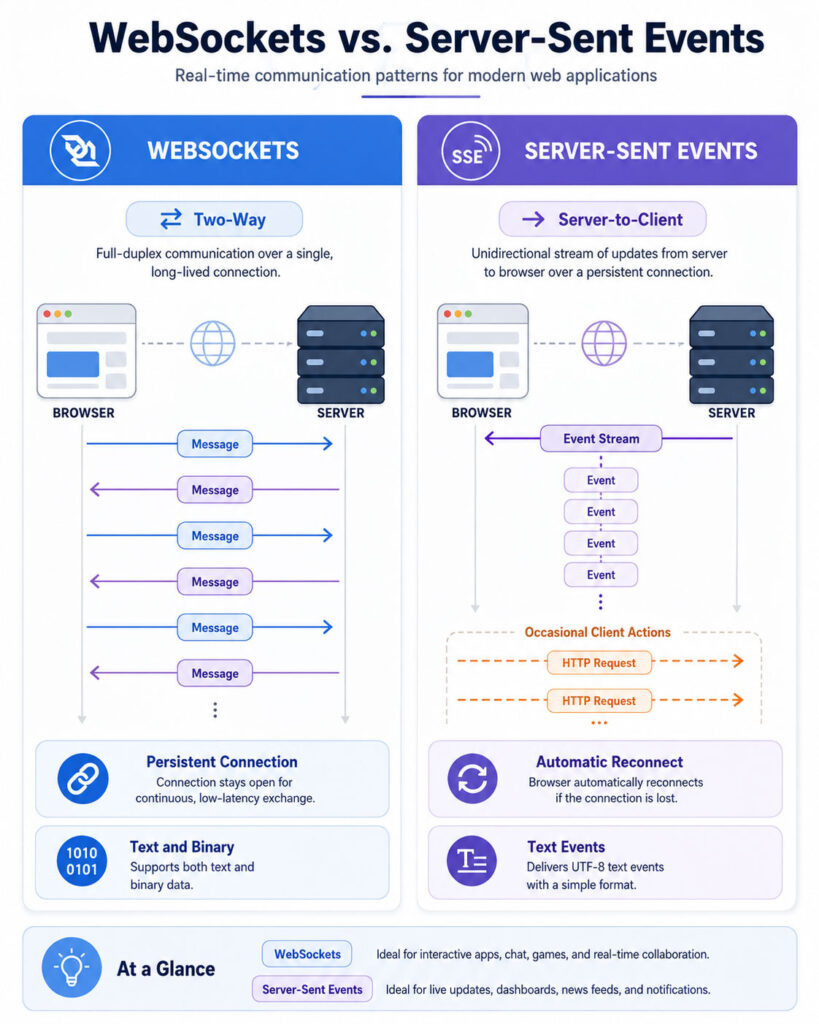
The WebSockets vs Server-Sent Events comparison helps developers choose the right communication method for live web applications. WebSockets create a two-way channel in which the client and server can send messages independently. In contrast, Server-Sent Events allow the server to stream updates to a browser through an open HTTP response.
Both technologies can deliver information without repeatedly polling the server. However, they differ in communication direction, protocol behaviour, supported data types, reconnection, implementation complexity, and infrastructure requirements.
WebSockets often suit chat systems, collaborative editing, multiplayer games, and interactive controls. Meanwhile, Server-Sent Events work well for notifications, progress updates, dashboards, activity feeds, logs, and streamed AI responses. Therefore, the correct choice depends on whether the application genuinely needs continuous two-way communication.
WebSockets vs Server-Sent Events: Quick Answer
- Choose WebSockets when the client and server must exchange frequent messages in both directions.
- Choose Server-Sent Events when the server mainly pushes text updates to a browser.
- Choose SSE with normal HTTP requests when the client sends occasional commands but receives continuous server updates.
- Use neither when ordinary requests, periodic refreshes, or short polling already meet the application’s needs.
WebSockets provide greater communication flexibility. However, SSE often offers a simpler solution when data flows primarily from the server to the client.
What Is a Real-Time Web Application?
A real-time web application updates the interface shortly after information changes. It does not require the user to refresh the page manually before seeing the latest result.
Examples include chat messages, live scores, stock prices, order status, delivery tracking, collaborative documents, monitoring dashboards, multiplayer games, and AI-generated text streams.
The word “real-time” does not always mean that a message arrives with no delay. Instead, it usually means that the application delivers updates quickly enough for its intended use.
A safety-control system may require extremely low and predictable latency. In contrast, a business dashboard may remain useful when an update arrives after one or two seconds. Therefore, developers should define an acceptable delay before selecting a communication technology.
What Is Polling?
Polling occurs when a client repeatedly asks the server whether new information is available. For example, a browser may send a request every five seconds to check for updated notifications.
Polling is easy to understand and works through normal HTTP infrastructure. However, it can create unnecessary requests when the server has no new data.
Shorter polling intervals improve update speed but increase request volume. Longer intervals reduce traffic but make the interface feel less responsive.
WebSockets and Server-Sent Events keep a connection open so that the server can send updates without waiting for the next polling request.
What Is Long Polling?
Long polling reduces repeated empty responses. The client sends a request, and the server keeps it open until new information becomes available or a timeout occurs.
After receiving a response, the client immediately sends another request. This method can support near-real-time updates through ordinary HTTP, but it still involves repeated request and response cycles.
Long polling remains useful when persistent streaming technologies are unavailable or when existing infrastructure already supports it reliably. Nevertheless, WebSockets or SSE may provide a cleaner model for applications with continuous updates.
What Are WebSockets?
WebSockets provide a persistent two-way communication channel between a client and server. After an opening handshake, either side can send a message without waiting for the other side to make a new HTTP request.
This full-duplex behaviour makes WebSockets suitable for interactive applications. For example, a chat client can send a message while receiving messages from other users through the same connection.
WebSocket communication uses framed messages. It supports both text and binary data, so applications can exchange JSON, plain text, encoded commands, images, audio chunks, or custom binary formats.
However, WebSockets provide a relatively low-level transport. The application still needs to define message types, authorization rules, acknowledgements, retries, subscriptions, validation, error handling, and connection recovery.
How a WebSocket Connection Works
- The browser starts a WebSocket connection with the server.
- The client and server complete an opening handshake.
- The connection changes to the WebSocket protocol.
- The client and server exchange messages independently.
- Either side may send text, binary data, or control frames.
- The connection remains open until one side closes it or a network failure occurs.
After the handshake, the application can reuse the established connection for many messages. Therefore, it avoids creating a complete HTTP request for every update.
Basic WebSocket Browser Example
const socket = new WebSocket('wss://example.com/realtime');

socket.addEventListener('open', () => {
socket.send(JSON.stringify({
type: 'subscribe',
channel: 'order-updates'
}));
});

socket.addEventListener('message', event => {
const message = JSON.parse(event.data);
console.log('Update received:', message);
});

socket.addEventListener('error', error => {
console.error('WebSocket error:', error);
});

socket.addEventListener('close', event => {
console.log('Connection closed:', event.code);
});
Production applications need additional logic for authentication, reconnection, message validation, connection timeouts, and duplicate handling.
What Are Server-Sent Events?
Server-Sent Events, commonly called SSE, allow a server to continuously send text events to a browser through an HTTP connection. The browser uses the EventSource interface to open and monitor the stream.
SSE communication is unidirectional. The server sends information to the browser, but the browser does not send messages back through the same event stream.
If the client needs to submit data, it can use an ordinary fetch, form submission, or API request. This combination works well when client-to-server commands are occasional but server-to-client updates are continuous.
SSE uses the text/event-stream content type. Events are UTF-8 text and may contain data, an event name, an identifier, and a suggested retry interval.
How Server-Sent Events Work
- The browser creates an
EventSourcefor an HTTP endpoint. - The server responds with the
text/event-streamcontent type. - The server keeps the response open.
- The server writes events whenever new information becomes available.
- The browser converts incoming blocks into message events.
- If the connection closes unexpectedly, the browser normally attempts to reconnect.
This flow uses familiar HTTP behaviour and requires less custom connection management for simple one-way streams.
Basic Server-Sent Events Browser Example
const source = new EventSource('/api/order-updates');

source.addEventListener('message', event => {
const update = JSON.parse(event.data);
console.log('Update received:', update);
});

source.addEventListener('order-status', event => {
const status = JSON.parse(event.data);
console.log('Order status:', status);
});

source.addEventListener('error', error => {
console.error('SSE connection error:', error);
});
Server-Sent Event Format
A server can send an event using a simple text format:
event: order-status
id: 1042
retry: 5000
data: {"orderId":728,"status":"Dispatched"}
The blank line completes the event. The browser dispatches the event according to its name, while the identifier can help the server resume the stream after reconnection.
WebSockets vs Server-Sent Events Comparison
| Area | WebSockets | Server-Sent Events |
|---|---|---|
| Communication direction | Client-to-server and server-to-client | Server-to-client only |
| Connection type | WebSocket protocol after a handshake | Long-running HTTP response |
| Browser API | WebSocket |
EventSource |
| Data formats | Text and binary | UTF-8 text |
| Automatic reconnection | Application must implement it | Built into EventSource |
| Event identifiers | Application-defined | Built-in event ID support |
| Client messages | Sent through the same connection | Require a separate HTTP request |
| Implementation complexity | Usually higher | Usually lower for one-way updates |
| Binary streaming | Supported | Not directly supported |
| Common use cases | Chat, games, collaboration, interactive control | Feeds, notifications, progress, logs, AI streaming |
The WebSockets vs Server-Sent Events table shows the main architectural difference. WebSockets create a flexible duplex channel, while SSE provides a focused server-to-browser event stream.
Bidirectional vs Unidirectional Communication
The most important difference is the direction in which information travels. WebSockets support full-duplex communication, so both endpoints can send messages whenever the connection remains open.
SSE supports server-to-client updates. The browser receives events but cannot send a message back through the EventSource stream.
However, unidirectional communication is not always a limitation. A dashboard may send filter changes through ordinary HTTP requests and receive live data through SSE. Similarly, an AI interface may submit a prompt with fetch and receive generated text through an event stream.
Therefore, developers should not select WebSockets only because they technically support more directions. They should first determine how frequently the client needs to send information after establishing the connection.
WebSockets vs Server-Sent Events for Data Formats
WebSockets support text and binary messages. Text messages commonly contain JSON, while binary messages can carry compact application data, audio chunks, images, or encoded protocol messages.
Server-Sent Events use UTF-8 text. Applications commonly place JSON inside the data field when they need structured values.
Binary information can be converted into text, but formats such as Base64 increase message size and processing work. Therefore, WebSockets are usually more suitable when an application regularly transfers binary data.
SSE remains effective for status updates, generated text, progress values, event notifications, and other naturally text-based messages.
Connection Establishment
A WebSocket starts with an HTTP-based opening handshake. After the server accepts the connection, both sides exchange WebSocket frames instead of ordinary HTTP responses.
An SSE connection remains an HTTP request with a streaming response. The server sends the text/event-stream content type and keeps the response open.
This difference can affect deployment. Reverse proxies, gateways, firewalls, and load balancers must support WebSocket upgrades for WebSocket traffic. SSE infrastructure must allow long-running responses and avoid buffering events until the response completes.
Teams should test their complete production path rather than testing only a development server on a local machine.
Automatic Reconnection
The native WebSocket API reports when a connection closes, but it does not automatically create a replacement connection. The application must decide when and how to reconnect.
A reliable reconnection strategy normally uses increasing delays, random variation, retry limits, network-status awareness, and a way to restore subscriptions.
EventSource normally reconnects automatically after an unexpected interruption. The server can also provide a retry value to suggest a reconnection delay.
Built-in reconnection makes SSE convenient, but the server still needs a recovery strategy. Otherwise, the client may reconnect successfully while missing events that occurred during the interruption.
Resuming Missed Events
SSE supports event identifiers through the id field. After a connection interruption, the browser can send the last received identifier when it reconnects.
The server can use that value to replay later events from a database, queue, or short-term event history. However, the application must store the events and implement replay logic.
WebSockets do not define a built-in event history mechanism. Developers can add message sequence numbers, acknowledgement IDs, timestamps, or resume tokens to their application protocol.
Neither technology guarantees that an application will never miss a business event. Reliable systems need persistent data, acknowledgements, deduplication, and replay rules according to their requirements.
Message Ordering
Messages on an established WebSocket connection travel through an ordered transport. SSE events also arrive in the order written to the event stream.
However, reconnecting, retrying commands, switching servers, or consuming messages from several backend services can create application-level ordering problems.
For example, a client might receive a delayed “processing” update after it has already received “completed.” Sequence numbers or version values can help the application reject stale updates.
Therefore, developers should not depend only on network ordering when business state can change across several services or connections.
Delivery Guarantees
WebSockets and SSE transport messages, but neither automatically provides complete business-level delivery guarantees.
A message may disappear when the client disconnects, the server restarts, a proxy times out, or the application closes before processing the update. A sender may also retry and cause a duplicate.
Applications that cannot lose events should store important information in a durable system. They may also need message identifiers, acknowledgement records, idempotent operations, and replay endpoints.
For non-critical interface updates, losing one intermediate event may be acceptable when the next update contains the latest complete state.
Backpressure and Fast Message Streams
Backpressure occurs when messages arrive faster than the receiver can process them. Without control, memory usage can grow and the interface may become unresponsive.
The standard browser WebSocket interface does not automatically regulate an incoming message stream according to application processing speed. Developers should monitor workload, limit message rates, combine updates, or drop outdated data where appropriate.
The bufferedAmount property can help an application observe data waiting to be transmitted from the client. However, the complete flow-control design still belongs to the application.
SSE applications can also receive updates faster than the interface can display them. Servers may need to batch events, reduce frequency, or send only the latest state.
Heartbeats and Connection Timeouts
Proxies, mobile networks, and load balancers may close connections that appear inactive. Therefore, long-lived connections often need periodic traffic or carefully configured timeouts.
WebSocket implementations can use protocol-level ping and pong control frames on the server side. Applications may also define their own heartbeat messages when libraries or platforms require them.
An SSE server can periodically send a comment line that the browser ignores. This small transmission can help prevent intermediaries from treating the stream as inactive.
Heartbeat intervals should remain reasonable. Sending them too frequently wastes bandwidth and battery, while sending them too slowly may not prevent infrastructure timeouts.
Performance and Network Overhead
After a WebSocket connection is established, messages can use compact frames. This efficiency can benefit applications that exchange many small messages in both directions.
SSE messages remain text-based and use event-stream formatting. However, the overhead is often acceptable for notifications, status changes, progress updates, and generated text.
Actual performance depends on message size, frequency, network quality, serialization, server architecture, encryption, and application processing.
Therefore, the WebSockets vs Server-Sent Events performance decision should rely on realistic testing instead of assumptions based only on protocol names.
Scalability and Long-Lived Connections
Both technologies create long-lived connections. Consequently, servers must manage connection counts, memory, timeouts, authentication state, disconnections, and message distribution.
A WebSocket server may keep subscription and connection state in memory. In a multi-server deployment, a shared message broker can distribute events to the server holding each user’s connection.
SSE servers may use a similar broker to stream notifications from several backend services. Although SSE is simpler at the browser level, the backend still needs an efficient way to manage thousands of open responses.
Load testing should include connection establishment, sudden reconnection waves, inactive users, slow clients, deployments, and server failure.
Load Balancing and Shared State
A load balancer must keep each live connection attached to a server while that connection remains open. If the application stores subscription state only in that server’s memory, reconnecting to another server can lose context.
Sticky routing can help, but it should not become the only recovery mechanism. Servers may restart, deployments may replace instances, and clients may reconnect through another route.
A shared broker, durable subscription record, or repeatable subscription message can make the architecture more resilient.
Both WebSocket and SSE clients should restore required channels, filters, or topics after reconnecting.
Authentication
Applications should authenticate the connection before sending private information. They should also verify authorization for every channel, topic, account, document, or resource requested by the client.
A valid login does not mean that a user may subscribe to every event. For example, an authenticated customer should not receive another customer’s order updates.
Browser-based implementations commonly rely on secure session cookies or short-lived credentials supported by the application architecture. Avoid placing long-lived secrets in URLs because logs, browser history, analytics, or intermediaries may record them.
When authorization changes, the server should close or update existing subscriptions rather than waiting for the user to reconnect voluntarily.
WebSockets vs Server-Sent Events for Security
Use encrypted connections in production. WebSocket endpoints should normally use wss://, while SSE endpoints should use HTTPS.
WebSocket servers should validate the browser’s origin and reject unexpected cross-origin connection attempts. They should also limit message size, validate every payload, restrict message rates, and close abusive connections.
SSE endpoints should enforce authentication, authorization, CORS rules, and data minimisation. A client should receive only the events required for its current account and subscription.
Both technologies need protection against injection, insecure deserialization, leaked credentials, excessive connections, denial-of-service attacks, and sensitive logging.
Connection Lifecycle
Applications should close connections when the user signs out, leaves the relevant page, or no longer needs live updates.
For WebSockets, call the connection’s close method and clean up message handlers, timers, and retry tasks.
For SSE, call EventSource.close() when the stream is no longer required.
Proper cleanup reduces server load, battery usage, network traffic, and duplicate subscriptions during page navigation.
WebSockets vs Server-Sent Events for Common Applications
| Application | Commonly Suitable Choice | Reason |
|---|---|---|
| Live notification feed | Server-Sent Events | Updates mainly travel from server to browser |
| Two-way chat | WebSockets | Users frequently send and receive messages |
| AI text streaming | Server-Sent Events or fetch streaming | The server continuously sends generated text |
| Multiplayer game | WebSockets | Clients and server exchange frequent state updates |
| File-processing progress | Server-Sent Events | The server pushes percentage and status changes |
| Collaborative editor | WebSockets | Many users send operations and receive updates |
| Monitoring dashboard | Server-Sent Events | Metrics mainly flow from server to browser |
| Remote device controls | WebSockets | The client sends commands and receives responses |
| Order-status updates | Server-Sent Events | The browser mainly receives status changes |
| Live support application | WebSockets | Agents and customers exchange messages interactively |
When Server-Sent Events Are Simpler
Consider an application that submits a long-running report request. The browser sends one normal HTTP request to start the job, while the server sends progress updates through SSE.
The client does not need a constant two-way messaging channel. Therefore, using WebSockets would add message routing and reconnection logic without providing a meaningful benefit.
This pattern also works for background imports, video processing, document conversion, deployment logs, and AI response streaming.
When WebSockets Provide a Clear Advantage
Consider a collaborative editor in which every user continuously submits changes and receives changes from others. The server may also send cursor positions, document locks, acknowledgements, and presence information.
Using separate HTTP requests for every client operation while maintaining an SSE stream could work, but the architecture may become less natural.
A WebSocket connection gives the application one interactive channel for frequent communication in both directions.
Choose WebSockets for Continuous Two-Way Interaction
Choose WebSockets when the client and server need to exchange frequent messages with low application overhead. This pattern fits chat, multiplayer games, collaborative tools, interactive trading interfaces, and remote-control systems.
WebSockets also make sense when the application sends binary data or maintains a custom message protocol across one connection.
However, the development team must manage reconnection, subscriptions, authentication, message schemas, rate limits, errors, and connection state.
Choose Server-Sent Events for Server-Driven Updates
Choose Server-Sent Events when the browser primarily receives text updates from the server. SSE provides a straightforward event model and automatic browser reconnection.
It works especially well for notifications, news feeds, background-job progress, deployment output, analytics dashboards, price updates, and streamed generated text.
The client can continue using ordinary HTTP requests for actions such as starting a job, changing filters, submitting a prompt, or acknowledging an alert.
Choose HTTP Requests with SSE
Many applications need frequent server updates but only occasional client actions. Combining standard API requests with SSE can keep the architecture simple.
For example, a user sends a prompt through a POST request. The server starts processing and streams tokens or progress events to the browser through SSE.
This design preserves familiar request validation and authorization while giving the browser a live response channel.
When Ordinary HTTP Is Enough
Not every changing page needs a persistent connection. A user may open an administration screen only briefly or refresh a report a few times each day.
In these cases, a standard request, manual refresh button, or moderate polling interval may be easier to maintain.
Persistent connections add server load, lifecycle management, monitoring, and recovery requirements. Therefore, use them when live updates create a meaningful user or business benefit.
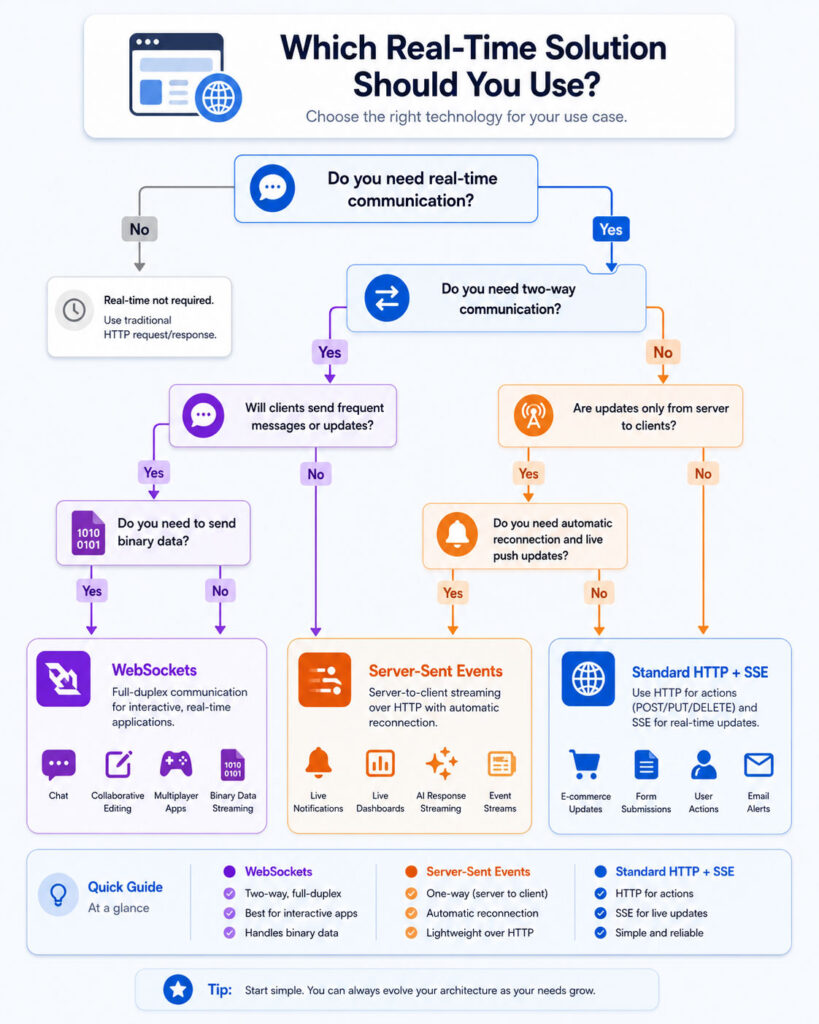
WebSockets vs Server-Sent Events Decision Guide
- Do both sides send frequent messages? Choose WebSockets.
- Does the server mainly send text updates? Choose Server-Sent Events.
- Does the application stream binary data? Choose WebSockets.
- Does the client submit occasional commands? Consider normal HTTP requests with SSE.
- Is automatic browser reconnection valuable? SSE provides it by default.
- Does the application require a custom interactive protocol? WebSockets provide greater flexibility.
- Are updates infrequent? Standard HTTP or polling may be sufficient.
- Can important messages be missed? Add durable storage, identifiers, and replay regardless of the transport.
Designing a WebSocket Message Protocol
A WebSocket transports messages, but the application must define their meaning. A consistent envelope can make routing and validation easier.
{
  "type": "order.subscribe",
  "requestId": "req-1042",
  "payload": {
    "orderId": 728
  }
}
The server may respond with an acknowledgement:
{
  "type": "order.subscribed",
  "requestId": "req-1042",
  "payload": {
    "orderId": 728
  }
}
Use documented message types, schema validation, versioning, request identifiers, and clear error responses. Do not allow arbitrary client messages to invoke server operations without authorization.
WebSocket Reconnection Strategy
A client should not reconnect immediately in an unlimited loop because a service outage could cause thousands of clients to reconnect at the same time.
Use an increasing delay with random variation:
function getReconnectDelay(attempt) {
  const maximumDelay = 30000;
  const baseDelay = Math.min(1000 * 2 ** attempt, maximumDelay);
  return baseDelay + Math.random() * 1000;
}
After reconnecting, the client should authenticate again if required and restore its subscriptions. It may also need to request messages that arrived while it was offline.
Managing SSE Event History
Assign an identifier to every important event:
id: 1043
event: order-status
data: {"orderId":728,"status":"Delivered"}
When the browser reconnects, the server can inspect the last event identifier and send later events from its stored history.
However, the server must decide how long to keep this history. It should also handle cases where the requested event is too old and no longer available.
In that situation, the server may send a complete current-state snapshot before continuing with live updates.
Use Snapshots with Incremental Updates
A reliable live interface often starts with a complete snapshot from a normal API request. It then applies incremental updates from WebSockets or SSE.
If the connection fails for too long or the application detects a sequence gap, it can request another snapshot.
This approach prevents the interface from depending permanently on every intermediate event. It also simplifies recovery when event history is unavailable.
Avoid Updating the Interface Too Frequently
A server may produce hundreds of changes every second, but the browser does not always need to render every one.
For dashboards and charts, the client can combine updates and refresh the interface at a controlled interval. It may also keep only the latest value for each metric.
This method reduces layout work, memory pressure, battery usage, and visual noise without changing the underlying transport.
Handle Duplicate Messages
Reconnects and retries can produce duplicate messages. Important operations should remain safe when the same event arrives more than once.
Use unique event identifiers and record the most recently processed sequence. For commands that modify data, use idempotency keys or server-side duplicate detection.
Never assume that receiving a message once means the application processed it exactly once.
Handle Slow Clients
A client may have a weak network, a busy browser, or a slow device. If the server continues sending unlimited updates, queued data can consume excessive memory.
The server can limit queue size, combine similar updates, disconnect clients that remain too far behind, or send a fresh snapshot instead of every missed change.
Applications should prioritise current useful information over an unlimited backlog of outdated interface events.
Plan for Server Deployments
Deployments can close active connections even when the client and server are healthy. Therefore, a reconnection should be treated as a normal lifecycle event rather than an exceptional failure.
Servers can stop accepting new connections, allow existing work to finish for a limited period, and then close connections with a meaningful reason.
Clients should reconnect through normal discovery and restore subscriptions without requiring the user to reload the page.
Monitor Real-Time Connections
Operational monitoring should include:
- Current open connections.
- New connections and disconnections.
- Connection duration.
- Authentication and authorization failures.
- Messages sent and received.
- Queued or dropped messages.
- Reconnection frequency.
- Average and maximum event delay.
- Errors by client version and device type.
- Memory and processor usage per connection group.
Do not store complete private message content unless a clear operational or legal requirement justifies it.
Test Network Interruptions
Real users move between Wi-Fi and mobile networks, close laptops, suspend browser tabs, enter tunnels, and experience temporary outages.
Testing should include:
- Short and long network interruptions.
- Server restarts and deployments.
- Expired authentication sessions.
- Slow clients and high message rates.
- Multiple browser tabs.
- Proxy and load-balancer timeouts.
- Duplicate and out-of-order business events.
- Unavailable replay history.
- Sudden reconnection by many clients.
- Application navigation and logout.
Common WebSocket Mistakes
- Choosing WebSockets when the server only sends occasional updates.
- Failing to implement reconnection and subscription recovery.
- Trusting client-supplied channel or account identifiers.
- Skipping origin validation.
- Sending unvalidated JSON directly into business logic.
- Allowing unlimited message sizes or rates.
- Keeping all connection state on one server without recovery.
- Ignoring slow clients and growing send queues.
- Assuming transport delivery equals successful business processing.
- Failing to close connections during logout or page cleanup.
Common Server-Sent Events Mistakes
- Using SSE when the client must continuously send messages through the same connection.
- Forgetting the
text/event-streamcontent type. - Failing to separate events with a blank line.
- Allowing a proxy to buffer the stream.
- Not flushing events after writing them.
- Assuming automatic reconnection also replays missed events.
- Ignoring event identifiers and recovery rules.
- Sending binary data through inefficient text encoding.
- Failing to send heartbeats through infrastructure with idle timeouts.
- Leaving EventSource connections open after the page no longer needs them.
Can WebSockets Send Binary Data?
Yes. WebSockets support text and binary messages. Browser applications can receive binary information as a Blob or ArrayBuffer, depending on the selected configuration.
This capability makes WebSockets more suitable than SSE for frequent binary transfer. However, developers should still apply message-size limits and validate the binary format.
Can Server-Sent Events Send JSON?
Yes. The server can serialize an object as JSON and place it in the SSE data field. The browser receives it as text and can parse it with JSON.parse.
Do not assume that every event contains valid JSON. Handle parsing failures and validate the resulting structure before using it.
Do WebSockets Reconnect Automatically?
No. The browser’s standard WebSocket API reports closure, but the application must create a new connection and restore its previous state.
A production client should use controlled retry delays and stop retrying when the user signs out or permanently loses access.
Do Server-Sent Events Reconnect Automatically?
EventSource normally attempts to reconnect after an eligible connection interruption. It can also send the last received event identifier so that the server can resume the stream.
However, the server must maintain event history or send a new state snapshot. Automatic reconnection alone does not recover unavailable messages.
Can SSE Support Chat Applications?
An application can receive chat messages through SSE and send new messages through separate HTTP requests. Therefore, SSE can technically support a chat interface.
However, WebSockets may provide a more natural architecture when users frequently send typing indicators, presence updates, read receipts, reactions, and messages in both directions.
Are WebSockets Always Faster Than SSE?
No. WebSockets can reduce framing overhead for frequent two-way messages, but the user-visible result depends on the complete application.
For one-way text streams, SSE may provide comparable practical responsiveness with less implementation complexity.
Is SSE Suitable for AI Response Streaming?
Yes. SSE can stream generated text, progress events, citations, tool statuses, and completion signals from a server to a browser.
The browser can submit the original prompt through a normal request and use the event stream for continuing output. However, developers should support cancellation, errors, authentication expiry, and incomplete responses.
Can WebSockets and SSE Be Used Together?
Yes, although most applications should avoid adding both without a clear reason. One feature may use WebSockets for collaborative interaction, while another uses SSE for a server-generated activity feed.
Teams should evaluate whether separate technologies justify the additional deployment, monitoring, and maintenance work.
Which Technology Is Easier to Implement?
SSE is usually easier when the server sends text updates and the client uses normal requests for commands. The browser API includes event handling and reconnection behaviour.
WebSockets require more application-level design, but they provide greater flexibility for continuous two-way communication.
Final Verdict: WebSockets vs Server-Sent Events
The WebSockets vs Server-Sent Events comparison does not have one winner for every real-time application. WebSockets provide a persistent two-way channel, support text and binary messages, and suit applications with frequent interactive communication.
Server-Sent Events provide a simpler server-to-browser stream through HTTP. They offer automatic reconnection, named events, event identifiers, and a natural fit for text updates such as notifications, progress reports, dashboards, logs, and generated AI responses.
Choose WebSockets when both sides must communicate continuously. Choose SSE when the server mainly pushes text updates and the browser can send occasional commands through ordinary HTTP requests.
Finally, select the simplest option that meets the actual requirement. A carefully designed SSE stream can be better than an unnecessary WebSocket system, while a true interactive application will benefit from the flexibility of WebSocket communication.

AboutTPJ Technical Team
The Project Jugaad Technical Team creates practical, easy-to-follow content on software development, web technologies, artificial intelligence, cybersecurity, cloud platforms, and digital tools. Our articles are informed by more than 13 years of hands-on experience with .NET, Angular, SQL Server, AWS, WordPress, Linux hosting, application deployment, and real-world troubleshooting. Each guide is researched, reviewed, and updated to provide accurate, useful, and actionable information for developers, businesses, and everyday technology users.