Software Development
Model Context Protocol, commonly called MCP, provides a standard way for AI applications to connect with external tools, data sources, and workflows.
A language model can answer questions using the information available in its conversation and training. However, it cannot automatically read a private database, search a company document library, check a calendar, or update an external system.
Therefore, developers need controlled integrations that provide relevant context and approved actions. MCP creates a shared communication layer for those integrations.
What Is Model Context Protocol?
Model Context Protocol is an open protocol for connecting AI applications with external systems.
Through an MCP connection, an AI application can discover available capabilities, read approved contextual data, and call tools exposed by a server.
For example, an AI coding assistant may connect to:
- A source-code repository.
- A documentation system.
- A local file directory.
- A database.
- A cloud platform.
- A project-management application.
- A calendar or communication service.
- A custom business API.
Consequently, the AI can work with current and organisation-specific information instead of relying only on the model’s built-in knowledge.
Why Was MCP Created?
Before a shared protocol, developers often created a separate custom integration for every combination of AI application and external system.
For example, one coding assistant might need a custom connector for a database. Another assistant could require a different connector for the same database. Meanwhile, every document platform, ticketing system, and cloud service needed its own integration pattern.
This approach creates repeated work:
AI Application A → Custom Database Connector
AI Application A → Custom File Connector
AI Application B → Different Database Connector
AI Application B → Different File Connector
MCP introduces a reusable protocol boundary:
AI Application
      ↓
MCP Client
      ↓
MCP Server
      ↓
Files, APIs, databases, tools, and workflows
As a result, an MCP-compatible server can expose capabilities through a consistent interface to compatible clients.
What Problem Does MCP Solve?
The protocol mainly standardises how AI applications discover and use external context and actions.
It can help solve several integration problems:
- Different AI tools using different connector formats.
- Repeated implementation of similar integrations.
- Unclear descriptions of available AI tools.
- Inconsistent input and output structures.
- Limited portability between AI applications.
- Difficulty exposing local and remote systems through one model.
However, the protocol does not automatically solve business logic, data quality, permissions, security, or AI accuracy. Developers must still design those areas carefully.
Model Context Protocol Architecture
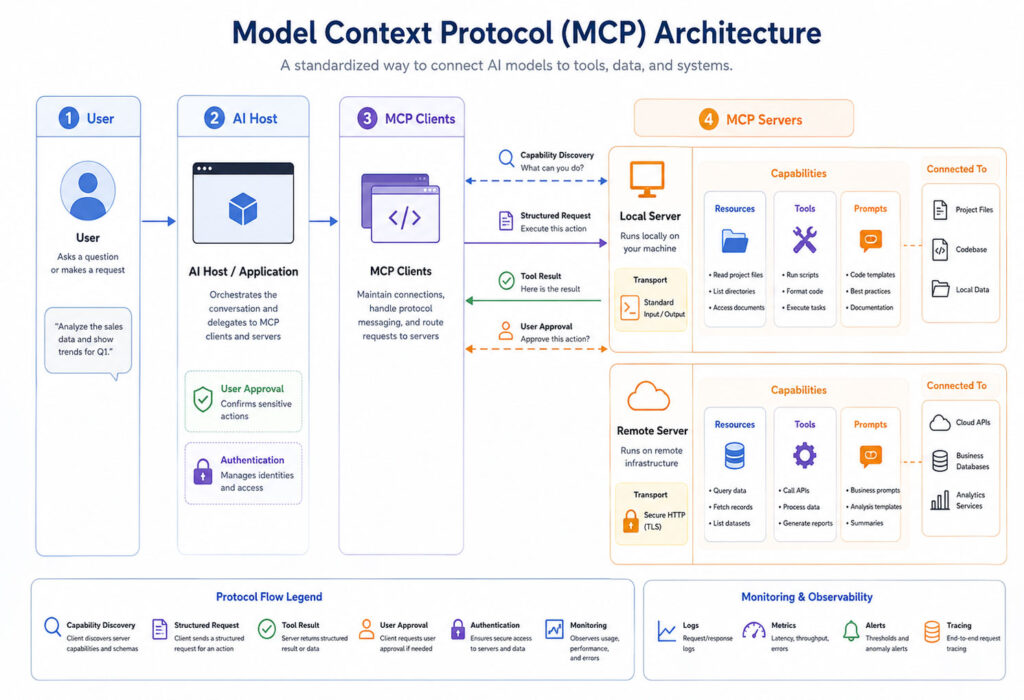
MCP follows a client-server architecture with three main roles:
| Component | Purpose |
|---|---|
| Host | The AI application that manages the user experience and model interaction |
| Client | A component inside the host that creates and manages a connection to one MCP server |
| Server | A program or service that exposes tools, resources, and prompts |
These roles describe protocol responsibilities rather than specific commercial products.
What Is an MCP Host?
The host is the main AI application used by the person.
For example, a host may be:
- An AI chat application.
- A coding environment.
- An enterprise assistant.
- A desktop application.
- A custom agent platform.
The host manages the language model, conversation, user interface, permissions, and overall workflow.
In addition, the host may control which servers the user can connect and which tool calls require confirmation.
What Is an MCP Client?
An MCP client is the connector inside the host application.
Typically, one client maintains one connection to one server. Therefore, a host connected to three servers may manage three separate client connections.
AI Host
├── MCP Client → Documentation Server
├── MCP Client → Database Server
└── MCP Client → Calendar Server
The client handles protocol communication, capability discovery, requests, responses, and lifecycle events.
What Is an MCP Server?
An MCP server exposes a controlled set of capabilities to connected clients.
The server may run locally on the user’s computer or remotely on another system.
For example, a local server might read files from an approved project directory. In contrast, a remote server might connect to a cloud platform or business application.
The server decides which tools and data it exposes. However, the host decides how those capabilities appear to the user and model.
Core MCP Capabilities
Servers can expose three primary capability types:
| Capability | Purpose | Example |
|---|---|---|
| Resources | Provide readable contextual data | File contents, schemas, documents, or records |
| Tools | Perform an action or computation | Search a database, create a ticket, or run a calculation |
| Prompts | Provide reusable interaction templates | Review code, analyse logs, or create a report |
A server does not need to support all three. Instead, it can expose only the capabilities required by its purpose.
How an MCP Connection Works
An MCP connection follows a defined lifecycle.
- The host starts or connects to the server.
- The client and server initialise the connection.
- Both sides exchange protocol versions and capabilities.
- The client discovers available resources, tools, or prompts.
- The host makes selected capabilities available to the model or user.
- The client sends requests when required.
- The server returns results, errors, or notifications.
- The connection ends when the host or server no longer needs it.
Capability negotiation matters because different servers and clients may support different optional features.
Simple MCP Workflow Example
Consider an employee asking an AI assistant:
Find the current status of order 4831
and prepare a short customer update.
The workflow may look like this:
User request
      ↓
AI identifies the required order tool
      ↓
MCP client calls the order-status tool
      ↓
MCP server queries the approved business system
      ↓
Server returns the current order information
      ↓
AI drafts a customer-friendly update
      ↓
User reviews the result
The model does not connect directly to the database. Instead, it uses a defined tool with controlled inputs and outputs.
Does MCP Contain the AI Model?
No. MCP does not define or host the language model itself.
Instead, the protocol connects an AI application with external capabilities. The host still chooses the model, manages the conversation, and decides how to use server results.
Therefore, changing the model does not necessarily require redesigning every MCP server.
Does MCP Store Business Data?
The protocol does not require one central MCP database.
An MCP server may read data from an existing API, database, local file, cloud service, or another system. It can then return only the information needed by the client.
Consequently, organisations can keep their existing systems while adding a standard AI integration layer.
How MCP Messages Are Structured
MCP uses JSON-RPC 2.0 messages for communication between clients and servers.
A simplified request may look like this:
{
  "jsonrpc": "2.0",
  "id": 1,
  "method": "tools/list",
  "params": {}
}
The server can then return the available tools:
{
  "jsonrpc": "2.0",
  "id": 1,
  "result": {
    "tools": [
      {
        "name": "get_order_status",
        "description": "Returns the current status of an order"
      }
    ]
  }
}
In real implementations, tool definitions also include structured input schemas and other metadata.
What Are MCP Resources?
Resources provide contextual information that a client can read.
For example, a server may expose:
- Text files.
- Product documentation.
- Database schemas.
- Application configuration.
- Customer records.
- Source-code files.
- Log entries.
- API responses.
Each resource uses a unique URI so the client can identify and retrieve it.
file:///project/README.md
database://sales/schema
docs://employee-handbook/leave-policy
git://repository/main/src/orders
The exact URI format depends on the server.
How Resources Differ from Tools
A resource primarily provides information. A tool, on the other hand, performs an operation.
| Requirement | Better Capability |
|---|---|
| Read a document | Resource |
| View a database schema | Resource |
| Search customer records | Tool |
| Create a support ticket | Tool |
| Calculate delivery cost | Tool |
| Load a reusable review instruction | Prompt |
However, server designers can choose different patterns depending on security, performance, and user experience.
What Are MCP Tools?
Tools are functions that the AI application can call through the server.
A tool definition normally includes:
- A unique name.
- A clear description.
- A structured input schema.
- Optional output information.
- The operation performed by the server.
For example, an order-status tool could use the following conceptual definition:
{
  "name": "get_order_status",
  "description": "Returns the current status of an order",
  "inputSchema": {
    "type": "object",
    "properties": {
      "orderId": {
        "type": "string"
      }
    },
    "required": [
      "orderId"
    ]
  }
}
The model can inspect the name, description, and schema before deciding whether the tool fits the user’s request.
Tool Call Example
When the model needs the current order state, the client may send a request similar to this:
{
  "jsonrpc": "2.0",
  "id": 7,
  "method": "tools/call",
  "params": {
    "name": "get_order_status",
    "arguments": {
      "orderId": "4831"
    }
  }
}
The server validates the input, queries the approved system, and returns a structured result.
However, a successful protocol call does not prove that the business result is correct. The server must still validate permissions, data, and application rules.
Read-Only vs Data-Changing Tools
Not every tool creates the same level of risk.
| Tool Type | Example | Typical Risk |
|---|---|---|
| Read-Only | Search documentation | Exposure of information |
| Calculation | Calculate tax or distance | Incorrect result |
| Create | Create a support ticket | Unwanted external action |
| Update | Change a customer record | Incorrect or unauthorised modification |
| Delete | Remove a cloud resource | Permanent data or service loss |
Therefore, hosts should provide stronger confirmation and controls for sensitive actions.
What Are MCP Prompts?
Prompts are reusable templates exposed by a server.
They can help users perform common tasks consistently.
For example, a development server may provide prompts such as:
- Review this code for security issues.
- Summarise the latest application logs.
- Create release notes from recent changes.
- Analyse a database query.
- Prepare a project status report.
A prompt may include arguments, instructions, and references to available resources.
However, prompts do not automatically perform actions. They prepare structured messages that the host can send to the model.
Local MCP Servers
A local server runs on the same computer as the AI host.
Local servers commonly use the standard input and output transport, also called stdio.
In this model, the client launches the server as a subprocess:
AI Host
   ↓ starts local process
MCP Server
   ↓ reads approved local data
Project files or local tools
Local servers can work well for:
- Source-code tools.
- Local file access.
- Desktop automation.
- Development utilities.
- Private testing environments.
Nevertheless, a local server may inherit access to files, environment variables, command-line tools, and user credentials. Therefore, users should install only trusted server packages.
Remote MCP Servers
A remote server runs independently and accepts connections over a network.
The current standard remote transport is Streamable HTTP.
A remote server can support:
- Shared enterprise data.
- Cloud platforms.
- Central business APIs.
- Organisation-wide tools.
- Managed authentication and auditing.
Because several users may connect to one service, remote deployments require strong identity, authorisation, rate limiting, monitoring, and tenant isolation.
MCP Transport Comparison
| Point | stdio | Streamable HTTP |
|---|---|---|
| Location | Usually local | Usually remote or independently hosted |
| Connection | Standard input and output | HTTP requests with optional streaming |
| Server Process | Client commonly launches it | Runs as an independent service |
| Authentication | Often uses local credentials or environment configuration | Can use standard remote authorisation flows |
| Common Use | Developer tools and local data | Shared services and enterprise integrations |
Custom transports are possible. Still, most integrations should prefer standard transports to improve compatibility.
MCP vs API
MCP does not replace application programming interfaces.
An API exposes business operations or data to software clients. Meanwhile, an MCP server can present those APIs to AI applications through standard tool, resource, and prompt definitions.
Existing Business API
          ↑
      MCP Server
          ↑
      MCP Client
          ↑
     AI Application
Therefore, organisations can place an MCP layer in front of an existing API rather than rebuilding the underlying service.
MCP vs REST API
| Point | REST API | MCP |
|---|---|---|
| Main Audience | General software clients | AI applications and agents |
| Operations | Resources and HTTP methods | Tools, resources, prompts, and protocol capabilities |
| Discovery | Usually documentation or an API specification | Clients can list supported protocol capabilities |
| Transport | Usually HTTP | stdio, Streamable HTTP, or custom transport |
| Underlying Logic | Implements business operations directly | Can wrap existing APIs, files, databases, and workflows |
In practice, many MCP servers call REST APIs internally.
MCP vs Function Calling
Function calling allows a model to request a structured function defined by an AI application or model provider.
MCP provides a broader interoperability layer for discovering and invoking tools exposed by external servers.
Therefore, the two concepts can work together. A host may translate MCP tool definitions into the function-calling format supported by its selected model.
The difference lies mainly in scope:
- Function calling connects a model with functions inside one application integration.
- MCP standardises how external servers expose capabilities to compatible clients.
MCP vs Plugins
A plugin usually belongs to a particular application or platform.
By contrast, an MCP server follows an open protocol that several compatible applications may support.
However, actual portability still depends on the client, transport, authentication, extensions, and server features used by the integration.
Common MCP Use Cases
1. AI Coding Assistants
A coding assistant can use MCP servers to access project files, issue trackers, documentation, source control, test systems, or cloud resources.
For example, the assistant may review an error, search internal documentation, inspect a related source file, and suggest a correction.
2. Enterprise Knowledge Search
An enterprise assistant can retrieve approved information from policies, manuals, support documents, and internal knowledge systems.
Consequently, employees can ask questions through natural language while the server controls which data sources remain available.
3. Database Analysis
A server can expose safe tools for viewing schemas, running approved read-only queries, or generating summaries.
However, direct unrestricted database access creates significant risk. Therefore, servers should validate queries, limit results, enforce permissions, and block unsafe operations.
4. Cloud Management
An MCP server can expose cloud operations such as listing resources, retrieving logs, checking costs, or starting approved deployment workflows.
Because cloud actions can affect production systems, organisations should require strong authentication and human confirmation.
5. Customer Support
An assistant can search customer records, check order status, retrieve knowledge articles, and draft a response.
Still, the tool should avoid exposing records that the current employee is not authorised to access.
6. Project Management
AI applications can read tasks, create work items, update status, or prepare project summaries through approved tools.
In addition, prompts can standardise recurring activities such as sprint reviews and release notes.
7. Personal Productivity
A personal assistant may connect to calendars, notes, task managers, local files, or communication tools.
However, convenience increases the importance of consent and permission controls because the assistant may access sensitive personal information.
Benefits of Model Context Protocol
- Provides a consistent integration model.
- Reduces repeated connector development.
- Separates AI applications from external service implementations.
- Supports local and remote integrations.
- Allows runtime capability discovery.
- Encourages structured inputs and outputs.
- Makes tools reusable across compatible hosts.
- Supports composable AI workflows.
Nevertheless, protocol compatibility does not guarantee identical behaviour across every host or server.
Limitations of MCP
- Client support varies by application.
- Server quality and security vary by provider.
- Authentication can add implementation complexity.
- Tool descriptions may be incomplete or misleading.
- Remote systems introduce network failures and latency.
- AI models may select the wrong tool.
- Generated arguments may be invalid.
- More integrations increase the attack surface.
- Protocol and SDK changes require maintenance.
Therefore, teams should evaluate MCP as an integration standard rather than a complete AI solution.
Is Model Context Protocol Secure?
MCP can support secure integrations, but the protocol does not make every server safe automatically.
Security depends on the host, server, transport, authentication, permissions, tool design, data source, and deployment environment.
Therefore, developers should treat every server as software that may access sensitive systems or perform real actions.
Main MCP Security Risks
1. Excessive Permissions
A server may receive broader access than it needs.
For example, a documentation tool may receive write access to an entire file system even though it only needs to read one directory.
As a result, a server error or malicious request could affect unrelated data.
2. Prompt Injection
External content can contain instructions designed to manipulate an AI model.
For example, a document may include hidden or misleading text that asks the model to ignore the user’s request and call a sensitive tool.
Therefore, retrieved content should be treated as untrusted data rather than trusted system instructions.
3. Malicious or Compromised Servers
An untrusted server package may read files, access environment variables, execute commands, or send data to an external system.
Local servers are especially sensitive because they can run with the user’s operating-system permissions.
Consequently, users should verify the server source, publisher, package, version, and requested access before installation.
4. Unsafe Tool Calls
A model may select the wrong tool or provide incorrect arguments.
For instance, it may update the wrong customer record or delete the wrong cloud resource.
Therefore, sensitive tools should support validation, previews, confirmations, and reversible workflows where possible.
5. Data Leakage
A server may return more information than the user needs or has permission to view.
In addition, the host may include server results in model context, logs, or conversation history.
As a result, developers must review the complete data path rather than only the server response.
6. Token and Credential Misuse
Remote servers often need access tokens or credentials to reach protected systems.
Those credentials should be limited to the intended server and resource. Passing tokens through to unrelated downstream services can create serious security problems.
Therefore, servers should validate token audiences and follow the protocol’s authorisation guidance.
7. Server-Side Request Forgery
A server that fetches user-provided URLs may accidentally allow access to internal network services or cloud metadata endpoints.
Consequently, servers should validate destinations, restrict network access, and avoid making unrestricted requests from user-controlled input.
8. Session and Connection Risks
Remote connections can face session hijacking, impersonation, replay, or origin-related attacks.
Therefore, HTTP servers should validate connection details, use secure transport, authenticate clients, and protect session identifiers.
Human Approval for MCP Tools
The official tool guidance recommends keeping a human in the loop for tool invocations.
Hosts should clearly show:
- Which tools are available.
- Which server provides each tool.
- What operation the tool will perform.
- Which inputs will be sent.
- Whether the operation changes external data.
- What result the server returns.
For high-risk actions, the user should confirm the operation before execution.
Use Least-Privilege Access
Every MCP server should receive only the access required for its purpose.
For example:
- A documentation server should not receive cloud-administrator credentials.
- A read-only database server should not receive update or delete permissions.
- A project server should access only approved directories.
- A calendar server should not access unrelated email content.
- A development tool should not receive production credentials by default.
Least privilege reduces the impact of errors, prompt injection, and server compromise.
Separate Read and Write Tools
Do not combine unrelated read and destructive actions inside one broad tool.
Instead of exposing one tool called manage_database, define smaller operations such as:
list_tables
describe_table
run_read_only_query
create_backup
request_record_update
Smaller tools provide clearer descriptions, narrower permissions, and more meaningful confirmation screens.
Validate Every Tool Input
Servers should not trust arguments simply because an AI model generated them.
Validate:
- Required fields.
- Data types.
- Maximum lengths.
- Allowed values.
- Resource identifiers.
- File paths.
- URLs and network destinations.
- User permissions.
- Business rules.
In addition, use parameterised database queries instead of combining model-generated text directly with SQL.
Protect Local MCP Servers
A local server can access resources available to the current operating-system user.
Therefore:
- Install servers only from trusted sources.
- Review the command that the client runs.
- Pin or control package versions.
- Restrict approved directories.
- Avoid exposing production secrets through environment variables.
- Run sensitive servers in an isolated environment.
- Review updates before installation.
- Remove servers that you no longer use.
Most importantly, do not assume that local software is safe merely because it does not use a remote URL.
Protect Remote MCP Servers
Remote servers should use secure HTTP connections and proper authorisation when they expose protected data or operations.
Common controls include:
- User authentication.
- OAuth-based authorisation.
- Role-based permissions.
- Tenant isolation.
- Rate limiting.
- Input validation.
- Audit logging.
- Token audience validation.
- Secure secret storage.
- Monitoring and alerting.
In addition, servers should validate the HTTP Origin header where required by the transport guidance.
Do Not Place Secrets in Prompts
Users and developers should avoid sending passwords, API keys, private certificates, or production connection strings through conversational prompts.
Instead, the server should retrieve approved credentials from a secure secret store and use them internally.
The model normally needs the result of an operation, not the secret used to perform it.
Log Actions Without Exposing Sensitive Data
Audit logs can help teams understand who called a tool, when the request occurred, and whether it succeeded.
However, logs should not record complete access tokens, passwords, private documents, or unnecessary personal information.
Therefore, define a clear logging and retention policy before production use.
How to Evaluate an MCP Server
Before connecting a server, review the following questions:
- Who created and maintains the server?
- Is the source code available for review?
- Which tools, resources, and prompts does it expose?
- Which files, systems, and credentials can it access?
- Does it perform read-only or data-changing operations?
- Where does the server run?
- Where does it send data?
- How does it authenticate users?
- How frequently does the project receive updates?
- Can you disable or remove it easily?
If the answers remain unclear, avoid connecting the server to sensitive data or production systems.
How to Design a Good MCP Tool
A good tool should have one clear purpose.
Use a specific name and description:
Good:
get_customer_order_status

Too broad:
manage_customer_data
In addition, define narrow inputs, predictable outputs, helpful errors, and clear permission requirements.
The server should also document whether the tool reads data, creates records, updates systems, or performs irreversible operations.
When Should You Use MCP?
MCP provides strong value when:
- Several AI applications need access to the same system.
- You want reusable tool and resource integrations.
- An agent must discover capabilities dynamically.
- You need both local and remote AI integrations.
- The organisation wants a standard protocol boundary.
- Existing APIs need to become accessible to AI clients.
- Structured tool schemas improve reliability.
When Might a Direct API Integration Be Better?
A direct API integration may remain simpler when:
- Only one application needs the integration.
- The workflow contains a small number of fixed actions.
- The application does not need runtime discovery.
- The team already has a stable internal connector.
- The additional protocol layer provides limited value.
- Very strict performance or network requirements apply.
Therefore, do not add MCP only because it is popular. Use it when interoperability and reusable capability discovery solve a real problem.
Should You Build or Use an Existing MCP Server?
| Situation | Recommended Starting Point |
|---|---|
| Trusted maintained server already fits the requirement | Evaluate and use the existing server |
| System contains private business logic | Build a controlled internal server |
| Existing API needs a reusable AI interface | Create a thin MCP server over the API |
| Server requests excessive permissions | Avoid it or build a narrower alternative |
| Requirement is a single fixed application call | Consider a direct API integration |
Recommended MCP Development Workflow
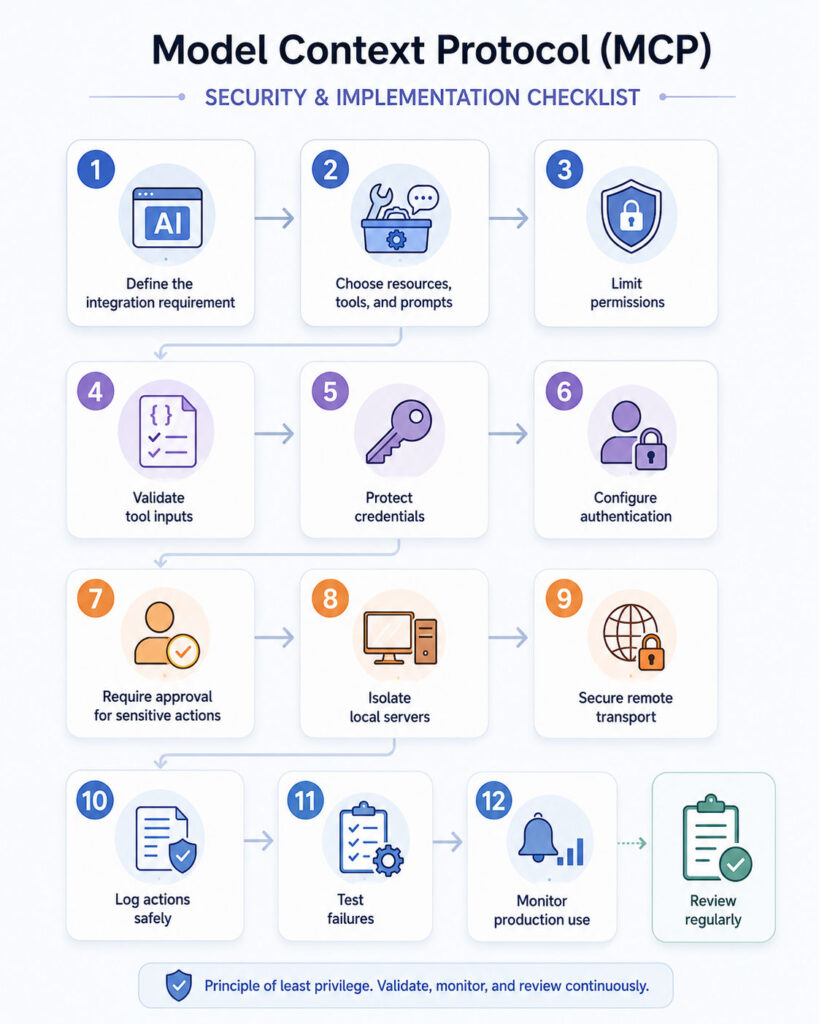
- Define the business requirement.
- Identify the data and actions involved.
- Choose resources, tools, and prompts appropriately.
- Design narrow capability boundaries.
- Create structured input and output schemas.
- Add authentication and authorisation.
- Apply least-privilege access.
- Validate all model-generated arguments.
- Add user confirmation for sensitive actions.
- Test errors, timeouts, and unavailable dependencies.
- Add audit logs and monitoring.
- Test with the intended MCP clients.
- Document security limitations.
- Deploy in a controlled environment.
- Review permissions and updates regularly.
MCP Implementation Checklist
| Area | Recommended Check |
|---|---|
| Purpose | Does the server solve one clear integration problem? |
| Capabilities | Are tools, resources, and prompts separated logically? |
| Permissions | Does the server use least-privilege access? |
| Validation | Are all tool arguments validated? |
| Authentication | Are protected remote operations authorised securely? |
| Consent | Can users review sensitive tool calls? |
| Secrets | Are credentials stored outside prompts and source code? |
| Errors | Does the server handle invalid requests and dependency failures? |
| Monitoring | Are actions logged without exposing sensitive data? |
| Updates | Can server and SDK changes be tested safely? |
Common MCP Mistakes
- Giving a server full system access.
- Installing unverified local packages.
- Using vague tool names and descriptions.
- Combining read, update, and delete actions in one tool.
- Allowing destructive actions without confirmation.
- Passing tokens to unrelated services.
- Trusting model-generated database queries.
- Returning more data than the user needs.
- Ignoring timeouts and remote-server failures.
- Assuming every client supports the same optional features.
Model Context Protocol for Beginners
Beginners can understand MCP through a simple comparison.
The AI host is the application the user interacts with. The MCP client is the connector. The MCP server exposes approved data and actions.
User
↓
AI Application
↓
MCP Client
↓
MCP Server
↓
External system
Start by connecting one low-risk, read-only server. Afterwards, inspect the available tools and observe how the client asks for permission.
Once the basic flow becomes clear, move to custom servers and authenticated remote integrations.
Final Verdict
Model Context Protocol provides a standard way for AI applications to connect with external tools, files, databases, APIs, and workflows.
Its client-server architecture separates the AI host from the systems that provide context and actions. In addition, structured capabilities make integrations more reusable across compatible applications.
However, MCP does not make an AI system accurate, secure, or authorised automatically. Developers must still validate inputs, restrict permissions, protect credentials, review tool calls, and monitor production activity.
Conclusion
MCP can reduce the repeated work involved in connecting AI assistants and agents to external systems.
Use resources for context, tools for controlled actions, and prompts for reusable workflows. Meanwhile, choose local or remote transports according to the deployment requirement.
Most importantly, begin with a narrow and low-risk integration. A carefully designed MCP server with clear permissions provides more value than a broad server that exposes every system to an AI model.

AboutTPJ Technical Team
The Project Jugaad Technical Team creates practical, easy-to-follow content on software development, web technologies, artificial intelligence, cybersecurity, cloud platforms, and digital tools. Our articles are informed by more than 13 years of hands-on experience with .NET, Angular, SQL Server, AWS, WordPress, Linux hosting, application deployment, and real-world troubleshooting. Each guide is researched, reviewed, and updated to provide accurate, useful, and actionable information for developers, businesses, and everyday technology users.