Web Development
JavaScript vs TypeScript is an important comparison for anyone who wants to learn web development, build modern applications, or choose a language for a new project.
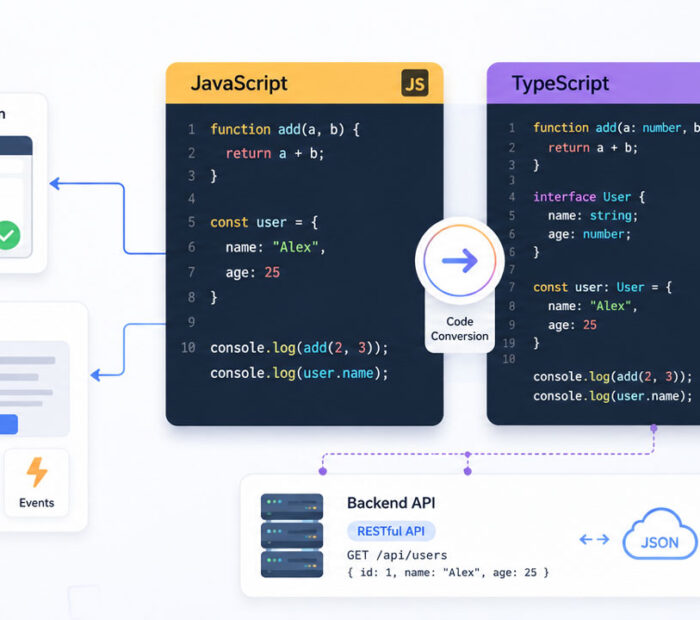
JavaScript powers interactive websites and runs directly in modern browsers. TypeScript builds on JavaScript by adding optional static types and development tools that can catch many mistakes before the code runs.
Therefore, the right choice depends on your experience, project size, team structure, and long-term goals. Beginners should understand JavaScript first, while larger applications often benefit from TypeScript.
What Is JavaScript?
JavaScript is a programming language used to create interactive websites and applications.
For example, developers use JavaScript to handle button clicks, form validation, menus, animations, API requests, dashboards, and real-time updates. It also supports backend development through environments such as Node.js.
JavaScript runs directly in web browsers. As a result, developers can start learning it with only a browser and a simple code editor.
What Is TypeScript?
TypeScript is a programming language that extends JavaScript with optional static typing and additional development features.
Developers write TypeScript code and then convert it into JavaScript. Browsers and most JavaScript environments execute the generated JavaScript rather than the original TypeScript source.
For example, TypeScript can define whether a variable should contain a string, number, object, or another value. Consequently, the development tools can identify many type-related mistakes before the application runs.
Is TypeScript Different from JavaScript?
TypeScript is closely connected to JavaScript rather than being a completely separate language.
Valid JavaScript code can often work inside a TypeScript file. However, TypeScript adds features such as type annotations, interfaces, generics, and stronger editor support.
In simple words, JavaScript provides the foundation, while TypeScript adds a structured layer for safer and more maintainable development.
Quick Difference Between JavaScript and TypeScript
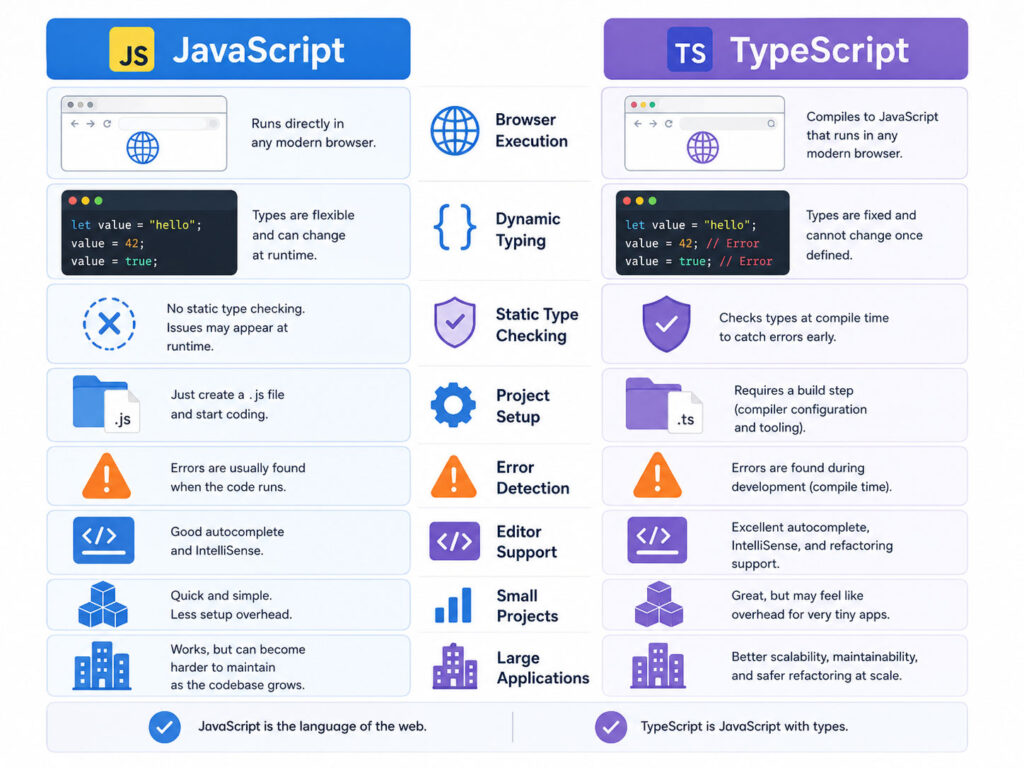
| Point | JavaScript | TypeScript |
|---|---|---|
| Language Type | Dynamically typed | Supports optional static typing |
| Browser Support | Runs directly in browsers | Converts into JavaScript before browser use |
| Error Detection | Many errors appear while the code runs | Many type errors appear during development |
| Setup | Simple setup for beginners | Needs TypeScript tools and configuration |
| Best Fit | Learning, scripts, prototypes, and smaller projects | Large applications, teams, and long-term projects |
Both languages can build strong applications. However, TypeScript adds more checks before the code reaches users.
Simple JavaScript Example
The following JavaScript function adds two values:
function add(firstValue, secondValue) {
      return firstValue + secondValue;
}
console.log(add(10, 20));
JavaScript accepts the values without checking their types in advance. Therefore, passing strings instead of numbers may produce an unexpected result.
Simple TypeScript Example
TypeScript allows the developer to define the expected value types:
function add(firstValue: number, secondValue: number): number {
      return firstValue + secondValue;
}
console.log(add(10, 20));
In this example, the development tools can warn the developer when the function receives a value that is not a number.
How JavaScript Handles Types
JavaScript determines value types while the application runs.
For example, a variable may first contain a number and later contain a string. This flexibility helps developers write code quickly. However, it can also create unexpected errors in larger applications.
let userId = 101;
userId = "USER-101";
JavaScript allows both assignments. Therefore, developers must use tests, validation, naming, and careful code reviews to prevent type-related problems.
How TypeScript Handles Types
TypeScript allows developers to describe the expected shape of data before running the application.
let userId: number = 101;
userId = "USER-101"; // TypeScript reports an error
As a result, developers can detect the incorrect assignment while writing or building the code.
TypeScript can also infer types automatically. Therefore, developers do not need to write a type beside every variable.
let userName = "Riya";
// TypeScript infers that userName is a string.
Benefits of JavaScript
JavaScript remains essential because browsers understand it directly.
- It has a simple starting setup.
- It supports frontend and backend development.
- It has a large ecosystem of libraries and frameworks.
- It works well for scripts, prototypes, websites, and applications.
- It helps beginners understand web programming fundamentals.
- It remains the foundation for learning TypeScript.
In addition, JavaScript gives developers quick feedback because they can run code immediately in a browser.
Limitations of JavaScript
JavaScript’s flexibility can also create challenges.
- Type-related mistakes may appear only while the application runs.
- Large codebases can become harder to understand.
- Changing shared data structures may break several features.
- Editor suggestions may become less accurate when data shapes remain unclear.
- Team members may interpret the same object differently.
However, good testing, documentation, linting, and coding standards can reduce these risks.
Benefits of TypeScript
TypeScript helps developers create clearer and more predictable code.
- Static types can catch many mistakes early.
- Editors can provide stronger suggestions and navigation.
- Interfaces can document object structures.
- Refactoring becomes safer in larger codebases.
- Teams can understand function inputs and outputs more easily.
- Modern frameworks and tools often provide strong TypeScript support.
Consequently, TypeScript can reduce confusion when many developers work on the same project.
Limitations of TypeScript
TypeScript adds useful checks, but it also introduces extra work.
- Beginners must learn JavaScript concepts and TypeScript types.
- Projects need TypeScript configuration and build tools.
- Complex types can become difficult to understand.
- Type errors may slow early development when the project setup is unclear.
- Incorrect type assertions can create a false sense of safety.
Moreover, TypeScript cannot prevent every runtime error. Developers still need validation, testing, security checks, and error handling.
JavaScript vs TypeScript for Small Projects
JavaScript may be enough for a small script, simple landing page, quick prototype, or short learning project.
Its lower setup requirement helps developers test an idea quickly. In addition, beginners can focus on variables, functions, conditions, loops, events, and browser APIs without learning type syntax immediately.
Still, TypeScript can work well for small projects when the developer already understands it or expects the project to grow.
JavaScript vs TypeScript for Large Applications
TypeScript often becomes more useful as an application grows.
Large applications usually contain many components, services, APIs, models, and shared functions. Therefore, clear types can help teams understand how these parts connect.
For example, an interface can describe the expected user data:
interface User {
  id: number;
  name: string;
  email: string;
  isActive: boolean;
}
If the data structure changes, TypeScript can highlight affected areas. As a result, developers can update the project more safely.
JavaScript vs TypeScript for Frontend Development
Both JavaScript and TypeScript support modern frontend development.
JavaScript works with browser APIs and popular libraries. Meanwhile, TypeScript adds stronger development support for components, application state, API responses, and shared data models.
Angular uses TypeScript as its primary development language. React and Vue also support TypeScript, although developers can use JavaScript with them.
Therefore, TypeScript becomes especially useful for structured frontend applications that will grow over time.
JavaScript vs TypeScript for Backend Development
Developers can use both languages for backend development through Node.js and related frameworks.
JavaScript offers a fast starting point for APIs, automation, and smaller services. In contrast, TypeScript can make request models, database entities, configuration, and service contracts easier to understand.
For a large backend application, clear types may reduce errors between controllers, services, repositories, and external APIs.
Which One Is Easier to Learn?
JavaScript is easier to start because it requires fewer tools and concepts.
A beginner can write JavaScript in an HTML page or browser console and see the result immediately. Therefore, it provides a practical introduction to programming and web development.
TypeScript requires additional knowledge about types, configuration, and code conversion. However, it becomes easier once the learner understands JavaScript basics.
Should Beginners Learn JavaScript or TypeScript First?
Most beginners should learn JavaScript first.
Start with variables, data types, arrays, objects, functions, conditions, loops, events, promises, modules, and asynchronous programming. Next, build a few small projects.
Afterwards, learn TypeScript concepts such as type annotations, unions, interfaces, type aliases, generics, and type narrowing.
This order helps learners understand which problems TypeScript solves instead of treating its type system as unnecessary syntax.
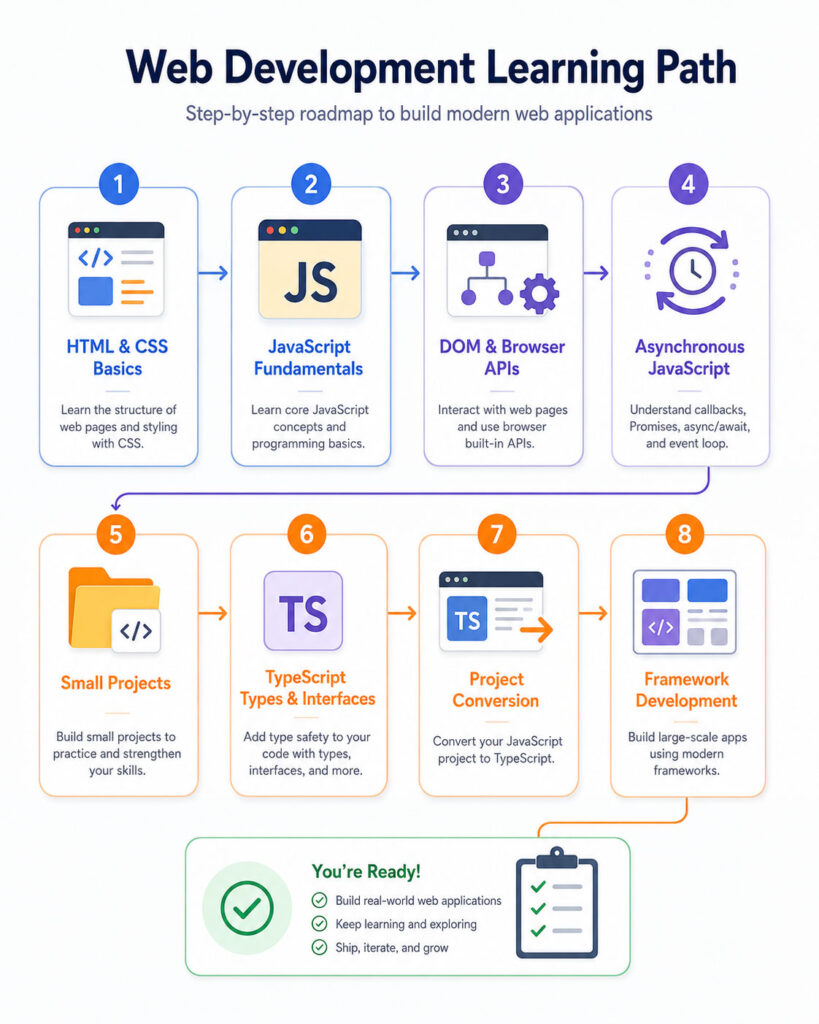
Recommended Learning Path
- Learn HTML and CSS basics.
- Understand JavaScript variables, functions, arrays, and objects.
- Learn DOM events and browser APIs.
- Study promises, asynchronous functions, and API requests.
- Build small JavaScript projects.
- Learn TypeScript types and interfaces.
- Convert a small JavaScript project to TypeScript.
- Use TypeScript with a frontend or backend framework.
Most importantly, practise by building real features instead of reading syntax alone.
Can You Convert JavaScript to TypeScript?
Yes, teams can move a JavaScript project to TypeScript gradually.
First, they can add TypeScript tooling and allow existing JavaScript files. Next, they can convert one file or feature at a time.
During migration, developers should add useful types instead of hiding every warning with broad types or unsafe assertions.
A gradual approach reduces risk and allows the application to continue working throughout the migration.
JavaScript or TypeScript for Jobs
Developers benefit from learning both because TypeScript depends on JavaScript concepts.
JavaScript knowledge helps with browser behavior, asynchronous code, frameworks, Node.js, and debugging. Meanwhile, TypeScript knowledge helps with structured projects, typed APIs, team development, and modern tooling.
Therefore, learners should not replace JavaScript fundamentals with TypeScript syntax. Strong JavaScript skills make TypeScript development much easier.
Common TypeScript Mistakes
- Using
anyeverywhere to silence type errors. - Adding complicated types when a simple type would work.
- Using type assertions without checking runtime data.
- Assuming types replace validation and testing.
- Ignoring strict compiler options without understanding them.
- Writing duplicate types instead of reusing shared models.
TypeScript provides the most value when types describe real application data accurately.
Which One Should You Choose?
| Your Situation | Recommended Starting Point |
|---|---|
| You are completely new to web development | Learn JavaScript first |
| You are building a small script or quick prototype | JavaScript may be enough |
| You are building a large application | Consider TypeScript |
| Several developers share the same codebase | TypeScript can improve clarity |
| You are learning Angular | Learn JavaScript basics, then TypeScript |
| You want modern frontend or backend development skills | Learn both JavaScript and TypeScript |
Final Verdict
JavaScript and TypeScript are not competing choices in the usual sense. Instead, they form a natural learning and development path.
JavaScript remains the essential foundation for web development. TypeScript then adds structure, stronger tooling, and earlier error detection.
Therefore, beginners should start with JavaScript and add TypeScript after understanding the core language. Experienced developers can choose TypeScript when project size, teamwork, and long-term maintenance justify the additional setup.
Conclusion
JavaScript vs TypeScript becomes easier to understand when you focus on the project need.
Choose JavaScript for learning fundamentals, quick experiments, and simple projects. In contrast, choose TypeScript when the application needs clear data structures, safer refactoring, stronger editor support, and long-term maintainability.
For the strongest web development skills, learn both. Begin with JavaScript, practise real projects, and then use TypeScript to make larger applications easier to manage.

AboutTPJ Technical Team
The Project Jugaad Technical Team creates practical, easy-to-follow content on software development, web technologies, artificial intelligence, cybersecurity, cloud platforms, and digital tools. Our articles are informed by more than 13 years of hands-on experience with .NET, Angular, SQL Server, AWS, WordPress, Linux hosting, application deployment, and real-world troubleshooting. Each guide is researched, reviewed, and updated to provide accurate, useful, and actionable information for developers, businesses, and everyday technology users.