Technology Guide
The HDR10 vs Dolby Vision vs HDR10+ comparison matters when buying a television, streaming device, monitor, projector, or media player. All three formats can display high-dynamic-range video, but they handle brightness, colour, contrast, and tone mapping differently.
HDR10 is the most common baseline format and uses static metadata for the complete movie or programme. Dolby Vision and HDR10+, by contrast, can use dynamic metadata that changes according to individual scenes or frames.
However, the format logo alone does not guarantee better picture quality. The television’s panel, peak brightness, black levels, colour volume, local dimming, tone-mapping quality, and room lighting often create a larger visible difference.
Therefore, buyers should compare both the supported HDR formats and the television’s real display performance.
HDR10 vs Dolby Vision vs HDR10+: Quick Answer
- Choose a television with strong HDR10 performance because HDR10 remains the common compatibility baseline.
- Prefer Dolby Vision support when your favourite streaming services, discs, or playback devices use Dolby Vision.
- Consider HDR10+ when your television, streaming platforms, games, and media devices support the format.
- Select a television supporting both dynamic formats when broad compatibility is important and the model fits your budget.
- Prioritise panel quality and brightness because a weak display cannot create excellent HDR merely by recognising a premium format.
- Verify the complete playback chain, including the content, application, player, HDMI connection, receiver, and television.
In general, Dolby Vision and HDR10+ provide more flexible scene-by-scene guidance than standard HDR10. Nevertheless, a well-performing HDR10 television can look better than a poor television displaying a dynamic format.
What Is HDR?
HDR stands for High Dynamic Range. It allows compatible video to represent a wider range between dark and bright parts of an image.
For example, an HDR scene can preserve bright sunlight, reflections, fire, stars, and dark shadow details at the same time. Standard Dynamic Range, commonly called SDR, has less brightness and colour range available for the same scene.
HDR can improve:
- Bright highlights.
- Shadow detail.
- Perceived contrast.
- Colour depth.
- Colour volume.
- Realism in reflective surfaces.
- Detail in difficult lighting.
However, HDR does not simply make the complete picture brighter. Instead, it gives filmmakers and display devices more range for controlling where brightness and colour appear.
HDR vs 4K Resolution
HDR and 4K describe different parts of picture quality.
4K refers mainly to image resolution, which determines the number of pixels. HDR, meanwhile, concerns brightness range, contrast, colour, and image mapping.
| Area | 4K | HDR |
|---|---|---|
| Main purpose | Increases image detail through more pixels | Expands brightness, contrast, and colour presentation |
| Common measurement | Pixel dimensions | Brightness, colour depth, metadata, and tone mapping |
| Visible benefit | Sharper fine detail | Brighter highlights and deeper visual range |
| Dependency | Screen size and viewing distance | Panel brightness, black level, and format support |
A television can therefore support 4K without producing impressive HDR. Similarly, some HDR content may use a resolution below 4K.
HDR vs SDR
SDR was designed around older display and broadcast limitations. As a result, content creators had a smaller range for representing extreme brightness and colour.
HDR provides a larger creative range. For instance, a sunset may show bright sunlight, coloured clouds, and detail in the darker landscape without compressing every element into a narrow brightness range.
Nevertheless, HDR quality varies significantly. A budget television may accept an HDR signal but lack enough brightness or contrast to show a strong improvement over SDR.
What Is Peak Brightness?
Peak brightness describes how bright a display can become, usually for a limited portion of the screen and sometimes for a limited duration.
Brightness is commonly measured in nits. One nit represents one candela per square metre.
Higher peak brightness can help a television reproduce:
- Sunlight.
- Reflections.
- Explosions.
- Headlights.
- Fire.
- Bright clouds.
- Specular highlights.
However, one peak-brightness number does not describe the complete performance. Sustained brightness, window size, panel temperature, power limits, and picture mode also affect the result.
What Are Black Levels?
Black level describes how dark the display can make the darkest areas of an image.
A television with deep black levels can create strong perceived contrast even when its peak brightness is lower than that of another model.
OLED televisions can turn individual pixels off, which produces extremely dark blacks. Mini-LED LCD televisions, by comparison, use many local-dimming zones to reduce backlight output behind dark areas.
Therefore, the best HDR display is not always the model with the highest brightness number. Contrast between the darkest and brightest parts matters as well.
What Is Wide Colour Gamut?
Wide Colour Gamut allows compatible content and displays to reproduce a broader range of colours than older SDR systems.
This capability can improve:
- Deep reds.
- Rich greens.
- Bright blues.
- Natural skin tones.
- Colour transitions.
- Saturated highlights.
However, a television must have sufficient colour volume to retain strong colour at higher brightness levels. Otherwise, bright colours may become less saturated.
What Is Colour Depth?
Colour depth describes how many tonal values a video signal can represent.
HDR10 and HDR10+ commonly use a 10-bit video foundation. Consequently, they can represent more tonal steps than typical 8-bit SDR content.
Dolby Vision supports workflows with greater precision within its broader specification and processing system. However, the final television panel and playback chain may still operate with practical hardware limitations.
Therefore, buyers should not assume that a larger marketing number automatically creates a visible improvement on every display.
What Is Colour Banding?
Colour banding appears when a smooth gradient breaks into visible stripes or steps.
It may appear in:
- Blue skies.
- Sunsets.
- Dark walls.
- Fog.
- Smoke.
- Animated backgrounds.
Higher colour depth can reduce banding. However, source compression, streaming quality, television processing, and the original master also affect the result.
What Is Tone Mapping?
HDR content may contain highlights brighter than a television can physically display. Tone mapping adjusts that content to fit within the display’s capabilities.
For example, a programme may contain highlights mastered above the television’s peak brightness. The display must then decide how to preserve detail without making the complete image look flat or clipping bright objects.
A good tone-mapping system balances:
- Highlight detail.
- Overall brightness.
- Shadow visibility.
- Colour accuracy.
- Creative intent.
Consequently, two televisions receiving the same HDR10 signal can produce noticeably different pictures.
What Is HDR Metadata?
Metadata provides information that helps a television interpret and display HDR content.
Depending on the format, metadata can describe:
- Mastering-display characteristics.
- Maximum content brightness.
- Average brightness information.
- Scene-level tone-mapping guidance.
- Frame-level image adjustments.
- Target display behaviour.
However, the television still performs its own processing. Metadata guides the display, but it does not replace the display’s panel or picture-processing capabilities.
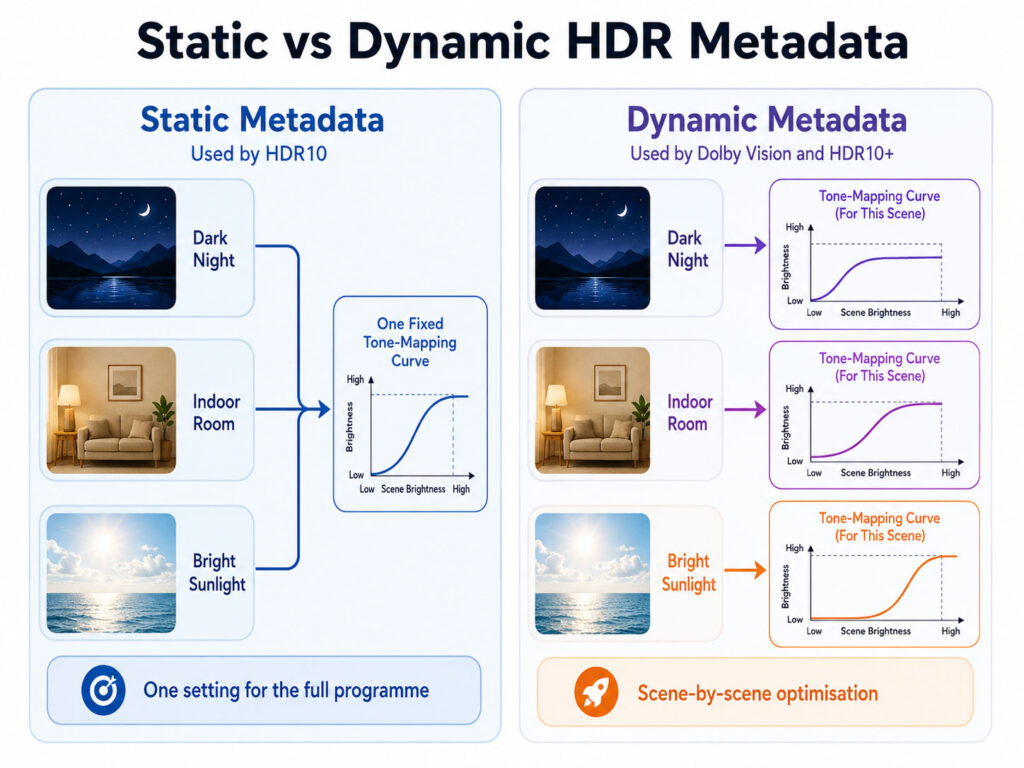
Static vs Dynamic HDR Metadata
Static metadata provides one set of brightness information for the complete movie, episode, or programme.
Dynamic metadata, by contrast, can provide different guidance for different scenes or frames.
| Area | Static Metadata | Dynamic Metadata |
|---|---|---|
| Adjustment frequency | One main set for the complete programme | Can change between scenes or frames |
| Dark and bright scenes | Uses one overall reference | Can optimise each scene separately |
| Common format | HDR10 | Dolby Vision and HDR10+ |
| Tone-mapping flexibility | Depends heavily on television processing | Provides more detailed content guidance |
| Compatibility | Very broad | Requires matching format support |
Dynamic metadata can be especially useful when a programme moves between very dark and very bright scenes. Nevertheless, the visible improvement depends on the television and content mastering.
What Is HDR10?
HDR10 is an open and widely supported HDR media profile.
It uses a 10-bit video signal, the PQ brightness-transfer system, wide-colour information, and static metadata.
HDR10 is commonly supported by:
- HDR televisions.
- Streaming devices.
- Game consoles.
- 4K Blu-ray players.
- Monitors.
- Projectors.
- Computers and graphics hardware.
Because it serves as a broad baseline, content available in Dolby Vision or HDR10+ commonly includes an HDR10-compatible presentation or fallback.
How HDR10 Static Metadata Works
HDR10 can provide one set of information describing the content’s mastering display and brightness characteristics.
The television then uses that information for the complete programme. However, one overall setting may not suit every scene equally.
For example, a dark night scene and a bright snow scene may receive the same general metadata reference even though their ideal tone mapping differs.
Consequently, the television’s own processing becomes especially important with HDR10.
Advantages of HDR10
- Very broad television support.
- Common availability across streaming and discs.
- No proprietary consumer-format requirement.
- Strong compatibility with game consoles and monitors.
- Useful fallback when dynamic formats are unsupported.
- Simple playback across mixed equipment.
Therefore, HDR10 remains important even when a television also supports Dolby Vision or HDR10+.
Limitations of HDR10
- One static metadata set serves the complete programme.
- Television tone mapping has a major influence.
- Scene-specific optimisation is not built into the standard metadata approach.
- Budget displays may clip highlights or darken the image.
- Manufacturer processing can produce inconsistent results.
However, advanced televisions can analyse HDR10 content dynamically through their own processing. This television-generated tone mapping is different from receiving creator-provided dynamic metadata.
What Is Dolby Vision?
Dolby Vision is a proprietary HDR system that can use dynamic metadata to optimise content for compatible displays.
The metadata can provide scene-specific or shot-specific information. As a result, the television receives more detailed guidance than it receives from standard HDR10 metadata.
Dolby Vision appears across:
- Streaming services.
- Movies and television programmes.
- 4K Blu-ray discs.
- Selected games.
- Smartphones and tablets.
- Televisions and projectors.
However, every component in the playback chain must support the required Dolby Vision profile and signal path.
How Dolby Vision Dynamic Metadata Works
Dolby Vision metadata can change throughout the content.
For instance, a dark indoor scene can receive different mapping guidance from a bright outdoor scene. The compatible television then uses that information together with its own display capabilities.
Consequently, a lower-brightness television can receive mapping tailored more closely to its limits.
Nevertheless, Dolby Vision does not make all televisions look identical. Panel technology, processing, picture modes, and calibration still affect the result.
Advantages of Dolby Vision
- Dynamic scene-level or shot-level metadata.
- Strong adoption across premium streaming content.
- Support across many televisions and playback devices.
- Content mapping for displays with different capabilities.
- Compatibility with selected gaming systems.
- Support for advanced ambient-light features on suitable televisions.
Limitations of Dolby Vision
- Not every television manufacturer supports it.
- Some streaming devices or HDMI inputs may require configuration.
- Gaming support varies by console, title, refresh rate, and television.
- Picture modes may appear darker in bright rooms.
- The format uses a licensed proprietary ecosystem.
- Unsupported equipment may fall back to HDR10 or another presentation.
What Is Dolby Vision IQ?
Dolby Vision IQ combines Dolby Vision information with a compatible television’s ambient-light sensor and content-aware processing.
In a bright room, the television may adjust the presentation so dark details remain visible. Meanwhile, a dark-room presentation can remain closer to cinema-style viewing.
However, Dolby Vision IQ availability depends on the television model. Therefore, ordinary Dolby Vision support does not automatically include every Dolby Vision IQ feature.
What Is Dolby Vision 2?
Dolby announced Dolby Vision 2 in September 2025 as a newer generation of its picture-quality platform.
The system introduces additional features designed to improve dark-scene visibility, ambient-light adaptation, motion handling, and display-aware presentation.
However, buyers should distinguish between an announced standard and features currently available on a specific television.
Therefore, check the exact model specification rather than assuming that every Dolby Vision television supports Dolby Vision 2.
What Is HDR10+?
HDR10+ extends the HDR10 foundation by adding dynamic metadata.
The metadata can guide tone mapping on a scene-by-scene or frame-by-frame basis. Consequently, the display can adapt more accurately when brightness changes throughout the programme.
HDR10+ is designed as a royalty-free format for adopters and maintains compatibility with the HDR10 base presentation.
It appears in:
- Streaming films and programmes.
- Selected televisions.
- 4K Blu-ray content.
- Smartphones and tablets.
- Computer monitors.
- Supported games and graphics hardware.
How HDR10+ Dynamic Metadata Works
HDR10+ metadata supplies changing information about brightness, contrast, and colour.
For example, a television may receive one mapping instruction for a dim interior and another for a bright explosion.
As a result, the television can preserve highlight and shadow detail more effectively than a simple one-setting approach.
However, the display must be certified or otherwise compatible with HDR10+ to use the dynamic metadata.
Advantages of HDR10+
- Dynamic scene-level or frame-level metadata.
- Backward compatibility with the HDR10 foundation.
- Royalty-free adoption model.
- Support across selected streaming services and devices.
- Ambient-light adaptation on compatible displays.
- Gaming features for supported hardware.
Limitations of HDR10+
- Television support varies between manufacturers.
- Some popular content libraries favour Dolby Vision.
- Playback devices may not preserve HDR10+ metadata.
- Receivers and switchers can interrupt compatibility.
- Games require matching source and display support.
- Consumers may struggle to confirm whether playback is using HDR10+.
What Is HDR10+ Adaptive?
HDR10+ Adaptive uses dynamic metadata together with a compatible display’s ambient-light sensor.
As room brightness changes, the television can adjust tone mapping to preserve detail and visibility.
For example, a dark scene may receive a controlled brightness adjustment in a well-lit living room.
Nevertheless, HDR10+ Adaptive remains dependent on television certification, sensor capability, picture settings, and compatible HDR10+ content.
What Is HDR10+ Advanced?
HDR10+ Advanced was announced in December 2025 as an expanded dynamic-metadata system.
Its features include enhanced brightness information, local tone-mapping guidance, genre-based optimisation, advanced colour control, motion-related metadata, and cloud-gaming support.
However, early availability may remain limited while television manufacturers, content platforms, and playback devices adopt the new capabilities.
Therefore, buyers should not confuse ordinary HDR10+ support with HDR10+ Advanced certification.
HDR10 vs Dolby Vision vs HDR10+ Comparison
| Area | HDR10 | Dolby Vision | HDR10+ |
|---|---|---|---|
| Metadata | Static | Dynamic | Dynamic |
| Adjustment | One general set for the programme | Scene-level or shot-level guidance | Scene-level or frame-level guidance |
| Base video depth | 10-bit | Supports advanced Dolby Vision workflows | 10-bit HDR10 foundation |
| Licensing approach | Open baseline format | Proprietary licensed ecosystem | Royalty-free adopter model |
| Television support | Very broad | Broad but manufacturer-dependent | Broad but manufacturer-dependent |
| Streaming support | Very broad | Strong across major premium content | Growing across major platforms |
| Gaming support | Very broad | Selected consoles, PCs, and games | Selected PCs, displays, and games |
| Fallback behaviour | Native baseline | Often falls back to HDR10 when available | Retains HDR10-compatible presentation |
| Ambient-light option | Depends on television processing | Dolby Vision IQ on compatible TVs | HDR10+ Adaptive on compatible TVs |
| Best advantage | Compatibility | Dynamic ecosystem and content support | Dynamic metadata with HDR10 compatibility |
Which HDR Format Has the Best Picture Quality?
Dolby Vision and HDR10+ have a technical advantage over standard HDR10 because they can provide dynamic metadata.
However, that advantage does not guarantee a better image in every comparison.
A high-quality television displaying HDR10 can outperform a low-brightness television displaying Dolby Vision or HDR10+. Similarly, poor source mastering can limit every format.
Ultimately, the visible result depends on:
- The television panel.
- Peak and sustained brightness.
- Black-level performance.
- Local dimming.
- Colour volume.
- Content mastering.
- Tone-mapping quality.
- Picture-mode settings.
- Room lighting.
- Format compatibility across the playback chain.
HDR Format Compatibility
For an HDR format to work correctly, every important part of the playback chain must support it.
The chain may include:
- The movie, programme, or game.
- The streaming application.
- The playback device.
- The operating system.
- The HDMI output.
- The HDMI cable.
- An AV receiver or soundbar.
- The television input.
- The television itself.
If one component lacks support, the system may fall back to HDR10, SDR, or another available presentation.
Content Support Matters
A television cannot display Dolby Vision or HDR10+ metadata when the selected content does not contain it.
Therefore, buyers should review the services and sources they use most often.
For example, one household may primarily watch streaming films available in Dolby Vision. Another may use a platform, television, and media library with strong HDR10+ support.
Consequently, the most useful format depends partly on the viewer’s content habits.
Streaming Services and HDR Formats
Streaming platforms may support more than one HDR format. However, availability can differ by programme, device, subscription plan, application version, and region.
A title may also be available in Dolby Vision on one device but only HDR10 on another.
Therefore, verify:
- The content’s format badge.
- The supported subscription tier.
- The playback device’s specification.
- The television’s detected signal.
- The streaming application version.
- The required internet speed.
Moreover, platform support can change. Buyers should therefore check current official documentation when a particular format is essential.
Streaming Quality and Compression
HDR format support does not determine the complete streaming quality.
Video bitrate, compression, resolution, internet stability, and application settings also influence the picture.
For example, a heavily compressed Dolby Vision stream may show more artefacts than a high-bitrate HDR10 disc.
Therefore, compare the source quality as well as the metadata format.
4K Blu-ray and HDR Formats
4K Ultra HD Blu-ray discs commonly include HDR10 because it provides broad compatibility.
Selected discs add Dolby Vision or HDR10+ metadata. However, the disc player, receiver, and television must support the same optional format.
Before buying a disc or player, check:
- The format printed on the disc package.
- Player support for Dolby Vision or HDR10+.
- Receiver passthrough compatibility.
- Television input configuration.
- Firmware updates.
A disc containing an optional dynamic format can usually retain an HDR10-compatible base for unsupported equipment.
Streaming Device Compatibility
External streaming devices vary in their HDR capabilities.
Some models support HDR10, Dolby Vision, and HDR10+. Others support only one dynamic format or limit support to specific applications.
In addition, an older streaming device may receive a software update that changes format support.
Therefore, check the exact model rather than assuming that every device within one product family behaves identically.
Built-In TV Apps vs External Streaming Devices
A television’s built-in application may support a different HDR format from an external streaming player.
For example, the built-in application may activate Dolby Vision, while the external player sends only HDR10 because of its settings or capabilities.
Conversely, an external device may add HDR10+ support that the television’s older application lacks.
Therefore, compare both playback paths before assuming that the television is the problem.
HDR Formats for Gaming
HDR gaming introduces additional requirements beyond movie playback.
Games need low latency, correct calibration, stable frame rates, and compatibility with features such as:
- 4K resolution.
- 120Hz refresh rate.
- Variable Refresh Rate.
- Auto Low Latency Mode.
- Game-mode tone mapping.
- Console or PC HDR calibration.
Consequently, a television may support Dolby Vision for films but offer limited refresh-rate or processing options for Dolby Vision gaming.
HDR10 for Gaming
HDR10 remains the most broadly supported HDR gaming format.
Game consoles, PCs, and monitors commonly use it. In addition, operating systems and consoles often provide HDR calibration tools.
However, the game, device, and television may each apply their own tone mapping. Poor configuration can therefore make highlights look clipped or dark areas appear washed out.
Dolby Vision Gaming
Dolby Vision gaming is available on selected consoles, computers, displays, and games.
Compatible systems can combine dynamic Dolby processing with gaming presentation. Moreover, some supported setups can operate at high refresh rates.
Nevertheless, users should verify:
- Console or graphics-card support.
- The game’s HDR implementation.
- Television refresh-rate limits.
- Input-lag performance.
- Variable Refresh Rate compatibility.
- The correct HDMI port.
A television supporting Dolby Vision movies does not automatically provide the best Dolby Vision gaming experience.
HDR10+ Gaming
HDR10+ Gaming adds gaming-focused features to the HDR10+ ecosystem.
Supported capabilities include source-side tone mapping, automated HDR calibration, low-latency display modes, and compatibility with high-refresh-rate gaming workflows.
However, both the source and the display need compatible support. Furthermore, the game or graphics system must provide the required HDR10+ Gaming information.
Therefore, the logo matters only when the complete gaming setup supports it.
Console Compatibility
Console HDR support differs between models and software versions.
One console may support HDR10 and Dolby Vision, while another mainly uses HDR10 for games.
Consequently, buyers should review the current specifications of their exact console rather than choosing a television based on a general brand assumption.
PC HDR Compatibility
Computer HDR depends on the operating system, graphics card, driver, application, game, monitor, and cable connection.
A monitor may advertise HDR10 input support but still lack the brightness, contrast, or local dimming needed for strong HDR.
Therefore, PC users should review:
- Display certification.
- Peak brightness.
- Local dimming.
- Colour gamut.
- Refresh rate.
- Graphics-driver support.
- Operating-system HDR calibration.
- Game-specific compatibility.
HDR Monitors
Many computer monitors accept HDR10 because it provides a common input format.
However, entry-level monitors may produce only a small improvement over SDR.
For a convincing HDR experience, look beyond the HDR logo and examine brightness, native contrast, local dimming, black levels, and colour performance.
Moreover, desktop use can present different requirements from television viewing, including text clarity, windowed HDR, and consistent brightness.
HDR Projectors
Projectors cannot usually produce the same peak brightness as modern televisions.
Therefore, tone mapping becomes especially important.
A projector may support HDR10, Dolby Vision through selected systems, or HDR10+ depending on its design. However, screen size, room darkness, screen material, and projector brightness heavily influence the result.
Consequently, format support should not replace a proper projector and room evaluation.
HDR on Smartphones and Tablets
Selected smartphones and tablets support HDR10, Dolby Vision, HDR10+, or multiple formats.
These devices may stream HDR video or record content in an HDR format.
However, small screens, automatic brightness, battery limits, outdoor use, and application support affect the experience.
Therefore, smartphone format support is useful but should not be compared directly with a large premium television.
Does HDMI Version Control HDR Format Support?
HDMI carries HDR video between compatible devices, but the version label alone does not confirm every feature.
For example, a device may support Dolby Vision or HDR10+ through a particular HDMI implementation without exposing every optional gaming feature.
Therefore, check the manufacturer’s listed capabilities for:
- HDR10.
- Dolby Vision.
- HDR10+.
- 4K at 120Hz.
- Variable Refresh Rate.
- Enhanced Audio Return Channel.
- Required bandwidth.
Do You Need a Special HDMI Cable?
An HDMI cable must support the required bandwidth and remain reliable at the chosen length.
For 4K HDR movie playback, a suitable certified high-speed cable may be sufficient. However, 4K at 120Hz, Variable Refresh Rate, and other higher-bandwidth features may require an Ultra High Speed HDMI cable or another officially specified solution.
A faulty cable can cause:
- Black screens.
- Signal dropouts.
- Incorrect colour.
- Loss of HDR.
- Reduced resolution.
- Refresh-rate limitations.
Nevertheless, an expensive decorative cable does not improve digital picture quality when a suitable certified cable already transmits the signal correctly.
AV Receiver and Soundbar Passthrough
An AV receiver, HDMI switch, or soundbar placed between the source and television must pass through the selected HDR format.
If it lacks Dolby Vision or HDR10+ support, the source may fall back to HDR10 or SDR.
Therefore, review:
- Video passthrough formats.
- Maximum resolution and refresh rate.
- HDMI input settings.
- Firmware updates.
- Enhanced-format port modes.
Alternatively, the source can connect directly to the television while audio returns through ARC or eARC, depending on the equipment.
HDR Format Fallback
Fallback occurs when the preferred format is unavailable but another compatible presentation exists.
For example:
- Dolby Vision content may play as HDR10.
- HDR10+ content can retain its HDR10 base.
- HDR content may play as SDR on unsupported equipment.
However, fallback behaviour depends on the specific content and delivery method.
Therefore, do not assume that every file or disc contains every possible fallback layer.
Why the TV Shows HDR10 Instead of Dolby Vision
The television may show HDR10 when:
- The selected title lacks Dolby Vision.
- The playback application does not support it.
- The streaming plan excludes premium HDR.
- The external device outputs HDR10 only.
- The HDMI port is using a restricted mode.
- The receiver cannot pass Dolby Vision.
- A software or firmware update is missing.
- The television’s Dolby Vision mode is disabled.
Therefore, test the same title through the television’s built-in application to isolate the external playback chain.
Why the TV Shows HDR10 Instead of HDR10+
HDR10+ may fall back to HDR10 when:
- The content contains only HDR10.
- The streaming device strips the dynamic metadata.
- The television lacks HDR10+ support.
- The application does not deliver HDR10+ on that device.
- The AV receiver cannot pass the signal.
- The file container or player does not preserve metadata.
Consequently, every component should be checked before blaming the content or television.
Picture Quality Depends on the Television
HDR metadata guides the television, but the television determines what it can physically display.
Important hardware characteristics include:
- Panel technology.
- Peak brightness.
- Sustained brightness.
- Native contrast.
- Local-dimming zones.
- Black uniformity.
- Colour volume.
- Viewing angles.
- Processing quality.
Therefore, buyers should read model-specific measurements and reviews rather than relying only on the product box.
OLED and HDR Formats
OLED televisions offer extremely deep black levels because individual pixels can turn off.
As a result, they can create impressive HDR contrast even when their full-screen brightness is lower than that of some Mini-LED televisions.
However, very bright rooms and large bright scenes may favour a high-output LCD model.
Dolby Vision, HDR10+, and HDR10 can all look excellent on a capable OLED television.
Mini-LED and HDR Formats
Mini-LED televisions use a powerful backlight divided into many local-dimming zones.
Consequently, they can achieve high highlight brightness and strong full-screen output.
However, bright objects on dark backgrounds may produce blooming when the dimming zones cannot match every small object precisely.
A strong tone-mapping system and accurate local dimming remain important regardless of the HDR format.
QLED and HDR
QLED generally refers to an LCD television using quantum-dot technology to improve colour performance.
However, the term alone does not describe black levels, dimming-zone count, or HDR brightness.
Therefore, one QLED television may provide excellent HDR, while another may offer only basic entry-level performance.
Edge-Lit TVs and HDR
Edge-lit televisions place backlights around the edges of the panel rather than behind many local zones.
These models can accept HDR signals, but they may struggle with deep blacks, precise highlights, and dark-scene uniformity.
Consequently, Dolby Vision or HDR10+ cannot fully correct the display’s physical limitations.
Peak Brightness Is Not Everything
A high peak-brightness result can improve sparkling highlights. However, it does not guarantee accurate HDR.
A television may become very bright while:
- Raising black levels.
- Clipping highlight detail.
- Oversaturating colours.
- Changing the intended image.
- Dimming large bright scenes.
Therefore, brightness should be evaluated together with contrast, colour, and tone mapping.
Room Lighting and HDR
A dark room allows viewers to see subtle shadow detail and deep blacks more easily.
A bright living room, by contrast, can make dark cinematic content appear difficult to see.
Features such as Dolby Vision IQ and HDR10+ Adaptive attempt to account for ambient light on compatible televisions.
However, reducing reflections, controlling direct sunlight, and choosing a suitable screen finish can improve every format.
Picture Modes
HDR televisions often provide different picture modes for cinema, standard viewing, vivid content, games, and filmmaker-oriented presentation.
The most accurate mode may look darker than a shop-floor demonstration mode.
Therefore, viewers should select a mode suited to the room and content rather than assuming that the brightest option is best.
Dynamic Tone Mapping on the TV
Some televisions analyse HDR10 content and adjust tone mapping dynamically even though HDR10 carries static metadata.
This manufacturer-generated processing may improve visibility and highlight detail.
However, it can also change the creator’s intended brightness.
Consequently, users may prefer one setting for daytime viewing and another for a dark cinema-style room.
Filmmaker Mode and HDR
Filmmaker-oriented picture modes aim to reduce unnecessary processing and preserve the original frame rate, colour, and creative presentation.
However, a very accurate mode may look too dark in a brightly lit room.
Therefore, accuracy and practical visibility must be balanced according to the viewing environment.
Is Dolby Vision Always Better Than HDR10?
No. Dolby Vision offers more advanced metadata capability, but the result depends on implementation.
A poorly tuned Dolby Vision picture mode may look less appealing than excellent HDR10 tone mapping on another television.
Moreover, not every title receives equally careful mastering.
Therefore, compare actual television performance rather than assuming that the format name decides the result.
Is HDR10+ Always Better Than HDR10?
HDR10+ can provide more precise guidance because its metadata changes with the content.
However, a television with excellent HDR10 processing may already analyse scenes effectively.
In addition, poorly mastered HDR10+ content cannot overcome weak source quality.
Consequently, HDR10+ provides useful potential rather than a guaranteed improvement in every scene.
Dolby Vision vs HDR10+
Dolby Vision and HDR10+ both use dynamic metadata, so their main consumer difference often involves ecosystem support.
Dolby Vision has strong support across many premium televisions, streaming titles, discs, and selected gaming devices.
HDR10+, meanwhile, provides a royalty-free dynamic format built on the HDR10 foundation and is supported across a growing range of services and devices.
Therefore, the better choice depends on the content and equipment the viewer actually uses.
How to Choose an HDR Television
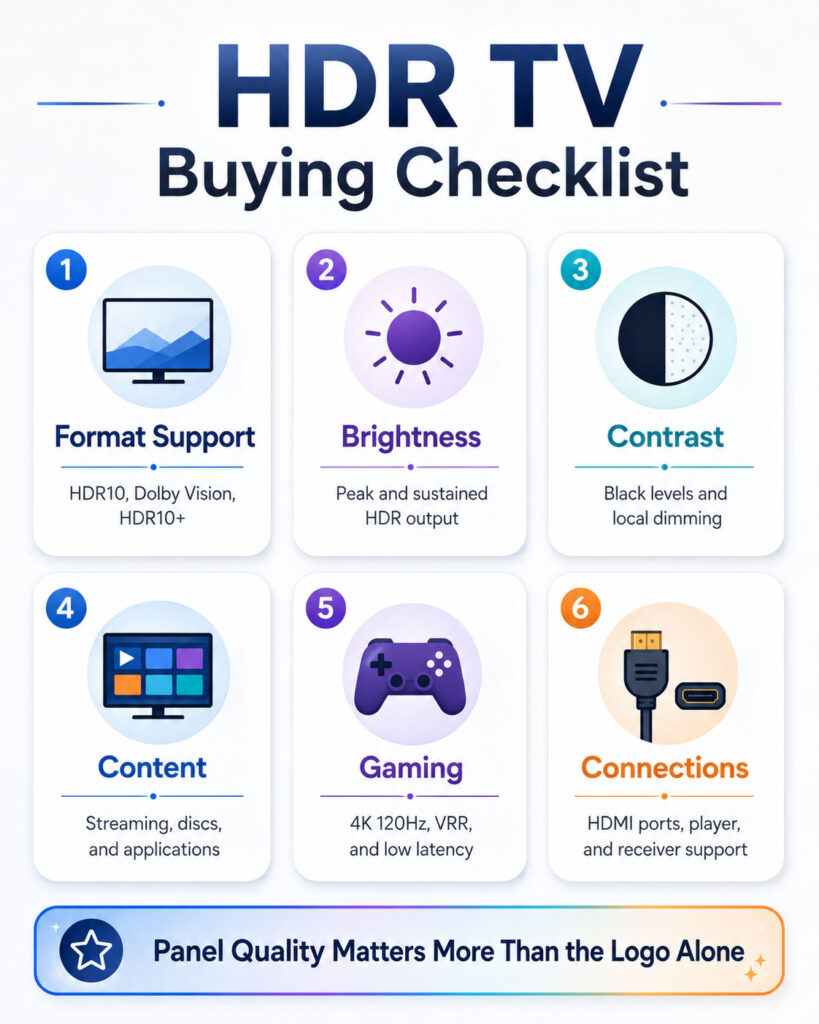
Begin with the television’s real picture performance rather than the number of HDR logos on the product page.
Next, compare the formats used by your favourite streaming services, consoles, players, and disc collection.
Finally, confirm the television’s brightness, contrast, local dimming, gaming features, and room suitability.
Step 1: Identify Your Main Content
Different viewers prioritise different sources.
For example, your main use may involve:
- Streaming films and series.
- 4K Blu-ray discs.
- Console gaming.
- PC gaming.
- Live sports.
- Broadcast television.
- Personal videos.
- YouTube or online content.
Therefore, choose format support according to the content you watch most often.
Step 2: Check Your Streaming Services
Review the current HDR support of your preferred applications.
In addition, check whether the required HDR format works on:
- The television’s built-in app.
- Your external streaming device.
- Your subscription tier.
- Your region.
- The selected title.
Because support changes, current official service documentation remains more reliable than an old compatibility list.
Step 3: Review Panel Performance
Look for independent measurements or reliable reviews covering:
- HDR peak brightness.
- Sustained brightness.
- Native contrast.
- Local-dimming behaviour.
- Black levels.
- Colour volume.
- Viewing angles.
- Reflection handling.
A television with better panel performance can produce a stronger improvement than one additional HDR format.
Step 4: Consider Your Room
A dark room benefits from deep blacks and controlled shadow detail. Meanwhile, a bright living room may require greater sustained brightness and strong reflection handling.
Therefore, consider:
- Window position.
- Direct sunlight.
- Evening and daytime use.
- Room-light control.
- Viewing angle.
- Screen reflections.
Ambient-light-aware HDR features can help. However, they should complement rather than replace suitable display hardware.
Step 5: Check Gaming Requirements
Gamers should review more than HDR format support.
Important features include:
- 4K at 120Hz.
- Variable Refresh Rate.
- Auto Low Latency Mode.
- Input lag.
- Console HDR calibration.
- Dolby Vision gaming support.
- HDR10+ Gaming support.
- The number of high-bandwidth HDMI ports.
Furthermore, check whether the television supports the desired HDR format and refresh rate simultaneously.
Step 6: Check the Complete Device Chain
List every component between the content and screen.
For example:
- Streaming application or disc.
- Media player or game console.
- HDMI cable.
- Receiver, switch, or soundbar.
- Television HDMI input.
- Television picture mode.
One incompatible component can remove dynamic metadata. Therefore, every link should support the intended format.
Step 7: Compare Format Support
Use the following buying priorities:
- HDR10 should be available as the compatibility baseline.
- Dolby Vision adds value for compatible streaming, discs, and gaming.
- HDR10+ improves support for compatible dynamic-metadata content.
- Both dynamic formats provide the broadest flexibility.
- Advanced variants matter only when your content and equipment use them.
Step 8: Check Picture Modes
A television may use separate modes for HDR10, Dolby Vision, and HDR10+.
Therefore, compare:
- Dark-room cinema mode.
- Bright-room mode.
- Game mode.
- Filmmaker-oriented mode.
- Ambient-light processing.
- Motion settings.
A television with flexible, accurate modes may suit more viewing conditions.
Step 9: Review Software Support
Smart televisions rely on firmware and application updates.
Consequently, review the manufacturer’s update history, application support, and reputation for fixing HDMI or HDR issues.
However, do not purchase a television solely because a future update has been promised.
Step 10: Compare the Final Price
Format support can increase value, but buyers should avoid sacrificing core picture quality for one logo.
For example, a better-performing HDR10 and Dolby Vision television may be preferable to a weaker model supporting all three formats.
Therefore, choose the best complete television within the budget.
HDR Television Buying Checklist
- Confirm HDR10 support.
- Review Dolby Vision availability.
- Check HDR10+ compatibility.
- Compare real HDR brightness.
- Examine black levels and contrast.
- Review local-dimming quality.
- Check colour volume.
- Consider room brightness and reflections.
- Verify streaming-app support.
- Review console and gaming features.
- Count high-bandwidth HDMI ports.
- Check receiver or soundbar passthrough.
- Review software-update support.
- Compare warranty and service options.
Which Format Is Best for Streaming?
Dolby Vision is valuable when the viewer uses streaming services and titles with strong Dolby Vision support.
HDR10+, meanwhile, can provide dynamic HDR on supported services and devices.
However, HDR10 remains essential because it works across the broadest range of streaming equipment.
Therefore, a television supporting HDR10 plus both dynamic formats offers the most flexibility.
Which Format Is Best for Movies?
Dolby Vision and HDR10+ can both provide scene-specific image guidance.
The better option depends on the movie’s available master, the disc or streaming service, and the television.
Consequently, movie enthusiasts should check their preferred content libraries rather than selecting one format only from its specification.
Which Format Is Best for Gaming?
HDR10 provides the broadest gaming compatibility.
Dolby Vision Gaming adds value for compatible consoles, computers, televisions, and games. Similarly, HDR10+ Gaming can provide automated calibration and source-side tone mapping on supported hardware.
However, input lag, 120Hz support, Variable Refresh Rate, and tone-mapping behaviour may matter more than the format logo.
Which Format Is Best for a Bright Room?
A bright room benefits from a television with strong sustained brightness and good reflection handling.
Dolby Vision IQ and HDR10+ Adaptive may adjust compatible content according to ambient light.
Nevertheless, a dim television cannot become a bright-room leader through metadata alone.
Which Format Is Best for a Dark Room?
In a dark room, black levels, shadow detail, and restrained tone mapping become especially important.
OLED televisions can perform strongly because of their pixel-level blacks. Meanwhile, capable Mini-LED televisions can combine dark blacks with brighter highlights.
Both Dolby Vision and HDR10+ can work well when content and display processing are strong.
Which Format Is Best for Budget TVs?
Budget televisions often support HDR10 and may add Dolby Vision or HDR10+.
However, many lack the brightness and local dimming needed for dramatic HDR.
Therefore, buyers should prioritise measured performance, native contrast, and sensible picture processing over the number of format badges.
Which Format Is Best for Premium TVs?
Premium buyers should look for strong panel performance together with broad format support.
A television supporting HDR10, Dolby Vision, and HDR10+ can reduce compatibility concerns.
However, processing quality, gaming features, colour accuracy, and panel behaviour still separate excellent models from average ones.
Should You Buy a TV Without Dolby Vision?
A television without Dolby Vision can still provide excellent HDR through HDR10 and HDR10+.
However, buyers who watch significant Dolby Vision content should understand that playback may fall back to HDR10.
Therefore, the decision depends on the model’s picture quality, price, and content usage.
Should You Buy a TV Without HDR10+?
A television without HDR10+ can still display the HDR10 base presentation of compatible content.
Moreover, Dolby Vision may cover many dynamic-HDR titles on that television.
Nevertheless, viewers using HDR10+-focused devices and services may prefer native support.
Is a TV Supporting Both Dolby Vision and HDR10+ Better?
Supporting both formats provides greater compatibility.
However, it does not automatically mean that the television has better brightness, contrast, colour, or tone mapping.
Therefore, dual-format support should be treated as a useful feature rather than a complete measure of picture quality.
Does HDR Format Matter on a Cheap TV?
Format support still matters because it determines whether the television can interpret the signal.
However, panel limitations may reduce the visible difference between HDR10 and dynamic formats.
Consequently, improving the display hardware often provides a larger benefit than adding another HDR badge.
Do You Need a New TV for Dolby Vision or HDR10+?
Yes, the television must support the selected dynamic format.
A software update may add support only when the existing hardware and manufacturer design allow it.
Therefore, users should not expect an unsupported model to gain every format later.
Can You Convert HDR10 to Dolby Vision?
Professional content workflows can create Dolby Vision deliverables from suitable source material and mastering processes.
However, a consumer television cannot recreate original creator-provided Dolby Vision metadata from ordinary HDR10 content.
Television-generated dynamic tone mapping remains separate from genuine Dolby Vision mastering.
Can You Convert HDR10 to HDR10+?
Content creators can analyse suitable HDR material and generate HDR10+ metadata through compatible production tools.
However, a television displaying standard HDR10 does not receive the original HDR10+ metadata unless it is included in the source.
Is Dynamic Tone Mapping the Same as Dynamic Metadata?
No.
Dynamic metadata comes from the content workflow and provides changing guidance to the display.
Dynamic tone mapping performed by a television analyses the incoming picture and creates its own adjustments.
Consequently, a television may dynamically process HDR10 even though the content contains only static metadata.
Why Does Dolby Vision Look Too Dark?
Possible reasons include:
- A cinema mode designed for a dark room.
- Bright ambient lighting.
- Low television brightness capability.
- Energy-saving settings.
- An inaccurate black-level setting.
- A poorly mastered title.
- Incorrect external-device output.
Therefore, try the television’s brighter Dolby Vision mode, reduce room light, and verify the playback settings.
Why Does HDR Look Washed Out?
A washed-out HDR image can result from:
- Incorrect colour-space handling.
- A device outputting the wrong signal.
- An unsupported player or application.
- PC HDR configuration problems.
- An incorrect HDMI input mode.
- Weak black levels.
- Poor content conversion.
Consequently, users should test a known high-quality HDR title before changing many television settings.
Why Does HDR Look Worse Than SDR?
Entry-level televisions may dim the complete HDR image because they cannot reproduce the mastered highlights.
In addition, bright-room reflections can hide shadow details.
Therefore, the problem may involve display limitations rather than the HDR format itself.
Why Does the Picture Change When HDR Starts?
The television commonly switches to a separate HDR picture mode when it detects HDR10, Dolby Vision, or HDR10+.
As a result, brightness, colour, contrast, and motion settings may change automatically.
Users should therefore configure SDR and HDR modes separately.
How to Confirm the Active HDR Format
Depending on the television, users can check:
- An on-screen information banner.
- The picture-mode name.
- A format logo.
- The input-signal menu.
- The playback-device diagnostics.
- The streaming application’s information screen.
However, some televisions display only a general HDR label. Therefore, consult the model’s user guide when the format remains unclear.
Does Dolby Vision Include Dolby Atmos?
No. Dolby Vision concerns picture presentation, while Dolby Atmos concerns audio.
A movie can therefore include one without the other.
Similarly, a television may support Dolby Vision but require additional audio equipment for the full Dolby Atmos experience.
Does HDR10+ Include Better Audio?
No. HDR10+ affects picture metadata and tone mapping.
Audio format support remains separate and depends on the content, player, television, receiver, and sound system.
Is HDR10+ the Same as HDR10?
No. HDR10+ uses the HDR10 foundation but adds dynamic metadata.
Consequently, an HDR10 television can display the compatible base presentation without using the additional HDR10+ scene-level guidance.
Is Dolby Vision the Same as HDR10+?
No. Both use dynamic metadata, but they belong to different ecosystems and use different technical workflows.
A television needs explicit support for each format.
Does Every HDR TV Support HDR10?
HDR10 serves as the common baseline for modern HDR televisions.
However, buyers should still verify the specification, especially for specialised monitors, projectors, or older products.
Can HDR10+ Content Play on a Dolby Vision TV?
The content may play through its HDR10-compatible presentation when the television lacks HDR10+ support.
However, the television will not use the HDR10+ dynamic metadata.
Can Dolby Vision Content Play on an HDR10+ TV?
Playback may fall back to HDR10 when the content and delivery method include a compatible HDR10 version.
However, the television cannot use Dolby Vision metadata without Dolby Vision support.
Does More Brightness Always Mean Better HDR?
No. Brightness should remain controlled and preserve detail.
A television also needs strong black levels, colour volume, local dimming, and accurate tone mapping.
Do HDR Formats Affect Input Lag?
The format itself does not determine the complete input lag.
However, different HDR picture modes may use different processing paths.
Therefore, gamers should review measured input lag in the exact HDR mode they plan to use.
Will HDR10+ Advanced Replace HDR10+?
HDR10+ Advanced extends the existing ecosystem with additional metadata capabilities.
However, adoption will depend on compatible content, televisions, services, and certification.
Standard HDR10+ and HDR10 compatibility will therefore remain important during the transition.
Will Dolby Vision 2 Replace Dolby Vision?
Dolby Vision 2 represents a newer platform generation.
Nevertheless, existing Dolby Vision televisions and content will remain relevant, while adoption expands gradually through new devices and services.
Therefore, buyers should focus on the features supported by the television they can purchase today.
Common HDR Buying Mistakes
- Choosing a television only by its format logos.
- Ignoring peak and sustained brightness.
- Assuming every HDR television has local dimming.
- Confusing HDR with 4K resolution.
- Expecting Dolby Vision to fix a weak panel.
- Assuming HDR10+ works through every streaming device.
- Ignoring receiver and soundbar passthrough.
- Buying unsuitable HDMI cables for high-refresh-rate gaming.
- Using the brightest picture mode without checking accuracy.
- Expecting identical format support across every application.
- Paying for future features that are not currently available.
- Ignoring room lighting and reflections.
Final Verdict: HDR10 vs Dolby Vision vs HDR10+
The HDR10 vs Dolby Vision vs HDR10+ comparison does not produce one winner for every user.
HDR10 remains the essential compatibility baseline. It works across the widest range of televisions, streaming devices, discs, consoles, monitors, and projectors.
Dolby Vision adds dynamic metadata and has strong support across premium movies, streaming services, televisions, and selected gaming systems. Meanwhile, HDR10+ provides dynamic metadata through an HDR10-compatible and royalty-free ecosystem.
For the widest compatibility, choose a television that supports HDR10, Dolby Vision, and HDR10+. However, do not select a weak television merely because it includes every format logo.
Ultimately, panel quality, brightness, black levels, local dimming, colour volume, tone mapping, content availability, and room conditions determine the visible experience. The best HDR television is therefore the model that combines strong display performance with the formats used by your favourite content and devices.

AboutTPJ Technical Team
The Project Jugaad Technical Team creates practical, easy-to-follow content on software development, web technologies, artificial intelligence, cybersecurity, cloud platforms, and digital tools. Our articles are informed by more than 13 years of hands-on experience with .NET, Angular, SQL Server, AWS, WordPress, Linux hosting, application deployment, and real-world troubleshooting. Each guide is researched, reviewed, and updated to provide accurate, useful, and actionable information for developers, businesses, and everyday technology users.