Software Development
The Serverless vs Containers comparison helps development teams decide how applications should run, scale, and use cloud infrastructure. Serverless platforms manage much of the underlying environment and execute code when requests or events occur. Containers, meanwhile, package an application with its runtime and dependencies, giving teams greater control over deployment and execution.
Both approaches can support APIs, background jobs, scheduled tasks, microservices, data processing, and modern cloud applications. However, they differ in infrastructure responsibility, portability, startup behaviour, scaling, pricing, runtime limits, observability, and operational complexity.
Serverless computing often suits event-driven workloads and unpredictable traffic. In contrast, container deployment works well when applications require custom runtimes, consistent environments, long-running processes, or greater infrastructure control. Therefore, the best deployment model depends on the workload rather than one option being universally superior.
Serverless vs Containers: Quick Answer
- Choose serverless for event-driven functions, scheduled tasks, lightweight APIs, unpredictable traffic, and workloads that benefit from scaling to zero.
- Choose containers for long-running services, custom software dependencies, portable deployment packages, and applications requiring greater runtime control.
- Choose a managed container platform when you want container flexibility without operating every server or cluster component.
- Use both approaches when separate parts of the same application have different execution, scaling, or infrastructure requirements.
In summary, serverless reduces the amount of infrastructure a development team manages directly. Containers provide greater control and portability, although they usually require more operational planning.
What Is Serverless Computing?
Serverless computing is a cloud execution model in which the provider manages servers, operating systems, capacity allocation, scaling, and much of the runtime environment.
Despite its name, serverless does not mean that servers disappear. Cloud infrastructure still runs the application; however, customers do not provision and manage individual servers for every workload.
Developers usually deploy functions, application code, configuration, or supported container images to a managed platform. When an event or request arrives, the provider starts the required resources and adjusts capacity according to demand.
In many cases, serverless platforms charge according to requests, execution time, allocated memory, processor usage, or another consumption-based measurement.
What Is Function as a Service?
Function as a Service, commonly called FaaS, is a popular form of serverless computing. Developers deploy individual functions that run in response to events.
For example, a function may run when:
- An HTTP request reaches an API endpoint.
- A file is uploaded to object storage.
- A message arrives in a queue.
- A database record changes.
- A scheduled time is reached.
- A user completes an authentication event.
- A monitoring alert is triggered.
Usually, a function performs a focused task and then stops. Nevertheless, modern serverless platforms may also support complete web services, workflows, container-based workloads, and managed application backends.
How Serverless Computing Works
- A developer deploys application code or a supported package.
- The platform prepares the execution environment.
- An event or request triggers the application.
- The platform assigns compute resources.
- The code processes the request.
- The platform returns or stores the result.
- Capacity increases or decreases according to demand.
Although the provider handles much of the infrastructure lifecycle, the development team still remains responsible for application code, permissions, data, dependencies, secrets, configuration, monitoring, and secure integration.
What Is a Container?
A container packages an application with the libraries, runtime, configuration files, and system dependencies it requires.
Containers share the host operating-system kernel. At the same time, operating-system isolation features keep their processes separated from other workloads.
As a result, containers are generally lighter than full virtual machines. They can also start faster and use fewer infrastructure resources.
A container image acts as a reusable template, whereas a running container is an instance created from that image.
Developers can build the image during continuous integration, store it in a registry, and deploy the same version across development, testing, staging, and production environments.
What Is Docker?
Docker is a widely used platform and tooling ecosystem for building, packaging, distributing, and running containers.
A Dockerfile contains the instructions required to build a container image. For example:
FROM node:22-alpine

WORKDIR /app

COPY package*.json ./
RUN npm ci --omit=dev

COPY . .

EXPOSE 3000

CMD ["node", "server.js"]
This example creates a Node.js application image with its production dependencies. Consequently, the same image can run on any compatible container environment.
However, Docker is not the only container technology. Modern platforms commonly use standard image formats and compatible runtimes.
How Container Deployment Works
- Developers create application code and a container definition.
- A build pipeline creates an immutable container image.
- The image is scanned and stored in a registry.
- A container platform pulls the selected image version.
- The platform starts one or more container instances.
- Traffic is routed to healthy instances.
- The platform restarts, replaces, or scales containers as needed.
Containers provide a consistent application package. However, teams still need a platform for networking, health checks, scaling, secrets, logs, storage, deployments, and service discovery.
What Is Container Orchestration?
Container orchestration manages container deployment across servers or cloud resources. For example, it can schedule workloads, restart failed containers, distribute traffic, scale services, manage configuration, and coordinate rolling updates.
Kubernetes is a well-known orchestration platform. Nevertheless, organisations may also use managed container services, application platforms, serverless container products, or simpler hosting environments.
Orchestration provides flexibility, but it also introduces concepts such as clusters, nodes, workloads, services, networking, storage, policies, and control-plane management.
Therefore, a small application may not need a full orchestration platform. Teams should select infrastructure according to actual operational requirements.
Serverless vs Containers Architecture
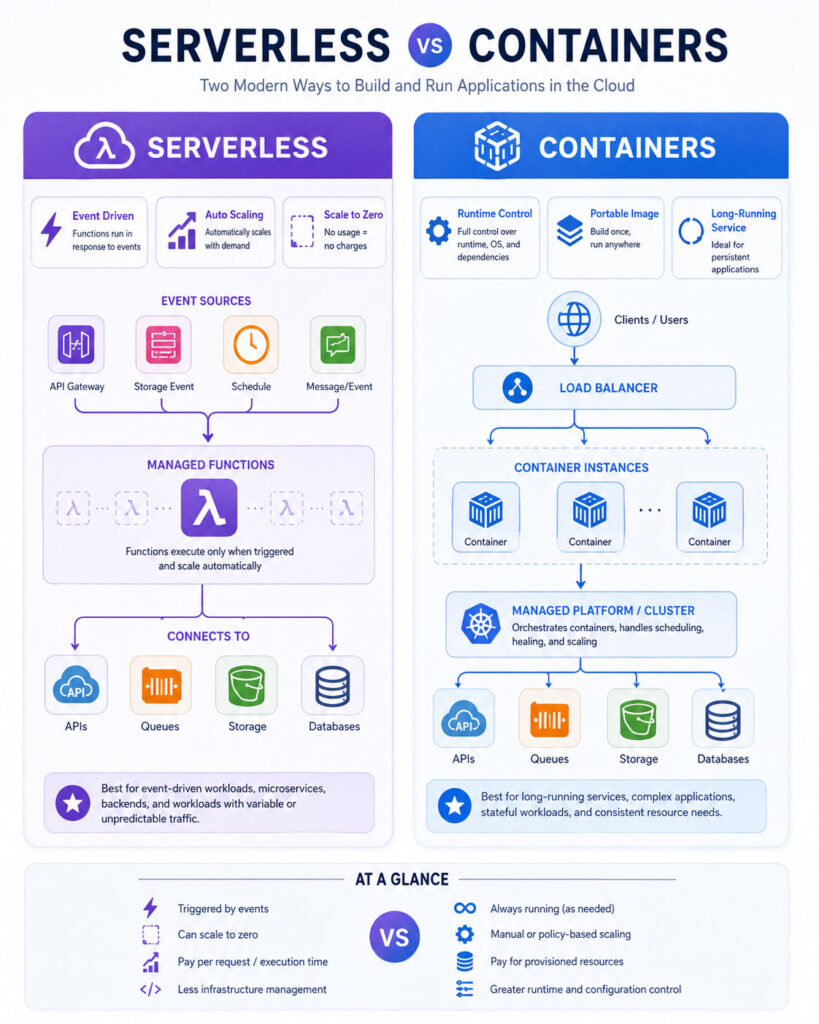
A serverless application is often divided into functions or managed services connected through events, APIs, queues, databases, and storage.
A containerized application, by comparison, may consist of one service or several independently deployable services running through a container platform.
Both approaches can support microservices. However, serverless encourages short-lived event handlers, while containers support a wider range of process lifecycles.
Ultimately, architectural boundaries should follow business capability, scaling behaviour, ownership, and reliability requirements instead of deployment technology alone.
Serverless vs Containers Comparison
| Area | Serverless | Containers |
|---|---|---|
| Infrastructure management | Mostly managed by the provider | Depends on the selected container platform |
| Scaling | Usually automatic and event-driven | Configured through replicas, policies, or managed scaling |
| Scale to zero | Commonly supported | Supported by some managed platforms |
| Startup time | May experience cold starts | Depends on image size and platform |
| Runtime control | Limited by platform capabilities | Greater control over runtime and dependencies |
| Portability | May depend heavily on provider services | Images are relatively portable across compatible platforms |
| Long-running processes | May face duration or lifecycle limits | Well suited to long-running services |
| Pricing | Usually based on execution or requests | Usually based on reserved or running resources |
| Operational responsibility | Lower infrastructure responsibility | Higher unless using a managed platform |
| Custom software | Limited by runtime and packaging support | Supports extensive custom dependencies |
| Local environment parity | Can be difficult to reproduce exactly | Container images provide stronger consistency |
| Best suited for | Event-driven and variable workloads | Controlled and long-running applications |
The Serverless vs Containers table highlights the central trade-off. Serverless prioritises managed execution and automatic scaling, whereas containers prioritise environmental control, portability, and flexible application lifecycles.
Serverless Does Not Mean No Operations
Serverless reduces server administration. Nevertheless, the application still requires monitoring, configuration, security, and operational support.
Teams must manage:
- Function versions and deployments.
- Runtime updates.
- Application permissions.
- Secrets and environment configuration.
- Database connections.
- Timeouts and retries.
- Dead-letter queues.
- Logs, metrics, and traces.
- Cost limits.
- Regional availability.
- Dependency vulnerabilities.
- Incident response.
In other words, operational work moves away from server maintenance and toward application behaviour, managed-service integration, permissions, and distributed-system reliability.
Containers Do Not Automatically Require Kubernetes
Teams often assume that container deployment requires a large Kubernetes cluster. However, many cloud and hosting platforms can run container images without exposing full cluster management.
For instance, a small application may use a managed container service, application platform, or serverless container product. These services can provide HTTPS, health checks, scaling, deployments, and logs without requiring teams to operate worker nodes.
Kubernetes becomes useful when an organisation needs its scheduling model, ecosystem, extensibility, networking controls, policy framework, or multi-service orchestration.
Therefore, teams should choose the simplest container platform that meets their requirements.
Serverless vs Containers for Scalability
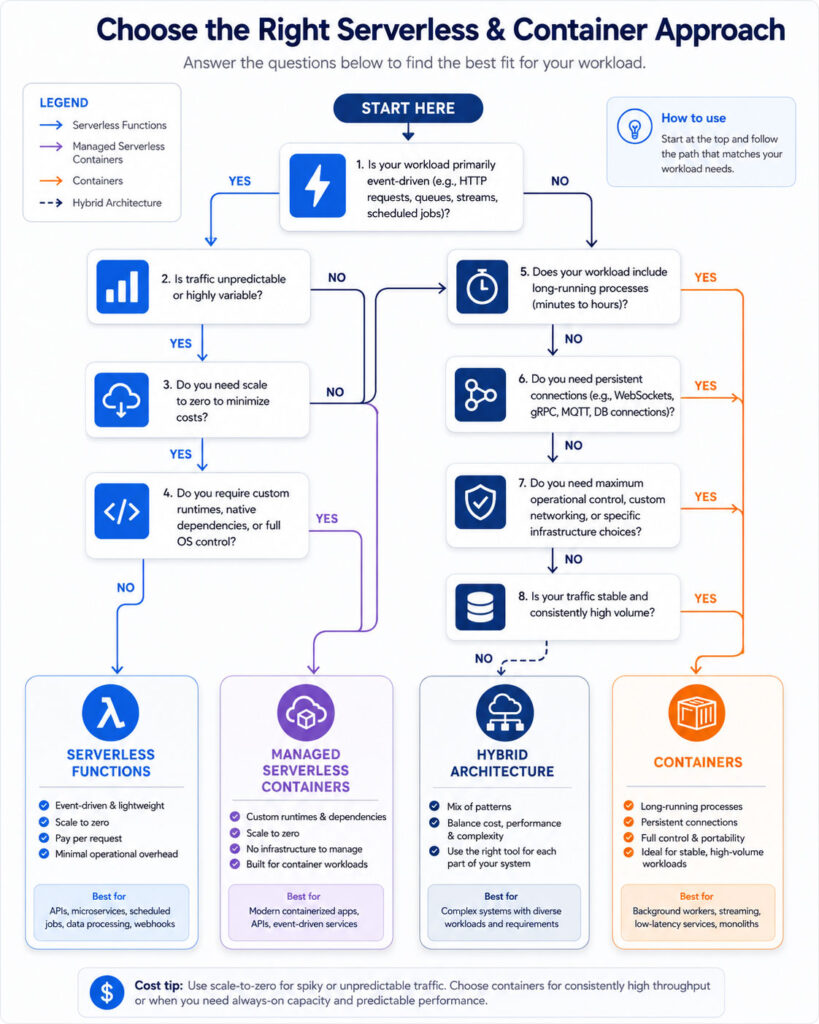
Serverless platforms usually add execution capacity automatically when incoming events increase. Therefore, developers may not need to create servers, configure instance groups, or manually increase replicas.
This model suits workloads with sudden peaks. For example, thousands of uploaded images can trigger independent processing functions.
However, automatic scaling can overwhelm databases, external APIs, or downstream services. As a result, teams should configure concurrency limits, queueing, rate controls, and backpressure.
Containers can also scale horizontally by adding instances. In that case, the development or platform team normally defines resource requests, scaling metrics, minimum capacity, maximum replicas, and traffic policies.
Scaling to Zero
Many serverless services can reduce active execution capacity to zero when no requests are present. Consequently, infrequent workloads may avoid paying continuously for idle compute capacity.
Some managed container platforms can also scale container instances to zero. Therefore, this capability is not exclusive to function-based serverless computing.
However, when an application has no active instances, the platform may need to start a new execution environment before serving the next request.
Applications requiring consistently low latency may instead maintain minimum capacity.
Cold Starts
A cold start occurs when a platform must prepare a new execution environment before processing a request.
The delay can include resource allocation, runtime startup, dependency loading, application initialization, and external connection creation.
Its impact depends on the programming language, package size, platform, region, resource allocation, network configuration, and initialization work.
Containers can also experience startup delays while the platform pulls an image, schedules an instance, launches the process, and completes health checks. Therefore, teams should measure startup latency for both deployment models.
Reducing Serverless Cold Starts
- Keep deployment packages small.
- Remove unnecessary dependencies.
- Avoid expensive initialization.
- Reuse connections when execution environments remain active.
- Select an appropriate runtime.
- Configure minimum or provisioned capacity when supported.
- Avoid unnecessary network layers for latency-sensitive functions.
- Measure percentile latency instead of average response time alone.
Although minimum capacity can reduce cold starts, it may also reduce serverless cost savings.
Reducing Container Startup Time
- Use smaller base images.
- Remove build tools and development files from production images.
- Use multi-stage builds.
- Keep image layers cacheable.
- Avoid downloading dependencies during startup.
- Use accurate readiness checks.
- Store images near the deployment region.
- Avoid unnecessary shell processes and initialization scripts.
As a result, smaller images can improve deployment speed, storage efficiency, vulnerability scanning, and recovery after failed instances.
Serverless vs Containers for Cost
Serverless pricing commonly charges for requests and actual execution resources. Therefore, it can be economical for intermittent workloads because idle compute capacity may fall to zero.
However, high-volume or continuously active workloads can become expensive. Additional charges may also apply to API gateways, storage, queues, networking, databases, logs, and monitoring.
Containers normally consume allocated resources while instances are running. Consequently, an underused container may still incur cost because processor and memory capacity remain reserved.
For stable workloads, reserved container capacity can provide predictable pricing. By comparison, irregular workloads may benefit more from serverless consumption pricing.
Calculate Cost per Successful Task
Teams should not compare only the advertised compute price. Instead, they should calculate the complete cost of a successful business operation.
Include:
- Execution or container-resource charges.
- API and gateway requests.
- Storage and database operations.
- Network transfer.
- Queue and event-delivery costs.
- Logging, tracing, and monitoring.
- Build pipelines and image registries.
- Cluster or control-plane charges.
- Engineering and operational effort.
- Retries, failures, and duplicate processing.
- Security and compliance tooling.
Otherwise, a low compute price can become misleading when the architecture depends on several additional managed services.
Example Cost Pattern
Consider a document-processing application that receives a few hundred files on most days but occasionally receives a large batch.
A serverless design can trigger one function per file and reduce active compute capacity after processing finishes. Therefore, its cost may follow actual usage closely.
A permanently running container service may spend much of the day waiting. However, a container worker can become more economical when document volume remains consistently high.
Ultimately, the better choice depends on duration, concurrency, resource requirements, traffic predictability, and surrounding service costs.
Serverless vs Containers for Performance
Containers often provide more predictable runtime behaviour because teams can control processor allocation, memory, concurrency, runtime settings, and minimum instance counts.
Serverless platforms, in contrast, may adjust capacity according to current demand and provider scheduling. They may also impose execution, memory, request, or concurrency limits.
Nevertheless, a serverless function can perform extremely well for focused tasks, especially when the platform keeps an environment active.
Therefore, teams should benchmark the complete application under realistic load, including database calls, retries, startup delays, downstream services, and network transfer.
Long-Running Workloads
Containers are generally suitable for services that run continuously. Examples include web servers, streaming processors, persistent workers, message consumers, and game servers.
Function-based serverless services may enforce execution-duration limits. Consequently, a long task may need to be divided into smaller steps or moved to a serverless container or managed batch service.
Breaking work into smaller events can improve retry behaviour and independent scaling. However, it also introduces orchestration, state management, and idempotency requirements.
Therefore, teams should not divide a simple long-running process into many functions only to fit an unsuitable platform.
Stateful Applications
Serverless functions should generally treat local execution state as temporary because a later request may run in a different environment.
Persistent information should therefore remain in an external database, cache, queue, object store, or managed workflow system.
Containers also should not rely on local writable storage when instances can be replaced or scaled. Nevertheless, orchestration platforms can attach persistent volumes when an application genuinely requires them.
Stateful services such as databases still need careful backup, consistency, replication, recovery, and storage planning regardless of deployment model.
Stateless Application Design
Stateless application instances are easier to scale, replace, and recover. Each request either contains or retrieves the information needed to complete its work.
Useful practices include:
- Store sessions in a shared system or secure client mechanism.
- Keep files in durable object storage.
- Use databases for persistent application state.
- Use queues for asynchronous work.
- Make retryable operations idempotent.
- Avoid depending on one process’s local memory.
These practices benefit both serverless functions and containerized services.
Serverless vs Containers for Portability
Containers package application code and dependencies into a standard image. Consequently, they can improve consistency across development, testing, staging, and production platforms.
However, a containerized application may still depend heavily on a provider’s databases, queues, storage, identity services, networking, and monitoring tools.
Serverless functions may likewise depend on provider-specific triggers, permissions, deployment files, event formats, and runtime behaviour.
Therefore, containers generally improve runtime portability, but they do not automatically remove cloud-provider dependency.
Vendor Lock-In
Vendor lock-in occurs when moving an application to another platform requires significant changes, cost, or risk.
Serverless systems can become closely connected to provider-specific gateways, triggers, workflows, databases, permissions, and logging services.
Containers may reduce runtime lock-in because the image can move to another compatible environment. Nevertheless, networking, infrastructure definitions, security policies, storage, observability, and managed services may still require redesign.
Teams should therefore balance portability with the productivity gained from useful managed services.
Runtime and Dependency Control
Containers allow teams to select the operating-system base, runtime version, native libraries, package versions, and supporting tools.
This control is especially useful for applications requiring image-processing libraries, command-line programs, custom certificates, headless browsers, or specialised runtimes.
Serverless platforms usually support a defined collection of languages, runtime versions, package sizes, and execution settings. However, custom-runtime or container-image support may extend those options.
Before selecting serverless, teams should verify every required dependency, runtime version, architecture, and package-size limit.
Local Development and Testing
Containers can provide strong environment consistency because developers can run the same image locally or use a closely related development image.
However, local container behaviour may still differ from managed production networking, identity, scaling, and storage.
Serverless functions can also be tested locally. Nevertheless, accurately reproducing provider-specific events, permissions, queues, managed databases, and runtime behaviour can be difficult.
Therefore, teams should combine unit tests, integration tests, and staged testing in an environment that closely resembles production.
Deployment Speed
A small serverless function can deploy quickly because the platform manages the execution environment.
However, a large collection of functions and infrastructure resources can make complete application deployment more complicated.
Containers provide a consistent image artifact that a pipeline can test, scan, sign, and promote between environments. Nevertheless, large images can slow builds, registry transfers, deployment, and recovery.
Teams should therefore measure the time required to deploy, verify, roll back, and restore the complete application rather than one component.
Deployment Strategies
Both deployment models can support controlled release patterns, depending on the selected platform.
Common strategies include:
- Rolling deployment: Replaces instances gradually.
- Blue-green deployment: Prepares a separate environment before switching traffic.
- Canary deployment: Sends a small percentage of traffic to a new version.
- Version routing: Routes requests between function versions.
- Feature flags: Enable behaviour without redeploying every component.
Regardless of the strategy, every deployment should include health checks, monitoring, rollback criteria, and database compatibility planning.
Serverless vs Containers for Microservices
Both deployment models can support microservices, although they encourage different service boundaries.
A serverless architecture may use functions for focused event handlers. By comparison, containers may package complete services containing related endpoints and background operations.
Creating one function for every small method can produce excessive fragmentation, duplicated configuration, and difficult monitoring. Conversely, placing every business capability in one large container can reduce independent scaling and deployment.
Therefore, service boundaries should follow cohesive business responsibilities rather than technical fashion.
Event-Driven Architecture
Serverless platforms integrate naturally with queues, event buses, scheduled triggers, storage notifications, and database events.
As a result, producers and consumers can remain loosely coupled while scaling independently.
However, event-driven systems introduce duplicate delivery, delayed processing, ordering, retry, schema evolution, and dead-letter handling concerns.
Containers can also publish and consume events. Therefore, event-driven architecture is not limited to serverless functions.
Synchronous vs Asynchronous Work
Synchronous requests expect a response while the client waits. Examples include loading a page, authenticating a user, or submitting a quick API request.
Asynchronous work continues after the initial request ends. For example, an application may generate a report, resize an image, send a notification, or process an import later.
Serverless functions work well for short, independent, retryable asynchronous events. Containers, meanwhile, suit continuous queue consumption, long-running jobs, specialised libraries, and stable high-throughput processing.
Serverless vs Containers for Background Jobs
| Background Job Type | Commonly Suitable Choice | Reason |
|---|---|---|
| Short file transformation | Serverless | Event-driven and independently scalable |
| Scheduled cleanup | Serverless | Runs briefly at defined times |
| Continuous queue consumer | Container | Long-running process with stable throughput |
| Large video encoding | Container or managed batch | Long duration and specialised resources |
| Email notification trigger | Serverless | Short and event-based |
| Machine-learning inference API | Container or serverless container | May require custom libraries and memory |
| Periodic data synchronization | Depends on duration | Short jobs suit functions; long jobs suit containers |
| Streaming message processor | Container | Maintains a continuous connection |
Observability
Distributed applications need logs, metrics, traces, alerts, and correlation identifiers.
Serverless applications may produce logs across many functions and managed services. For instance, one user request can pass through an API gateway, function, queue, second function, and database.
Container platforms may provide central logs and metrics. However, teams still need to configure collection, retention, dashboards, and alerts.
Therefore, structured logs and distributed tracing should follow a business operation across every component.
Debugging Serverless Applications
Serverless debugging can be difficult when failures depend on managed events, retries, temporary environments, concurrency, or provider permissions.
Useful practices include:
- Keep business logic separate from the event handler.
- Use structured logging.
- Record correlation and request identifiers.
- Capture failed events safely.
- Use dead-letter queues.
- Validate event schemas.
- Monitor throttling and concurrency limits.
- Reproduce failures in a controlled test environment.
Debugging Container Applications
Containers make runtime dependencies visible through the image definition. Nevertheless, production failures can still involve networking, storage, health checks, scheduling, or resource limits.
Useful practices include:
- Use immutable image versions.
- Export logs instead of storing them only inside the container.
- Define health and readiness endpoints.
- Monitor processor and memory limits.
- Keep unnecessary diagnostic tools out of minimal production images.
- Test graceful shutdown.
- Capture deployment and scheduling events.
Serverless vs Containers for Security
Serverless and container platforms both follow a shared-responsibility model. The provider secures parts of the infrastructure, while the customer secures application code, identities, data, configuration, dependencies, and access policies.
Serverless reduces responsibility for host maintenance and operating-system patching. However, it can create many small functions, triggers, permissions, secrets, and managed-service connections.
Containers provide greater runtime control. In return, teams must manage image security, package vulnerabilities, base-image updates, runtime permissions, network exposure, and platform configuration.
Therefore, neither deployment model is automatically secure. Security depends on the complete architecture, configuration, delivery process, and monitoring approach.
Serverless Security Responsibilities
- Apply least-privilege permissions to every function.
- Validate request and event data.
- Protect environment variables and secrets.
- Update dependencies and supported runtimes.
- Restrict public endpoints.
- Configure timeouts and concurrency limits.
- Protect queues, storage, and databases.
- Monitor unusual invocation patterns.
- Prevent sensitive information from entering logs.
- Control which services can trigger each function.
Container Security Responsibilities
- Use trusted and minimal base images.
- Scan images during build and before deployment.
- Patch operating-system packages and application dependencies.
- Run processes as a non-root user where possible.
- Use read-only filesystems when practical.
- Drop unnecessary system capabilities.
- Protect registries and image-signing keys.
- Restrict network communication.
- Set processor and memory limits.
- Monitor running containers and platform configuration.
Supply Chain Security
Both serverless packages and container images can include vulnerable or malicious dependencies.
Therefore, a secure delivery pipeline should:
- Pin or lock dependency versions.
- Review third-party packages.
- Scan dependencies and images.
- Generate a software bill of materials when required.
- Protect build systems and credentials.
- Sign deployment artifacts.
- Restrict who can publish releases.
- Promote the same tested artifact between environments.
- Monitor newly disclosed vulnerabilities.
In addition, teams should avoid rebuilding production from unverified dependencies during an emergency deployment.
Identity and Access Management
Serverless architectures often assign an identity to each function or service. This granularity can improve least privilege, although it can also create many policies to manage.
Containerized applications may use workload identities, application identities, service accounts, certificates, or platform-managed credentials.
Regardless of the model, teams should never embed cloud credentials, private keys, or database passwords inside source code or container images.
Instead, use short-lived workload credentials and managed secret systems whenever the platform supports them.
Network Security
Serverless functions may operate behind managed gateways and private network connections. However, private-network integration can add configuration, cost, or startup complexity.
Container platforms provide extensive networking controls. Nevertheless, incorrect ingress, service, firewall, or policy configuration can expose internal services.
Therefore, teams should expose only required endpoints, encrypt traffic, authenticate service calls, and restrict communication between workloads.
An internal network location alone should never be treated as proof that a service is trustworthy.
Resource Isolation
Cloud providers isolate serverless executions according to the design of each service.
Containers isolate processes through operating-system mechanisms, but they share the host kernel. Consequently, container security depends on the runtime, host, kernel, platform, and configuration.
Virtual machines may provide a stronger isolation boundary for selected workloads. Alternatively, sandboxed container technologies can add another layer of protection.
Ultimately, the isolation model should match the application’s sensitivity and threat model.
Compliance Considerations
Regulated applications may require evidence about data location, encryption, access, software versions, logging, vulnerability management, and change control.
Serverless services can simplify some infrastructure compliance responsibilities because the provider manages the platform. However, distributed managed-service configurations can make evidence collection more complicated.
Containers provide greater environmental control, which may help specialised compliance requirements. In exchange, teams assume more responsibility for hardening, patching, and operational records.
Therefore, organisations should review the exact service and configuration rather than relying only on a provider’s broad certification.
Choose Serverless for Event-Driven Applications
Serverless is a strong option when work begins through events and completes within the platform’s execution model.
Good examples include:
- Processing uploaded images or documents.
- Sending notifications.
- Running scheduled maintenance tasks.
- Handling webhook events.
- Transforming queue messages.
- Generating lightweight API responses.
- Updating search indexes after data changes.
- Creating thumbnails.
- Running short data-validation tasks.
- Automating cloud-resource events.
Because these workloads can scale independently and remain idle between events, they often align well with serverless pricing and execution.
Choose Serverless for Unpredictable Traffic
A serverless platform can react quickly to large changes in request volume without requiring the team to maintain capacity for every possible peak.
Therefore, it can suit campaigns, seasonal applications, webhook receivers, low-traffic internal tools, and services with irregular demand.
However, teams must confirm platform concurrency limits and downstream capacity. Otherwise, rapid scaling can exhaust database connections or trigger external API limits.
Choose Containers for Long-Running Services
Containers suit applications that need to run continuously, maintain connections, consume streams, or execute longer than a function platform allows.
Examples include:
- Web applications and backend services.
- Continuous message consumers.
- WebSocket servers.
- Streaming processors.
- Custom proxy services.
- Media-processing workers.
- Machine-learning model servers.
- Game servers.
- Self-hosted third-party software.
- Services requiring specialised system libraries.
Choose Containers for Custom Runtime Requirements
A container can include a specific operating-system base, runtime, native library, command-line tool, certificate, or processing package.
As a result, containers suit applications using media libraries, document processors, headless browsers, custom language runtimes, or machine-learning dependencies.
However, greater control also creates responsibility for maintaining and securing those components.
Choose Managed Serverless Containers
Managed serverless container platforms combine a container image with provider-managed infrastructure and automatic scaling.
This approach can provide:
- Custom runtime and dependency control.
- Automatic HTTPS and traffic routing.
- Managed instance creation.
- Scale-to-zero capability on supported platforms.
- Request-based or usage-based pricing.
- Simpler operations than a complete container cluster.
Therefore, managed serverless containers can provide a useful middle ground when a function is too restrictive but a full orchestration platform is unnecessary.
Use a Hybrid Serverless and Container Architecture
One application can use serverless functions and containers together.
For example:
- A containerized API accepts customer requests.
- The API publishes background work to a queue.
- A serverless function sends a notification.
- A container worker processes a long-running video task.
- A scheduled function performs periodic cleanup.
- A managed workflow coordinates the complete process.
In this way, each component uses the deployment model that best matches its workload.
However, teams should avoid forcing both technologies into the architecture when one simpler model would meet every requirement.
Example: E-Commerce Application
An e-commerce platform may run its main web API and order service in containers because they receive stable traffic and require predictable latency.
Meanwhile, serverless functions can process payment webhooks, resize images, send emails, generate scheduled reports, and respond to inventory events.
A container worker may process large catalogue imports, while a short function validates each uploaded file and begins the workflow.
Consequently, each component can scale according to its own demand.
Example: SaaS Application
A SaaS product may run its billing service, user-interface backend, and real-time notification gateway in containers.
Serverless functions can then process audit events, scheduled maintenance, tenant-provisioning steps, and report notifications.
However, using multiple deployment models increases delivery and monitoring complexity. Therefore, teams should standardise logging, identity, secrets, and release practices.
Example: Data Processing Pipeline
A file uploaded to object storage can trigger a serverless function. The function validates the metadata and places a processing message in a queue.
Next, a container worker with specialised libraries consumes the message and performs the long-running transformation.
After processing finishes, another function updates the database and notifies the user.
This design combines lightweight event handling with controlled long-running execution.
Serverless vs Containers Decision Checklist
- Is the workload event-driven and short-lived? Consider serverless.
- Must the process run continuously? Consider containers.
- Does traffic vary significantly? Serverless or auto-scaling managed containers may fit.
- Do you need custom native libraries? Containers provide greater control.
- Must the application maintain persistent connections? Containers are usually more suitable.
- Can the service tolerate occasional startup delay? Scale-to-zero becomes more practical.
- Is portability a major requirement? Containers may reduce runtime dependency.
- Is the team small and operational capacity limited? Managed serverless or managed containers may help.
- Is traffic stable and constantly high? Containers may provide predictable resource use.
- Do different components have different needs? Consider a hybrid architecture.
Questions to Ask Before Choosing
- How long does one request or job run?
- Is traffic predictable or irregular?
- Must capacity scale to zero?
- What latency can users tolerate?
- Does the application maintain connections or local state?
- Which runtimes and native dependencies are required?
- How much portability is genuinely needed?
- What are the provider’s execution and concurrency limits?
- What is the expected monthly request volume?
- How much idle capacity would containers require?
- Which databases, queues, and gateways are needed?
- What operational skills does the team have?
- How will deployment, rollback, and monitoring work?
- What are the security and compliance requirements?
Common Serverless Mistakes
- Using serverless only because it appears to eliminate operations.
- Ignoring cold-start effects on latency-sensitive endpoints.
- Creating too many small functions without clear boundaries.
- Allowing unlimited concurrency to overwhelm a database.
- Placing business logic directly inside provider event handlers.
- Failing to make retried operations idempotent.
- Ignoring execution-duration and package-size limits.
- Giving every function broad cloud permissions.
- Logging complete events containing sensitive information.
- Assuming consumption pricing will always be cheaper.
- Depending heavily on one provider without understanding migration cost.
- Failing to monitor dead-letter queues and failed events.
Common Container Mistakes
- Using a full orchestration cluster for one simple application.
- Creating large images with unnecessary software.
- Running containers as root without a requirement.
- Embedding secrets inside images.
- Using mutable image tags without version control.
- Failing to define health and readiness checks.
- Storing important data only inside a container filesystem.
- Ignoring processor and memory limits.
- Using outdated base images and packages.
- Exposing internal services publicly.
- Assuming containers provide complete security isolation.
- Failing to test graceful shutdown and replacement.
Common Hybrid Architecture Mistakes
- Using both models without a clear workload reason.
- Maintaining separate monitoring standards for each platform.
- Duplicating authentication and authorization logic.
- Creating complicated event chains that are difficult to trace.
- Using several deployment tools without central ownership.
- Ignoring cross-service retries and duplicate processing.
- Applying inconsistent security policies.
- Failing to calculate the combined cost of all managed services.
Is Serverless Cheaper Than Containers?
Serverless can be cheaper for intermittent workloads because charges follow actual execution and idle capacity may reduce to zero.
Containers can be cheaper for continuously active workloads with stable resource use. Therefore, the result depends on execution duration, traffic, memory, processor usage, networking, and related service charges.
Are Containers More Scalable Than Serverless?
Both approaches can scale to large workloads.
Serverless platforms provide managed scaling, whereas container platforms provide configurable scaling and greater resource control.
In practice, the real limit often comes from databases, queues, external APIs, regional capacity, or application design.
Can Serverless Run Containers?
Yes. Some managed serverless platforms accept container images and automatically run them according to requests or events.
This approach provides custom packaging while the provider manages infrastructure and scaling. However, the platform may still impose request, runtime, networking, or lifecycle restrictions.
Can Containers Scale to Zero?
Some managed container platforms can reduce application instances to zero when there is no traffic.
Traditional container services and clusters may instead keep a minimum number of instances running. Therefore, scale-to-zero behaviour depends on the selected platform.
Is Docker the Same as Serverless?
No. Docker packages and runs containers, whereas serverless describes an execution and operational model.
A serverless platform may internally use containers or accept a compatible image. Nevertheless, the two concepts remain different.
Is Kubernetes Serverless?
Kubernetes is primarily a container-orchestration platform that manages scheduling, scaling, networking, configuration, and lifecycle.
Additional tools can add serverless-style function execution or scale-to-zero behaviour. However, running Kubernetes itself is not automatically serverless.
Which Is Better for Microservices?
Both models can work well.
Serverless functions suit focused event-driven components, while containers suit complete services, persistent processes, and custom runtimes.
Therefore, the decision should follow service boundaries, traffic, execution time, dependencies, latency, and operational skills.
Which Is Better for Startups?
A startup with a small team may benefit from serverless or a managed container platform because both can reduce direct infrastructure administration.
Serverless may suit irregular early-stage traffic. By comparison, managed containers may provide greater flexibility for conventional web frameworks or custom dependencies.
Which Is Better for Enterprise Applications?
Enterprises often use both approaches.
Serverless can support automation, event processing, integrations, and asynchronous tasks. Containers can support core services, standardised runtimes, platform engineering, and complex applications.
Ultimately, governance, security, observability, cost management, and developer experience matter more than choosing one model for the entire organisation.
Can You Move from Serverless to Containers?
Yes, especially when core business logic remains separate from provider-specific event handlers.
However, migration may require replacing triggers, gateways, identity policies, queues, logging, configuration, and managed-service integrations.
Clear application boundaries can reduce the effort, although complete portability is rarely free.
Can You Move from Containers to Serverless?
Yes, when workloads fit the platform’s execution model.
Short APIs, event handlers, scheduled jobs, and independent background tasks are common candidates. However, persistent connections, long-running processes, large dependencies, and custom networking may require redesign or a serverless container platform.
Final Verdict: Serverless vs Containers
The Serverless vs Containers comparison does not produce one winner for every application. Serverless reduces infrastructure management, scales automatically, and aligns cost with actual execution. Therefore, it works particularly well for event-driven, short-lived, irregular, and independently scalable workloads.
Containers provide greater runtime control, environmental consistency, portability, and support for long-running applications. As a result, they work well for web services, persistent workers, streaming systems, custom dependencies, and workloads requiring predictable execution.
Choose serverless when the application benefits from event triggers, scale to zero, and limited infrastructure management. In contrast, choose containers when the workload requires custom software, persistent execution, portability, or greater operational control.
Finally, consider managed serverless containers or a hybrid architecture when requirements vary. The best deployment model is the simplest approach that meets the application’s performance, security, cost, portability, and operational needs.

AboutTPJ Technical Team
The Project Jugaad Technical Team creates practical, easy-to-follow content on software development, web technologies, artificial intelligence, cybersecurity, cloud platforms, and digital tools. Our articles are informed by more than 13 years of hands-on experience with .NET, Angular, SQL Server, AWS, WordPress, Linux hosting, application deployment, and real-world troubleshooting. Each guide is researched, reviewed, and updated to provide accurate, useful, and actionable information for developers, businesses, and everyday technology users.