Technology Guide
No-Code vs Low-Code is an important topic because many businesses, startups, teams, and non-technical users now want to build apps, websites, forms, dashboards, and workflows faster.
Earlier, software development mostly required full programming knowledge. Today, no-code and low-code platforms allow users to create digital solutions with visual builders, ready-made components, automation flows, and integrations.
However, no-code and low-code are not the same. They are useful for different users, project sizes, and technical needs.
What Is No-Code?
No-code means creating applications, websites, forms, or workflows without writing traditional code.
Most no-code tools use drag-and-drop builders, visual forms, templates, ready-made blocks, and simple configuration options.
For example, a business user may create a contact form, booking page, internal task tracker, or simple workflow automation without needing a developer for every small change.
What Is Low-Code?
Low-code means creating applications with visual development tools while still allowing some coding when needed.
Low-code platforms reduce the amount of manual coding, but they do not remove coding completely. Developers can use low-code tools to build faster and then add custom logic, APIs, validations, or integrations where required.
In simple words, low-code gives more flexibility than no-code because it supports both visual development and custom code.
Quick Difference Between No-Code and Low-Code
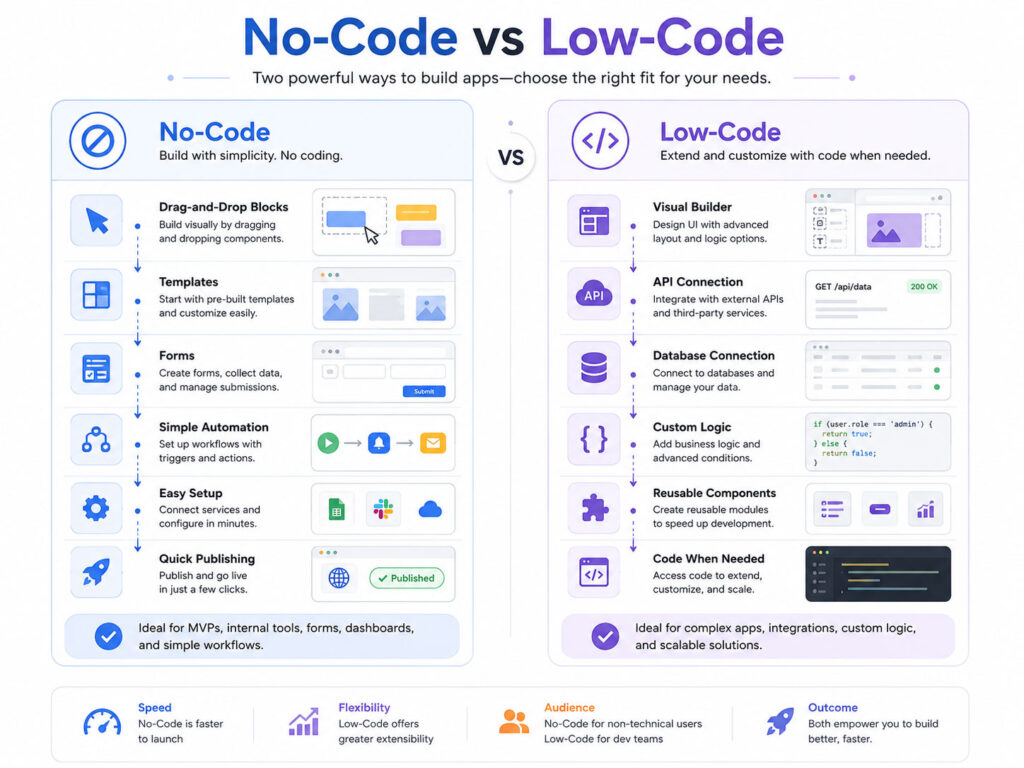
The easiest way to understand the difference is this: no-code is mostly for users who do not write code, while low-code is better when some technical customization is needed.
| Point | No-Code | Low-Code |
|---|---|---|
| Main User | Non-technical users and business teams | Developers, IT teams, and technical users |
| Coding Needed | Usually no coding required | Some coding may be needed |
| Flexibility | Limited to platform features | More flexible with custom logic |
| Best For | Simple apps, forms, websites, and workflows | Business apps, integrations, internal systems, and custom workflows |
| Speed | Very fast for simple use cases | Fast, but may need technical setup |
How No-Code Platforms Work
No-code platforms usually provide ready-made tools that users can configure visually.
Instead of writing code, users select components, connect steps, set rules, and publish the result. This makes no-code useful for quick solutions and business process improvements.
A simple no-code flow may look like this:
Select template → Add fields or blocks → Set rules →Connect tools → Publish workflow or appThis approach works well when the requirement is clear and does not need complex customization.
Common No-Code Use Cases
No-code tools are useful for simple and quick digital solutions.
- Contact forms and inquiry forms.
- Landing pages and simple websites.
- Booking forms and appointment pages.
- Internal task trackers.
- Simple CRM or lead collection systems.
- Email automation workflows.
- Basic dashboards and reporting views.
Because of this, no-code can help teams test ideas quickly without waiting for a full development cycle.
How Low-Code Platforms Work
Low-code platforms also use visual builders, but they give more control to technical users.
A developer or IT team can create screens, data models, workflows, and integrations faster. Then, they can add custom code for special rules, advanced validation, API handling, or business logic.
A simple low-code flow may look like this:
Create visual app → Connect database or API → Add business rules → Add custom code if needed → Test and deployThis approach is useful when the project needs both speed and customization.
Common Low-Code Use Cases
Low-code is useful for more structured business applications.
- Internal business applications.
- Approval workflows.
- Inventory or asset tracking systems.
- Customer support tools.
- Employee onboarding systems.
- Data entry and reporting applications.
- Applications that connect with APIs or databases.
Low-code can help developers build faster while still keeping control over important technical parts.
Benefits of No-Code
No-code platforms are useful when speed and simplicity matter.
- They allow non-technical users to build simple solutions.
- They reduce dependency on developers for small tasks.
- They help test ideas quickly.
- They are useful for prototypes and internal workflows.
- They can reduce development time for simple projects.
As a result, no-code is a good option for teams that want quick results without complex technical requirements.
Limitations of No-Code
No-code platforms also have limitations.
- Customization may be limited.
- Complex logic may be difficult to build.
- Performance depends on the platform.
- Data export or migration may not always be simple.
- Advanced integrations may require paid plans or technical help.
Therefore, no-code is not always suitable for large, complex, or highly customized applications.
Benefits of Low-Code
Low-code platforms are useful when teams need faster development with technical flexibility.
- They speed up application development.
- They allow developers to add custom logic.
- They support APIs, databases, and integrations.
- They are useful for business process automation.
- They can reduce repetitive development work.
Because of this, low-code can be a strong option for IT teams and businesses that need practical software faster.
Limitations of Low-Code
Low-code is powerful, but it still needs planning and technical understanding.
- Developers may still be needed for complex projects.
- Platform limitations can affect future changes.
- Licensing cost may increase as usage grows.
- Security and data access must be configured properly.
- Vendor dependency should be considered before choosing a platform.
So, low-code should be selected carefully based on long-term needs, not only short-term speed.
No-Code vs Low-Code: Which One Should You Use?
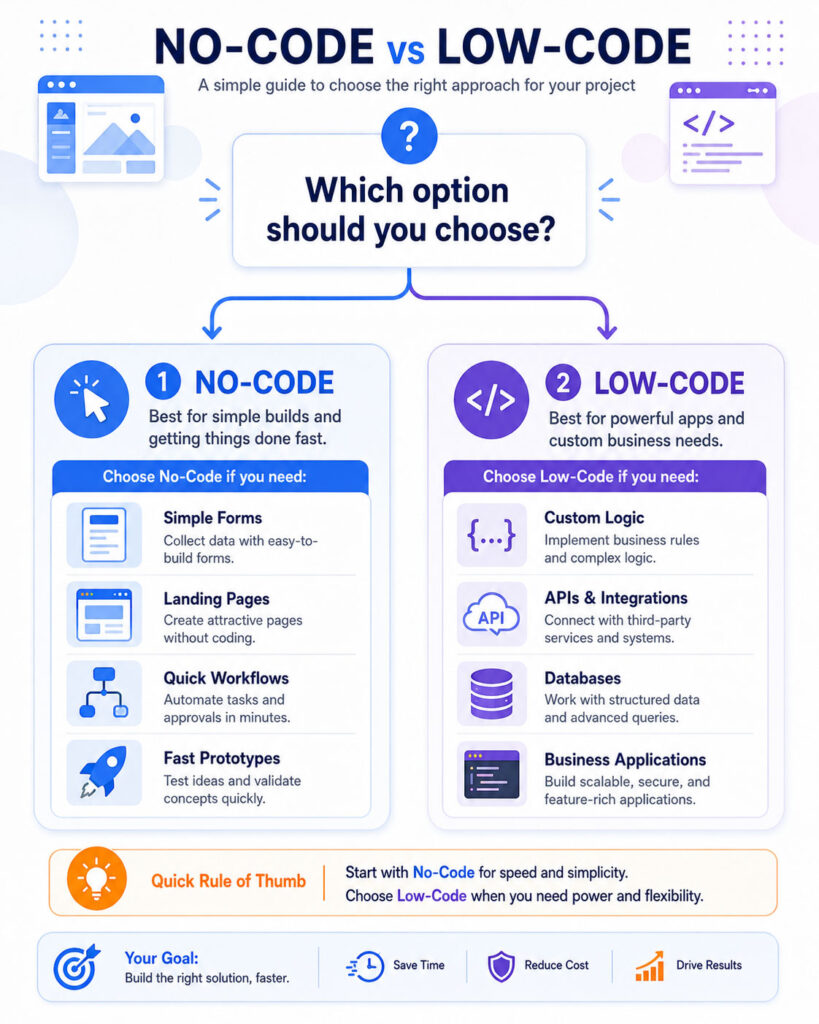
The best choice depends on who will build the solution and how complex the requirement is.
| Your Need | Better Option |
|---|---|
| Simple form or landing page | No-Code |
| Quick prototype or idea testing | No-Code |
| Business app with custom rules | Low-Code |
| API or database integration | Low-Code |
| Workflow automation without coding | No-Code or Low-Code |
| Complex application with long-term scaling | Low-Code or custom development |
Conclusion
No-Code vs Low-Code becomes simple when you understand the level of control needed.
No-code is best for simple solutions, quick workflows, forms, landing pages, and non-technical users. Low-code is better when the project needs custom logic, integrations, databases, APIs, and technical flexibility.
For small and simple needs, no-code can save time. For larger business needs, low-code can speed up development while still allowing technical customization. The right choice depends on your users, project complexity, budget, and long-term plans.

AboutTPJ Technical Team
The Project Jugaad Technical Team creates practical, easy-to-follow content on software development, web technologies, artificial intelligence, cybersecurity, cloud platforms, and digital tools. Our articles are informed by more than 13 years of hands-on experience with .NET, Angular, SQL Server, AWS, WordPress, Linux hosting, application deployment, and real-world troubleshooting. Each guide is researched, reviewed, and updated to provide accurate, useful, and actionable information for developers, businesses, and everyday technology users.