Cyber Security
Malware Explained is an important topic because phones, laptops, websites, apps, and online accounts are now part of daily life. If a device gets infected with malware, it can affect personal data, files, privacy, money, and work.
Malware can enter a device through fake downloads, unsafe links, infected email attachments, pirated software, harmful websites, or weak security settings.
Because of this, every user should understand what malware is, how it works, and how to reduce the risk of infection.
What Is Malware?
Malware means malicious software. It is software created to harm, disturb, steal, spy, lock, or misuse a device, account, network, or data.
In simple words, malware is unwanted harmful software that can create security problems.
Malware can affect computers, mobile phones, servers, websites, browsers, and even connected devices. Some malware works silently in the background, while some malware shows clear warning signs.
Why Malware Is Dangerous
Malware is dangerous because it can damage files, steal passwords, track activity, slow down devices, show unwanted ads, or lock important data.
For example, a fake attachment may install malware on a laptop. After that, the malware may try to steal login details or send data to an attacker.
Some malware also spreads from one system to another. So, one infected device can sometimes create risk for other devices or users.
How Malware Usually Enters a Device
Malware often enters a device when users click, download, install, or open something unsafe.
| Source | Possible Risk |
|---|---|
| Email Attachments | Fake invoices, reports, or documents may contain harmful files |
| Unsafe Links | Links may open fake websites or start unwanted downloads |
| Pirated Software | Cracked apps may include hidden malware |
| Fake Updates | Popups may ask users to install harmful updates |
| Unknown USB Drives | External devices may carry infected files |
| Weak Passwords | Attackers may access accounts and spread harmful files |
Therefore, safe browsing and careful downloading are important parts of malware protection.
Common Types of Malware
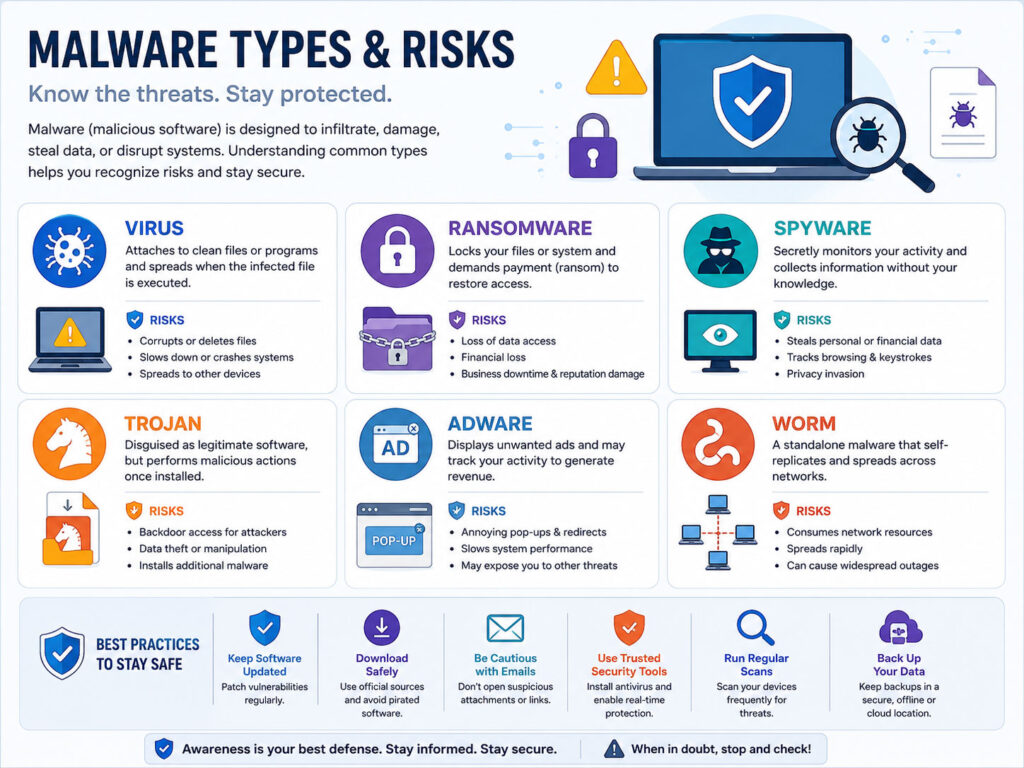
Malware comes in many forms. Each type has a different purpose and risk level.
| Malware Type | Simple Meaning |
|---|---|
| Virus | Harmful software that can attach to files and spread when files run |
| Worm | Malware that can spread across systems or networks |
| Trojan | Malware hidden inside something that looks useful or safe |
| Ransomware | Malware that locks files and demands payment |
| Spyware | Malware that secretly watches activity or collects information |
| Adware | Software that shows unwanted ads or redirects |
| Keylogger | Malware that records typed information such as passwords |
Some malware may combine more than one behavior. For example, one harmful program may spy, steal data, and download more malware.
Virus
A virus is one of the most commonly known malware types.
It may attach itself to files or programs. When the infected file runs, the virus may spread or cause damage.
Viruses can corrupt files, slow down systems, or disturb normal device behavior. So, users should avoid opening unknown files and should keep security software updated.
Trojan
A trojan looks like a safe or useful file, but it hides harmful behavior.
For example, a user may download a fake tool, game, installer, or cracked software. After installation, the trojan may open a backdoor, steal data, or allow more harmful actions.
Trojans are dangerous because they depend on user trust. They often look normal at first.
Ransomware
Ransomware is malware that locks or encrypts files and then asks for payment.
It can affect personal photos, documents, business files, and important records. In many cases, users lose access to files if they do not have a safe backup.
The best protection against ransomware includes regular backups, updated software, careful email handling, and strong access control.
Spyware and Keyloggers
Spyware secretly collects information from a device.
It may track browsing activity, app usage, personal details, or login behavior. A keylogger is a specific type of spyware that records what a user types.
This is risky because typed passwords, messages, card details, or private information may get exposed.
Warning Signs of Malware Infection
Malware does not always show clear signs. However, some changes may indicate a problem.
- Your device becomes suddenly slow.
- Apps crash often without a clear reason.
- Unknown programs appear on the device.
- Browser homepage or search engine changes automatically.
- You see too many popups or unwanted ads.
- Files become missing, locked, or renamed.
- Your device heats up or battery drains quickly.
- Friends receive strange messages from your account.
If you notice these signs, disconnect from risky activity, scan the device, change important passwords from a safe device, and review recent downloads or installed apps.
How to Protect Yourself from Malware
Good security habits can reduce malware risk.
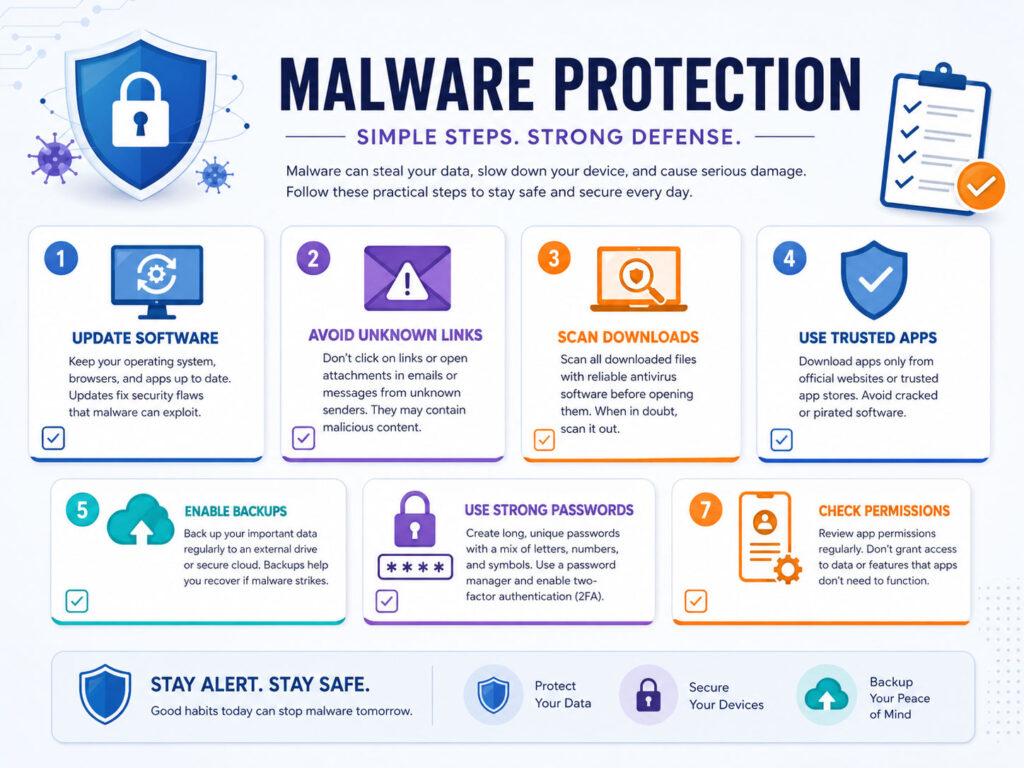
- Install apps only from trusted sources.
- Keep your operating system, browser, and apps updated.
- Avoid pirated software and cracked tools.
- Do not open unknown email attachments.
- Check website addresses before downloading anything.
- Use reliable security software when possible.
- Enable two-factor authentication for important accounts.
- Back up important files regularly.
These steps are simple, but they can prevent many common malware problems.
Malware Protection for Mobile Users
Mobile phones also need protection because they store contacts, photos, messages, banking apps, and personal accounts.
- Download apps only from official app stores.
- Check app permissions before allowing access.
- Remove apps you no longer use.
- Do not install unknown APK files from random websites.
- Keep screen lock enabled.
- Update the phone system and apps regularly.
If an app asks for unnecessary permissions, think carefully before installing or using it.
Why Backups Are Important
Backups are one of the best protections against data loss.
If malware damages or locks your files, a clean backup can help you recover important data. This is especially useful against ransomware.
For better safety, keep more than one backup. You can use cloud storage for easy access and an external drive for offline backup.
What to Do If You Think You Have Malware
If you suspect malware, act carefully.
- Stop opening unknown files or links.
- Disconnect external drives if they may be at risk.
- Run a security scan with trusted software.
- Remove suspicious apps or browser extensions.
- Change important passwords from a clean device.
- Check banking, email, and social accounts for unusual activity.
- Restore files only from clean and trusted backups.
For business systems or serious infections, it is better to take help from a qualified IT support or security professional.
Conclusion
Malware Explained in simple words means understanding harmful software that can damage devices, steal data, spy on activity, or lock important files.
Common malware types include viruses, worms, trojans, ransomware, spyware, adware, and keyloggers. Each type works differently, but the protection approach is similar.
Use trusted downloads, updated software, strong passwords, two-factor authentication, security scans, and regular backups. These habits can help protect your devices, accounts, and important data from many malware risks.

AboutTPJ Technical Team
The Project Jugaad Technical Team creates practical, easy-to-follow content on software development, web technologies, artificial intelligence, cybersecurity, cloud platforms, and digital tools. Our articles are informed by more than 13 years of hands-on experience with .NET, Angular, SQL Server, AWS, WordPress, Linux hosting, application deployment, and real-world troubleshooting. Each guide is researched, reviewed, and updated to provide accurate, useful, and actionable information for developers, businesses, and everyday technology users.