Web Development
Progressive Web App vs Native App is an important comparison for businesses planning a mobile-friendly product, customer portal, e-commerce platform, internal application, or digital service.
Both approaches can provide an app-like user experience. However, they differ in development technology, installation, distribution, device access, performance, maintenance, and cost.
A Progressive Web App uses web technologies and can run through a browser while also offering installation and selected platform integrations. In contrast, a native app is developed for a particular operating system using its platform tools and software development kits.
Therefore, the better option depends on what the application must do rather than which technology appears more modern.
What Is a Progressive Web App?
A Progressive Web App, commonly called a PWA, is a web application enhanced with features that make it behave more like an installed platform application.
It is generally built using standard web technologies such as:
- HTML.
- CSS.
- JavaScript or TypeScript.
- A web framework when required.
- A web app manifest.
- A service worker for suitable offline and background features.
Users can normally access the application through a URL. On supported browsers and devices, they may also install it and launch it from the home screen, desktop, start menu, or application launcher.
How a Progressive Web App Works
A PWA begins as a normal web application delivered through a secure web connection.
The browser loads the application’s HTML, styles, scripts, images, and data. Afterwards, supported PWA features can improve installation, caching, offline behaviour, notifications, and operating-system integration.
User opens a website
        ↓
Browser loads the web application
        ↓
Manifest provides installation information
        ↓
Service worker manages selected network requests
        ↓
Application can offer installation and offline features
The application should still provide a usable experience when a particular browser does not support every optional capability.
What Is a Web App Manifest?
A web app manifest is a JSON file that describes how an installed web application should appear and behave.
It can define information such as:
- Application name.
- Short name.
- Start URL.
- Icons.
- Display mode.
- Theme colour.
- Background colour.
- Preferred orientation.
- Application shortcuts.
A simplified manifest may look like this:
{
  "name": "Customer Service Portal",
  "short_name": "Service Portal",
  "start_url": "/",
  "display": "standalone",
  "background_color": "#ffffff",
  "theme_color": "#2457d6",
  "icons": [
    {
      "src": "/icons/app-192.png",
      "sizes": "192x192",
      "type": "image/png"
    },
    {
      "src": "/icons/app-512.png",
      "sizes": "512x512",
      "type": "image/png"
    }
  ]
}
The browser reads this information when determining how the application should appear after installation.
What Is a Service Worker?
A service worker is a script that runs separately from the main web page and can intercept selected network requests.
Depending on its implementation and browser support, it can help with:
- Caching application files.
- Providing an offline page.
- Serving previously saved content.
- Retrying selected actions when connectivity returns.
- Receiving web push notifications.
- Updating cached application assets.
- Supporting certain background events.
However, adding a service worker does not make an application offline automatically. Developers must define which assets and data should be cached and how the app should behave without a network connection.
Simple Service Worker Registration
if ('serviceWorker' in navigator) {
  window.addEventListener('load', async () => {
    try {
      await navigator.serviceWorker.register('/service-worker.js');
      console.log('Service worker registered');
    } catch (error) {
      console.error('Service worker registration failed', error);
    }
  });
}
The application should not depend on service-worker support for its most basic functionality unless the product specifically targets controlled environments.
What Is a Native App?
A native app is developed for a specific operating system using that platform’s development tools, frameworks, and application programming interfaces.
For example:
- An iPhone or iPad application may use Swift, SwiftUI, UIKit, and Apple platform APIs.
- An Android application may use Kotlin, Java, Jetpack Compose, and Android platform APIs.
Developers normally compile the source code into an application package and distribute it through an app store, enterprise system, managed deployment, or another platform-supported channel.
How a Native App Works
A native application is installed directly on the device.
It runs through the operating system and can request access to supported device features through platform APIs.
User installs the application
        ↓
Operating system verifies the package
        ↓
Application receives approved permissions
        ↓
Native code uses platform APIs
        ↓
Application communicates with local data and remote services
The operating system controls areas such as permissions, background execution, notifications, application storage, signing, and updates.
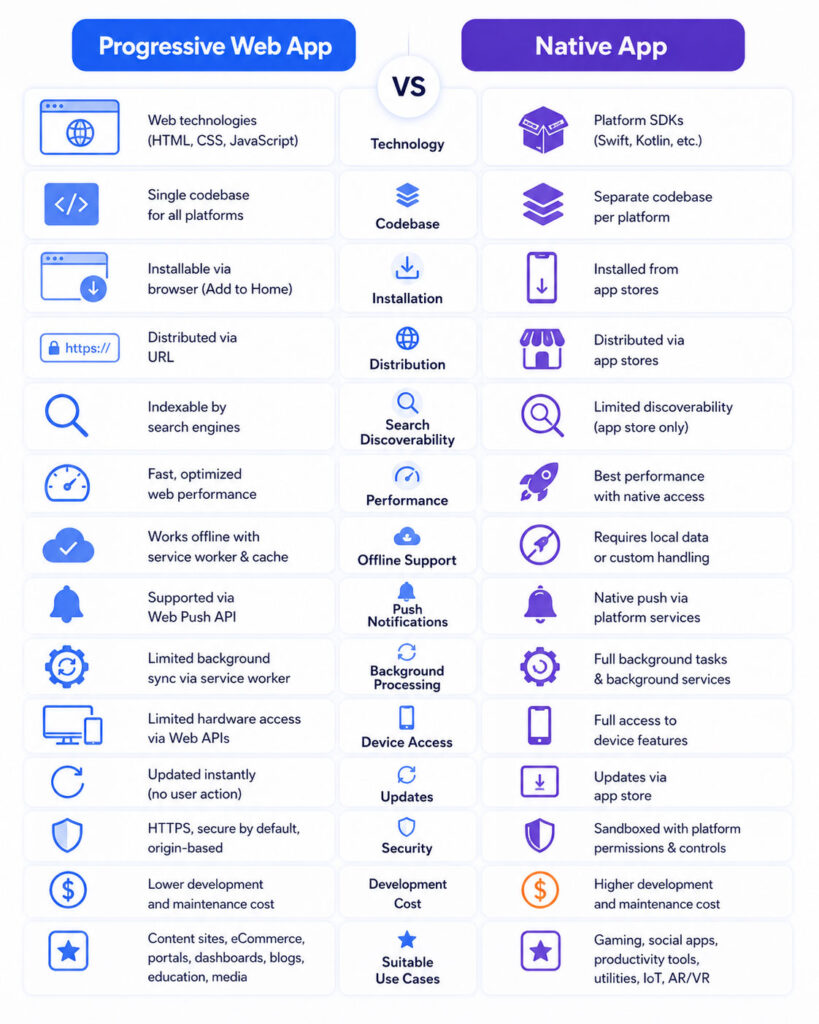
Progressive Web App vs Native App: Quick Comparison
| Point | Progressive Web App | Native App |
|---|---|---|
| Technology | HTML, CSS, JavaScript, and web APIs | Platform languages, frameworks, and SDKs |
| Primary Access | URL through a browser | Installed application package |
| Installation | Optional installation through a supported browser | Normally installed through a store or managed distribution |
| Codebase | One web codebase can support several platforms | Separate platform codebases may be required |
| Device Integration | Depends on available browser APIs | Typically provides broader platform access |
| Offline Support | Requires deliberate caching and local-data design | Can store local data and implement platform-specific offline features |
| Updates | Web assets can update from the server | Application versions are commonly distributed through platform channels |
| Search Discoverability | Public pages can be linked and indexed like other web content | Usually discovered through app stores, campaigns, or deep links |
| Initial Development Cost | Often lower for multi-platform reach | Can be higher when separate iOS and Android development is required |
| Best Fit | Content, commerce, portals, forms, SaaS, and broad web reach | Advanced hardware, intensive performance, complex background work, and platform-specific experiences |
This table describes common patterns. Actual results depend on the application’s architecture, development team, platform support, and product requirements.
Progressive Web App vs Responsive Website
A responsive website adjusts its layout to different screen sizes. However, responsiveness alone does not make a website a PWA.
A Progressive Web App normally adds application-oriented features such as:
- An installation manifest.
- Application icons.
- A standalone display mode.
- Offline or resilient network behaviour.
- Local data storage.
- Push notifications where supported.
- Application shortcuts or operating-system integration.
Therefore, every PWA should be responsive, but not every responsive website is a PWA.
Progressive Web App vs Mobile Website
A mobile website is a website designed to work comfortably on smaller screens.
Users normally open it through a browser tab. By contrast, an installable PWA can receive its own application icon and open in a standalone window on supported devices.
Nevertheless, the PWA remains a web application and should continue working through a normal browser URL.
Native App vs Cross-Platform App
A cross-platform mobile app uses a shared framework to create applications for several operating systems.
Examples may include frameworks that use one main codebase while producing platform application packages.
A cross-platform app is distributed more like a native app than a PWA. It can appear in app stores and use native platform bridges.
However, it may still require platform-specific code for advanced device features, performance optimisation, and operating-system differences.
Native App vs Hybrid App
A hybrid app usually packages web content inside a native application container.
The container can provide access to selected device features through plugins or bridges.
Therefore, hybrid development can reuse web skills while still distributing through app stores. However, its behaviour, performance, and maintenance differ from both a browser-installed PWA and a fully native application.
Core Characteristics of a Good PWA
A strong Progressive Web App should be:
- Reliable: It should handle slow, unstable, and unavailable networks gracefully.
- Responsive: It should work across mobile, tablet, and desktop layouts.
- Installable: Supported devices should receive appropriate manifest information and icons.
- Secure: It should use HTTPS and safe authentication practices.
- Accessible: Keyboard, screen-reader, contrast, and form usability should be considered.
- Discoverable: Public pages should use valid links, metadata, and crawlable HTML where relevant.
- Progressively enhanced: Essential functionality should not disappear merely because one optional web API is unavailable.
Most importantly, a PWA should solve a user problem rather than exist only to display an installation prompt.
Progressive Web App vs Native App Performance
Native apps generally have the strongest access to platform-specific performance tools, graphics APIs, background modes, and device optimisation.
Therefore, native development often fits demanding applications such as advanced games, real-time video processing, augmented reality, large animations, professional media editing, and intensive sensor use.
However, a well-built PWA can perform efficiently for many business and consumer applications.
Performance depends on:
- Application size.
- JavaScript execution.
- Image and media optimisation.
- Network design.
- API response time.
- Rendering strategy.
- Device capability.
- Browser implementation.
- Caching.
- Third-party scripts.
Consequently, a poorly designed native app can feel slower than a carefully optimised web application.
Startup Performance
An installed native app can package much of its interface and application code on the device.
A PWA may also cache its application shell and selected assets. Therefore, returning users can receive a fast launch when the cache remains valid.
Still, first-time PWA visitors must initially download the required web resources. As a result, developers should minimise the initial JavaScript bundle and prioritise meaningful content.
Animation and Graphics
Modern browsers can support smooth interfaces, transitions, canvas rendering, WebGL, and other visual capabilities.
Nevertheless, native platforms usually offer broader access to graphics frameworks and device-specific performance features.
Therefore, a standard dashboard or shopping interface may work well as a PWA, while a graphics-intensive game may benefit from native development.
Progressive Web App vs Native App Offline Support
Both approaches can work offline, but neither becomes offline-ready automatically.
A PWA can use a service worker, Cache Storage, IndexedDB, and other web storage features to preserve required assets and data.
A native application can store data in platform databases, local files, secure storage, or application-managed caches.
In both cases, the team must decide:
- Which features should remain available offline.
- Which records should be stored locally.
- How much storage the application may use.
- How changes should synchronise later.
- How conflicts should be resolved.
- How stale information should be identified.
- What happens when the user signs out.
PWA Offline Caching Strategies
| Strategy | How It Works | Common Use |
|---|---|---|
| Cache First | Return cached content first and use the network when the cache is unavailable | Icons, fonts, and stable assets |
| Network First | Try the network first and use cached data when the request fails | Frequently updated content |
| Stale While Revalidate | Return cached content immediately while updating it in the background | Articles, images, and reusable resources |
| Network Only | Always require a live network request | Sensitive or real-time operations |
| Cache Only | Serve only content prepared in the cache | Pre-cached application shell files |
Do not cache every API response automatically. Sensitive, personal, financial, or rapidly changing data requires careful handling.
Handling Offline User Actions
Suppose a field employee completes a form without internet access.
The application can store the pending action locally and attempt synchronisation after connectivity returns.
User submits form offline
        ↓
Application stores a pending record
        ↓
Network connection returns
        ↓
Application sends the record to the server
        ↓
Server validates and saves the update
        ↓
Application marks the local record as synchronised
However, developers must prevent duplicate submissions and inform users when data remains pending.
Push Notifications
Native applications can use platform notification services after receiving the required user permission.
PWAs can use the standards-based Web Push system where the browser and operating system support it.
On iPhone and iPad, Web Push is available for web apps added to the Home Screen on supported operating-system versions. The installed web app must request permission through a user interaction.
Therefore, push support should be verified for every target browser and device rather than assumed from desktop testing alone.
Device Hardware Access
A native app normally receives the broadest and earliest access to operating-system features.
Depending on the platform and permissions, it may work with:
- Camera and microphone.
- Precise and background location.
- Bluetooth devices.
- Near-field communication.
- Biometric authentication.
- Contacts and calendars.
- Health and fitness information.
- Motion sensors.
- File systems.
- Secure hardware.
- System share menus.
- Vehicle, wearable, or home-device ecosystems.
PWAs can access an increasing number of device capabilities through web APIs. However, support varies across browsers and operating systems.
Therefore, check the exact API required by the product rather than asking only whether PWAs support hardware access in general.
Background Processing
Mobile operating systems carefully control background execution to protect battery life, privacy, and system performance.
Native apps can request specific background modes for approved tasks such as navigation, audio, location, data refresh, or device communication.
A PWA can use service-worker events for supported tasks such as push handling, caching, and selected synchronisation.
However, a service worker is not a continuously running background process. The browser can start and stop it according to system conditions.
Consequently, applications that require continuous background tracking or long-running processing may need native platform support.
Installation Experience
A native app is commonly installed through an application store or organisation-managed channel.
A PWA can be opened instantly through a link without installation. Afterwards, supported browsers may allow the user to add it to the device.
| Installation Point | PWA | Native App |
|---|---|---|
| Try Before Installing | Users can open the URL immediately | Users commonly install the application first |
| Installation Source | Supporting browser or website interface | App store or managed distribution |
| Application Icon | Available after installation | Available after installation |
| Standalone Window | Available on supported platforms | Standard behaviour |
| Store Listing | Not required for normal web distribution | Commonly used for public distribution |
The direct-link experience can reduce installation friction. However, users may be more familiar with searching an application store than installing from a browser.
App Store Distribution
Native apps commonly use Apple App Store, Google Play, enterprise deployment, or another supported distribution method.
Store distribution can provide:
- A searchable product listing.
- User ratings and reviews.
- Application update delivery.
- Store-based purchase systems.
- Security and policy review.
- Device compatibility controls.
- Promotional visibility.
However, the development team must follow store policies, prepare release information, respond to reviews, and manage approval timelines.
A PWA does not require a store listing because users can reach it through a URL. Some platforms also provide methods to package or distribute web applications through stores, but support and policies vary.
Search Discoverability
A PWA remains part of the web.
Therefore, its public URLs can appear in search results when they are crawlable, indexable, useful, and technically accessible.
This characteristic can benefit:
- News and content platforms.
- Product catalogues.
- Service directories.
- Public tools.
- Educational applications.
- E-commerce stores.
- Booking services.
A native application normally depends more heavily on an app-store listing, website landing page, paid promotion, brand awareness, and deep links.
Progressive Web App Updates
A web development team can deploy updated HTML, CSS, JavaScript, and server functionality without requiring a traditional app-store submission.
However, service-worker caches can make updates more complex.
The browser may download a new service worker while the current application continues using the older version. Therefore, the application should notify users when a refresh or restart is required.
Developers should also avoid forcing an update in the middle of important work.
Native App Updates
Native updates are commonly prepared as new application versions and delivered through the relevant distribution channel.
The process can include:
- Build and test the release.
- Update version information.
- Sign the application package.
- Upload it to the store or deployment system.
- Complete review when required.
- Release the version.
- Allow users or managed devices to install it.
This approach provides controlled versioning. However, some users may delay installing an available update.
Development Cost
A PWA can reduce initial development effort when one responsive web codebase meets the complete product requirement.
The same development team can often support desktop, mobile, and tablet users.
Native development may require:
- Separate iOS and Android specialists.
- Different user-interface implementations.
- Platform-specific testing.
- Separate store releases.
- Multiple application packages.
- Platform-specific bug fixes.
However, the cost difference becomes smaller when a PWA needs complex offline synchronisation, browser-specific workarounds, advanced device access, and extensive platform testing.
Maintenance Cost
A shared web codebase can simplify feature maintenance.
Nevertheless, developers must still test across browsers, screen sizes, operating systems, and device capabilities.
Native applications require platform updates whenever Apple, Google, or device manufacturers change APIs, permissions, policies, and operating-system behaviour.
Therefore, compare the complete lifecycle cost rather than only the first development estimate.
User Interface and Platform Consistency
A native app can closely follow the design conventions, navigation patterns, controls, accessibility tools, and gestures of its operating system.
A PWA can provide one consistent brand experience across several platforms.
However, forcing the same interface onto every screen may feel less natural to users.
A strong PWA should still respect touch targets, safe areas, keyboard input, back navigation, orientation, and platform accessibility expectations.
Security Comparison
Neither approach is secure automatically.
A PWA normally operates within the browser security model and should use HTTPS, secure cookies, proper authentication, content-security controls, safe caching, and server-side validation.
A native app uses operating-system permissions, application signing, secure storage, platform security APIs, and distribution controls.
| Security Area | PWA Consideration | Native App Consideration |
|---|---|---|
| Transport | Use HTTPS for application and API traffic | Use secure network connections and certificate validation |
| Local Data | Avoid caching sensitive data unnecessarily | Use encrypted or platform-protected storage where appropriate |
| Permissions | Browser requests permission for supported web APIs | Operating system controls declared and runtime permissions |
| Code Delivery | Web assets arrive from the server | Signed application packages are installed on the device |
| Updates | Server and service-worker update process | Store or managed application version updates |
| Primary Risk | Web vulnerabilities, unsafe caching, and compromised sessions | Insecure local storage, excessive permissions, and vulnerable application code |
Most importantly, both applications must validate critical business actions on the server.
Payments and Monetisation
A PWA can use supported web payment methods, subscriptions, advertising, and account-based billing.
A native application can use platform purchase systems, subscriptions, advertising SDKs, and other permitted payment models.
However, store rules for digital goods and external payment options vary by platform and region.
Therefore, review the current policies before finalising the business model.
When Should You Choose a Progressive Web App?
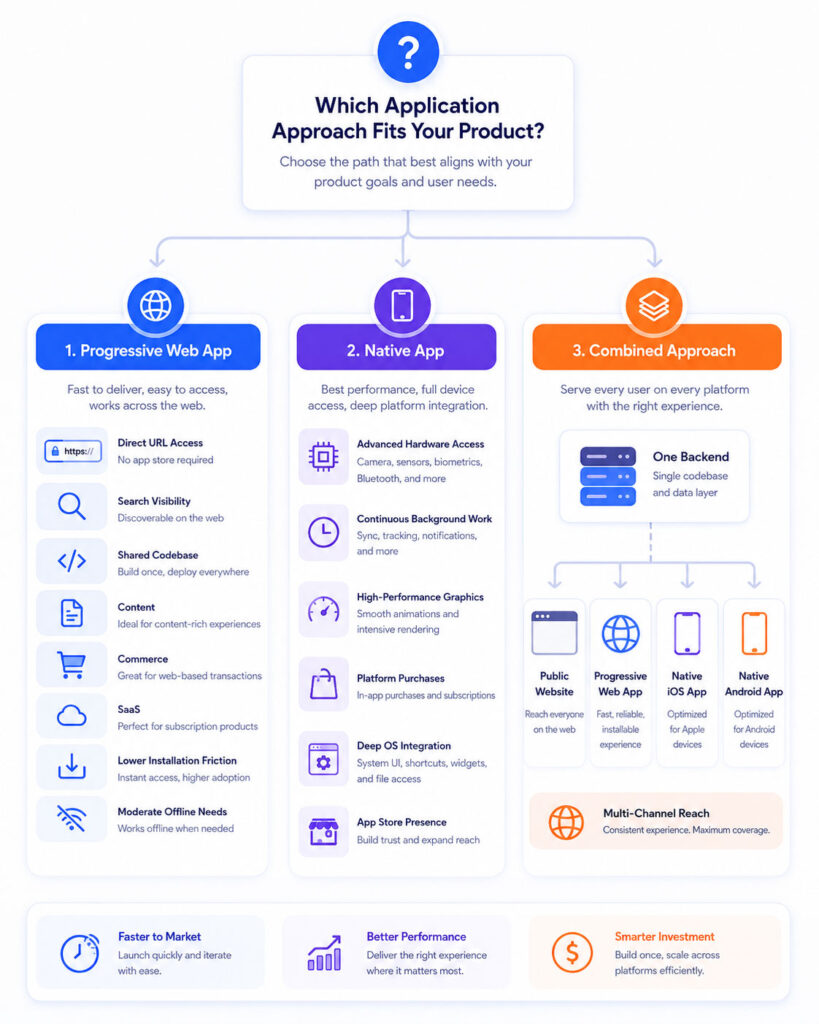
A PWA provides a strong starting point when broad reach, easy access, shared development, and web discoverability matter more than advanced platform integration.
Consider a PWA when:
- The product should work on mobile and desktop.
- Users should access it through a link immediately.
- Search-engine discoverability provides business value.
- The application mainly uses forms, lists, dashboards, content, and standard media.
- One shared codebase can meet the required experience.
- Users may not install an application for occasional use.
- The organisation wants to release updates quickly.
- The budget does not support separate native teams.
- Only moderate offline capability is required.
- Required device features are available through target browsers.
When Should You Choose a Native App?
A native app provides more value when the product depends heavily on the device and operating system.
Consider native development when:
- The application needs advanced camera or media processing.
- Continuous or specialised background execution is essential.
- The product depends on Bluetooth, NFC, health data, wearables, or other platform ecosystems.
- High-performance graphics or gaming are central requirements.
- The interface must closely follow platform conventions.
- App-store discovery and reviews are important.
- Strong integration with platform subscriptions or purchases is required.
- The application needs advanced notification behaviour.
- Large amounts of data must remain available offline.
- The business can support separate platform development and maintenance.
PWA vs Native App for E-Commerce
A PWA can work well for an online store because users can open products from search results, advertisements, messages, and social links.
It can also support installation, cached pages, saved carts, notifications, and streamlined checkout where browser support allows it.
However, a native shopping app may provide greater value for frequent customers who need loyalty cards, advanced notifications, barcode scanning, location-aware stores, platform wallets, and deeper device integration.
Therefore, many retailers use a strong mobile website or PWA first and add a native app for highly engaged customers.
PWA vs Native App for SaaS
Many software-as-a-service platforms work well as PWAs.
Dashboards, billing portals, project tools, CRM systems, and productivity applications often rely on forms, tables, APIs, files, and notifications that the web platform can support effectively.
In addition, users may need the same product on desktop and mobile.
A native app becomes more attractive when the SaaS product requires advanced background operations, specialised hardware, platform-specific integrations, or a highly optimised mobile workflow.
PWA vs Native App for Banking and Finance
Financial applications require strong authentication, secure communication, careful local storage, fraud controls, and regulatory compliance.
A PWA can support account viewing, payments, forms, and customer portals through secure web technologies.
However, a native app may offer deeper access to biometric authentication, secure hardware, device integrity checks, notifications, and platform-specific fraud controls.
The architecture should follow the organisation’s threat model and compliance requirements rather than assuming that one technology is automatically secure.
PWA vs Native App for Games
Simple puzzles, card games, educational games, and casual experiences can work well through the web.
They gain easy sharing and do not require users to install a large package first.
However, advanced 3D games, high-frame-rate action, complex graphics, large asset libraries, controller integration, and store-based purchases commonly favour native or dedicated game-engine distribution.
PWA vs Native App for Content Platforms
News, blogs, documentation, learning portals, and media catalogues benefit strongly from web distribution.
Users can share individual URLs, and search engines can discover public content.
A PWA can add installation, offline reading, saved articles, and notifications.
A native application may still provide value for downloaded media, subscription experiences, audio playback, or advanced background content features.
PWA vs Native App for Field Service
Field-service applications often require offline forms, photographs, location, signatures, synchronisation, and background activity.
A PWA can support many of these workflows when the target devices and browsers provide the necessary capabilities.
However, a native app may be more reliable when employees require continuous location tracking, Bluetooth equipment, large offline databases, background uploads, or tightly controlled devices.
Therefore, test the complete field workflow under weak and unavailable network conditions before choosing the architecture.
PWA vs Native App for Internal Business Tools
Internal dashboards, approval systems, inventory portals, reporting tools, and employee applications often work well as PWAs.
The organisation can provide one URL and update the application centrally.
In managed environments, browser versions and devices may also be more predictable.
However, a native app may suit internal tools that use scanners, rugged hardware, background services, enterprise device controls, or specialised peripherals.
PWA vs Native App for Startups
A startup often needs to validate the product before investing in several platform-specific applications.
A responsive web application or PWA can provide:
- Faster initial launch.
- One main codebase.
- Direct sharing through URLs.
- Desktop and mobile support.
- Search visibility where relevant.
- Lower early maintenance effort.
After the product gains active users, the startup can measure whether native features would improve retention, revenue, performance, or engagement.
However, a startup should choose native development from the beginning when the core product cannot function properly through available web APIs.
Can You Use Both a PWA and Native App?
Yes. The two approaches do not need to be mutually exclusive.
A business can provide:
- A public website for discovery.
- A PWA for broad cross-platform access.
- A native app for frequent users and advanced features.
- Shared backend APIs for every client.
Shared Backend APIs
        ↓
├── Public Website
├── Progressive Web App
├── Native iOS App
└── Native Android App
This strategy can maximise reach. However, it also increases development, testing, content consistency, analytics, and maintenance requirements.
Start with Web and Add Native Features Later
A product can begin as a responsive web application and gradually add:
- A web app manifest.
- Installation support.
- Application icons.
- Offline fallbacks.
- Cached application assets.
- Local data storage.
- Push notifications where supported.
- Background synchronisation for suitable actions.
Later, the team can build native applications when user behaviour and business requirements justify the investment.
However, the original backend should expose stable and secure APIs so several clients can use the same business logic.
Can a PWA Be Converted into a Native App?
A team can package web technology inside a native container or use a cross-platform framework to reuse selected code.
However, conversion is rarely a one-click process for a production application.
The team may still need to address:
- Navigation.
- Platform permissions.
- Offline storage.
- Notifications.
- Deep linking.
- Application signing.
- Store policies.
- Native plugins.
- Accessibility.
- Performance.
Therefore, plan the architecture around reusable business logic rather than assuming that the complete interface can move unchanged.
Progressive Web App Development Checklist
- Define the target users and devices.
- Confirm required browser capabilities.
- Build a responsive and accessible web application.
- Serve the complete application through HTTPS.
- Create and link a valid web app manifest.
- Provide suitable application icons.
- Choose a clear standalone display mode.
- Design an offline or network-failure experience.
- Register a service worker where appropriate.
- Choose safe caching strategies.
- Protect authentication and sensitive data.
- Test installation across target platforms.
- Test updates and service-worker replacement.
- Measure loading, responsiveness, and visual stability.
- Provide fallbacks for unsupported capabilities.
Native App Development Checklist
- Define supported operating-system versions.
- Choose native or cross-platform development.
- Design platform-appropriate navigation and controls.
- Request only necessary permissions.
- Protect local credentials and sensitive data.
- Design offline storage and synchronisation.
- Implement notifications and background modes carefully.
- Test on real devices and screen sizes.
- Prepare signing certificates and application identifiers.
- Create store listings, screenshots, and privacy details.
- Complete platform review and release processes.
- Monitor crashes, performance, and user feedback.
- Maintain compatibility with operating-system updates.
Progressive Web App Testing Checklist
A PWA should be tested as both a website and an installed application.
- Open it through a normal browser tab.
- Install it through supported browsers.
- Launch it from the device icon.
- Test first-time and returning visits.
- Test slow, unstable, and unavailable networks.
- Verify cached information and offline messages.
- Test login, logout, and session expiry.
- Confirm that updates do not interrupt active work.
- Check keyboard and screen-reader accessibility.
- Verify push permissions and notifications where supported.
- Test storage limits and data cleanup.
- Confirm that public pages remain crawlable.
Native App Testing Checklist
- Test supported operating-system versions.
- Test low-memory and low-storage devices.
- Review permission-denied scenarios.
- Test background and foreground transitions.
- Verify offline and synchronisation behaviour.
- Test notifications in different application states.
- Review battery and data usage.
- Test application updates and migrations.
- Verify deep links.
- Test biometric and secure-storage failures.
- Check accessibility settings and text scaling.
- Review store compliance before submission.
Common PWA Mistakes
- Calling a responsive website a PWA without adding useful app capabilities.
- Caching every response without considering privacy or freshness.
- Breaking the application when JavaScript or a web API is unavailable.
- Showing an installation prompt before users understand the product.
- Lazy loading critical application resources incorrectly.
- Failing to notify users about a waiting update.
- Testing only in one Chromium browser.
- Assuming desktop support guarantees identical mobile support.
- Ignoring SEO because the application looks like an app.
- Storing sensitive information in insecure browser storage.
Common Native App Mistakes
- Requesting unnecessary permissions during the first launch.
- Ignoring platform design conventions.
- Building separate platforms without shared backend contracts.
- Failing to test application upgrades and database migrations.
- Assuming every user installs updates immediately.
- Running excessive background operations.
- Storing secrets directly inside the application package.
- Ignoring low-end devices and battery use.
- Submitting to stores without reviewing current policies.
- Building a native app when a mobile website would solve the requirement.
Questions to Ask Before Choosing
- Do users need the application occasionally or every day?
- Must the product be discoverable through web search?
- Should users access it without installation?
- Which device APIs are essential?
- Does the application need continuous background processing?
- How much data must work offline?
- Does the product require advanced graphics or real-time processing?
- Is app-store presence important?
- Can the business support separate mobile development teams?
- How quickly must updates reach users?
- Which browsers and operating systems must be supported?
- What security and compliance requirements apply?
Progressive Web App vs Native App Decision Guide
| Your Requirement | Recommended Starting Point |
|---|---|
| Immediate access through a URL | Progressive Web App |
| Search-engine discoverability | Progressive Web App |
| One main mobile and desktop codebase | Progressive Web App |
| Content, commerce, forms, or business dashboard | Progressive Web App |
| Advanced hardware and operating-system integration | Native App |
| Continuous specialised background work | Native App |
| High-performance game or media processing | Native App |
| Strong store presence and platform purchases | Native App |
| Broad reach plus advanced features for frequent users | Use both approaches |
| Unclear early-stage product requirements | Start with a responsive web application or PWA prototype |
Which Option Costs Less?
A PWA often costs less initially because one web team can support several device types.
However, cost depends on the complete feature set.
A complex PWA with advanced offline synchronisation, browser-specific fixes, and hardware integrations may require substantial development and testing.
Similarly, a simple native application can remain manageable when it targets only one controlled platform.
Therefore, estimate the required capabilities, platforms, testing effort, maintenance, and support before comparing budgets.
Which Option Provides a Better User Experience?
Neither approach guarantees a better experience by itself.
A useful PWA can provide fast access, easy sharing, installation, and a consistent interface.
A well-designed native app can provide deep platform integration, responsive controls, and advanced device capabilities.
The better experience is the one that helps users complete their task reliably with the least unnecessary friction.
Final Verdict
A Progressive Web App provides broad reach, direct URL access, search discoverability, optional installation, and a shared web codebase.
A native app provides deeper platform access, stronger support for intensive processing, advanced background behaviour, and closer integration with operating-system ecosystems.
Therefore, choose a PWA when standard web capabilities can satisfy the full product requirement. Choose native development when the product depends on capabilities that the target browsers cannot deliver consistently.
Conclusion
Progressive Web App vs Native App does not have one universal winner.
Start by listing required features, devices, offline workflows, performance needs, distribution channels, and budget.
Next, verify whether the target browsers support every essential capability. If they do, a PWA can provide an efficient and widely accessible solution.
Alternatively, choose a native app when deep hardware integration, specialised background execution, high-performance graphics, or platform-specific user experience is central to the product.
Most importantly, select the simplest approach that can deliver a reliable experience without blocking future growth.

AboutTPJ Technical Team
The Project Jugaad Technical Team creates practical, easy-to-follow content on software development, web technologies, artificial intelligence, cybersecurity, cloud platforms, and digital tools. Our articles are informed by more than 13 years of hands-on experience with .NET, Angular, SQL Server, AWS, WordPress, Linux hosting, application deployment, and real-world troubleshooting. Each guide is researched, reviewed, and updated to provide accurate, useful, and actionable information for developers, businesses, and everyday technology users.