Software Development
API vs Webhook is a common topic when applications need to share data or communicate with each other. Both APIs and webhooks help systems connect, but they work in different ways.
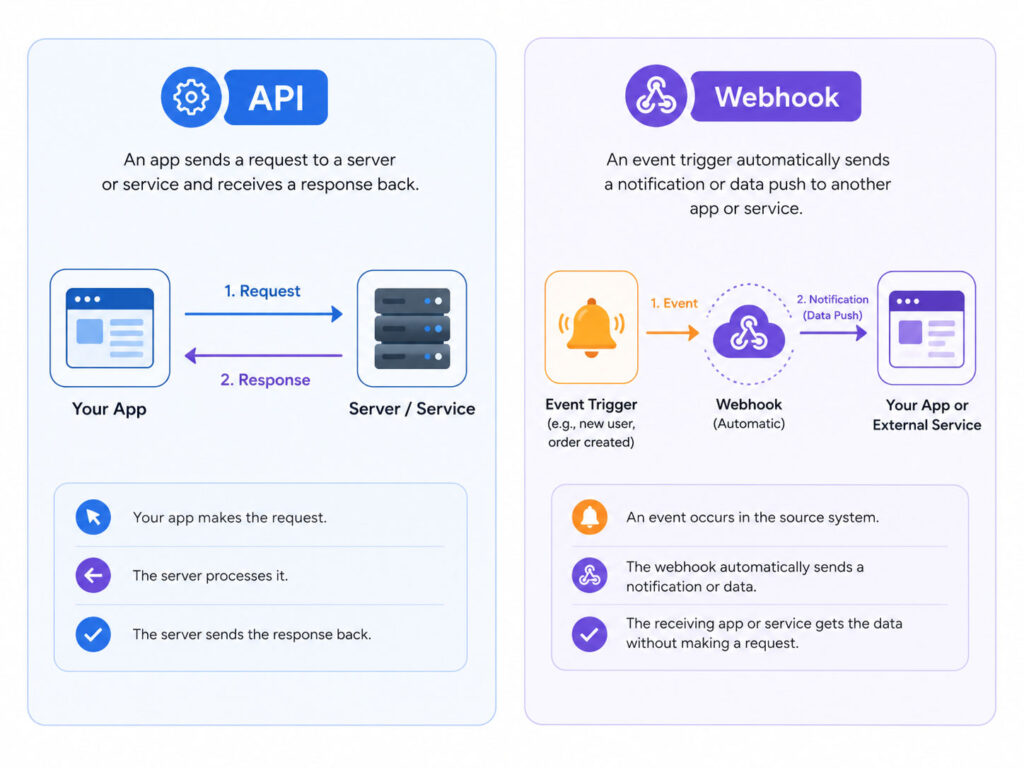
An API usually works when one application asks another application for data. A webhook works when one application automatically sends data after a specific event happens.
Because of this difference, APIs are often called request-based communication, while webhooks are often called event-based communication.
What Is an API?
API stands for Application Programming Interface. It allows one software application to communicate with another software application.
For example, a weather app may use an API to get the latest temperature from a weather service. Similarly, a payment page may use an API to check payment status from a payment provider.
In simple words, an API works like a waiter in a restaurant. You ask for something, the waiter takes your request, and then brings the response back to you.
What Is a Webhook?
A webhook is a way for one application to send information automatically when something happens.
For example, when a payment succeeds, the payment provider can send a webhook to your application. Your application can then update the order status without repeatedly checking the payment provider.
In simple words, a webhook works like a notification. You do not need to ask again and again. The system informs you when the event happens.
Quick Difference Between API and Webhook
The easiest way to understand the difference is this: API means you ask for data, while webhook means the system sends data when an event happens.
| Point | API | Webhook |
|---|---|---|
| Communication Type | Request-based | Event-based |
| Who Starts It? | Your application sends a request | Another application sends data after an event |
| Data Flow | You ask and then receive response | You receive data automatically |
| Best For | Fetching, creating, updating, or deleting data | Receiving real-time event notifications |
| Example | Check order status using API | Receive payment success update through webhook |
How an API Works
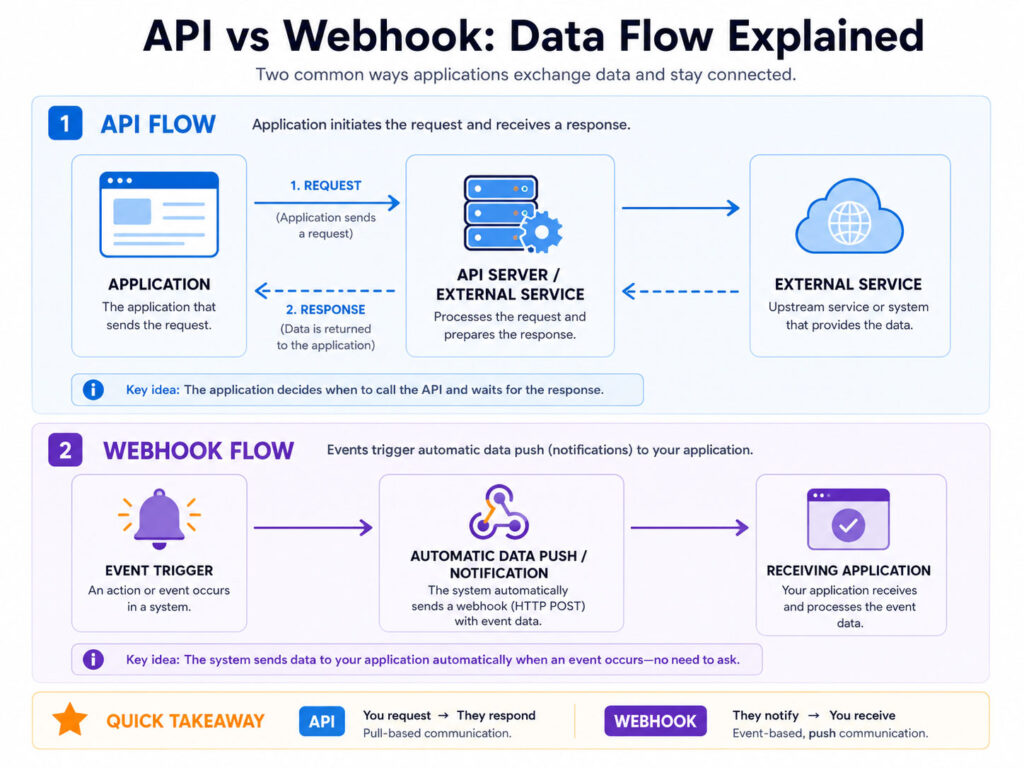
An API works when an application sends a request to another system.
For example, your application may ask a server for user details, product information, payment status, or order history. The server checks the request and sends a response.
A simple API flow looks like this:
Application sends request → API receives request → Server processes request → API sends responseThis process happens only when the application asks for data or action.
Simple API Example
Suppose an online store wants to check the status of an order. It may call an API like this:
GET /orders/12345/statusThe server may return a response like this:
{
  "orderId": "12345",
  "status": "Shipped"
}
In this case, the application asked for the order status, and the API returned the answer.
How a Webhook Works
A webhook works when an event triggers an automatic message.
For example, when a customer completes payment, the payment system can send a webhook to your application. Your application receives the data and updates the order status.
A simple webhook flow looks like this:
Event happens → Webhook sends data → Your application receives data → Your system takes actionThis process happens automatically after the event. So, your application does not need to keep checking again and again.
Simple Webhook Example
Suppose a payment succeeds. The payment provider may send a webhook payload like this:
{
  "event": "payment_success",
  "orderId": "12345",
  "amount": 999,
  "status": "Paid"
}
Your application can use this data to mark the order as paid and continue the next step.
API vs Webhook with Real-Life Examples
APIs and webhooks are easier to understand with daily examples.
| Situation | Better Option | Reason |
|---|---|---|
| Check current payment status | API | Your system asks for the latest status |
| Get notified when payment succeeds | Webhook | The payment provider sends an automatic update |
| Fetch product list from another system | API | Your app requests the product data |
| Receive alert when a form is submitted | Webhook | The form tool sends event data instantly |
| Update customer details | API | Your app sends update request to another system |
When Should You Use an API?
You should use an API when your application needs control over when to request data or perform an action.
APIs are useful for:
- Fetching user details
- Checking order status
- Creating or updating records
- Searching product information
- Connecting mobile apps with backend systems
- Integrating third-party services
Therefore, APIs are useful when your application needs to ask for information or send instructions.
When Should You Use a Webhook?
You should use a webhook when your application needs to react to events quickly.
Webhooks are useful for:
- Payment success notifications
- Form submission alerts
- New order notifications
- Subscription renewal updates
- Git push or deployment events
- CRM or email marketing updates
Because webhooks send updates automatically, they reduce repeated API calls and improve real-time communication.
Can You Use API and Webhook Together?
Yes, many applications use APIs and webhooks together.
For example, a payment provider may send a webhook when payment succeeds. After receiving the webhook, your application may call an API to get full payment details.
This combination is common because webhooks notify your system about events, while APIs help fetch or update additional information.
Common Mistakes to Avoid
APIs and webhooks are useful, but you should design them carefully.
- Do not call APIs too frequently without need.
- Do not trust webhook data without verification.
- Keep API keys and webhook secrets private.
- Validate incoming webhook requests.
- Handle duplicate webhook events safely.
- Log important API and webhook activity for troubleshooting.
These steps can make integrations safer and more reliable.
Conclusion
API vs Webhook becomes simple when you understand the communication style.
An API works when your application asks another system for data or action. A webhook works when another system automatically sends data after an event happens.
Use APIs when you need request-based control. Use webhooks when you need event-based updates. In many real projects, both work together to create smooth and reliable integrations.

AboutTPJ Technical Team
The Project Jugaad Technical Team creates practical, easy-to-follow content on software development, web technologies, artificial intelligence, cybersecurity, cloud platforms, and digital tools. Our articles are informed by more than 13 years of hands-on experience with .NET, Angular, SQL Server, AWS, WordPress, Linux hosting, application deployment, and real-world troubleshooting. Each guide is researched, reviewed, and updated to provide accurate, useful, and actionable information for developers, businesses, and everyday technology users.