Cyber Security
Phishing Email Examples can help you understand how fake emails look and how attackers try to trick users. Many phishing emails look normal at first, but they often contain warning signs.
Today, phishing emails may look like messages from banks, delivery companies, social media platforms, payment apps, office tools, or online stores. However, their real goal is usually to steal passwords, payment details, personal information, or account access.
So, before you click any link or download any attachment, you should check the email carefully.
What Is a Phishing Email?
A phishing email is a fake email that tries to trick you into sharing sensitive information or taking unsafe action.
For example, it may ask you to verify your account, update payment details, reset your password, download an invoice, or claim a reward. The email may look urgent so that you act quickly without thinking.
Phishing emails can target anyone. Students, office users, business owners, online shoppers, and normal internet users can all receive them.
Why Phishing Emails Are Dangerous
Phishing emails are dangerous because they can look real. Attackers often copy logos, colors, button styles, and writing patterns from trusted brands.
If you click a fake link and enter your login details, attackers may access your account. If you download a harmful attachment, your device may get infected with malware.
Because of this, phishing awareness is one of the most important cyber security habits for beginners.
Common Warning Signs of a Phishing Email
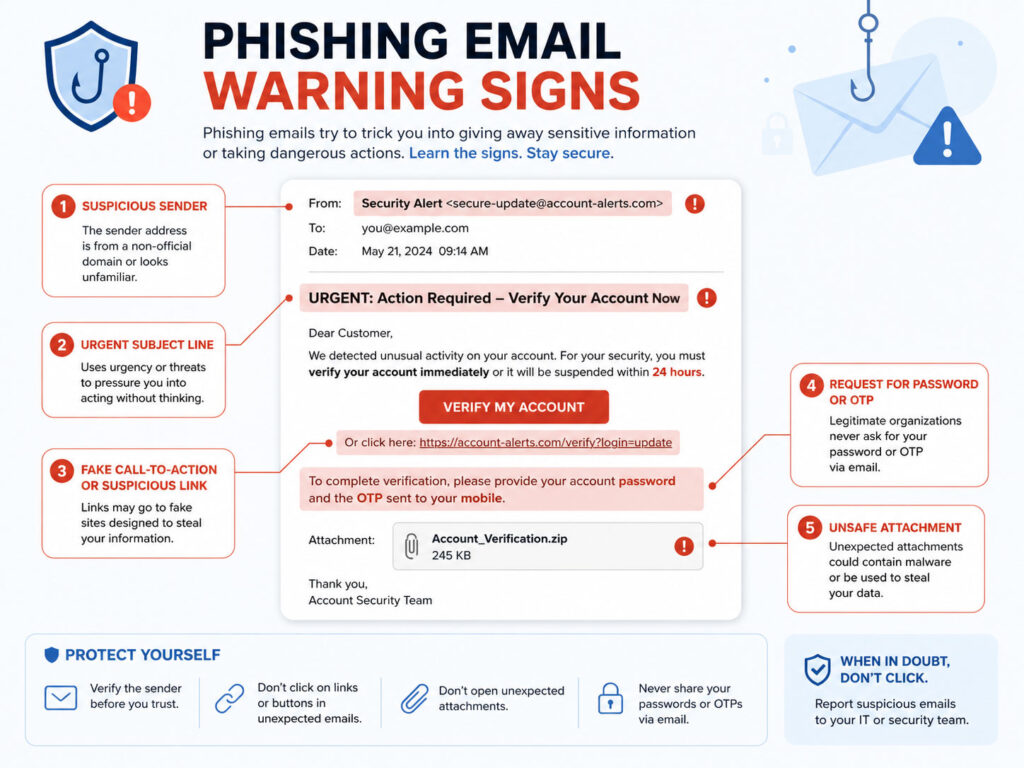
Most phishing emails have one or more warning signs. You should pause and verify the email if you notice any of these signs.
| Warning Sign | What It Means |
|---|---|
| Urgent message | The email pushes you to act immediately |
| Unknown sender | The email comes from an address you do not recognize |
| Suspicious link | The link does not match the official website |
| Unexpected attachment | The file may contain malware or unsafe content |
| Spelling mistakes | The email may contain poor grammar or unusual wording |
| Request for private details | The email asks for password, OTP, PIN, or banking details |
In short, a phishing email often tries to create pressure, fear, curiosity, or greed.
Phishing Email Example 1: Fake Bank Alert
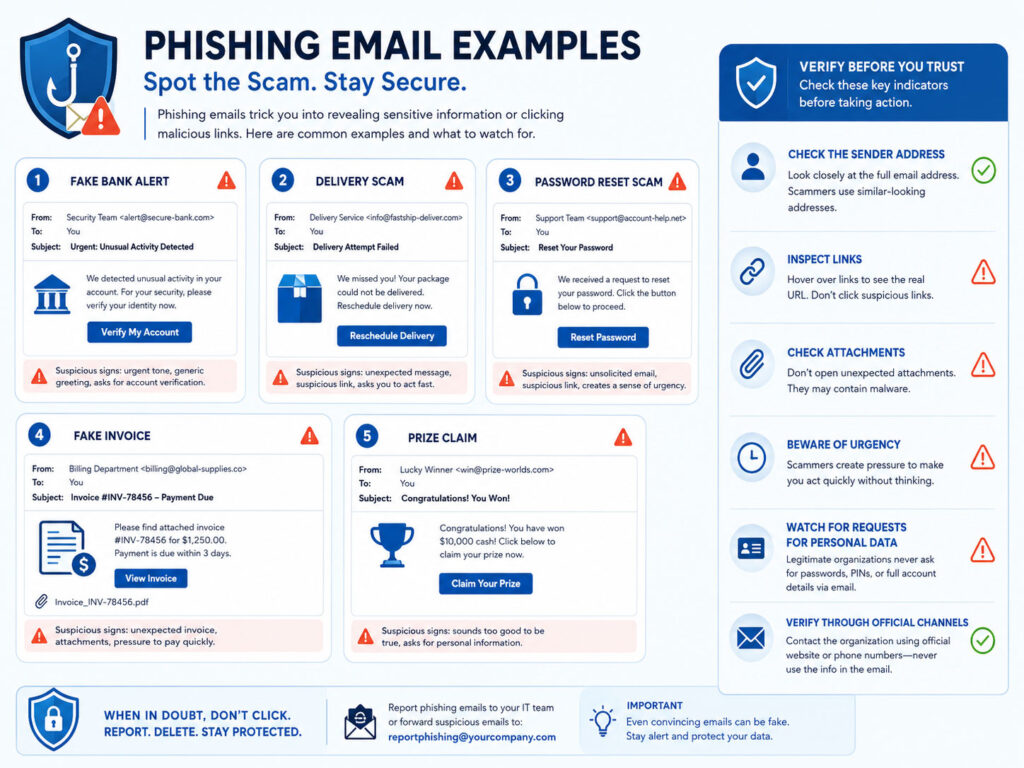
A fake bank alert may say that your account has been locked or that suspicious activity was found.
It may ask you to click a link and verify your account immediately.
Example message:
Your bank account has been temporarily blocked.
Click here to verify your details and restore access.
This is risky because real banks usually do not ask you to enter passwords, PINs, OTPs, or full card details through email links.
Phishing Email Example 2: Fake Delivery Message
A fake delivery email may claim that your parcel is waiting or that delivery failed.
It may ask you to pay a small fee, update your address, or open a tracking link.
Example message:
Your package could not be delivered.
Pay a small redelivery fee to schedule delivery again.
Before clicking, visit the delivery company website manually and check the tracking number from the official source.
Phishing Email Example 3: Password Reset Request
A fake password reset email may say that someone requested a password change for your account.
It may include a button like Reset Password or Secure Your Account.
Example message:
We noticed unusual login activity.
Reset your password now to protect your account.
If you did not request a password reset, do not click the email link. Instead, open the official website or app directly and check your account security settings.
Phishing Email Example 4: Fake Invoice or Payment Email
A fake invoice email may look like it came from a vendor, software company, or payment service.
It may include an attachment or a payment link. Sometimes, attackers use file names like invoice.pdf, payment-details.zip, or tax-document.docx.
Example message:
Please find the pending invoice attached.
Open the document and complete the payment today.
If you were not expecting the invoice, verify it with the sender through another trusted method before opening the file.
Phishing Email Example 5: Prize or Gift Claim
A fake prize email may say that you won a gift card, phone, cashback, lottery, or special reward.
It may ask you to share personal details or pay a small processing fee.
Example message:
Congratulations! You have won a gift card.
Claim your reward before it expires.
If an offer looks too good to be true, it is usually safer to ignore it.
How to Check If an Email Is Fake
You can reduce phishing risk by checking a few things before taking action.
- Check the sender email address carefully.
- Move your mouse over links before clicking to preview the destination.
- Do not trust urgent messages without verification.
- Open official websites manually instead of clicking email links.
- Do not download unexpected attachments.
- Never share passwords, OTPs, PINs, or banking details through email.
- Contact the company directly if the email looks important but suspicious.
These simple checks can prevent many online scams.
What to Do If You Clicked a Phishing Link
If you clicked a phishing link, act quickly.
- Do not enter any personal information on the opened page.
- Close the website immediately if it looks suspicious.
- Change your password if you entered login details.
- Enable two-factor authentication on the affected account.
- Log out from unknown devices or sessions.
- Scan your device if you downloaded any file.
- Contact your bank immediately if payment details were shared.
Quick action can reduce damage and help you protect your accounts.
Best Practices to Avoid Phishing Emails
Phishing attacks keep changing, but basic safety habits still help a lot.
- Use strong and unique passwords for important accounts.
- Enable two-factor authentication wherever possible.
- Keep your browser, apps, and device updated.
- Use spam filters and report suspicious emails.
- Avoid using public Wi-Fi for sensitive account activity.
- Educate family members or team members about phishing signs.
Also, slow down before clicking. Many phishing attacks work because users act too quickly.
Conclusion
Phishing Email Examples show how attackers use fake messages to create fear, urgency, or curiosity. These emails may look real, but small warning signs can help you identify them.
Always check the sender, link, attachment, message tone, and request before taking action. If something feels suspicious, verify it from the official source.
By staying alert and following safe email habits, you can protect your accounts, personal information, and devices from common phishing attacks.

AboutTPJ Technical Team
The Project Jugaad Technical Team creates practical, easy-to-follow content on software development, web technologies, artificial intelligence, cybersecurity, cloud platforms, and digital tools. Our articles are informed by more than 13 years of hands-on experience with .NET, Angular, SQL Server, AWS, WordPress, Linux hosting, application deployment, and real-world troubleshooting. Each guide is researched, reviewed, and updated to provide accurate, useful, and actionable information for developers, businesses, and everyday technology users.