Cyber Security
Two-Factor Authentication Explained is an important topic for anyone who uses email, banking apps, social media, cloud storage, shopping websites, or work accounts.
A password alone is not always enough to protect an account. Passwords can be guessed, leaked, reused, or stolen through phishing attacks. Because of this, many websites now offer two-factor authentication for better account protection.
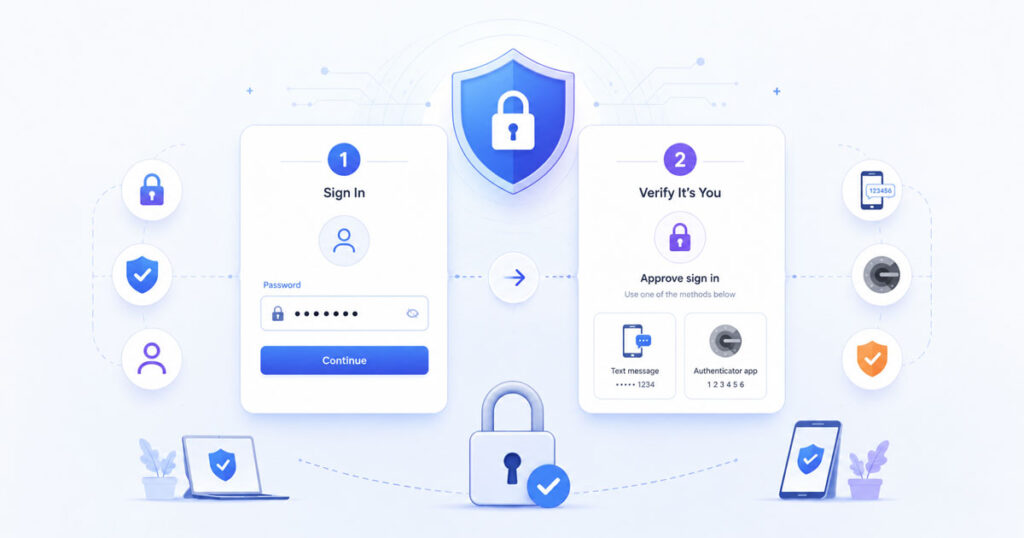
Two-factor authentication adds one extra step after your password. As a result, even if someone knows your password, they may still fail to access your account.
What Is Two-Factor Authentication?
Two-factor authentication, also called 2FA, is a security method that uses two different steps to confirm your identity.
The first step is usually something you know, such as your password. The second step is usually something you have or something you are, such as a code, phone approval, authenticator app, fingerprint, face unlock, or security key.
In simple words, 2FA adds another lock to your account.
Why Passwords Alone Are Risky
Passwords are useful, but they have many weaknesses.
Many users create simple passwords because they are easy to remember. Some users also reuse the same password on multiple websites. However, if one website suffers a data leak, attackers may try the same password on other accounts.
Phishing is another serious risk. A fake login page may capture your password if you enter it without checking the website carefully.
How Two-Factor Authentication Helps
Two-factor authentication reduces risk by asking for an extra verification step.
For example, after entering your password, you may need to enter a code from an authenticator app. In another case, you may need to approve the login from your phone.
This extra step makes account access harder for attackers. They need more than just your password.
Quick Example of 2FA Login
A normal login uses only one step. A 2FA login uses two steps.
| Login Type | How It Works |
|---|---|
| Password Login | You enter your username and password |
| 2FA Login | You enter your password and complete an extra verification step |
Therefore, 2FA gives your account an additional layer of safety.
Common Types of Two-Factor Authentication
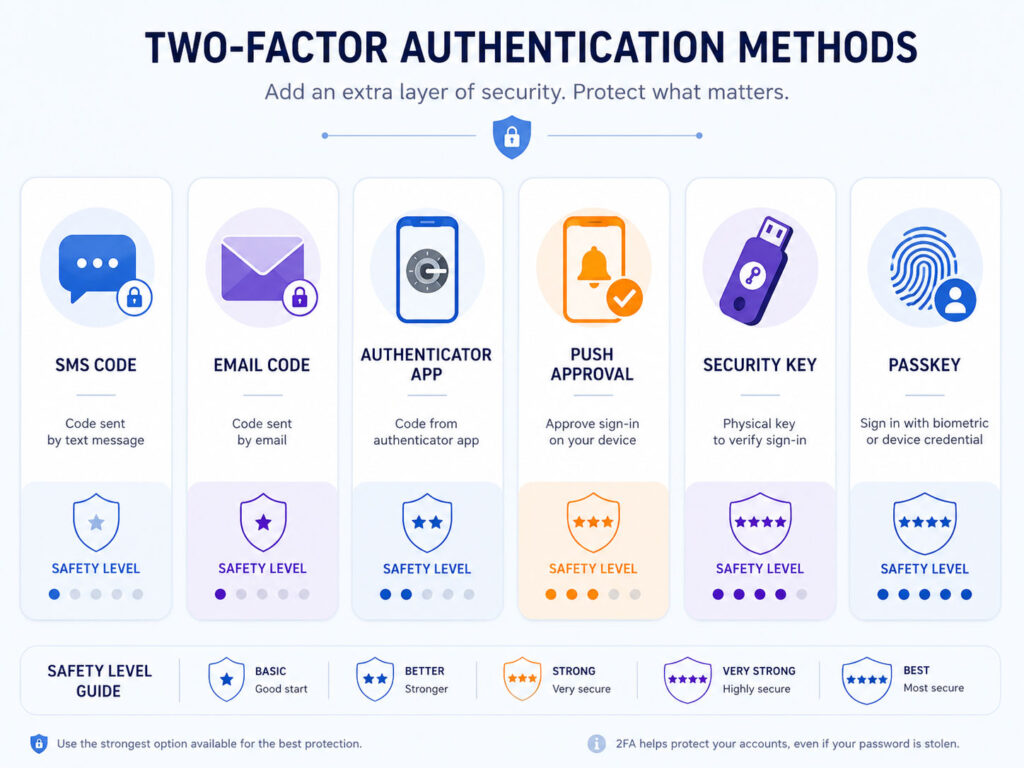
Different websites support different 2FA methods. Some methods are more secure than others.
| 2FA Method | How It Works |
|---|---|
| SMS Code | You receive a verification code by text message |
| Email Code | You receive a code through email |
| Authenticator App | An app generates time-based login codes |
| Push Approval | You approve the login request from your device |
| Security Key | You use a physical key to confirm login |
| Passkey | You sign in using device-based passwordless authentication |
All 2FA methods are better than using only a password. However, some options provide stronger protection.
SMS 2FA
SMS 2FA sends a login code to your mobile number.
It is simple and widely available. However, it may not be the strongest method because phone numbers can be targeted through SIM swap attacks or message interception in some situations.
Still, SMS 2FA is better than no 2FA. If a website offers only SMS-based 2FA, enabling it is usually a good step.
Authenticator App 2FA
An authenticator app generates time-based codes on your phone.
These codes change regularly and do not depend on SMS delivery. Because of this, authenticator apps are usually safer than SMS codes.
Popular authenticator apps can generate codes for email, social media, cloud, banking, and work accounts. However, you should keep backup codes safely in case you lose your phone.
Security Keys and Passkeys
Security keys and passkeys can provide stronger protection against phishing.
A security key is a physical device that confirms login. A passkey is a passwordless sign-in method that works through your device, fingerprint, face unlock, or screen lock.
These methods can reduce the risk of entering secret codes on fake websites. Therefore, they are useful for important accounts when available.
Which 2FA Method Should You Use?
The best 2FA method depends on what the website supports and how important the account is.
For important accounts, use stronger methods whenever possible. An authenticator app, passkey, or security key is usually better than SMS. However, SMS is still better than no extra protection.
A simple priority order can look like this:
| Priority | 2FA Method | Best For |
|---|---|---|
| Strong | Security key or passkey | Email, banking, work, and high-value accounts |
| Good | Authenticator app | Most personal and professional accounts |
| Basic | SMS or email code | Accounts where stronger options are not available |
Where Should You Enable 2FA First?
You do not need to enable 2FA on every account in one day. Start with your most important accounts.
- Email accounts
- Banking and payment apps
- Cloud storage accounts
- Social media accounts
- Work or business accounts
- Password manager accounts
- Online shopping accounts with saved payment details
Your email account should be one of the first accounts to protect because it often connects with password resets for other services.
Important 2FA Safety Tips
Two-factor authentication improves security, but you should still use it carefully.
- Never share 2FA codes with anyone.
- Do not enter codes on suspicious websites.
- Save backup codes in a safe place.
- Keep your recovery email and phone number updated.
- Use a strong screen lock on your phone.
- Remove old devices from account settings when needed.
- Be careful with login approval requests you did not start.
If you receive a 2FA code or login approval request without trying to sign in, someone may be trying to access your account.
Common Mistakes to Avoid
Many users enable 2FA but forget backup and recovery planning.
If you lose your phone and do not have backup codes, you may face difficulty accessing your account. So, store recovery codes safely and update recovery options regularly.
Also, do not approve login requests blindly. Always check whether you started the login yourself.
Conclusion
Two-Factor Authentication Explained simply means adding a second security step to your login process.
It protects your account even when your password becomes weak, stolen, or leaked. Stronger methods like authenticator apps, security keys, and passkeys can provide better protection than password-only login.
Start by enabling 2FA on your most important accounts. Then, choose stronger 2FA methods wherever possible and keep your backup options safe.

AboutTPJ Technical Team
The Project Jugaad Technical Team creates practical, easy-to-follow content on software development, web technologies, artificial intelligence, cybersecurity, cloud platforms, and digital tools. Our articles are informed by more than 13 years of hands-on experience with .NET, Angular, SQL Server, AWS, WordPress, Linux hosting, application deployment, and real-world troubleshooting. Each guide is researched, reviewed, and updated to provide accurate, useful, and actionable information for developers, businesses, and everyday technology users.